
A Hardening Program for Transfer Servers
A file transfer server occupies an uncomfortable spot in your network. It is reachable from outside by design, it holds business data by design, and it runs around the clock by design. Each of those properties is the entire point of the machine — and each one makes it interesting to strangers. Web servers face the internet but usually hold nothing worth stealing directly; database servers hold everything but should never face the internet. A transfer server does both at once.
Hardening is the deliberate work of removing easy wins from that machine before anyone goes looking for them. It means closing what doesn't need to be open and removing what doesn't need to be installed. It means limiting what each account can reach, and making sure you would notice if any of that changed. Most of it costs nothing but attention. The problem is that in most shops, hardening happens exactly once — during setup, or in the nervous week after a security scare. Then it quietly decays while everyone gets back to their day jobs.
This article gives you the alternative: a program instead of a project. You will get a five-layer model that organizes the work and a baseline checklist you can copy today. You will also get the baseline-verify-maintain loop that keeps the whole thing true a year from now. This is the opening article of our Server Hardening series, and it is the map the other five articles hang from.
What "Hardening" Actually Means
Security people talk about a system's attack surface: the sum of every point where an outsider can interact with it. Every open port is surface. Every account that can log in is surface. Every installed program that might contain a flaw is surface. Every error message that explains too much is surface. Think of a building: the attack surface is every door, window, loading dock, and mail slot — not just the front entrance you intended people to use.
Hardening is the discipline of shrinking that surface and strengthening what remains. It is mostly subtraction: fewer open ports, fewer services, fewer accounts, fewer privileges, fewer details volunteered to strangers. That makes it different from most security work you can buy. Nobody can sell you subtraction; it comes from an administrator who knows what the machine is for and removes everything that isn't that.
Two honest limits, up front. First, you cannot reach zero surface — a transfer server must accept connections and store files, or it isn't a transfer server. The goal is a surface that is small, known, and watched, not one that is gone. Second, hardening does not make a machine unbreachable. It makes the cheap, automated attacks fail and forces anyone serious to work harder and louder — which is exactly what gives your monitoring something to catch.
Why Transfer Servers Deserve This More Than Most
If you only have time to harden one system this quarter, the transfer server is a strong candidate. Consider what it concentrates in one box:
- Exposure. Its service ports are published to the internet, or at least to partner networks. Anyone can knock. Automated scanners knock constantly — connect to any public address and watch the logs fill with probes within hours. That background noise is simply the weather on the modern internet, and your server stands in it all day.
- Data. Invoices, payroll extracts, medical records, engineering drawings — whatever your organization exchanges with the outside world passes through this machine and often rests on it. A breach here is not an abstract "system compromise"; it is your actual files in someone else's hands.
- Credentials. Every partner, customer, and internal job that transfers files authenticates to this server. Its account list is a directory of relationships, and any credential captured here will be tried elsewhere.
- Uptime pressure. Because partners depend on it around the clock, there is always a reason to postpone disruptive maintenance. That is how transfer servers end up running old software with "temporary" exceptions that turned five years old.
- Inheritance. Transfer servers outlive the people who built them. The box you run today was probably configured by someone who has since left, for partners who may no longer exist, with choices nobody can explain. Hardening is also the act of re-deciding those choices on purpose.
Here is the encouraging part: the overwhelming majority of real-world compromises use old flaws, weak or reused passwords, and sloppy configuration — not exotic new techniques. Those are precisely the things hardening removes. You are not trying to out-engineer a nation-state; you are trying to be a dramatically less convenient target than the default install of anything.
The Five Layers of a Hardened Transfer Server
Hardening fails when it is treated as one big undifferentiated pile of tips. It works when you organize it into layers. Each layer has a different owner, a different rhythm of change, and a different article's worth of detail. We use five:
The diagram below shows how the layers nest. The network layer decides who can reach the machine at all. The operating system carries the service, and the service enforces the protocol rules. Accounts sit innermost, deciding what each authenticated identity can touch. Monitoring stands beside the stack, watching all of it.
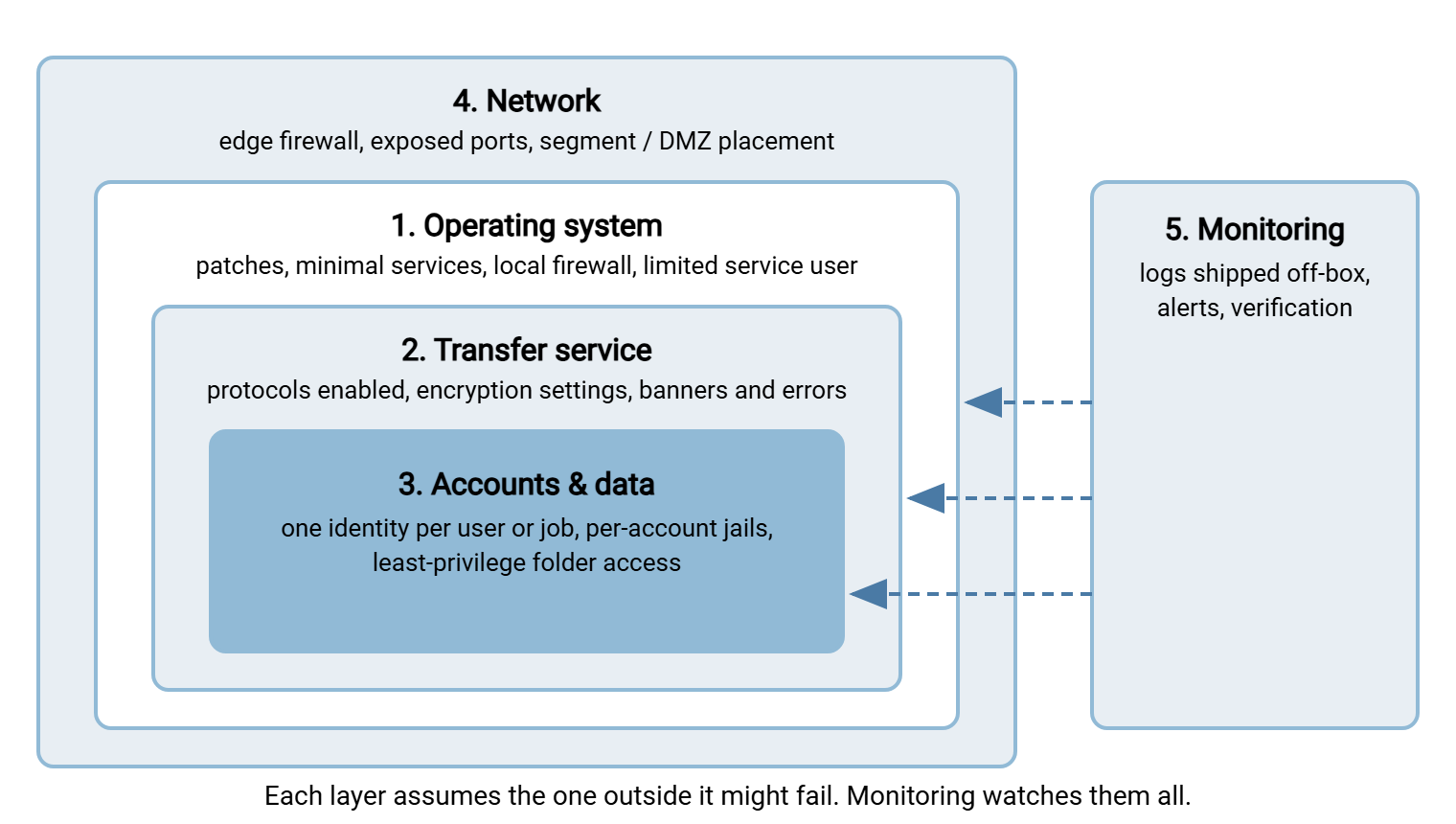
Layer 1 — the operating system. The service is a tenant; the OS is the building. The OS might run unpatched extras, let the service run with administrator rights, or accept connections on ports you forgot existed. If so, nothing you do inside the service can compensate. This layer is covered in depth in OS-level hardening under the transfer service.
Layer 2 — the transfer service itself. Which protocols are enabled, what encryption they insist on, what the server announces to strangers, how it responds to bad input. The information-leakage half of this layer — banners, errors, and listings — gets its own article later in this series. The protocol-specific dials live in the companion guides listed in the next section.
Layer 3 — accounts and data. Who can log in, what each identity can see once it has, and what one leaked password would cost you. This is where shared accounts and unjailed users quietly turn a small incident into a disaster. That layer is the subject of account isolation and jails.
Layer 4 — the network around the machine. This layer covers the edge firewall rules that decide who can reach which port, and the server's placement. Ideally, that placement is in a DMZ, a buffer network that keeps internet-facing services away from your internal systems. Placement is a big enough subject that it has its own series: DMZ and gateway architecture.
Layer 5 — monitoring. This layer covers logs that leave the box and alerts on the events that matter. It includes scheduled checks that the other four layers still look the way you decided they should. Without this layer the others erode invisibly. The logging side is covered in our transfer logging and audit series; the checking side is this series' closing article on verification.
One Program, Many Protocols
Notice what the layer model deliberately leaves out: protocol-specific configuration detail. Whether your server speaks SFTP, FTPS, plain FTP internally, or HTTPS — or, like most real transfer servers, several at once — the program is the same. The OS underneath, the account design, the patching rhythm, and the verification schedule do not care which protocol rides on top.
That is why this series is the umbrella, and the protocol guides are the rooms underneath it. When you reach the service layer for a specific protocol, go to the guide that covers those dials rather than expecting them here:
| Protocol | Deep-dive guide | What it covers |
|---|---|---|
| SFTP | SFTP server configuration | Subsystem setup, chroot jails done right, cipher and key-exchange policy, testing the lockdown |
| FTPS | Hardening FTPS | TLS version floors, cipher policy, closing downgrade paths, verifying from outside |
| FTP | FTP account models | Anonymous vs real vs virtual users, per-user isolation, choosing and migrating between models |
Read this series for the machine and the program; read those guides for the protocol dials. Together they cover the whole server without repeating each other.
The Baseline-Verify-Maintain Loop
The layer model tells you what to harden. The loop tells you how to keep it hardened, and it is the difference between a program and a burst of enthusiasm. Three steps, repeating forever:
- Baseline. Decide the intended state of every layer and write it down. Record which ports are open and why, which accounts exist and who owns them, which protocols are enabled, and where logs go. A baseline is that written record. If it exists only in your head, it is not a baseline — it is a memory, and memories don't survive staff turnover or a busy quarter.
- Verify. On a schedule, compare reality to the baseline. Scan the server from outside, review the account list, and check that the settings you chose are still set. Reality drifts — a "temporary" firewall rule stays, an update re-enables something, a test account lingers. Verification is how drift gets caught while it is still boring. The mechanics are in verifying your hardening actually holds.
- Maintain. Apply security updates on a rhythm that respects the partners depending on the server. Route every deliberate change through the baseline document so it stays true. Patching a machine that other companies rely on is its own craft, covered in patching without breaking partners.
Then the loop closes: every maintenance action updates the baseline, and the next verification checks against the updated version. One-time hardening decays because nothing pulls it back into shape; the loop is that pull. It is also, incidentally, what an auditor means when they ask whether you "have a hardening process" — not whether you once had a good weekend.
What does a baseline look like in practice? Nothing fancy. It is a text file or wiki page per server, structured like the checklist below. It has a short changelog at the bottom: what changed, when, and who approved it. The format matters far less than two properties. It must live somewhere the whole team can read it. And it must be updated in the same breath as the server itself. A baseline that trails reality by three changes has already stopped being one.
Remember: hardening is not a state a server reaches; it is a loop a team runs. A modest checklist you re-verify every quarter beats a heroic lockdown nobody ever checks again.
Your Baseline Checklist
Here is a starting baseline, organized by the five layers. Copy it, delete what doesn't apply, and fill in the blanks for each transfer server you run. Every line is expanded somewhere in this series or its companion guides — the checklist is the index, not the whole story.
TRANSFER SERVER HARDENING BASELINE — host: ________  owner: ________

1. OPERATING SYSTEM
   [ ] OS fully patched; update source and schedule documented
   [ ] Unneeded services, roles, and packages removed or disabled
   [ ] Local firewall on; default-deny inbound; only service ports allowed
   [ ] Service runs as a dedicated limited account (never root/SYSTEM)
   [ ] Transfer data lives on its own volume, separate from the OS

2. TRANSFER SERVICE
   [ ] Only the protocols actually used are enabled (FTP/FTPS/SFTP/HTTPS)
   [ ] Encryption required; weak protocol versions and ciphers disabled
   [ ] Greeting/banner trimmed; authorized-use notice in place
   [ ] Errors and listings reveal nothing to unauthenticated visitors

3. ACCOUNTS AND DATA
   [ ] No shared accounts: one identity per person, partner, or job
   [ ] Every account jailed to its own folder; escape attempts tested
   [ ] Unused, test, and leaver accounts removed; review date set

4. NETWORK
   [ ] Edge firewall permits only published service ports to this host
   [ ] Management access (RDP/SSH/console) restricted to admin network
   [ ] Placement reviewed: DMZ or segmented, not on the flat LAN

5. MONITORING
   [ ] Session and authentication logging enabled, shipped off the box
   [ ] Alerts configured for failed-login bursts and service stops
   [ ] Verification on the calendar: external scan + config drift check
Resist the urge to add thirty more lines. A baseline earns its keep by being checkable in an hour; completeness that nobody re-verifies is decoration.
Running the Program on a Small Team
Everything above works for a two-person IT shop — the layers just get scheduled instead of staffed. A realistic sequence:
- First: accounts and information leakage. These are the highest value for the lowest risk. Removing a shared account or trimming a chatty banner cannot take the service down, and both close doors attackers genuinely use. Budget an afternoon for the account review and an hour for the banners.
- Second: the OS layer. Removing services and enabling the local firewall can interrupt service if you get it wrong. So that work deserves a maintenance window and a test plan. Budget a half day, most of it verification.
- Third: the schedule. Put the verification checks and the patch window on the calendar as recurring events with named owners. This costs thirty minutes and is the step that makes the other two permanent.
Write the baseline as you go rather than afterward — the checklist above is the documentation. Filling it in while your hands are on the settings takes minutes instead of a dreaded documentation day. Tooling helps here too. On Windows, a server such as Sysax Multi Server keeps user accounts, folder access, and activity logging in one administration interface. That turns much of layer 3 and layer 5 into a review pass instead of a scripting project.
How Hardening Programs Fail
It is worth knowing the standard failure modes in advance, because every one of them is avoidable:
- The big bang. Someone attempts all five layers in one weekend, breaks a partner's overnight job, and the whole effort gets rolled back and quietly abandoned. Harden in small, verified steps instead — the program is a loop, not a sprint.
- Hardening into an outage. Disabling old encryption settings without checking which partner clients still need them is the classic. The fix is the testing discipline from the patching article: know your clients before you raise a floor.
- Checklist theater. The baseline gets written, framed, and never verified. Six months later it describes a server that no longer exists. If you only keep one recurring calendar entry from this series, make it the verification one.
- Obscurity as strategy. Renaming ports and hiding version numbers instead of patching. Trimming what you announce is worthwhile hygiene — but it is a courtesy to yourself, not a control, and the information-leakage article draws that line carefully.
- The hero. One admin holds the entire program in their head. They change jobs; the program leaves with them. The baseline document is the antidote — it is cheap insurance against your own promotion.
Where to Go Next
You now have the map: five layers, one loop, one checklist. Start at the bottom of the stack with OS-level hardening, then work through accounts and jails. Those are the two articles that remove the most risk per hour spent. When the layers are in place, verification closes the loop and keeps them there. Identity questions sit alongside this whole program — password policy, service accounts, MFA. For those, our transfer authentication series is the companion shelf.
Frequently Asked Questions
Is hardening a one-time project or an ongoing task?
Our transfer server sits behind a firewall. Do we still need to harden it?
What is the difference between hardening and patching?
We are a two-person IT team. How much of this is realistic?
Which layer should I harden first?
From the Sysax team: we build secure file transfer software for Windows. Sysax Multi Server is an FTP, FTPS, SFTP, and HTTPS server. Sysax FTP Automation handles scheduled, scripted transfers. Free trials are on the download page.