
Shared Storage vs Replication Behind an HA Pair
Moving an address from one node to another takes a second. Making sure the second node has the files partners uploaded to the first decides the outcome. Your failover will be a non-event or a reconciliation exercise. Every high-availability design for a transfer server has to answer one question: when the standby takes over, where does it get the data? There are only two answers. Either both nodes use one copy of the data, or each node has its own copy and something keeps the copies in step.
This article compares the two honestly. You will see how shared storage works and what it does to your list of failure modes. You will see how replication works and what "lag" costs you. You will see what consistency and split-brain mean when the thing at stake is a folder of partner files. You will see exactly what happens to an upload that is in flight when the active node dies. And you will see a way to choose between the options using your recovery point objective and your budget. This article is part of our High Availability for Transfer Services series and builds on the pair described in active-passive failover.
The Question the Standby Has to Answer
Picture the moment after failover. The virtual IP now points at node B. A partner reconnects, lists their folder, and expects to see the file they uploaded ten minutes ago. The downstream job expects to pick up whatever arrived overnight. Node B can only satisfy them if it can see those files. Shared storage means there is one set of files, on a volume both nodes can reach, so node B sees exactly what node A saw. Replication means each node has its own disk and a process copies changes from one to the other. So node B sees what node A saw as of the last copy.
That "as of the last copy" phrase is the entire difference. With shared storage, the recovery point objective, the amount of recent data you accept losing, is zero for anything fully written to disk. With replication, it is the replication lag: the delay between a write landing on the active node and the same write appearing on the standby. Everything else in this article is a consequence of that one distinction.
Option One: Shared Storage
Shared storage is a volume that lives outside both nodes. It may live on a storage array reached over a storage network (a SAN). Or it may live on a file server reached over the ordinary network (a NAS or file share). In an active-passive pair the volume is typically mounted only by the active node. On failover the cluster manager unmounts it from the failed node, or forcibly cuts that node off, and mounts it on the standby. Failover clustering built into Windows Server does exactly this with a cluster disk, and a Linux cluster manager does the equivalent. In an active-active cluster the volume is a file share or a clustered file system that every node mounts at once.
The appeal is obvious: one copy, no lag, nothing to keep in step. The costs are less obvious, and each one changes the failure list from the first article in this series:
- The storage is now the single point of failure. Two nodes sharing one volume survive the loss of a node and do not survive the loss of the volume. The array or file server must itself be redundant: mirrored disks, dual controllers, dual paths. If it is not, you have moved the risk rather than removed it.
- A full disk is full for both nodes. Failover cannot fix a capacity problem, because the standby mounts the same full volume. Our Storage Growth on Transfer Servers series is the companion here.
- Deletions and corruption are instant and shared. A wrong delete, a ransomware run, or a bad script on the active node damages the only copy. Shared storage needs backups even more than replication does.
- Locks can go stale. When node A dies holding a lock on a file, the storage may keep that lock for a while. Node B's first attempt to write the same file can fail until the lock times out. Test this in a drill rather than discovering it live.
- Half-written files are visible immediately. Whatever node A had flushed to the volume at the moment it died is what node B sees. That includes a 1.2 GB fragment of a 3 GB upload sitting under its final name unless partners use temporary names.
The last two points are why shared storage is not automatically "the safe choice." It gives you a zero recovery point; it does not give you a tidy one.
Option Two: Replication
Replication keeps a second copy on the standby's own disk and updates it as the active node changes. It comes in two flavors, and the difference matters.
File-level replication copies whole files. A scheduled job compares the source and target folders and copies whatever is new or changed. The workhorses are robocopy on Windows and rsync on Linux. DFS Replication, built into Windows Server, does the same continuously with change tracking. A scheduled-transfer product can run the job with retry and alerting. Sysax FTP Automation, for example, can schedule a mirror task from the active node's data and configuration folders to the standby every few minutes. It can report when a run fails. The lag is the schedule interval plus copy time. A job every two minutes gives a lag of two minutes on a quiet day and longer when a large file is mid-copy.
Block-level replication works below the file system, shipping changed disk blocks from one volume to another. Operating systems and storage arrays offer it in two modes. In synchronous mode a write is acknowledged to the application only once both copies have it, so the recovery point is zero. The cost is every write waiting for the round trip to the standby. In asynchronous mode the write is acknowledged locally and shipped afterwards. So the lag is usually seconds rather than minutes, and the application never waits. Block replication is closer to shared storage in behavior, with the standby's copy normally kept unmounted until failover.
The diagram shows the file-level topology most estates start with: one-way replication from the active node to the standby. The configuration folder and the data folders are copied on different schedules.
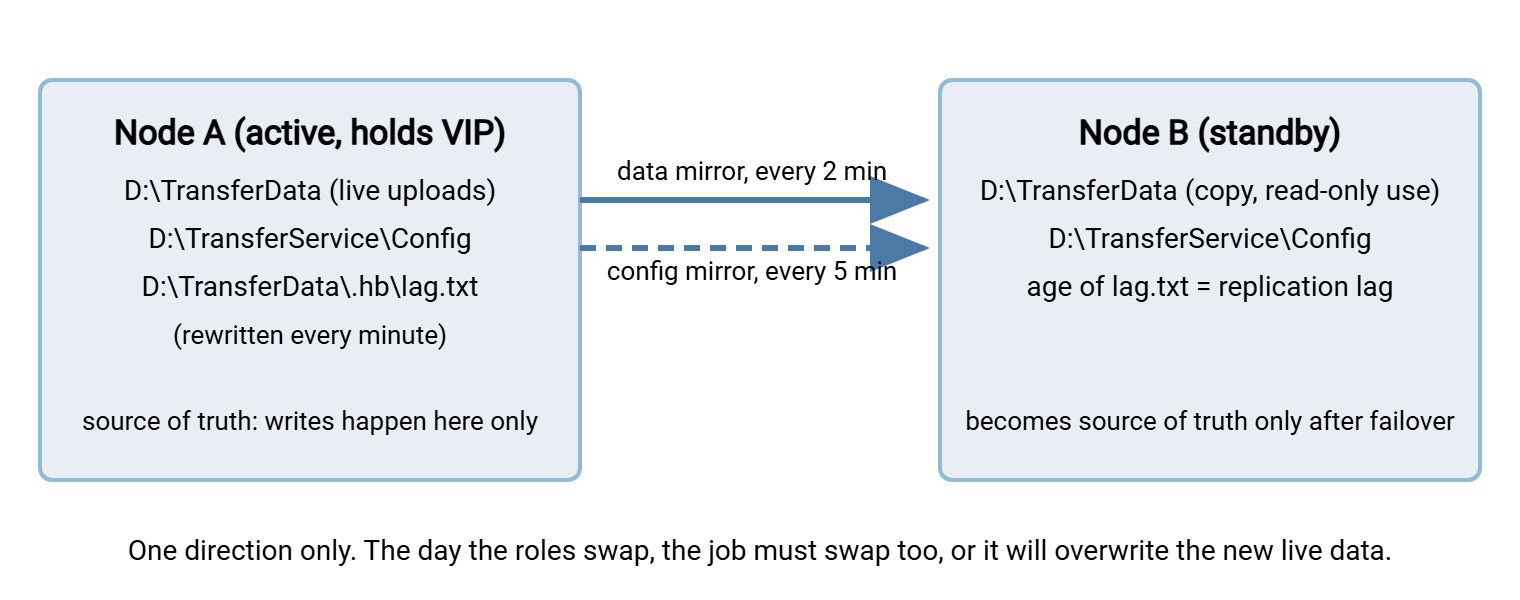
A concrete data mirror, run from a scheduled task on the active node every two minutes, looks like this on Windows and Linux:
:: Windows, on the active node: mirror live data to the standby
robocopy D:\TransferData \\nodeB\D$\TransferData /MIR /XF *.part *.tmp /R:1 /W:2 /NP /LOG+:D:\Logs\data-mirror.log

# Linux, on the active node: same idea over SSH
rsync -a --delete --exclude='*.part' --exclude='*.tmp' /srv/transfer/ nodeB:/srv/transfer/
Read the flags. /MIR and --delete make the target match the source exactly, including deletions, which is what a standby needs. A file the downstream job consumed and removed on node A should disappear from node B too. Otherwise, it will be processed twice after failover. /XF *.part *.tmp and the --exclude options skip files still being written under a temporary name, so a half-upload is never copied. /R:1 /W:2 limits retries so a locked file cannot stall the whole run past the next scheduled start. And the log line is not optional: a mirror that has been failing silently for a week is a standby with a week-old picture of the world.
Never run the mirror in both directions at once, and never leave the old job running after a failover. A one-way mirror from a node that is no longer active will overwrite the live data on the new active node with stale copies. It will delete every file that arrived since. Swapping the job's direction is a numbered step in the failover runbook, not an afterthought.
Consistency and Split-Brain in Plain Words
Consistency means every node agrees about which files exist and what is in them. Shared storage is consistent by construction, because there is only one copy. Replication is consistent only at the instant a copy finishes, and drifts between copies by exactly the lag. For an active-passive pair that drift is tolerable, since only the active node's view is ever shown to partners. For an active-active cluster it is not, which is why active-active designs almost always end up on shared storage.
Split-brain is the state where both nodes believe they are active. With shared storage the danger is physical: two nodes writing the same volume at once corrupt the file system. That is why cluster managers use fencing, forcibly disconnecting the losing node from the storage before the survivor mounts it. They use quorum, a third vote such as a witness share so that a lone node cannot promote itself. With replication the danger is logical. If both nodes accept uploads and a two-way sync tries to reconcile them, the sync has to pick a winner for every conflict. In that case, "last writer wins" can silently discard a partner's file. The plain defense is to keep replication one-way and treat exactly one node as the source of truth at any moment. Make changing that role a deliberate, logged act. Multi-master replication such as DFS Replication can keep two writable copies in step. But its conflict handling and lag make it a standby technology, not a substitute for shared storage under an active-active cluster.
In-Flight Files During a Failover
Take the worked example from earlier in this series and follow the file through each design. A partner is uploading a 3 GB file; the active node dies when 1.2 GB has arrived. The replication lag, where there is any, is two minutes. Another file from the same partner finished thirty seconds before the failure.
With shared storage, node B mounts the volume and sees both files. It sees the finished one, complete, and the 1.2 GB fragment under whatever name the partner was writing to. The finished file is safe. The fragment is a trap. If the partner uploaded straight to the final name, a downstream job on node B may pick it up as a complete file. If the partner used a temporary name and renames on completion, the fragment is obviously incomplete. In that case, the partner's client, on reconnecting, either resumes from 1.2 GB or starts over. Which of those happens depends on client and server support, covered in our Resume and Checkpoint Restart series. Either way, no completed file was lost.
With asynchronous replication, node B has whatever the last mirror run copied. The fragment never reached it, because the mirror excluded temporary names, which is good. The file that finished thirty seconds before the failure also never reached it, because the next mirror run was ninety seconds away. The partner's client reported success; the file exists only on the dead node. This is your two-minute RPO turned into a specific missing file, and there are exactly three ways to deal with it. Wait for node A to come back and copy the file across. Or ask the partner to resend it. Or, if node A's disk is gone, accept the loss and tell the partner. Which of those is acceptable is a conversation to have before you build, not after. The reverse case exists too. A file the downstream job already consumed and deleted on node A in those last two minutes still sits on node B. It will be processed a second time after failover unless the job detects duplicates. Our article on why duplicates happen covers that side.
With synchronous block replication, node B has every block node A had acknowledged, so the outcome matches shared storage. The finished file is present, the fragment is present, and the same temporary-name discipline decides whether the fragment causes trouble.
The lesson across all three: the transfer-level safeguards are what make failover survivable regardless of storage. Those are temporary names with an atomic rename, size-stability checks before a downstream job trusts a file, and marker files that announce completion. They are the subject of our temp names and atomic renames and size-stability and settle checks articles. They are worth insisting on with every partner.
Choosing by Recovery Point and Budget
The choice comes down to three questions. How much recent data can you afford to lose? Must the nodes both serve at once? What can you spend, in money and in skills? The table maps the common answers.
| Your situation | Sensible choice | Resulting RPO | What you take on |
|---|---|---|---|
| Active-passive; partners can resend; small team | Scheduled file mirror (robocopy, rsync, or a mirror task) | Schedule interval, typically one to five minutes | Lag monitoring; swapping the job on failover |
| Active-passive; loss of any completed file is unacceptable | Synchronous block replication, or shared storage with a cluster manager | Zero for acknowledged writes | Fencing and quorum; storage becomes the critical component |
| Active-passive; nodes in different buildings | Asynchronous block replication, or DFS Replication | Seconds to a minute | Bandwidth between sites; a DNS or routed failover story |
| Active-active; every node serves | Shared storage on a redundant file server or array | Zero | Redundant storage, stale-lock handling, backups kept separate |
Two honest observations. First, a scheduled file mirror is not a lesser choice. It is the right choice for most active-passive pairs. That is because the team already understands it, can see it working in a log, and can fix it at two in the morning. Second, whichever option you pick, backups remain separate. Replication and shared storage both faithfully preserve a deletion or a corrupted file. Only a backup taken earlier gets it back. That is disaster recovery territory, covered in our Disaster Recovery for Transfer Workflows series.
Running Replication Properly
If you choose a mirror job, a handful of habits separate a standby you can trust from one you merely hope about:
- Mirror configuration and data separately. Configuration changes rarely and must arrive completely; data changes constantly. Different schedules, different logs.
- Exclude in-progress files by name. Insist that partners and internal jobs write to a temporary name, and exclude that pattern from the mirror.
- Measure the lag, do not assume it. Have the active node rewrite a tiny heartbeat file every minute inside the mirrored tree. On the standby, check that file's age; because both
rsync -aandrobocopypreserve timestamps, its age on the standby is the lag. - Alert when the lag exceeds your RPO. A lag alarm is a replication-health alarm. What to do with the alert belongs to our Transfer Server Health Monitoring series.
- Compare, occasionally. Once a week, count files and total bytes on both sides, or hash a sample. A mirror can report success while quietly skipping a folder it cannot read.
- Rehearse the direction swap. The runbook step that stops the old mirror and starts the reverse one is the step most often forgotten. It is the one with the worst consequences. Practice it, as described in failover drills.
# on the standby: raise an alarm if the mirrored heartbeat file is older than three minutes
if find /srv/transfer/.hb/lag.txt -mmin +3 | grep -q . ; then
    echo "replication lag exceeds three minutes" | logger -t hacheck -p user.warning
fi
The Short Version
Shared storage gives both nodes one copy of the data and a zero recovery point. The price is making the storage the critical component and exposing half-written files instantly. Replication gives each node its own copy. The price is a lag that is exactly your recovery point, and a direction that must be swapped on failover. Most active-passive pairs do well with a scheduled, monitored, one-way file mirror; active-active clusters need shared storage. Whatever you choose, temporary names and atomic renames are what keep an in-flight upload from becoming a corrupt delivery. The next article, making redundancy invisible to partners, turns from the data to the identity partners see.
Frequently Asked Questions
Is shared storage always safer than replication?
How often should the mirror job run?
Can I use a plain network share as the shared storage?
What happens to a partner's upload that was in progress when the node failed?
Does replication replace backups?
From the Sysax team: we build secure file transfer software for Windows. Sysax Multi Server is an FTP, FTPS, SFTP, and HTTPS server. Sysax FTP Automation handles scheduled, scripted transfers. Free trials are on the download page.