
Active-Passive Failover for Transfer Servers
If you are adding redundancy to a transfer server for the first time, this is the design to start with. Two machines, one address, one of them serving at any moment, the other waiting. It is the least clever arrangement that still survives the loss of a node, and its lack of cleverness is the point. A junior administrator can draw it on a whiteboard and explain it to a partner. They can repair it at two in the morning without reading a manual.
This article builds the pair piece by piece: the floating address that partners connect to, and the health check that decides which node deserves it. It covers what actually happens in the twenty seconds after a node dies, and the list of things that must be identical on both machines. It gives a runbook for the day you fail over on purpose. This article is part of our High Availability for Transfer Services series. If terms like RTO or heartbeat are new, start with what high availability means for a transfer service and come back.
The Shape of an Active-Passive Pair
An active-passive pair is two servers running the same transfer software with the same configuration, where only one, the active node, accepts partner connections. The other, the passive node or standby, runs the same service but receives no traffic, because the address partners use does not point at it. When the active node fails, the address moves, and the standby becomes active. Nothing about it changes except that traffic now arrives.
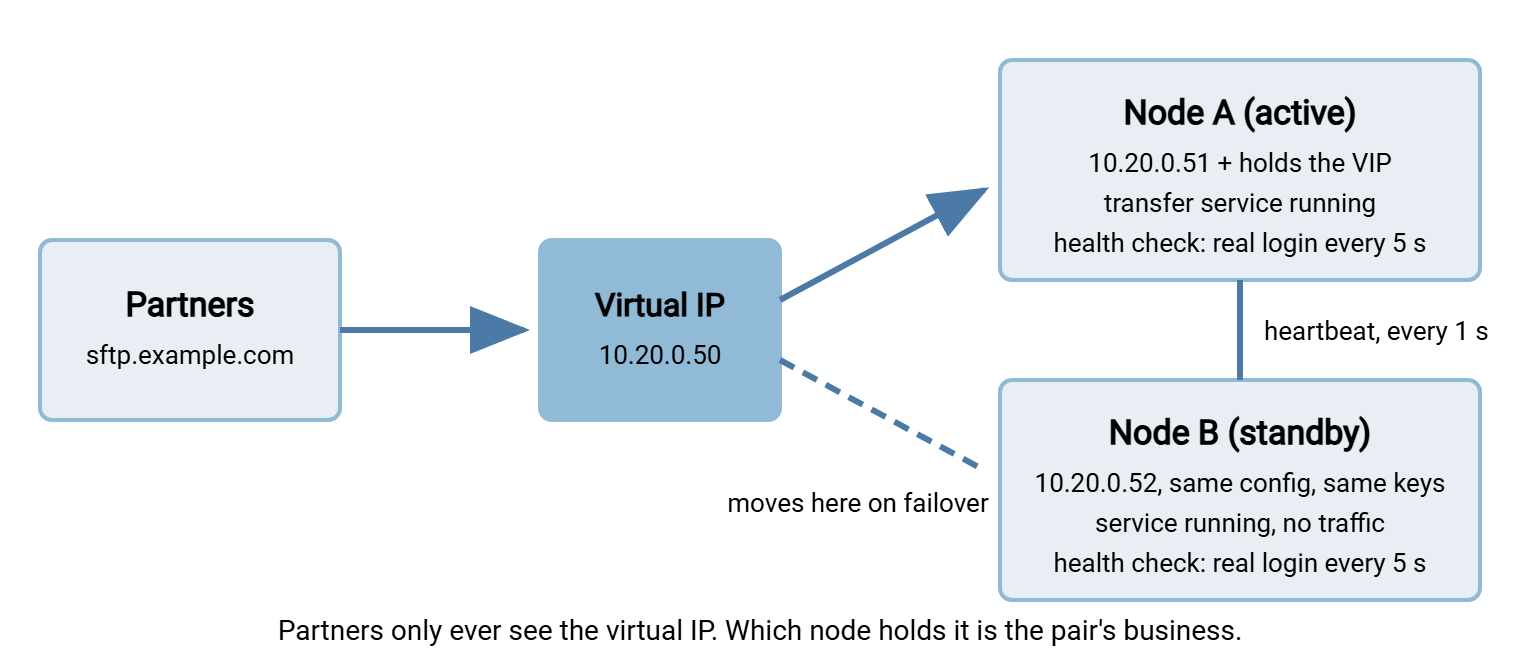
Three components make this work. The virtual IP is the address partners connect to; it belongs to the pair, not to either machine. The heartbeat is a regular "I am alive" message between the nodes, so the standby can tell when the active node has gone quiet. The health check is a test each node runs against itself to decide whether it is actually fit to serve. That is a different question from whether it is alive. The diagram shows all three.
The Virtual IP: How One Address Moves
Partners connect to a hostname such as sftp.example.com, which resolves to the virtual IP, say 10.20.0.50. Each node also has its own permanent address, 10.20.0.51 and 10.20.0.52, used for management, replication, and heartbeats. The virtual IP is an extra address on the active node's network interface. When failover happens, the active node drops it (or simply dies) and the standby adds it to its own interface.
One more step makes the move visible to the network. Switches and neighboring machines remember which physical network card owns each IP address. When the standby takes the virtual IP, it broadcasts an announcement, called a gratuitous ARP. It says "this address now lives at my network card." Every device on the segment updates its table, and the next packet for 10.20.0.50 arrives at the standby. On a local network this takes well under a second, which is why a virtual IP beats changing DNS. A DNS change has to wait for every partner's cached lookup to expire. Some clients cache far longer than the record's time-to-live says they should. The DNS side of the story belongs to making redundancy invisible to partners.
You do not write the address-moving logic yourself. On Linux, the long-standing tool keepalived does it. Each node runs a small daemon, and the nodes exchange advertisements. The one with the highest priority that is passing its health check holds the address. A minimal configuration on the active node looks like this; the standby has the same file with state BACKUP and a lower priority.
vrrp_script chk_sftp {
    script   "/usr/local/bin/check_sftp.sh"   # exit 0 = healthy
    interval 5        # run every five seconds
    fall     3        # three failures in a row = unhealthy
    rise     2        # two successes in a row = healthy again
}

vrrp_instance SFTP_VIP {
    state            MASTER      # BACKUP on the standby
    interface        eth0
    virtual_router_id 51
    priority         150         # 100 on the standby
    advert_int       1           # heartbeat every second
    virtual_ipaddress {
        10.20.0.50/24
    }
    track_script {
        chk_sftp
    }
}
Read it top to bottom. The script block defines the health check and how many consecutive results change the node's opinion of itself. The instance block says which interface carries the address, how often to send heartbeats, and which node wins when both are healthy. If the check fails three times running, this node's priority effectively drops, the standby's advertisements win, and the address moves. On Windows, the same job is done by the failover clustering feature built into Windows Server. You create a cluster from the two nodes and add the transfer service as a generic service resource. You give it a client access point, which is a name plus an IP address that the cluster moves between nodes. The concepts are identical; only the tooling differs.
A Health Check That Tells the Truth
The health check decides when the address moves, so a lazy check produces lazy failover. There are four levels of honesty, and most first attempts stop at the first:
- Port open. Something answered on port 22. The service may be hung, refusing every login, or sitting on a full disk.
- Banner received. The SSH version string came back. Better, but a server can send its banner and then fail every authentication.
- Real login. A dedicated check account authenticates with a key. Now you know the host key loaded, the account store is reachable, and authentication works.
- Real transfer. The check account uploads a small file, downloads it, and deletes it. Now you know the disk is writable and has space, which is what partners actually need.
Level four costs a few hundred bytes of disk activity every five seconds and is worth it. The script below does a real SFTP login and upload with the OpenSSH client, which exists on Windows as well as Linux. It uses batch mode, which aborts and returns a non-zero exit code on the first command that fails, so the exit code is the verdict.
#!/bin/sh
# check_sftp.sh - exit 0 only if a real login and a real upload succeed
printf 'put /etc/hacheck/probe.txt /probe/probe.txt\nrm /probe/probe.txt\n' | \
  sftp -q -b - \
       -i /etc/hacheck/probe_key \
       -o ConnectTimeout=5 \
       -o StrictHostKeyChecking=yes \
       -P 22 hacheck@127.0.0.1 >/dev/null 2>&1
Three details matter. The check connects to the node's own address, not the virtual IP, because the question is "is this machine fit to serve," not "is someone serving." The probe account has write access to one small folder and nothing else. And StrictHostKeyChecking=yes means the check fails if the host key ever changes. That turns an accidental key regeneration into an immediate, visible failure instead of a partner complaint a week later.
The fall 3 and rise 2 thresholds deserve a sentence. With a five-second interval, three consecutive failures means the address moves about fifteen seconds after the service breaks. Requiring two successes before a node is considered healthy again prevents flapping. In that miserable state, a marginal node passes one check, takes the address, fails the next, and hands it back. It drops every partner session each time. A pair that flaps is worse than a single server.
Failover, Second by Second
Here is what the logs look like when the active node's disk fills at ten past two in the morning, with the configuration above. Node B is the standby.
Mar 14 02:10:03 nodeA sftpd[4127]: write failed: No space left on device (user acme_inbound)
Mar 14 02:10:05 nodeA keepalived: Script chk_sftp failed (exit 1)
Mar 14 02:10:10 nodeA keepalived: Script chk_sftp failed (exit 1)
Mar 14 02:10:15 nodeA keepalived: Script chk_sftp failed (exit 1) - entering FAULT state
Mar 14 02:10:15 nodeA keepalived: VRRP_Instance(SFTP_VIP) removing 10.20.0.50/24
Mar 14 02:10:16 nodeB keepalived: VRRP_Instance(SFTP_VIP) transition to MASTER
Mar 14 02:10:16 nodeB keepalived: adding 10.20.0.50/24, sending gratuitous ARP
Mar 14 02:10:41 nodeB sftpd[2210]: accepted publickey for acme_inbound from 198.51.100.7
Mar 14 02:10:52 nodeB sftpd[2210]: upload complete /inbound/acme/orders_0314.csv
Detection took twelve seconds (three failed checks), and the move took one second. The partner's automated job reconnected twenty-five seconds later on its own retry timer. From the partner's point of view, one upload failed with a broken connection and the retry succeeded. That is a good failover, and nobody woke up: the RTO was under a minute because software did the work.
What happened to the partner's upload that was in flight at 02:10:03? It is gone. An SFTP session is a TCP connection to one specific machine. When the address moves, the standby has no memory of that connection and answers the next packet with a reset. The client must reconnect and start the file again, or resume it if both sides support resume. Our Resume and Checkpoint Restart series covers that. The partial file on node A must never be mistaken for a complete one. That is why partners should upload to a temporary name and rename on completion. The pattern is in our article on temp names and atomic renames.
For FTP and FTPS the story is the same for the control connection and slightly worse for the data connection. Any transfer in progress dies with it. The good news comes with a plain virtual IP and no load balancer. The passive-mode reply from the new active node points at the same address and the same port range as before. So partners' firewall rules keep working. Load balancers change that, and the next article in this series, on active-active and load-balanced clusters, explains how.
Keeping the Two Nodes Identical
The standby is only useful if it is indistinguishable from the active node. Everything a partner's client checks, and everything the service needs to run, must match. This is the checklist; keep a copy where the next administrator will find it.
- SSH host key. Copy the private host key from the active node to the standby, and never let the standby generate its own. If the keys differ, every SFTP client will refuse to connect after failover with a "host key has changed" warning, and rightly so. Our guide to host keys and known_hosts explains what the client is protecting against.
- TLS certificate and private key. For FTPS and HTTPS, install the same certificate on both nodes. Renewals must reach both; a certificate renewed on the active node only becomes an outage the day you fail over. See installing and chaining certificates for the mechanics.
- Accounts and permissions. Every user, key, password, home folder, and permission. Either both nodes read the same directory or database, or the account store is replicated on every change.
- Service configuration. Listening ports, the passive port range, the announced external address, limits, banners, logging settings. A standby that announces a different passive range breaks every FTP partner's firewall rules; configuring passive port ranges shows what must match.
- Folder layout. The same drive letters or mount points, the same paths, the same ownership. Where the data itself lives, and how the standby sees it, is the subject of shared storage vs replication.
- Firewall rules, time, and patches. The host firewall must allow the same ports on both, and clocks must agree or the two nodes' logs will not line up. Patch the standby first, fail over, patch the old active node: that routine turns maintenance from an outage into a rehearsal.
Configuration drift is the quiet killer of standby nodes. The practical defense is a scheduled copy of the configuration and account files from active to standby every few minutes. That way, a change reaches the standby before anyone forgets. On Windows a one-line robocopy job does it; on Linux, rsync.
:: Windows: mirror the service configuration to the standby every five minutes
robocopy "D:\TransferService\Config" "\\nodeB\D$\TransferService\Config" /MIR /R:2 /W:5 /LOG+:D:\Logs\config-mirror.log

# Linux: same idea, over SSH, run from cron on the active node
rsync -a --delete /etc/transfer/ nodeB:/etc/transfer/
Both commands mirror, meaning files deleted on the active node are deleted on the standby too, which is what you want for configuration. Exclude anything node-specific, such as the file that holds the node's own address, and runtime state such as lock files. A scheduled-transfer tool can run the same mirror with retry and alerting built in. Sysax FTP Automation, for example, can schedule a mirror task that copies the configuration folder to the standby on a timer. It reports when the task fails, the part a bare robocopy in a scheduled task tends to leave out.
Never let a standby generate its own SSH host key or request its own certificate. Both nodes present one identity to partners. The day you rebuild a node, restoring its host key is the first step, not the last.
Split-Brain and the Heartbeat Path
Split-brain is what happens when the heartbeat link fails but both nodes keep running. Each node stops hearing the other, each concludes its partner is dead, and both claim the virtual IP. Now two machines answer for the same address. Switches see the address flip between two network cards, and partner connections land on whichever node won the last announcement. If the nodes share storage, both write to it at once. It is the one failure mode in which redundancy makes things worse than a single server.
The defenses are simple to describe. First, do not run heartbeats over the same path as everything else. A dedicated cable or second network between the nodes means a switch failure cannot silence the heartbeat while leaving both nodes alive. Second, use quorum, a rule that a node may act as active only if it can see a majority of voters. Two nodes cannot form a majority, so a third vote is added, typically a small witness file share that both nodes can reach. A node that loses contact with both its partner and the witness stands down. Failover clustering in Windows Server works this way by design. Third, where storage is shared, use fencing: the survivor forcibly cuts the other node off from the storage before taking over. The storage side of split-brain is developed in shared storage vs replication.
A Manual Failover Runbook
Automatic failover handles the surprises. Planned failover, done by a person during a maintenance window, is how you patch without an outage and how you prove the pair works. Write the steps down, number them, and follow them the same way every time.
- Announce the window to partners who asked to be told, even though the design should make it invisible. Say "connections may drop once for under a minute."
- Confirm the standby is healthy by running the health check script on it by hand. Confirm the configuration mirror ran within the last few minutes and the host key fingerprint on the standby matches the active node.
- Check for in-flight transfers on the active node. If a large upload is running, wait for it, or accept that it will be dropped and note which partner.
- Trigger the move. Lower the active node's priority, put it into maintenance mode, or stop its service so the health check fails on purpose. Do not pull the network cable; that tests something different.
- Verify from outside. From a machine that is not either node, log in to the virtual IP with a real account. Upload a file, list the folder, and delete the file. Check the host key fingerprint the client reports.
- Watch the logs on the new active node for a few minutes: partner logins appearing, no authentication or permission errors.
- Do the maintenance on the old active node, now the standby. Reboot it as often as you like.
- Decide about failback. Leaving the roles swapped is fine and avoids a second interruption. If you must fail back, repeat steps two to six in the other direction.
- Record the times: when you triggered the move, when the first partner login arrived on the new node, anything that surprised you. Those numbers are the evidence the next failover drill starts from.
Where Active-Passive Falls Short
The design has honest limits. Half the hardware sits idle, which is the price of simplicity. It adds no capacity: if one node cannot handle the peak, two in active-passive cannot either. In that case, you are in the territory of our Server Capacity and Concurrency series. The recovery point depends entirely on how the standby gets its data. With shared storage the RPO is zero. With a mirror job every two minutes it is two minutes. That mirror needs the same watching as the service itself, which is the job of the Transfer Server Health Monitoring series. None of these are reasons not to build it; they are the reasons the rest of this series exists.
The Short Version
An active-passive pair is two identical nodes, a virtual IP that partners connect to, and a heartbeat between the nodes. Each node has a health check that performs a real login and a real upload. When the active node fails its check three times, the address moves to the standby. Partners' clients reconnect on their next retry, and any transfer that was in flight is repeated. Keeping the two nodes identical, especially the host key and certificate, is most of the ongoing work. From here, read making redundancy invisible to partners for the partner-facing details. If a gateway or proxy sits in front of your pair, our article on gateway resilience covers that tier.
Frequently Asked Questions
Do partner sessions survive a failover?
Should the standby's transfer service be running or stopped?
Why not just change DNS when the primary fails?
How do I copy the SSH host key to the standby safely?
What if both nodes think they are active?
From the Sysax team: we build secure file transfer software for Windows. Sysax Multi Server is an FTP, FTPS, SFTP, and HTTPS server. Sysax FTP Automation handles scheduled, scripted transfers. Free trials are on the download page.