
The Migration Inventory: Every Flow, Job, Key, and Partner
The register was marked complete on a Tuesday. It was marked complete again the following Monday, after the log sweep turned up an account called scanner9 that nobody had heard of. It was marked complete a third time two weeks later, when a quarterly upload from HR knocked on the old server. Complete, it turned out, was a status the register could reach three times. You can only migrate what you know exists. Nearly every transfer migration that breaks, breaks on something that was not on the list. It might be the quarterly upload nobody mentioned, or the appliance connecting by raw IP. It might be the partner whose firewall pinned an address from years ago. The old platform will happily serve flows that no document admits to, right up until the day you turn it off.
This article, part of our Workload Migration series, builds the migration's foundation: a register. It has one structured record per flow, covering flows and schedules, credentials, host keys and certificates, and firewall rules. It also covers the configuration partners hold on their side. This article then covers the completeness checks that find what the documentation forgot, because the register's value is not what you wrote in it. It is what you can prove is not missing from it. "Complete" is a verdict the sweeps give, not a box you tick.
Why the Inventory Comes First
Every later phase of the migration consumes the register. Building the target platform means recreating every account, folder, and key the register lists. Porting the automation means working through its job rows one by one. Partner communications go to the contacts it names. Cutover waves are sequenced by the criticality it records. Validation compares the outputs it says to expect. Decommissioning ends with the register marked complete, every row confirmed moved. Skip or rush the inventory and every one of those phases inherits the gaps. But a gap discovered during cutover costs fifty times what it costs now, and comes with an audience.
There is a second, quieter reason to start here. The inventory is the one phase with no risk. Nothing changes, nothing can break, and every hour spent is banked. Teams under deadline pressure are always tempted to trim it, which is exactly backwards: it is the cheapest insurance in the whole project. As the opening article of this series argues, the cutover date should be an output of this work, never an input to it. I have never heard anyone say the inventory took too long. I have heard the other sentence often.
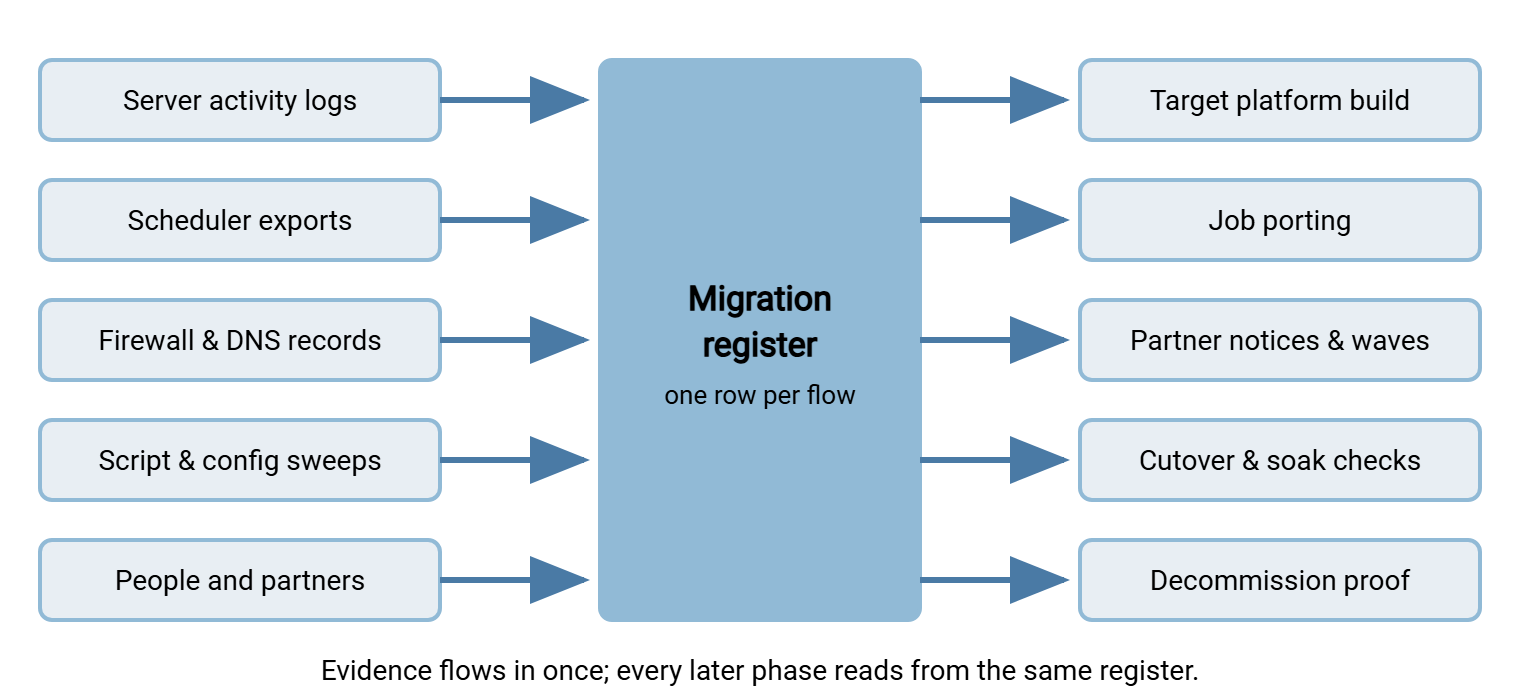
The diagram below shows the register's position in the project. Evidence sources feed into it on one side, and every later migration phase reads from it on the other. Nothing else in the project has that double role, which is why nothing else deserves the same early effort.
One Row per Flow
The unit of inventory is the flow: one logical movement of files between two parties, in one direction, on some schedule. Not "the Bayside connection" — Bayside may upload manifests to you nightly and pull invoices from you weekly. Those are two flows with different schedules, folders, and failure consequences. If your estate spans several servers rather than one, run this same exercise per server and then merge. Our FTP sprawl consolidation series covers that program-level version.
Here is a filled example record. Copy the field list, not the values:
FLOW-041
direction:      inbound -- partner uploads to us
partner:        Bayside Logistics (tech contact J. Moreno, reached and verified)
protocol:       SFTP, key authentication
account:        bayside_in
endpoint used:  transfer.example.com  (confirmed: connects by name, not raw IP)
their pins:     our host-key fingerprint; our address allowlisted in their firewall
schedule:       daily, arrives 01:30-02:30; must land by 04:00
files:          manifests_YYYYMMDD.csv, one per day, around two megabytes
landing path:   /inbound/bayside/
downstream:     ERP import job pulls the file at 04:15 (see FLOW-072)
criticality:    high -- a missed day stalls warehouse receiving
late tolerance: about four hours, then business impact begins
status:         inventoried > built > ported > notified > tested > cut over
Three of those fields do the most work later. Their pins records everything on the partner's side that references your platform's identity — it becomes the partner-communications checklist. Downstream records who consumes the file after it lands — it becomes the timing constraint your cutover must honor. And status turns the register into the project tracker, as we will see at the end.
Cataloging, Section by Section
Flows and schedules
Start from evidence, not memory. Export the old server's activity logs for at least a full quarter and group sessions by account, source address, and time of day. That grouping is your first draft of the flow list. Then walk the schedulers: every scheduled task, cron entry, and watch-folder rule that touches the platform. Check on the server itself and on the machines around it. Record each flow's direction (who initiates), protocol, schedule, and expected file names. Use patterns like manifests_YYYYMMDD.csv, since names encode dates. Record typical sizes too. A dedicated scheduler helps here by being enumerable. A tool such as Sysax FTP Automation lists its tasks in one place, while loose scripts must be hunted machine by machine. The hunt itself is the same discipline as an automation inventory, and that article's techniques all apply here.
Accounts and credentials
For every account the flows use, record who or what logs in with it and how it authenticates (password, key, or both). Record where the secret is stored on the initiating side, and when it was last rotated. "Where the secret is stored" matters more than it sounds. A password might live in a scheduler's protected store, in a script in plain text, or in a vendor appliance's web interface. It might live only in a partner's systems where you will never see it. Each storage place is a thing that must be updated at cutover if anything about the account changes. The register should name it explicitly per flow. A password that lives in four places has four chances to be the old one.
Partner-facing accounts deserve special care because changing them requires coordination with another organization. The full lifecycle is covered in partner credential lifecycle. The strong default for the migration itself is to change nothing. Recreate the same account names and the same passwords or keys exactly on the target. That gives partners one less thing to update. Do not plan to "clean up accounts while we're at it" during the move. Record the cleanup candidates in the register and run that project after the soak. Then a locked-out partner is one problem instead of one of five. "While we're at it" is how one project becomes three.
Host keys, fingerprints, and certificates
This section has two directions, and the second is the one everyone forgets. First, your server's own identity: the SFTP host key partners have pinned, and the certificates your FTPS and HTTPS endpoints present. Record fingerprints, algorithms, and where the private material lives — the move-it-or-replace-it decision comes in the cutover article. Second, consider the identities you have pinned. Every outbound job that pushes files to a partner has recorded their host key in a known-hosts file on the old platform. A new platform with an empty known-hosts file will either refuse those connections or, worse, be configured to blindly accept whatever key it sees. Inventory both directions. The habits in key rotation and inventory make this a list you maintain rather than an archaeology dig you repeat.
Firewall rules and network dependencies
On your side, record the inbound rules that expose the old platform and any address translation in front of it. Record the passive port range if plain FTP or FTPS is in play. Then the mirror image you cannot see directly — which partners' firewalls name your address. You can infer much of it. Any partner who ever asked "what IP will you be coming from?" has an allowlist. The source addresses in your logs tell you exactly which address each inbound partner would need to re-approve if yours changes. Record it per flow; it drives both the addressing strategy and the partner notices. A partner's firewall remembers your old address more faithfully than your own documentation does.
Partner-side configuration
Finally, the register records what lives entirely on the other side. Record the endpoint name or address saved in their scripts, the fingerprint in their known-hosts file, and the credentials they store. Record the schedule their automation runs on. Most valuable of all, record a named technical contact you have actually reached, not a distribution list from an old email thread. You cannot read their configuration, so the honest entry is often "unconfirmed — ask J. Moreno," and that is fine. Every unconfirmed field is a question for the notice-and-test process in partner coordination.
The Completeness Checks
Everything above catalogs what you know about. This section is the counterweight: systematic sweeps designed to surface what you don't. Run all of them — each one catches a different species of forgotten flow.
The log sweep. List every distinct account and source address that touched the old platform over the last quarter, with session counts and last-seen times. Reconcile the list against the register. Anything in the logs but not the register is a finding:
Accounts seen in server logs, last ninety days:

account         sessions   last seen       in register?
bayside_in          88     Mar 14 02:11    yes (FLOW-041)
alderbank_out       62     Mar 14 03:05    yes (FLOW-017)
cobalt_pr           13     Mar 12 22:40    yes (FLOW-029)
scanner9             9     Mar 13 04:52    NO -- investigate
legacy_hr            1     Jan 06 07:15    NO -- quarterly job? annual?
The scheduler sweep. On every server that might automate transfers — not just the transfer server — enumerate scheduled tasks. Search them for transfer commands, script names, and the old platform's hostname or address. Application servers are the usual hiding place, and the machine under someone's desk is the traditional one.
The configuration sweep. Search every script repository, config share, and application settings store you control for the old hostname and IP address as literal strings. Every hit is either a job to repoint or documentation to fix, and both belong in the register. The sweep is mechanical enough to script — search recursively for each alias the DNS mining found, plus the raw address:
What to sweep for, everywhere you can search:

  xfer01                the server's machine name
  xfer01.corp.example   its internal DNS name
  transfer.example.com  the public alias partners were given
  203.0.113.25          the raw address -- hits here are repoint jobs
                        AND future breakage risks (hardcoded IPs)

Where to sweep:  script repositories, shared drives with .bat/.ps1/.sh
files, scheduler task definitions, application config stores, and the
documentation wiki (stale docs recruit new users to the old endpoint).
Firewall and DNS mining. Your own firewall's rules referencing the old server reveal exposures you forgot; your DNS zone reveals every name that resolves to it. Each extra name is a name some client somewhere might be using — each one must be moved, redirected, or deliberately retired. Names are cheap to create, and nobody is paid to delete them.
The calendar problem. A quarter of logs will not show the year-end job. Check how far back your log retention actually reaches and sweep the oldest window you have. If retention is short, the honest mitigations start with retaining now. In that case, keep the old platform's listener observed (not serving — observed) across the next quarter boundary after cutover. And ask the finance and compliance calendars what runs rarely. Never assume rare means unimportant — rare flows are usually regulatory.
Ask the humans — but grade the answers. Announce the migration broadly and ask who uses the platform. You will learn real things. But treat silence as no information, never as absence. The owner of the most fragile flow is often a system, a departed employee, or a partner who does not read your announcements. The discovery techniques in finding all your FTP — port listening, traffic observation, spend records — generalize to any platform and close the gap the humans leave.
Kestrel Payroll's register was declared complete after the scheduler sweep, and the log sweep was run mostly for form's sake. It turned up one account, legacy_hr, with a single session in early January and no row in the register. Nobody on the migration team recognized it, and the broadcast asking who used the platform had drawn no reply about it. That was because the person who set it up had left the year before. The finance calendar answered in a minute: it was the annual pension return. A script uploaded it once a year from a workstation that had been moved twice since. The flow got a row, an owner, and a place in the test plan. The register was declared complete again the following week, which turned out to be the correct number of times.
Remember: the register is complete when the sweeps stop producing findings, not when the fields stop being empty. Documentation tells you what should exist; only logs, schedulers, firewalls, and DNS tell you what does.
Criticality and the Fields That Drive Sequencing
Two more fields per flow turn the register from a catalog into a plan. Criticality: what actually happens if this flow misses a day — in business words ("warehouse receiving stalls"), not severity numbers. Late tolerance: how long the flow can be down before that happens, in words — minutes, hours, a business day. These two drive everything strategic later. They decide which partners migrate in the first wave and which migrate last. They decide which flows justify a parallel run, and how long the soak must watch each one. Add an owner — a person, not a team name — for every flow. During cutover week someone must be reachable who can say "yes, that file is correct." When nobody claims a flow, flow ownership and contacts covers how to find an owner rather than invent one.
Move, Retire, or Replace: The Verdict Column
Not every row deserves a ticket to the new platform. The inventory is the one moment when every flow in the estate is looked at directly. That makes it the cheapest retirement opportunity you will ever get. Give each row a verdict. Choose move to recreate as-is on the target. Choose retire if the consumer is gone, the report is unread, or the partner relationship ended years ago. Choose replace if the need is real but the flow is the wrong shape. That might be a nightly full dump that should be a small delta, or a person-shaped process that should be automated.
Be disciplined about what the verdicts mean for the project. "Retire" still requires the same care as a move. That means confirmation from the supposed consumer, an announced end date, and a watch on the old platform's logs to prove nothing actually depended on it. "Replace" is the dangerous verdict: it smuggles redesign work into a project whose whole discipline is like-for-like change. I have watched one "replace" verdict turn a six-week move into a two-quarter redesign. Unless the replacement is trivial, record the intent, migrate the flow as-is, and schedule the redesign for after the soak. A migration that also redesigns is two projects wearing one deadline.
Gotcha: a flow with no identifiable owner is not automatically retirable. Unowned flows are disproportionately the regulatory and financial ones — the owner left, the obligation didn't. Treat "no owner found" as a research task, not a verdict.
The Register as the Migration's Living Tracker
The register's second life begins when inventory ends. Give every row a status that advances through the same gates the whole migration does — inventoried, built, ported, notified, tested, cut over, soaked, retired. Then the register becomes the project's dashboard. At any moment, the migration is the set of rows not yet at "retired." Keep it in one shared, versioned place. Route every mid-migration change (a new flow request, a credential rotation) through it so it stays true. And when the project ends, keep it. Row by row, it is the evidence pack that validation and decommissioning will need. Next year it is the up-to-date flow documentation you never had this year.
One forward-looking choice makes the next migration's inventory cheap: pick a target platform whose records are easy to query. A server that logs activity both to file and to a database — Sysax Multi Server does both — turns the log sweep from a parsing project into a query. Per-account logging means the account-to-flow mapping you just built by hand falls out of the data next time.
Wrapping Up: The List Is the Migration
Every breakage story in this series' opening article is, at root, an inventory failure — something moved without being known, or known without being moved. Build the register one row per flow. Fill the sections that live on your side from logs and schedulers. Mark honestly what lives on the partner's side as confirmed or unconfirmed. Then run the sweeps until they come back quiet. Mark it complete once, when the sweeps say so, rather than three times, when the calendar does. From here the series moves to strategy: choosing a cutover shape, and the job-porting mechanics that consume the register's automation rows.
Frequently Asked Questions
How far back should the log sweep go?
What if the old server barely logs anything?
Is a spreadsheet good enough for the register?
Should internal flows be inventoried as carefully as partner flows?
Who should own the register?
From the Sysax team: we build secure file transfer software for Windows. Sysax Multi Server is an FTP, FTPS, SFTP, and HTTPS server. Sysax FTP Automation handles scheduled, scripted transfers. Free trials are on the download page.