
Migrating Transfer Workloads Without Breaking a Decade of Setups
The cutover was booked for a weekend. It was a well-planned weekend: change freeze approved, partners notified, rollback steps on the wiki. By Sunday night the new server was up and the old one was off. By Wednesday the third partner had called to ask why their nightly upload had been failing since Saturday. By the following Friday the weekend had become a fortnight. Nothing about the new software was wrong. Sooner or later every transfer platform has to move. The hardware ages out, the operating system falls off support, or the company standardizes on something new. Every administrator who has been near one of these projects knows the uncomfortable truth: installing the new software is the easy weekend. The hard part is that a transfer server is wired into dozens of unattended setups (scheduled jobs, partner scripts, firewall rules, pinned keys). Most of that wiring was done years ago, by people who never wrote it down. Some of it lives on machines you cannot even log into.
This article opens our Workload Migration series, and it makes one argument. A transfer migration is a coordination project that happens to include an infrastructure swap, not the other way around. By the end you will know exactly why these migrations bite harder than ordinary server moves. You will know the specific places where years of quiet configuration are waiting to break. You will know the phase plan the rest of the series walks through in depth. None of it assumes a particular product or platform. The discipline is the same whether you are moving between two vendors, two data centers, or from a home-grown setup to a managed one. The software install is still the easy weekend. It is also the only easy weekend.
Why a Transfer Migration Is Not a Server Swap
Compare it to moving a web server. You build the new machine, copy the content, and point the DNS name at the new address. By morning every visitor is on the new box without noticing. Browsers follow names wherever they lead, and the humans behind them retry, shrug, and click again if something hiccups for a minute. Browsers are forgiving creatures, and nothing else in this article is.
A transfer platform serves a different kind of client. Its users are mostly unattended automation. Think a partner's nightly script, a scheduled job on an application server, or an appliance in a warehouse that uploads scans at 02:10 every night. These clients were configured once — sometimes many years ago — and never touched again. They do not shrug and retry creatively. Many of them verify your server's identity cryptographically and refuse to connect if anything about it changes. Some of them reach you by a raw IP address. Whoever set them up couldn't get DNS working that afternoon and hardcoded the number instead. That afternoon was six years ago, and the number is still there.
That is the core asymmetry: you control one end of every flow, and the other end belongs to someone else. It might be a trading partner, another department, a vendor's appliance, or a script whose author left the company. A transfer platform is less like a server and more like a contract with every one of those counterparties. Migrating it means renegotiating the contract with all of them at once, including the ones who never answer email.
The Breakage Catalog
Here is where those contracts actually live, and how each one breaks. Every item in this catalog has earned its place in a real outage story somewhere.
Partner-embedded endpoints
Your hostname — or worse, your raw IP address — is stored in partner scripts, saved connection profiles, and vendor appliances on networks you will never see. You cannot search their configuration for references to your server the way you can search your own. If the address changes, a DNS name rescues only the partners who used the name. Everyone who hardcoded the IP then connects to a dead address until a human on their side intervenes. You cannot search a partner's estate, however hard you stare at your own.
Pinned host keys and fingerprints
An SFTP server proves its identity with a host key — a cryptographic key pair. The client records the key's public half the first time it connects, usually as a short digest called a fingerprint. From then on, a well-configured client refuses to talk to any server whose key does not match. This is exactly the behavior you want against impostors. It is exactly the behavior that halts every unattended job the morning after your new server presents an unfamiliar key. There is no human at the keyboard to read the warning and decide — the job just stops. Our guide to host keys and known-hosts files covers the mechanics. The migration decision it forces — move the old key or announce a new fingerprint — gets a full treatment later in this series.
Firewall pins on both sides
Somewhere in a partner's firewall is a rule that a security team approved long ago: allow traffic to or from your specific address. If partners connect in to you, their outbound rules may name your address. If you push files to them, their inbound allowlist almost certainly does. That is the list of source addresses permitted through. A new platform with a new address means their firewall silently drops the packets. Nothing errors on their side; on yours, connections just time out in a way that looks exactly like a network fault. This is a change only the partner can make, on your schedule, through their change-control process. Their change board meets on Thursdays, though not this Thursday.
Certificates and trust stores
FTPS and HTTPS endpoints present a certificate, and the name on it must match the name the client connected to. Some partner setups go further and pin the certificate itself, or trust it through a private certificate chain someone installed on their side ages ago. A new endpoint with a new certificate — or the same certificate behind a different name — fails their checks. It fails the same way a changed host key does: silently, in an unattended job.
Timing dependencies
The nightly file has arrived by 04:00 for so long that three downstream jobs quietly assume it. A new platform may run the same schedule from a different timezone setting, or just process faster or slower. That shifts arrival times that nothing formally documented but everything depends on. Nothing errors — outputs are merely early or late relative to a whole ecosystem trained around the old behavior. Files start missing cutoffs that were never written down anywhere. A cutoff nobody wrote down is still a cutoff.
Paths, names, and behavior quirks
Folder layouts are baked into partner scripts and internal jobs: /inbound/bayside/ had better exist on the new platform, with the same spelling and the same permissions. So are subtler behaviors nobody chose deliberately — how directory listings are ordered, whether uploads appear under temporary names, what permissions new files carry. Jobs downstream have adapted to all of it, and they notice when it changes. Downstream jobs are the most attentive readers your server will ever have.
The flows nobody remembers
Every estate has them: the quarterly regulatory upload, the year-end job, the script a retired employee left running on a machine under a desk. They do not appear in daily logs, and they are absent from the documentation. They surface after cutover — as failures, at the worst possible moment. Finding them before they find you is the whole business of the migration inventory. If your organization already keeps a transfer inventory, it is the starting point, not the finish line.
Remember: every item in this catalog has the same anatomy. It is configuration that refers to your platform but lives where you cannot see it or change it. That is the defining feature of a transfer migration, and it is why coordination, not engineering effort, decides whether the move breaks anything.
The table below sorts the moving parts by where they live. The right-hand column is the migration's real risk register: everything there changes only when another organization acts.
| Moving part | On your side (you can change it) | On the partner's side (you can only ask) |
|---|---|---|
| Endpoint address | Your DNS records, your public IP | The saved hostname — or hardcoded IP — in their scripts and profiles |
| Server identity | The host key pair, the certificate | The pinned fingerprint in their known-hosts file, their trust store |
| Network path | Your inbound firewall rules | Their allowlist naming your specific address |
| Credentials | The account database on the server | The stored password or private key their job authenticates with |
| Timing | Your job schedules | Their schedules, cutoffs, and downstream assumptions |
| Layout | Folders and permissions on the server | Paths and file names baked into their automation |
Why the Breakage Is Quiet
When a web application breaks, users complain within minutes. When a transfer flow breaks, the default outcome is silence. The partner's script fails at 02:10 and writes one line into a log on a machine nobody reads. Its retry loop swallows the error night after night. On your side, nothing alarms either — because the failure is an absence. No file arrived. No error was logged on your server, because no connection was ever attempted, or the connection was refused before it became a session. Monitoring that watches for failures sees nothing. Only monitoring that watches for expected arrivals can see a file that isn't there. That is why freshness checks for expected files are the single most valuable instrument in a migration.
Northgate Retail learned the value of that instrument on the second morning of their migration. Forty-one of forty-two nightly store feeds arrived on the new platform. The forty-second, from a warehouse scanner that had been set up with a raw IP address years earlier, did not. Nothing on either side logged an error, because the scanner was talking to an address that no longer answered. The freshness check flagged the empty inbox at seven; the scanner's own retry loop would have kept failing politely until the stock counts drifted. They put the old address back on the network that afternoon, forwarding to the new server. They added a column to the register for "connects by raw IP". The column had four more names in it by the end of the week.
Without that instrument, the business discovers the breakage instead of the monitoring. Invoices go unpaid, a price update is missing from stores, or a payroll feed is short one branch. By then it has been days, the partner is annoyed, and the trail is cold. The lesson to internalize before planning anything: a transfer migration is judged by its quietest failure, not its loudest. The loud ones get fixed the same morning. The quiet ones cost you a partner's trust three weeks later. Our companion piece on why jobs fail silently explains the anatomy in full.
The Phase Plan
The antidote to all of this is sequence. Do the phases in an order where each one makes the next one safe, and refuse to skip ahead. The diagram below shows the plan the rest of this series expands: seven phases, each with a gate you must pass before moving on.
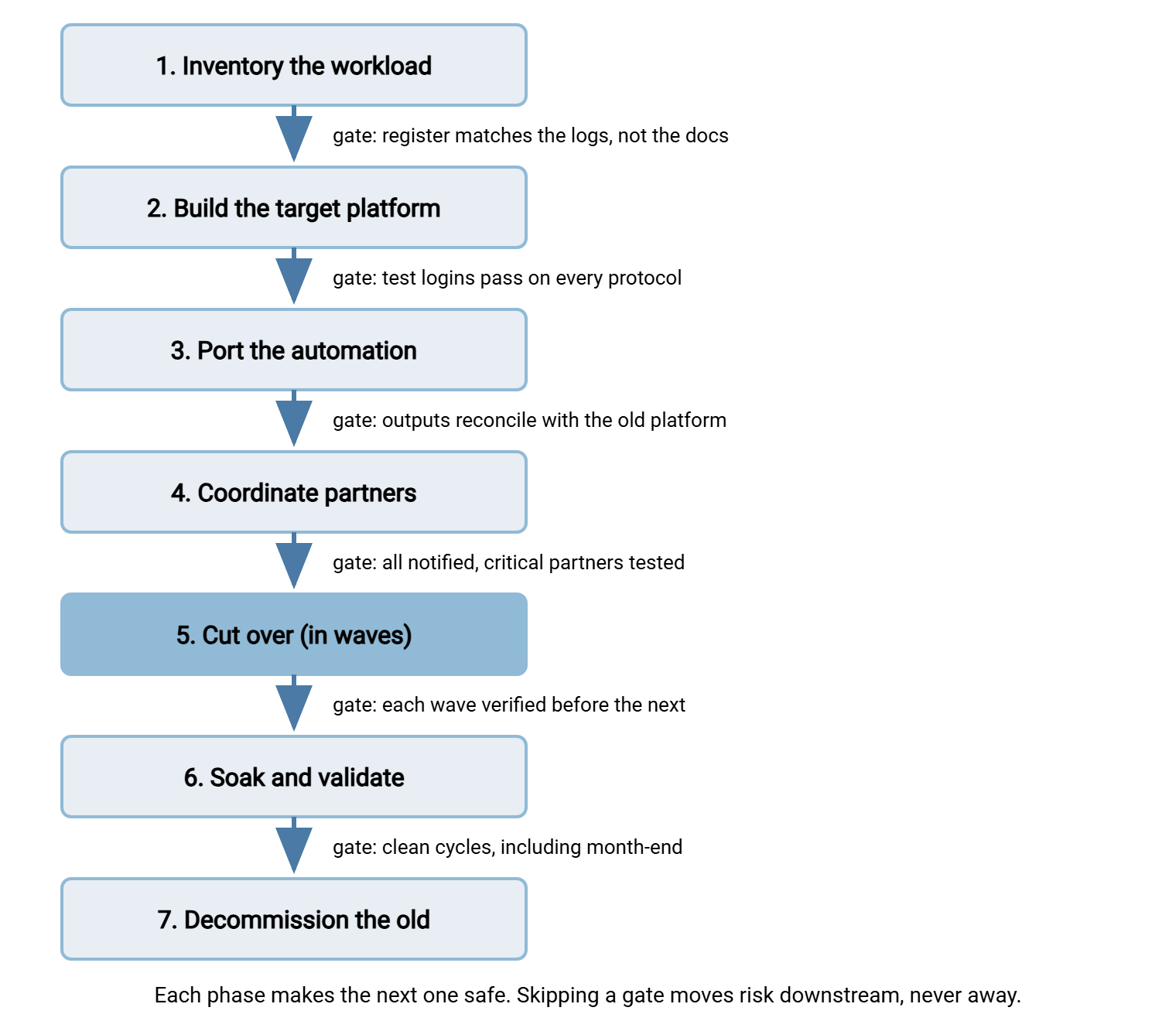
Inventory the workload. Build the register of every flow, job, schedule, credential, host key, firewall rule, and partner contact. Check it against a quarter of server logs, because the documentation always lies. This phase gets its own article: the migration inventory.
Build the target. Stand the new platform up early — accounts, folder trees, keys, certificates, logging — long before anything depends on it. Trial licensing makes this phase cost nothing but time. A Windows target such as Sysax Multi Server, for example, can be installed from a free trial and fully configured before you commit to anything. The same early-build logic applies whatever platform you chose.
Port the automation. Every scheduled job and script that ran against — or on — the old platform is extracted, then rebuilt or repointed. Each is run in parallel until its outputs provably match. The move may also re-platform loose Windows scripts into a dedicated scheduler such as Sysax FTP Automation. If so, its wizard-built tasks make like-for-like rebuilds quick. But the reconciliation discipline is identical whatever tool runs the jobs. This is careful, unglamorous work, and it is where silent drift is either caught or shipped.
Coordinate partners. Notices, test windows, and per-partner confirmation, sequenced by risk, with an escalation ladder for the partner who never answers. The full kit — including the notice template — is in coordinating partners through your migration.
Cut over. Move the traffic — all at once, in parallel for a while, or partner by partner. The three shapes and the endpoint-stability tricks that make them safer are compared honestly in cutover strategies.
Soak and validate. The new platform carries production while the old one stands ready. You compare outputs, watch freshness, and keep rollback genuinely possible until the evidence says the migration holds — including through a month-end. That discipline is validation and rollback.
Decommission. The old platform's logs must show that nobody — no partner, no forgotten quarterly job — has knocked on it for an agreed period. Only then does it go dark for good. Dark for good, not dark for the weekend and back by Tuesday.
Gates, and Why the Date Comes Last
The classic way these projects go wrong is that the cutover date gets chosen first. A weekend is picked in a planning meeting, announced upward, and defended ever after. The phases are then compressed to fit it. Inventory gets a day instead of a month. Partner notice goes out two weeks before go-live instead of six. I have sat in the meeting where the weekend was picked before anyone had opened the inventory. The inventory was subsequently declared complete three times. The gates exist precisely to prevent this: each phase has an exit test, and the date is whatever the gates allow. A slipped migration costs a status update; a broken one costs partners.
Here is the gate test in checklist form. Until every line is true, you do not have a cutover date — you have a wish:
Before you pick a cutover date:

[ ] Every flow on the old platform is in the register, verified against
    a full quarter of server logs -- not just against the documentation.
[ ] Every external partner has a named technical contact you have
    actually reached recently.
[ ] You know which partners connect by hostname and which by raw IP.
[ ] You know which partners pin your host key or certificate, and you
    have decided: move the key, or announce a new fingerprint.
[ ] You know which partners allowlist your address in their firewall,
    and they know a change may be coming.
[ ] The target platform accepts a test login on every protocol and
    account type you serve today.
[ ] Every ported job has produced output that reconciles with the old
    platform's output for the same inputs.
[ ] The rollback path has been rehearsed at least once -- performed,
    not just written down.
Rule of thumb: pick the date last. Every gate you wave through to protect a date turns into an incident on the far side of it. There, fixing anything costs ten times more and the audience includes your partners.
Neighboring Projects That Share the Discipline
Three projects look so much like a workload migration that they borrow this entire playbook, and this series points at them where the details differ.
- Retiring an insecure protocol. Moving partners off plain FTP is a migration where the protocol changes but the platform may not. The partner coordination is identical; the extra security argument is its own series, starting with the FTP retirement plan.
- Consolidating sprawl. Folding five accidental FTP servers into one platform is several migrations run as a program, with discovery as the dominant problem. This is covered in our FTP sprawl consolidation series.
- Moving the data itself. This series moves the workload — service, jobs, partners, keys. Moving terabytes of accumulated files to the new platform is a bulk-copy problem with its own tooling and verification habits. The seed-and-delta cutover pattern is the piece you will want first.
And if the migration's destination is cloud infrastructure, everything here still applies — plus some new address and identity realities covered in our cloud and hybrid transfer series.
What "Not Breaking Anything" Actually Means
Define success precisely, because "nothing broke" is unfalsifiable without evidence. A migration has succeeded when all of the following are true. Every flow in the register runs on the new platform. Its outputs have been shown equivalent — same files, same windows, same results — not assumed so. Every partner has confirmed their side works, or been chased up the escalation ladder until someone did. The old platform's logs prove that no client, human or scheduled, still calls on it. And rollback stayed genuinely possible until the moment you formally gave it up. Every phase in the plan exists to make one of those clauses true.
Notice what is absent from that definition: speed. Nobody remembers whether the migration took six weeks or four months. Everybody remembers the payroll file that went missing.
Where to Start
Start where the plan starts: build the register. The migration inventory is the next article in this series and the foundation every later phase consumes. Then read the cutover strategies to understand the shape your migration will eventually take. Knowing the destination changes how you inventory. The rest of the series will be waiting when each phase arrives.
Frequently Asked Questions
How long should a transfer migration take?
Can we migrate without partners noticing at all?
Should we upgrade protocols at the same time as migrating?
What is the single most common thing that breaks?
Do we need a change freeze during the migration?
From the Sysax team: we build secure file transfer software for Windows. Sysax Multi Server is an FTP, FTPS, SFTP, and HTTPS server. Sysax FTP Automation handles scheduled, scripted transfers. Free trials are on the download page.