
Cutover Strategies: Big Bang, Parallel Run, and Trickle
"So when do we flip it?" is the first question every planning meeting asks, and it is the wrong one. The cutover is the moment production traffic stops arriving at the old transfer platform and starts arriving at the new one. Everything else in a migration is preparation or verification; the cutover is the part where the risk actually gets spent. And the single biggest decision about it is not a date. It is a shape. You can move everything in one night. You can run both platforms side by side until the new one has proven itself. Or you can walk flows across one wave at a time. There are three shapes, three completely different risk profiles, and only one of them was ever going to fit in a weekend.
This article, part of our Workload Migration series, compares the three shapes honestly (each one is right somewhere). It then opens the toolbox that makes any of them safer. It covers DNS aliases and their TTLs in plain words, and keeping your address. It covers the host-key decision that determines whether partners are warned or alarmed, and the firewall change only partners can make. By the end you will be able to name your migration's shape and defend it. Defending a shape is easier than defending a weekend.
What a Cutover Actually Moves
Decompose the flip before you choose a shape for it. A cutover changes up to four things. It can change where the name or address partners connect to points. It can change which machine accepts sessions and holds the files. It can change where your jobs run, and which platform's folders downstream systems read. The three strategies differ mainly in whether those changes happen for everyone at once or flow by flow. The craft of a quiet cutover is keeping everything else stable while they happen. Keep the same names, same server identity, same folder layout, same file naming, and same schedules. Your migration register already tells you which partners connect by name and which by hardcoded address. That single field decides how much of this article's toolbox is available to you.
Big Bang: Everything Moves at Once
The classic shape starts with a freeze on changes and a final synchronization of in-flight data. The seed-and-delta pattern is the right way to do that copy. Then the addressing flips, and by morning every flow lands on the new platform. The old one drops to standby.
Where it is right: small estates with few external partners. It also fits flows so intertwined that splitting them creates more risk than moving them together. And it fits hard deadlines — a data-center exit, hardware failure, an end-of-support date — where the calendar has already chosen for you. The calendar is an unsentimental project manager.
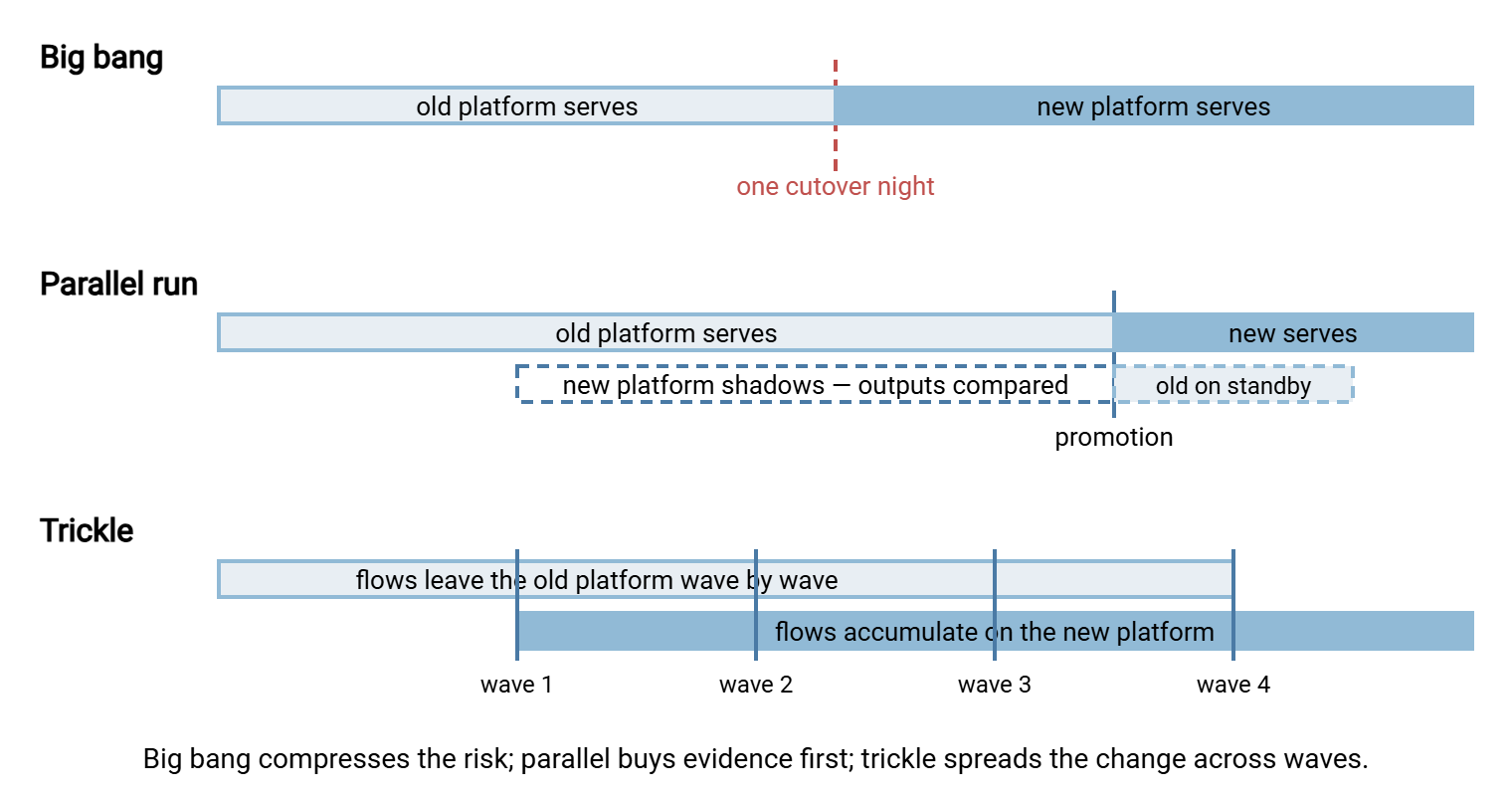
The honest costs. Every problem the preparation missed surfaces simultaneously, in production, on the same morning. That includes the unported quarterly job, the partner whose firewall still pins the old address, and the path spelled differently on the new platform. Triage happens under fire, with partners on the phone. And rollback is a second big bang, with the same blast radius in reverse. Big bang does not reduce risk; it compresses all of it into one weekend and bets on your rehearsal. I have run one big bang that went perfectly, and I would still not choose it twice.
The mitigations apply if this is your shape. Rehearse the entire runbook against a copy until the timing is boring. Schedule the window in the estate's quietest cycle, never adjacent to month-end. Freeze all other changes for the window. Pre-agree the go/no-go checkpoints and the rollback trigger with names attached. Decide in advance, as the validation and rollback article insists. Nobody makes good abort decisions at three in the morning.
Parallel Run: Both Platforms Live, One Trusted
In a parallel run — often called a shadow run — the old platform keeps serving production while the new one processes the same work. You compare their outputs until the new platform has earned trust. Inbound flows are easy to duplicate without bothering anyone: partners keep uploading to the old platform. A small job copies each arrival to the new platform's matching folder, where the ported automation processes it. Outbound needs one hard rule: only one platform may ever actually send to a partner. The shadow side writes its outputs to a holding area for comparison instead of delivering them. Double delivery is not a test artifact; it is a real incident on the partner's side. Their deduplication is not something to gamble on.
The payoff is the strongest evidence any strategy can produce: days or weeks of side-by-side outputs. You get the same file counts, same names, same hashes — before any partner depends on the new platform. The comparison mechanics live in the job-porting article; the promotion decision they feed lives in validation. The evidence is only as good as the records on each side. So the new platform's logging needs to be production-grade from day one of the shadow. A target that logs activity both to file and to a database, as Sysax Multi Server does, gives the comparison a queryable side to stand on.
The honest costs: you run two of everything — infrastructure, monitoring, patching, attention — for the whole period. The duplication plumbing is itself code that can mislead you. Some flows resist shadowing, because they are conversations rather than deliveries. A partner polling and deleting files, for instance, can only happen against one platform. Parallel runs shine for your highest-stakes flows and exhaust everyone when applied to all fifty. We learned the "all fifty" part the slow way. Which is why the third shape exists.
Trickle: Wave by Wave Until the Old Platform Is Quiet
The trickle strategy partitions the estate into waves — groups of flows or partners. It cuts each wave over separately, verifying it before starting the next. The first wave is deliberately friendly: low-criticality flows, internal consumers, partners who answer email. Each wave teaches the next; by the third, your runbook has survived contact with reality twice.
Where it is right: estates with many independent partners, each with their own change calendar, none of whom you can compel. Trickle is the only shape that respects the fact that a hundred partners will not all act on the same weekend. Sequencing those waves by risk is exactly the craft of the partner coordination article.
The honest costs: both platforms are in production for weeks or months. You have two systems to patch, monitor, and reason about, with credentials and folders alive in two places. The split-brain risk is real. A partner whose flow moved last week absentmindedly uploads to the old platform this week. The file lands where nothing is watching. Mitigate per wave: as each flow is verified on the new platform, disable its account on the old one. Then a stray connection fails loudly at login instead of succeeding quietly into an abandoned folder. And accept in advance that a stubborn tail — the last few unresponsive partners — will hold the old platform hostage for a while. The escalation ladder for them is in the partner article too.
The diagram below puts the three shapes on one timeline: where the risk concentrates, where the platforms overlap, and how long the old one must stay alive.
Choosing: An Honest Comparison
The table below is the chooser. Read it as tendencies, not laws — and notice that the last row admits what most real migrations become.
| Question | Big bang | Parallel run | Trickle |
|---|---|---|---|
| Calendar time | Shortest | Medium | Longest |
| Risk profile | All of it, one night | Lowest — evidence before exposure | Spread thin across waves |
| Operational load | One hard weekend | Two of everything, plus comparison labor | Two platforms in production for months |
| Rollback | A second big bang | Trivial before promotion | Per flow, cheap |
| Evidence of equivalence | Only after the fact | Strongest, gathered in advance | Per wave, accumulating |
| Partner coordination | One date for everyone | Mostly invisible until promotion | Each partner gets their own date |
| Natural fit | Small estate, hard deadline | A few high-stakes flows | Many independent partners |
In practice most sizable migrations end up hybrid. They use trickle waves for the partner estate, with a short parallel shadow inside each wave for its riskiest flows. They use a small big bang at the end for the intertwined core that refused to be split. That is not indecision — it is matching the risk tool to each flow's stakes, using the criticality your register recorded. Most trickles are hybrids that have not admitted it yet.
The Endpoint-Stability Toolbox
Whatever shape you choose, every tool below reduces how much of the change partners can see. The less they see, the fewer of them must act, and the fewer can fail to.
Give every flow a name — then move the name
DNS is the original indirection layer. A name like transfer.example.com resolves to an address. Every resolver that looks it up may cache the answer for the record's TTL — "time to live." That is the number of seconds a looked-up answer may be reused before asking again. That cache is why a name flip is not instant. With a TTL of a day, clients may keep connecting to the old address for up to a day after you change the record. The standard maneuver turns that into a non-event:
About a week out:   TTL on transfer.example.com is 86400 seconds (a day).
                    Lower it to 300 (five minutes). Do this at least a
                    full day early -- answers cached under the OLD long
                    TTL must expire before the short one protects you.
Cutover:            Point the name at the new platform's address.
                    Within about five minutes, every name-following
                    client is arriving at the new platform.
During the soak:    Leave the TTL at five minutes. Rollback is now
                    another five-minute flip, not a day-long wait.
After decommission: Raise the TTL back to something polite.
The catch: the name only carries clients that use it. Partners who hardcoded your IP, or connected to the server's machine name instead of the service alias, get nothing from the flip. The register knows who they are, and they become manual coordination items. That suggests the long-game move. If partners currently connect to anything other than a service alias you control, hand them the alias now. Make that its own small change before the migration. Every partner moved onto the name today is a partner the actual cutover — and every future one — cannot break. The same abstraction belongs on the client side of your own jobs. A scheduler such as Sysax FTP Automation keeps the destination host in the task's connection settings rather than scattered through script text. So repointing your own automation is an edit, not a hunt.
Meridian Parts kept the old name alive as an alias for a quarter, and it was the quietest decision in the whole migration. Partners had been handed the service alias months earlier, but the internal jobs had grown up connecting to the server's machine name. Nobody trusted the configuration sweep to have found every one of them. So on cutover night the old machine name became a second alias for the new platform. The internal DNS server's query log showed which machines were still asking for it. Eleven jobs came in by the old name in the first week, two in the eighth, and none by the end of the quarter. Each one was repointed as it surfaced. The name was retired on the quarter's last day. Not one of those eleven jobs ever failed.
Keep the address itself when you can
When old and new platforms share a network, you can sometimes transplant the address. Drain the old server, release its IP, and let the new one claim it. Or, better, keep a stable public address on a translation or load-balancing layer and swing only the private backend behind it. Partners' firewall pins survive untouched; even the hardcoded-IP crowd follows along. There are limits: it rarely works across data centers or into cloud address space. A shared address forces that flip to be sharp — the address serves one platform or the other, never both. So it pairs naturally with big bang and awkwardly with long trickles. A stable front address is also what partner-transparent redundancy is built on, so it keeps earning its keep long after the migration.
Host keys: move the key, or announce the new fingerprint
For SFTP, the server's host key is its identity; clients pin its fingerprint and refuse impostors, as covered in host keys and known-hosts. A migration must choose between two legitimate options. Both are legitimate; only one is quiet.
Move the key. Install the old server's host key pair on the new platform. Every SFTP client sees the identical fingerprint, and the identity question never arises — zero partner action, zero warnings. This is the quiet option, and usually the right one when many unattended clients pin you. Handle it honestly: the private key is a secret, so move it over an encrypted channel and destroy intermediate copies. And accept what you are carrying. Does the old key use a dated algorithm, or is the old server's integrity in any doubt? If so, the move imports that history into your clean new platform. A moved key brings its past along, uninspected.
Announce a new fingerprint. Generate fresh keys on the new platform — a clean identity, modern algorithms, no inherited doubt. Tell every partner in advance what to expect. A proper notice includes the old and new fingerprints side by side in the common digest formats. Include the date the change takes effect and a contact for mismatches. Deliver the notice through a channel partners already trust rather than only at the moment of connection. Partners then verify the key their client reports against the one you announced. That is exactly the out-of-band check that defeats interception attacks, as explained in MITM and trust failures.
Never do this: tell partners to "just accept whatever fingerprint it shows." It converts your one-day migration convenience into their permanent habit of trusting any server that answers to your name — precisely the reflex an attacker needs. Warned partners verify; alarmed partners either call you (fine) or blind-accept (not fine).
FTPS and HTTPS endpoints face the same fork in certificate form. The certificate must cover the alias partners connect to. You either move it with the platform or issue a fresh one. A certificate from a public authority re-verifies transparently on the partner's side; the mechanics of getting the chain right are in installing and chaining certificates.
Folders, names, and behavior
The endpoint is more than the address and identity — it is everything partner automation touches. Recreate paths letter for letter, keep account names and file-naming patterns identical, and preserve behavioral details like upload-then-rename conventions. Every difference a partner's script can observe is a difference some partner's script depends on.
Firewalls: The Change Only Partners Can Make
An address may change — the one partners connect to, or the source address you push from. If it does, every partner whose firewall names your old address must act before your traffic flows. Their notice needs three things: the new addresses, the date, and one instruction that saves the migration: add, don't replace. The old address must stay allowed on their side until you decommission, because rollback means arriving from it again. A partner who tidily deleted the old rule has quietly deleted your rollback. Mirror the same discipline on your own firewall: both platforms reachable, both able to reach out, until the old one is formally retired. The longer version of that conversation with partners is in firewalls and partner coordination.
Wrapping Up: Name the Shape, Then Work the List
Choose the shape deliberately. Use big bang for the small and deadline-driven, and parallel for the flows whose failure you cannot afford. Use trickle for the many-partner estate, and hybrid for most real migrations. Then spend your effort where every shape spends it: keeping the endpoint stable so most partners see nothing at all. "Nothing at all" is the best review a cutover can get. The human half of that promise, notices and test windows and the partner who never replies, is next in coordinating partners through your migration. The evidence that lets you call any wave "done" is in validating the migration.
Frequently Asked Questions
What TTL should we set before cutover, and why not zero?
Is moving a host key to the new server actually safe?
Could we run old and new on the same address with different ports?
How long should a parallel run last?
What happens to partners who cannot make the cutover date?
From the Sysax team: we build secure file transfer software for Windows. Sysax Multi Server is an FTP, FTPS, SFTP, and HTTPS server. Sysax FTP Automation handles scheduled, scripted transfers. Free trials are on the download page.