
The Multi-Site Distribution Problem, Mapped
Head office finishes the new price file at one in the morning. By the time the first branch unlocks its doors, that file needs to be on every one of forty branch servers. It must be the same file, the right version, provably there. Written down like that, it sounds like ordinary file transfer with a bigger address book. It is not. The moment one file must land at many sites, the problem changes shape. Success stops being a yes-or-no question and becomes a fleet-level claim. The slowest link in the estate starts setting your schedule. And "did it work?" turns into a report with forty rows.
This article maps the territory before you build anything. You will learn the recurring shapes that one-to-many distribution takes. You will learn the handful of axes — site count, frequency, urgency, identicality, link quality — that actually drive the design. You will also learn the questions to answer about your own estate before choosing a topology or a tool. It is the opening article of our Multi-Site Distribution series; the rest of the series builds the designs this article teaches you to specify.
Why One-to-Many Is Not Just Transfer, Multiplied
A single server-to-server transfer has one sender, one receiver, one link, and one outcome. Multiply the receivers and three things change fundamentally. All three surprise people who treat distribution as a loop around a transfer job.
First, partial success becomes the normal case. With one destination, a transfer either worked or it did not. With forty destinations, the common outcome on any given night is thirty-eight successes, one site that was mid-reboot, and one whose link dropped halfway through. Nothing "failed" in the dramatic sense — yet the flow is not done, because the promise was every site. A distribution design that has no answer for the two stragglers has no answer at all; it just has not met them yet.
Second, the weakest site sets the pace. Your data center talks to the hub over fiber; branch-014 talks to it over shop-grade broadband shared with the tills. If the design assumes every site behaves like the best site, the worst site breaks it monthly. Multi-site design is largely the art of accommodating the bottom of the fleet without punishing the top. We return to that theme in distributing over thin and unreliable links.
Third, the sender's resources multiply. One two-gigabyte content set sent to forty sites is eighty gigabytes leaving the hub. Forty transfers started at the same moment is forty simultaneous sessions, forty times the disk reads, and an outbound pipe carved into forty slices. The hub's capacity — bandwidth, sessions, disk — becomes a shared budget that the design must spend deliberately. That is why scheduling in waves exists at all, as covered properly in hub designs for branch distribution.
Remember: a distribution flow succeeds at fleet level or not at all. "The job ran fine" is a statement about the hub. "Every site has the right version" is a statement about the estate — and only the second one is the promise the business heard.
The Four Shapes of Distribution Work
Almost every multi-site flow you will meet is one of four shapes. Naming the shape early matters, because each one relaxes some requirements and tightens others. A design that fits one shape can quietly mistreat another.
The diagram below shows the four shapes side by side. It shows identical content to all sites, versioned releases to all sites, and a different slice per site. It also shows the reverse flow where sites send data back.
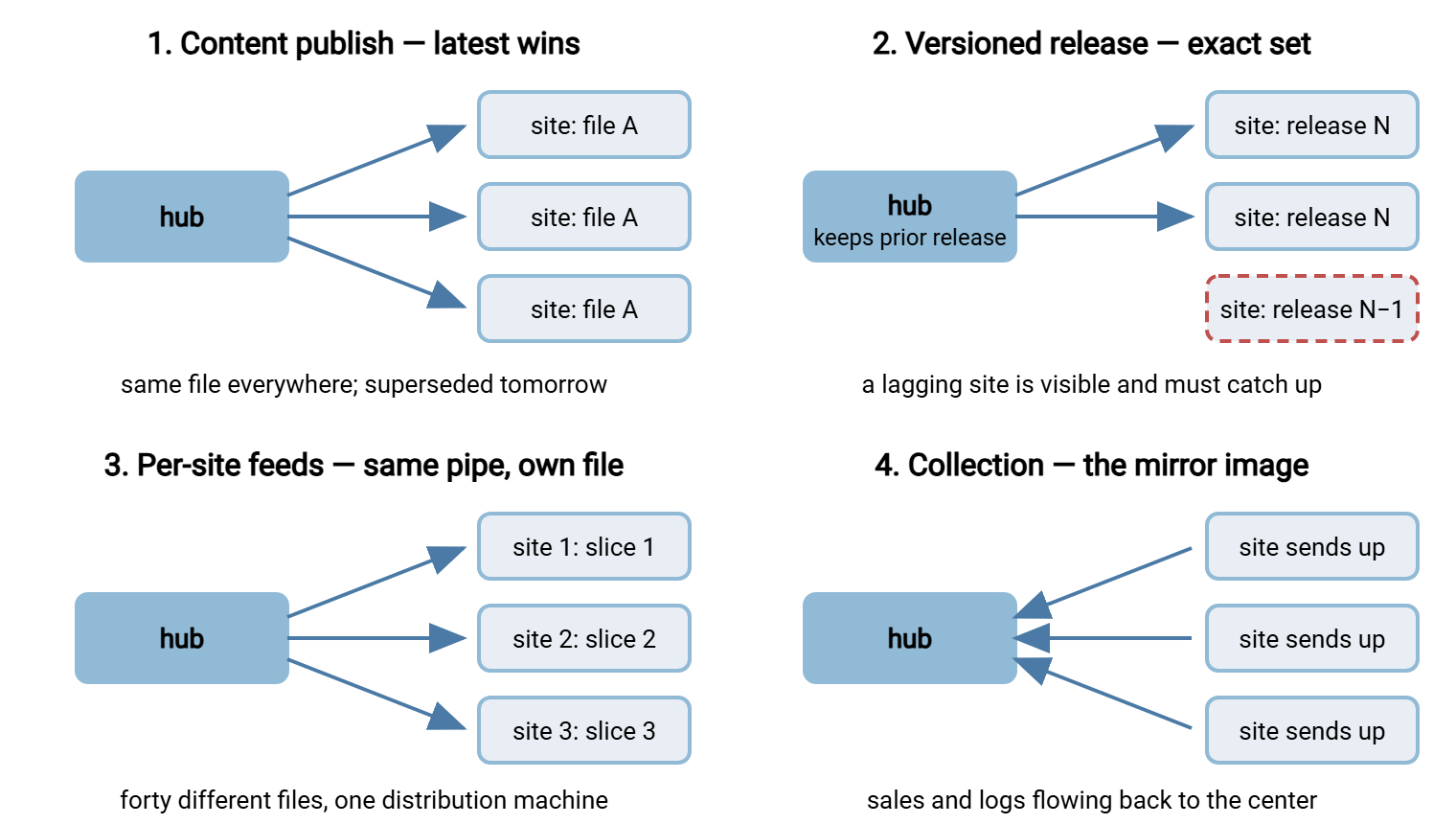
Content publish is the price-file case: the same file goes to every site, and each release supersedes the last. Only the latest version matters — a branch that missed two nights should skip straight to today's file, not replay the ones it missed. That single property, latest wins, simplifies catch-up enormously, and you should notice when a flow has it.
Versioned release distribution covers configuration packages, signage playlists, application assets, and anything where sites move deliberately from one known-good set to the next. Here exactness matters more than freshness. Every file in the release must arrive intact and complete. A site running the previous release must be visible as such. Keeping the prior release available for rollback is part of the design, not an afterthought.
Per-site feeds look like distribution from the machinery's point of view but carry a different file to each site. That could be each branch's own stock extract, or each clinic's own appointment list. The distribution engine, scheduling, and verification are shared; the payload is personalized. The design consequence is that filenames and folder layout must encode the site identity unambiguously. That is where naming discipline from our naming convention guide pays off.
Collection is the arrows reversed: every site sends sales, logs, or readings back to the center. It is the mirror image of distribution and shares the fleet-level thinking, but its pressures differ. The hub becomes a many-writers landing zone rather than a one-writer publisher. This series focuses on the outbound direction; the inbound one belongs to the wider server-to-server exchange patterns family.
The Axes That Drive the Design
Once you know the shape, six axes determine nearly every design decision that follows. Score your flow against each one honestly — the table gives realistic anchors for the low and high ends.
| Axis | The question it asks | Easy end (example) | Hard end (example) |
|---|---|---|---|
| Site count | How many destinations must every release reach? | Four regional offices you could check by hand | Four hundred shops where only automation can know the truth |
| Frequency | How often does a new version ship? | A quarterly manual pack | Nightly price files plus intraday corrections |
| Urgency | Is there a deadline, and what breaks if a site misses it? | Training videos: nice by Friday | Prices at every branch before its doors open, local time |
| Identicality | Must sites match exactly at a moment, or converge eventually? | Reference documents: within a day is fine | Every till charging the same price for the same item today |
| Payload | How big, and one file or thousands? | One price file of a few megabytes | A content set of several gigabytes in thousands of small files |
| Link floor | What is the worst connection any site has? | All sites on managed fiber | A dozen branches on shared shop broadband that drops nightly |
Site count deserves one remark before we move on, because it changes kind, not just quantity. At four sites, a human can open four folders and eyeball the result; informal process survives. Somewhere between ten and twenty sites, that stops — not because the copying gets harder, but because knowing gets harder. Past that line, any answer to "are the sites current?" that involves a person checking is fiction. The design must produce the answer as data. Most of the pain in inherited multi-site setups traces back to an estate that grew across that line. Its process stayed on the small side of the line.
Two of the remaining axes deserve a closer look, because they are the ones people misjudge most often.
Urgency: Deadlines Are Per-Site, Promises Are Fleet-Wide
"Before the branches open" sounds like one deadline. Across an estate it is forty deadlines, and if the estate spans timezones, they land at different absolute moments. The eastern branches open while the western ones are still dark. Handled well, that is free scheduling headroom. Handled badly, it is a morning incident that travels west with the sun.
State every deadline in the site's local terms ("ready ninety minutes before local opening") and then translate it into the hub's schedule. The gap between when distribution usually finishes and when it must finish is your safety margin. You should know that number rather than feel it. A flow that completes at three and is needed at seven has four hours of margin for retries and stragglers. A flow that completes at half past six has none. No amount of monitoring will manufacture time that the schedule did not leave.
Urgency also decides what failure means. If a site can trade a day without the new manuals, a missed delivery is a ticket. If a branch cannot legally sell at yesterday's prices, a missed delivery is an opening-time incident with a manager on the phone. Write down, per flow, what actually happens at a site that missed the deadline. That sentence, more than anything else, tells you how much verification and alerting the flow deserves. That is the subject of proving every site got the right version.
Identicality: How Identical Is "Identical"?
Every distribution flow claims the sites should "have the same files." Push on that claim and it splits into three genuinely different requirements. Eventual convergence means every site ends up with the latest version within some tolerance — an hour, a day. Under that requirement, nobody cares that branch-007 was briefly behind. Deadline consistency means all sites must be on the new version by a stated moment. Under that requirement, the transition may happen at different times during the window. Coordinated cutover means sites must switch together — deliver early, then activate everywhere at once. Usually, this means shipping the files ahead of time. Then you flip a small marker or let site software apply the change at a set local time.
These three requirements point at different machinery. Eventual convergence tolerates casual designs and even continuous replication. Deadline consistency demands per-site verification against the clock. Coordinated cutover forces you to separate delivery (getting bytes to the site) from activation (the site starting to use them). That separation solves half the hard problems in this field. Slow links threaten delivery but never activation once the files are already local. The comparison between replication-style and job-style machinery for each requirement gets a full article of its own later in this series.
Gotcha: when the business says "all branches must have it at nine," ask whether they mean delivered by nine or in use at nine. Those are different systems. Delivering by nine needs bandwidth and retries; switching at nine needs early delivery plus a local activation step. Building the first when the business meant the second is a painful discovery to make in production.
The Hub Question
One structural decision underlies every design in this series: distribution runs through a hub. That is one central place that holds the authoritative copy and deals with every site. The alternative, sites copying from each other or from wherever the data was produced, scales miserably. Relationships multiply, nobody can say where the true version lives, and troubleshooting means archaeology. The general argument lives in our server-to-server patterns series. For one-to-many flows the verdict is nearly automatic, because the flow is star-shaped by nature.
Making the hub real means giving it three properties. It holds the authoritative copy — the release area that producers publish into and sites receive from. This area is laid out so that a release is complete and immutable once published. The hub is the security boundary — each site connects with its own identity, sees only what it should, and every byte in or out is logged. And it is the evidence source — when someone asks which sites have the current version, the hub's records are where the answer starts. In practice the hub is a hardened file transfer server. On Windows estates a server such as Sysax Multi Server fits the role. It gives each branch its own account, and per-area permissions so a site can read releases but not touch its neighbors. It provides activity logging to file or database that later becomes your delivery evidence.
What the hub does not decide is direction: whether the hub pushes to the sites or the sites pull from the hub. That choice — who initiates, who retries, who notices failure — shapes credentials, firewall rules, and offline-site handling. It gets the next article to itself: hub designs for branch distribution. The short preview: pull is quietly winning at most estates, for reasons that have everything to do with the offline branch. The underlying vocabulary, if push and pull are new terms, is in push vs pull.
A Distribution Census, One Sheet per Flow
Before designing anything, write a one-page census for each distribution flow you own or are about to build. It forces the axes into the open, and it is the input every later article in this series assumes you have. A filled-in example for the flow this series keeps returning to:
DISTRIBUTION FLOW CENSUS
------------------------------------------------------------
Flow name:         nightly price file
Shape:             content publish (latest wins)
Producer:          pricing system export, lands on hub about
                   an hour after midnight, hub time
Sites:             forty branches, branch-001 .. branch-040,
                   across three timezones
Payload:           one file, prices_YYYYMMDD.csv, a few MB
Frequency:         nightly, plus rare intraday corrections
Deadline:          ready ninety minutes before local opening
Identicality:      deadline consistency (in use at opening)
Offline tolerance: a branch may miss one night, never two;
                   catch-up takes the LATEST file only
Link floor:        shop broadband at a dozen branches;
                   drops for minutes at a time overnight
Failure meaning:   branch opens on stale prices = incident
Proof required:    per-site receipt + morning report naming
                   any branch not on today's version
------------------------------------------------------------
Ten lines, and notice how much design it already contains. Latest-wins tells you catch-up policy. The link floor tells you to plan for resume and retries. The deadline plus timezones sketches the schedule. The proof line commits you to per-site verification rather than trusting the hub's job log. The flow later becomes real automation — scheduled tasks fanning a release out, or branch-side jobs pulling it. When it does, a tool like Sysax FTP Automation turns each census line into configuration. That includes the schedule, the retry behavior, and the notification on failure. But the census comes first; automating an unspecified flow just makes it fail faster.
Reading the Map: Three Worked Examples
To make the axes concrete, here is how three common flows score, and what each score implies.
- Nightly price file to forty branches. Content publish; small payload; nightly; hard local deadline; deadline consistency; thin links at some sites. The small payload means bandwidth is not the enemy — the deadline and the stragglers are. Design effort goes into scheduling margin, retries, and per-site proof. This is the flow our worked forty-branch design builds end to end.
- Weekly content set to the same branches. Versioned release; several gigabytes; weekly; soft deadline ("during the weekend"); exactness matters; same thin links. Now bandwidth is the enemy: the design leans on waves, deltas, resume, and a long window. Verification shifts from "arrived by seven" to "complete and intact."
- Device configuration packs to four hundred kiosks. Versioned release; tiny payload; on-release; eventual convergence acceptable within a day; sites frequently powered off. Site count and absence dominate. The design must let a kiosk that wakes up late fetch the current release unaided. Reporting must distinguish "not yet" from "failing."
Same machinery, three different centers of gravity. That is the payoff of mapping before building. You spend your engineering on the axis that is actually hard for your flow, instead of buying gigabit answers to a straggler problem.
Where This Series Goes From Here
You now have the vocabulary: shapes, axes, the fleet promise, delivery versus activation, and the census sheet that captures a flow on one page. The rest of the series turns each hard axis into a design. Hub designs for branch distribution settles push versus pull, wave scheduling, and the offline branch. Distributing over thin and unreliable links takes on the link floor. Proving every site got the right version builds the evidence layer. The worked design assembles all of it into one forty-branch estate you can adapt.
Frequently Asked Questions
Is multi-site distribution just running the same transfer job forty times?
What does "latest wins" mean and why does it matter?
How is delivering a file different from activating it?
Do I really need a hub, or can sites copy from each other?
Which axis should I worry about first?
From the Sysax team: we build secure file transfer software for Windows. Sysax Multi Server is an FTP, FTPS, SFTP, and HTTPS server. Sysax FTP Automation handles scheduled, scripted transfers. Free trials are on the download page.