
Hub Designs for Branch Distribution: Push, Pull, Waves, and State
Every serious multi-site distribution runs through a hub — one central server that holds the authoritative copy and deals with every branch. That much is settled the moment you map the problem (we did the mapping in the multi-site distribution problem, mapped). What the hub decision does not settle is the question this article answers. Does the hub push files out to the branches, or do the branches pull files from the hub?
The choice looks cosmetic — the same bytes cross the same wires either way. But it decides where credentials live, which firewalls must open, and who notices a failure first. It also decides what happens to the branch that was switched off while everyone else got the file. By the end of this article you will be able to argue the choice for your own estate. You will be able to schedule the fan-out in waves so the hub survives its own success. You will also be able to design the per-site state tracking that turns "I think it went out" into a row of facts per branch. This article is part of our Multi-Site Distribution series.
The Hub's Job, in One Paragraph
Whichever direction you choose, the hub itself has the same three duties. It holds the release area — the folder structure where a new version is published completely before any site is allowed to see it. It is the security boundary — every branch talks to the hub with its own identity, and nothing branch-to-branch. And it is the evidence source — the place whose logs can later reconstruct which site received what, when. Keep those three duties in view; both designs below are just different ways of honoring them.
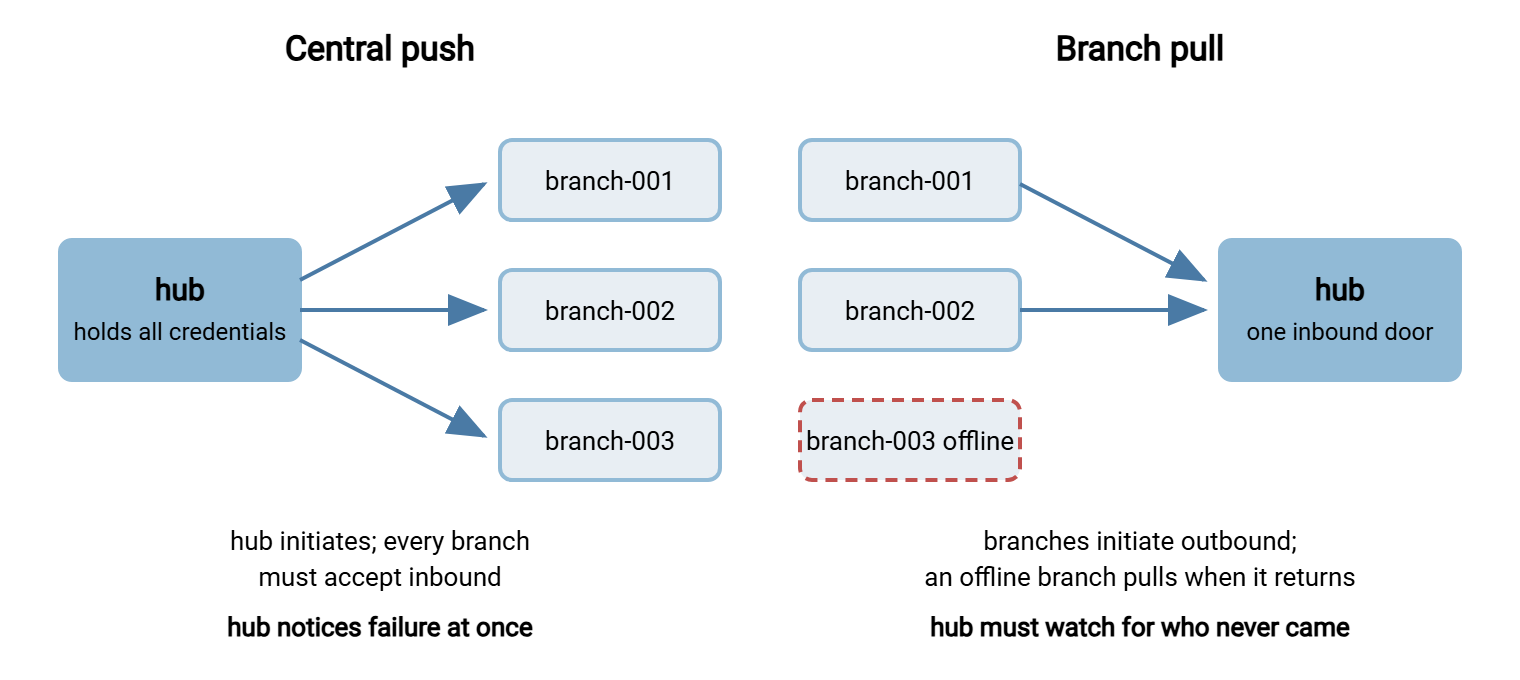
The diagram below shows the two designs side by side. In central push, automation on the hub connects out to each branch and uploads. In branch pull, a small scheduled job at each branch connects in to the hub and downloads.
Design One: Central Push
In a push design, the hub runs the automation. A scheduled job — or forty of them — connects out to each branch over SFTP or FTPS and uploads the current release. The branches are passive: each one just runs a transfer service that accepts the hub's connection and receives files into an agreed folder.
Push has one outstanding virtue: the hub knows immediately how every delivery went. The transfer either succeeded or threw an error, in a log the operations team is already watching, on the machine they already administer. Failure detection is native. Retry is native too — the hub owns the retry policy and applies it uniformly. It can escalate through the backoff patterns described in retry strategies and backoff without any cooperation from the branch.
Now the costs. The hub must hold credentials for every branch — forty passwords or keys in one place, which concentrates both administration and risk. Each branch must accept an inbound connection. That means forty branch firewalls with an open door, and forty router configurations that can drift. It also means forty places where a change made by the branch's internet provider breaks distribution. And the hub carries the whole orchestration load: it must sequence, parallelize, and time forty transfers per release. That is exactly the wave-scheduling problem covered below.
Push fits best when branches are thin — a bare device or appliance that can receive files but could never run its own scheduled job. It also fits best when the center must control delivery timing precisely, or when site count is modest and the inbound-access problem is manageable. It is also the natural shape when the "branches" are actually partner systems you do not manage. That is a different topic with its own patterns — see the server-to-server exchange patterns series for direction choices between arbitrary systems.
Design Two: Branch Pull
In a pull design, the initiative moves to the edges. Each branch runs a small scheduled job — a script fired by the operating system's scheduler (see using the task scheduler for transfers) or an automation client. That job connects to the hub at its assigned time, checks what the current release is, and downloads what it does not already have. The hub, for its part, is simply a well-run transfer server.
The security geometry improves in three ways at once. Each branch holds only its own credential, so a compromised branch exposes one account, not the fleet. The estate needs exactly one inbound door — the hub's — instead of forty. Every branch firewall needs only ordinary outbound access, which it almost certainly allows already. And the hub can be hardened like the single exposed service it is. On a Windows hub, a server such as Sysax Multi Server gives each branch its own account with per-area permissions. Those permissions give read access to the release area, and write access only to its own receipts folder. The server also provides IP allow rules where branch addresses are static. It provides activity logging to file or database that records every download per account. That last item quietly becomes your delivery evidence, as the verification article shows.
Pull's weakness is the mirror of push's strength: nobody notices a missing branch at the moment it goes missing. If branch-023's job never fires — machine off, scheduler broken, script deleted by a helpful technician — the hub sees nothing. No error, no log line, just silence. A pull design is therefore incomplete without a hub-side check that asks, after the window closes, "who never came?" That is an absence check, not an error check, and it is the single most commonly omitted piece of pull-based estates. The general technique lives in freshness checks and expected files.
Remember: push turns a missing site into a loud error at the hub; pull turns it into silence. Silence is cheaper to operate but must be made loud deliberately — with an end-of-window check that compares who pulled against who should have. If you adopt pull without building that check, you have not chosen a design; you have chosen not to know.
Choosing: The Decision Table
Neither design is "correct" — but for fleets of branches, the forces line up in a pattern. Here is the comparison in one place.
| Question | Central push | Branch pull |
|---|---|---|
| Who initiates the connection? | Hub, outbound to every branch | Each branch, outbound to the hub |
| Where do credentials live? | All branch credentials on the hub | One credential per branch, held locally |
| Firewall openings needed | Inbound at every branch | Inbound at the hub only |
| Who notices a failed delivery? | Hub, immediately, as an error | Nobody, until an absence check runs |
| The branch that was offline | Hub must re-run its delivery later | Catches itself up on reconnect |
| Load control at the hub | Explicit — hub decides task timing | By schedule offsets plus connection limits |
| Best fit | Few sites, dumb endpoints, center-controlled timing | Many branches, flaky links and uptime, capable site machines |
For the classic estate — dozens of branches, consumer-grade links, machines that reboot when the cleaner needs the socket — pull wins more often than not. The offline branch handles itself, and the security geometry is simpler. The deciding vocabulary, if the push/pull distinction itself is new to you, is laid out in push vs pull. Hybrids are legitimate too. Some estates push to a handful of regional relay servers and let branches pull from their nearest relay. That is worth the added moving parts only once branch counts climb well into the hundreds or the geography demands it.
What Actually Runs at Each Branch
The direction decision also decides what software the branch needs. It is worth stating plainly because branch machines are the least-loved computers in any estate.
In a push design, each branch runs a small transfer server. It listens for the hub's connection and writes what arrives into an agreed folder. That is more than it sounds. A listening service at forty sites means forty services to patch, and forty certificates or host keys to manage. It means forty attack surfaces facing whatever the branch network lets in. Keep the service minimal, restrict it to the hub's address, and treat it as part of the fleet's patch cycle, not as furniture.
In a pull design, each branch runs a client-side job: a scheduled script, or an installed automation client such as Sysax FTP Automation configured with the pull task. The configuration includes its schedule, its retry behavior, and an email notification if the pull ultimately fails. So the branch job itself can call for help instead of failing mutely. Nothing at the branch listens for inbound connections at all, which is precisely why the security review goes easily. The trade is operational: forty small jobs now live at the edges. So version-control their configuration centrally and make redeploying a branch's job a ten-minute routine. Branch machines get rebuilt more often than anyone admits.
Scheduling in Waves So the Hub Survives
Whatever the direction, resist the beginner's schedule: everything at once. Forty simultaneous transfers do not finish forty times slower than one. They contend for the hub's uplink, its disk, and its session limits. Everything crawls, timeouts fire, and retries pile onto the congestion. The night ends with half the fleet delivered and no idea why. The cure is wave scheduling: divide the fleet into groups and start each group at a different offset.
Sizing a wave is arithmetic, not art. Estimate the hub's usable outbound bandwidth, divide by what one branch transfer typically draws, and keep a healthy margin. If the hub can comfortably feed about ten branch-speed transfers, waves of eight are sensible. Then spread the waves so each has time to substantially finish before the next begins. Put the slowest-link branches in the earliest waves. They need the most runway, and their stragglers then overlap harmlessly with later waves. Add a little deliberate jitter inside each wave — start times a few minutes apart rather than all on the same minute. That way, the hub never absorbs a synchronized thundering herd.
Mechanically, waves are just multiple schedules. In a push design built on Sysax FTP Automation, each wave is a set of transfer tasks sharing a start time. The next wave's tasks are scheduled at the next offset. The Enterprise edition's parallel task execution lets a wave's tasks genuinely run side by side instead of queuing. In a pull design, the wave lives in the branches' scheduler offsets. Branch-001 through branch-008 fire at the first offset, the next eight a half hour later. The hub's connection limits serve as the backstop against accidental pile-ups. Either way, write the wave plan down as a table (the worked forty-branch design includes a complete one). That lets the on-call engineer see at a glance which branches should be transferring at three in the morning.
Per-Site State: Knowing Where Every Branch Stands
Once more than a handful of sites exist, you need a persistent answer to the question "what does branch-014 have right now?" It must be answered per branch, from data, without logging into anything at the branch. That answer is per-site state, and it does not come as a product feature; you build it from the evidence the transfers already generate.
The design has three parts. First, a state record per site — one small file or database row per branch, updated whenever a delivery completes. A folder of marker files on the hub does the job at forty branches and is transparent to inspect:
hub:/distribution/state/branch-014.txt

flow:      nightly-prices
site:      branch-014
release:   prices_YYYYMMDD.csv
delivered: Mar 14 02:41 hub time
method:    pull (receipt uploaded by branch job)
status:    current
Second, a feed that updates it. In a push design, the transfer task's own success or failure updates the record — the natural place is the task's post-transfer step. In a pull design, the trustworthy feed is the branch's receipt. After a successful download and verification, the branch job uploads a tiny confirmation file into its own receipts folder on the hub. A hub-side process folds receipts into state. The hub server's activity log corroborates both — which account downloaded which file at which minute. Logging the activity to a database rather than flat file makes the later reporting queries trivial.
Third, a reader: the end-of-window job that walks the state records and produces the morning answer — forty rows, each current or not. That reader, its report format, and the alerting on stragglers belong to the verification article; here the point is architectural. Design the state store on day one, feed it from evidence rather than hope, and never let "the job ran" stand in for "the site confirmed."
The Branch That Was Offline
Now the scenario every design must pass. Tuesday night, a storm takes out power at branch-023. The other thirty-nine branches receive the release; branch-023 is dark through the whole distribution window and comes back at ten the next morning. What happens?
In a naive push design, the answer is "someone re-runs the task manually" — which means the answer is "sometimes nothing." A sound push design automates the second chance. It uses retries with backoff during the window, and after the window a catch-up queue. Failed sites are retried on a slower cycle, every hour or so, until delivery succeeds or a human is alerted. The state record marks the branch stale the moment the window closes without success. So the morning report tells the truth while catch-up proceeds.
A pull design handles the same night with less machinery, provided the hub's release area is built for returning sites. Branch-023's puller fires on its next scheduled slot after power returns, asks "what is current?", and downloads it. Nobody at the center had to remember the branch existed. Two layout rules make this work:
- Publish releases into a stable, self-describing layout. Keep each release in its own folder plus an unambiguous pointer to the current one. That pointer is a
current.txtmarker naming the release, written last and written atomically. A returning branch reads the pointer and compares it with what it has. It knows exactly what to fetch with no negotiation and no memory of the missed nights. - Apply the flow's catch-up policy, not history replay. For latest-wins flows like price files, the returning branch fetches only the current release — the missed ones are worthless by definition. For versioned releases, it fetches the current complete set. Either way the branch must never apply a half-downloaded release. Download to a temporary name, verify, then swap atomically, exactly as described in temp names and atomic renames.
Design test: before calling any hub design finished, walk it through the offline-branch night on paper. Who notices? What retries, and on what cycle? What does the returning branch fetch, and what stops it from activating a partial download? If any answer is "a person remembers to," the design is not finished.
Pulling It Together
A hub design is four decisions made deliberately. First comes direction: push for control and native visibility, pull for fleets, flaky sites, and simpler security. Next come waves: sized to the hub's real capacity, slowest links first, jitter within. Then comes state: a record per site, fed by evidence, read by an end-of-window report. Finally comes the offline branch: automated catch-up in push, a self-describing release area in pull. Get those four right and the remaining articles slot in cleanly. Our article on thin and unreliable links stretches the design across the worst connections in your estate. The worked forty-branch design shows every one of these choices made and defended in a single realistic build.
Frequently Asked Questions
Is push or pull better for distributing to branches?
If branches pull, how do I find out that one of them didn't?
What is wave scheduling and how big should a wave be?
How does a branch that was powered off catch up?
Where should per-site delivery state be stored?
From the Sysax team: we build secure file transfer software for Windows. Sysax Multi Server is an FTP, FTPS, SFTP, and HTTPS server. Sysax FTP Automation handles scheduled, scripted transfers. Free trials are on the download page.