
Multi-Site File Availability: Replication vs Transfer Jobs
"Can't the branches just have the same files we have?" It is the most reasonable request in the building. It arrives after everyone has tried opening the files across the WAN, a misery already explained in why mapped drives crawl over VPN and WAN. So the files must exist at every site. Two very different machines can make that true. One is replication, a continuous engine that keeps server copies matching as files change. The other is scheduled transfer jobs, which deliver copies on a timetable as discrete, logged events. Both produce "the files are here at every site." They differ in everything else: who may write where, what happens when two sites change one file, and how the WAN gets used. Above all, they differ in how each one fails. One of them will also copy your mistakes to every site with great care.
This article compares them honestly on those axes. By the end you will be able to look at a multi-site requirement and name the right machine. Just as usefully, you will be able to predict the specific operational chores each choice signs you up for. It is part of our Shares vs Transfer series, and it leans on the share-vs-transfer distinction drawn in shares vs transfers.
The Two Machines, Defined
Replication keeps designated folder trees on two or more servers continuously synchronized. The canonical Windows implementation is the pair many admins know as DFS. A namespace layer publishes one virtual path (\\corp\files\projects) and quietly directs each user to the nearest server holding a copy. A replication engine watches each member server for changes and propagates them to the others. Mature engines are efficient about it: they detect changes from the filesystem journal rather than rescanning. They ship only the changed portions of files (remote differential compression — a cousin of the delta technique our rsync series explains). They stage outbound changes in a working area so transmission survives interruptions. Replication is typically multi-master: every member accepts writes, and the engine's job is to make them all converge on the same contents. Converge is a word to watch; it does not say which contents.
Replication has topology choices of its own, worth knowing before the comparison. A full mesh — every member replicating with every other — converges fastest and tolerates any single site loss. But its connection count grows quadratically and becomes unmanageable beyond a handful of sites. A hub-and-spoke replication topology routes all propagation through one or two hub servers. This means far fewer connections and saner WAN paths, at the price that spoke-to-spoke changes travel two hops and the hub becomes precious. Lose it without a second hub and propagation stops while every member still cheerfully accepts writes, brewing conflicts for later. Most real deployments at scale end up hub-and-spoke with a paired hub. Keep that shape in mind, because it makes the comparison below fairer. At scale, both machines end up looking like a hub with spokes.
Scheduled transfer jobs are the same delivery machinery this whole library covers, pointed at your own sites. A job runs at defined times (or when a watched folder changes). It connects to each destination over a transfer protocol such as SFTP or FTPS, and copies what is new, one way. There is no engine watching filesystems around the clock and no reconciliation logic. There is a source that is authoritative, destinations that receive, and a log line per file per site per run. Freshness equals the schedule; ownership is wherever you pointed the source.
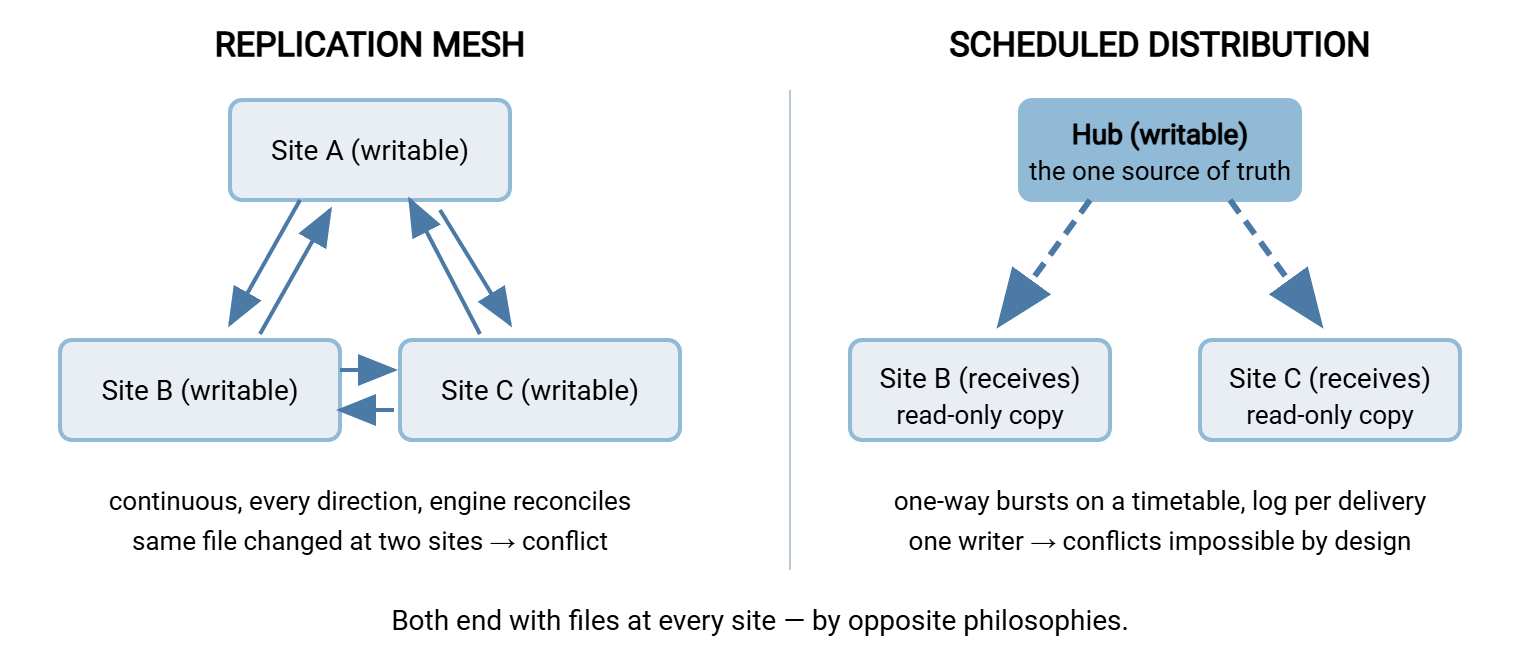
The diagram below shows the two shapes. In a replication mesh, every site holds a writable copy and the engine reconciles among them. In a hub-and-spoke distribution, one authoritative source pushes to receiving sites on a schedule.
Conflict Handling: The Deepest Difference
A conflict happens when the same file changes at two sites within the propagation window — before either site has seen the other's edit. Multi-master replication must then choose, and engines choose by rule, typically a last-writer-wins policy. Under that policy, the most recent change becomes the file everywhere, and the losing version is shunted to a conflict area. (DFS-style engines keep a conflict and deleted folder with limited retention.) Note what did not happen: no error, no prompt, no notification to the person whose morning's work just lost the coin flip. Multi-master replication converges by quietly discarding one truth. This is fine for files rarely edited twice concurrently, and quietly corrosive for busy collaborative trees spanning time zones. The mitigations are organizational as much as technical. They include read-only replicas at sites that only consume, and folder ownership conventions ("each region edits only its own subtree"). They also include user education that the other site's edits take time to arrive. Nobody gets a receipt for the version that lost.
Scheduled transfer jobs cannot have conflicts, and it is worth seeing why: the design permits only one writer. The hub is authoritative; the spokes receive. If a branch user edits their local copy of a distributed file, the next run overwrites it — brutal, but unambiguous, and easily made safe by distributing into read-only locations. If the requirement genuinely includes "both sites edit the same files," a one-way job is the wrong tool, full stop. In that case, you either accept replication with its conflict rules or restructure ownership so each file has one home. (Two one-way flows in opposite directions over disjoint folders is a surprisingly common right answer.) Or you move the collaboration itself to one place. Forcing the decision into the open is the transfer job's quiet virtue: ownership ambiguity has to be resolved at design time, not discovered in a conflict folder. I prefer to have that argument in a meeting. Meetings keep minutes.
Bandwidth Patterns: Trickle vs Burst
Replication uses the WAN as a continuous trickle that tracks your change rate. Every saved file starts propagating within moments, all business day, with deltas keeping the volume down — a large edited file may ship only its changed blocks. The engine competes with interactive traffic constantly, so mature engines offer bandwidth throttles and schedule windows; tune them too tight and you trade bandwidth for lag. The trickle's great advantage is freshness: minutes-scale convergence under normal load. Its cost is that WAN usage becomes a function of user behavior. A team dumping scan archives into a replicated folder at 2 p.m. is a WAN event you did not schedule. The engine does not consult the calendar.
Transfer jobs use the WAN in planned bursts. Nothing moves between runs. Then a concentrated push happens at the time you chose — typically overnight, when the link is idle. Volume per burst is the day's changed files, usually whole files unless you add delta tooling. Predictability is the win: the network team can circle the window on a chart, and the business day's bandwidth belongs entirely to the business. The cost is staleness between runs — a file finished at 9 a.m. reaches the branches at the next run, and everyone must know that. Choosing the window well is its own craft: see off-peak scheduling.
Put numbers on it to feel the difference. Say a site's tree changes by 2 GB per working day. As replication, that is roughly 2 GB (less, after deltas) dribbled across ten business hours. That is an average load of well under 1 Mbps, invisible on most links, but bursty in practice. The load spikes when users do big things, at whatever hour they do them. As a nightly job, it is the same 2 GB pushed in one window — about half an hour of a 10 Mbps allocation. The daytime link carries nothing at all. Neither number is scary; the difference is whose schedule the load follows: the users' (replication) or yours (jobs). Where a nightly burst outgrows its window on a long fat link, the arithmetic and fixes live in our UDP-accelerated transfer series.
Failure Modes: How Each One Breaks
Choose between these machines primarily on this axis, because you will live with it. I have lived with both, and the failures are what I remember.
Replication fails silently, as a state. The engine's characteristic failure is backlog: a member falls behind and changes queue up. Causes include an undersized staging area thrashing on huge files, a saturated link, or a database hiccup after an unclean shutdown. Nothing errors; users gradually see different files at different sites. The discovery is usually a human noticing ("the branch says the contract is the old version"). Locked-open files postpone replication too — the spreadsheet someone keeps open all week never ships. So a replication deployment is a monitoring commitment. Watch backlog counts per member pair (Windows admins schedule exactly that query), watch staging utilization, and alert on growth. The engine will not raise its own hand. And one propagation behavior deserves fear kept in mind: replication faithfully replicates mistakes. A tree deleted at any writable member is efficiently deleted everywhere, at trickle speed. It was asked to keep the sites identical, and it did.
Bluewater Bank's engine did precisely that one Tuesday afternoon. Someone tidying a replicated projects tree at a branch moved a large folder into the wrong parent and, seeing an unfamiliar tree, deleted it to start again. Within the hour the folder was gone at head office and at the other four branches, exactly as the engine had been configured to ensure. The conflict-and-deleted area at the hub still held most of the contents, and the previous night's backup held the rest. The tree was back before the end of the day. The change made afterward was not to the engine but to the tree. The branch subtrees became read-only replicas, and writes moved to the one site that owned them.
Transfer jobs fail loudly, as events. A run either completes or errors: endpoint unreachable, credential expired, disk full. Each is a specific failure at a specific time, which retry logic can re-attempt and an alert can escalate. Staleness is visible and bounded by the schedule. Partial deliveries are handled by the standard atomic pattern — upload under a temporary name, rename on completion — so a spoke never holds half a file. The honest caveats: an unmonitored job also fails silently in practice. The difference is that failure is an event you can alert on, not a state you must poll — so configure the alert. And a job only moves what its selection rules match, so a misconfigured filter skips files with a clean log. Test the rules, then trust the alerts.
Remember: neither machine is a backup. Replication propagates deletions and corruptions with admirable efficiency, and a transfer job overwrites yesterday's copy with today's mistake on schedule. Both give you availability — multiple live copies — not recoverability. Version-retaining backups remain a separate, non-negotiable layer under either choice.
Side by Side
| Dimension | Replication | Scheduled transfer jobs |
|---|---|---|
| Who can write | Every member (multi-master) | The source only |
| Conflicts | Possible; engine picks a winner silently | Impossible by design |
| Freshness | Minutes, when healthy | The schedule, exactly |
| WAN pattern | All-day trickle tracking change rate | Planned bursts in chosen windows |
| Characteristic failure | Silent backlog; must be monitored as a state | Loud per-run errors; alertable events |
| Per-file delivery evidence | Weak — convergence, not receipts | Native — a log line per file per site |
| Crosses org/trust boundaries | Poorly — wants one directory/domain | Naturally — authenticated endpoints anywhere |
| Best at | Live shared trees across your own sites | Publishing, feeds, and boundary crossings |
Choosing per Use Case
- Branch offices working in a common document tree — replication, fronted by a namespace so users hit the nearest copy, with conflict exposure managed by folder ownership conventions. This is the scenario the technology was built for. The technology ships with the Windows server platform you already own, and inside one Active Directory domain it is the natural first choice.
- Publishing from a center outward — price lists, catalogs, signage content, software packages to stores or plants: scheduled one-way distribution. One writer already describes the business reality; the jobs make it explicit. Per-site delivery logs answer "which stores have the new list?" — a question replication cannot answer crisply. (Replication with read-only members can also serve here; choose jobs when you need the evidence and the bandwidth windows.)
- Two-way heavy collaboration on the same files across sites — the honest answer is that neither machine loves this. Replication will do it with last-writer-wins roulette during the propagation window. Consider instead restructuring ownership per subtree, or relocating the collaboration (one site's share plus remote-app access, per the fixes in mapped drives over WAN).
- Anything crossing an organizational boundary — partner distribution, franchisees, acquired companies on separate directories: transfer jobs, always. Replication engines assume shared directory trust and management; a transfer flow assumes nothing but an authenticated endpoint. That is why it is also the graduation path described in outgrowing the shared drive.
- Collecting from the edges inward — the mirror image of publishing: log files, point-of-sale exports, or scan batches produced at every branch and needed at the center. Use transfer jobs again, one per site inbound to the hub, because each branch owns only its own files (no conflicts by construction). The center's real question — "which sites have I received today?" — is answered by exactly the per-site, per-run logs that jobs produce and replication does not.
- Offsite copies for disaster recovery — either machine can maintain the copy; scheduled jobs add a bounded, known recovery point ("as of last night's run") and delivery evidence. Whichever you pick, the note above stands: this is availability, not backup.
Hybrids, and Building the Job Side on Windows
Mature multi-site designs usually run both machines, each where it is strong. Replication maintains the live collaborative trees among your own domain-joined sites. Scheduled jobs handle everything published, everything evidential, and everything that leaves the family. The two compose cleanly — a replicated tree can contain the watched outbound folder from which a job distributes externally. The high-availability angle on the same choice is in shared storage vs replication.
Building the job side on Windows takes two familiar pieces. Each receiving site runs a transfer endpoint — Sysax Multi Server serves SFTP, FTPS, and HTTPS with per-site accounts jailed to their receiving folders. Its activity log becomes your per-site delivery record. The hub runs the scheduler — Sysax FTP Automation defines each distribution as a job: the source folder, the destinations, the timetable or folder-watch trigger, retry behavior, and error alerts. So a failed push to one branch becomes a notification rather than a discovery. For Linux-to-Linux mirroring legs, the delta approach in our rsync and delta transfer series fills the same role with the same one-writer discipline.
The Deciding Question
Strip the comparison to one question: does more than one site truly need to write? If yes — a genuinely shared living tree — take replication, and accept its terms. Those are conflict rules doing quiet arbitration, a trickling WAN, and a standing duty to monitor backlog, because its failures are silent states. If no — one authoritative source publishing outward, or files crossing any boundary — take scheduled transfer jobs, and accept their terms. Those are staleness bounded by the schedule and the duty to wire up alerts. In exchange, you get structural immunity to conflicts, plannable bandwidth, and a delivery log that answers questions. Most environments, examined honestly, contain both answers at once. That is why the mature design runs both machines, each on the folders whose truth it tells best. For the model-level foundations under this choice, start at shares vs transfers. Both machines copy mistakes with great care; only a backup copies yesterday.
Frequently Asked Questions
Is replication the same as backup?
Why do two replicated sites show different files?
What happens when two people edit the same file at two sites?
Can replication extend to a partner organization?
Aren't scheduled transfer jobs just a stale version of replication?
How fresh can scheduled distribution get?
From the Sysax team: we build secure file transfer software for Windows. Sysax Multi Server is an FTP, FTPS, SFTP, and HTTPS server. Sysax FTP Automation handles scheduled, scripted transfers. Free trials are on the download page.