
Why Mapped Drives Crawl Over VPN and WAN
"The S: drive is fine at the office, but from home it takes two minutes to open a folder. Can you look at the VPN?" The ticket arrives in every organization, and in every organization the same things get looked at in the same order. The VPN gets looked at. The firewall gets looked at. Someone suggests more bandwidth, the bandwidth arrives, and nothing changes, because the problem was never bandwidth. It is the multiplication of two numbers. One is the number of round trips a share protocol makes per operation. The other is the time each round trip takes on a long network path. The mapped drive, everyone agrees, "works" from home. That word is doing a great deal of lifting.
This article does the multiplication in the open. You will see what a mapped drive actually is under the drive letter. You will see why latency, not bandwidth, is the quantity that matters. We will count the round trips behind a single double-click. We will see what caching genuinely rescues and what it cannot. A short test proves the diagnosis on your own network before you spend money on the wrong fix. The article ends with the three honest options: accept, optimize, or switch the workflow to file transfer. It is part of our Shares vs Transfer series and builds on the model distinction drawn in shares vs transfers.
A Mapped Drive Is a Conversation, Not a Cable
Mapping a drive letter to \\fs01\finance creates a convincing illusion: the share appears in Explorer looking exactly like a local disk. Underneath, there is no disk. There is SMB (Server Message Block, the Windows file-sharing protocol) holding a continuous request-and-response conversation with the file server. Every action you take is translated into protocol messages: "list this directory," "tell me this file's attributes," "open this file," "read bytes 0 through 65535," "write these bytes," "close." Each message crosses the network to the server, and the reply crosses back. And — this is the crucial part — many of these exchanges are sequential. The client needs the answer to one before it knows what to ask next. It cannot ask for a file's contents until the open succeeds; it cannot open the file until the path checks resolve.
On a LAN this conversation is invisible, because each exchange completes in a fraction of a millisecond. The illusion of the local disk holds. Stretch the same conversation over a VPN or a WAN link and every one of those exchanges pays the full path delay, both ways, in strict single file. The illusion collapses — not because anything is broken, but because the arithmetic changed. The drive letter, to its credit, looks exactly the same throughout.
Latency Is Not Bandwidth
Two properties of a network path get conflated constantly, and this problem lives entirely in the gap between them.
- Bandwidth is how much data the path can carry per second — the width of the pipe. Upgrading a 100 Mbps link to 500 Mbps buys more width.
- Latency is how long one message takes to get to the other end and back — the length of the pipe. It is usually measured as round-trip time (RTT) in milliseconds. It is set by distance, the speed of light in fiber, and every device the packets traverse. No purchase makes the path meaningfully shorter.
A VPN adds latency in two ways. The traffic often detours through a VPN gateway rather than taking the direct path. And encryption and tunneling add small processing delays at each end. A home user twenty miles from the office might see 25–50 ms RTT through the VPN; a user on another continent, 100 ms or more. Compare that with the 0.2–0.5 ms of an office LAN. The path did not get 20 percent slower. It got one hundred times slower per exchange — while the bandwidth may be identical or better than office Ethernet. No vendor sold you the extra distance; it came with the house.
Bulk data flow is mostly a bandwidth problem. Modern protocols handle it well by pipelining — keeping many requests in flight at once so the pipe stays full. Chatty request-response conversations are a latency problem, and no amount of width helps a conversation that insists on waiting for each answer. (The deep version of this distinction — the bandwidth-delay product and why fat, long pipes underperform — is the opening subject of our UDP-accelerated transfer series.)
Counting the Round Trips: One Double-Click, Itemized
Watch what actually happens, in protocol terms, when a remote user double-clicks report.xlsx on a mapped drive. Assume the drive is already mapped. The TCP connection, protocol negotiation, authentication, and share attach may therefore already be done. Those cost a handful of round trips on first contact. The double-click itself then triggers, in order:
- Path and attribute checks — Explorer and the application each verify the file exists and fetch its metadata. Several small exchanges, each a full round trip.
- The application opens the file, reads a header, and closes it — a probe many applications perform before the real open. A few more round trips.
- The application creates its lock marker (Office writes a hidden
~$report.xlsxcompanion file): create, write, close. More round trips. - The real open, followed by content reads. Reads of a large contiguous file pipeline reasonably well. Reads of a structured document that the application parses as it goes — read a bit, decide, seek, read elsewhere — serialize badly.
- Antivirus on both ends may open and scan the file again; Explorer may fetch extra metadata for the window decorations. Still more round trips.
Counted honestly in a packet capture, a modest Office document routinely costs a couple of hundred round trips from double-click to editable window. And that is a conservative figure. Complex documents and eager add-ins push it higher. Now the multiplication:
| Operation (typical round trips) | Office LAN, 0.3 ms RTT | VPN, 30 ms RTT | Far WAN, 80 ms RTT |
|---|---|---|---|
| List a folder of 200 files (~40) | 12 ms — instant | 1.2 s — a pause | 3.2 s — a wait |
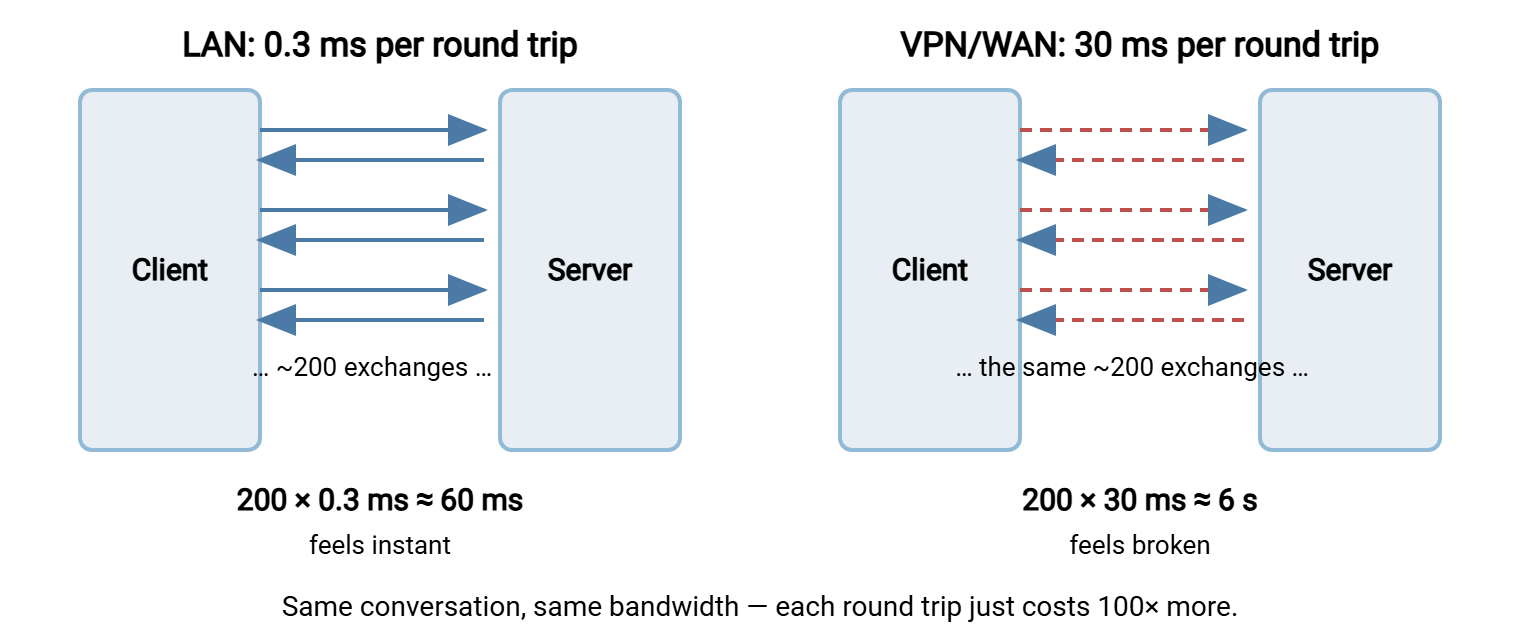
| Open an Office document (~200) | 60 ms — instant | 6 s — annoying | 16 s — "it's broken" |
| Copy 100 small files (~1,500) | 0.5 s | 45 s | 2 minutes |
| Copy one 500 MB file (pipelines) | bandwidth-bound | bandwidth-bound | mostly bandwidth-bound |
Two footnotes make the table honest. First, the setup costs return more often over VPN than on a LAN. Home connections drop, tunnels renegotiate, and idle sessions time out. So remote users re-pay the connect-negotiate-authenticate sequence far more often than office users ever do. That is another handful of round trips at 30 ms each, several times a day. Second, these are clean-path numbers; add any packet loss (common on home Wi-Fi) and retransmissions stretch the tail further. The table is the optimistic case. Home Wi-Fi rarely is.
Read the last row carefully, because it explains the most confusing symptom users report. Copying one big file over the VPN is often perfectly acceptable, while opening a folder of tiny files is agony. Big sequential reads let the client keep many requests in flight, so the link's bandwidth is the limit. Small metadata operations cannot be pipelined past their dependencies, so the link's length is the limit. Same drive, same VPN, opposite bottlenecks. The transfer-side version of the same effect is in protocol overhead and small files.
The diagram below shows the same operation on both paths: the round trips are identical — only the cost of each one changed.
Why So Chatty? The Protocol Assumed a LAN
None of this is a defect in SMB. The protocol grew up on local networks, where a round trip was effectively free. So its design leans on frequent small exchanges. Ask for what you need, when you need it, one precise question at a time. That is a perfectly good design for the environment it assumed. Later protocol revisions worked hard on the problem. They added compound requests that bundle several operations into one exchange, larger read and write sizes, and credit systems. Those systems allow deep pipelining of independent requests. These revisions genuinely help, especially for bulk data. What no revision can remove is the dependent chain. Operations where the next question depends on the previous answer must serialize. Every serialized exchange pays full fare over distance. The protocol is not slow. It is polite, and politeness takes turns.
Applications then multiply the chatter, innocently. Office applications probe files, write lock companions, and autosave. Explorer fetches metadata, icons, and previews — a preview means reading the file contents for every file in view. Antivirus rescans on open and close. Each layer was written by people picturing a local disk, and each is reasonable alone. Stacked on a 30 ms path, they compound into the two-minute folder. Nobody wrote the slow part. Everyone wrote a piece of it.
Remember: the user's report "the network drive is slow from home" is almost never a bandwidth problem, a server problem, or a VPN misconfiguration. It is round trips × latency. Any fix must reduce one of those two factors to change what the user feels. That means fewer round trips, or shorter distance between the work and the file.
What Caching Fixes — and What It Cannot
Share protocols are not naive; they cache aggressively wherever correctness allows, and it is worth knowing exactly where the rescue applies.
- Client-side caching with leases. The server grants a client a revocable promise (a lease) that nobody else is touching a file. This lets the client satisfy repeated reads and buffer writes locally. This is why the second open of the same document is often dramatically faster than the first. It cannot help the first open, a listing of new folders, or any file another user also has open. The moment sharing is real, the cache must be revalidated across the same slow path.
- Offline files. Windows can keep marked shares available offline, syncing a local copy in the background. This is genuinely useful for laptop users on their own working set. But it is a sync mechanism grafted onto a share, with sync's classic behaviors. Those include stale reads until the next sync and conflict prompts when the same file changed in both places.
- Branch and peer caching. Features that let clients in one office fetch already-downloaded content from each other help the second and later readers of the same file in that office. First reader still pays.
- WAN optimizers. Appliances that compress and deduplicate traffic between sites shrink the data — sometimes impressively. But a dependent metadata exchange still requires an answer from the far end before the next question. They soften the bandwidth cost, not the serialization cost.
And one thing caching structurally cannot fix: the save. A write must eventually reach the real copy on the server, synchronously enough that the user waits for it. Users forgive a slow first open more readily than the spinning cursor after Ctrl+S, and that one is irreducible while the file lives far away. The save is the one moment the drive cannot bluff.
Northgate Retail learned the cost of a distant save the ordinary way. A regional manager kept the weekly stock-count workbook open on the head-office share from a store on a branch link. One Friday the link blinked for a few seconds in the middle of a save. The client's write had reached the server halfway. The workbook on disk was no longer a workbook, and the store's copy was whatever the application still held in memory. The previous night's backup was intact and the manager re-entered one day's figures, which was tedious rather than tragic. The lesson went into the branch guide the following week in nine words: copy it down, edit it locally, copy it back. The drive letter had looked exactly like a local disk right up to the moment it was not.
Prove It Before You Fix It
Three measurements, run from an affected remote machine, separate a latency problem from everything else in about five minutes:
REM 1. Measure the round trip to the file server
ping fs01.corp.example.com
REM    LAN ~0.3 ms | VPN often 20-60 ms | far WAN 100+ ms

REM 2. Bandwidth test: one large file (pipelines well)
robocopy \\fs01\finance\archive C:\temp bigexport.zip
REM    Note the MB/s. This is your link doing its best.

REM 3. Latency test: a tree of small files (serializes)
robocopy \\fs01\finance\reports C:\temp\reports /E
REM    Note files-per-second, not MB/s. This is what users feel.
If test 2 runs near your link speed while test 3 crawls at a few files per second, the diagnosis is confirmed: round trips × latency. More bandwidth will improve test 2, which was already fine, and leave test 3 — the thing users actually complained about — untouched. Bring these three numbers to the meeting; they end the "just upgrade the circuit" conversation quickly. I have brought them, and the meeting was over inside a minute.
Your Three Honest Options
Once the arithmetic is understood, there are exactly three intellectually honest responses. Organizations usually need a mix.
Option one: accept it
For occasional access to small files, seconds of delay may cost less than any engineering. Set expectations explicitly — "the S: drive works remotely but is slow by nature; here is why." Then reduce self-inflicted pain. Teach remote users to copy a file locally, edit at local speed, and copy it back, rather than editing in place across the VPN. Disable preview panes and thumbnails for remote sessions. Acceptance with an explanation beats mystery tickets. We learned that the slow way, one mystery ticket at a time.
Option two: optimize the share path
Keep the model, shorten the pain. Ensure clients and servers negotiate a modern SMB dialect so compounding, large I/O, and leasing all apply. Route VPN users to the nearest gateway rather than backhauling across the country. Enable offline files for laptop working sets. And consider the quietly excellent fix for interactive work: move the application next to the data. A remote desktop or published-app session runs the application in the data center at LAN distance from the share. Only screen pixels cross the WAN. Where the need is multi-site rather than remote-worker, replicating data to each site changes the problem entirely. That path is compared in replication vs transfer jobs.
Option three: switch the workflow to transfer
Some share uses over WAN are transfer flows in disguise, and converting them removes the latency problem outright. A transfer moves each file once, as an efficiently pipelined stream. All the work happens on local copies. The branch that "opens" the price list from HQ every morning can receive it by a scheduled push instead. The remote contractor fighting the VPN can exchange files through an SFTP or HTTPS endpoint. On Windows, Sysax Multi Server serves exactly that role, giving each outside user an authenticated, logged folder without any VPN at all. Recurring distributions can run unattended with Sysax FTP Automation, which schedules the push, retries failures, and logs each delivery. The judgment call — which share workflows have quietly become transfer workflows — has its own guide: recognizing when a workflow has outgrown the shared drive.
The Version to Tell the Help Desk
A mapped drive is not a cable to the file server; it is a rapid-fire conversation. Every exchange in that conversation must cross the network and return before the next one starts. In the office each exchange costs a fraction of a millisecond and the conversation is invisible. Over a VPN each identical exchange costs thirty or eighty milliseconds, and a two-hundred-exchange file open becomes six or sixteen seconds. Bandwidth is the width of the pipe; this problem is the length. That is why the big ISO copies fine while the folder of Word documents crawls. It is why the circuit upgrade changed nothing. The real fixes are fewer round trips (caching, modern dialects, working on local copies), or shorter distance (run the app near the data). Or use a different model altogether (deliver copies as transfers). The model choice itself is the subject of shares vs transfers. The same latency physics governs every mounted-drive protocol — WebDAV included, as our WebDAV series shows. The drive still "works" from home. Now you can say what the word means.
Frequently Asked Questions
Will a faster internet plan speed up our mapped drives?
Why is opening the same file the second time so much faster?
Why does one big file copy fine while a folder of small files crawls?
Does the VPN itself make things slower?
Would switching the share to WebDAV or NFS fix the slowness?
From the Sysax team: we build secure file transfer software for Windows. Sysax Multi Server is an FTP, FTPS, SFTP, and HTTPS server. Sysax FTP Automation handles scheduled, scripted transfers. Free trials are on the download page.