
Recognizing When a Workflow Has Outgrown the Shared Drive
The folder is called TEMP. It was created for one team, for one quarter. It has since acquired a second team's files, a branch office's working copies, and a partner's weekly drop. It has also acquired a script that watches one subfolder because that was the fastest way to feed the new system. Nobody ever decided to misuse a shared drive; each step was reasonable at the time. Years later the S: drive is simultaneously a collaboration space, a WAN transport, a partner exchange gateway, and an application integration bus. Only one of those is a job it can do well. TEMP, for its part, has never been more permanent.
The administrator's skill here is not condemning shares; it is recognizing graduation day for a specific workflow. That is the point where a process that lives on the share has quietly acquired requirements the share cannot meet. This article catalogs the warning signs by family. It gives you a scored self-assessment you can run against any share in ten minutes, and then walks the redesign. You will see how to lift the outgrown workflow onto a proper transfer flow while leaving the healthy share uses exactly where they are. It is part of our Shares vs Transfer series and applies the sorting tests defined in shares vs transfers.
Why the Share Wins by Default — and Deserves To
Be honest about why everything lands on the share first: it is genuinely excellent at its actual job. Zero training — every user already knows folders. Zero ceremony — drop the file, tell a colleague, done. Live access with one current version, locking to arbitrate simultaneous editors, permissions that follow your existing groups. For people collaborating inside one office on one trusted network, a shared drive is not a compromise; it is the correct architecture. No part of this article argues otherwise.
The trouble is that the share's convenience makes it the path of least resistance for jobs it was never shaped for. A share has no concept of delivery, no per-event record, no retry, no notion of an outsider it can safely host, and physics-level trouble over distance. When a workflow starts needing those things, the share does not refuse — it just does the job badly. The badness shows up as tickets, disputes, and near-misses rather than as one clean failure. Hence the value of a catalog of symptoms; the share will not file the ticket itself.
The opposite error is worth naming too, because it is how migrations get a bad reputation. That error is declaring the shared drive obsolete and pushing every workflow toward formal transfer flows, upload portals, and ticketed requests. Users experience that as friction without benefit, and they respond the way users always do. They route around it with email attachments and personal cloud accounts, which is a strictly worse place for your data to live. Migrate the workflows that show symptoms; defend the ones that don't. Credibility with your users is part of the security architecture. I have watched a well-meant mandate spend all of it in under a month.
The Warning Signs, Family by Family
Distance signs
Users outside the LAN interact with the share all day, and it hurts. Branch staff open HQ documents across the WAN. Home workers wait through VPN folder listings. Someone keeps a copy locally "because the drive is too slow" and now two versions drift. These symptoms are arithmetic, not configuration — a share protocol pays round-trip latency on every operation, as counted in why mapped drives crawl over VPN and WAN. When the complaints are chronic, the workflow is telling you its users need copies delivered to where they are, not access stretched to where the file is.
Boundary signs
Non-employees touch the share. There is a VPN account whose entire purpose is letting a vendor reach one folder. A contractor has a domain login for deliverables. The answer to "how does the partner send us files?" involves anyone connecting into your network. Every one of these grants a network presence and a protocol surface to someone outside your administration — a trust-boundary violation wearing a convenience costume. Boundary crossings are precisely what transfer endpoints exist for: narrow doors, own credentials, one jailed folder, every action logged.
Evidence signs
Someone asked what the share cannot answer. "Can you confirm the partner picked up Friday's file?" "Who changed this contract?" "The auditor needs a record of everything sent to the processor." A share holds files; it does not hold events. Reconstructing delivery stories from filesystem timestamps and object-access logs is forensic work with unsatisfying endings. If evidence questions arrive more than once, the workflow needs a mechanism whose native output is a delivery record. Timestamps are not testimony.
Collision signs
The one-copy model is fraying. Filenames like Report_FINAL_v7_JK_edit2.xlsx breed in the folder. Users fight over locks, or two people edit copies and someone's afternoon gets overwritten. People email attachments of files on the share to dodge the locking. Collision chaos usually means the workflow is not really collaboration anymore. In that case, it is a sequence of handoffs (draft, review, approve, send) being simulated badly inside one folder. Handoffs are events that want explicit delivery steps. Nothing named FINAL has ever been final.
Process signs
The share has become an interface between systems. Folders named incoming, outgoing, processed, failed. A script polls for new files every five minutes; an application exports here so another can import. And the incidents have started. The poller ran mid-copy and ingested half a file. A file arrived late and the batch missed it. Something failed silently for nine days because a folder is not a job and cannot alert anyone. A folder-shaped integration is a transfer flow that nobody has admitted to yet. It deserves the reliability machinery (atomic handoffs, retries, alerts, logs) that real transfer tooling provides. A folder will wait nine days without a word.
Remember: the single strongest tell is a share folder that has become an interface — for an outsider, for another site, or for another system. Folders are wonderful storage and terrible contracts: they cannot authenticate a counterparty, confirm a delivery, retry a failure, or page you when nothing arrived. The moment a folder is load-bearing for a process, the process has outgrown it.
The Ten-Minute Assessment
Score any share-based workflow against the twelve statements below: 0 = never, 1 = occasionally, 2 = routinely. Be honest; the share cannot hear you.
OUTGROWN-THE-SHARE ASSESSMENT       score each: 0 never / 1 sometimes / 2 routinely

DISTANCE
[ ] Users work against this folder over VPN or WAN links
[ ] People keep local copies because the share is too slow remotely

BOUNDARY
[ ] Non-employees (partner, vendor, contractor) can reach this folder
[ ] A VPN or domain account exists mainly for outside file access

EVIDENCE
[ ] We are asked to prove a file was delivered, fetched, or changed
[ ] Compliance or customer questionnaires cover this data's movement

COLLISION
[ ] Version-suffix filenames (FINAL_v3...) appear in this folder
[ ] Lock conflicts or overwritten edits cause rework

PROCESS
[ ] A script or application polls this folder for new files
[ ] Folder names encode workflow states (in, out, processed, failed)
[ ] A missed or late file here has caused a business incident
[ ] Files are copied from here to another site by hand or by script

SCORING
 0-4   Healthy share. Leave it alone.
 5-9   Mixed: the share hosts a workflow that deserves its own flow.
       Migrate the handoff steps; keep the collaboration.
10+    The share is load-bearing infrastructure for jobs it cannot do.
       Redesign the crossing workflows as transfer flows now, before
       the next incident does the persuading.
Reading the Assessment: Three Common Profiles
Scores cluster into recognizable shapes, and each shape suggests its own first move.
- The stretched share scores high on distance and low elsewhere: a healthy internal share whose users moved. Nothing about the workflow is wrong — its geography is. The fix is usually not a transfer redesign of the collaboration itself but delivering data to where the users are. That might mean a scheduled morning push of the files the branch actually consumes, or replication if both sites must write. The tradeoff is compared in replication vs transfer jobs.
- The accidental gateway scores high on boundary and evidence: outsiders reach the share, and questions about what moved go unanswered. This is the profile with real risk attached, and it gets the full redesign in the next sections. That means a proper endpoint for the outsiders, delivery records for the questions, and the VPN accounts revoked at the end.
- The folder-shaped integration scores high on process: scripts polling, state encoded in folder names, incidents when timing slips. Here the counterparty is software, so no human habits need changing at all. Replace the polling with a monitored job that delivers atomically and alerts on absence. Then the "integration" becomes an operable flow overnight.
A workflow scoring high across all families — remote partners writing into a folder that scripts poll, with auditors asking questions — is not a hard case. It is the easy case: every signpost points the same direction, and the only mistake available is waiting. I have made it.
Migration Thinking: Move the Workflow, Not the Share
The most common migration mistake is scoping it as "replace the shared drive." That turns a two-week fix into a two-year political project and is usually wrong anyway. Most of what is on the share belongs on the share. The correct scope is one workflow. Find the specific process that triggered the warning signs, and lift that onto a transfer flow, leaving everything else untouched. "Replace the shared drive" is how a fortnight becomes a steering committee.
The design move is to find the seam — the moment in the workflow where collaboration ends and a handoff begins. Before the seam, people are editing, reviewing, iterating: share territory, leave it there. At the seam, a finished artifact must move to a counterparty, a site, or a system: that step becomes a transfer, with authentication, logging, and retry. The two models then connect through the simplest possible joint: a designated folder on the share that the transfer machinery watches (outbound), or delivers into (inbound). Users keep their familiar folders; the boundary crossing gets real machinery. This staged pattern — model per stage, chained at folders — echoes the taxonomy in our File Transfer Fundamentals series. This pattern means the migration changes almost nothing about how internal people work.
Before building anything, write the workflow down in one paragraph of facts, because the redesign will be exactly as good as this description. Record who the counterparties are and which side of the trust boundary each sits on. Record which direction files move, and whether "both" really means both or means two separate one-way flows. Include the file types, typical sizes, and volumes. Include the schedule or trigger ("whenever finance finishes" is a trigger — it becomes a watched folder). Record what should happen on failure, and who needs to know. Include what evidence must exist afterward, in whose hands. Ten minutes of this turns vague unease about a folder into a specification a transfer flow can actually meet. It frequently reveals that the "one workflow" is three, each simpler than the tangle they formed together. The same facts become the first rows of the transfer inventory later, so nothing is wasted.
Kestrel Payroll found this out while tidying rather than migrating. A folder named archive on the payroll share had not been opened by a person in two years. A cleanup plan proposed moving it to cold storage over a weekend. Writing the workflow down first turned up a script on the reporting server. It polled that exact folder every ten minutes for the previous night's export. The payroll application had been writing that export there since a reorganization nobody remembered. The folder called archive was the live feed. The cleanup was rescheduled, the feed became a monitored job with its own folder and its own alert, and the archive folder finally got to be one.
A Worked Redesign: The Partner Drop Folder
Take the commonest offender. Today, partner staff connect by VPN with a domain account and write files into \\fs01\exchange\partnerX. Your team watches the folder by eye, and disputes about "we sent that Tuesday" are settled by scrolling timestamps. The redesign, before and after, looks like this:
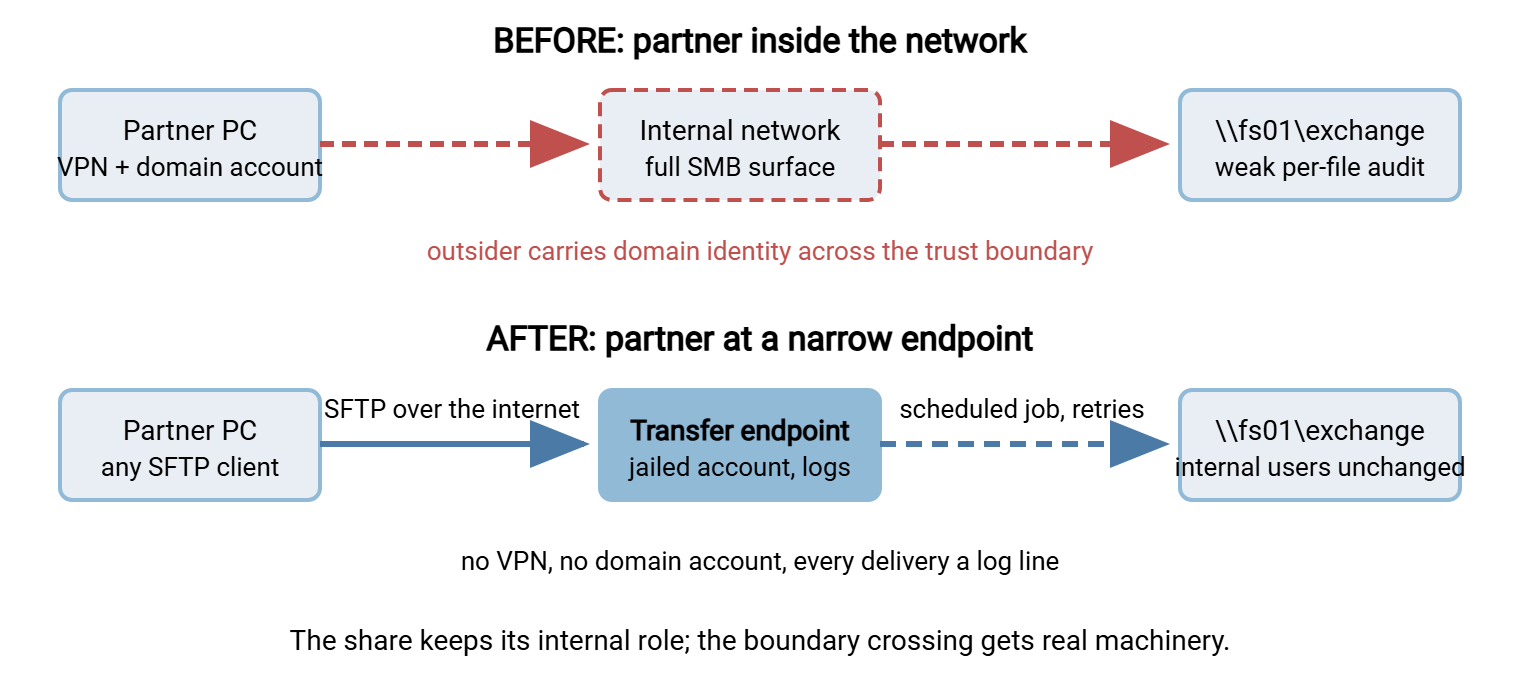
Concretely, on Windows the pieces start with a transfer server — Sysax Multi Server serves FTP, FTPS, SFTP, and HTTPS from one box. The server publishes one jailed account per partner, so each counterparty sees only its own folder. Every login and file action lands in the activity log. Behind the server, a scheduled job bridges endpoint and share: Sysax FTP Automation can watch the internal outbound folder and deliver whatever appears. It can collect inbound files to the team's share folder, retry failures, and run pre/post steps. Those steps can include OpenPGP encryption where partner data must be protected as files, not just in transit. Internal users keep working in the same folders they always used. The partner gets a better experience than the VPN ever gave them (any standard SFTP client, no network ceremony). And the evidence questions now have one-line answers.
Three details separate a redesign that hums from one that generates its own tickets. First, atomic delivery: configure jobs to upload under a temporary name and rename on completion. This keeps the receiving side from ingesting a half-written file — the flaw that plagued the old polling arrangement. Second, agree on naming and layout with the counterparty up front (dated filenames, one folder per direction), because "which file is which" disputes survive any protocol change. Third, decide retention: the endpoint is a doorway, not an archive. So have the collection job sweep delivered files into the internal share and age out the endpoint folders on a schedule.
Then run the cutover like any migration. Stand the endpoint up alongside the share access and move one partner as a pilot. Run both paths in parallel through a full business cycle, then revoke the VPN account. The revocation is the actual security win, so do not let the parallel phase become permanent. The general rollout discipline is in change rollout and rollback. Repeat for the next warning-sign workflow. The branch that needs morning files becomes a scheduled push. The polling script becomes a monitored job with atomic delivery. The multi-site copy question gets its own comparison in replication vs transfer jobs.
What Stays on the Share
End where the honesty started. After every outgrown workflow is lifted out, the share should still be busy. It should still have the department folders, the project scratch space, the team collaborating on drafts, and the copier delivering scans. It should still hold the application data sitting one rack away from the servers that read it. All of that is same-trust-zone, same-LAN, live-access work — exactly what share protocols are for, and no transfer flow would serve it better. Keep those shares, and keep them well: patched, permissioned, and hardened per securing SMB. The goal of this article is not fewer shares. It is shares doing share work and transfer machinery doing boundary work, with a clean folder-shaped seam between them.
Graduation, Summarized
Watch for the five families: distance (WAN users suffering), boundary (outsiders inside), evidence (questions the share cannot answer), collision (the one-copy model fraying), and process (folders as interfaces). Score honestly with the assessment. Then migrate by workflow, not by share. Find the seam where collaboration becomes handoff, put a transfer flow on the handoff, and connect the two at a watched folder. The result is boringly reliable, which is the point. The foundations behind the judgment are in shares vs transfers. The protocol most boundary flows should ride is covered end to end in our SFTP series. Even TEMP can stay, provided nothing outside the building depends on it.
Frequently Asked Questions
Does outgrowing the share mean we should get rid of shared drives?
What is the single clearest sign a workflow has outgrown the share?
Our partner likes the current share access. How do we sell the change?
Can we migrate gradually, or is it all-or-nothing?
What about the scripts that poll our share for new files?
From the Sysax team: we build secure file transfer software for Windows. Sysax Multi Server is an FTP, FTPS, SFTP, and HTTPS server. Sysax FTP Automation handles scheduled, scripted transfers. Free trials are on the download page.