
Support Realities: Community, Contracts, and Who Answers at Two a.m.
"Thank you for contacting support. Have you consulted the documentation?" It is 02:14, a partner's nightly feed has failed three times, and the retry window closes at six. The reply to your ticket is a link to the page you read an hour ago. Every administrator has received that email. I have, to my discomfort, also sent it. The question that decides the next four hours is not whether the server is open source or commercial. It is: who can help, how fast, and what do they actually know? Every organization believes it has an answer. Fewer have tested it.
Support, for this article, is whatever helps you fix the tool when your own knowledge runs out. It comes in two shapes. A community is many people with no obligation to you. A contract is a few people with one. This article, part of our Open Source vs Commercial series, covers what community support is and is not. It covers what a contract actually buys and what its response promise does not say. It explains why commercial support is sometimes worse than a good community and sometimes far better. It gives you the tells for which one you are looking at before you depend on it.
We sell commercial transfer software, and support is part of what we sell, so we are not a neutral party. We have tried to compensate by writing the section on bad commercial support as bluntly as a customer would. We have also tried to compensate by giving you questions that would expose us as readily as anyone else. Judge our support by them.
What Community Support Is, and Is Not
Community support is the sum of everything that helps you with an open tool without anyone being obligated to. For a widely used tool it is substantial: the manual pages, the project's documentation, and the distribution's integration notes. There are years of archived questions where nearly every error message has already been explained. There are public issue trackers, and forums or mailing lists where experienced users, packagers, and sometimes the authors answer. For the operating-system tools most transfer estates rely on, there is also the distribution vendor. It packages, patches, and, under a paid subscription, supports the tool as part of the platform.
What community support is not matters just as much. It is not obligated: nobody has to answer, and nobody has to answer tonight. It is not confidential: the logs you post are public, so they need sanitizing. The problem you describe reveals something about your environment. It is not contextual: the people answering do not know your network, your partner, or the change someone made on Tuesday. And it is not uniform: a large, active project has a deep community. A small or fading one has a mailing list where questions go to retire.
The honest summary is that community support is superb at the common problem and unreliable at the rare one. The common problem is where most two a.m. incidents live. That is why fluent teams running mature open tools often feel well supported without a contract. The rare one is the interaction between your specific configuration and your specific partner's client. That is where nobody has seen it before and nobody is obligated to look.
What a Support Contract Actually Buys
A support contract buys an obligation. Specifically, it usually buys a queue with your ticket in it and a promise to respond within a stated time for a stated severity. The usual package also includes an escalation path from first-line staff to engineers who know the product's internals. It usually includes access to fixes and sometimes hotfixes built for your problem, plus a party that is accountable if the product is at fault. Those are real, and for a rare problem in a product only the vendor understands, they are the only thing that helps.
What a contract does not buy is the part people assume. It does not buy resolution; a response promise is a promise to reply, not to fix. It does not buy competence; the person who responds is whoever the vendor hired for that tier. It does not buy knowledge of your environment. It does not buy help with the things around the product (the firewall, the directory, the partner's client, the operating system). And "that's outside the product" is a legitimate answer under most contracts. And it does not buy coverage at two a.m. unless the contract says so, in your time zone, for your severity level.
Reading the promise is a skill of its own. The words to check:
- Response versus resolution. Almost all promises are response times. Ask what resolution targets exist, if any, and what "workaround" means when the vendor counts one as a resolution.
- Hours and time zone. "Business hours" in whose day? A promise measured in the vendor's daytime can mean your two a.m. ticket is acknowledged after your morning.
- Severity definitions, and who assigns them. If the vendor decides your outage is "medium," the fast clock never starts. Look for severity definitions written in terms of your business impact.
- Channels. A portal-only contract has no phone at two a.m. A phone number with a voicemail is not a phone.
- Version coverage. Many contracts support only current or recent versions. "Please reproduce on the latest release" can be a forced upgrade delivered as a support answer.
- Entitlement. Support usually lapses with the subscription or maintenance term. Know what happens to your ticket queue the week after a missed renewal.
Acme Logistics had a four-hour response contract and a partner feed that failed at one in the morning. The ticket was acknowledged at 09:12, comfortably inside four business hours of a day that began at nine. The acknowledgment asked for the logs that were already attached. The feed had been fixed at 03:40 by Acme's own on-call engineer. The engineer found the answer in the archived forum of the open source client the partner used. At renewal Acme negotiated the hours clause. More usefully, they wrote down what the engineer had done, which is how runbooks begin.
Sometimes Worse, Sometimes Far Better, and How to Tell
Here is the admission a vendor is supposed to avoid: commercial support is sometimes worse than a good community. The failure modes are familiar to anyone who has held a ticket open for a week. A first-line tier that reads from a script and asks for the logs you already attached. Ticket ping-pong between departments. A knowledge base thinner than the project forum for an equivalent open tool. A small vendor whose one engineer is on holiday. A large vendor whose first line is outsourced and whose escalation path is a rumor. Against a large open project with active maintainers and a decade of searchable answers, all of that loses, on the customer's money.
And here is the other half: commercial support is sometimes far better than any community can be. For a genuinely rare problem — a specific interaction inside the product — there is only one path to a resolution. That is a support engineer who can read the source and build a fix. A good vendor delivers a resolution in days. When the problem is urgent and yours, a person who takes ownership of the ticket, follows it to closure, and calls you back is something no forum offers. Small vendors, at their best, put the person who wrote the code on the phone. That is what buyers are paying for, and when it exists it is worth every penny.
The tells that separate them are observable:
- For a vendor, file a real ticket during the trial. Not a softball: a moderately hard configuration question with logs attached. Time the first response. Read whether it engaged with your logs or asked for them again, and count the hand-offs before someone competent appeared. This one test predicts the contract better than any clause in it. The article on designing a server trial shows where it fits.
- Ask who answers. Are first-line staff employees or a contractor? Can you reach an engineer, and how? Is there a named contact for escalation? Vague answers are answers.
- Read the vendor's public traces. Release notes that acknowledge reported bugs and credit reporters indicate a vendor that listens. A community forum for the product, if one exists, shows how the vendor behaves when nobody is paying for that conversation.
- Check the response to security advisories. How quickly were past vulnerabilities fixed and disclosed? Our security questions for vendors article covers this in depth. It doubles as a support-quality test.
- For an open project, check the pulse. Recent releases, recent security fixes, an issue tracker where reports get replies, documentation that matches current behavior. Then search the last three error messages you actually saw. See whether the answers are recent, correct, and from people who evidently know the tool.
- For either, ask peers. Someone running the same tool in a similar organization will tell you in two minutes what the support experience is really like. Reference checks work for open projects too.
Remember: a support contract is a promise about response, not about competence or resolution. A community is a probability, not a promise. Test the vendor with a real ticket during the trial and test the community with your own real error messages. Believe what you observe over what either side tells you.
The Comparison, Honestly
The table below compares a good community with a good contract, the best case of each. It includes the way to verify each claim for the tool or vendor in front of you. A bad community or a bad contract fails most rows, which is the point of verifying.
| Dimension | Good community | Good contract | How to verify |
|---|---|---|---|
| Obligation to respond | None | Contractual, per severity | Read the severity table and hours clause |
| Common problems | Excellent — already answered, searchable | Good — knowledge base, first line | Search your last three real errors |
| Rare problems | Unreliable — may never be answered | Strong — engineers with source access, hotfixes | Trial ticket; ask about hotfix policy |
| Two a.m. coverage | Archives yes; people no | Only if contracted, in your time zone | Hours clause; call the number once at night |
| Knowledge of your environment | None | Only what your ticket history records | Ask whether tickets keep environment notes |
| Confidentiality | Public — sanitize everything | Private, under the agreement | Read the data-handling terms |
| Surrounding stack (OS, firewall, directory) | Often covered — same people run all of it | Usually out of scope | Ask for an example of an out-of-scope ruling |
| Continuity | Lasts as long as the project is alive | Lasts as long as the term and the vendor | Project pulse; vendor monitoring |
Who Actually Answers at Two a.m.
Now return to 02:14. The diagram below shows the escalation ladder under each model. The thing to notice is the bottom two rungs: they are identical. Under both models, the first hour belongs to your own on-call person and your own runbook. Community or contract enters only after that, and under a contract, only at the severity and hours you paid for.
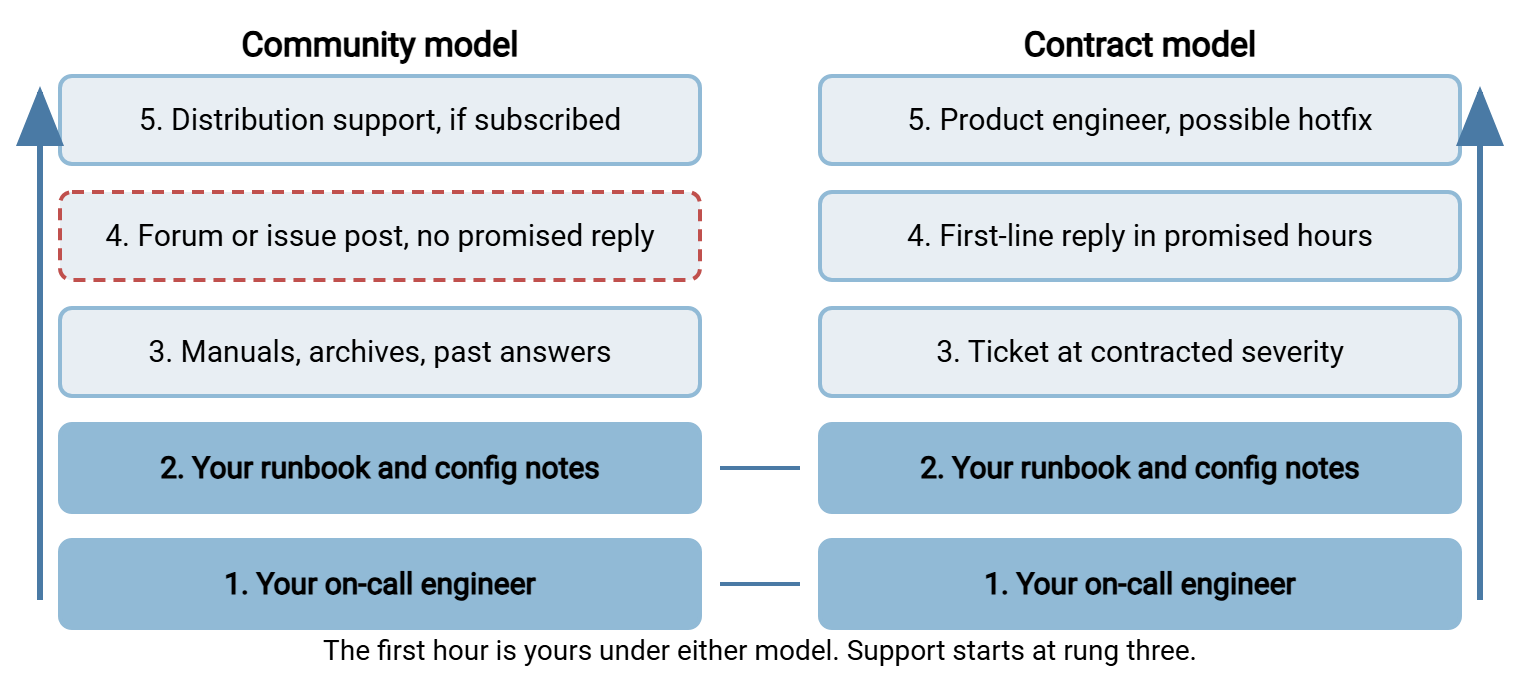
Two consequences follow. First, the quality of rungs one and two, your on-call skills and your runbook, matters more than the model above them. Most incidents never climb past those rungs. Second, the model above them matters enormously for the incidents that do climb, which are the ones that make the news internally. Invest in the bottom rungs regardless, and choose the top rungs deliberately.
The Internal Expert Is a Single Point of Failure, Either Way
The person who set up the transfer server is the real support organization in most companies, under both models. The open source estate depends on the engineer who understands the configuration. The commercial estate depends on the administrator who knows the console and holds the vendor relationship. Neither community nor contract replaces that person. Both are far less useful once that person has left, because the first thing either will ask is "what does your configuration look like?"
The mitigation is unglamorous and identical on both sides. It takes a runbook for the common failures, written from real incidents, and the configuration documented next to itself, under version control where possible. It also takes a second person who has actually performed the common tasks, not just watched. Add a short note after every incident so the runbook grows. Tickets, left alone, do not age into runbooks. Runbooks per flow gives the format. Our why jobs fail silently and alerting that gets read articles cover the monitoring side of the same problem. A two a.m. page you never receive needs no support at all. That is not the good kind of quiet.
One small thing the tool can do to help either way is log well. When the log for a failed session shows the account, the source address, the authentication method tried, and the exact error, the on-call engineer often never needs rung three. If they do, that log makes the ticket or forum post answerable on the first reply. The commercial example we know best, Sysax Multi Server, logs activity to a file or a database for that reason. An OpenSSH server with verbose logging does the same job from the system log. Under either model, the log is the first support engineer on the scene, and the only one guaranteed to be awake.
The Questions That Reveal Support Quality
Below are the questions, in copyable form, for each side. Ask them before you depend on the tool, and again at each renewal or major upgrade. Support quality drifts both ways over time. The article on ongoing vendor monitoring is where the commercial ones belong on a calendar.
SUPPORT QUALITY — QUESTIONS FOR AN OPEN SOURCE PROJECT
 1. When was the last release? The last security fix? Who made them?
 2. Does the issue tracker show reports getting replies within weeks?
 3. Does the documentation describe the current behavior, or an old one?
 4. Search your three most recent real error messages: are the answers
    recent, correct, and from people who evidently know the tool?
 5. Does the operating-system distribution package and patch it? Under
    a paid subscription, is it inside their support scope?
 6. Who in your organization has answered a question about it for a
    colleague in the last quarter? (If nobody, you have no community.)
 7. Is there a peer organization you can ask about their experience?

SUPPORT QUALITY — QUESTIONS FOR A COMMERCIAL VENDOR
 1. Response time for which severity, defined by whom, in whose hours
    and time zone? Is there a resolution target at all?
 2. Who answers first: employees or a contractor? How do I reach an
    engineer, and is there a named escalation contact?
 3. Which versions are supported? What happens to my ticket if I am
    one version behind?
 4. What is the hotfix policy for a bug that blocks a partner flow?
 5. Is there a phone, and does someone answer it at night?
 6. What happens to support entitlement in the week after a renewal
    is missed?
 7. Can I file a real ticket during the trial? (Then file one.)
 8. What is explicitly out of scope — OS, firewall, directory, the
    partner's client?

Record the answers with the date. Compare at renewal.
Question seven on the vendor list matters most, and it is the reason to insist on a proper trial rather than a demo. A vendor who will not let you test support before you buy is telling you what support will be like after. Question five deserves a literal test: call the number once at night. Yes, actually call it.
Gotcha: the most common support failure is not a bad vendor or a dead community. It is an organization that never decided, in advance, what severity a failed partner feed is. It never decided who is allowed to open a high-severity ticket, or where the vendor's phone number is written down. Decide those three things on a calm afternoon, and put them in the runbook at rung two.
The Version to Tell a Colleague
Community support is a large number of people with no obligation and a deep archive. It is excellent for common problems, unreliable for rare ones. Contract support is a small number of people with an obligation to respond, whose competence and coverage are whatever you verified. It is the only path for rare problems inside the product, and sometimes worse than a good forum. Under both models, the first hour belongs to your own on-call engineer and your runbook. The internal expert is a single point of failure until a second person and a written configuration exist. Test the vendor with a real ticket, test the community with your real errors, and believe what you observe. And if the reply at 02:14 is a link to the documentation, at least make sure the documentation is yours.
From here, the hidden costs on both sides shows where support hours land on the ledger. The article on licensing basics explains how support entitlement is tied to license terms. The article on mixing open source and commercial tools shows how to keep both models supportable at once. Our own support page is at sysax.com/support; hold it to the questions above.
Frequently Asked Questions
Does a support contract guarantee my problem gets fixed?
Is community support acceptable for a production partner-facing server?
What does a "four-hour response" promise actually mean?
How can I test a vendor's support before buying?
Do paid Linux subscriptions cover the SSH server?
From the Sysax team: we build secure file transfer software for Windows. Sysax Multi Server is an FTP, FTPS, SFTP, and HTTPS server. Sysax FTP Automation handles scheduled, scripted transfers. Free trials are on the download page.