
Why Transfer Jobs Fail Silently (and How to Stop It)
"Run complete, 0 files." The line is in the log every night, timestamped and tidy, and the scheduler's status column beside it is a reassuring green. Nobody reads it, because nothing about it asks to be read. The transfer failures that hurt are almost never the loud ones. A job that crashes with an error message gets fixed the same morning. The job that quietly stops doing its work, while every light stays green, can run for weeks before anyone notices. By then the damage is measured in missing data and missed deadlines. The business has learned it cannot trust your automation. A silent failure is exactly that: a job that is no longer doing its job, without producing any signal a human ever sees.
Silent failures are not rare accidents. They are the natural end state of any automated transfer that runs long enough. Every part of the machinery around a job decays independently: the scheduler, the credentials, the folder paths, the notification address. Most of those parts fail without making a sound. This article is about how that happens and how to stop it. It covers the four distinct ways a job goes quiet and why "the scheduler says success" proves far less than it seems to. It also offers a ten-question audit you can run against every job you own this week.
It is the opening article of our Monitoring & Alerting series. The later articles build the machinery: freshness checks, status signals, alert design. This one builds the mindset, and the mindset comes first. I have been on the receiving end of a six-week silence, and I would rather you were not.
A War Story: Six Weeks of Nothing
A story first, because every experienced administrator has a version of it and every new administrator is about to get one.
Northgate Retail had a nightly job that connected to a logistics partner's SFTP server and downloaded shipment confirmation files. It took anything matching shipconf_YYYYMMDD.csv in the partner's outbound folder. Then it dropped them into the warehouse system's import directory. The job had run for years. It logged every run, it emailed on errors, and it had never caused a problem, which is precisely why nobody was watching it. Reliability is how a job earns the right to be ignored.
One Friday evening, the partner reorganized their folder layout. Outbound files moved from /outbox into a new subfolder, /outbox/daily. The nightly job kept connecting exactly as before. It logged in successfully. It listed /outbox, which still existed and was now empty. It found zero files matching the pattern and transferred zero files. It wrote "Run complete, 0 files" to its log and exited with a success code. The scheduler recorded success. No error occurred, so no error email was sent. The next night it did the same thing, and the night after that.
Six weeks later, Northgate's quarter-end reconciliation failed because shipment records were missing. The trail led backwards through the warehouse system to the import directory, which turned out to have been empty since a Friday nobody could quite place. The backfill took three people most of a week. They asked the partner to restage old files and replayed imports in order. They explained to management why an automated process could skip six weeks of work without a single alarm. That week has a price, and costing failed jobs and manual work shows how to put a number on it.
Here is the uncomfortable part: nothing malfunctioned. The scheduler fired every night. The script did exactly what it was written to do. The error alerting worked perfectly; there were no errors. Every individual component was healthy, and the flow as a whole was dead. That is the signature of a silent failure, and no amount of "did the job error?" checking will ever catch it. The job was not lying. It was answering a different question.
Silence Is a Signal, Not a Comfort
Most teams monitor their transfers the way they monitor a smoke detector: assume everything is fine unless something shrieks. That model has a hidden assumption — that failure reliably produces a shriek. For transfer jobs, it does not. The failure modes that produce errors are only a subset, and arguably the smaller subset, of the ways a flow stops working. A smoke detector with no battery is also very quiet.
The mindset shift at the heart of this series is a single inversion: treat silence as an unknown state, not a good state. "No news is good news" only holds when you have positively confirmed that bad news can reach you and that good news is actually being produced. Until then, silence means one of three things — everything is fine, something failed quietly, or your messenger is dead. From the inside, those three are indistinguishable.
The professional term for the fix is positive confirmation. Instead of listening for failure, require regular, checkable evidence of success — a file that arrived, a status line that was written, a fresh timestamp. When the evidence stops appearing, something is wrong, even though nothing has said so. In practice: the shipment feed is healthy when this morning's file is in the import directory, and unknown until it is. Everything else in this series is machinery for producing and checking that evidence.
The Four Ways Jobs Go Quiet
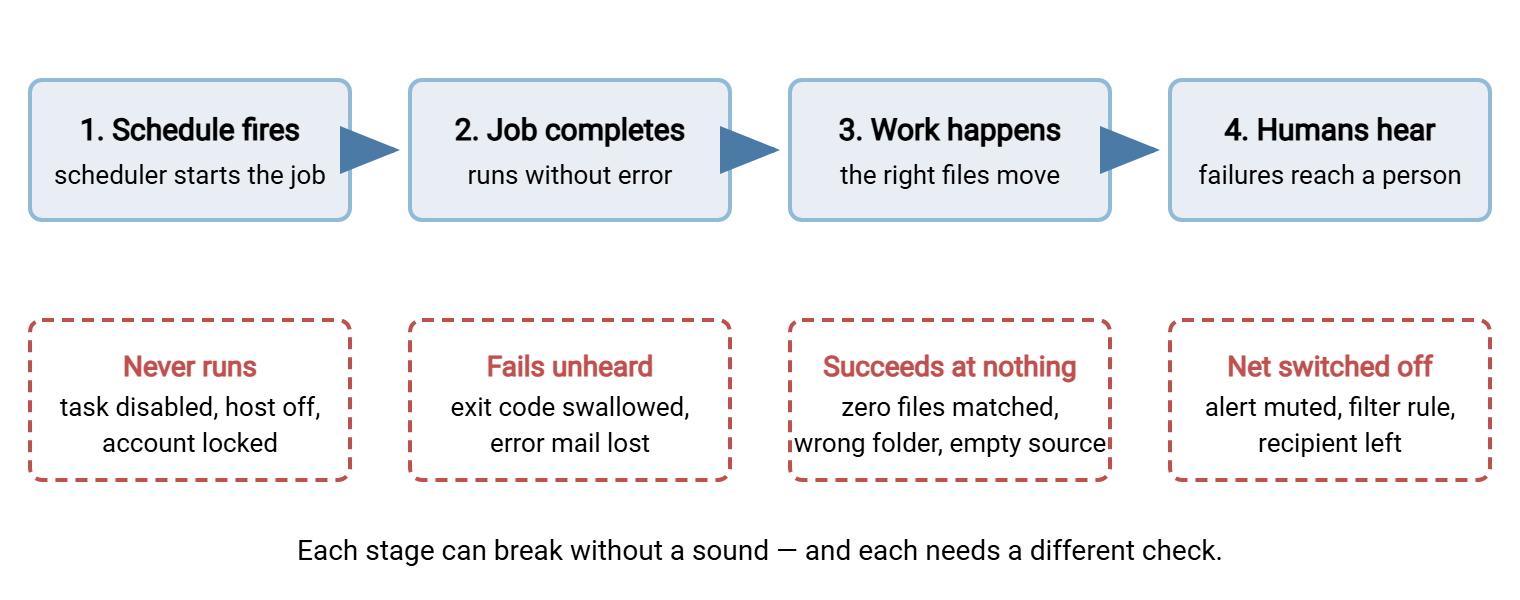
Silent failures feel mysterious until you sort them. In practice, almost every one falls into one of four modes, and each mode defeats a different layer of the safety net you thought you had. The diagram below shows a scheduled transfer flow as a chain of four assumptions. The schedule fires, the job completes, real work happens, and failures reach a human. The diagram shows the silent way each assumption breaks.
Mode 1: The job never ran at all
This is the purest silent failure, because a job that never starts produces nothing — no log line, no exit code, no error. There is no evidence to alert on. It happens more ways than most people expect. A scheduled task is disabled during maintenance and never re-enabled. A server is rebuilt or migrated without its scheduled jobs coming along. The service account that runs the job is locked out or its password expired, so the scheduler cannot start the process. The machine itself is powered down or the scheduler service stopped. A schedule is edited by hand and saved wrong. Our scheduled jobs series covers the hygiene that prevents some of this. But prevention is not detection. Mode 1 can only be detected from outside the job, by noticing that expected evidence of a run never appeared. A job that never starts has a spotless record.
Mode 2: The job ran, failed, and nobody heard
Here the job did produce a failure signal — and the signal died on the way to a human. Here are the classic causes. A wrapper script ignores the transfer client's exit code — the small number every program returns when it ends, zero for success, non-zero for failure. The wrapper exits zero regardless, so the scheduler happily records success. Error output is written to a log file nobody reads. A notification email is sent to a mailbox belonging to someone who left the company, or to a distribution list that quietly lost its members. The error mail is classified as junk by a filter rule someone created during a noisy week. The failure was loud at the source and silent at the destination. Getting exit codes to propagate honestly is half of status monitoring. Getting the message to survive the trip is the alert-path problem we treat in monitoring the monitoring.
Mode 3: The job ran, "succeeded," and did nothing useful
This is the war-story mode, and it is the most treacherous because every green light is genuinely green. The job completes without error — it just no longer accomplishes anything. Zero files matched the pattern because the sender renamed them. The source folder is empty because the upstream export broke. The remote path still exists but the partner moved the real traffic elsewhere. The files transferred fine but to a share whose downstream consumer was retired. In every variant, the job's definition of success — "no step raised an error" — has drifted away from the business's definition. The business wants "the data arrived where it is needed." Nothing inside the job can notice that drift unless you teach it to, which is the subject of the next section.
Mode 4: The safety net itself was off
The final mode is failure of the watchers rather than the watched. An alert muted during an incident ("we know, stop paging") and never unmuted. A monitoring script that itself crashed months ago. A maintenance window that disables notifications and outlives its window. A threshold set so generously it can never fire. These failures are doubly silent: the flow breaks quietly, and the thing that was supposed to notice is also broken quietly. Because this mode deserves its own defenses — test alerts, canary flows, alert audits — we give it a full article: keeping alerts trustworthy.
Remember: "the job errored and we missed it" is only one of four silent modes — and error-based alerting, however good, addresses only that one. Modes 1, 3, and 4 produce no error at all. Any monitoring plan that cannot catch a job that never ran, or a run that succeeded at nothing, has holes. Those holes are exactly where the expensive failures live.
Why "Exit 0" Lies
The scheduler's success column deserves a moment of honest scrutiny, because it is where most teams' confidence comes from. When a scheduler records success, it is reporting one fact: the process it started ended, and returned exit code zero. That is all. It does not mean files moved. It does not mean the right files moved. It does not mean anything arrived anywhere. It means no step of the script announced failure. The scheduler is a very honest witness to a very small fact.
The gap between "no step failed" and "the work happened" is where mode 3 lives. The fix is to shrink the gap: make the job assert its outcome before it claims success. An outcome assertion is one or two lines of code that check the result against expectations — and downgrade the run to failure if reality falls short. The most valuable assertion in all of file transfer automation is embarrassingly simple: did we actually move a plausible amount of work?
# after the download step: refuse to call an empty run a success
count=$(find /data/import -name "shipconf_*.csv" -mmin -60 | wc -l)

if [ "$count" -eq 0 ]; then
    echo "RESULT: FAIL reason=zero_files_transferred" >> /var/log/shipconf-job.log
    exit 1
fi

echo "RESULT: OK files=$count" >> /var/log/shipconf-job.log
exit 0
Two design points hide in that snippet. First, the job writes a single, final, machine-readable RESULT: line every run. That gives later checks one unambiguous verdict to key on, rather than scraping free-form text. Second, zero is treated as a failure by default. If a flow legitimately has empty days, say so explicitly in configuration ("zero files is normal on Saturday and Sunday") instead of letting zero pass unexamined every day. The moment your war story begins is the moment zero became normal without anyone deciding it should be.
Richer assertions follow the same shape: compare today's file count to the usual range, check total bytes are non-trivial, verify the destination actually contains what you sent. Our integrity-in-automation article covers the strongest form — hashes proving content arrived intact. The retry and error handling series covers what the job should do in the moments before it gives up and calls itself failed.
Making Failure Loud: The First Layer
Once jobs fail honestly, the next requirement is that failure travels: every run's outcome must reach a place a human actually looks. The simplest respectable version is notification email wired to the job's outcome — and simple is fine. A small estate does not need an alerting platform to start; it needs every job to have a voice.
If you build your own jobs from scripts, that means capturing the exit status and sending mail on failure — the mechanics live in our bash and cron series. If you run transfers through an automation tool, use its built-in voice. Sysax FTP Automation, for example, can send an email notification when a scheduled task succeeds or fails. That gives every job a first alerting layer without writing any plumbing. Because its tasks include retry and error handling, a failure notification means the job already retried and genuinely could not complete. It does not mean one packet hiccupped.
Two warnings before you declare victory. First, route notifications to a shared, monitored destination — a team mailbox or channel — never to one person's inbox. People go on leave and eventually leave for good. Second, notice what this layer still cannot see. A job that never ran sends no failure mail (mode 1). A job that succeeded at nothing sends a success mail (mode 3). Failure notifications are necessary and insufficient. Making the messages themselves worth reading — subject lines, severity, content — is its own craft, covered in alerts people actually read.
Catching What Error Alerts Can't: Watch the Outcome
The remaining modes fall to a different technique: stop watching the job and start watching the result. If the nightly run is supposed to produce files in the import directory by six, then check the import directory at six — independently of the job. A fresh file means the whole chain worked, whatever the logs claim. A stale directory means the chain is broken somewhere, even if every scheduler in the building shows green. This is the freshness check, and it is the single highest-value monitoring idea in this series. It detects modes 1, 2, and 3 with one test that does not care why the file is missing. We build them properly — deadlines, grace windows, weekend awareness — in the freshness checks article.
The same outside-the-job principle applies to evidence. When you need to know what actually happened last night — not what the job says happened — server-side records are the ground truth. They are written by different software on a different machine than the job you are doubting. If your files land on a server you control, its activity log is an independent witness. Sysax Multi Server records every session and transfer to both a log file and a database, with automatic rollover. So "did the partner's upload actually arrive on Tuesday, and how many bytes was it?" is a query you can answer in seconds rather than an archaeology project. Knowing which independent records exist for each flow — and checking them when silence gets suspicious — is the operational cousin of the logging discipline in what to log.
The Silent-Failure Audit: Ten Questions per Job
Theory becomes protection the day you interrogate real jobs with it. Below is the audit. Take your list of transfer jobs. If you do not have a list, that is finding zero, and our file flow census shows how to build one. Ask these ten questions of each job. Write the answers down; the gaps are your monitoring backlog, roughly in priority order. It will be longer than you hoped. Mine was.
- If this job never ran tonight, what would tell us, and when? If the honest answer is "a person would eventually complain," mode 1 is unguarded.
- If it ran and failed, what would tell us? Name the exact mechanism — which email, to which mailbox, triggered by what.
- If it ran, succeeded, and moved zero files, what would tell us? This is the mode 3 question, and "nothing" is the most common truthful answer in a first audit.
- Does the job check its own outcome before claiming success? Look for an assertion — a file count, a size check, a verify step — between the transfer and the exit.
- Does the wrapper propagate failure honestly? Confirm the script passes the transfer client's exit code outward instead of swallowing it.
- Where do its notifications go, and is that destination alive? Check the mailbox exists, is monitored, and is not one departed person deep.
- When did we last actually see a failure message from it? If nobody can remember one, force a harmless failure in a test window and watch the whole path.
- Are its alerts currently enabled? Check for mutes, disabled rules, and filter rules left over from old incidents.
- What deadline does the business attach to this flow? "The file must be there by seven on weekdays" is the requirement a freshness check will encode.
- Who owns this job, by name? Silent failures thrive precisely where ownership is vague.
Do this now: run the ten questions against your three most business-critical flows before doing anything else in this series. The audit takes about fifteen minutes per job and costs nothing. In most estates, it finds at least one flow where a job could stop running tonight and nothing would say so.
From Mindset to Machinery
Silent failure is not a freak event; it is the default trajectory of unmonitored automation. Jobs stop being scheduled, fail into dead mailboxes, succeed at nothing, and outlive their own safety nets — four modes, each invisible to the layer below it. The defense is a mindset — silence is an unknown state, success must be asserted, evidence beats absence-of-errors — expressed as small, boring machinery.
The rest of this series builds that machinery in order. Start with freshness checks, which catch the most modes for the least effort. Then wire up the three status signals in exit codes, logs, and heartbeats. And once alerts exist, keep them honest with monitoring the monitoring. Six weeks of nothing should never be possible again. "Run complete, 0 files" is not a result. It is a confession.
Frequently Asked Questions
How can a transfer job fail without producing any error?
The scheduler says the job succeeded, but no files arrived. How?
Should jobs send email on success as well as on failure?
How do I find silent failures that are already happening?
What is the single best defense if I can only do one thing?
From the Sysax team: we build secure file transfer software for Windows. Sysax Multi Server is an FTP, FTPS, SFTP, and HTTPS server. Sysax FTP Automation handles scheduled, scripted transfers. Free trials are on the download page.