
Designing a Trial That Actually Tests the Server
There is a spare machine under a desk. The trial license arrived on Monday, and the installer went on by Tuesday. On Wednesday somebody uploaded a file to prove it works. It worked. The console got clicked around for an afternoon, and then the quarter got busy. The trial expires a month later having confirmed exactly one thing: that the product can be installed. The decision falls back on the demo, the one event in the whole process the vendor controlled from start to finish.
A trial, done properly, is a structured test built from your real flows. It times the tasks your administrators will do every week. It breaks things on purpose to see how the server behaves. And it defines what "pass" means before anything is installed. This article is that plan. It is part of our Choosing a File Transfer Server series. It assumes you have the requirements worksheet and the criteria matrix from the earlier articles. The trial is where their verification columns become a calendar.
Why Demos Decide Purchases, and Why They Shouldn't
The disclosure first: Sysax sells a file transfer server and offers a trial of it. So this article describes the test we would expect our own product to be put through. If a trial plan from a vendor seems designed to show the product at its best, that is a reason to write your own, this one included. Judge it by whether the steps below could make a product fail.
Demos win purchases for a simple reason: they are the only structured comparison most evaluations contain. Each vendor gets an hour, shows a rehearsed sequence on a clean system with sample data, and answers questions from memory. Nothing goes wrong, because the demo environment has been used a hundred times. The team leaves with a strong impression of the last demo and a vague one of the first. The impression becomes the decision.
A trial replaces impressions with observations. The difference is not effort; a well-designed trial takes about two working weeks of part-time attention per candidate. The difference is structure. Without exit criteria, a calendar, and a results sheet, a trial is a longer demo in which you do the clicking.
Before You Install: Exit Criteria and Environment
Exit criteria
Exit criteria are the conditions under which the trial is declared passed. The whole discipline of the method is that they are written, agreed, and signed before the installer is downloaded. Written afterwards, they describe what the product turned out to do. Written before, they describe what you need, and a candidate that fails one ends its trial early. That is the trial working, not failing.
EXIT CRITERIA — agreed and signed before installation
(pass requires ALL of E1-E7; a fail on any ends the trial for that candidate)

E1  Every gate row in the criteria matrix verified by a named person,
    with the observation recorded (not "vendor confirmed").
E2  At least three real flows replayed end to end with the partners'
    style of client, including one inbound and one outbound.
E3  Every timed admin task completed within its target by an admin
    who had not seen the product before, using vendor documentation.
E4  Every failure injection recovered as documented; no injection
    produced silent data loss or a partial file presented as complete.
E5  Logs answered the five evidence questions for a test account
    without scripting; log lines arrived in the central platform intact.
E6  The partner window completed with the partner's own client,
    and any host-key or certificate change was communicated correctly.
E7  One real support ticket opened and answered by someone who could
    have fixed the problem.

Signed by: ______ (administrator)  ______ (security)  ______ (budget owner)
Notice what the criteria do not contain: anything about how the product felt. Impressions are recorded separately, in the results sheet, and they inform the tie-breaks. They do not decide a pass.
Remember: a trial that a product cannot fail is a demo you paid for with your own time. If none of the exit criteria could realistically be missed, rewrite them until at least two are uncomfortable for your favorite candidate.
The trial environment
The environment decides whether the trial's observations transfer to production. The rule is to mirror the shape of production without touching production, the same rule as building a staging environment:
- Same operating system build and patch level as the intended production host, on a virtual machine you can snapshot before installation. That way, a second candidate, or a second run, starts from the same clean state.
- Same network position. If production will sit in a DMZ behind the same firewall rules, put the trial server there. In that case, use the real passive port range and the real external address. A trial on a flat lab network hides every firewall problem you will meet later.
- A test organizational unit in the directory with a handful of test users and one that you will disable mid-trial.
- Test partner accounts with real key types. Generate keys the way your partners do; if one partner uses an older key format, include it.
- Synthetic data only. Never load real customer or personal data into a trial system; generate files of the right sizes, names, and counts instead. Our data minimization guide explains why, and synthetic test files shows how. The file mix matters more than the content.
- The partners' clients. The command-line tools, scripting libraries, and graphical clients your partners and applications actually use, not the vendor's recommended client.
- A destination for logs that matches production: the central log platform or, at minimum, a collector that can prove lines arrive with fields intact.
Two warnings. An environment that is too small hides performance problems. One that is too large hides nothing but costs a week to build. Match production hardware if the performance row carries real weight. Otherwise a modest machine is fine, noted in the results sheet. And "synthetic data only" means only. Not a sample. Not "just one small file to check the format". Synthetic.
A Day-by-Day Structure
The plan below fits a fourteen-working-day core inside a typical thirty-day trial license. That leaves buffer for a partner who reschedules or an injection that needs a re-run. Three gates punctuate it. A gate failure ends the trial for that candidate, and the days after it go back to the team. The diagram shows the calendar and the gates.
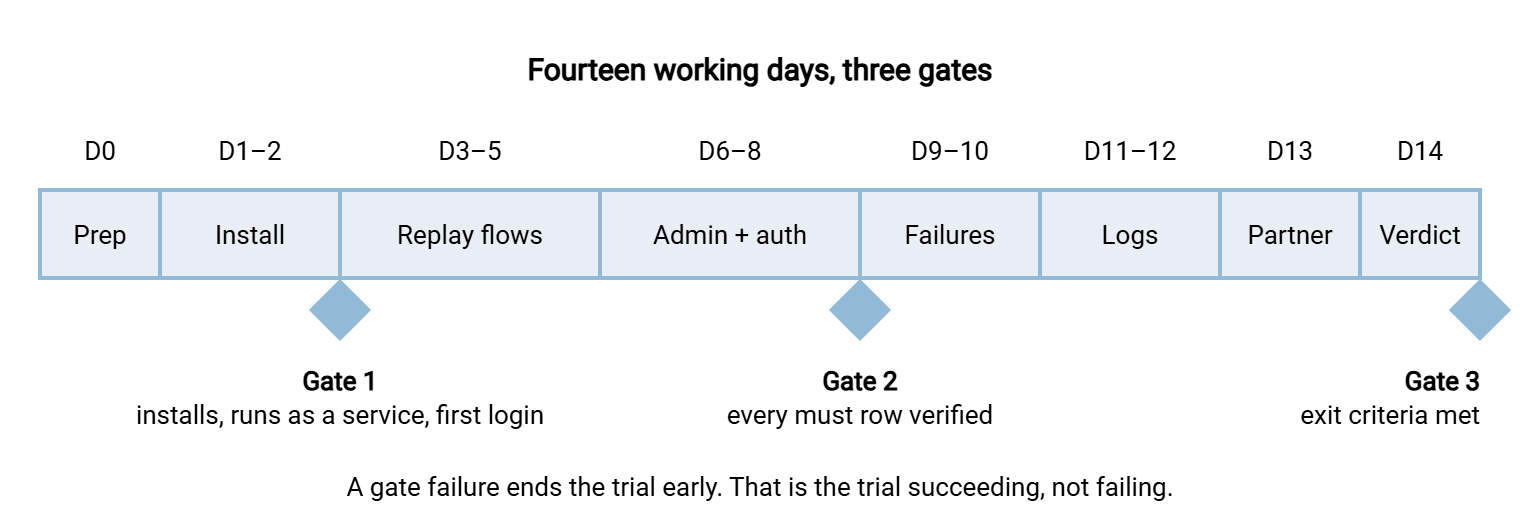
The same calendar in copyable form, with what each block produces:
DAY 0     Prep: snapshot the VM, create test OU and users, generate partner
          keys, build the synthetic file mix, confirm firewall rules and
          log collector, print the results sheet.
DAY 1-2   Install from vendor docs only; run as a service; configure
          listeners, passive range, external address, certificate, host key;
          first login per protocol.            GATE 1: all of that works.
DAY 3-5   Replay three real flows with partner-style clients: inbound
          partner upload, outbound scripted download, browser upload.
          Record timings and any manual steps.
DAY 6-8   Timed admin tasks (table below) by an admin new to the product;
          directory login, disable-user test, key-only enforcement,
          cross-partner folder isolation.       GATE 2: every must row verified.
DAY 9-10  Failure injections (list below), one at a time, from a snapshot.
DAY 11-12 Logs and evidence: five questions, central-platform arrival,
          report export; open the real support ticket.
DAY 13    Partner window with one friendly partner and their client.
DAY 14    Verdict against exit criteria; results sheet complete.
                                                GATE 3: pass or fail.
The shape of the trial license itself is worth a sentence, because it is the first thing you learn about a vendor. A trial should unlock the full feature set for long enough to run this calendar with buffer. It should do so without a credit card and without a sales call to extend it. As one example of the shape to demand, Sysax Multi Server offers a thirty-day trial. The full feature set is unlocked and no card is required. Whatever product you are evaluating, a trial that hides features behind a sales conversation has told you something about what ownership will feel like.
Admin Tasks, Timed
The administration rows in the matrix are verified by timing. The timing only means something under two conditions. The person doing the task has not used the product before. And they work from the vendor's documentation without calling anyone. The targets below are reasonable for a small team. Adjust them from your requirements, and record the actual time and the number of documentation lookups alongside.
| Task | Target | What "done" looks like |
|---|---|---|
| Onboard a partner with key authentication, confined to its own folder | Fifteen minutes | Partner logs in with the key only; password login refused; cannot list any other folder |
| Rotate that partner's key | Five minutes | Old key refused, new key accepted, no service restart, no other account affected |
| Restrict an account to one source address | Five minutes | Login from a second address refused and logged with the address |
| Change the passive port range and external address | Ten minutes | FTPS client behind NAT lists a directory using the new range |
| Replace the TLS certificate | Fifteen minutes | Clients see the new chain; no partner-visible downtime beyond a reconnect |
| Export one account's activity for a week | Ten minutes | Readable output with who, what, when, and source address, without scripting |
| Back up the configuration and restore it to a fresh host | Thirty minutes | Accounts, keys, folder rules, and listeners identical; partner logs in unchanged |
| Create ten accounts from a script or import | Twenty minutes | Ten working accounts without clicking through ten forms |
The restore task deserves emphasis. It is the one nobody performs until the day the disk dies. It reveals whether "configuration" is a single portable unit or a scattering of registry keys, files, and database rows. A product that cannot be restored to a fresh host in half an hour by a person reading the manual is a product you will rebuild from memory at the worst possible moment. I have done that rebuild. It was a Sunday.
Kestrel Payroll's trial lasted thirty days and contained one test: an upload on day two, which worked. The order went through on the strength of the demo. An administrator attempted the first restore to a fresh host eleven months later, at two in the morning. A disk had failed, and the administrator was reading the manual for the first time. The restore took most of a day. The configuration turned out to live in four places, one of which nobody had been backing up. The trial license had expired with twenty-eight days unused.
Failure Injections
A failure injection is a deliberate fault introduced to see how the server behaves and, just as importantly, what it tells you. Run each from a fresh snapshot, one at a time, and record three things. Those are what happened to the file, what appeared in the log, and what an operator would have noticed without looking. The list covers the failures that actually occur in production. Disks fill, hosts reboot, certificates expire, and all three prefer month-end.
- Kill the service mid-upload. Stop the service while a large file is arriving. Is the partial file left with its final name, where a downstream job would collect it as complete? Our temporary names and atomic renames article explains what good behavior looks like.
- Reboot the host during a transfer. Does the service return on its own, with nobody logged in, and do listeners come back on every protocol? This is the test of the "runs unattended" requirement. Our guide to surviving reboots shows why it matters for the jobs on the other end.
- Fill the disk. Upload until the volume is full. Does the server refuse cleanly and log why, or accept a truncated file and report success?
- Present an expired certificate. Install a certificate that expires tomorrow and wait. What do partners see, and does anything warn you first? Pair this with the certificate expiry monitoring practices you will need in production.
- Attack a login. Script fifty wrong passwords against a test account. Does lockout or throttling engage as configured, is it logged with the source address, and can an admin release it? Our lockout and throttling design article describes the behavior to expect.
- Use the wrong key. Connect with a key that is not authorized, and with the right key on the wrong account. Both should fail loudly and log distinctly.
- Drop the network mid-download. Pull the virtual cable during a scripted download. Does the client-side job see a clear error, and does the server log an incomplete transfer rather than a completed one?
- Restore from backup after corruption. Delete the configuration and restore it. This is the admin task above, run under pressure; note whether the restored server accepts the partner's existing host-key fingerprint.
Two rules make the injections fair. Inject the same faults into every candidate, in the same order, from equivalent snapshots. And judge the log as harshly as the behavior. A server that handles a failure well but records nothing has left the next administrator to rediscover the failure from scratch.
Logs and Evidence
Days eleven and twelve answer one question: could this server produce the evidence an auditor, a partner, or an incident responder will one day demand? Take a test account that has been busy all trial and ask the five evidence questions, each answered without scripting:
- Who logged in as this account, from where, and when did each session start and end?
- Which files did it upload, download, rename, and delete, with sizes and timestamps?
- Which login attempts failed, and why?
- Which administrative changes were made to this account, by whom?
- Did every one of those log lines arrive in the central platform with its fields intact?
The what-to-log guide lists the fields each answer needs. The article evidence auditors accept describes the form the output must take: an export a non-administrator can read, not a screenshot of a console. Keep the exports. They go into the results sheet as proof. They are the first things the scoring session will ask to see.
The Partner Test Window
No trial is complete without one real partner using their own client against the trial server, because partners are where surprises live. Those include an older key format, a client that insists on a particular cipher, and a firewall on their side that only allows one of your addresses. Pick a friendly partner with a low-stakes flow and agree a window. Tell them in advance what will be different: a new address, a new host key fingerprint, a new certificate chain. Our partner onboarding runbook is the checklist for that conversation. The article partner test windows covers booking and running one. The host keys article explains why the fingerprint change deserves its own message.
During the window, record what the partner saw, how long the connection took to work, and every question they asked. A partner who needed three emails to connect to the trial server will need the same three at cutover. Multiply that by every other partner you have. That number belongs in the results sheet under administration, because it is a cost the console will never show you.
Recording Results So They Survive the Meeting
The results sheet is the trial's only durable output. Keep one row per matrix criterion, and for each: the observation, the evidence file or screenshot, who observed it, and the date. Add the task timings, the injection outcomes, and the partner notes as attachments. Impressions go in a separate column, clearly labeled, so they can inform tie-breaks without contaminating the scores.
Fill the sheet in daily, not at the end. Memory of a trial compresses badly. By the verdict meeting, "the restore was fiddly" has become "the restore was fine." The one injection that produced a partial file has been forgotten because the other seven went well. A sheet completed on the day is the difference between a decision that survives scrutiny and one relitigated every time the server misbehaves.
Gotcha: the most common trial failure is not the product; it is the calendar. A trial with no fixed days drifts, the license expires with half the injections unrun, and the decision falls back to the demo. Book the fourteen days before you download anything.
Where This Leaves You
At the end of the calendar, each surviving candidate has a completed results sheet. It records every gate row observed, three flows replayed, eight tasks timed, eight failures injected, five evidence questions answered, one partner connected, one ticket answered. A candidate that hit a gate has a shorter sheet and a clear reason, which is just as useful. Nothing in the sheet depends on a demo, and you know a good deal more than that the product can be installed.
The next article turns those sheets into scores, and into a decision memo that explains them. Before then, put the commercial rows in writing with the questions every vendor should answer. The support ticket you opened on day eleven is the first of those answers. For the buy case behind the whole exercise, what dedicated tools add includes a shorter trial drill that pairs well with this one.
Frequently Asked Questions
How many candidates should we trial?
Can we run the trials in parallel?
What if the vendor offers to run the trial for us?
Is fourteen days too long for a small purchase?
Should the trial use production data if it is faster?
From the Sysax team: we build secure file transfer software for Windows. Sysax Multi Server is an FTP, FTPS, SFTP, and HTTPS server. Sysax FTP Automation handles scheduled, scripted transfers. Free trials are on the download page.