
Mixing Open Source and Commercial Tools Sensibly
"We're an open source shop." "What runs the partner server in the DMZ?" "That's a product, but that's different." "And the desktops?" "A free client the help desk installed years ago." "So you're a mixed shop." "We're an open source shop with exceptions." I have had that conversation with the sides swapped, at a company that called itself "all commercial." It ran its nightly extracts on an SSH server nobody had bought. Almost no organization runs a pure estate. The mix already exists. The only question is whether it was chosen or merely accumulated.
A mixed estate is one where open source and commercial transfer tools each do the jobs they are best at. They agree on a few things where they meet. This closing article in our Open Source vs Commercial series walks through a typical healthy version. That has the standard SSH server inside, a commercial server at the edge, and open source clients everywhere. Then the article does the part accumulation never does. It names the interface points where the two worlds have to agree and sets the rules that prevent double maintenance. It also gives you decision rules for the next tool request.
The usual disclosure: we sell commercial transfer software for Windows, so we benefit when one box in the diagram below is a product. We have tried to draw the estate the way a skeptical architect would, with open source doing every job it is best at. We have also tried to make the commercial component earn its place on the axes from the opening article, not by default.
The Typical Healthy Estate
Here is the estate we will use throughout. It is a composite, but every element is common.
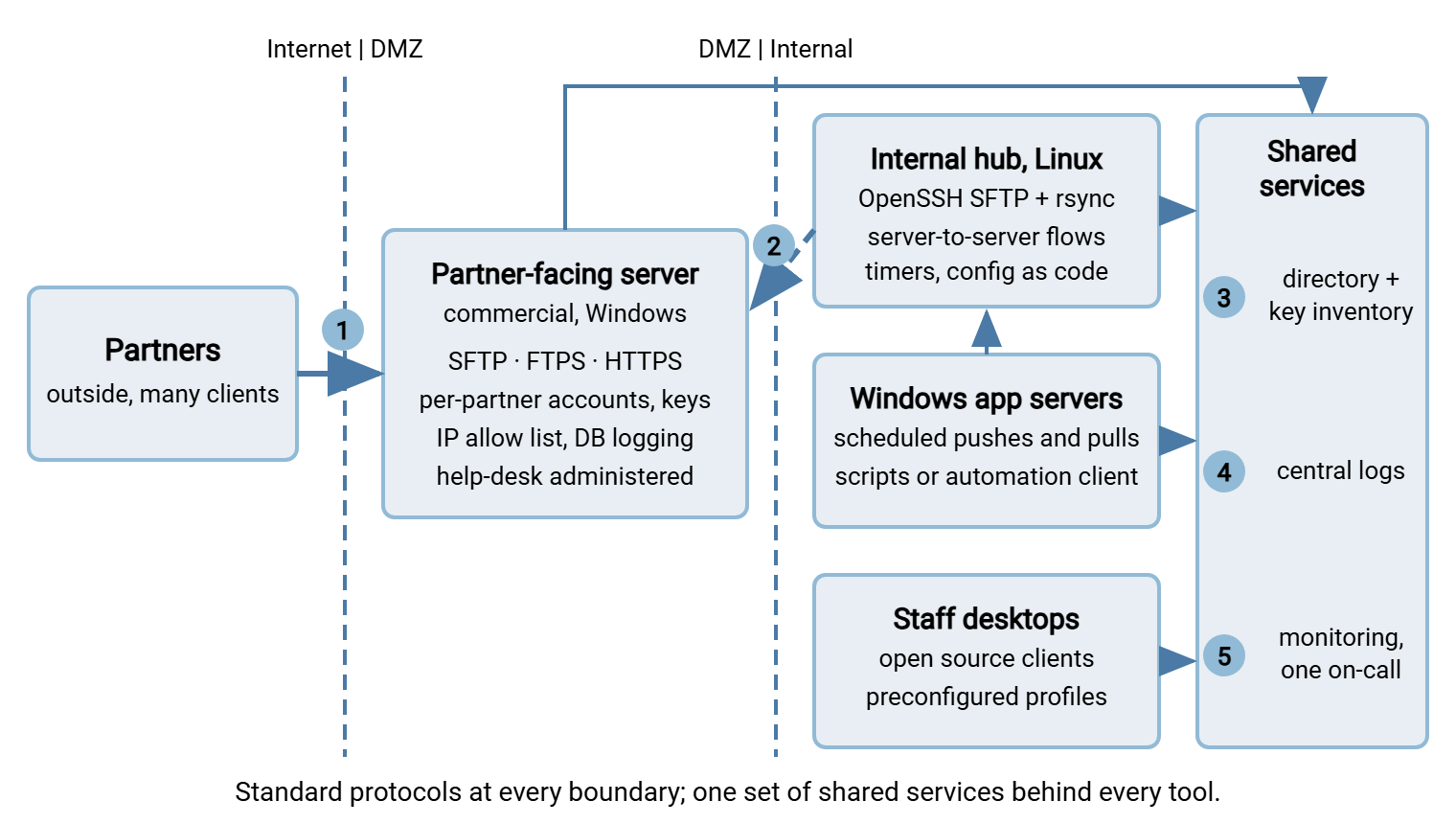
Inside: an open source hub. A Linux host, or a small group of them, runs the OpenSSH SFTP subsystem for server-to-server flows. Those include application exports, database extracts, backups on their way somewhere else. rsync over SSH handles mirroring. Scheduled work runs from cron or service-manager timers. The configuration lives in version control, applied by the same configuration-management tool as the rest of the Linux fleet. The infrastructure team runs it and is fluent in all of it. The setup follows SFTP server configuration and needs nothing bought.
At the edge: a commercial partner-facing server. In the DMZ sits a Windows transfer server that partners connect to. It speaks several protocols from one address because partners demand several. SFTP serves most, FTPS serves two legacy trading partners, and HTTPS serves the customers who upload through a browser. Staff who administer it authenticate with their directory accounts. Each partner has its own account with a public key, an IP allow list, and a jailed folder. The help desk creates partner accounts and resets credentials from a console. The server logs every session to a database that the audit team queries. The commercial example we know best, Sysax Multi Server, is one way to fill this box. A product fills it at all because of three conditions combined. Those are Windows-native administration, several protocols on one address, and non-infrastructure staff doing the daily work. These are the three conditions where the open source case itself admits it gets thinner.
On Windows application servers: scheduled jobs. Finance, payroll, and a few line-of-business systems push and pull files on schedules. Some jobs are scripts; some run in a commercial automation client. The choice is per flow, made on the skills of the team that owns it. Every job connects outward over the same standard protocols with keys from the same inventory.
On desktops: open source clients. Staff who move files by hand use one standard graphical client and, for the technical ones, the OpenSSH command-line tools. All are free. All are distributed with preconfigured profiles and pre-trusted host keys, as our client standardization series describes.
The diagram below maps the estate. The numbered markers are the interface points, the places where the two kinds of component have to agree on something.
The Interface Points: Where the Two Worlds Have to Agree
A mixed estate is healthy when the components agree on a small number of things and are free to differ on everything else. Those agreements are the interface points. Get them right and the tools can be swapped independently. Get them wrong and the estate is two estates that happen to share a network.
1. The protocol boundary. Everything that crosses a trust boundary (partner to DMZ, DMZ to inside, desktop to server) crosses on a standard protocol. Those protocols are SFTP with keys, FTPS with certificates, HTTPS. No product-specific feature ever becomes part of an interface. A partner is promised "SFTP, this host, this key," never "our server's feature." This single rule makes both servers replaceable. It is the one most often broken by accident, when a product's convenience feature becomes something a partner depends on.
Kestrel Payroll broke it without noticing. A client asked for a confirmation message after each upload. The partner-facing product had a configurable banner, so an administrator set one up with the client's wording. Three years later Kestrel wanted to move the edge server. The client's written procedures referred to that banner by name. Their operators had been trained to wait for it. The migration slipped a quarter while the client rewrote a procedure that should never have mentioned the product. They had been promised a feature. They should have been promised a protocol.
2. The DMZ hand-off. Files arriving at the partner-facing server do not stay there. The internal hub pulls them inward over SFTP on a schedule, and pushes outbound files the same way. So the DMZ server holds data only briefly, and nothing inside ever accepts a connection from the DMZ. The pattern is in keeping data out of the DMZ. For mixing, the point is that the hand-off is just another standard-protocol transfer. The hub neither knows nor cares that the DMZ server is commercial.
3. Identity. Use one directory for people, so a departing administrator loses access to both servers in one action. The approach is described in offboarding that closes the account. Use one inventory for keys (partner public keys on the edge, service keys inside) with owners and rotation dates. This follows key rotation and inventory. One service account per job, never a shared one. The commercial server's directory authentication and the hub's system accounts both feed the same source of truth.
4. Logs. Both servers, every scheduled job, and (where possible) the clients ship logs to one central collector. The logs use a form that can be queried together, the discipline in centralizing logs. The commercial server's database and the hub's system log both end up in the same place. So "show me every file from this partner and where it went" is one query, not two tools and a spreadsheet.
5. Monitoring. One on-call rotation and one alert channel receive failures from every tool. Per-flow freshness checks ("the payroll file should have arrived by six") are defined per flow, regardless of which tool carries it. They follow freshness checks for expected files. A flow that crosses both worlds has one check at its destination, not one per tool.
6. Conventions. File naming, folder layout, and the temp-name-then-rename rule for partial-file safety are the same on both sides. So a script written against the hub works against the edge server unchanged. See naming convention design and temp names and atomic renames.
| Interface point | The rule | What breaks if ignored |
|---|---|---|
| Protocol boundary | Standard protocols only; no product feature crosses a boundary | Partners depend on a product; you can never replace it |
| DMZ hand-off | Inside pulls; DMZ holds data briefly; nothing inbound to the LAN | Data accumulates in the DMZ; the edge becomes the system of record |
| Identity | One directory, one key inventory, one account per job | Offboarding misses one side; keys nobody can attribute |
| Logs | Everything to one collector, queryable together | Every audit question is two searches and a reconciliation |
| Monitoring | One on-call, one alert channel, freshness checks per flow | Each tool alerts differently; one of them alerts nobody |
| Conventions | Same naming, layout, and rename-on-complete rules everywhere | Scripts that work on one server silently mishandle the other |
Avoiding Double Maintenance
Double maintenance is what happens when a mixed estate becomes two estates. Two servers do the same job for different teams. There are two client standards, two schedulers, two log formats, two key inventories, two runbooks. Each duplicate seems harmless when it is added. Together they are why mixed estates get a bad reputation, deserved when the mix accumulated rather than being designed. Duplicates are sociable; each one invites the next.
The prevention is a few rules, held firmly:
- One tool per job class. One partner-facing server. One internal hub. One graphical client standard and one command-line standard. One scheduler per platform. When a second one appears for the same job, one of them is on its way out, and which is decided now, not later.
- Adding a tool retires a tool, or gets a written justification. The estate has a tool count. It is allowed to grow only with a sentence explaining why the existing tools could not do the job. Most requests fail that sentence.
- One repository for configuration, in two forms. The open source side is configuration as code. The commercial side cannot always be, so its configuration is exported or documented into the same repository at every change. One place to look, whichever tool.
- One patch calendar. Operating-system updates carry the open source components; the commercial vendor's releases carry the product. Both go on the same schedule, reviewed together, following update and patch strategy.
- One runbook structure and one owner per tool. Every tool has a named owner and a runbook in the same format. So the on-call engineer at two a.m. opens the same kind of document whichever component failed. The article flow ownership and contacts shows how to record the owner.
These rules are also the defense against re-sprawl, which is what an estate does if nobody holds them. The article preventing re-sprawl covers the governance side.
Remember: the cost of a mixed estate is not the number of models in it. It is the number of things that had to be done twice. Two tools that share one directory, one log collector, one on-call rotation, and one repository cost barely more than one. Two tools with two of everything cost more than three.
Decision Rules for the Next Tool
The estate stays deliberate only if the next request is handled deliberately, and the next request always comes. Below are the decision rules, in copyable form, to run before any new transfer tool enters the environment. They are ordered; most requests are settled by the first three.
DECISION RULES FOR THE NEXT TRANSFER TOOL — run in order

 1. EXISTING FIRST.  Can a tool already in the estate do this?
    If yes, use it. A new account or folder is not a new tool.
 2. BOUNDARY.  Does the flow cross a trust boundary to outsiders?
    If yes, it goes through the partner-facing server. No new
    endpoints for outsiders, ever.
 3. PLATFORM-NATIVE.  Linux host: OpenSSH SFTP, rsync, timers.
    Windows host: a tool built for Windows accounts, services, and
    the event log — commercial, or OpenSSH if SFTP-only and the team
    is fluent.
 4. STANDARD PROTOCOL AT THE INTERFACE.  Whatever the tool, the
    connection it makes is SFTP, FTPS, or HTTPS with standard
    credentials. Product features never become an interface.
 5. THE ON-CALL TEAM CHOOSES.  The people who will be paged for it
    pick between candidates. Skills fit beats feature lists.
 6. OPEN VS COMMERCIAL.  Single protocol, automation-heavy,
    fluent team: open source. Several protocols on one address,
    console administration by non-infrastructure staff, reports the
    business reads directly: commercial. Otherwise: the ledger.
 7. ONE IN, ONE OUT.  Adding this tool retires which tool? If none,
    write the justification and get it signed by the tool owner.
 8. EXIT TEST.  Could we replace it within a quarter? If not, what
    change to the design would make that true? Make that change.
 9. WIRED BEFORE LIVE.  Logs to the collector, alerts to on-call,
    identity from the directory, keys in the inventory — before the
    first production flow, not after.
10. RECORDED.  License record, owner, and runbook exist before install.
Rule six is where the rest of the series lands. Use the axes from the opening article for the quick call. Use the ledger from the hidden costs on both sides when the quick call is not obvious. Rule ten points at the inventory from licensing basics.
Four Requests, Run Against the Rules
Rules are abstract until they meet a ticket. Here are four requests the estate above would receive in an ordinary quarter, and where the rules send each.
"A new trading partner will only do FTPS." Rule one: the partner-facing server already speaks FTPS. Rule two: it is an outsider, so it goes through that server regardless. Outcome: a new account, a certificate check, an IP allow-list entry, and a freshness check on the inbound flow. No new tool; closed in an afternoon.
"The reporting application on Linux needs to pull a nightly extract from the database host." Rule one: the internal hub does exactly this. Rule three: both hosts are Linux, so OpenSSH and rsync or sftp from a timer are native. Outcome: a service account with its own key, recorded in the inventory. Add a timer, a log line the collector already understands, and a freshness check. No product; infrastructure owns it.
"Finance needs to send encrypted payment files to the bank every evening and get an email when it fails." Rule two: an outsider, so the connection leaves through the DMZ path. Rule three: the finance system is on Windows. Rule five: the finance application team, not the infrastructure team, will be on call for it. They do not maintain scripts. Rule six therefore points to a commercial automation client on the Windows side. Sysax FTP Automation is the example we know best. It has wizard-built scheduled tasks, OpenPGP encryption before sending, and notifications on failure. A team fluent in PowerShell might reasonably choose a script, as in PowerShell SFTP scripting. Either way, rule four holds: the connection to the bank is SFTP with a key from the inventory. Rule nine wires the logs and alerts before the first live run.
"Our team wants its own SFTP server so we don't have to ask infrastructure." Rule one: the hub already does this. Rule seven: no tool is being retired and no justification survives the sentence "the existing hub could not do this because…". Outcome: a folder and an account on the hub, owned by the requesting team. There is also a conversation about why account creation takes as long as it does. How long account creation takes is a process problem to fix, not a reason for a second server.
Gotcha: the fourth request is the one that quietly destroys mixed estates, and it never arrives as "we want to duplicate infrastructure." It arrives as a reasonable complaint about turnaround time. Fix the turnaround time. A second server is how sprawl starts, whichever license it runs under.
When the Mix Should Change
A deliberate mix is not a permanent one. Three signals say the balance should shift. The open source hub's hours on the ledger may climb because the team keeps building console-like features for people outside infrastructure. If so, part of its job may belong on the commercial side. If the commercial server's license growth is driven by flows that never touch an outsider, those flows probably belong on the hub. And if the team's skills have shifted, the platform-native rule now points somewhere new. The moves themselves are covered by transition paths for the scripts-to-tools direction. See platform migration mechanics for swapping one server for another.
Whatever moves, the interface points do not. A partner promised SFTP and a key is still promised SFTP and a key. The logs still reach the collector. The page still reaches on-call. That is the whole reason to define the interfaces before the tools: so the tools can change and the estate stays whole. Kestrel's client, promised a protocol, would never have noticed the move.
The Version to Tell a Colleague
Every real transfer estate mixes open source and commercial tools; the healthy ones do it on purpose. The pattern is an open source hub inside, where Linux and the infrastructure team make OpenSSH the obvious choice. A commercial server sits at the edge, where several protocols, console administration, and partner-facing polish earn a product its place. Open source clients are everywhere. What keeps it one estate rather than two is agreement at the interface points. That means standard protocols at every boundary, one directory and key inventory, one log collector, one on-call rotation, shared conventions. It also takes a short set of decision rules. Those make the next tool request prove it cannot be met by a tool already there. Call yourself an open source shop, or a commercial one, if you like. Just know which exceptions you are running, and why.
This closes the series. If you arrived here first, the opening article supplies the axes the rules depend on. And what open source does well explains why the hub needs nothing bought. For the buying side of the edge server, the choosing a transfer server series picks up where this one stops.
Frequently Asked Questions
Isn't running both an open source server and a commercial one double the work?
Can open source clients connect to a commercial server, and vice versa?
Which side should the partner-facing server be on?
How do we keep logs consistent across different tools?
When should we stop mixing and consolidate on one model?
From the Sysax team: we build secure file transfer software for Windows. Sysax Multi Server is an FTP, FTPS, SFTP, and HTTPS server. Sysax FTP Automation handles scheduled, scripted transfers. Free trials are on the download page.