
Building a Small Transfer Utility in Python
Every team has one: the transfer script that works perfectly, as long as the person who wrote it runs it. The hostname is hard-coded, the paths assume one particular machine, and the only documentation is memory. When its author is on leave, the files simply do not move. The script is not bad — it is just you-shaped. This article is about reshaping it into a small utility: a tool with a command line, a config file, a rehearsal mode, and a log. Any coworker can run, read, and trust the tool.
We will build one utility end to end — outbox-push, which uploads finished files from a local outbox to an SFTP server and archives what it sent. Every design decision along the way is transferable to whatever your version moves. This article is the capstone of our Python Automation series. The SFTP mechanics come from SFTP transfers in Python, and the robustness habits from writing robust Python transfer scripts. Here they get assembled into something shippable.
What We Are Building
The specification, in five sentences. outbox-push reads a config file naming a server, an outbox directory, an archive directory, and a file pattern. It scans the outbox for matching files that have finished being written, and builds a plan. With --dry-run it prints the plan and stops. Otherwise it uploads each file under a temporary name, renames it into place, moves the local copy to the archive, and logs every outcome. It exits 0 on success, 1 if any file failed, and distinct codes for config and connection problems.
Behind that spec sit four design rules worth stating, because they — not the code — are the reusable part. Configuration lives outside the code, so one script serves many flows and edits never touch logic. Plan first, then act, so the tool can always tell you what it is about to do — that separation is what makes dry-run almost free. Account per file, so partial failure is a first-class, reportable outcome rather than a mystery. And archive, don't delete: moving sent files aside makes the job naturally rerun-safe, because a rerun finds an empty outbox instead of resending yesterday. That is the everyday face of the ideas in our duplicate detection and idempotency series.
Just as deliberate is what the spec leaves out. No parallel uploads — one connection, one file at a time, is fast enough for an outbox and vastly easier to reason about. No resume of half-sent files — the temp-name pattern makes restarting from zero safe, and the files are job-sized, not archive-sized. No multi-server fan-out — that is a second config file and a second scheduled run, not a cleverer program. Small utilities stay trustworthy by refusing features. Every one of these can be added later if a real flow demands it, which is different from adding it because it might.
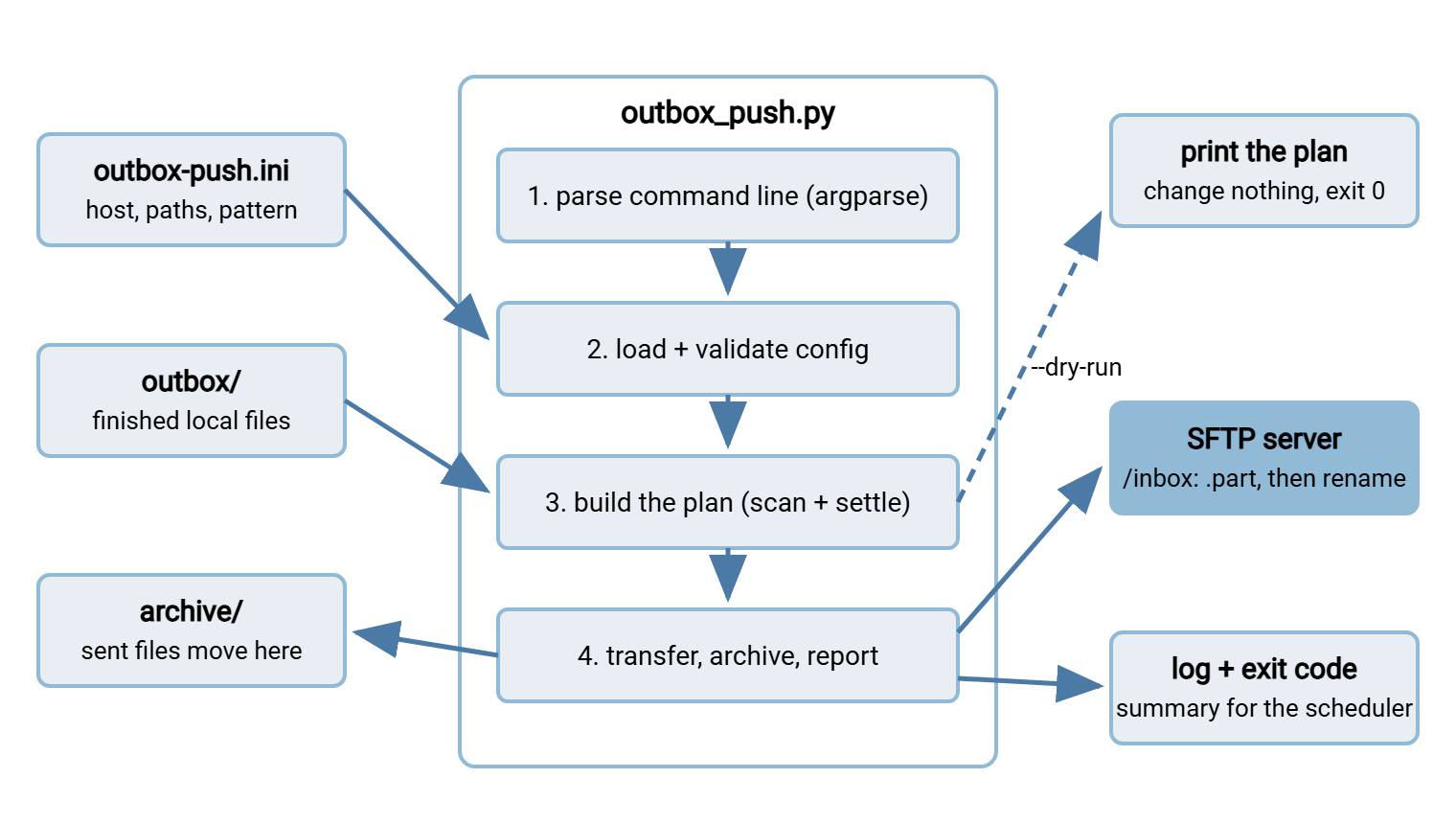
The diagram shows one run's anatomy: config and outbox feed the four stages inside the utility. The dry-run switch exits after planning. A real run continues to the server, the archive, and the log.
The Command Line
The command line is the utility's public face, and argparse — the standard library's argument parser — gives you a professional one in a dozen lines. That includes free --help output that doubles as the first page of documentation:
import argparse

def parse_args(argv=None):
    parser = argparse.ArgumentParser(
        prog="outbox-push",
        description="Upload finished files from an outbox over SFTP, "
                    "then archive them locally.")
    parser.add_argument("--config", default="outbox-push.ini",
                        help="path to the INI config file")
    parser.add_argument("--dry-run", action="store_true",
                        help="print the plan and exit; transfer nothing")
    parser.add_argument("--verbose", action="store_true",
                        help="log at DEBUG level")
    return parser.parse_args(argv)
Two small choices carry weight. The argv=None parameter lets tests call parse_args(["--dry-run"]) directly instead of faking a real command line. And keeping the option list short is deliberate: everything about a flow belongs in the config file. The command line carries only what changes per invocation — which config, whether to rehearse, how loudly to log. When flags multiply, that boundary has usually been lost. The --verbose flag wires straight into logging setup — level=logging.DEBUG if args.verbose else logging.INFO. So an operator investigating a problem gets the chatty version of the same log, not a different tool.
The Config File
The config format is INI — sections in brackets, key = value lines. The standard library parses it, coworkers can edit it without training, and it supports comments, which JSON does not. Here is the whole file:
[connection]
host = sftp.partner.example.com
port = 22
username = outbox-push
key_file = /opt/jobs/outbox-push/key_ed25519
known_hosts = /opt/jobs/outbox-push/known_hosts

[paths]
outbox = /data/outbox
archive = /data/outbox/sent
remote_dir = /inbox

[behavior]
pattern = *.csv
settle_seconds = 60
Notice what the file does not contain: a password. Authentication is a key file, owned by a dedicated service account, per service account hygiene — the config names where credentials live, never what they are. Loading is a few lines with configparser, but the valuable part is validating before acting:
import configparser

REQUIRED = {"connection": ["host", "username", "key_file", "known_hosts"],
            "paths": ["outbox", "archive", "remote_dir"]}

def load_config(path):
    cp = configparser.ConfigParser()
    if not cp.read(path):
        raise ValueError(f"config file not found or unreadable: {path}")
    for section, keys in REQUIRED.items():
        for key in keys:
            if not cp.get(section, key, fallback=""):
                raise ValueError(f"config missing [{section}] {key}")
    return cp
main() catches that ValueError and exits with code 2 — the config-problem code — before any network connection is attempted. A tool that validates its config completely, first, fails in one obvious way instead of halfway through a transfer. The error message names the exact missing key rather than making the next person diff a working copy.
Plan First, Then Act
The planning stage turns "whatever is in the outbox" into an explicit list, applying two filters. The name must match the configured pattern. The file must have settled — been unmodified for at least settle_seconds. That way, the tool never grabs a file another process is still writing:
import time
from pathlib import Path

def build_plan(cfg):
    outbox = Path(cfg["paths"]["outbox"])
    pattern = cfg["behavior"].get("pattern", "*")
    settle = cfg["behavior"].getint("settle_seconds", fallback=60)
    plan = []
    for path in sorted(outbox.glob(pattern)):
        if not path.is_file():
            continue
        age = time.time() - path.stat().st_mtime
        if age < settle:
            log.info("skipping %s: modified %.0fs ago, still settling",
                     path.name, age)
            continue
        plan.append(path)
    return plan
The settle check is the consumer's half of the partial-file defense. The producer's half is writers using temp names in the outbox, which this tool's own uploads model on the remote side. With the plan built, dry-run is almost embarrassingly simple — and that simplicity is the payoff of the plan/act separation:
    if args.dry_run:
        for path in plan:
            log.info("would upload %s (%d bytes) to %s",
                     path.name, path.stat().st_size, cfg["paths"]["remote_dir"])
        log.info("dry run: %d files would transfer; nothing changed", len(plan))
        return 0
Because planning and acting share every line of code up to this branch, the rehearsal is honest. The dry run reports exactly the files a real run would take. A dry-run mode bolted on afterward, with its own scanning logic, drifts from the truth and eventually lies.
The Transfer Step
The action stage is the SFTP skeleton from earlier in the series wearing config instead of constants. It uses verified host keys from the job-owned known_hosts file (the reasoning lives in host keys and known_hosts). It uses key authentication, timeouts, and per-file accounting:
import paramiko

def transfer(plan, cfg):
    conn, paths = cfg["connection"], cfg["paths"]
    client = paramiko.SSHClient()
    client.load_host_keys(conn["known_hosts"])   # unknown servers: rejected
    client.connect(conn["host"], port=conn.getint("port", fallback=22),
                   username=conn["username"], key_filename=conn["key_file"],
                   allow_agent=False, look_for_keys=False,
                   timeout=15, banner_timeout=15, auth_timeout=15)
    results = {}
    try:
        sftp = client.open_sftp()
        archive = Path(paths["archive"])
        archive.mkdir(parents=True, exist_ok=True)
        for path in plan:
            final = f"{paths['remote_dir']}/{path.name}"
            try:
                sftp.put(str(path), final + ".part", confirm=True)
                sftp.rename(final + ".part", final)
            except (OSError, paramiko.SSHException) as exc:
                results[path.name] = f"failed: {exc}"
            else:
                path.replace(archive / path.name)    # archive only on success
                results[path.name] = "ok"
    finally:
        client.close()
    return results
Read the success path in order, because the order is the design. Upload to a .part name, rename remotely (so the receiver only ever sees complete files), and only then move the local file to the archive. If the process died between any two steps, a rerun does the right thing. In that case, the file is still in the outbox. The worst leftover is a stale .part on the server, overwritten by the next attempt. confirm=True makes the library stat the upload and verify its size before we celebrate. The archive move uses Path.replace(), which is atomic when source and destination share a filesystem — put the archive beside the outbox, not on another volume.
Reporting, Exit Codes, and the Log
The last stage turns the results dictionary into the three outputs other people and systems consume — the log, the summary, and the exit code:
    failed = {n: r for n, r in results.items() if r != "ok"}
    for name, reason in failed.items():
        log.error("%s %s", name, reason)
    log.info("finished: %d sent, %d failed, %d planned",
             len(results) - len(failed), len(failed), len(plan))
    return 1 if failed else 0
With logging configured as in the robustness article, a normal day's entry is three lines. That setup uses timestamps, levels, a file the whole team knows about. A bad day's entry names each failed file with the server's own error text. The exit code map is documented in a comment at the top of the file: 0 clean, 1 partial, 2 config, 3 connection or authentication. Those codes are the hook that schedulers and monitoring grab; the log is for the human who follows up. A rehearsal followed by a real run looks like this from the operator's chair:
$ .venv/bin/python outbox_push.py --config outbox-push.ini --dry-run
Mar 14 15:02:11 INFO would upload invoices.csv (184320 bytes) to /inbox
Mar 14 15:02:11 INFO would upload orders.csv (92160 bytes) to /inbox
Mar 14 15:02:11 INFO dry run: 2 files would transfer; nothing changed

$ .venv/bin/python outbox_push.py --config outbox-push.ini
Mar 14 15:03:40 INFO skipping refunds.csv: modified 12s ago, still settling
Mar 14 15:03:44 INFO finished: 2 sent, 0 failed, 2 planned
Note the file that appeared between the two runs: refunds.csv was being written when the real run started. The settle check calmly left it for next time instead of shipping half of it. That is the kind of behavior that builds an operator's trust faster than any documentation.
The main() That Ties It Together
Each piece so far is a function; main() is the short narrative that connects them and owns the exit codes:
def main(argv=None):
    args = parse_args(argv)
    logging.basicConfig(
        level=logging.DEBUG if args.verbose else logging.INFO,
        format="%(asctime)s %(levelname)s %(message)s",
        datefmt="%b %d %H:%M:%S")
    try:
        cfg = load_config(args.config)
    except ValueError as exc:
        log.error("%s", exc)
        return 2                                  # config problem

    plan = build_plan(cfg)
    if args.dry_run:
        report_plan(plan, cfg)                    # the dry-run block above
        return 0
    if not plan:
        log.info("nothing to send")
        return 0

    try:
        results = transfer(plan, cfg)
    except paramiko.AuthenticationException:
        log.error("authentication rejected — check account and key")
        return 3
    except (paramiko.SSHException, OSError) as exc:
        log.error("connection failed: %s", exc)
        return 3
    return summarize(results, plan)               # 0 or 1

if __name__ == "__main__":
    sys.exit(main())
The function reads top to bottom the way you would explain the tool to a new teammate, and that is not an accident. When the structure of the code matches the story of the run, the next maintainer debugs by reading, not by stepping through with a debugger. Note also that an empty outbox exits 0 with a calm log line. "Nothing to send" is a normal morning, not an error. Crying wolf about it would train people to ignore the exit codes that matter.
Handing It to a Coworker
A utility is finished when someone else can run it without you in the room. That takes a handoff kit — five small artifacts that travel with the code:
- A README of about ten lines: what the tool does, one example command, where the config and log live, the exit-code map, and who owns it. Long documents rot; ten lines survive.
- A pinned requirements file, so the environment rebuilds identically. Pin exact versions — every line has the form
package==<pinned-version>, recorded from the environment you tested, not left open-ended for a rebuild to surprise you. - A config template —
outbox-push.ini.examplewith every key present and comments explaining each — so a new flow starts by copying it, not reverse-engineering yours. - The
--helptext, which argparse already wrote. - Setup commands that actually work, tested on a clean machine:
python3 -m venv .venv
.venv/bin/python -m pip install -r requirements.txt
.venv/bin/python outbox_push.py --config outbox-push.ini --dry-run
That final command is the whole handoff philosophy in one line: the first thing a new operator ever runs is the rehearsal. The rehearsal proves their environment, their config, and their permissions while changing nothing. (On Windows the venv's interpreter lives at .venv\Scripts\python.exe; the sequence is otherwise identical.) Getting this utility onto a schedule is its own discipline. So is keeping the interpreter findable when cron or Task Scheduler runs it as somebody else. Both are covered next in deploying and scheduling Python transfer jobs.
Remember: the handoff kit is not optional polish — it is the difference between a utility and a you-shaped script with better structure. If the dry run, the README, and the config template do not exist, the bus factor is still one.
When Not to Build It
Now the honest accounting. This utility is roughly two hundred lines plus a config template, a README, and a test habit. Somebody owns it forever: dependency updates, the day the partner changes servers, the onboarding of each new operator. That price is fair when the logic is genuinely yours. It is a bad deal when the flow is a standard shape that configuration could cover.
On Windows, Sysax FTP Automation exists for exactly those standard shapes. A wizard builds the transfer task — upload, download, backup, mirror, or sync. Scheduling, folder monitoring, email notifications, and OpenPGP encryption are built in, with no code for anyone to inherit. A reasonable team builds outbox-push when the plan step needs custom rules a wizard cannot express, and configures the tool when it does not. And if you also run the receiving end, pairing the utility with a server that logs well means each upload leaves matching evidence on both sides. One example is Sysax Multi Server, whose activity logs record every session and rename. Matching evidence is precisely what you want the day a file's whereabouts are disputed.
Where to Go Next
You have watched a script become a tool: argparse for the interface, INI for the flow. It has a plan stage that makes dry-run honest, a transfer stage that fails safely, and a handoff kit that makes the bus factor greater than one. You have two directions from here. One is to deploy and schedule it so it runs without a human. The other is to revisit when Python beats shell with today's build in mind. You now know exactly what the Python side of that trade costs, because you just paid it.
Frequently Asked Questions
Why an INI config file instead of JSON or YAML?
Should the utility delete files after uploading them?
Can my coworker just run it with my SSH key?
What stops two runs from overlapping?
When should this grow into a proper installable package?
From the Sysax team: we build secure file transfer software for Windows. Sysax Multi Server is an FTP, FTPS, SFTP, and HTTPS server. Sysax FTP Automation handles scheduled, scripted transfers. Free trials are on the download page.