
The FTP Retirement Plan: Sequence and Timeline
The slide says "FTP retirement: 90% complete" and has a green tick beside it. It has said that for five months. The easy conversions happened in the spring. A handful of stubborn flows remain, and the old server still runs for their sake. The project has quietly stopped appearing in status meetings. There is a specific purgatory reserved for FTP retirements, and it is called mostly done. Mostly done is operationally identical to not done. The cleartext exposure, the audit finding, and the questionnaire problem all persist until the last flow moves and the service actually stops. The tick, meanwhile, stays green.
The difference between retirements that finish and retirements that stall is almost never technical skill. It is sequencing: which flows move first, how each cutover is de-risked, and whether the shutdown date is engineered to survive contact with reality. This article turns the inventory you built in the discovery sweep into that sequence: workstreams, phases, parallel runs, and a date that holds. It is part of our Retiring Plain FTP series. It pairs with the hands-on FTP-to-SFTP/FTPS migration guide, which covers the mechanics of converting each script, client, and account. This article schedules the work; that one performs it.
Why Retirements Stall
Three failure patterns account for nearly every stalled FTP retirement, and the plan below is built specifically to avoid them. All three feel reasonable at the time, which is how they became patterns.
- The big bang. "We will switch everything over the weekend of the maintenance window." All-at-once cutovers concentrate every unknown into one night. The first surprise burns the window, and the rollback restores FTP everywhere. The organization learns that touching this system causes outages. The second attempt never gets scheduled.
- The ownerless middle. The project has an owner, but individual flows do not. Every conversion needs someone to say "verified, cut it over". When no named person owes that answer per flow, each one waits politely forever.
- The floating date. "We'll shut it down once everything has moved" inverts the causality. Flows move because a date exists. Without one, the last few flows have no reason to move at all, and the old server runs indefinitely for an audience of three.
The corrective is the same in all three cases. Use many small cutovers instead of one big one, a named owner per flow, and a shutdown date set early and defended. None of these is clever. All of them get skipped.
Phase Zero: Stand Up the Destination
Nothing can move until the new endpoint exists, so the plan starts by giving every flow somewhere to go. The choice of secure protocol — SFTP (transfers over SSH) or FTPS (FTP wrapped in TLS) — is usually decided per audience. SFTP travels best through firewalls and suits most partners and scripts. FTPS suits environments already invested in certificates, and HTTPS covers browser-based human uploads. The decision logic is covered in SFTP vs FTPS and, for partner-facing choices, the partner protocol decision. The plan only needs the outcome recorded per flow in the inventory's disposition column.
The destination is rarely new hardware. A multi-protocol Windows server such as Sysax Multi Server serves FTPS, SFTP, and HTTPS alongside plain FTP from one installation. This enables the pattern the whole plan depends on: the new doors open beside the old one. They open on the same host, with the same folder structure and accounts where possible. Same paths and credentials with a different protocol means each flow's conversion is a connection-settings change, not a data migration. Phase zero exits when a test account has logged in over each new protocol, transferred files both directions, and the server's logging shows the sessions. That is because from now on, those logs are how you verify progress. One more phase-zero deliverable pays for itself repeatedly. Record the SFTP host key fingerprint and the FTPS certificate details now, and put them in the connection information sheet. Every script owner, user, and partner who connects later will be asked by their software to trust the new endpoint. Publishing the fingerprint up front is what makes that trust decision a verification instead of a guess.
Group the Inventory Into Workstreams
Do not schedule 40 flows as 40 independent tasks. Group them into workstreams — sets of flows that share an owner, a partner, or a conversion method. Flows in a workstream convert with the same technique and the same conversations. Five workstreams cover nearly every inventory:
| Workstream | Typical contents | Effort profile |
|---|---|---|
| Dormant flows | Accounts and jobs with no recent activity | Minutes each: announce, disable, watch for complaints |
| Internal scripts and jobs | Scheduled tasks, batch files, application configs you control | Hours each: convert, parallel-run, cut over |
| Interactive users | People with GUI clients and saved site profiles | One instruction sheet, then per-team follow-up |
| Partner flows | Exchanges where the other side must change settings | Weeks of calendar time per partner, little of it yours |
| Legacy devices | Firmware-bound equipment that only speaks FTP | Containment project per device class, not a conversion |
Each workstream gets a named lead, and each flow keeps its named owner from the inventory. The workstream lead drives the technique; the flow owner signs off that their flow works on the new protocol. Splitting those two roles is what keeps forty flows from serializing behind one exhausted administrator. Forty flows in one queue is not a plan; it is a waiting room.
Sequence: Easy Wins First, Long Poles Early
The ordering principle is twofold, and the second half is the one people miss. Easy wins go first. Closing dormant flows and converting a few scripts you own produces visible progress in week one. It builds the team's fluency with the new protocols and shrinks the inventory before the hard conversations start. Early wins also protect the program politically — a project that is 30% done by the first status report keeps its funding and attention. A project that is 0% done by then keeps a slide.
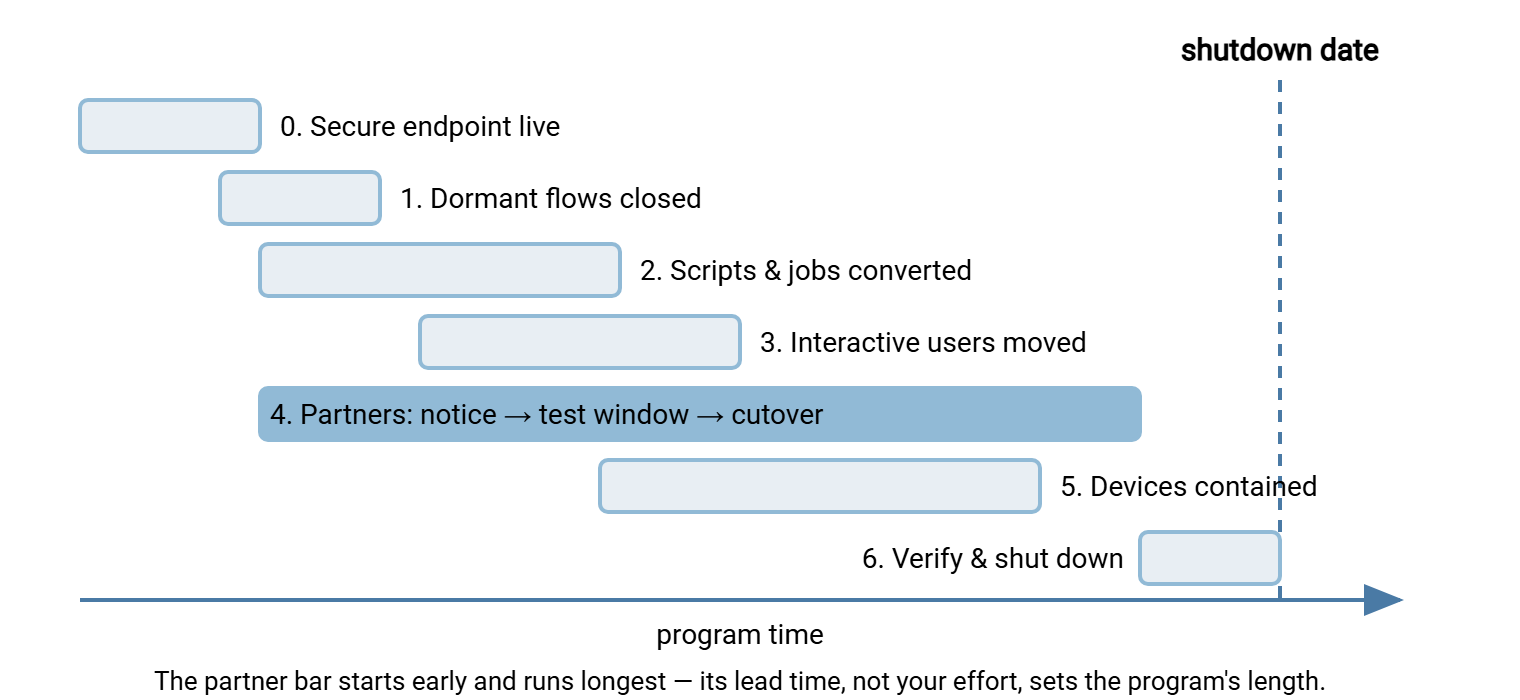
But long poles start early too. Partner cutovers consume weeks of calendar time, almost none of it your effort. The partner has to read the notice, schedule their change, test, and cut over, all at their pace. If partner notices wait until the internal work finishes, the program's total duration is internal work plus partner lead time. Send the first notices the same week you convert your first script, and the two clocks run concurrently. The same logic applies to legacy devices. The containment design for an unupgradeable instrument takes elapsed time for approvals and network changes, so it starts mid-program, not at the end.
The diagram below shows the resulting shape: short early phases stacked at the start, the partner workstream running long and overlapping everything, and verification closing against a fixed shutdown date.
The Phase Skeleton
Here is the plan skeleton to copy into your project tracker. Each phase lists its exit criteria — the observable condition that must be true before the phase counts as done. Dates are yours to attach; the structure and criteria are the part worth keeping:
FTP RETIREMENT PLAN — PHASE SKELETON

PHASE 0 — DESTINATION READY
  Work: enable SFTP/FTPS (and HTTPS if needed) beside existing FTP;
        mirror folder structure and accounts; test both directions.
  Exit: test transfers verified over each new protocol; sessions
        visible in server logs; connection info sheet drafted.

PHASE 1 — FREE WINS
  Work: announce and disable dormant accounts/flows; remove stale
        firewall rules with no traffic; delete orphaned jobs
        confirmed dead with their owners.
  Exit: every inventory row marked "retire outright" is closed.

PHASE 2 — INTERNAL SCRIPTS AND JOBS   [start partner notices NOW]
  Work: convert each scheduled job/script to the new protocol;
        parallel-run old and new; cut over on clean comparison.
  Exit: no internal automation initiates plain FTP; conversions
        verified from server logs, not assumptions.

PHASE 3 — INTERACTIVE USERS
  Work: publish the new connection settings; per-team switch-over;
        remove saved plain-FTP site profiles as teams confirm.
  Exit: no human-driven plain-FTP logins in the last full week.

PHASE 4 — PARTNERS (runs alongside 2 and 3)
  Work: initial notice -> test window -> reminder -> cutover ->
        final notice per partner; track each partner's state.
  Exit: every partner cut over, or holding a signed, time-boxed
        exception with an end date.

PHASE 5 — LEGACY DEVICES (runs alongside 3 and 4)
  Work: verify each device truly cannot upgrade; build isolation
        segment + secure relay; sign risk acceptance per device.
  Exit: no device sends cleartext FTP beyond its contained segment.

PHASE 6 — SHUTDOWN AND PROOF
  Work: disable plain FTP service-wide; keep monitoring for
        reconnection attempts; final discovery sweep as evidence.
  Exit: verification checklist complete; evidence pack archived;
        business case closed with "exposure removed."
Phase 2 is where the hands-on conversion knowledge lives, and this plan deliberately does not duplicate it. Script-by-script conversion patterns, client settings, and rollback mechanics are all in the migration guide. One tooling note belongs at the planning level, though. If your discovery sweep surfaced a sprawl of ad-hoc batch files, phase 2 is the natural moment to consolidate them into a scheduler built for transfers. Sysax FTP Automation runs the same jobs over SFTP or FTPS by changing the connection profile. It offers retry and error handling that homegrown scripts usually lack. Converting and consolidating in one pass costs little extra and leaves the estate easier to audit forever after.
The Parallel-Run Strategy
A parallel run means the old flow keeps running while the new flow runs beside it, and you compare results before trusting the new one. It is the single best insurance in this program, because it converts cutover risk — "will the new path work?" — into an evidence question answered before anything is switched off. Evidence is cheaper than a rollback, and much cheaper than the meeting after one.
For a scheduled job, the pattern is concrete. The converted job runs on the new protocol into a staging folder (or with a distinguishing filename prefix), while the original continues untouched. After each cycle, compare the two outputs — file counts, sizes, and ideally checksums. For a partner flow, the parallel run is the test window. The partner sends test files to the new endpoint while production stays on the old one, and both sides confirm arrival and content. How to run one without a dozen emails is in partner test windows. For interactive users, it is having both site profiles available for a week while they switch at their own pace.
Two rules keep parallel runs honest. First, define the exit criteria before the run starts. Typically, that means a fixed number of consecutive clean cycles — say three for a daily job, two full cycles for a weekly one. A monthly flow deserves at least one full real cycle. That is exactly why monthly and quarterly flows must enter parallel-run early in the calendar. Discovering in the final week that a quarterly job has never been tested is a self-inflicted schedule slip. Second, define the end. A parallel run without a termination date becomes two production systems, and you have doubled your maintenance instead of halving your risk. When the criteria pass, the old job is disabled — not deleted — the same day, so rollback stays a five-minute option during the settling period. The general discipline for that switch-and-keep-the-old-one pattern is in change rollout and rollback.
Kestrel Payroll set their shutdown date for the end of a quarter and had every daily job converted by the second month. In the final week, someone noticed that the quarterly pension extract had never run on the new protocol. That was because its next scheduled run fell three days after the shutdown date. They did not move the date. They ran the extract by hand against the new endpoint, compared it byte for byte with the previous quarter's file, and got the owner's sign-off on a Thursday. The plan template gained a line the next morning: slowest cycle into parallel run first, whatever its size.
Remember: the two clocks that set your program's length are partner lead time and the slowest flow's natural cycle. Send partner notices and start parallel runs for monthly flows in the program's first weeks, even though both finish near its end. Everything else can compress; these two cannot.
Setting a Shutdown Date That Holds
The shutdown date is a tool, not a hope. Set it early — as soon as phase 1 proves the program moves — and engineer it to survive:
- Derive it from the long poles. Longest partner lead time plus the slowest flow's parallel-run, plus contingency. A date pulled from a calendar rather than from the work is a date you will move. A moved date teaches everyone that the next one will move too.
- Anchor it to something external if you can. An audit cycle, a contract renewal, an insurance questionnaire deadline. External anchors defend the date in meetings you are not in.
- Announce it once, everywhere, and repeat it verbatim. The date appears in every partner notice, every user instruction, every status report. Ambiguity about the date is the first crack in it.
- Build the exception lane before anyone needs it. Some flow will miss the date for a defensible reason. The answer is not moving the date. It is a time-boxed exception — named owner, documented reason, firm end date, signed by the risk owner. Exceptions for devices that can never convert get the fuller treatment in the containment article. Exceptions for laggard partners are covered in partner communications. The crucial property of both: the date holds for everyone else, and each exception carries its own expiry.
- Freeze new FTP from day one. Add a change-control gate: no new plain-FTP flows, no exceptions without the sponsor's signature. A retirement that leaks new flows in the back while closing old ones in front never finishes.
Governance That Keeps It Moving
The program needs a drumbeat, and a modest one suffices: a short weekly review of the inventory's status column. Count rows by state — found, planned, converted, verified — and publish the two numbers that matter: flows remaining, and days to shutdown. The inventory itself is the status report; if a separate slide deck starts diverging from it, the deck is wrong. Stuck rows get named in the review, and the escalation path is the business-case sponsor. That is because a flow stuck three weeks is no longer a technical problem. It is a priorities problem, and sponsors exist to resolve priorities. Server logs, not assurances, are the arbiter of "converted". A flow counts when its traffic appears on the new protocol and its plain-FTP logins stop appearing in the old one's log. We learned that the slow way, on a flow whose slide said converted for six weeks before its log agreed.
What Done Looks Like
Done is not "the last flow moved." Done means the service is disabled and monitoring is in place for anything that tries to reconnect. The final sweep has run as evidence. Exceptions are documented with expiry dates, and the business case is closed with proof attached. That finish line — including the verification checklist and the evidence pack — is the subject of proving plain FTP is actually gone.
From here, the two workstreams with their own craft get their own articles. Moving partners without burning bridges is covered in partner communications. Containing the devices that will never convert is covered in legacy device containment. The plan holds the calendar; those two hold the hardest conversations on it. The tick goes green after the last one, not before.
Frequently Asked Questions
How long should a parallel run last?
Is a phased retirement really better than one clean cutover weekend?
Do we need new hardware or a new server for the secure endpoint?
Should we set the shutdown date before discovery is finished?
What if one partner cannot make the date?
Which should move first — internal flows or partners?
From the Sysax team: we build secure file transfer software for Windows. Sysax Multi Server is an FTP, FTPS, SFTP, and HTTPS server. Sysax FTP Automation handles scheduled, scripted transfers. Free trials are on the download page.