
SFTP vs FTPS: The Definitive Admin's Comparison
Sooner or later, every administrator gets handed the same requirement: "we need to move files securely." Two acronyms immediately appear, one letter apart — SFTP and FTPS. They look so similar that people assume they are flavors of the same thing. They are not. They are two unrelated protocols that happen to solve the same problem. Their differences decide how many firewall rules you write and what breaks at renewal time. Those differences also decide how painful your unattended transfer jobs are to keep alive.
This article compares the two the way you will actually experience them. It covers what each one puts on the wire, which ports have to be open, and how each side proves its identity. It covers how well each behaves in scripts that run at 2 a.m., and what your partners are likely to support. It ends with a weighted scorecard you can copy into a document and fill in for your own situation. It is part of our SFTP vs FTPS vs FTP series, and everything here is explained from scratch — no prior protocol knowledge assumed.
First, Untangle the Names
SFTP stands for SSH File Transfer Protocol. It is a file transfer service built on top of SSH — Secure Shell. That is the same encrypted remote-login protocol administrators use every day to reach Linux servers. SFTP is not FTP with security added. It shares no commands, no code, and no history with FTP. It was designed later, from a clean sheet, as a subsystem of SSH. When you connect with an SFTP client, you are making an SSH connection. That connection speaks a file-transfer dialect instead of opening a shell.
FTPS stands for FTP over TLS (you will also see "FTP over SSL," the older name for the same idea). This one really is FTP — the classic protocol with its control connection and separate data connections. It is wrapped inside TLS, the same encryption layer that turns HTTP into HTTPS. Everything you know about plain FTP still applies to FTPS: the command channel, the passive mode negotiation, the separate connection per transfer. TLS adds encryption and server certificates around that existing machinery without changing it.
So the honest summary is simple. SFTP is a different protocol that borrowed FTP's initials. FTPS is the FTP you already know wearing an encryption layer. That single fact predicts almost every difference in the rest of this article.
Remember: SFTP is not "FTP over SSH," and it is not FTP tunneled through anything. It is a separate protocol that rides inside an SSH connection. If a vendor form asks whether you support "FTP-SSL" they mean FTPS. If it says "FTP over SSH" they are almost always confused. In that case, it is worth a clarifying email before you open firewall ports.
What Each One Looks Like on the Wire
The clearest way to see the difference is to count connections. An SFTP session is one TCP connection, normally to port 22 on the server. Login, directory listings, uploads, downloads — everything travels through that single encrypted channel, multiplexed the way SSH multiplexes everything. An FTPS session is two or more connections. A long-lived control connection carries commands. A fresh data connection handles every file transferred and every directory listed. Each data connection is negotiated on the fly to a port the server announces mid-session.
The diagram below shows the two side by side: SFTP's single tunnel on the left, FTPS's control-plus-data pair on the right.
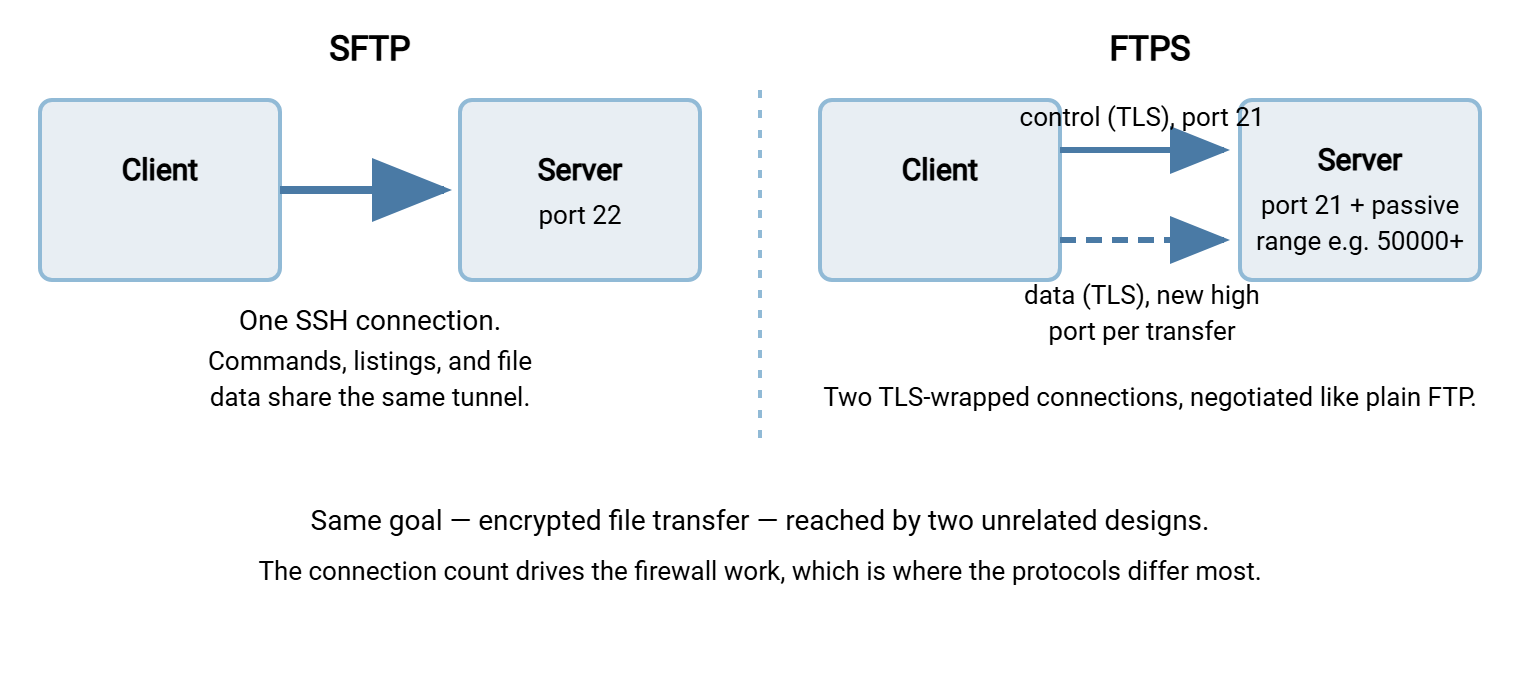
FTPS itself comes in two variants, worth knowing because both are still in the wild. Explicit FTPS starts as a plain FTP connection to port 21. The client then sends the command AUTH TLS. Both sides upgrade the connection to encrypted before the password is sent. Implicit FTPS skips the upgrade and expects TLS from the very first byte, traditionally on port 990. Explicit is the standardized, modern form; implicit survives in older devices and some hosted services. Our FTPS pillar covers the two variants in depth.
When you are unsure what a server actually speaks, two quick probes settle it. An SSH banner means SFTP territory; a certificate handshake after AUTH TLS means explicit FTPS:
# Does port 22 answer with an SSH banner? (SFTP lives here)
nc -w 3 transfer.example.com 22
SSH-2.0-OpenSSH_for_Windows

# Does port 21 upgrade to TLS? (explicit FTPS)
openssl s_client -starttls ftp -connect transfer.example.com:21
# ...certificate chain and handshake details follow

# Implicit FTPS: TLS from the first byte on 990
openssl s_client -connect transfer.example.com:990
Security: Both Encrypt Well — the Differences Live Elsewhere
Here is a claim that surprises people: on pure cryptographic strength, SFTP and FTPS are effectively equals. Both encrypt credentials and file contents with modern ciphers. Both protect you from someone reading transfers off the network. A correctly configured deployment of either will pass a security review. Choosing between them on "which encryption is stronger" is a dead end — the meaningful security differences are structural, not cryptographic.
The first structural difference is how the server proves its identity. An SFTP server presents a host key — a keypair the server generates for itself. The first time a client connects, it records the key's fingerprint. On every later connection it checks that the key has not changed. This model is called trust on first use: simple, free, no third party involved. But it does put weight on verifying that first fingerprint through some out-of-band channel rather than blindly accepting it. That channel might be a phone call or a partner's onboarding sheet.
An FTPS server presents an X.509 certificate — the same kind of document HTTPS websites use. It is normally signed by a certificate authority the client already trusts. The client checks the signature chain and that the name on the certificate matches the host it dialed. This model gives you third-party vouching and works smoothly with strangers, but it introduces a lifecycle. Certificates expire and must be renewed. An expired certificate stops transfers as effectively as a power cut.
The second structural difference is specific to explicit FTPS: the session starts in cleartext and upgrades. Because of that, a misconfigured server can quietly accept clients that never upgrade at all. Those clients send passwords in the clear while everyone assumes otherwise. Good FTPS servers have a setting that requires encryption before login and requires PROT P. That is the command that encrypts the data connections too. That setting should always be on. SFTP has no equivalent trap; there is no unencrypted variant to fall back to.
Ports and Firewalls: The Biggest Practical Difference
Ask any network administrator which of these protocols they prefer to firewall, and you will get the same answer: SFTP, without hesitation. The reason is arithmetic. An SFTP server needs exactly one inbound rule: TCP port 22. That is the whole conversation with the firewall team, and the rule never changes.
FTPS inherits FTP's two-connection design, which means it also inherits the passive-mode dance. For every transfer, the server picks a high port from its passive port range and tells the client to connect there. So the firewall needs port 21 (and 990 if you allow implicit) plus the entire passive range opened and forwarded correctly. That range is often a few dozen to a few hundred ports. The mechanics of that negotiation are exactly the ones covered in our active vs passive FTP explainer. The server-side setup lives in configuring passive port ranges.
TLS then adds an extra twist that catches even experienced admins. With plain FTP, many firewalls and NAT devices read the control channel and spot the port negotiation. They helpfully open the data path or rewrite addresses on the fly. Encrypt the control channel and the firewall can no longer see the negotiation. The helper goes blind, and setups that "just worked" with plain FTP start failing with FTPS. The classic symptom is a login that succeeds followed by a directory listing that hangs. The full story is in this pillar's companion article, the three protocols from the firewall's point of view.
None of this makes FTPS unusable — thousands of organizations run it happily. But it does mean FTPS costs more firewall work up front and more troubleshooting over its lifetime. That is especially true when load balancers or NAT sit in the path.
Authentication: SSH Keys vs Certificates and Passwords
Both protocols support ordinary usernames and passwords, safely encrypted in transit. The difference is what each offers beyond passwords.
SFTP's marquee feature is public key authentication. Each user generates a keypair — a private key that stays on their machine and a public key you install on the server. Logins then happen without any password at all: the client proves possession of the private key cryptographically. Keys are free to create and never expire on their own. They can be revoked individually by deleting one line on the server. They are the natural fit for unattended jobs, because nothing interactive is required and no secret has to be embedded readably in a script. The tradeoff is inventory discipline: keys accumulate, and you need a habit of removing them when people leave. Our SFTP pillar goes deeper on key management.
FTPS authentication usually means a password sent over the encrypted control channel. That is perfectly sound, just password-shaped, with the rotation and sharing habits that follow. For higher assurance, FTPS can also do client certificates, where each client presents its own X.509 certificate and the server validates it. This is genuinely strong and appears in regulated business-to-business exchanges, but it doubles your certificate lifecycle. Now client certificates expire too, on their own schedules. Each expiry is a future outage waiting on a calendar reminder.
A fair summary: SFTP gives you strong, script-friendly authentication with almost no ceremony. FTPS gives you familiar passwords by default and strong authentication only by taking on PKI paperwork.
Automation: Which One Behaves at 2 a.m.?
Most file transfer in business is not a human dragging files in a client. It is scheduled jobs moving invoices, backups, and exports while nobody watches. Judge the protocols by that standard and the differences sharpen.
SFTP was practically designed for unattended work. Key authentication means no password prompts and no plaintext credentials in scripts. One connection means one thing to time out, one thing to retry, one firewall path that either works always or never. And because there is no per-transfer port negotiation, a job that works once tends to work identically forever. Host key pinning also travels well: the script fails loudly if the server's identity changes, which is exactly the behavior you want.
FTPS automates perfectly well too — every serious scripting tool supports it — but its failure modes are more numerous. A job can fail because the passive range changed or a new firewall in the path cannot see the negotiation. It can also fail because the server's certificate expired overnight. Certificate expiry deserves special respect. It arrives on a fixed date and affects every client at once. The fix requires whoever controls the certificate, not whoever noticed the failure. If you run FTPS, the renewal date belongs in the same calendar as your domain renewals.
Purpose-built tools narrow the gap in practice. A scheduler like Sysax FTP Automation stores the protocol choice inside each connection profile alongside host, credentials, and retry rules. So a scripted job speaks SFTP or FTPS with the same folder-monitoring and error handling either way. Switching a partner from one protocol to the other is a profile edit rather than a rewrite.
Ecosystem: What Clients, Servers, and Partners Actually Support
Protocol choices are rarely made alone; the other end of the transfer gets a vote. Some honest generalizations about where each protocol is strong:
- SFTP is the default in the Unix and cloud world. Every Linux and macOS machine ships with an SFTP client and, effectively, a server via SSH. Managed file transfer services and cloud transfer endpoints lead with SFTP. When a developer or hosting provider says "secure file transfer," they usually mean this.
- FTPS is strong where FTP was strong. Windows-centric shops, older EDI and retail supply chains, and long-lived business integrations often standardized on FTP years ago. In those cases, they added TLS to keep the tooling. For a partner whose software already speaks FTP, FTPS is the smallest possible change.
- Web browsers support neither. If your real requirement is "a person clicks a link and downloads a file," both protocols are the wrong tool. In that case, an HTTPS-based approach fits better. See our HTTP and HTTPS file transfer pillar.
- Server-side, this is not either/or. Modern transfer servers speak both protocols from one installation and one user database. Sysax Multi Server, for example, serves FTP, FTPS, and SFTP simultaneously. That lets you offer SFTP as the preferred door while keeping an FTPS door open for the partners who need it.
The Scorecard: A Weighted Decision Framework
When the choice is genuinely open, resist deciding by vibe. Copy the table below into a document, and adjust the weights to your situation. Score each protocol from 1 (poor fit) to 5 (excellent fit) on each row. Then multiply and total. The pre-filled scores reflect the typical case discussed above — override any of them where your environment differs, and delete rows that do not apply.
| Criterion | Weight (1–3) | SFTP score | FTPS score | What to consider |
|---|---|---|---|---|
| Firewall simplicity | 3 | 5 | 2 | One port vs port 21 plus a passive range; NAT in the path favors SFTP further. |
| Unattended automation | 3 | 5 | 3 | Key auth with no expiry vs passwords/certificates with renewal dates. |
| Partner compatibility | 3 | 4 | 4 | Score from your real partner list, not from this table — survey them first. |
| Identity and trust model | 2 | 4 | 4 | Host key fingerprints (verify once) vs CA-signed certificates (renew forever). |
| Fit with existing tooling | 2 | — | — | Score locally: existing FTP scripts and clients favor FTPS; SSH-based shops favor SFTP. |
| Compliance expectations | 2 | 5 | 5 | Both satisfy encryption-in-transit requirements when configured correctly. |
| Troubleshooting burden | 1 | 4 | 2 | Fewer connections, fewer failure modes; FTPS inherits every FTP data-connection issue. |
Using it is simple: for each row, multiply the weight by each protocol's score, then sum each column. With the default numbers, SFTP wins clearly — which matches the general industry drift. But the table earns its keep in the cases where it does not. If your partner survey comes back heavily FTP-shaped, or your organization already runs a certificate authority and manages renewals well, FTPS can legitimately come out ahead. The point of scoring is to make that reasoning visible and defensible. That matters when someone asks "why did we pick this?" two budget cycles from now. For a partner-by-partner version of this exercise with worked examples, see choosing a protocol for partner exchange.
Rule of thumb: for a brand-new deployment where you control both ends, pick SFTP — one port, key authentication, nothing to renew. Reach for FTPS when the other side's tooling, standards, or auditors specifically require it. Either choice is defensible; running plain FTP for sensitive data is the only indefensible option on the menu.
The Short Version, and Where to Go Next
SFTP and FTPS both deliver encrypted, authenticated file transfer, and both are respectable choices. SFTP is a clean-sheet protocol inside SSH: one connection, one port, key-based logins, minimal firewall conversation, no expiry dates. FTPS is classic FTP wrapped in TLS: familiar to legacy tooling and strong on certificate-based trust. But it carries FTP's multi-connection firewall complexity plus a certificate lifecycle. New builds usually land on SFTP; existing FTP estates and certain partner ecosystems keep FTPS very much alive.
From here, there are three natural next steps in this series. The article on the firewall's view of the three protocols expands the networking half of this comparison. The article on the partner decision framework applies the scorecard to real counterparties. And migrating from FTP to SFTP or FTPS is the playbook for acting on the decision.
Frequently Asked Questions
Is SFTP just FTP running over SSH?
Which is more secure, SFTP or FTPS?
What ports do I need to open for each protocol?
Do I need to buy a certificate to run an SFTP server?
Can one server offer SFTP and FTPS at the same time?
Why does my FTPS login succeed but directory listings hang?
From the Sysax team: we build secure file transfer software for Windows. Sysax Multi Server is an FTP, FTPS, SFTP, and HTTPS server. Sysax FTP Automation handles scheduled, scripted transfers. Free trials are on the download page.