
When a Device Only Speaks FTP: Containment
The multifunction printer on the third floor scans to FTP and nothing newer. It has done so without complaint since the day it was unboxed. Every FTP retirement eventually meets the device. Sometimes it is that printer. Sometimes it is a lab instrument whose export module was written for a protocol landscape two decades gone. It might be a machine controller, a badge system, or a video recorder. This equipment does its real job perfectly and will never, under any firmware, learn SFTP. It speaks FTP, only FTP, and is not embarrassed about it. The retirement program built in this series converts scripts, moves users, and migrates partners. But none of those plays works here: the FTP client is burned into the device.
You have three honest options. You can replace the device (sometimes right, often absurdly expensive for a protocol problem). You can pretend not to see it (which quietly falsifies every "we retired FTP" claim you will ever make). Or you can contain it. Keep the device's FTP, but shrink the distance its cleartext travels to a short, isolated, watched hop, and carry the files onward encrypted. This article is the containment playbook from our Retiring Plain FTP series. It covers the isolation segment, the local-drop-and-secure-relay pattern, and the monitoring around it. It also covers the risk-acceptance memo that turns an awkward leftover into a governed, documented exception.
Why Some Devices Never Upgrade
This category exists for reasons that shape the fix. Embedded devices carry their network stack in firmware — software written into the device by its manufacturer. The firmware is updated only when the manufacturer ships a new version. When FTP support was added to these products, it was the obvious choice: universally understood, trivial to implement on a small processor. Then the products shipped, the engineering teams moved on, and three durable situations emerged:
- The frozen product. The device still sells or still works, but its firmware line stopped receiving features long ago. Security protocols require real cryptographic machinery — key storage, algorithm updates — that old hardware may not even have room for.
- The absent vendor. The manufacturer was acquired, discontinued the line, or no longer exists. There is no one to ship an update even in principle.
- The validated system. In regulated environments — laboratory, medical, industrial — the instrument and its software were validated as a unit. Any change, including firmware, triggers a costly revalidation. The organization chooses not to update, rationally, because the change process costs more than the device.
Notice what these have in common: the device is not broken, and the people who bought it did nothing wrong. That framing matters when you write the risk memo later. Containment is not a cleanup of someone's mistake. It is the engineering answer to equipment outliving the protocol assumptions of its era. The device has outlived the protocol, the vendor, and two reorganizations.
First, Verify It Truly Cannot
Before any device earns a containment exception, spend an hour confirming the constraint is real. "It only does FTP" is often folklore that predates the current firmware. Work the list:
- Check the installed firmware against the vendor's latest. Scan-to-SFTP and scan-to-SMB arrived in later firmware for many multifunction printers; an update may dissolve the problem outright.
- Read the device's own menus and manual. Export options are sometimes hiding under different names — network folder (SMB), email, WebDAV, or an HTTPS upload. Any of those beats containing plain FTP.
- Ask the vendor, if one exists. A support question costs nothing, and some vendors sell an add-on module or a newer export license for exactly this reason.
- Check the direction of the flow. Some devices can be pulled from instead of pushing. If the instrument writes to internal storage a nearby machine can fetch securely, the FTP client never needs to run at all.
Only when this check comes back empty does the device enter the containment lane of the retirement plan. Record the verification in the inventory — the memo you write later will cite it under "alternatives considered."
Acme had three devices on the containment list before anyone ran that check. The badge system stayed on it: its vendor had been acquired twice, and the firmware had not changed in years. The two multifunction printers came off it in an afternoon. That was because a firmware update that had been sitting in the vendor's portal for eighteen months added scan-to-SFTP. The printers had been capable of it all along. Two segments never got built. The badge system got its memo, its VLAN, and a review date, and everyone agreed it had earned them.
The Containment Principle: Shrink It, Don't Bless It
Be precise about what containment does and does not claim. It does not make the device's FTP secure — the credentials and file contents on that hop remain readable to anything that can observe them. What containment changes is who could possibly observe them. Uncontained, the device's cleartext crosses your general network, visible in principle to any compromised machine along the path. It often crosses the internet to a partner. Contained, the cleartext exists only on a short hop inside a segment that contains exactly two parties — the device and a relay. Everything beyond that hop is encrypted, and the segment itself is watched for anything unexpected.
Three properties define done. The cleartext hop is as short and as isolated as you can make it. Every onward journey is encrypted. The residual risk is written down, signed, and scheduled for review. The first two are network engineering. The third is what separates a managed exception from a shadow one. It is the part auditors, insurers, and your own future self will thank you for. Future you is the least forgiving of the three.
The Isolation Segment
An isolation segment is a small network — usually a VLAN with its own subnet. Its traffic is separated from the rest of your network by a firewall, so nothing outside the segment can observe traffic inside it. The device moves into the segment, along with one other machine: the relay host. Then the firewall policy does the real work. The rules, in plain language:
- The device may reach the relay host on the FTP ports — and nothing else. Port 21 plus the data-connection ports the transfer needs. No internet, no file servers, no other subnets. Legacy devices frequently use active mode, where the receiving server connects back to the device for each transfer. Inside a two-party segment that quirk is harmless, so permit it here rather than fighting decades-old firmware about passive mode.
- Nothing initiates connections into the segment except your management network, narrowly, for administering the device and relay.
- The relay host may send outbound on the secure protocol only — SFTP or FTPS to the flow's real destination — plus whatever management and time-sync your standards require.
- Everything else is denied and logged. The denies are not just protection; they are instrumentation. A logged attempt by the device to reach anywhere unexpected is your early warning that something on the segment is not what you think.
The isolation cuts both ways, which is why it earns its cost. Traffic inside the segment cannot be observed from outside it — a compromised laptop in the office cannot sniff the device's password. The device itself often runs an old embedded operating system that will never see another patch. It cannot reach anything but the relay if it is ever compromised. You have simultaneously protected the cleartext and quarantined the device's own attack surface. The same discipline, applied to another legacy protocol, is described in our TFTP security and containment guide. The rule-writing side of it is covered in transfer-friendly firewall design.
The Local-Drop-and-Secure-Relay Pattern
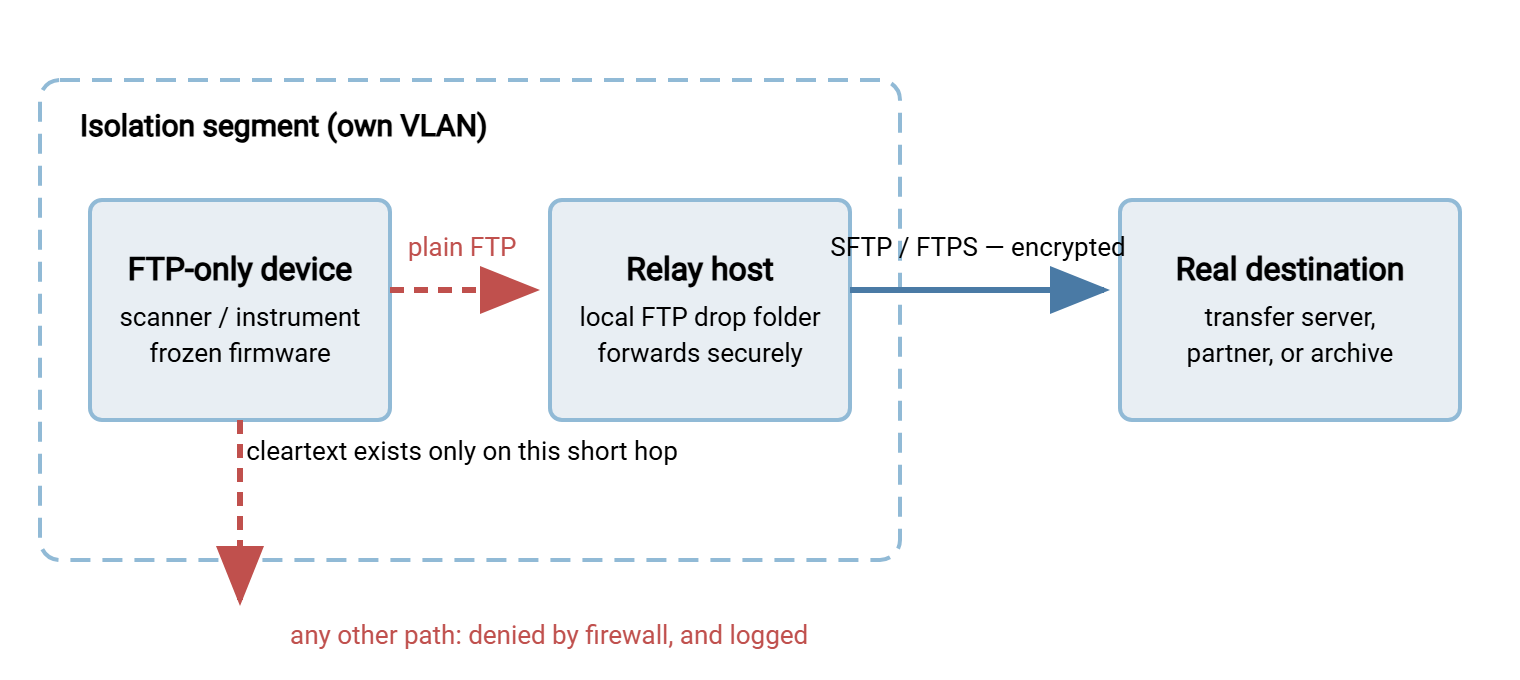
Isolation alone would strand the files inside the segment, so the second half of the pattern carries them onward. The device delivers by plain FTP to a relay host in its own segment — a local drop, one short hop. The relay then forwards every arriving file outward over an encrypted protocol to wherever the flow actually needs to go. That could be your main transfer server, a partner's SFTP endpoint, or an archive. Downstream, nothing knows or cares that the first hop was FTP. The device does not know either, and has never wanted to.
The diagram below shows the shape: cleartext confined to the short hop inside the dashed segment boundary, encryption everywhere beyond it, and every other path from the device denied.
Building the relay takes an afternoon with standard parts:
- The receiving side is an ordinary FTP service on the relay host, bound to the segment's interface only, with one dedicated account for the device. A Windows file transfer server such as Sysax Multi Server fits naturally here. It accepts the device's plain FTP on the isolated interface and logs every session. Because it also speaks SFTP, FTPS, and HTTPS, the same installation can serve as the encrypted endpoint the files move to next.
- The forwarding side is a folder-watching job. When a file lands in the drop folder, send it onward over SFTP or FTPS, verify the send, then delete the local copy. A transfer scheduler like Sysax FTP Automation does this as configuration — folder monitoring, retry on failure, and error alerts. That matters, because a relay that fails silently turns "contained" into "files quietly piling up on an unwatched box."
- The device's account is dedicated to that device, restricted to its own drop folder, and write-only if the device tolerates it. It carries a password used nowhere else. Old firmware sometimes limits password length or characters; do the best the device allows, and let uniqueness carry the weight the complexity cannot. That password crosses the segment readable — uniqueness is what makes its capture worthless anywhere else.
- Files should not dwell. Forward promptly and keep the drop folder empty; the relay is a corridor, not a store. Short retention also keeps the segment's data value near zero if anything ever does go wrong inside it.
Watching the Exception
A contained device is a standing exception, and standing exceptions rot unless something watches them. The watching is modest but non-negotiable. Keep the relay's session logs, so every device upload is a dated record. Alert on the firewall's deny log for the segment, because a device that suddenly tries to reach the internet is telling you something changed. Alert when the relay's forwarding job fails or the drop folder ages beyond its normal cycle. I have seen a drop folder fill quietly for a month before anyone asked why the archive was thin. The alert takes five minutes to set up. The article on disk, sessions, and queue metrics shows which numbers to watch. Include the segment in the periodic sweeps from the discovery article. The contained FTP should appear exactly there and nowhere else. The sweep is how you prove the "nowhere else" half. If you want to reason more formally about what residual risk the watching actually covers, the transfer threat modeling series gives you the framework.
Documented Risk Acceptance
The technical containment is half the answer. The other half is governance. Someone with authority over the risk — not the administrator who built the segment — formally accepts what remains, in writing, with a review date. This is a risk acceptance, and it changes the nature of the exception. An undocumented legacy device is a skeleton in the closet: discovered by an auditor, it reads as concealment. A documented one is a managed decision: disclosed on questionnaires, defensible in audits, and honest on insurance applications. "Encrypted in transit, with one contained, documented exception under review" is a strong answer, while a discovered surprise is a terrible one.
The memo is one page. Copy this skeleton:
RISK ACCEPTANCE MEMO — LEGACY DEVICE ON PLAIN FTP

System:        [device make/model, location, asset tag]
Business use:  [what it does and for whom]
Owner:         [named business owner of the device/workflow]

RESIDUAL RISK ACCEPTED
The device transfers files by plain FTP, which sends credentials
and file contents unencrypted. This traffic is confined to an
isolated network segment containing only the device and a relay
host; all onward transfer is encrypted (SFTP/FTPS).
Remaining exposure: an attacker with a presence INSIDE the
isolation segment could read this device's transfers and its
dedicated credential.

COMPENSATING CONTROLS
- Isolated segment; firewall denies all other device traffic (logged)
- Dedicated, unique, folder-restricted account on the relay
- Relay forwards promptly; drop folder holds no standing data
- Session logging on relay; alerts on denies and forward failures
- Segment included in periodic discovery re-scans

ALTERNATIVES CONSIDERED
- Firmware upgrade: [checked — none available / details]
- Alternate protocol on device: [checked — none / details]
- Replacement: [cost/timeline; revisit at end-of-life]

ACCEPTANCE
[Name, role] accepts the residual risk described above.
Signature/date: ____________
Review date:  [+ one review cycle]   Expires: [date or event]
Exception ends early if: device retired, vendor ships a secure
protocol, or any incident involves this segment.
Route the memo to whoever owns risk in your organization — a security officer, an IT director, the device's business owner plus IT jointly. The signature line is the point: it moves the decision to the level where risk decisions belong. Risk is accepted upstairs; downstairs it is only inherited. Where the broader question "when is plain FTP ever tolerable?" needs a principled treatment beyond one device, see our when plain FTP is acceptable companion article. This memo is that article's reasoning, operationalized for a single stubborn machine.
Remember: the relay does not make FTP secure — it makes the insecure part small, isolated, and watched. The memo does not remove risk — it makes the risk a signed decision with an expiry instead of a secret. Containment without documentation is just a tidier version of ignoring the problem.
The Exit Path
Containment is a holding pattern, not a destination, and the memo's review date is where the exit gets planned. Each review asks three questions. Does the device still exist and still matter? Has the vendor shipped anything that changes the answer? Is replacement now cheaper than the exception's ongoing cost? Two habits shorten the exception's life. First, put the device on the asset lifecycle list, so its eventual replacement is budgeted rather than perpetually deferred. Second — the cheapest security control in this entire series — add one line to your procurement checklist: new equipment that transfers files must support SFTP, FTPS, or HTTPS. Every device bought under that rule is a containment segment you will never have to build. It is the dullest sentence in this series, and my favorite.
When the device finally retires, finish the job. Remove its account and tear down the segment and firewall rules. Run one sweep to confirm nothing else was using them, and close the memo with an end date. The final sweep matters more than it seems. Contained segments have a way of quietly collecting a second device over the years. And the verification article treats every exception segment as a named item to re-check, not a blank spot on the map.
The Short Version
Verify the device truly cannot speak anything better. Give it a segment where its cleartext touches exactly one machine. Relay everything onward encrypted. Watch the denies, the logs, and the forwarding job. Sign the memo, review it on schedule, and buy nothing FTP-only ever again. That is the whole pattern. It is the difference between "we retired FTP, except for some stuff" and "we retired FTP, with two documented exceptions, contained and reviewed, expiring with the hardware." The first sentence fails audits and undermines the program; the second one closes it with credibility intact. The third-floor printer, meanwhile, is still scanning, and cannot see past the relay.
Frequently Asked Questions
If the device is on its own VLAN, do we still need the relay?
Can the device just FTP directly to the partner or server it always used?
Our device only supports active-mode FTP. Does that break the pattern?
Who should sign the risk-acceptance memo?
Does a contained device mean we can't say we retired FTP?
What happens to the segment when the device is replaced?
From the Sysax team: we build secure file transfer software for Windows. Sysax Multi Server is an FTP, FTPS, SFTP, and HTTPS server. Sysax FTP Automation handles scheduled, scripted transfers. Free trials are on the download page.