
When Plain FTP Is Still (Barely) Acceptable — and How to Contain It
Every security checklist you will ever read says the same thing: plain FTP is obsolete, insecure, and must be eliminated. The advice is broadly right — and yet almost every real network still has FTP running somewhere. It is usually attached to a device or process that nobody can change this quarter. The gap between "FTP must die" and "the CNC machine on the shop floor only speaks FTP" is where administrators actually live. Absolutist advice offers no help there.
This article takes the honest middle path. It explains exactly what plain FTP exposes and why the list of defensible uses keeps shrinking. Then it does the two things purist advice skips. It shows how to contain the FTP you cannot remove yet, with compensating controls that genuinely compensate. It shows how to write the exit plan that turns a permanent liability into a temporary, documented one. It is part of our SFTP vs FTPS vs FTP series, and it assumes no prior security background.
What Plain FTP Actually Exposes
Start with the facts, stated plainly and without drama. FTP predates the idea that networks are hostile, so it encrypts nothing. Three separate things travel in readable cleartext:
- Credentials. The username and password cross the wire as ordinary text in the
USERandPASScommands. Anyone who can observe the traffic can read them directly. That includes observers on the same network segment, on any router or link along the path, or on a compromised machine in between. No cracking is involved; it is simply reading. - File contents. Every byte of every upload and download is visible to the same observers, on the separate data connection FTP opens per transfer.
- The session itself. Commands, filenames, and directory structures are readable too, which tells an observer what exists and what is worth taking.
Two consequences make this worse than it first sounds. First, passwords get reused. An FTP password captured in cleartext is frequently also somebody's Active Directory or email password. So the blast radius extends far beyond the FTP server. Second, the exposure is silent. Encrypted protocols fail loudly when something is wrong; cleartext protocols leak without leaving a trace on either endpoint.
The honest counterweight is that exposure depends on the path. "Anyone who can observe the traffic" means something very different depending on the setting. Compare the open internet, a shared office network, and an isolated two-device network segment in a locked room. That difference is the entire basis for the legitimate cases below. It never makes FTP secure, but it changes how much insecurity you are actually accepting. For a refresher on the protocol mechanics themselves, see our FTP protocol pillar.
The Shrinking List of Legitimate Cases
Here are the situations where a reasonable administrator can still defend running plain FTP — each with its honest justification and its honest caveat.
1. Anonymous distribution of already-public files
A classic public FTP mirror serving open-source installers or public datasets exposes nothing confidential: the files are meant for everyone. And anonymous FTP is the convention where anyone logs in with the username anonymous and no real password. That means there are no credentials worth stealing. The caveat is integrity rather than secrecy: a cleartext download can be tampered with in transit. So this case is only defensible when recipients can verify checksums published over a secure channel. In practice plain HTTPS has replaced most of these mirrors because browsers speak it natively.
2. Isolated networks that never touch a hostile path
Consider a lab segment, a factory-floor network, or a test bench where FTP moves firmware images between machines that share a locked cabinet. It has a genuinely small attack surface. If the traffic cannot leave the segment and the segment's membership is controlled, the "anyone on the path" threat shrinks to "people already inside the room." The caveat: isolation claims decay. Segments acquire uplinks, temporary bridges, and forgotten Wi-Fi access points over time. So this case is only as strong as your most recent verification that the isolation still holds.
3. Devices that speak nothing else
This is the case that keeps FTP alive in most organizations. Think of the multifunction copier whose scan-to-server feature predates SFTP support, the CNC controller, the lab instrument, or the building management system. The device cannot be upgraded, replacement is expensive and unfunded, and the business function it performs is not optional. Running FTP for that device is defensible — if it is contained as described in the next section, and only for as long as the device survives. What is not defensible is letting the device's limitation set the standard for everything around it.
4. Traffic already encrypted by a lower layer
FTP between two sites connected by an encrypted site-to-site VPN tunnel is cleartext to the endpoints but encrypted across the actual untrusted path. This is a real mitigation, used deliberately in plenty of business integrations. There are caveats. The protection ends where the tunnel ends (the LAN segments on each side still see cleartext). It depends entirely on somebody else's tunnel configuration staying correct. And the FTP credentials themselves remain weak secrets. It is a defensible bridge arrangement, not a destination.
What is no longer on the list
Notice what does not appear above. There is no FTP across the internet with real user credentials or FTP carrying customer or personal data. There is no FTP for partner exchange because "it has always worked," or FTP because switching feels like effort. Those were common answers once; the tooling has improved enough that they no longer survive scrutiny. The upgrade path is genuinely short now — SFTP or FTPS covers choosing the successor, and the effort involved is a project, not an era.
The Honest Test: Score Your Own FTP Use
Abstract categories only help so much. For each FTP use you actually have, walk it through this table. The left column is the question; the right column is what a risk-increasing answer looks like. Zero risk answers: your use is in the defensible zone — contain it and document it. One or more: containment is mandatory and the exit plan gets a date. Three or more: treat it as an active migration project, using the playbook in migrating from FTP to SFTP or FTPS.
| Question | Risk-increasing answer |
|---|---|
| Does the traffic cross any network you do not fully control? | Yes — internet, shared office LAN, third-party links, or "not sure." |
| Are the FTP credentials real accounts, or reused anywhere else? | Yes — domain accounts, shared passwords, or passwords also used elsewhere. |
| Is the data non-public — business records, personal data, anything under compliance? | Yes — or nobody has actually classified what flows through it. |
| Could either endpoint speak SFTP or FTPS with a settings change or minor update? | Yes — running plain FTP is a choice, not a constraint. |
| Is there a named owner and a written reason for this FTP use? | No — undocumented FTP is unmanaged FTP. |
The fourth question deserves emphasis because it is the one most often skipped. A surprising share of "legacy" FTP turns out to be modern software with encryption support that nobody enabled. That is a five-minute fix mislabeled as a constraint. Always check the current firmware and settings of the "FTP-only" device before granting it that status.
Containment: Controls That Actually Compensate
Containment means arranging the network so that the FTP you keep can hurt as little as possible when — not if — its weaknesses are exercised. The controls below are ordered by impact; the first two do most of the work.
Isolate the traffic path
Put the FTP conversation on its own network segment — a dedicated VLAN or physically separate switch. Use firewall rules that permit exactly the required host pairs and ports, and nothing else. The legacy scanner talks to one server. The server accepts FTP from the scanner's address only. Neither endpoint's FTP path routes to the internet. Cleartext traffic that only ever crosses a two-node segment has a threat model you can reason about. Cleartext traffic on the general office network does not. If the firewall work around FTP's two-connection design is unfamiliar, the firewall's view of the three protocols explains what you are scoping.
Assume the credentials are public
Since FTP passwords travel in cleartext, design as though they were printed on a poster. Use a dedicated account that exists only on the FTP server and shares no password with anything else. It must do nothing except its one job: write into (or read from) a single restricted folder. Give it no delete rights it does not need. Now a captured credential yields an attacker exactly what they could already see by capturing the traffic — nothing more.
Bridge at the boundary
The most effective pattern for legacy devices is the protocol bridge. Let the device speak FTP only to a nearby internal server. Carry the files onward — to their real destination across the untrusted network — over SFTP or FTPS. The cleartext hop shrinks to a few meters of controlled cable; the long, exposed hop is encrypted. The diagram below shows the shape.
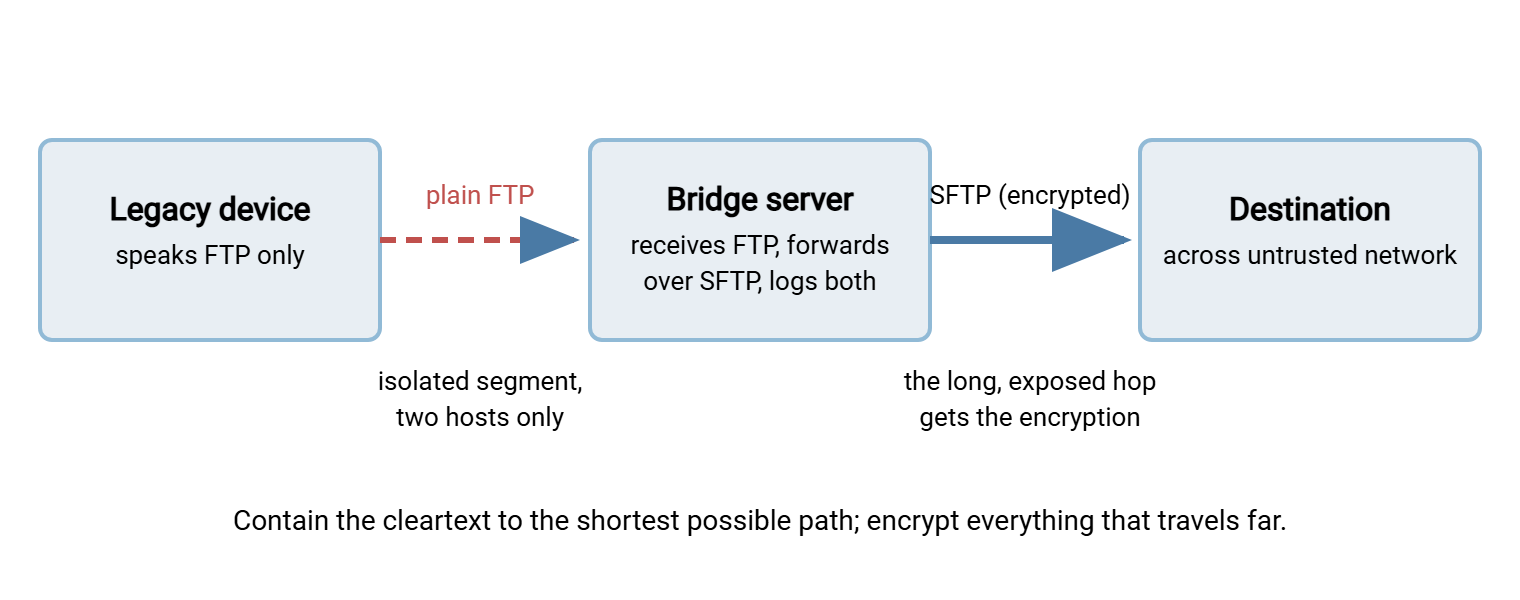
This pattern is straightforward to build with ordinary tools. A multi-protocol server such as Sysax Multi Server can be the bridge's receiving end. It can accept the device's FTP on an isolated interface while offering SFTP outward, with per-session activity logging on both. A folder-monitoring scheduler such as Sysax FTP Automation can watch the drop folder. It can forward each arriving file over SFTP or FTPS automatically, with retries and error handling. The legacy device never learns anything changed.
Log, restrict, and prune
Round out containment with three habits. Keep full session logging on the FTP server and actually review it. New source addresses or odd-hours logins on a two-device segment are loud signals precisely because the segment is quiet. Keep the server software patched and its feature surface minimal. Allow no anonymous access unless that is the point, no write access where read suffices, and no accounts beyond the ones the use case needs. And re-verify the isolation on a schedule, because the controls above quietly rot as networks evolve.
Remember: compensating controls compensate for confidentiality on the path, but they never make FTP authentication strong. Design every contained FTP use so that a stolen password gains an attacker nothing you were not already prepared to lose. That means a dedicated account, one folder, least privilege, and no reuse.
The Exit Plan You Should Have Anyway
Even a well-contained FTP use should be temporary on paper. An exit plan is not a promise to migrate this quarter; it is a short written record proving the situation is managed rather than forgotten. It turns "we still have FTP" from an audit finding into an audit answer. Every plan needs six lines — copy this template into your documentation system and fill it in per FTP use:
FTP EXIT PLAN — one per contained FTP use
------------------------------------------
System / flow:        Shop-floor scanner -> bridge server (scan-to-FTP)
Named owner:          A. Ramos (infrastructure)
Why FTP remains:      Device firmware has no SFTP/FTPS support (verified
                      against latest firmware on: last review date)
Containment in place: Dedicated VLAN 118; server accepts FTP from scanner IP
                      only; dedicated account "scandrop", write-only, one
                      folder; onward leg SFTP; session logging enabled
Exit trigger:         Device replacement (budgeted cycle), OR firmware adds
                      secure transfer, OR isolation can no longer be verified
Successor plan:       Replacement device -> SFTP direct to file server;
                      decommission VLAN 118 and the "scandrop" account
Review date:          Re-check firmware, isolation, and logs each review
                      cycle; owner signs off
Two details make this document useful rather than ceremonial. The exit trigger ties the migration to events that will actually occur — hardware replacement cycles, firmware updates, network redesigns. So the plan executes itself instead of waiting for a heroic project. And the review date forces someone to periodically re-ask the fourth question from the honest test. Has "FTP-only" quietly become "FTP by default"? Devices gain secure-transfer support in firmware updates more often than anyone checks.
When the Answer Is Simply No
Containment is for the cases you cannot yet change. It is not a permission slip for the cases you can. Does your FTP use cross the internet with real credentials, carry personal or regulated data, or serve business partners? If so, the honest reading of the test above is that you are past containment and into migration. And the migration is smaller than it looks. If the endpoints already speak FTP, FTPS is usually a configuration change plus a certificate. If you control both ends, SFTP gives you the cleanest long-term footing. The full comparison is in SFTP vs FTPS. The step-by-step conversion of scripts, users, and partners is in the migration guide.
It is worth saying once, without drama: cleartext credential capture is not a theoretical attack. That is why checklists are so absolute about this. Cleartext credential capture is one of the oldest, easiest moves available to anyone who gains a foothold on a network path. It converts a minor intrusion into account compromise. The fix is cheap and well-trodden. That combination — real risk, cheap fix — is why the tolerance for exceptions keeps shrinking.
Rule of thumb: plain FTP is acceptable only where you can meet all three conditions. Name the entire path the traffic crosses. Name everyone who can observe it. Show that a captured password unlocks nothing beyond one restricted folder. If any of those three sentences is hard to finish, you have your answer. The exit plan template above is where to write it down.
The Version to Keep
Plain FTP encrypts nothing, and the defensible uses left are narrow. They are public-file distribution, genuinely isolated segments, devices with no alternative, and paths encrypted by a lower layer. Each survives only with containment — isolation, throwaway credentials, boundary bridging, logging. Each deserves a written exit plan with a named owner and a real trigger. Everything else belongs on the migration list, where the modern replacements are cheaper than their reputation suggests.
From here, this series offers two natural next reads. Read SFTP vs FTPS to choose the successor protocol. Read migrating scripts and users off FTP to execute the exit plan when its trigger fires.
Frequently Asked Questions
Is FTP over a VPN secure enough?
Is anonymous FTP for public downloads still okay?
Our scanner or legacy device only supports FTP. What should we do?
Do we have to replace our FTP server to move off plain FTP?
Will auditors accept contained plain FTP?
How do I find out where FTP is still used on my network?
From the Sysax team: we build secure file transfer software for Windows. Sysax Multi Server is an FTP, FTPS, SFTP, and HTTPS server. Sysax FTP Automation handles scheduled, scripted transfers. Free trials are on the download page.