
Transient vs Permanent Failures: The Split That Drives Everything
"Just make it retry." A transfer job fails at two in the morning. Before any code runs, before any alert fires, one question decides what should happen next: would trying again help? If the network hiccuped, the answer is yes: wait a moment and retry, and nobody ever needs to know. If the password is wrong, the answer is no. Retrying the same wrong password five hundred times will not make it right. But it may lock the account and turn a small problem into an outage.
Every piece of error handling you will ever build sits on top of that one question. Retry timing, backoff, dead-letter folders, alerting: all of them assume you can first sort failures into two piles. The piles are transient (temporary, likely to succeed on a later attempt) and permanent (will keep failing until a human changes something). Get the sorting wrong and the cleverest retry loop becomes a machine for making things worse. I have watched a very well-built loop do exactly that, at speed, with excellent logging.
This article gives you the taxonomy: the three families of failure and the real signals that tell them apart. Those signals are FTP reply codes, SSH and SFTP error behavior, and process exit codes. This article gives you a classification table you can lift into your own scripts, and the reasons retrying a permanent failure is actively harmful. It is the foundation of our Retry Logic and Error Handling series; the rest builds on it.
The Only Question That Matters: Would Trying Again Help?
A transient failure is one caused by a condition that changes on its own. A router dropped a packet. The partner's server was rebooting during its patch window. A file was momentarily locked by the process still writing it. Wait thirty seconds, or five minutes, and the same operation succeeds. The classic analogy is a busy phone line: nothing is wrong with the number, so calling back works.
A permanent failure is one caused by a condition that does not change on its own. The password is wrong. The remote directory does not exist. The account lacks write permission. The disk quota is exhausted. This is the disconnected number: redialing produces the same recording every time, forever, until somebody fixes the underlying fact.
The two piles demand opposite responses. Transient failures deserve patience — an automatic retry, ideally with increasing delays, as covered in our backoff guide. Permanent failures deserve escalation — stop, record exactly what happened, and tell a human, because only a human can change the underlying fact. A job that retries everything treats both piles as transient; a job that gives up on everything treats both as permanent. Both designs fail: the first noisily and dangerously, the second quietly and on schedule.
There is a third, honest category we will return to later: ambiguous failures, where the error alone cannot tell you which pile you are in. Good error handling has a plan for those too.
Three Families of Failure
Nearly every transfer error belongs to one of three families, and each family leans strongly toward one pile.
Family one: the network and the remote service. Connections time out, get refused, or get reset mid-transfer. The remote server is down for maintenance, overloaded, or restarting. These are the classic transients — networks recover, servers come back. The lean is not absolute: a connection refused because the firewall silently dropped your new IP address will never fix itself. But as a family, network and service failures are where retries earn their keep.
Family two: credentials and permissions. Wrong password, expired account, revoked SSH key, no write access to the target folder, a changed host key. These are almost always permanent — and several of them are worse than permanent, because retrying them looks exactly like an attack. Modern servers count failed logins and lock accounts or ban IP addresses. Our article on authentication failures and lockouts walks through how quickly an innocent retry loop trips those defenses.
Family three: files and disks. The file you were told to fetch is not there. The name contains a character the remote side refuses. The local disk is full; the remote quota is exhausted. This family is genuinely mixed. A missing file is permanent for this attempt but might be transient in a polling job. "Not there yet" is normal an hour before the partner's export runs. A full disk is technically transient (space can be freed) but never frees itself at two in the morning. Treat it as permanent-until-fixed and alert. Above all, never retry a disk-full condition in a tight loop while your own log grows on the same disk.
FTP Tells You Which Is Which: 4xx vs 5xx
The people who designed FTP understood this split, and they built it into the protocol. Every FTP server response begins with a three-digit reply code, and the first digit carries the classification. A code starting with 4 is a transient negative reply: the request failed, but the condition is temporary. The standard's own intent is "try again later." A code starting with 5 is a permanent negative reply: the request failed and will keep failing if repeated as-is. Our reference on FTP commands and reply codes covers the full grammar; here we only need the failure half. It is rare for a protocol to hand you the answer sheet. Take it.
The 4xx codes you will actually meet include 421 (service not available — the server is shutting down or refusing new sessions). Others are 425 (can't open data connection) and 426 (connection closed, transfer aborted). There is 450 (file action not taken — often the file is busy or locked). There are also 451 (local error on the server) and 452 (insufficient storage space). All of them are invitations to retry after a delay.
The 5xx codes include 500-series syntax errors (your client sent something the server does not understand — retrying sends the same thing). Others are 530 (not logged in — the credential problem) and 550 (file unavailable — no such file, or no permission). There are also 552 (storage allocation exceeded — a quota) and 553 (file name not allowed). None of these change on a second attempt.
Two pairs show how precise the scheme is. 452 versus 552: both are about storage. But 452 means the disk is full right now (space may be freed — transient). Meanwhile, 552 means your account's quota is exhausted (policy — permanent until an administrator raises it). And 450 versus 550: both mean "file action not taken." But 450 hints the file is temporarily busy, while 550 means it is missing or forbidden. A session excerpt makes the difference concrete:
Command:  STOR reports/batch_YYYYMMDD.zip
Response: 452 Requested action not taken. Insufficient storage space.
          (transient: wait, then retry the upload)

Command:  STOR reports/batch_YYYYMMDD.zip
Response: 552 Requested file action aborted. Storage allocation exceeded.
          (permanent: stop and alert - a quota will not raise itself)
Real servers do not always play by the book. Some return 550 for a momentarily locked file, and a few return 4xx codes for conditions that never recover. Treat the first digit as a strong prior, not gospel, and let repeated failure overrule it. The broader catalog of ways FTP sessions die, including data-connection hangs that produce no code at all, is in FTP failure modes.
SFTP and SSH: Reading Failures Without Reply Codes
SFTP — file transfer over SSH — has no 4xx/5xx convention, so classification takes slightly more reading. The signals live in three places.
Connection-level errors happen before SFTP even starts: "connection timed out," "connection refused," "connection reset by peer," "no route to host." These are family-one failures and lean transient, with the same caveat as always. A refusal that repeats identically for an hour is a firewall or a dead service, not a blip.
Authentication and trust errors are permanent, and one of them is special. "Permission denied (publickey,password)" means the credential or key is wrong — do not retry. "Host key verification failed" or "remote host identification has changed" means the server is not presenting the identity your client remembered. That is either a legitimate server rebuild or a machine-in-the-middle attack, and no script can tell which. This is the one failure where the correct action is an immediate hard stop and a human conversation. The correct action is never an automatic retry, and never an automatic "accept the new key."
Protocol status messages arrive once you are connected: "No such file," "Permission denied," "Failure." The first two classify exactly like their FTP cousins 550 and 553 — permanent. The generic "Failure" status is SFTP's least helpful message. Servers use it for everything from a full disk to a rejected rename, so treat it as ambiguous and let repetition decide.
Exit Codes: The Signal Your Scheduler Sees
Whatever protocol you use, if the transfer runs from a script, the operating system reduces the whole story to a single number: the exit code. Zero means success; anything else means failure. Your scheduler and your monitoring act on this number first, so it pays to know how much classification it can carry. The OpenSSH tools, for instance, return 255 for connection and protocol errors and 1 for most operation failures — a useful first split on its own.
Some tools encode real detail. curl distinguishes "could not resolve host" (6), "failed to connect" (7), "operation timed out" (28), and "login denied" (67). The first three lean transient; the last is permanent. rsync separates "partial transfer due to error" (23), "source files vanished mid-run" (24), and "timeout" (30). Other tools collapse everything into 1, and then the exit code only tells you that it failed. The why must come from captured error output, which is the subject of error messages worth logging.
Two OS-level conventions are worth memorizing. An exit code of 124 usually means a wrapper like timeout killed the command (transient-leaning — something hung). Codes above 128 mean the process died from a signal (137 means killed — often the machine was shutting down). A wrapper that captures both the exit code and the last lines of error output has everything classification needs:
sftp -b upload.batch acct@sftp.partner.example 2>>"$ERRLOG"
rc=$?
if [ $rc -ne 0 ]; then
  echo "Mar 14 02:10 job=nightly-push rc=$rc $(tail -n 1 "$ERRLOG")"
fi
A Classification Table You Can Steal
Here is the working table: real error text, the pile it belongs in, and the action your job should take. Adapt the wording to what your own tools emit, but keep the three-column shape — message, class, action — because that shape is what your retry logic executes.
| Error you will see | Class | Action |
|---|---|---|
| Connection timed out / reset by peer | Transient | Retry with backoff; alert if still failing after the budget |
421 Service not available |
Transient | Retry after minutes, not seconds — the server asked for room |
426 Connection closed; transfer aborted |
Transient | Retry; verify no partial file was left behind |
450 File unavailable (busy) |
Transient | Retry — the writer may still be writing |
452 Insufficient storage |
Transient, barely | Retry with long delays and alert — someone must free space |
530 Login incorrect / Permission denied (publickey) |
Permanent | Never retry — alert immediately; retries risk a lockout |
550 No such file or directory |
Permanent* | Alert — unless the job is polling for a file not due yet |
552 Storage allocation exceeded |
Permanent | Alert — a quota needs an administrator |
553 File name not allowed |
Permanent | Park the file and alert — the name must change |
| Host key verification failed | Permanent + security | Hard stop — verify the key with the server's owner first |
| No space left on device (local) | Permanent until fixed | Stop the job and alert — retry loops make full disks worse |
Why Retrying a Permanent Failure Makes Things Worse
It is tempting to shrug and retry everything: worst case, the retries fail too, right? No. Retrying permanent failures causes real damage, in at least four ways. I wrote that loop once. It seemed thorough.
It triggers lockouts. This is the classic. A service account's password gets rotated, the job's stored copy does not, and the next run receives 530 Login incorrect. A retry-everything loop then presents the dead password every thirty seconds. To the server's brute-force protection this is indistinguishable from a credential attack, so it locks the account or bans the IP address. Now one broken job has become an outage for every job sharing that credential. A human is required on the other side to lift the lockout or ban. The full anatomy of that cascade is in auth failures and lockouts. The loop, throughout, believes it is helping.
Kestrel Payroll met the lockout version on a Tuesday. The password on a shared service account was rotated during the day; the nightly job's stored copy was not. At two in the morning the job began receiving 530 Login incorrect and presenting the same password every thirty seconds. That was what its retry-everything loop was built to do. By half past two the partner's server had locked the account, and three other jobs sharing that credential failed on their first attempt. The on-call engineer found the one useful line in the log, the first 530, underneath four hundred identical ones. The fix to the job was three lines in a classify function: a 530 now stops the run and sends one alert. The password rotation procedure gained a checklist item, which was the less exciting fix and the one that mattered more.
It buries the signal. One clean "password rejected, stopping" line is actionable. Nine hundred identical retry failures scrolled through the log overnight are noise that hides the one line that mattered. That noise also hides any other failure that happened the same night. Nine hundred lines is not a log. It is a haystack with timestamps.
It delays the fix. Every hour a job spends quietly retrying a hopeless operation is an hour nobody is fixing the real problem. Escalating immediately starts the human clock at failure time, not at whenever-someone-checks time.
It can duplicate work. Some "failures" are actually successes with a lost confirmation — the upload finished, then the connection dropped before the server said so. Retrying re-sends the file, and the receiving system processes it twice. That risk is manageable, but only by designing for it deliberately; our duplicate detection and idempotency series covers that side of the story.
Remember: a retry is not a harmless shrug. It consumes login attempts, log space, time, and sometimes the patience of the partner's security system. Spend retries only where they can possibly pay off — on transient failures.
The Ambiguous Middle: When the Error Cannot Tell You
Some failures refuse to classify themselves. A timeout could be a congested link (transient) or a firewall change that will never pass your traffic (permanent). "Connection refused" could be a service mid-restart or a decommissioned server. A DNS failure could be an outage or a typo that has been broken since the job was created. The error text is identical in each case; only time can tell them apart. Time is a slow diagnostic, but it is never out of stock.
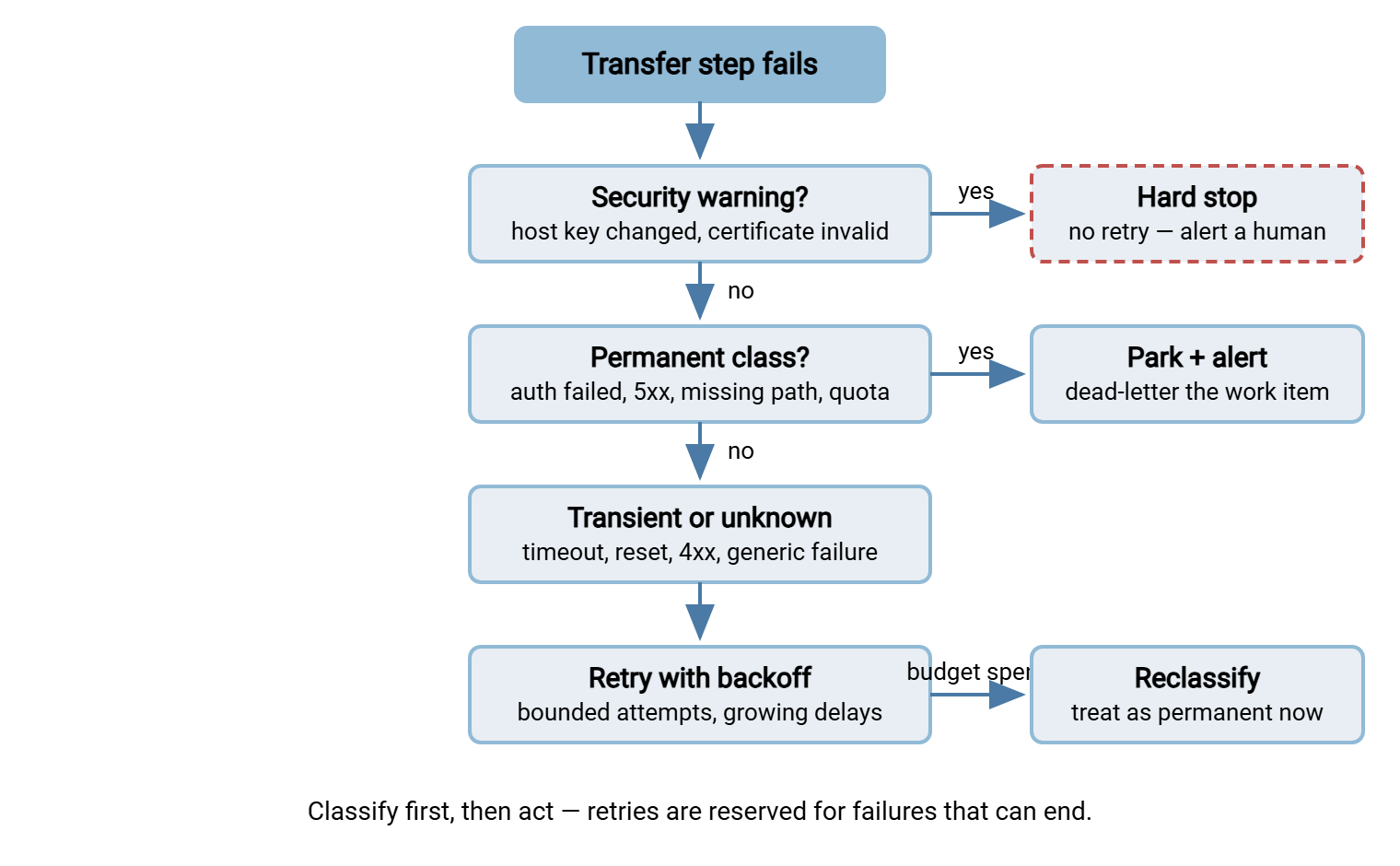
The professional answer is a rule, decided in advance: treat ambiguous failures as transient, but only a bounded number of times. Retry with backoff as if the failure were temporary. If it survives the whole retry budget — say, five attempts across fifteen minutes — reclassify it as permanent. In that case, stop, park any affected file, and alert. Repetition is itself a signal — a blip that is still blipping after fifteen minutes is not a blip.
The diagram below shows the resulting decision tree — the classify-then-act shape that every robust transfer job implements in some form. That might be in ten lines of script or in a product's checkbox settings.
Putting Classification Into Practice
In a script, classification is a small function that turns an exit code and captured error text into one of three verdicts. Language-neutral pseudocode:
classify(exit_code, error_text):
    if error_text contains "host key" or "certificate":  return SECURITY_STOP
    if error_text contains "530" or "denied" or "552" or "553":  return PERMANENT
    if error_text contains "421" or "425" or "426" or "450"
       or "timed out" or "reset" or "refused":  return TRANSIENT
    return UNKNOWN   # handled as transient, with a bounded budget
Match on the most stable part of the message — the reply code number or a short phrase — not the whole line, because servers vary their wording. Keep the pattern list in one place so the next person can extend it. Log the verdict alongside the raw error so wrong classifications can be audited later. The scripting side — where this function lives and how the retry loop calls it — is covered in our Bash and cron and PowerShell automation series.
If you would rather configure than build, this decision tree is also what mature transfer tools implement for you. Sysax FTP Automation, for example, builds retry and error handling into each transfer task. It can send an email notification when a task fails — the park-and-alert branch of the tree. The honest trade-off: a product's classification is a sensible default you adopt, while your own script's is a policy you maintain.
The server's own log is one more source of truth. When your client-side error is vague, a bare "transfer failed", the server usually recorded why it refused you. If you run the receiving side on Sysax Multi Server, every session and its outcome is logged to file and database. That lets you look up the refusal from the other end. Comparing both sides of a failed conversation is the fastest classification tool there is; reading transfer logs shows how.
Rule of thumb: when a failure is ambiguous, retry it like a transient but count it like a permanent — bounded attempts, then escalate. You will be right often enough, and never catastrophically wrong.
Where This Leads
Classification is the sorting step; the rest of this series is what happens to each pile. For the transient pile, retry strategies and backoff covers how long to wait, how many times to try, and when to give up. For the permanent pile, poison files and the dead-letter folder shows where failed work should live so it is never lost and never blocking. And error messages worth logging makes sure the evidence you capture at failure time is good enough to act on. Sort first; everything else depends on the split. The busy line gets called back. The disconnected number gets a human.
Frequently Asked Questions
What is the difference between a transient and a permanent failure?
How do FTP reply codes show whether an error is temporary?
Should my script ever retry a failed login?
How should I handle errors I cannot classify?
Why does a missing remote file sometimes count as transient?
From the Sysax team: we build secure file transfer software for Windows. Sysax Multi Server is an FTP, FTPS, SFTP, and HTTPS server. Sysax FTP Automation handles scheduled, scripted transfers. Free trials are on the download page.