
Poison Files and the Dead-Letter Folder
The Monday morning queue holds four hundred invoices, and the oldest is from Wednesday. Nothing is down. The network is fine, the partner's server answers, the disk has room. Most transfer failures are about the world: the network dropped, the server was busy, the disk filled. But sometimes the failure is about the file. One specific file fails, every single time, no matter how patient the retries, while its neighbors would sail through if they were ever given the chance. Left alone, that one file can jam an entire automated pipeline. The job keeps picking it up, keeps failing, keeps alerting. The healthy files queue up behind it like traffic behind a stalled car.
This article is about that file, the poison file, and the pattern that defuses it: the dead-letter folder. That is a deliberate quarantine where failed work waits, visibly and safely, for a human. You will learn how to recognize poison early and how to build the quarantine move so nothing is ever lost. You will learn how to alert once instead of hourly and how to reprocess after the fix. You will learn how each quarantined file becomes a lesson that prevents its siblings. It is part of our Retry Logic and Error Handling series, and it picks up exactly where a retry policy gives up. A retry policy that never gives up is not a policy. It is a habit.
What Makes a File Poison
A poison file is a file whose failure cause travels with the file itself. The environment is healthy — proof: every other file in the batch transferred fine — but something about this one item makes the operation fail deterministically. Retrying it is pointless by construction, because the retry brings the same file to the same rules and gets the same refusal. The term comes from the message-queue world, where a "poison message" is one that crashes its consumer on every delivery. Files in a transfer pipeline behave identically.
The usual suspects, roughly in the order you will meet them:
- A name the destination refuses. The name may contain characters illegal on the remote system, be too long, or trip a server-side rule. The transfer dies with a "file name not allowed" style rejection every time.
- Content that fails validation. A truncated CSV, a malformed record, an archive that will not open. The transfer may even succeed, but the next pipeline step rejects it and sends it back around.
- A file too large for the remote quota or an upload limit — everything smaller succeeds, this one never will.
- An encrypted file that will not decrypt — wrong key, corrupted during an earlier hop, or encrypted for the wrong recipient.
- A zero-byte or still-locked file — an upstream process died mid-write or never let go. (A file that is merely still being written is not poison, just early; intake settle checks, covered in our watch folders series, tell those apart.)
- A file flagged by malware scanning — which is really a special case with its own rules; see quarantine workflow design for that flow.
Notice what these have in common: they are permanent failures in the sense of our classification article, but scoped to one file. That scoping is the diagnostic. When a whole job fails, suspect the environment. When one file fails while the rest succeed, suspect the file.
How One File Clogs a Whole Pipeline
Acme's invoice flow stopped quietly on a Wednesday night when a sender uploaded a file with a stray character in its name. The transfer script, which processed the folder oldest-first and exited on error, died at that file on every run. By Monday several hundred healthy invoices were queued behind it while the finance team asked where their data had gone. The eventual diagnosis took an hour of log reading to reach a one-line cause. The fix took thirty seconds, which was the time needed to move one file aside. Nothing was down. Nothing was broken. One file was poison, and the pipeline had no way to route around it.
The damage a poison file does depends on how naive the pipeline is, and the failure modes stack up in an unpleasant ladder.
At the bottom: the job that stops at the first error. A batch script that exits on failure processes files alphabetically, hits the poison file, and dies — every run, at the same file. Files sorting after it are never attempted again. The job is "failing" daily, but the real story is that one file has switched the whole flow off. It reports this every morning, politely, to nobody.
One rung up: the job that skips and continues, but never remembers. Each run, the poison file is tried fresh, fails again, and stays in the inbox. The pipeline mostly works, but every run wastes its retry budget on a hopeless item. The log fills with the same error forever. The failure alert, if there is one, fires on every run until everyone stops reading alerts. This is the infinite reprocessing loop, and it is the default behavior of most hand-rolled watch-folder scripts. Mine included, once.
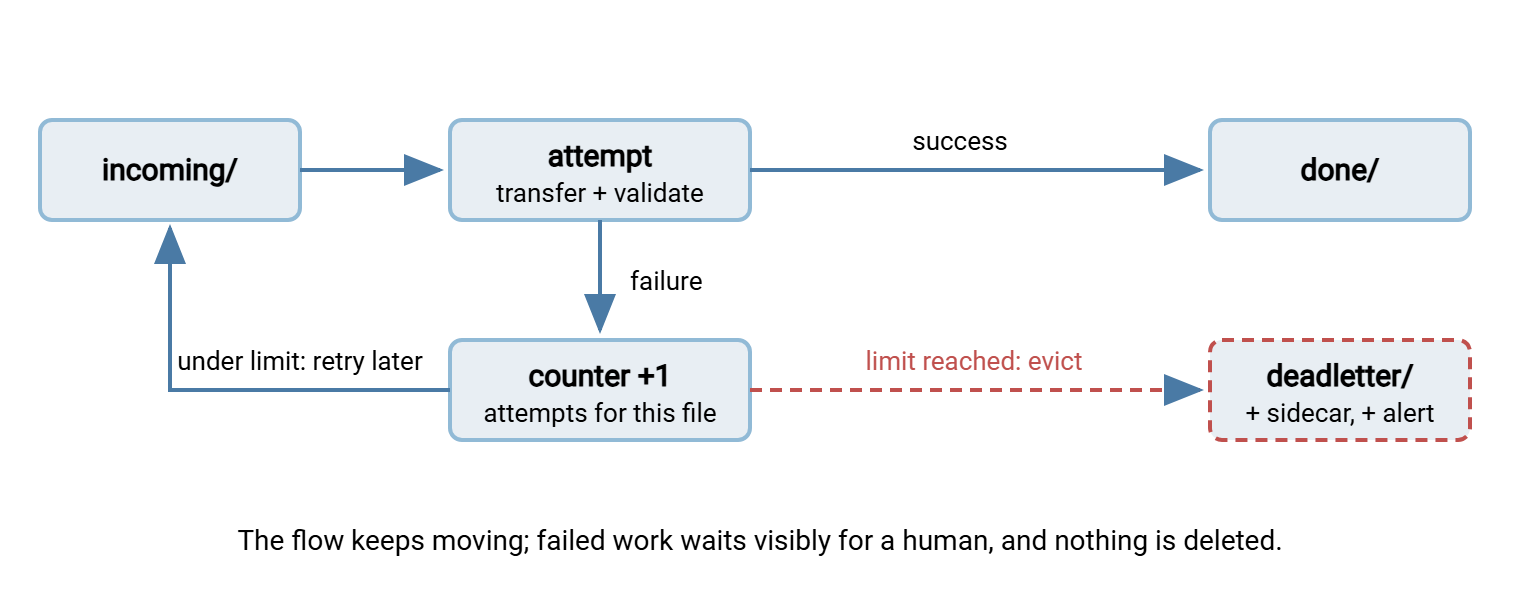
At the top of the ladder is the design this article teaches: the job that counts failures per file and evicts repeat offenders. The poison file gets its bounded chance, then leaves the flow — visibly, recoverably, and exactly once.
Remember: an unattended pipeline must never contain a file it can neither process nor get rid of. Every intake folder needs an exit that does not require success — that exit is the dead-letter folder.
Detection: Count Failures Per File
The mechanism that separates poison from bad luck is a per-file attempt counter. Environment blips strike randomly — different files fail on different runs. Poison is deterministic — the same file fails every run. Counting attempts per file makes the difference measurable: three consecutive failures of the same file, spread across runs and minutes, is no longer bad luck.
The counter has to survive between runs, which means it needs a home on disk. Three workable homes, in increasing order of ceremony:
- A rename suffix: after a failure, rename
report.csvtoreport.csv.try1, then.try2, and so on. The count is visible in a directory listing with no extra files — at the cost of mutating the name, which some flows cannot tolerate. - A sidecar file: keep
report.csv.attemptsnext to the payload, containing the count and last error. The payload stays pristine. - A small journal: one state file or database table for the whole flow, mapping file name to attempts and status. Most robust, and the natural choice once you also want per-file accounting for partial failure reporting.
The logic, language-neutral:
for file in intake:
    verdict = attempt_transfer(file)
    if verdict == SUCCESS:
        clear_counter(file); move file -> done
    else if verdict == PERMANENT_FOR_THIS_FILE:   # bad name, failed validation
        quarantine(file, reason)                  # no retries needed - poison on sight
    else:
        n = increment_counter(file)
        if n >= 3: quarantine(file, last_error)   # deterministic failure = poison
        else: leave file for next run             # retry with the normal backoff
The fast path in that logic matters: some errors declare poison on the first attempt. A "file name not allowed" rejection or a failed checksum will not improve with patience, so burning three retries on it just delays the inevitable. The classification skills from the failure-types article apply per file exactly as they do per job. Everything else — the ambiguous middle — gets its bounded chances with the usual backoff between them, and the counter decides when the chances run out.
Two tuning notes on the threshold. First, the count only means something if the attempts are spread across time. Three failures within the same second are really one failure observed three times. Count at most one attempt per run, or require a minimum gap between counted attempts. That way, the verdict "fails deterministically" rests on evidence gathered over minutes or hours. Second, pick the threshold by the cost of being wrong in each direction. Quarantining too eagerly means a human gets paged for what was actually a passing network wobble — annoying, but recoverable in one move. Quarantining too late means the pipeline burns runs on a hopeless file for a day. Three is the balanced default; flows through flaky networks may deserve five. Flows where a late file has real business cost should lean toward evicting early and letting a person decide.
The Dead-Letter Folder: Quarantine Done Properly
A dead-letter folder is a sibling directory where the pipeline moves work it has given up on. The name is borrowed from postal services — the dead-letter office is where undeliverable mail goes to be examined by a person. The design goals are the same: nothing is discarded, everything is findable, and the main flow keeps moving. A conventional layout:
/flows/payroll-inbound/
    incoming/                        <- partner drops files here
    working/                         <- files currently being processed
    done/                            <- delivered, kept per retention policy
    deadletter/
        payroll_YYYYMMDD.csv         <- the poison file, name unchanged
        payroll_YYYYMMDD.csv.why.txt <- the evidence sidecar
The rules that make the pattern trustworthy:
- Move, never copy. The file must exist in exactly one place, so its location is its status. Keep
deadletter/on the same filesystem as the flow so the move is a single atomic rename. There is no window where the file is half-moved or duplicated. - Keep the original name. The payload is evidence; renaming it complicates checksums, partner conversations, and any later reprocessing. Uniqueness collisions (the same name quarantined twice) are handled by a subfolder per day or a numeric suffix on the second arrival, never by overwriting.
- Write the evidence sidecar at quarantine time, while the error is still in hand. Future-you should not have to excavate logs to learn why a file is here.
- One dead-letter folder per flow, not one global bucket. "Why is this file here" is answered partly by where here is.
Treat the quarantine with the same care as the main flow, because it holds the same data. A dead-letter folder full of payroll files is a payroll data store, whatever its name says. So it inherits the flow's access restrictions, its encryption expectations, and its retention rules. Decide up front how long quarantined files may live. A reasonable policy is that anything resolved gets archived or purged with the normal done/ retention. An age-based cleanup job handles that well. Under that policy, anything unresolved past a set age triggers escalation rather than silent aging. Forgotten quarantine folders are one of the classic places sensitive files accumulate unnoticed. Our article on where transferred files accumulate is a tour of exactly that failure. The folder is called deadletter. The data inside is still called payroll.
The sidecar is short and rigidly boring — which is what makes it useful at three in the morning:
file:        payroll_YYYYMMDD.csv
flow:        payroll-inbound
host:        app01
first_seen:  Mar 14 02:10
quarantined: Mar 14 02:41
attempts:    3
last_error:  553 Requested action not taken. File name not allowed.
next_step:   fix cause, then move file back to incoming/
The diagram below shows the full circulation: the happy path through working/ to done/, the bounded retry loop, and the one-way eviction to deadletter/ with its alert.
Alert Once, Loudly, Then Stay Quiet
Alerting is where dead-letter designs usually go wrong, in one of two opposite directions. The noisy failure mode alerts on every failed attempt — three retries times a hundred runs equals an inbox nobody reads. The silent failure mode quarantines flawlessly and tells no one; the folder is discovered months later, full, during an unrelated incident. Both designs are, in their way, fully automated.
The correct trigger is the state change: alert exactly when a file crosses into the dead-letter folder, once per file. That moment carries real information — bounded retries have been exhausted, human action is now required — and it happens rarely enough to stay credible. The alert should carry the sidecar's content: file, flow, attempts, last error, and the next step. A subject line like payroll-inbound: 1 file quarantined (553 file name not allowed) lets the reader triage from the notification list without opening anything. That courtesy decides whether the alert gets acted on at seven in the morning or filed for later. If you run transfers through a tool rather than scripts, this is precisely where a product earns its keep. Sysax FTP Automation can send an email notification when a transfer task fails. That maps naturally onto "tell me when a file gives up, not every time it stumbles."
Back the event alert with a daily sweep: a scheduled check that lists every dead-letter folder's contents and ages. The sweep catches the alert that got lost and enforces the real rule: quarantine is a waiting room, not a landfill. A file sitting in deadletter/ for a week means the process broke twice: once technically, once organizationally. I have opened quarantine folders holding files a year old. They had waited very patiently. Wiring both signals into on-call habits is covered in alerts from transfer logs and our job monitoring series.
Reprocessing After the Fix
A dead-letter folder is only trustworthy if files can leave it safely. The re-entry protocol is short but each line exists because someone skipped it once:
- Fix the cause first. The file failed for a reason; putting it back unchanged just schedules the same quarantine for twenty minutes from now.
- Verify the payload. If the fix involved editing or regenerating the file, confirm its integrity before it re-enters the flow. In that case, use a checksum against the source, per checksum files and manifests.
- Check for a partial earlier delivery. If the original failure happened after some processing — say the upload completed but post-processing choked — re-running may deliver the file twice. Know whether the destination tolerates that; our duplicate detection and idempotency series is about exactly this risk.
- Move the file back to
incoming/and let the normal pipeline take it. Do not use a special one-off manual transfer, because the pipeline is the tested path and a hand-run copy skips its validations. - Archive the sidecar rather than deleting it. The
.whyfiles are your defect history.
Resist the temptation to "just push it through by hand." Manual pushes bypass logging, bypass validation, and leave no record that the file took an unusual path. That matters the day an auditor or a partner asks what happened to that specific payroll file. "Someone copied it by hand" is a complete answer and a poor one.
The Postmortem That Prevents Its Siblings
Every quarantined file is a defect report from your pipeline, and the archive of sidecars is a dataset. Read it quarterly and patterns appear. If half the quarantines are "file name not allowed," the real fix is a naming agreement with the sender. That means the conservative character rules in our file naming series, enforced by an intake check. The check rejects bad names at the door with a clear message, before they poison anything downstream. If the pattern is failed validation, tighten the producer or validate at intake. Each check you add converts tomorrow's mid-pipeline mystery into an immediate, well-labeled refusal at the boundary. Refusals at the door are cheap. Mysteries in the middle are not.
Server-side logs complete the picture. When the quarantined file crossed a server you operate, the server's own record shows every attempt from the other side. That is useful when the sidecar's error is vague. If that server is Sysax Multi Server, all activity is logged to file and to a database. So reconstructing one file's full history — every session, every attempt, every refusal — is a query rather than an archaeology project. Pair the postmortem with the well-written failure messages this series returns to later, and the sidecars practically write themselves.
Rule of thumb: the dead-letter folder should be boring. If it is filling faster than humans empty it, the pipeline has an upstream defect. If it is never used at all, check that the eviction logic actually works. An empty quarantine can also mean failures are looping forever in the inbox.
Where This Fits in the Series
The dead-letter folder is the destination that makes bounded retries honest. The approach in retry strategies and backoff decides when a file has had its fair chances. This pattern decides what happens next. From here, partial failures in multi-file jobs extends per-file thinking to whole batches. The article on designing for recovery assembles these pieces into jobs that survive even a mid-run crash. One folder, one counter, one honest alert: that is most of what "self-healing" means in practice. The stalled car gets towed to a marked bay, and the traffic moves.
Frequently Asked Questions
What is a poison file?
How many failures before a file should be quarantined?
Why not just delete a file that keeps failing?
Is a dead-letter folder the same as a malware quarantine?
How do I safely reprocess a quarantined file?
From the Sysax team: we build secure file transfer software for Windows. Sysax Multi Server is an FTP, FTPS, SFTP, and HTTPS server. Sysax FTP Automation handles scheduled, scripted transfers. Free trials are on the download page.