
Retry Strategies: Timing, Backoff, and Knowing When to Give Up
"It's fine, it retries." The job has been retrying since Friday. Deciding to retry a failed transfer is the easy part. The hard part is everything after that decision. How long should you wait before the next attempt, and should the waits grow? How do you keep fifty jobs from retrying in perfect lockstep? And, the question almost everyone skips, when should you stop? A retry loop without answers to those questions is not a strategy; it is a hope with a sleep in it.
This article works through the real options with actual numbers: immediate retry, fixed delay, and exponential backoff, each with a worked timing table. It covers jitter, explained plainly, and retry budgets that tie attempts to business deadlines. It covers the retry-forever trap that turns a resilient job into an unkillable zombie. It assumes you have already sorted the failure into the transient pile. The sorting itself is covered in transient vs permanent failures, the first article in our Retry Logic and Error Handling series. Retries are only for failures that can end. The job that has been retrying since Friday has not met one of those yet.
Four Questions Every Retry Policy Must Answer
A retry policy is the written-down answer to four questions, decided before the job ever runs:
- How many attempts? The total count, including the first try.
- How long between attempts? The delay — and whether it stays fixed or grows.
- What is the total time limit? The wall-clock budget the whole sequence may consume.
- What happens when the attempts run out? The give-up action: who gets told, and where the unfinished work goes.
Most retry problems in the wild trace back to one of these questions being answered by accident. A loop with no attempt limit answered question one with "infinity." A loop that sleeps five seconds every time answered question two without thinking about what the failing server experiences. And a loop whose give-up action is "exit silently" answered question four in the worst possible way. The rest of this article takes the questions in order. Infinity, for the record, is the most common answer and the least chosen.
Immediate Retry: Almost Always Wrong
The simplest strategy is to retry instantly, with no delay. It is also nearly useless, for one plain reason: the condition that caused the failure has had no time to change. If the partner's server was overloaded eighty milliseconds ago, it is still overloaded now. If a switch was rebooting, it is still rebooting. An immediate retry asks the same question before the world has had a chance to give a different answer. It adds its own small push to whatever congestion caused the problem. Asking again, louder, has never made a server less busy.
There is one honest exception. When a long-lived connection dies mid-session — a reset after twenty minutes of successful transfer — a single immediate reconnect is reasonable. That is because the likeliest cause is a one-off broken connection rather than an ongoing outage. The working rule: at most one immediate retry, ever, and only for a dropped connection. Everything after that first quick attempt should wait.
Fixed Delay: Simple, Predictable, Sometimes Enough
The next step up is a fixed delay: wait the same interval before every attempt. Five attempts, sixty seconds apart, looks like this:
| Attempt | Delay before it | Clock time elapsed |
|---|---|---|
| 1 | — | 0:00 |
| 2 | 60 s | 1:00 |
| 3 | 60 s | 2:00 |
| 4 | 60 s | 3:00 |
| 5 | 60 s | 4:00 |
Fixed delay is easy to reason about — the whole sequence fits inside four minutes, full stop — and for small estates it is often good enough. Its weakness shows at the edges. If the blip lasted two seconds, you still waited a full minute to recover. If the outage lasts an hour, you gave up after four minutes when the file could have gone out before breakfast with a little more patience. One interval cannot fit both a hiccup and an outage; that mismatch is exactly what backoff fixes. I ran sixty-second fixed delays for years without noticing either edge. Nobody bills you for waiting.
Exponential Backoff: Wait Longer Each Time
Exponential backoff grows the delay after every failure, usually by doubling it. The reasoning is almost conversational: the longer something has been broken, the longer it is likely to stay broken. So each failure is evidence that a longer wait is appropriate. Early attempts catch the short blips quickly; later attempts stop pestering a server that is having a bad night. A common shape, first retry after 30 seconds, doubling each time, six attempts total:
| Attempt | Delay before it | Clock time elapsed |
|---|---|---|
| 1 | — | 0:00 |
| 2 | 30 s | 0:30 |
| 3 | 1 min | 1:30 |
| 4 | 2 min | 3:30 |
| 5 | 4 min | 7:30 |
| 6 | 8 min | 15:30 |
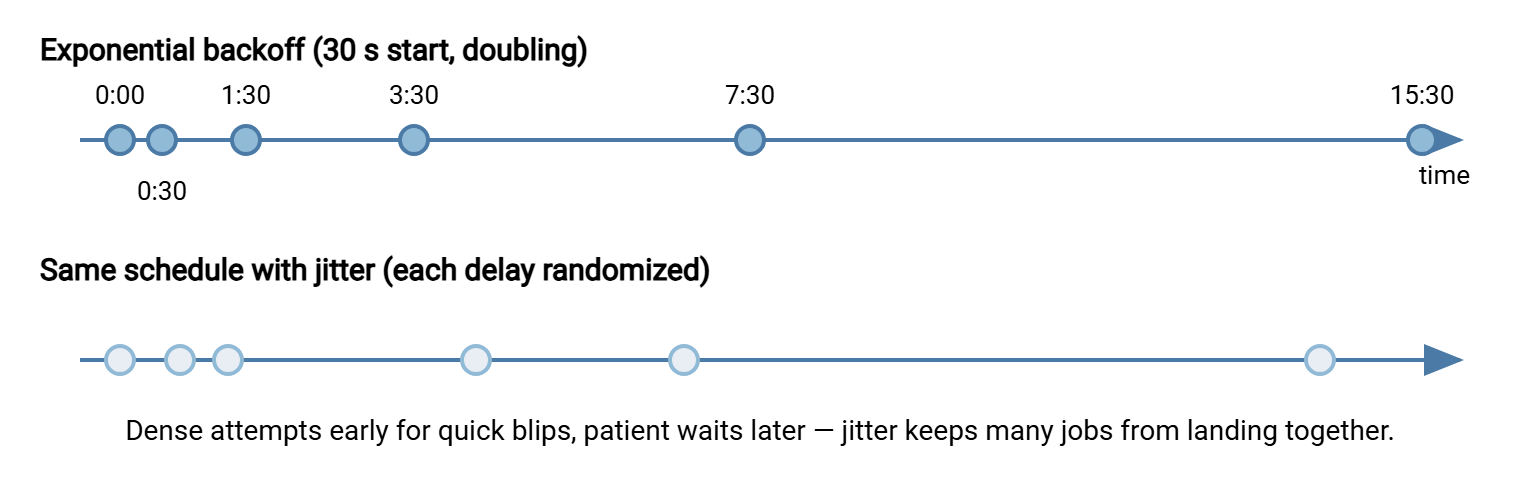
Six attempts, and the whole sequence still finishes inside sixteen minutes — but notice how the coverage is distributed. Three of the six attempts happen in the first ninety seconds, where most transient failures live. The last attempt waits eight patient minutes, long enough for a server reboot or a failover to complete. That distribution — dense early, sparse late — is the entire genius of the approach.
Two refinements make exponential backoff production-grade. First, cap the delay: pick a maximum (ten or fifteen minutes is typical) beyond which the delay stops growing. Doubling forever produces absurd waits — ten doublings of 30 seconds is over eight hours between attempts. Second, decide the starting delay by the failure type. Connection blips can start at seconds. But a 421 "service not available" reply or a 452 disk-full condition deserves minutes from the start — the server told you it needs room. Reply codes are exactly the classification signal to use for that (see FTP reply codes if that grammar is new).
One subtlety matters for jobs that move many files in one run: the growing delay belongs to a failure episode, not to the job as a whole. If file three fails twice and then succeeds, reset the delay back to its starting value before file four. Without the reset, a single rough patch early in the run condemns every later hiccup to the longest waits. Then a job that should finish in minutes crawls for an hour. Success is evidence the trouble has passed; let the schedule believe it.
The timeline below shows the same schedule drawn on a clock — the visual signature of backoff is attempts crowding the left edge and spreading out to the right.
Jitter: Do Not Retry in Lockstep
Here is a failure pattern that puzzles teams the first time they see it. The file server drops offline for a moment at Mar 14 02:00. Forty scheduled jobs across the company fail within the same second. Every one of them uses the same tidy backoff schedule, so at 02:00:30, all forty retry simultaneously. They hit a server still catching its breath and fail again. At 02:01:30, all forty arrive together again. The retries have organized themselves into synchronized waves, sometimes called a thundering herd. The waves themselves keep the server struggling (the server's side of that story is in handling burst load). Forty jobs, one schedule, perfect coordination, and nobody meant any of it.
Jitter is the fix, and it is almost embarrassingly simple: randomize each delay a little, so no two jobs wait exactly the same amount. Instead of sleeping exactly 60 seconds, sleep a random amount between 30 and 90. The waves smear out into a gentle drizzle. Two common recipes:
delay = base * 2^(attempt-1)          # the exponential schedule
sleep random(delay/2, delay*1.5)      # "ranged" jitter: 50% to 150%

sleep random(0, delay)                # "full" jitter: anywhere up to the delay
Either is fine for transfer work; the point is only that the exact moment of each retry should be unpredictable. In a shell script, $RANDOM is enough. If your whole estate is three cron jobs, jitter matters little. But the day the estate grows, jitter is the difference between one bad minute and a self-sustaining pile-up. It also protects you when the other side is the bottleneck. A partner recovering from an outage is being hammered by every one of their customers' retry loops at once. Yours may as well be the polite one.
Remember: backoff decides how long to wait; jitter decides exactly when within that wait. You want both — backoff for patience, jitter for politeness in a crowd.
The Retry Budget: Decide When to Give Up Before You Start
A retry budget is the total amount of failure you are willing to absorb before declaring defeat. It is expressed as both a maximum attempt count and a maximum wall-clock time, whichever runs out first. The attempt count protects the other side from being pestered; the wall-clock limit protects your schedule. Both matter, because six attempts with capped ten-minute delays can quietly consume most of an hour.
The right budget comes from the business, not from the code. Ask: when is this file actually needed? If the nightly batch must reach the partner by 06:00 and the job starts at 02:00, the honest budget is somewhere under four hours. But the alert should not wait that long. A sound pattern is two thresholds: keep retrying until the budget expires, but raise a warning much earlier (say, after fifteen minutes of failure). That gives a human time to intervene while intervention can still help. How that warning becomes a notification someone actually sees is the territory of our transfer job monitoring series.
The scheduler itself is a retry layer, too. If a pull job runs every hour anyway, a failed run's give-up is not the end of the story. For that hourly job, the next scheduled run is a free outer retry, sixty minutes later, with fresh state. Flows with that shape can afford small in-run budgets and lean on the schedule for persistence. A once-a-day flow with a hard morning deadline gets no such second chance, and its budget has to carry the whole burden. Same mechanism, very different numbers — which is why a budget is a per-flow decision, not a global constant.
The opposite of a budget is the retry-forever trap, and it is worth naming because it wears a disguise: it looks like resilience. A job that never gives up never reports failure. It just runs, and runs, and is still "running" at noon when someone finally asks where the file is. Worse, if the job is scheduled, the next run eventually starts while the first is still retrying. Now two copies fight over the same files and locks. Unbounded retries do not eliminate failure — they eliminate the report of failure, which is the only useful thing a failing job produces. Give-up behavior is a feature. The unfinished work goes somewhere deliberate — a parked file, an alert, a clean nonzero exit. That is exactly the hand-off to the dead-letter pattern covered next in this series.
Bluewater Bank met the trap from the receiving end. A supplier's nightly upload job had a retry loop with no ceiling. When the bank's SFTP service went down for maintenance late on a Friday, the loop began reconnecting every five seconds. It kept that up all weekend, because the maintenance ran long and nothing in the loop was counting. By Monday the bank's logs held roughly thirty-five thousand failed connections from one address. The supplier's job was still "running", and nobody on either side had received a single alert. The supplier added a six-attempt budget with a loud give-up. The bank added a per-address connection limit so the next such loop would be refused rather than absorbed. Both fixes took under an hour, which is less time than the loop had been prepared to spend.
Retry the Step, or Retry the Whole Job?
"Retry" is ambiguous until you say what gets retried. A transfer job is a chain of steps — connect, authenticate, change directory, upload each file, verify, disconnect — and you can retry at any link. Retrying the failed step alone (re-uploading one file over a live connection) is cheap and fast. Retrying the whole job (reconnect from scratch, reprocess everything) is expensive but resets state that may itself be the problem. A half-broken session sometimes cannot be salvaged.
The pattern that works in practice is two nested loops with small numbers. An inner loop retries the current operation two or three times over the existing connection. If the inner loop exhausts itself, the job tears the connection down and an outer loop retries the whole run with proper backoff. Keep the multiplication in mind: three inner attempts inside five outer attempts is fifteen tries at the worst-case step. That is plenty — and enough reason to keep both numbers small. Two safety notes belong to any whole-job retry. First, rerunning a job that half-completed must not resend the files that already made it. That requires per-file accounting, the subject of partial failures in multi-file jobs. Rerunning also flirts with the duplicate problem our duplicate detection and idempotency series exists for. Second, a retried upload must never leave the destination showing a half-written file in the meantime. Temp names and atomic renames — the toolkit of partial file safety — make retries invisible to the receiving side.
What Never Gets Retried
A retry strategy is also defined by what it refuses to touch. Authentication failures top the list: presenting a rejected password again is how service accounts get locked, as detailed in auth failures and lockouts. Host key and certificate warnings are a hard stop — they may mean an impostor server, and no delay makes that safe. Syntax errors, missing remote paths, and quota rejections repeat identically until a human changes something. If any of this is unfamiliar, the classification rules live in the first article of this series. The one-line summary is that backoff buys time for the world to change, and these are failures the world will not change on its own.
A Worked Retry Loop You Can Adapt
Here is the whole strategy in one small shell sketch — exponential backoff with a cap, ranged jitter, a wall-clock budget, and a deliberate give-up action. The same shape translates line-for-line into PowerShell (a for loop with Start-Sleep and Get-Random) or Python (a loop with time.sleep and random.uniform). Our PowerShell and Python automation series carry fuller versions.
MAX_TRIES=6; DELAY=30; CAP=480; DEADLINE=$(( $(date +%s) + 1200 ))  # 20-min budget

try=1
while true; do
  do_transfer && exit 0                       # success: done
  rc=$?
  [ $try -ge $MAX_TRIES ] && break            # attempts exhausted
  [ $(date +%s) -ge $DEADLINE ] && break      # budget exhausted
  jitter=$(( DELAY/2 + RANDOM % DELAY ))      # 50%-150% of DELAY
  echo "attempt $try failed rc=$rc; sleeping ${jitter}s"
  sleep $jitter
  DELAY=$(( DELAY*2 )); [ $DELAY -gt $CAP ] && DELAY=$CAP
  try=$(( try+1 ))
done
give_up "$rc"    # park the work, alert, exit nonzero - never fall off the end
Every line of that loop is a policy decision made visible, which is the real argument for writing it yourself at least once. That said, let us be honest about build-versus-configure. If the transfer runs on Windows through a scheduling tool anyway, Sysax FTP Automation already includes retry and error handling in its transfer tasks. It can email you when a task ultimately fails — the give-up action wired up without the shell arithmetic. The trade is the usual one: a product gives you a tested default; a script gives you exact control over the schedule. Either way, the four questions from the top of this article still need answers — a tool just records them as settings instead of code.
One last observability point: your retries are visible from the other side, and that visibility is useful. On the receiving end, a server such as Sysax Multi Server logs every session and its outcome to file and database. So a partner complaining about "hammering" — or your own server absorbing someone else's broken loop — shows up as a clean, timestamped record of connection attempts. Reading your own retry storm from the server's point of view is the fastest way to develop taste in backoff. The article on alerts from transfer logs shows how to make the pattern jump out. I have read one of my own retry storms in a partner's log. It is a humbling document.
A Sane Default Policy
If you adopt nothing else from this article, adopt this as the starting point for any unattended transfer, then tune per flow:
- Classify first. Retry only transient and unknown failures; permanents and security warnings go straight to the give-up action.
- Six attempts total, first retry after 30 seconds, doubling, capped at 8 minutes.
- Jitter every delay between 50% and 150% of its nominal value.
- Budget: 20 minutes wall-clock or the attempt limit, whichever ends first — tightened or loosened by the flow's real deadline.
- Give up loudly: park the unfinished work in a dead-letter location, send the alert, exit nonzero.
From here, the natural next reads include poison files and the dead-letter folder, where the given-up work goes. Another is designing transfer jobs that recover themselves, which turns a good retry policy into a job that survives even being killed mid-run. A strategy, unlike a hope, knows when to stop.
Frequently Asked Questions
What is exponential backoff in plain words?
What is jitter and why do I need it?
How many times should a transfer job retry?
Is retrying forever ever a good idea?
Should I retry the failed file or restart the whole job?
Does the backoff delay reset after a success?
From the Sysax team: we build secure file transfer software for Windows. Sysax Multi Server is an FTP, FTPS, SFTP, and HTTPS server. Sysax FTP Automation handles scheduled, scripted transfers. Free trials are on the download page.