
How the rsync Algorithm Works: Delta Transfer in Plain English
The first time you watch rsync update a multi-gigabyte directory over a slow link in a few seconds, it looks like a trick. The file on the far side really did change — you can prove it — yet almost nothing crossed the network. The trick has a name: delta transfer, the technique of sending only the parts of a file that differ instead of the whole file. It is the reason rsync sits underneath so many backup scripts, mirror jobs, and deployment pipelines.
Most administrators use rsync for years without knowing how the delta part actually works. That is a shame, because the algorithm is genuinely understandable — no mathematics degree required. Once you understand it, a whole set of practical questions answer themselves. You see why the first sync is always slow, and why rsync barely helps with zip archives and encrypted backups. You see why local copies skip the cleverness entirely, and why both machines need rsync installed.
This article walks through the algorithm step by step, in plain English, then draws out the practical consequences. It is part of our rsync & Delta Transfer series; the companion pieces cover the flags that matter and the operational patterns built on top of the algorithm.
The Problem: Copying Everything to Change Almost Nothing
Start with the situation rsync was built for. You have a 4 GB file — a virtual machine disk image, a mailbox file, a database export — on server A. Yesterday's copy of the same file is on server B. Overnight, perhaps 30 MB worth of blocks inside that file changed. You want B to match A again.
A conventional copy tool — scp, an FTP client, a drag-and-drop over a network share — solves this the blunt way. It sends all 4 GB, overwriting a file that was already 99% correct. Over a fast local network you may not care. Over a WAN link shared with an office full of people, or a metered cloud connection, you care a great deal. (Our SCP & SSH copying series covers the whole-file tools and where they are the right choice.)
The obvious better idea is: send only the differences. And if both versions of the file sat on the same machine, that would be easy. A diff tool could compare them byte by byte and produce a patch. The interesting problem, the one the rsync algorithm solves, is doing that when the two versions sit on different machines.
The Puzzle: Diffing Two Files That Never Meet
Think about the bind you are in. To compute an exact difference between the new file (on the sender) and the old file (on the receiver), some process needs to see both. But shipping either file to the other side defeats the purpose — that is the full copy you were trying to avoid.
The rsync algorithm's insight is that the receiver does not need to send its file. It only needs to send a compact description of its file — a set of small fingerprints. The sender can use those fingerprints to work out, on its own, which parts of the new file the receiver already possesses. The fingerprints are tiny compared to the data they describe, so the description costs almost nothing to transmit.
The whole algorithm is three steps. The receiver fingerprints what it has. The sender compares those fingerprints against the new file and sends instructions plus any genuinely new bytes. The receiver follows the instructions to rebuild the file. Let's take the steps one at a time.
Step 1: The Receiver Fingerprints What It Already Has
The machine holding the old copy — the receiver — cuts its file into fixed-size, non-overlapping blocks. Block size is chosen automatically and grows with the file. Think of it as somewhere from several hundred bytes up to tens of kilobytes. It is scaled so that even a huge file produces a manageable number of blocks.
For every block, the receiver computes two different checksums — two fingerprints of the same bytes:
- A weak checksum: a small 32-bit value that is extremely cheap to compute. It is not very trustworthy — unrelated blocks can occasionally produce the same weak checksum. But it has a special mathematical property we will need in step 2: it can "roll."
- A strong checksum: a much larger hash that is expensive to compute but so reliable that a match means, for practical purposes, the bytes are identical.
Why two? They play different roles. The weak checksum is a fast first-pass filter. The strong checksum is the careful verification applied only when the fast filter says "possible match." You will see the division of labor in a moment.
The receiver sends the full list — block number, weak checksum, strong checksum, for every block — to the sender. For a 4 GB file this list is typically a few megabytes at most: a rounding error compared to the file. Note the direction of travel, because it surprises people: checksums flow from receiver to sender; file data flows from sender to receiver.
Step 2: The Sender Slides, Matches, and Sends Only the Difference
Now the sender holds two things: its own new version of the file, and the receiver's fingerprint list. Its job is to find every region of the new file that matches a block the receiver already has.
Here is the subtlety that makes the algorithm clever. The sender cannot simply cut its file at the same fixed positions and compare block-for-block. If a single byte was inserted near the start of the file, every block boundary after that point shifts by one byte. In that case, naive position-by-position comparison would match nothing — even though nearly all the data is unchanged, just slightly displaced.
So the sender does something more thorough: it examines every possible block position. It places a block-sized window at byte 0 and computes the weak checksum of the bytes in the window. Then it slides the window to byte 1, then byte 2, and so on — one byte at a time. At each position, it checks whether the window's contents match any block the receiver reported.
That sounds ruinously expensive — computing a checksum over thousands of bytes, once per byte of a multi-gigabyte file. This is where the "rolling" property earns its name. Here is how a rolling checksum is designed. When the window slides one byte forward, the new checksum can be computed from the old one with a couple of arithmetic operations. Subtract the contribution of the byte that left the window, and add the contribution of the byte that entered. No re-reading the window. Sliding from one position to the next costs almost nothing, which is the only reason checking every position is feasible.
At each position, the sender looks the weak checksum up in a fast table built from the receiver's list:
- No match (the overwhelmingly common case): slide one byte and continue. The byte that just fell out the back of the window is remembered as literal data — bytes the receiver does not have and will need sent.
- Weak match: promising, but the weak checksum lies occasionally. The sender now computes the strong checksum of the window and compares it with the receiver's strong checksum for that block. If the strong checksums differ, it was a false alarm — keep sliding.
- Strong match too: the window contains a block the receiver already has. The sender emits any literal bytes accumulated since the last match, then a tiny token meaning "you already have this — block N of your old file." The window then jumps a whole block forward and the search resumes.
The diagram below shows the idea: the receiver's old file cut into fingerprinted blocks, and the sender's window sliding across the new file. The sender emits block references where the data matches and literal bytes where it does not.
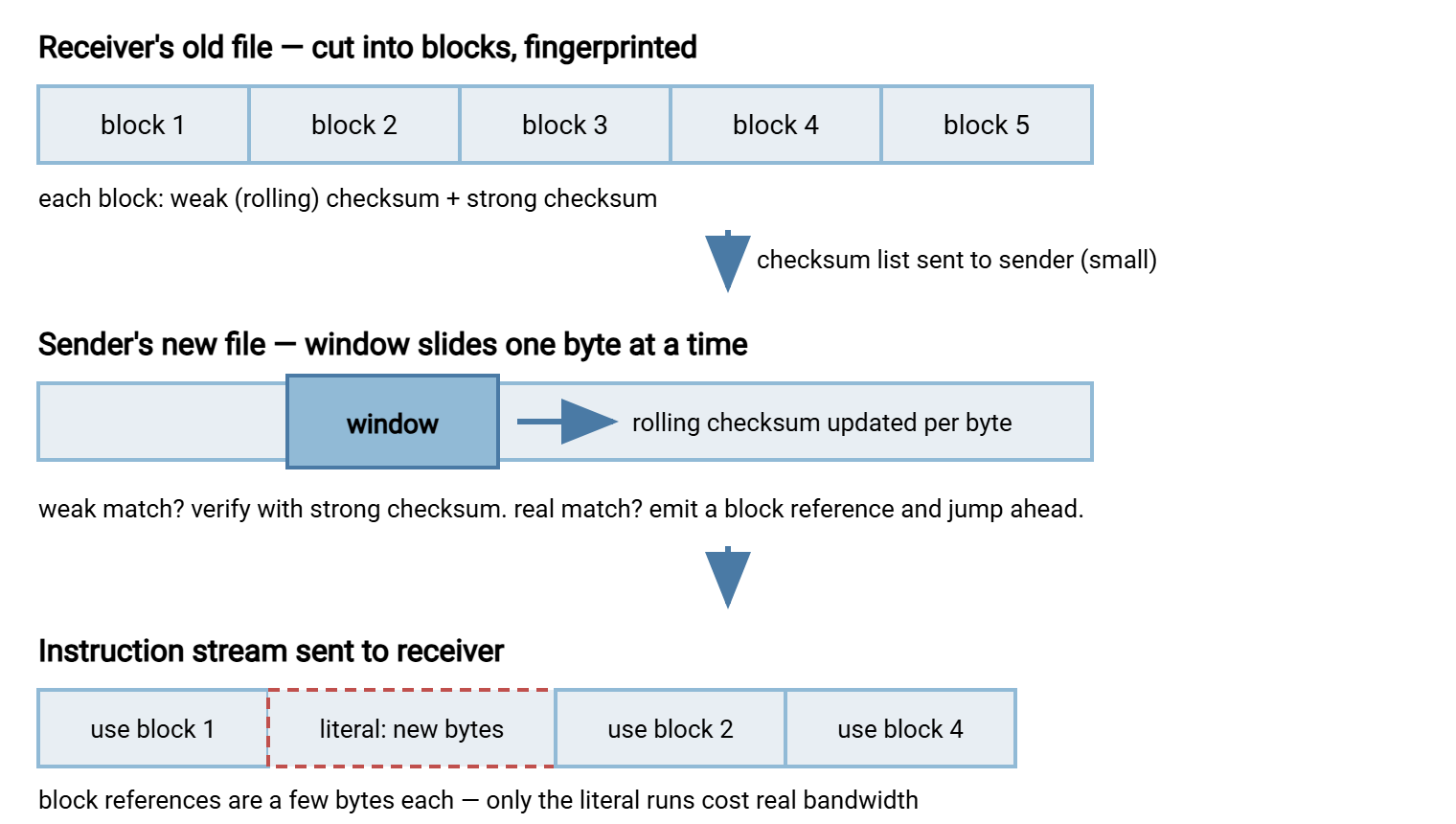
Because the window visits every byte offset, an insertion or deletion anywhere in the file cannot hide the unchanged data that follows it. The blocks after the shift still match — just at different positions — and the algorithm finds them there. That resilience to shifted data is what separates real delta transfer from naive block comparison.
Step 3: The Receiver Rebuilds the File
What actually travels from sender to receiver, then, is not a file. It is a recipe: copy your block 1, then insert these 2,113 literal bytes, then copy your blocks 2 through 40, then insert these 300 bytes… The receiver works through the recipe, reading referenced blocks from its own old copy on local disk and splicing in the literal runs from the network. It writes the result to a hidden temporary file alongside the destination.
Two finishing touches matter operationally:
- A whole-file check seals the deal. As it works, the sender computes a strong checksum over the entire new file, and the receiver computes the same over its reconstruction. If they disagree — vanishingly rare, but the algorithm is honest about its probabilistic corners — the file is transferred again with re-seeded checksums. You get correctness guarantees, not just likelihoods.
- The swap is atomic. Only after the temporary file is complete does rsync rename it over the destination. Readers on the receiving side see the old file or the new file, never a half-built hybrid. (This is also why the destination filesystem briefly needs space for both copies.)
Remember: delta transfer needs an old version of the file at the destination to compare against. The first time a file is synced there is nothing to fingerprint, so it crosses the wire in full. rsync's savings begin on the second run — which is exactly why it shines for recurring jobs and does nothing special for one-off copies.
Watching the Algorithm Work: A Five-Minute Lab
You do not have to take any of this on faith. rsync's --stats flag reports exactly how much data was matched versus sent literally. Try this against any test host (the ~/lab/ path is arbitrary):
# 1. Make a 100 MB test file and sync it (first run = full copy)
dd if=/dev/urandom of=big.bin bs=1M count=100
rsync -av --stats big.bin user@host:~/lab/

# 2. Change a tiny piece in the middle of the file
dd if=/dev/urandom of=big.bin bs=1M count=1 seek=50 conv=notrunc

# 3. Sync again and read the stats
rsync -av --stats big.bin user@host:~/lab/
The second run's stats tell the story. The lines to read:
Total file size: 104,857,600 bytes      <- how big the data is
Literal data: 1,081,344 bytes           <- bytes that actually had to be sent
Matched data: 103,776,256 bytes         <- bytes the receiver already had
Total bytes sent: 1,090,479             <- what really crossed the network
speedup is 95.42                        <- the ratio delta transfer earned you
Literal data is the new material found in step 2; matched data is everything reconstructed from the receiver's old copy. A 100 MB file updated for roughly 1 MB of traffic — and the same proportions hold when the file is 100 GB. Run the experiment once and the algorithm stops being folklore.
Where Delta Transfer Shines
The algorithm pays off whenever large files change partially in place, or large trees change sparsely. The classic winners:
- Disk images and virtual machine files — a running VM dirties a small fraction of its virtual disk per day. Delta transfer sends that fraction. (Sync images cold or from snapshots; syncing a file that is being written mid-transfer gives you a consistent copy of an inconsistent moment.)
- Mailboxes, databases exports, and other append-heavy or edit-in-place files — appended data matches nothing and is sent; the untouched bulk matches and is not.
- Big directory trees with scattered changes — before any block matching happens, rsync first runs a cheaper filter called the quick check. It compares each file's size and modification time on both sides. Files that match are skipped entirely, delta or no delta. In a typical tree, the quick check eliminates most files, and block matching then trims the survivors. The two mechanisms stack.
- Anything crossing a slow or metered link — the scarcer the bandwidth, the more each matched block is worth. Our WAN sync patterns article builds an entire workflow on this.
These are also the jobs that tend to become scheduled, unattended jobs — nightly mirrors, hourly pulls. rsync provides the transfer engine; recurrence, retries, and alerting come from whatever runs it. That could be cron or, on Windows, a scheduling tool such as Sysax FTP Automation built around monitored, retried transfer jobs.
Where It Can't Help: Compressed and Encrypted Files
Now the honest limitation, and it is a big one in backup work. Delta transfer depends on one assumption: a small change to the content produces a small change in the bytes. Compression and encryption both demolish that assumption, deliberately.
A compressor builds its output from patterns found earlier in the stream. So a one-byte edit early in a file changes how everything after it is encoded — the compressed bytes shuffle globally. Encryption is even stricter: producing wildly different output from slightly different input is a design requirement, not a side effect. Either way, when the sender slides its window across the new backup.zip or vault.gpg, almost no block matches the old version. So rsync sends nearly the whole file while dutifully burning CPU on checksums first.
The practical rules that follow:
- Sync first, compress at the destination if you must. An uncompressed tree delta-transfers beautifully; the same tree zipped into one archive does not. If archive files are unavoidable, some compressors offer an rsync-friendly mode (gzip's
--rsyncable, for example). That mode periodically resets the compressor's state so local edits stay local in the output — a worthwhile middle ground. - Expect nothing for media files. JPEGs, MP4s, and office document formats are already compressed containers. They rarely change in place anyway, so the quick check usually saves you — but when they do change, they re-send in full.
- Encrypted backup blobs re-send in full, every time. If your backup tool encrypts before rsync sees the data, rsync is reduced to an ordinary copy program. Either let rsync move plaintext over an encrypted transport (SSH — see rsync over SSH vs the daemon), or accept full transfers.
One clarification while we are here, because the flags confuse people: -z does not interact with any of this. It compresses the literal data while in flight to save bandwidth, and decompresses on arrival. This is a separate mechanism layered on top of delta transfer, useful for text, useless for already-compressed content.
What the Cleverness Costs
Delta transfer is not free; it trades CPU and disk reads for bandwidth. Step 1 reads the entire old file on the receiver. Step 2 reads the entire new file on the sender and hashes furiously. Both machines work harder than they would for a plain copy — the win is that the network carries a fraction of the bytes.
That trade explains a default that surprises almost everyone: when source and destination are both local paths, rsync skips delta transfer entirely. In that case, it behaves like an intelligent copy program (the --whole-file behavior). On a local disk-to-disk or fast-LAN copy, reading both files to compute checksums costs more than just sending the data — the bottleneck is disk, not network. You can force the matter in either direction. The -W/--whole-file option disables delta over the network (sensible on gigabit LANs). The --no-whole-file option re-enables it locally (occasionally useful when the destination is a slow or network-backed mount).
Related, and worth pinning down: --checksum (-c) is not the delta algorithm. It replaces the size-and-mtime quick check with a full-content hash of every file on both sides to decide which files need transferring at all. That is thorough, and dramatically slower, since every byte on both machines gets read. Delta transfer then still applies to the files selected. Use -c for occasional audits, not routine runs; our dry runs and verification article shows where it earns its cost.
The Version to Tell a Colleague
Here is the whole algorithm in five sentences. The receiver cuts its old copy into blocks and sends cheap fingerprints of them to the sender. The sender slides a window across the new file one byte at a time, using a rolling checksum that updates almost for free, to find every region the receiver already has — even if it moved. It sends back a recipe: "reuse these blocks of yours, insert these new bytes." The receiver rebuilds the file from the recipe, verifies a whole-file checksum, and atomically swaps it into place. Only the new bytes and a little bookkeeping ever cross the network.
And here are the consequences you will feel in practice. First syncs are full price. Unchanged files are skipped by the quick check before delta even starts. Compressed and encrypted files defeat block matching. Local copies skip it on purpose. And both ends must run rsync, because both ends do real work. From here, one natural next read is the flags that matter — including the ones with teeth. Another is mirroring patterns, where the algorithm gets put to scheduled work. For grounding on transfer concepts more broadly, the file transfer fundamentals series pairs well with this one.
Frequently Asked Questions
Does rsync send the whole file the first time?
Why doesn't rsync speed up my zip archives or encrypted backups?
Does rsync use delta transfer for local copies?
Is delta transfer the same thing as compression?
Do both machines need rsync installed?
What block size does rsync use, and should I tune it?
From the Sysax team: we build secure file transfer software for Windows. Sysax Multi Server is an FTP, FTPS, SFTP, and HTTPS server. Sysax FTP Automation handles scheduled, scripted transfers. Free trials are on the download page.