
One Port vs Many: The Three Protocols from the Firewall's Point of View
Most comparisons of FTP, FTPS, and SFTP argue about encryption and authentication. Ask the person who runs your firewall, though, and they will judge the same three protocols by completely different criteria. How many rules do I have to write? Will NAT mangle it? Can I see what is happening? What will the logs look like at 3 a.m. when something breaks? By those criteria the three protocols are not close — and knowing why explains a large share of real-world file transfer outages.
This article walks through each protocol exactly as a firewall experiences it. By the end you will know the precise rule set each one needs. You will know why plain FTP sometimes works "by magic" while FTPS fails mysteriously. You will know what encrypted transfers do to inspection and logging. You will know why network administrators push so hard for SFTP — along with the honest downsides of that favorite. It is part of our SFTP vs FTPS vs FTP series, and every networking term is defined on the way.
Thirty Seconds on How a Firewall Thinks
A modern firewall is stateful: it does not judge packets one by one, it tracks whole connections. When a machine inside opens a connection outward, the firewall records it in a state table and automatically allows the replies. What it refuses, by default, is anything inbound that no inside machine asked for. Rules are written in terms of direction, addresses, and ports — the numbered doors that let one machine run many services.
Two more ideas complete the picture. NAT (network address translation) lets many private machines share one public address by rewriting addresses in packet headers as they pass. That works invisibly, right up until a protocol writes addresses inside its messages. NAT's header rewriting cannot reach there. And some firewalls carry helpers, also called ALGs (application-layer gateways). These small pieces of code understand a specific protocol's payload and adjust the firewall's behavior to accommodate it. Keep all three ideas in mind; each of our protocols stresses a different one.
Plain FTP: Dynamic Ports, but at Least It Is Readable
FTP presents the firewall with its famous two-connection design. A control connection to port 21 carries commands. A fresh data connection is used for every file transfer and directory listing. The data connection is the troublemaker, because its port — and even its direction — is negotiated on the fly, inside the conversation. In passive mode the server announces a random high port for the client to dial. In active mode the client announces one for the server to dial back. The mechanics are covered fully in our active vs passive FTP explainer. From the firewall's chair, the summary is that FTP keeps opening surprise doors mid-session.
A firewall that judged FTP purely on ports would have to leave huge ranges open. What saved FTP for decades is that its control channel is cleartext — so the firewall can read it. An FTP helper watches port 21 traffic and spots a PASV reply or PORT command. The helper extracts the address and port from that message. It opens a precise, temporary pinhole for exactly that data connection. Under NAT, the helper goes further and rewrites the addresses inside the FTP messages so both sides hear something reachable. This is why plain FTP often "just works" through consumer routers and older corporate firewalls. An invisible assistant is reading your mail and holding doors open.
The costs are real, though. Helpers are per-vendor code with inconsistent behavior and a history of security bugs; many security teams disable them outright. And when a helper is absent or switched off, FTP's true firewall footprint reappears instantly. Active mode dies at the client's edge (the story of why firewalls block active FTP). Passive mode requires the server side to define and open a fixed passive port range. That is a block of high ports, say 50000–50100, that the server hands out and the firewall permits. The walkthrough is in configuring passive port ranges.
FTPS: The Same Dance, Blindfolded
FTPS is FTP wrapped in TLS — the encryption layer from HTTPS. Crucially, it wraps the control channel, and that single fact demolishes the helper arrangement that kept plain FTP working. The firewall still sees a connection to port 21 (or port 990 for implicit FTPS). Implicit FTPS is the variant that starts encrypted from the first byte. In either case, the commands inside are now ciphertext. The helper cannot read the PASV reply or learn which high port the data connection will use. It cannot open a pinhole or rewrite addresses for NAT. From the firewall's point of view, an FTPS session is a conversation about future connections held in a language it cannot understand. Then those connections arrive unannounced.
The diagram below shows the contrast at a glance: same two-connection protocol, but encryption removes the firewall's ability to assist.
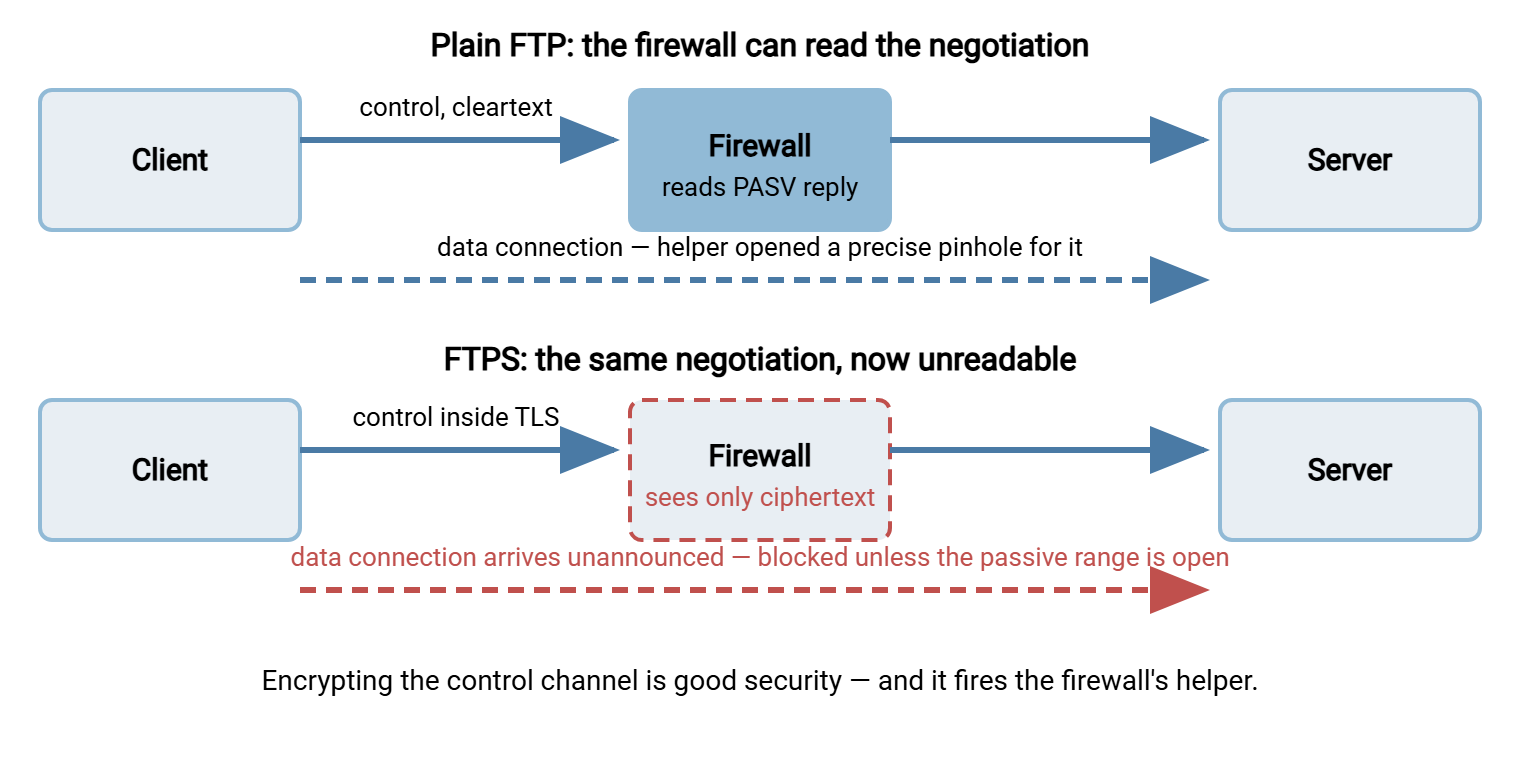
The consequences follow mechanically. FTPS through a firewall requires static configuration. The server administrator defines a passive port range and opens that exact range inbound on the firewall. When the server sits behind NAT, the administrator configures it to announce its public address. No helper will rewrite the private one for it. Miss any leg of that tripod and you get FTPS's signature failure: TLS handshake fine, login fine, then LIST hangs forever. Add a load balancer and the coordination burden grows again, as covered in FTP through load balancers and proxies.
One historical escape hatch deserves a mention: the CCC command ("clear command channel"). It lets a session authenticate under TLS, then drop the control channel back to cleartext so helpers can resume reading the negotiation. File data stays encrypted. The command trades away command privacy — filenames and directory activity go back to being visible. Support for it is spotty on both clients and firewalls. So treat it as a compatibility tool of last resort rather than a design. The deeper protocol details live in our FTPS pillar.
Remember: the single most common FTPS deployment surprise is a setup which worked for years as plain FTP breaking the day TLS is enabled. That is not because encryption is fragile. It is because encryption blinds the firewall helper that was quietly making FTP work. Budget the passive-range and external-address configuration into every FTPS rollout from day one.
SFTP: One Rule, One Direction, Nothing to Negotiate
Now the contrast. SFTP is a file transfer protocol carried inside a single SSH connection, normally to port 22. There is no separate data connection, no mid-session port negotiation, and no address written inside the payload. So there is nothing for a helper to do and nothing for NAT to break. The firewall's entire involvement is one rule: allow TCP to port 22 on the server, inbound from wherever clients live. The state table tracks one connection per session from start to finish. Clients behind any NAT, double NAT, or hotel Wi-Fi reach the server exactly as well as clients on the same desk.
This is why network administrators have a strong favorite, and it is worth stating their case in their terms. SFTP means the fewest rules and zero protocol-specific firewall code. It means no coordination between server settings and firewall settings beyond a single port. Its failure modes are ordinary TCP failure modes. When an SFTP session cannot connect, the diagnosis is the same as any service. Is the port open? Is the host up? Is DNS right? Nothing about the protocol itself generates mystery.
Honesty requires the counterpoints, and there are two. First, port 22 is also interactive SSH. On Unix-style systems the same daemon that serves SFTP can hand out shells. So "open 22 for file transfer" can quietly mean "expose remote administration" unless the server is configured to offer file transfer only. That means a dedicated SFTP service, or accounts restricted to the SFTP subsystem. A dedicated Windows transfer server such as Sysax Multi Server sidesteps the issue structurally: it serves SFTP without any shell to expose. Second, the firewall cannot see inside the connection at all — which cuts both ways, as the next section explains. Protocol internals are covered in our SFTP pillar.
Inspection: What Your Security Tools Can Still See
Firewalls and the intrusion-detection systems behind them historically did more than pass or block — they read. It is worth being precise about what each protocol lets on-path security tools observe:
- Plain FTP: everything. Credentials, commands, filenames, file contents. An intrusion-detection system can watch for malware signatures in transferred files; a data-loss-prevention system can spot a spreadsheet of customer records leaving. Total visibility for your tools — and for any attacker on the same path. The two are inseparable.
- FTPS: the outside of the envelope. The firewall sees connection endpoints, the TLS handshake, and the server's certificate. After
AUTH TLS, commands and data are opaque. Filenames and contents are invisible to on-path tools. - SFTP: the least of all. Beyond the initial SSH version banner and key exchange, everything — authentication, filenames, data — is ciphertext. On-path tools see one long encrypted conversation and can report only that it happened, between which addresses, and how many bytes moved.
The practical conclusion is not "encrypted protocols hurt security" — it is that visibility must move from the network path to the endpoints. When you adopt SFTP or FTPS, content inspection, malware scanning, and per-file accountability have to happen where the data is in the clear. That means on the server that receives it and the client that sends it. Plan that shift deliberately. Otherwise, you will discover during an incident that the network logs you used to rely on now describe envelopes rather than letters.
Logging: What You Will Actually Have When Something Breaks
Logging quality differs more than people expect, and it shapes every future troubleshooting session.
At the firewall, an SFTP session produces the cleanest possible record: one connection entry per session — source, destination, port 22, byte counts, duration. Sessions correlate one-to-one with log lines. FTP and FTPS produce sprawl: each session is one control connection plus a scatter of data connections to random high ports. Nothing in the firewall log ties a data connection on port 50077 back to the session that spawned it. Multiply by a few hundred sessions a day and the firewall log becomes genuinely hard to read. That is one reason transfer investigations on FTP estates take longer than they should.
Because encrypted protocols blind the path anyway, the durable answer for all three protocols is the same: make the server's own session log the source of truth. A transfer server logs what no firewall can. It records the authenticated user, files uploaded and downloaded by name, success or failure per operation, and the session those operations belonged to. Whatever server you run, enable per-session activity logging and retain it. In Sysax Multi Server this is a built-in activity log covering all the protocols it serves. That conveniently gives FTP, FTPS, and SFTP sessions one consistent log format to search during an investigation.
The Rule Sheet: Every Inbound Opening, Side by Side
Here is the whole article compressed into the two artifacts you will actually use. First, the comparison from the firewall's chair:
| From the firewall's chair | Plain FTP | FTPS | SFTP |
|---|---|---|---|
| Connections per session | 2+ (control + data each transfer) | 2+ (same design, TLS-wrapped) | 1 |
| Inbound rules required | 21 + passive range (or helper) | 21 (+990) + passive range, always static | 22 only |
| Helper/ALG involvement | Possible; fragile but functional | Impossible — TLS blinds it | Not needed |
| Survives NAT without server config? | Only with a working helper | No — external address must be announced | Yes |
| On-path visibility | Full (credentials included) | Endpoints + certificate only | Endpoints only |
| Firewall log readability | Noisy — uncorrelated data connections | Noisy — same sprawl, less context | Clean — one entry per session |
And the copyable rule checklist for a server behind your firewall, in vendor-neutral form — translate each line into your firewall's syntax:
SFTP server:
  allow tcp from CLIENT-SOURCES to SERVER port 22
  (done)

FTPS server (explicit):
  allow tcp from CLIENT-SOURCES to SERVER port 21
  allow tcp from CLIENT-SOURCES to SERVER ports 50000-50100   # match the
      server's configured passive range exactly
  server config: passive range 50000-50100, announce public IP
  optional (implicit FTPS): allow tcp ... port 990
  disable the firewall's FTP helper for this traffic (it cannot help)

Plain FTP server (contained/legacy only):
  allow tcp from CLIENT-SOURCES to SERVER port 21
  allow tcp from CLIENT-SOURCES to SERVER ports 50000-50100   # passive range
  or: rely on the FTP helper/ALG, if policy permits it
  restrict CLIENT-SOURCES to the narrowest set possible
So Why Do Network Admins Have Such a Strong Favorite?
Add up the columns. SFTP asks the firewall for one static rule, involves no protocol-specific code, is indifferent to NAT, and writes one clean log line per session. FTPS asks for a port range, careful server-firewall coordination, and NAT configuration, and its on-path behavior confuses every middlebox that once understood FTP. Plain FTP behaves tolerably only when a helper reads its cleartext. That same cleartext disqualifies it from carrying anything sensitive, as this pillar's plain FTP containment guide details.
The fair conclusion is not that FTPS is broken — it runs at scale in many industries. When a partner or standard requires it, the static passive range recipe above makes it dependable. The fair conclusion is that FTPS makes you pay a recurring operational tax that SFTP simply does not charge. The network team is the department that pays it. When the protocol choice is otherwise open, that tax is a legitimate tiebreaker. That is exactly how it is weighted in this pillar's SFTP vs FTPS scorecard.
The Short Version
A firewall sees plain FTP as a readable protocol that opens surprise doors. It sees FTPS as an unreadable protocol that opens the same doors unannounced. It sees SFTP as one ordinary connection to one port. That is the whole story: helpers made FTP livable, TLS fired the helpers, and SFTP made them unnecessary. Whichever protocol you deploy, move your logging to the server side. If you deploy FTPS, treat the passive range, the firewall rule, and the announced external address as one configuration item. They must always change together.
To go deeper, SFTP vs FTPS completes this comparison beyond the network layer. The article on configuring passive port ranges is the hands-on companion for the FTPS recipe. And the migration guide covers moving an FTP estate to either successor.
Frequently Asked Questions
Why did plain FTP work through our firewall but FTPS fails?
What exactly is an FTP ALG or helper?
Which ports do I open for FTPS?
Is exposing port 22 for SFTP a security risk?
Can our firewall decrypt FTPS or SFTP traffic to inspect it?
Does SFTP have active and passive modes too?
From the Sysax team: we build secure file transfer software for Windows. Sysax Multi Server is an FTP, FTPS, SFTP, and HTTPS server. Sysax FTP Automation handles scheduled, scripted transfers. Free trials are on the download page.