
SSH Keys Explained for File Transfer
Somewhere in your organization, there is probably a script that logs into an SFTP server every night and moves files. If that script authenticates with a password, the password is sitting in a file. Anyone who can read the script can read it. It is typed into a protocol conversation every single night. And if policy forces a password change, that can silently break the job at the worst possible time. Every administrator who inherits one of these scripts eventually asks the same question. There has to be a better way to let a machine log into another machine.
There is, and it is the SSH key pair. Keys are how serious SFTP and SCP automation authenticates. No secret is typed, no secret crosses the network, and access can be granted, restricted, and revoked one key at a time. But keys only deliver those benefits if you understand what the two halves actually do. Most explanations either drown the reader in cryptography or wave their hands entirely.
This article is the plain-words version. By the end you will know what each half of a key pair is for and how a key actually logs you in. You will know what a fingerprint is and why administrators quote them at each other. You will also know exactly why keys beat passwords for unattended transfer jobs. It is the foundation article of our SSH Key Management series. Everything else in the series builds on the mental model you get here.
One Identity, Two Halves: What a Key Pair Is
An SSH key pair is two small files that are generated together and mathematically linked. One is the private key — the secret half. The other is the public key — the shareable half. The pair works because of a one-way relationship between them. Anything signed with the private key can be verified with the public key. But the public key cannot be used to reconstruct the private key or to forge a signature. You can hand the public key to anyone on earth without weakening the secret half.
The classic analogy is a padlock and its key, and for once the classic analogy is accurate. The public key is a padlock: you can stamp out copies and hand them to every server you want access to. Each server snaps your padlock onto your account. The private key is the one physical key that opens those padlocks. Owning a padlock lets a server recognize you; it never lets the server — or anyone who steals the padlock — impersonate you.
This division of labor produces the single most important rule in all of key management, the rule that everything else in this series depends on:
Remember: the private key never leaves the machine it was created on. It is never emailed, never pasted into a chat, never uploaded to the server you want to reach. Only the public key travels. If any procedure, colleague, or vendor ever asks you to send a private key somewhere, the procedure is wrong.
Notice what this rule implies about setup. When you hear "install your key on the server," what actually gets installed is the public half. It is appended to a server-side list of accepted keys. The private half stays home. That is why key authentication can be safer than passwords even across untrusted networks. There is no moment, ever, when the secret is in transit.
How a Key Logs You In: A Challenge, Not a Secret
Password login is simple to picture: the client sends the secret, the server compares it to what it has on file. Key login is different in a way that matters. The client never sends the secret at all. Instead, the server issues a challenge — a one-time test that only the holder of the private key can pass.
Here is the sequence in plain words, for an SFTP client connecting to a server:
- The client connects and the two sides establish an encrypted channel. The server also proves its own identity at this point. That is the host key, a separate topic we cover in host keys and known_hosts.
- The client says, in effect: "I would like to log in as user
transfer-acme, and here is the public key I intend to use." - The server checks its list of authorized public keys for that account. If the offered key is on the list, the server replies: "Prove it. Sign this unique, one-time piece of data tied to this session."
- The client uses the private key to produce a signature over that data and sends the signature back. The signature demonstrates possession of the private key without revealing a single bit of it.
- The server verifies the signature using the stored public key. If it checks out, the login succeeds.
The diagram below shows the exchange. Follow the arrows and notice which things cross the network: a public key, a challenge, and a signature — never the private key itself.
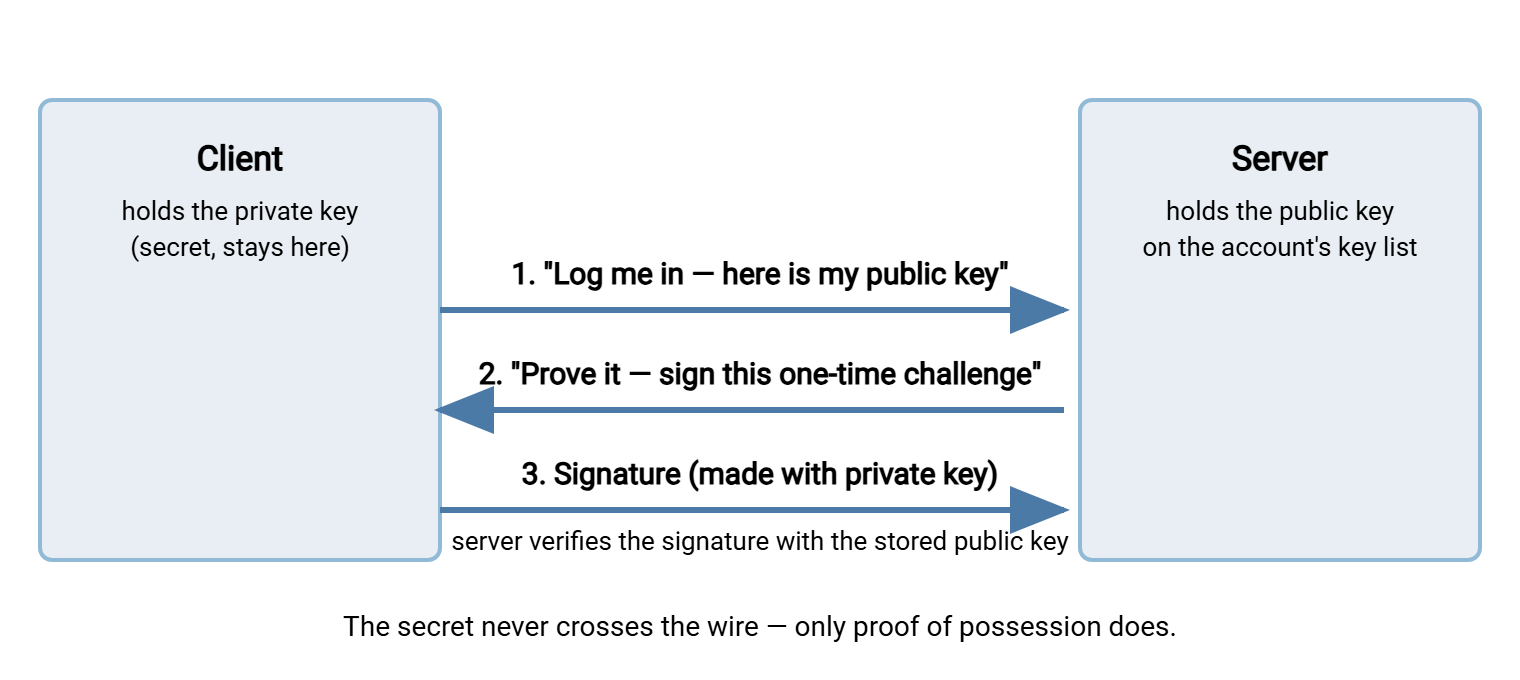
Two properties of this exchange are worth pausing on, because they are the source of every advantage keys have. First, the challenge is unique per session, so a recorded login cannot be replayed later. The old signature will not match a new challenge. Second, the server ends the exchange knowing the client holds the private key. Yet it has learned nothing that would let it impersonate the client elsewhere. An attacker who compromises the server cannot use that exchange to impersonate the client either. Compare that with a password, which the server necessarily receives in usable form every time you log in.
Fingerprints: A Short Name for a Long Key
A public key is a few hundred characters of base64 text. Humans cannot compare those by eye, and reading one over the phone to a partner would be absurd. So SSH gives every key a fingerprint: a short, fixed-length hash of the public key that acts as its name. If two fingerprints match, the keys are the same; if they differ in even one character, the keys are different. A fingerprint identifies a key the way the last four digits of a card number identify a card. It is enough to recognize it, nowhere near enough to recreate it, and safe to say out loud.
You will meet fingerprints constantly in transfer work. You use them to confirm with a partner that the key they received is the key you sent. You use them to check which key a nightly job is using. They let you match a line in a server's key list to an entry in your inventory. They also let you verify a server's identity on first connection. The command that prints a fingerprint is ssh-keygen -l, pointed at a public key file:
$ ssh-keygen -lf nightly-report.pub
256 SHA256:Yq8kT3n0Wb1xR7pVd2mAzcE9fH6uJ4sLgN5oPiQwXk0 nightly-report@batch01 (ED25519)
Read the output left to right. It shows the key's size in bits, the fingerprint itself (the SHA256:... string), the key's comment label, and the key type. When this series talks about "inventorying keys" or "confirming a key with a partner," fingerprints are the unit of conversation. Get in the habit of recording one for every key you create. It costs nothing now and answers questions years later.
Why Keys Beat Passwords for Unattended Transfers
For a human logging in interactively, passwords and keys are both workable. For an unattended job — a scheduled transfer that runs with nobody watching — the comparison stops being close. Here is the honest case, point by point:
- No secret crosses the network. A password is transmitted (inside the encrypted channel) and processed by the server on every login. A private key never travels. A compromised or impersonated server can capture a password and reuse it; it can capture nothing reusable from a key login.
- Not guessable in practice. Password guessing against internet-facing SFTP servers is constant background noise — dictionaries, credential lists, brute force. A properly generated key has no dictionary to try. Attackers scanning your server can hammer at it for the lifetime of the universe without stumbling onto a private key. (Guessing attacks and how to blunt them are covered in our brute-force protection series.)
- Nothing to type means nothing to prompt for. Unattended jobs fail in ugly ways when something unexpectedly asks a question. Key authentication is designed for non-interactive use; there is no prompt to hang on at 2 a.m.
- No scheduled-expiry breakage. Password policies that force periodic changes are built for humans and quietly sabotage machine accounts. The password expires, the job fails, and the on-call admin learns about the policy at 3 a.m. Keys do not expire on a policy clock; they are retired deliberately, on your schedule.
- One key per machine and per job. A password is one secret shared by every script and person who knows it. Keys are naturally per-client: the reporting server gets its own pair, the backup box gets its own, each partner gets their own. Access can then be revoked for exactly one of them without touching the rest.
- Server-side restrictions. A password grants whatever the account can do. A key entry on the server can carry conditions — only from this address, only this operation, no interactive shell. That per-key control is one of the strongest tools in this series, covered in distributing and controlling authorized_keys.
Honesty requires the other side of the ledger, too. Keys shift the burden rather than abolishing it. The private key file is still a secret that must be stored and permissioned correctly. And keys accumulate silently if nobody tracks them. A server can end up trusting keys whose owners left years ago. Keys do not remove the need for management; they make management possible, at a per-key granularity passwords cannot offer. The rest of this series is exactly that management. For a broader comparison of authentication methods across protocols, see our transfer authentication series.
The Two Files on Disk
Concretely, generating a key pair produces two files. With default naming on OpenSSH-style systems they land in the .ssh folder of your home directory. Examples are id_ed25519 (the private key) and id_ed25519.pub (the public key). The .pub suffix is the entire naming distinction, which is why sloppy handling causes accidents. The file without .pub is the secret.
The public key file is a single line of text, and it is worth seeing one so it stops being mysterious:
ssh-ed25519 AAAAC3NzaC1lZDI1NTE5AAAAIFa9k2PqT7wXe0cRuY4mHnB1sLdJ8vZoGxN6iQpM3tE5 nightly-report@batch01
There are three space-separated parts: the key type, the key material in base64, and a free-text comment. The comment is a label that travels with the key and exists purely for humans. Use the comment deliberately (which job, which machine) and future audits become dramatically easier. The private key file, by contrast, is a multi-line block framed by BEGIN and END OPENSSH PRIVATE KEY markers. You never need to read its contents; you only need to protect them.
What about key types? You will see names like ed25519, ecdsa, and rsa in file names and outputs. Resist the urge to memorize a "best algorithm" — that answer drifts, and chasing it is not the job. The durable guidance: use the current recommended types. In practice, that means whatever a current OpenSSH release offers as its default. Keep RSA in your toolkit for older servers and appliances that predate newer types. The generation walkthrough is the subject of generating and storing SSH keys properly. It includes the type decision and the passphrase decision.
Where Keys Fit in a Transfer Workflow
SSH keys matter to file transfer because the workhorse transfer protocols ride on SSH. SFTP is a file transfer protocol that runs inside an SSH session; SCP is a copy command that does the same. Authenticate the SSH session with a key and your file transfers are key-authenticated — there is no separate "SFTP key" to manage. (If the relationship between SSH and SFTP is fuzzy, how SFTP works lays it out; SFTP authentication covers the method choices on the server side.)
In a typical transfer setup, the pieces land like this:
- On the client machine — the one initiating transfers — lives the private key, owned by the account the job runs as. Command-line tools like
sftpandscppick it up automatically or via configuration. On Windows, a scheduled-transfer client such as Sysax FTP Automation stores the path to the private key in the connection profile. So every unattended run authenticates the same way. - On the server lives the public key, attached to a specific account. On OpenSSH servers that means a line in the account's
authorized_keysfile. On a Windows SFTP server such as Sysax Multi Server, you attach the public key to the account in the server's configuration. It is the same principle, with a different interface. The server stores public halves and challenges whoever connects. - In your records lives the fingerprint, the owner, and the purpose. This inventory habit keeps key sprawl from becoming next year's incident. It is covered in key rotation and the key inventory.
The table below condenses the comparison you will most often need when moving a transfer job from password to key authentication. It is also the comparison you will need to explain to management.
| Question | Password login | Key login |
|---|---|---|
| Does the secret cross the network? | Yes, on every login (inside encryption) | Never — only a one-time signature |
| Can it be guessed remotely? | Yes — weak or reused passwords fall | Not in practice |
| Granularity of access | One shared secret per account | One key per person, machine, or job |
| Revoking one user or machine | Change the password, update everyone | Remove that one public key |
| Per-credential restrictions on the server | No — account-wide only | Yes — source address, forced command, more |
| Suits unattended jobs? | Poorly — stored in plaintext, expiry breakage | Yes — designed for non-interactive use |
What Key Pairs Do Not Solve by Themselves
A clear mental model includes the edges. Three things a user key pair does not handle:
It does not verify the server. Your key proves the client's identity to the server. The mirror-image question is: is the machine I just connected to really my server, or an impostor? A different key pair entirely answers that: the server's host key. Your client checks it against a remembered fingerprint. Automation that ignores host keys is automation that can be silently redirected. So treat host keys and known_hosts as the required second half of this article.
It does not manage itself. Keys have no built-in expiry and no central registry. Every key you create will exist until someone deliberately removes its public half from the servers that trust it. Without an inventory and an offboarding habit, key sprawl becomes forgotten access. The rotation and inventory habits, and the offboarding sweeps later in this series, exist to prevent exactly that problem.
It does not protect a badly stored private key. The math is unbreakable; a private key sitting world-readable on a shared server is not. File permissions, storage locations, and the passphrase decision are the very next article in the series.
Where to Go Next
Here is the one-minute version to carry forward. An SSH key pair is a secret private half that never leaves its machine and a shareable public half that servers keep. Login is a challenge-and-signature exchange, so no secret ever crosses the network and nothing can be replayed. Fingerprints are short, safe names for keys — the vocabulary of every audit and every partner conversation. For unattended transfer jobs, keys beat passwords on every axis that matters. There is nothing transmitted, nothing guessable, and nothing to expire mid-job. There is also per-key revocation and restriction on the server.
Next, put the model into practice: generate and store a key properly, then control the server side with authorized_keys. If your immediate goal is moving a scheduled job off passwords, SFTP automation shows where key authentication slots into an unattended workflow.
Frequently Asked Questions
Can someone who has my public key break into my account?
What happens if I lose my private key?
Is the private key encrypted, or just a plain file?
What is a fingerprint actually used for?
Are SSH keys the same thing as SSL/TLS certificates?
Can I use one key pair for all my servers?
From the Sysax team: we build secure file transfer software for Windows. Sysax Multi Server is an FTP, FTPS, SFTP, and HTTPS server. Sysax FTP Automation handles scheduled, scripted transfers. Free trials are on the download page.