
What Attackers Actually Want from Your File Transfers
"Secure it against whom, exactly? Who would bother?" The question came at the end of a long change meeting, from a capable administrator, about a file transfer server. It is a fair question. The box is not a bank, not a customer database, not a hospital system. It is a quiet machine that moves files from one place to another. It feels like an unlikely target.
The answer is: more parties than you would guess, for more reasons than you would guess, and most of them are not choosing you at all. They are choosing everyone. Any service that listens on the internet is being probed continuously by automated scanners. File transfer services get special attention because of what they are. They are concentrated collections of data that somebody valued enough to move. They are guarded by credentials, sitting on the boundary between your network and the world. Nobody bothered. They automated the bothering.
This article decodes the motives. Understanding why attackers want your transfer service is the foundation of every defense decision that follows. Motive shapes method. An attacker who wants your files behaves differently from one who wants your bandwidth. The logs they leave behind look different too. By the end, you will be able to look at your own server the way an attacker does. You will know which defenses answer which motive. It is the opening article of our File Transfer Threat Modeling series, and everything else in the series builds on it.
Why File Transfer Services Make Attractive Targets
Five properties explain why this class of service draws attention at all, before any individual motive enters the picture:
- They concentrate curated data. Nobody sets up a transfer flow for worthless files. A transfer server collects payroll runs, invoices, orders, medical records, engineering drawings, and database exports. These are exactly the files an organization considers important enough to send somewhere. An attacker does not have to hunt through a whole network for the good material. The transfer service has already gathered it.
- They are exposed by design. A partner-facing transfer endpoint must be reachable by outsiders — that is its job. You cannot simply firewall it away from the internet the way you can an internal database. Exposure is a permanent condition to be managed, not a mistake to be corrected.
- They are easy to find. Transfer protocols live on well-known ports, and internet-wide scanning services catalog every reachable host continuously. Your server's address, open ports, and software version are almost certainly listed in public search indexes already. There is no hiding in obscurity.
- They are often less watched. Email and web servers get security attention because everyone knows they are attacked. Transfer servers frequently run for years in a quiet corner, doing their job, with nobody reading the logs. Quiet corners are where intruders prefer to work.
- They hold trust and credentials. A transfer server authenticates partners, stores or receives credentials, and produces files that downstream systems import without question. Compromising it does not just expose data — it inherits relationships.
With those properties in mind, the four motives below stop being abstract. Each one exploits a different property of the same machine.
The diagram below shows the four motives at a glance: the same transfer service, viewed by four different kinds of attacker, each after something different.
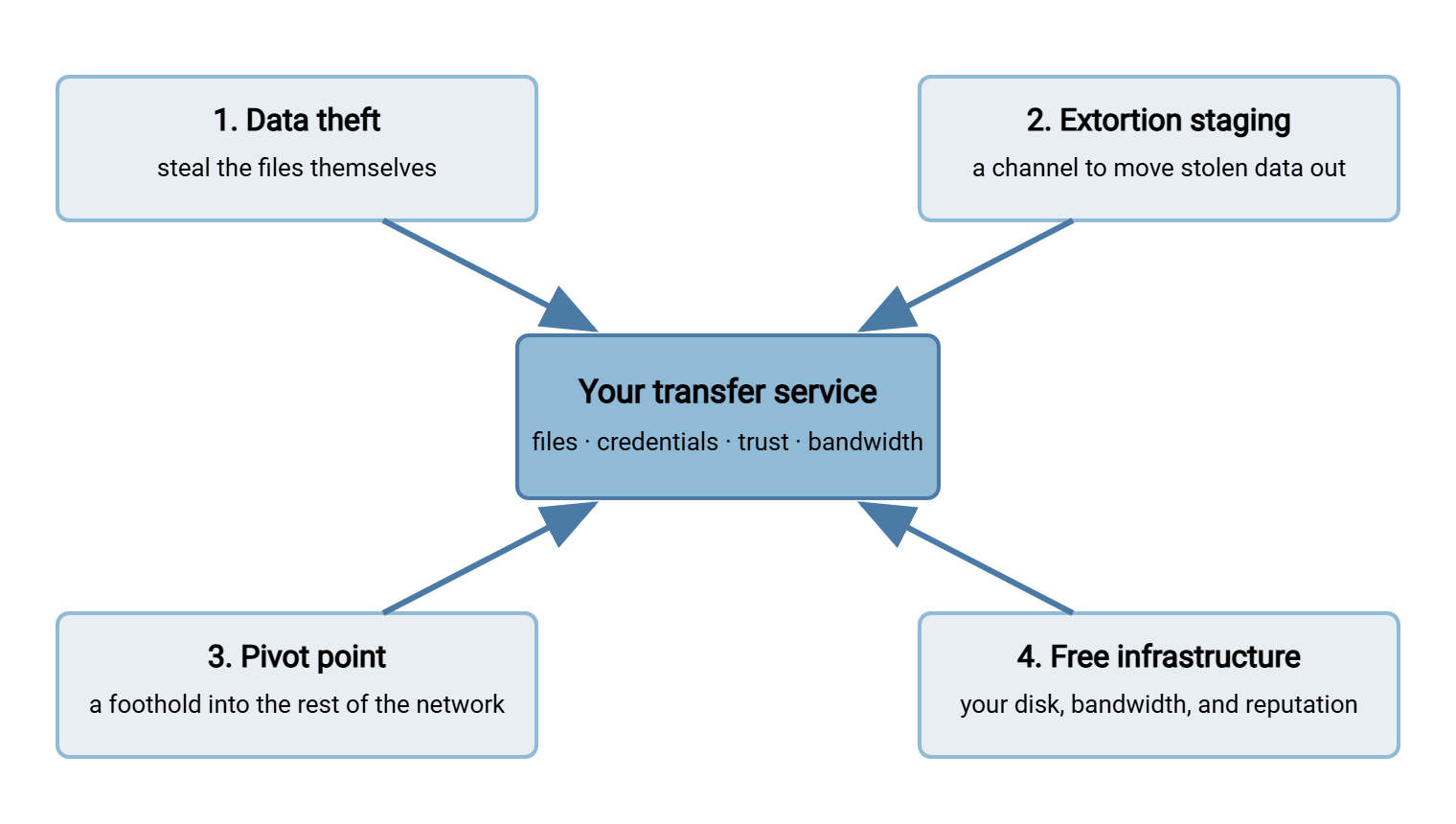
Motive One: The Data Itself
The most direct motive is theft of the files. What makes this worth an attacker's time is not always what administrators expect, so here are the forms value can take:
- Directly usable data. Payroll files contain names, addresses, salaries, bank details, and national identity numbers — the raw material of identity fraud. Healthcare files carry protected patient information. Order and invoice files reveal who your customers are and what they pay. Files like these have a straightforward criminal market.
- Extortion material. An attacker does not need to resell data to profit from it. Threatening to publish it — customer lists, contracts, personnel files, anything embarrassing or regulated — converts stolen files into leverage against you directly.
- Competitive and targeting value. Engineering drawings, price lists, and bid documents interest competitors and the intermediaries who sell to them. Even mundane files help an attacker plan the next stage: an org chart or a vendor list is a phishing target list.
- Aggregation value. Individually boring files become valuable in bulk. One week's invoice batch is nothing; the ability to quietly read every invoice batch for months is a business intelligence feed.
- Credentials inside files. A special prize: configuration exports, scripts, and documentation that pass through transfer flows often contain passwords, connection strings, and keys. Attackers search stolen file sets for these first, because each one opens another door.
Two practical conclusions follow. First, you cannot judge how attractive your data is until you know what actually flows. That is why a file flow census, an inventory of every transfer you run, is the natural companion to threat thinking. Administrators who run one are routinely surprised by what turns out to be crossing their own boundary. Second, retention multiplies exposure. A server that deletes files after delivery exposes one day's data when breached. A server that quietly accumulates them exposes the entire archive. Old files sitting in a delivered folder are risk earning no interest.
Northgate Retail learned the retention lesson from a census rather than a breach. The "delivered" folder on their partner server turned out to hold every nightly order file since the flow went live. Years of them sat behind the same partner password as the newest one. Nobody had decided to keep them. The job moved files in and nothing moved them out. They added a cleanup step that removed each file the day after the partner confirmed receipt. They also added a quota so the disk would complain if the cleanup ever stopped. The server's exposure went from an archive to a single day's traffic without anyone touching a firewall.
Motive Two: Ransomware and Extortion Staging
Modern ransomware operations rarely stop at encrypting your disks. The standard playbook is double extortion. First, quietly copy your data out. Then encrypt what remains. Then demand payment twice over: once for the decryption key, once for the promise not to publish what was stolen. That "copy your data out" step is called exfiltration. It means moving data from inside your network to somewhere the attacker controls. It is where your transfer infrastructure enters the story in two uncomfortable ways.
First, as the getaway vehicle. Attackers prefer to use tools that already exist inside a victim's network. Traffic from a legitimate, already-installed transfer tool draws far less suspicion than traffic from something they bring along. A transfer server or automation client that can reach the internet is, from an intruder's perspective, a pre-approved exfiltration channel. Outbound file transfers are literally what it is for, so a few more transfers blend in. This is exactly why defenders watch outbound transfer volume and destinations, not just logins. Suppose a flow normally moves fifty megabytes a night and suddenly moves twenty gigabytes. Or it connects to an address no partner has ever used. Either change is one of the highest-value alerts a transfer log can produce. It is the kind of signal our transfer logging and audit series is about.
Second, as a high-reach victim. To do its job, a transfer server often has read and write access to many places: department shares, application export folders, archive volumes. Ransomware that lands on an ordinary workstation encrypts what that workstation can reach. Ransomware that lands on a transfer server encrypts what the server can reach. That is usually far more. The server's reach — an operational convenience — is also its blast radius. Trimming that reach to what each job genuinely needs is one of the cheapest risk reductions available. It costs only configuration time. Convenience and blast radius are the same setting, read on different days.
Motive Three: A Pivot Point into Your Network
Some attackers do not care about your files at all. They want the machine — because of where it stands and what it knows. In security language, using one compromised system to reach others is called pivoting. The spread from system to system is lateral movement. Transfer servers make excellent pivot points for three reasons.
They straddle the boundary. A transfer server typically has one foot in the reachable world, accepting connections from the internet. It has one foot inside, with network paths to the systems that feed it files and collect them. Compromise the machine that bridges the two, and the attacker inherits the bridge. This is precisely why security architecture puts edge-facing transfer hosts in a DMZ. This is a buffer network segment with deliberately limited paths to the interior. Our DMZ and gateway architecture series covers this design in depth.
They know things. A working transfer environment accumulates operational knowledge. It has scripts with connection details, saved profiles for partner endpoints, and scheduled jobs that name internal hosts. Sometimes it has credentials stored in plain text by an administrator in a hurry. To an intruder, each stored credential is a key already cut. A transfer server that holds passwords for the ERP export share, the backup target, and three partner endpoints converts one compromise into four. Nothing on a transfer server is more patient than a stored password.
They are trusted downstream. Files that arrive through the established transfer flow are treated as legitimate by whatever consumes them. An import job does not interrogate a file's life story. It processes what appears in the folder. An attacker who controls the transfer path can therefore inject content into systems that would never accept a connection from the outside. That content might be a poisoned price file, a tampered configuration, or a malicious payload dressed as the nightly batch. The trust your automation places in the transfer flow is part of the transfer flow's value to an attacker.
The defensive translation: keep secrets off the edge machine wherever possible. Give every job its own narrowly scoped account. Treat the transfer server's own integrity as something worth monitoring — not just its uptime.
Motive Four: Free Infrastructure
The least dramatic motive is the most common one for small servers: the attacker wants your machine as a resource. Disk space, bandwidth, and a clean reputation are worth money, and a writable server on the internet provides all three at your expense. From their side, it is a very good deal.
- Storage for illegal content. Automated crawlers discover writable space. Classically, this is an anonymous FTP upload area, but any weakly guarded account will do. The space gets filled with pirated software, video, and worse. The operators then share your address as a distribution point. This abuse pattern is old, ongoing, and entirely automated. Our anonymous and guest access series covers it in detail.
- Malware distribution. Attackers need hosting for malicious files that does not trace back to them, served from an address with no bad reputation. A compromised transfer server with a respectable business domain is ideal: links to it pass reputation filters that would block a known-bad host.
- Relay and cover traffic. A compromised host can proxy an attacker's onward connections, making their traffic to the next victim appear to come from you.
The costs land on you in slow motion. Your address appears on blocklists. These are shared databases of misbehaving hosts that mail servers and security products consult. Suddenly, unrelated things break, like your organization's email deliverability. Disks fill with strangers' files until legitimate jobs fail. In the worst cases, illegal content on your hardware brings legal attention before you knew the content existed. Free-infrastructure abuse rarely makes headlines, but it is the most likely fate of an unwatched server with weak credentials or anonymous write access.
How Your Server Looks from the Outside
Attackers begin with reconnaissance — learning what you have before touching it. For internet-facing services, most of that work is already done for them. Scanning projects sweep the entire public address space on a rolling basis. They record which ports answer at every address and what the services say about themselves. Within hours of a new transfer endpoint going live, its existence, open ports, and banner are indexed and searchable. The banner is the greeting text a service sends on connection. It often names the software and version. Nobody had to look for you specifically. You were cataloged along with everyone else. I have seen the first guesses arrive before the partner's test login did.
From that catalog, two very different kinds of attention follow, and telling them apart matters:
- Opportunistic attention is bulk work. Automation harvests the list of every host answering on a transfer port. It tries common usernames and passwords against all of them, around the clock. It has no idea and no interest in who each victim is. This is the vast majority of what your logs will show, and every internet-facing server receives it.
- Targeted attention means someone chose you. The probes use your real account naming pattern, your employees' names, your partners' names — details that required research. Far rarer, far more serious, and only distinguishable from the noise if you actually read the evidence.
The evidence looks like this — a fragment of an authentication log from a typical internet-facing server, showing the opportunistic knocking that never stops:
03:12:44  connect 198.51.100.23   USER admin      530 Login incorrect
03:12:47  connect 198.51.100.23   USER admin      530 Login incorrect
03:12:53  connect 203.0.113.87    USER test       530 Login incorrect
03:13:05  connect 198.51.100.23   USER ftpuser    530 Login incorrect
03:13:18  connect 192.0.2.140     USER backup     530 Login incorrect
03:13:31  connect 203.0.113.87    USER admin123   530 Login incorrect
03:13:44  connect 192.0.2.140     USER upload     530 Login incorrect
Read defensively, this fragment says: multiple unrelated addresses, generic usernames, steady mechanical timing — opportunistic scanning, unpleasant but normal. The moment the usernames stop being generic and start being yours, the story changes. That distinction is only visible if login attempts are being recorded and reviewed. On a server product such as Sysax Multi Server, the activity log captures every connection and authentication attempt. That makes this kind of review a ten-minute habit rather than a forensic project. Reading your own authentication log for one week is the fastest education in attacker attention available, and it costs nothing.
While you are looking outward-in, check what your own service volunteers. Banners that announce exact software versions hand attackers their next search query ("known vulnerabilities in version X"). Trimming what your server discloses is part of the hardening discipline covered in our hardening transfer servers series.
Remember: you do not have to be chosen to be attacked. Most attacks against transfer services are automated sweeps that try every server they can find. Being small, obscure, or boring offers no protection from a process that never checks. Being hardened and being watched are the defenses that work — obscurity is not one of them.
Matching Motive to Defense
Motives are only useful if they change what you defend. The table below maps each motive to what the attacker reaches for first and the defenses that most directly answer it.
| Motive | What they go for first | Defenses that answer it |
|---|---|---|
| Data theft | The files, and the credentials guarding them | Strong authentication, encrypted protocols, least-privilege access, short retention on the server |
| Extortion staging | Your outbound channel and the server's reach | Egress monitoring, alerts on volume and new destinations, trimming the server's access to shares |
| Pivot point | Stored credentials and the server's trusted position | DMZ placement, minimal secrets on the edge box, one narrowly scoped account per job |
| Free infrastructure | Writable space behind weak or absent credentials | No anonymous writes, disk quotas, lockouts on guessing, routine log review |
The same handful of controls keeps appearing across four different motives: strong authentication, encryption, least privilege, restrained retention, and logs that someone reads. That convergence is good news for a small team — you do not need a defense per attacker. Guessing-resistant authentication alone shuts down the cheapest path for all four motives, which is why it gets an entire series of its own in brute-force protection.
From Motive to Threat Model
Knowing what attackers want is step zero of threat modeling. This is the structured habit of asking who might attack a system, how, and what to do about it. This series teaches it end to end. The next steps follow naturally from here. Map everything an attacker can touch on your service — every port, login prompt, admin page, script, and stored credential — with the attack surface of a file transfer service. See how the motives translate into concrete technique in the attacks file transfer services actually see. Then put it all together on one of your own flows with threat modeling a file transfer workflow, step by step.
The version to keep in your head: attackers come for your files, your outbound channel, your network position, or your raw resources. Usually they come for whatever is cheapest. They find it through automation that never sleeps and never cares who you are. Defend accordingly: assume you are already on the list, because you are. That is the answer to "who would bother?": nobody in particular, and everyone by default.
Frequently Asked Questions
My transfer server holds nothing sensitive. Am I still a target?
How do attackers even find my server in the first place?
Are small businesses really attacked, or just large ones?
What is the single most effective first defense?
Does moving my service to a nonstandard port protect it?
From the Sysax team: we build secure file transfer software for Windows — Sysax Multi Server, an FTP, FTPS, SFTP, and HTTPS server, and Sysax FTP Automation for scheduled, scripted transfers. Free trials are on the download page.