
The Attack Surface of a File Transfer Service
"Where can this thing be attacked?" "Port 22, and the login." That answer comes from a competent administrator, and it is true, and it is maybe a third of the real answer. The service can also be attacked through its admin interface or the operating system underneath it. Attacks can come through the scripts and stored credentials that drive it, or the DNS name that points at it. They can also come through the partners who connect to it. An attacker gets to pick whichever of those is weakest. A defender has to know the whole list. The attacker only needs one line of it.
That list has a name: the attack surface, the sum of every point where an unauthorized party could try to touch, probe, or influence your system. This article maps the full attack surface of a typical file transfer service, piece by piece, and then works through how to shrink it. Shrinking matters because surface is where flaws get to matter. A bug in a protocol you have disabled cannot hurt you. A credential that no longer exists cannot be stolen. This is part of our File Transfer Threat Modeling series. The previous article covered why attackers want your transfer service; this one covers where they can reach it.
Surface Is Not the Same as Vulnerability
Two terms get blurred together, and separating them makes the whole subject clearer. A vulnerability is a specific exploitable flaw — a bug in the software, a guessable password, a misconfigured permission. The attack surface is the set of places where a flaw could be exercised: every listening port, every login prompt, every interface, every stored secret. You rarely know your vulnerabilities — that is what makes them dangerous. But you can always know your surface, because it is an inventory of what exists and what is reachable.
That asymmetry is why surface reduction is such a powerful habit for a small team. You cannot patch bugs you have not heard of. But you can remove the protocol nobody uses, close the admin port to the internet, and delete the account of the partner who left. Every one of those moves neutralizes whole categories of unknown future flaws at once. Less surface means fewer places where the next bug, whatever it is, applies to you. You cannot outrun the next bug, but you can decline to be where it lands.
The map itself fits in one picture. The diagram below is what this article walks through. It puts the transfer service in the center, with seven kinds of surface an attacker can approach it through. These include network ports, the authentication endpoint, admin interfaces, and the software stack underneath. They also include the scripts and credentials that operate it, the names and certificates that identify it, and the partners who touch it.
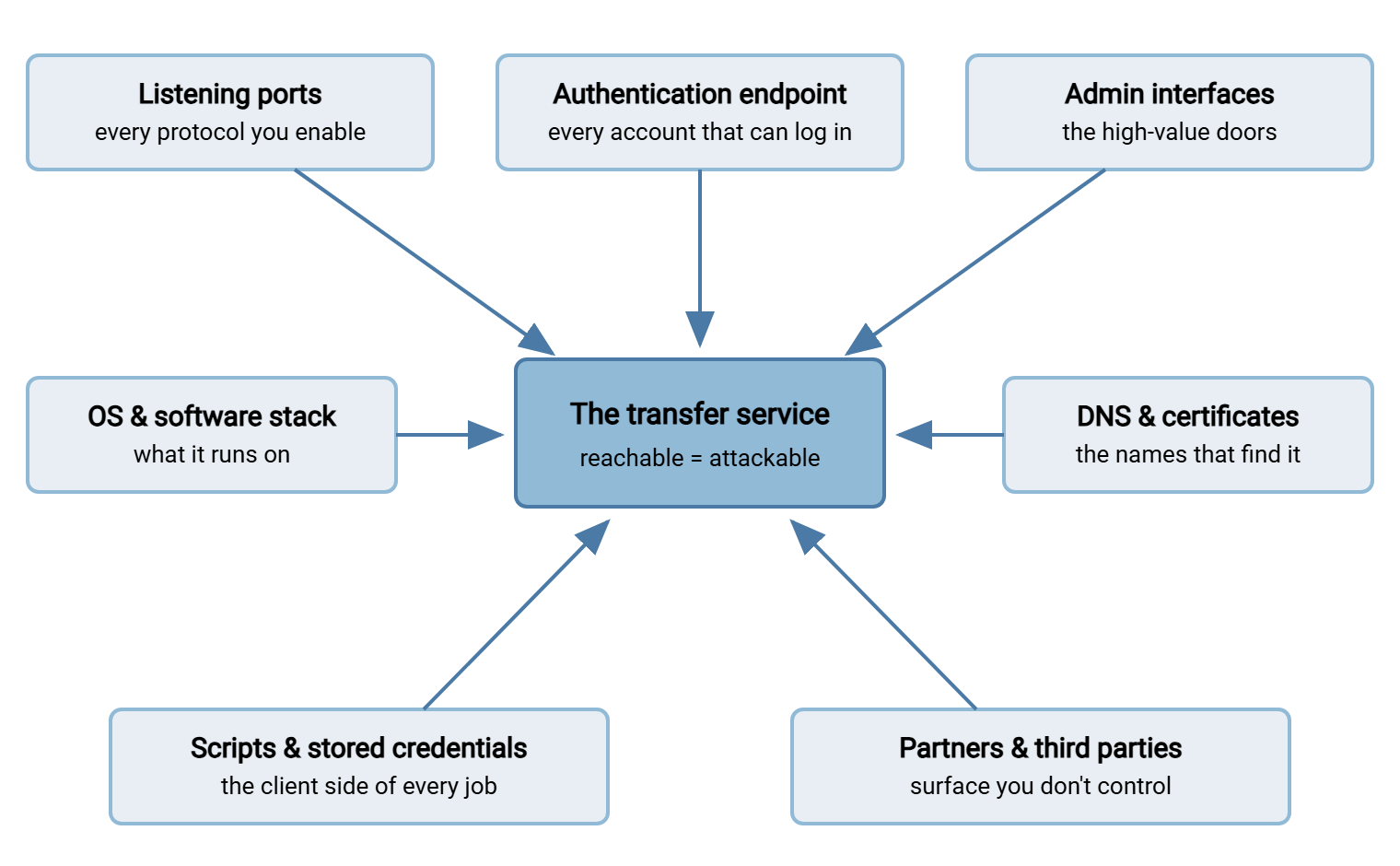
Walk any real transfer service through these seven and you will find surface you forgot you had. That is not a criticism. It is the normal condition of systems that grew over time. It is why the mapping exercise pays for itself. I have never once run it and found nothing.
Listening Ports and Protocol Endpoints
The most visible surface is the set of network ports the service answers on. Each one is a door. Behind each door sits code that parses whatever strangers send it. That protocol implementation has its own authentication path, its own configuration, and its own history of bugs. The rule that follows: every protocol you enable is a separate surface. A server offering FTP, FTPS, SFTP, and HTTPS simultaneously is four services wearing one name — four parsers, four sets of settings to get right. Multi-protocol servers such as Sysax Multi Server can speak all four from one box, which is genuinely convenient. That is exactly why the protocols you leave enabled should be the ones your flows actually use, not the ones the installer offered. If nothing uses plain FTP anymore, disabling it deletes an entire surface in one click. Our retiring plain FTP series covers getting to that point.
Ports also multiply in less obvious ways. FTP and FTPS in passive mode hand out data connections from a passive port range. This is a block of high ports that must be reachable. Every one is part of your surface. Configuring that range deliberately (and no wider than needed) is covered in configuring passive port ranges properly. The self-audit is short, and worth doing right now. List what your server is actually listening on, and compare it with what you believed.
C:\> netstat -ano | findstr LISTENING
  TCP    0.0.0.0:21       0.0.0.0:0    LISTENING    1420
  TCP    0.0.0.0:22       0.0.0.0:0    LISTENING    1420
  TCP    0.0.0.0:443      0.0.0.0:0    LISTENING    1420
  TCP    0.0.0.0:990      0.0.0.0:0    LISTENING    1420
  TCP    0.0.0.0:8080     0.0.0.0:0    LISTENING    2244   <-- what is this?
The last line is the classic find: a port nobody remembers, answering to the whole world (0.0.0.0 means "every network interface"). Often it turns out to be an admin panel or a forgotten tool — which brings us to the next two surfaces.
Bluewater Bank ran exactly this exercise on its partner transfer server during a routine review. They found a listener on a high port that nobody in the room could name. It turned out to be the remote console of a monitoring agent installed for a proof of concept. The agent had been left behind when the project ended. Its console answered on every interface. The firewall had been blocking it from outside the whole time, which is the only reason the story is short. They stopped the service, removed the agent, and added "explain every listener" to the quarterly checklist. Nobody wanted to find out what the next firewall change would have exposed.
One caution about this inside view: what the server listens on and what the internet can actually reach are different questions. Firewalls and NAT sit between them. The listening list is your potential surface. The ports reachable from outside are your exposed surface. Check the outside view too. Run a port check from a network you do not control, or ask a colleague at home to try the endpoints. Compare the two lists. Ports reachable externally that you cannot explain are urgent. Ports listening internally but blocked outside are dormant surface to clean up when you can. Dormant surface wakes up the next time someone edits a firewall rule.
The Authentication Endpoint
Every port that offers a login prompt is an invitation the whole internet can accept. This surface is measured not in ports but in accounts. Each username that can authenticate is one more credential that can be guessed, stolen, or stuffed. The attacks against this surface — password guessing, credential stuffing, spraying — are the most common events an internet-facing transfer service ever logs. The defensive discipline for them, lockouts and throttling and monitoring, fills our brute-force protection series. Choosing stronger methods than passwords fills the authentication series.
What matters for surface mapping is the inventory question: how many accounts exist, and how many should? Transfer services accumulate accounts the way drawers accumulate keys. There is the partner from a canceled contract and the test account from a troubleshooting session. There is the ex-employee whose login nobody disabled, and the shared account four people know the password to. Every one of them is surface. Stale accounts are the best kind for an attacker: valid credentials that no one is watching and no one will miss. The count of enabled accounts should match the count of active, named users and jobs — anything beyond that is surface with no purpose. A stale account never phones the help desk, which is what attackers like about it.
Login prompts can leak information even when the password is wrong, and that subtlety is worth knowing defensively. Suppose a service responds differently to "user exists, wrong password" than to "no such user". It might use a different message, or noticeably different timing. Those differences let outsiders quietly confirm which usernames are real before ever attempting a serious guess. Well-behaved server software answers both cases identically. It is worth checking that yours does.
Admin Interfaces: The High-Value Doors
Somewhere on every transfer server is the interface that configures it — a management console, a web panel, a remote desktop path. This surface is small and disproportionately valuable. A stolen user account gets an attacker one folder. A stolen admin session gets them every folder, every account, and every setting. It also lets them erase the logs that would have told the story.
The rule is blunt: administrative interfaces should not be reachable from the internet. Bind them to an internal management network or the local machine. Reach them over your VPN when working remotely. Protect them with different, stronger credentials than any transfer account, plus a second factor where supported. If the earlier netstat exercise showed a management port answering on all interfaces, that is finding number one from your mapping. Fixing that finding is usually a one-line configuration change. The broader lockdown of the box itself belongs to our hardening transfer servers series.
The Software Stack Beneath
Your transfer service is an application sitting on an operating system, alongside whatever else the box runs. All of it is surface. Three points deserve an administrator's attention:
- The service software itself ages. Transfer products — including big-name managed transfer products — have repeatedly been the direct target of exploitation campaigns when flaws were found in them. The lesson is not "product X is bad". It is that patching your transfer software is not optional maintenance. It is surface management for the code strangers talk to all day.
- The operating system underneath counts. OS-level services, disabled or not, patched or not, share fate with the transfer service above them.
- Co-tenants multiply exposure. A transfer server that is also the print server, the intranet box, and someone's report generator carries the combined surface of everything installed. Edge-facing roles deserve their own box precisely so their surface stays small and known — the reasoning behind the DMZ architecture approach.
Scripts, Jobs, and Stored Credentials
The surface that never appears on network diagrams is the client side of every automated flow. Somewhere, scripts and scheduled jobs hold the credentials that operate your transfers — and wherever those credentials sit, your attack surface extends to that spot. A password embedded in a batch file makes the batch file part of your transfer security. So is the wiki page where someone documented it, the shared drive where the script is backed up, and the old laptop with a copy of the repository. Credentials in scripts breed, and backups are how.
Mapping this surface means asking, for every job: where does its credential live, who can read that location, and what does the credential unlock? Uncomfortable answers are common — world-readable scripts with passwords in them, one credential reused across five jobs, keys without passphrases in unprotected folders. The fixes are equally concrete. Use keys with correct file permissions instead of embedded passwords (the SSH key management series is the full treatment). Use one narrowly scoped account per job. Hold credentials in a tool's protected connection profiles rather than pasting them into scripts. An automation client such as Sysax FTP Automation keeps the connection details in its profiles. At minimum, that gives credentials one managed home instead of a dozen accidental ones. Finding every job that exists in the first place is its own project — the file flow census is the method.
Remember: attack surface you forgot about is still attack surface. It is actually the most dangerous kind. Forgotten things are unpatched, unmonitored, and unmourned until they appear in an incident report. The mapping exercise exists to make sure the attacker holds no inventory you lack.
DNS, Names, and Certificates
Your endpoint is reached by name — transfer.example.com — and that name is surface too. Whoever controls the DNS record controls where your partners' uploads go. So the registrar and DNS accounts deserve the same protection as the server's own admin interface: strong unique credentials and a second factor. Watch for dangling records — names still pointing at addresses you have released. A stranger may later occupy those addresses while your name helpfully points customers at them. Decommissioning a server should always include deleting its DNS entries.
Certificates and host keys are the identity layer on top of the name: they are what lets a partner's software prove it reached the real you. An expired certificate does more damage than an outage. It trains humans and scripts on the far side to click through warnings. A partner trained to ignore warnings is a partner who will not notice genuine interception. Keeping certificates inventoried, renewed, and correctly chained is the subject of our certificate management series.
Partners and Third Parties: Surface You Don't Control
Every partner you exchange files with holds credentials to your service — which means your surface includes their security, and theirs includes yours. If a partner's automation host is compromised, the attacker inherits a valid login to your server, arriving from the expected address at the expected hour. No guessing required, nothing anomalous on the wire.
You cannot patch a partner, but you can bound what their compromise is worth. Give each partner an account that reaches exactly their own folder and nothing else (directory isolation patterns are covered in the file server permissions series). Restrict where their logins may come from when their addresses are stable. Watch for their account behaving out of character — new source address, odd hours, sudden volume. Detection signals like these are where logging earns its keep. They do double duty. The same out-of-character patterns that expose a compromised partner also expose misused access closer to home.
Shrinking the Surface: A Working Checklist
Mapping is diagnosis; shrinking is treatment. This checklist compresses the whole article into an afternoon of work. Copy it, run it against one server, and keep what you find for the risk assessment later in this series:
ATTACK SURFACE REVIEW — one transfer server

PORTS & PROTOCOLS
[ ] List every listening port; explain each or close it
[ ] Disable protocols no current flow uses
[ ] Passive port range: defined, minimal, firewalled to match

ACCOUNTS
[ ] Enabled accounts == active users + active jobs (no extras)
[ ] No shared accounts; every login names one person or one job
[ ] Stale / test / ex-partner / ex-employee accounts removed

ADMIN ACCESS
[ ] Admin interface unreachable from the internet
[ ] Admin credentials unique, strong, second factor if supported

SOFTWARE
[ ] Transfer service on current supported version; patch path known
[ ] OS patched; unrelated services removed from the box

CREDENTIALS & SCRIPTS
[ ] Every job's credential located and access-listed
[ ] No passwords readable in scripts, wikis, or shared folders
[ ] Keys have correct permissions; one account per job

NAMES & IDENTITY
[ ] DNS/registrar accounts protected with strong auth
[ ] No dangling DNS records; certs inventoried and in-date

PARTNERS
[ ] Each partner confined to their own folder
[ ] Partner source addresses restricted where practical
Expect the first pass to produce findings — that is success, not failure. Rank them and fix from the top, exactly as the step-by-step threat modeling method practices on a single flow.
The Shape of the Whole Thing
Attack surface is the defender's honest inventory: every port, account, interface, stored secret, name, and relationship through which your transfer service can be touched. You cannot make it zero — a transfer service with no surface transfers nothing. But you can make it known and minimal. Those two properties change everything downstream. Known surface gets monitored; minimal surface gives the next vulnerability fewer places to land.
There is also a quieter benefit. Once the surface is mapped, every future change request becomes easy to evaluate. Enabling a protocol, adding a partner, or exposing a new interface is no longer an abstract convenience question. It is a visible addition to a list you maintain. Teams that keep the map current find themselves saying "yes, and here is what that adds to our surface". That is exactly the posture that keeps a transfer service boring, in the best sense of the word. The answer to "where can this be attacked?" becomes seven clauses long, which is progress.
From here, the natural next read is the attacks file transfer services actually see. It shows what adversaries do against each of these surfaces in practice. Then read the practical risk assessment, where your surface findings become a ranked fix list for the whole estate.
Frequently Asked Questions
What is the difference between attack surface and a vulnerability?
If I only run SFTP, is my attack surface small enough?
Is it ever acceptable for the admin interface to face the internet?
Do ports blocked by the firewall still count as surface?
How often should I re-map the attack surface?
From the Sysax team: we build secure file transfer software for Windows — Sysax Multi Server, an FTP, FTPS, SFTP, and HTTPS server, and Sysax FTP Automation for scheduled, scripted transfers. Free trials are on the download page.