
Finding Stale and Orphaned Transfer Accounts
Every process in this series leaks. A leaver is missed because the email went to the wrong queue. A partner contract ends and nobody tells the transfer team. A job is retired and its service account is left "for now". The review stage exists because the other three stages are run by people. The question it asks is simple. Of all the accounts on this server, which ones are still used, and which ones still have an owner?
A stale account is one that has not logged in for a long time. It may still have a perfectly good owner who has not needed it. An orphaned account is one with no owner at all: the person left, the job ended, the contract expired. The two overlap but are not the same, and each needs a different source of evidence. This article gives you both sources: the server log for usage, the people list for ownership. It gives you a script that reconciles the account list against them. It also gives you a quarantine step that keeps the hunt from breaking anything, and a schedule that makes it a habit. It is the review stage of our User Lifecycle series. It turns the ten-minute census from the first article into a repeatable quarterly job.
Two Questions, Three Sources
The hunt answers two questions per account, and each has one authoritative source. "Is it used?" is answered only by the transfer server's own log, because that is the only place a login is recorded. "Does it have an owner?" is answered by the people list, joined to the account register that says who owns what. The people list is an export from HR or the directory that says who currently works here. The register is the third source, and if you do not have one yet, the first article shows the ten columns it needs.
| Question | Authoritative source | What a "no" means | Common false alarm |
|---|---|---|---|
| Is it used? | Transfer server log (file or database) | Stale: no login in the review window | Quarterly or annual jobs; log retention shorter than the window |
| Does it have an owner? | People list joined to the account register | Orphaned: owner absent or marked as left | Name changes; contractors missing from the HR export |
| Should it exist at all? | The owner, asked directly | Close it | Owners who say "keep" reflexively |
Notice that the directory is not the authoritative source for either question. A directory query tells you whether a person has logged on to the domain. That is evidence that they still work here, not that they use the transfer server. It is useful corroboration, and there is a query for it below, but the server log is the one that counts.
Last-Login Evidence from the Server Log
Whatever your server writes its log to, the job is the same. Find every successful login line, take the username from it, and keep the most recent one per user along with a count. The count matters as much as the date. An account that logged in once in a year and an account that logs in every night both have a "last login" in the window. Only one of them is plainly alive.
On an OpenSSH-based SFTP host the successful logins are the Accepted lines in the authentication log. Rotated logs must be read too, oldest first, so that the most recent entry is the one that survives. The -f flag on zcat lets it read compressed and uncompressed files alike. Reversing the file list puts the oldest first on a standard rotation scheme (check with ls before trusting it):
zcat -f $(ls -r /var/log/auth.log*) |
  awk '/sshd.*Accepted/ { last[$9] = $1 " " $2 " " $3; n[$9]++ }
       END { for (u in last) printf "%s,%d,%s\n", u, n[u], last[u] }' | sort > last-login.csv

cat last-login.csv
acme-in,63,Jun 30 02:00:11
kestrel-out,4,Apr 02 09:15:48
pnair,1,Jan 19 16:42:07
svc-erp-payroll,91,Jun 30 23:30:02
Read each row as username, number of logins in the period the logs cover, and the timestamp of the last one. The partner account logs in every weekday; the payroll job every night. The outbound partner logs in four times, which is plausibly quarterly. One human account logged in exactly once, months ago, which is a question for its owner. Any account in the register that does not appear in this file at all has not logged in for as long as the logs go back. You need to know how long that is. Three months of logs cannot prove an account has been idle for a year.
On a Windows server that writes its own text log, the same idea in PowerShell reads every log file. It matches the successful-login line and groups by user. The pattern below is for a synthetic format. Replace it with whatever your server actually writes. The reading transfer logs article will help you identify that format:
Select-String -Path 'D:\Logs\server-*.log' -Pattern 'LOGIN OK user=(\S+)' |
  ForEach-Object { [pscustomobject]@{ User = $_.Matches[0].Groups[1].Value; Line = $_.Line } } |
  Group-Object User |
  ForEach-Object { [pscustomobject]@{ User = $_.Name; Logins = $_.Count; Last = $_.Group[-1].Line } } |
  Export-Csv last-login.csv -NoTypeInformation
This assumes the log files sort into date order by name, which a daily server-YYYYMMDD.log convention guarantees. With that ordering, the last matching line in each group is the most recent login. A server that logs to a database makes all of this one query. The query takes the largest timestamp and the row count per username, over the successful-login rows. Sysax Multi Server, for example, records activity to a log file or a database. Either one gives you the last login per account in a minute once you know which column holds the username.
Directory Evidence, and What It Does Not Prove
For directory-backed human accounts, add one more column: when the person last logged on to the domain at all. If that date is also old, the person is probably gone and the HR export will confirm it. If it is recent, the person is here and simply not using the transfer server. That is a different conversation. Pull it for the group that holds your transfer users:
Get-ADGroupMember -Identity 'Transfer-Users' |
  Where-Object objectClass -eq 'user' |
  Get-ADUser -Properties LastLogonDate, PasswordLastSet |
  Select-Object SamAccountName, Enabled, LastLogonDate, PasswordLastSet |
  Sort-Object LastLogonDate |
  Export-Csv directory-users.csv -NoTypeInformation
LastLogonDate is derived from an attribute that replicates between domain controllers only every couple of weeks. So treat it as accurate to a fortnight, not a day. The filter on objectClass keeps nested groups and computer accounts out of the pipeline, where they would otherwise cause errors. Two dates in the past, on both this file and the server log, are a strong signal. One old date on its own is a question.
Reconciling Accounts Against the People List
Reconciliation means comparing two lists that should agree and reporting where they do not. Here one list is the account register, which says every account and its owner. The other is the HR export, which says every person and whether they still work here. For a human account the check is on the account's own username. For a service or partner account it is on the owner's username, because those accounts never appear in HR. Their orphan status depends entirely on whether the person responsible for them is still around.
This only works if the register records owners as directory usernames rather than display names. So add an owner_user column if yours does not have one. Matching on names fails on the first Jo Smith who turns out to be two people. The HR export needs just two columns, username and status. Most HR systems can produce that on a schedule once you explain what you need it for.
# accounts.csv: account,type,owner_user   hr-export.csv: username,status
$hr = @{}
Import-Csv .\hr-export.csv | ForEach-Object { $hr[$_.username.ToLower()] = $_.status }

Import-Csv .\accounts.csv | ForEach-Object {
    $acct  = $_.account.ToLower()
    $owner = $_.owner_user.ToLower()
    $finding = switch ($_.type) {
        'human' {
            if (-not $hr.ContainsKey($acct))      { 'ACCOUNT NOT IN HR' }
            elseif ($hr[$acct] -ne 'Active')      { "ACCOUNT HR STATUS: $($hr[$acct])" }
        }
        default {
            if (-not $hr.ContainsKey($owner))     { 'OWNER NOT IN HR' }
            elseif ($hr[$owner] -ne 'Active')     { "OWNER HR STATUS: $($hr[$owner])" }
        }
    }
    if ($finding) {
        [pscustomobject]@{ Account = $_.account; Type = $_.type; Owner = $_.owner_user; Finding = $finding }
    }
} | Format-Table -AutoSize

Account          Type     Owner    Finding
-------          ----     -----    -------
sokafor          human    sokafor  ACCOUNT HR STATUS: Left
acme-in          partner  sokafor  OWNER HR STATUS: Left
ftpuser2         service           OWNER NOT IN HR
temp_acme        partner  jrivera  OWNER NOT IN HR
The first block loads the HR export into a lookup table keyed by lowercase username. The second walks the register. Human accounts are checked by their own name, everything else by its owner's. Only rows with a finding are printed. Read the sample output as four different problems. Sam has left and Sam's human account was missed by offboarding. The Acme partner account is fine in itself but its owner was Sam, so it now has nobody. ftpuser2 has a blank owner, which the script reports as "not in HR" because an empty name is not in HR either. And temp_acme is owned by a username HR has never heard of. That usually means a contractor who was never in the HR system, or a typo. Either way it is a question.
Putting the Two Answers Together
Each account now has two facts: used or not used in the window, owned or not owned according to HR. The combinations decide what happens next, and the diagram below shows the whole pipeline from the three exports to the final action.
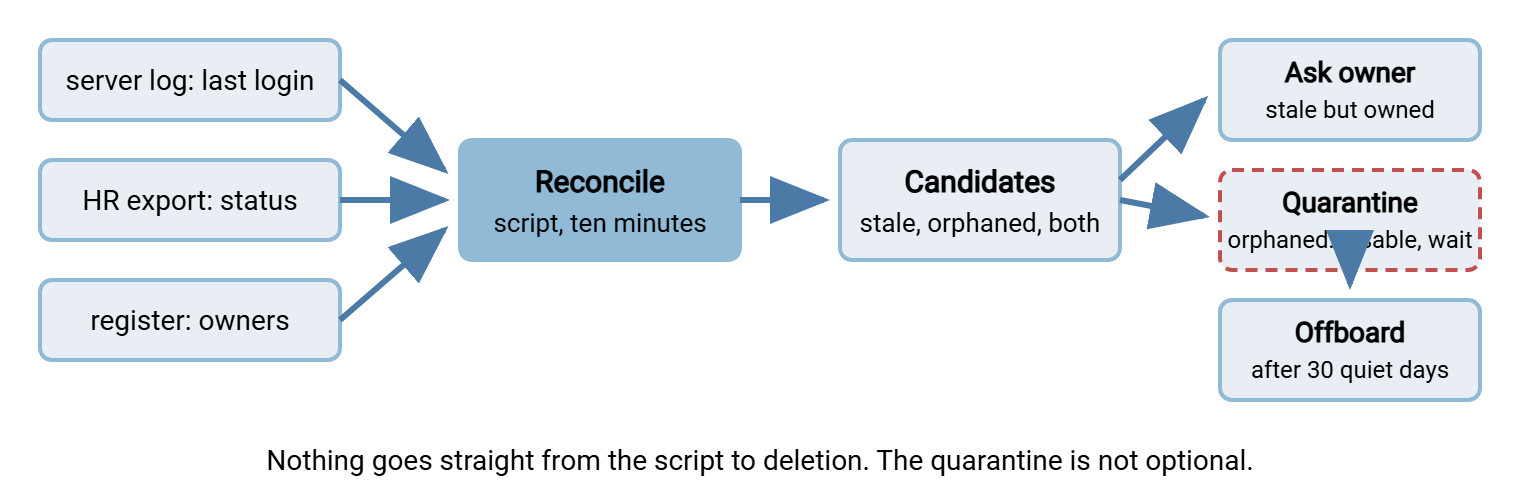
Used and owned is fine, and the register's last_login column gets updated. Not used but owned is stale. The owner gets an email asking whether the account is still needed, with a deadline. This is exactly as in the quarterly review from role changes and permission creep. Used but not owned is the interesting case. Something is logging in and nobody is responsible for it, which is usually a partner or a job whose custodian left. The job is to find the new owner, not to disable a working feed. Not used and not owned is an orphan, and orphans go to quarantine.
Resist the urge to sort the candidate list by how confident you are and delete the top of it. Bluewater Bank's first stale hunt found forty-one accounts with no login in a year. The administrator, reasonably pleased, deleted all forty-one in one afternoon. Two were the accounts used for a quarterly regulatory upload, which ran the following week and failed. Recreating them meant repeating the regulator's onboarding process, which took longer than the quarter. The hunt had been a success by every measure except the one that mattered.
Quarantine Before Removal
Quarantine is the step between "we think this account is dead" and "it is gone". The account is disabled, not deleted, and left that way for a fixed period, usually thirty days. That lets anything which silently depended on it fail loudly while the fix is still one click. An orphan by definition has no owner to ask. So the quarantine asks the only other party who can answer: whatever was using it. If nothing complains for thirty days, nothing was using it. If something does, you have found a dependency and an owner in one go.
Every quarantine gets a ticket. The ticket gets a notice sent to the last known department, the backup owner if the register has one, and the transfer team's own list. That way, when the phone rings the person who answers can find the reason in ten seconds:
Subject: Transfer account quarantined - ftpuser2 - restore on request until YYYY-MM-DD

The transfer account below has been DISABLED as part of the quarterly
stale-account review. It has not logged in since (last login or "no
record in the last N months") and has no current owner on record.

  Account:        ftpuser2
  Server:         transfer.example.com
  Folders:        /data/old
  Last login:     none in 12 months of logs
  Disabled on:    YYYY-MM-DD
  Will be deleted on: YYYY-MM-DD (30 days)

If you or a partner depend on this account, reply to this message or
call the transfer team and it will be restored within one working hour.
Restoring it requires naming an owner. After the deletion date the
account and its folder contents will be removed under the offboarding
process; files will be archived per the retention policy first.

Ticket: QUAR-0088
The line about naming an owner is the quiet enforcement mechanism. Restoration is fast and friendly, but it converts an orphan into an owned account, which is the only acceptable outcome other than deletion. And the promise about archiving the folder is not decoration. An orphaned account's folder can hold files nobody will admit to needing until the moment they are gone. So the folder goes through the retention rule before the account goes through the offboarding checklist. When the thirty days pass quietly, the account is closed with the checklist from offboarding that actually closes the account, from line eight onward. At that point, the register row is also marked closed.
Making the Hunt a Quarterly Habit
The first hunt on a server that has never had one is an afternoon of surprises. Every hunt after that is under an hour, provided the three exports arrive without effort. Schedule the log extraction and the directory query as scripts. Ask HR for the export on the first working day of each quarter, as a standing request rather than a favor. Keep the reconciliation script in the same folder as last quarter's outputs so the comparison is one command. The quarter's work is then a short list:
- Run the log extraction and the directory query; collect the HR export.
- Run the reconciliation; save the candidate list with the date in its file name.
- Update
last_loginin the register for every account that appeared in the log. - Email stale-but-owned accounts to their owners with a two-week deadline.
- Quarantine every orphan; open a ticket and send the notice for each.
- Close last quarter's quarantines that passed quietly, through the offboarding checklist.
- File the exports, the candidate list, the emails, and the tickets together as this quarter's evidence.
Step seven is why the auditor stops asking. The bundle it produces is exactly what an access review is expected to show. It contains a complete account list, evidence of use, evidence of ownership, decisions with dates, and actions taken. The periodic access reviews article explains how to present it. You are not doing extra work for the audit. You are keeping the by-products of work you would do anyway, in one folder, with the date in the name.
The same hunt applies to every place accounts live, not only the SFTP server. The automation host has service accounts. A scheduled-transfer tool such as Sysax FTP Automation holds partner-side credentials in its job definitions. A job that has not run in a year is a stale account on someone else's server. Their hunt may find it before yours does. The service accounts for jobs article covers keeping that side tidy. Add each system to the register, and the same script covers it.
Remember: the log answers "is it used", the people list answers "is it owned", and the owner answers "should it exist". Nothing goes from the script straight to deletion. Quarantine first, for thirty days, so that anything you were wrong about tells you so while the fix is still one click.
Closing the Loop
This is the last article in the series, and it is the one that makes the others honest. Provisioning, credential issuance, role changes, and offboarding each catch most of what they should. The hunt catches the remainder, on a calendar, with evidence. It feeds each finding back into the stage that should have handled it. A missed leaver goes into offboarding. An ownerless partner account gets a fresh owner and a register row. A "temporary" account from four years ago goes into a quiet thirty-day quarantine. The loop closes.
Run the first hunt this quarter. Expect the candidate list to be longer than you would like, and expect to feel slightly better about the server every quarter after that. The accounts, for their part, will stop outliving their owners, which was the point of the whole series.
Frequently Asked Questions
How long should the "no login" window be before an account counts as stale?
My HR export does not include contractors. What do I match them against?
An orphaned account is still logging in every night. Do I disable it?
Is disabling an account for thirty days really safe with a partner involved?
Do I need special software for any of this?
From the Sysax team: we build secure file transfer software for Windows. Sysax Multi Server is an FTP, FTPS, SFTP, and HTTPS server. Sysax FTP Automation handles scheduled, scripted transfers. Free trials are on the download page.