
Why Transfer Accounts Outlive Their Owners
Somewhere on your transfer server there is an account whose owner no longer works for you. I say this with confidence not because I know your server but because I have never seen one where it was untrue. A ticket created it, the ticket was closed, and nothing since has had any reason to remove it. It still has a valid password or key, still owns a folder, and still sits in the user list between accounts you recognize.
This article is about why that happens and what it costs. It covers the three places accounts live on a transfer estate and why each is forgotten in its own way. It explains what an orphaned account costs in security and audit terms. It also covers the lifecycle model — joiner, mover, leaver, review — that the rest of this series follows. By the end you will be able to take a ten-minute census of your own server. This is the opening article of our User Lifecycle series.
The Transfer Estate and Its Three Kinds of Account
Start with a term. The transfer estate is every system you run that accepts a login in order to move files. That includes the SFTP server the partners use and the old FTP box the warehouse never migrated off. It also includes the HTTPS upload portal and the automation host that runs the nightly jobs. Most organizations have more of these than they think. (Ask whoever ran the last network scan.)
Accounts on that estate come in three kinds. A human account belongs to one named person and is used interactively: someone opens a client, types a password, drags a file. A service account belongs to a job rather than a person. A scheduled script logs in at two in the morning, pushes the payroll file, and logs out unwatched. A partner account belongs to another organization. Their people or their scripts use it to drop files into your folders, and you rarely know which.
Each kind ages differently. A human account becomes an orphaned account — a login that still works but has nobody responsible for it — the day its owner leaves. A service account is orphaned when its job is retired, or when the person who understood the job leaves and nobody inherits the knowledge. A partner account is orphaned when the contract ends, which the transfer team often hears about last, if at all.
Orphaned accounts are the most common finding in any transfer audit. They are not a sign of a careless team; they are what happens when creation is a process and removal is a hope.
Where Accounts Live, and Why It Matters Where
Accounts on a transfer server are stored in one of three places, and the location decides who forgets them. A server-local account lives in the transfer server's own account database. The transfer administrator creates it in the server's admin console, sets its password or key, and maps it to a folder. Nothing outside that console knows the account exists. So when the owner leaves and the leaver process disables their domain login, the server-local account carries on untouched.
A directory-backed account is different: the server authenticates against your directory service. This is Active Directory or an LDAP directory, the central list of people and computers your organization already maintains. When the directory account is disabled, the transfer login stops the same minute. That is a real advantage but not a complete one. The per-user settings on the server — home folder, allowed IP addresses, the files the person owned — survive the disable. Directory service accounts are routinely excluded from the leaver process on the grounds that "nobody owns those".
The third place is easy to miss. A partner-side account is one your organization holds on somebody else's server. Think of the credentials your nightly job uses to log into Acme's SFTP and collect order files. They live in your scripts, your job scheduler, and (ideally) your password vault. Nobody at Acme will chase you when the administrator who set them up leaves. If only that administrator knew the password, you will discover the fact at the least convenient moment available.
A single server frequently holds the first two kinds at once. Sysax Multi Server, for example, supports built-in accounts alongside Windows and Active Directory authentication. This is sensible and also exactly how one estate ends up with two account lists nobody reconciles. The table below summarizes who creates each kind and who notices when its owner goes.
| Where it lives | Who creates it | What happens when the owner leaves | Typical failure |
|---|---|---|---|
| Server-local | Transfer admin, in the server console | Nothing. The leaver process does not know it exists. | Account stays valid for years |
| Directory-backed | Directory admin; transfer admin grants access | Login stops when the directory account is disabled | Folders, files, and per-user settings remain; service accounts skipped |
| Partner-side | The partner, on their server | Nothing on either side | Password known to one departed person, or to everyone |
Why Nobody Removes Them
Creation has a customer; removal does not. Someone wants the new account badly enough to open a ticket, chase it, and phone you when it stalls. Nobody wants an old account gone with the same energy: nobody is waiting, and nobody complains if it never happens. The removal ticket, when it exists, sits at the bottom of the queue with the other important-but-not-urgent tasks. This is the queue where tasks go to retire.
The leaver process is built around the directory, and the transfer server is not in the directory. The standard sequence — HR tells IT, IT disables the domain account, someone collects the badge — is thorough about what it knows about. Server-local accounts are invisible to it. So are the partner-side credentials in the leaver's scripts and the SSH key in their home folder on the automation host. So is the account they created "for the supplier" under their own name.
Fear does the rest. When a service account's purpose is unclear, the safe-looking choice is to leave it alone: what if something still uses it? Nobody knows, so nobody touches it, and every passing quarter makes the question harder to answer. Naming makes it worse: an account called ftpuser2 or temp_acme carries no owner, no purpose, and no date. The provisioning article gives you a naming standard that fixes that. An account nobody understands is an account nobody deletes. The accounts appear to know this.
Partner accounts fail at a different seam. The contract ends in procurement, or in the business unit that signed it, and neither knows there is a transfer account attached. The folder keeps quietly accepting files from an organization you no longer do business with.
What an Orphaned Account Actually Costs
The first cost is a working credential that nobody watches. Every orphaned account is a username and a secret that still open the door, held by someone no longer accountable to you. They sit in a personal password manager, in a batch file on an unwiped laptop, or on a sticky note that has survived three desk moves. Sticky notes are never offboarded. Our insider risk in file transfer article covers the attacker's view. The short version is that an unwatched valid login is the easiest way in.
The second cost is blast radius. The orphaned account did not lose its permissions when its owner left. It can still write to /inbox/acme, and anything written there is picked up by the same automation that processes real orders. A login that can plant files in a folder scripts trust is serious. The blast radius of one account article explains how far that damage travels.
The third cost arrives with the auditor. Every audit of a transfer system asks for a list of accounts and, for each one, evidence that it is justified. An account with no owner and no recent login has no justification, so it becomes a finding. Findings generate remediation plans, plans generate meetings, and meetings generate a memorable afternoon in which you explain who ftpuser2 was. The evidence auditors accept article describes what a clean answer looks like.
The fourth cost is the one nobody budgets for: an orphaned account gets harder to remove the longer it lives. Its folder fills with files someone might need, its key turns up in scripts nobody has read recently, and a partner might still be using it. Cleanup that would have taken five minutes on the leaver's last day needs a change ticket, a risk assessment, and a rollback plan a year later.
Meridian Parts ran a small SFTP server for supplier order files. A warehouse supervisor set up one supplier's account under his own name, because it was quicker than raising a request. He left the company the following spring. His domain account was disabled that afternoon. The SFTP account was server-local, so it was not disabled. The supplier's script kept logging in as him for four more years. The auditor who found it described the account as "a finding". The warehouse described it as "working fine".
The Lifecycle Model: Joiner, Mover, Leaver, Review
The fix is not a tool. It is treating the account as something with a life in stages, each with an owner and a trigger. Identity-management people call the stages joiner, mover, leaver. A joiner is a person or job that needs a new account. A mover is an existing account whose owner has changed role so its access must change. A leaver is an account whose owner has gone and which must be closed. Transfer systems need a fourth stage the standard model leaves implicit: review, the periodic check that catches what the first three missed.
The diagram below shows the four stages as a loop. An account is provisioned, changes with its owner's role, and is closed when the owner leaves. The review sweeps up whatever slipped through. It sends accounts that should not exist to the leaver stage and the rest back for a fresh justification.
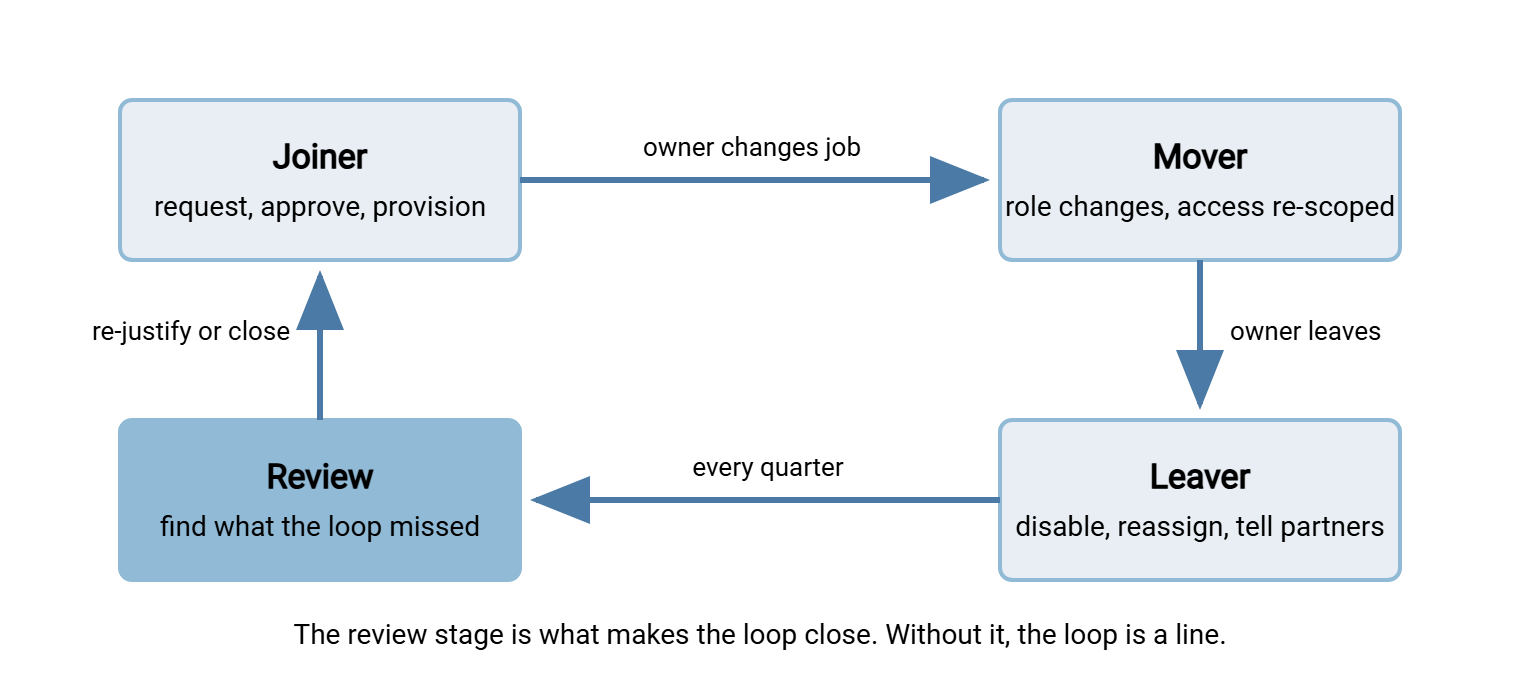
The model applies to all three kinds of account with a little translation. For a service account, "joiner" is the job going live, "mover" is the job changing scope, and "leaver" is the job being retired. For a partner account the stages track the contract: start, change, end. The vocabulary is shared because the failure is shared: an account that entered the loop and never left.
Three facts, recorded at creation, turn an orphan into an account. An owner is one named person who answers for it. A purpose says what it moves, for whom. A review date says when someone next asks whether it should still exist. Write down the owner. A named person. Not "the warehouse". Not "IT". Not the partner, who is the counterparty, not the owner.
A Ten-Minute Census of Your Own Estate
Before reading further, find out how bad your situation is. The census has three parts: list the accounts that exist, list the accounts that have been used, and compare. You do not need a tool for this, and you should not wait for one.
Part one: what accounts exist
If your transfer server keeps its own account database, export the user list from its admin console. A screenshot is acceptable for a first pass. If the server runs on Windows and some accounts are ordinary local Windows users, PowerShell lists those:
Get-LocalUser | Select-Object Name, Enabled, LastLogon, PasswordLastSet, Description | Sort-Object LastLogon
Read the output column by column. Enabled says whether the login currently works. LastLogon is the last time Windows itself saw the account log on. A transfer server that authenticates inside its own process may never update it. So treat a blank as "unknown", not "unused". PasswordLastSet is often the most telling field: a password last set many years ago belongs to someone who is not changing it. Description is where a previous administrator may have left a clue, or a joke.
For directory-backed accounts, ask the directory which users have not authenticated recently. This cmdlet from the Active Directory module does the search:
Search-ADAccount -AccountInactive -TimeSpan 90.00:00:00 -UsersOnly |
    Select-Object Name, SamAccountName, Enabled, LastLogonDate |
    Sort-Object LastLogonDate
-AccountInactive with a -TimeSpan of ninety days returns accounts that have not logged on to the domain in that period. Be honest about what it measures: the underlying attribute replicates between domain controllers only occasionally. So the date can lag the true last logon by up to a couple of weeks. That is fine for finding accounts idle for months and useless for finer judgments. It is also domain logon, not transfer-server logon. A person can be active in the directory and not have touched the transfer server all year.
Part two: who has actually logged in
The transfer server's own log is the only source that answers the question you actually care about. On an OpenSSH-based SFTP host, successful logins appear in the authentication log as lines like Accepted publickey for jsmith. A short awk command keeps the last one per user:
awk '/sshd.*Accepted/ {last[$9] = $1 " " $2 " " $3} END {for (u in last) print u, last[u]}' /var/log/auth.log | sort
Field nine in that log format is the username and fields one to three are the timestamp. Because the log is chronological, overwriting the entry each time leaves the most recent login per user. The output looks like acme-inbound Mar 14 02:00:07, one line per account that logged in during the period the log covers. An account from part one that does not appear here is your first evidence of staleness. Windows-based servers write a different format. A server that logs to a database gives the same answer with one query grouped by username. The reading transfer logs article walks through several formats.
Part three: compare
Put the two lists side by side. Every account that exists, has no login in the log, and has no owner you can name from memory is a candidate orphan. Count them. On a never-reviewed server the count is usually between a fifth and a third of the user list. The usual reaction is a short silence. The full reconciliation, with a script that matches against an HR export, is in the stale accounts article.
Remember: an account is not finished when it is created. It is finished when it is closed, its files have a new owner, and the partner who used it has been told. Everything between those two moments is the lifecycle, and every stage needs a named person responsible for it.
Template: The Account Register
The most useful artifact in this series is a plain list of accounts with the three facts attached. It does not need a database: a CSV file in a shared folder is enough. So is a tab in the spreadsheet that holds the flow inventory from our documenting transfer flows series. The columns below are the minimum; add to them, but do not remove any.
The columns are as follows. The account is the exact login name. The type is human, service, or partner. The lives_in value is server-local, directory, or partner-side. The owner and backup_owner are two named people so one departure cannot orphan the entry itself. The purpose is one plain line. The folders are the paths the account can reach. The auth value says how it authenticates. The ticket is the request that created it. The review_by date says when someone must next confirm it should exist. The last_login value is filled from the log at each review.
account,type,lives_in,owner,backup_owner,purpose,folders,auth,ticket,review_by,last_login
jsmith,human,directory,Jo Smith,Priya Nair,Uploads warehouse manifests,/outbox/warehouse,password+mfa,REQ-1042,YYYY-MM-DD,YYYY-MM-DD
svc-payroll-push,service,server-local,Priya Nair,Sam Okafor,Nightly payroll file to Kestrel Payroll,/outbox/kestrel,ssh-key,REQ-0977,YYYY-MM-DD,YYYY-MM-DD
acme-inbound,partner,server-local,Sam Okafor,Jo Smith,Acme order files inbound,/inbox/acme,ssh-key,REQ-1108,YYYY-MM-DD,YYYY-MM-DD
ftpuser2,unknown,server-local,,,UNKNOWN - investigate,/data/old,password,,YYYY-MM-DD,
The last row is deliberate. The register may contain accounts you do not understand, as long as they are marked as such and have a review date. An honest "unknown" with a date is the beginning of a cleanup; an account missing from the register is the beginning of a finding. The svc-payroll-push row is a service account running a scheduled job. If that job is a scripted transfer in a tool such as Sysax FTP Automation, the account's owner is whoever owns the job. In that case, the register should say so.
Keep the register next to the flow inventory, because the two answer each other's questions. The inventory says which flows exist and who owns them. The register says which accounts those flows use. Where the inventory records a partner, the partner-facing documentation in our partner onboarding documentation series should name the same account. That way, all three agree.
What Comes Next in the Series
You now have the vocabulary, the model, and a first count. The rest of the series takes the loop stage by stage. Provisioning transfer accounts fills the register in correctly from day one. Role changes and permission creep covers the mover stage nobody has a process for. Offboarding that actually closes the account is the stage most organizations skip and the one the auditor asks about first. Finding stale and orphaned accounts turns the ten-minute census into a quarterly habit with a script behind it.
If you take one thing from this article, take the register. Ten rows filled in honestly this week will save you a change ticket, a risk assessment, and an uncomfortable meeting next year. The Meridian Parts supplier account is still in their register, incidentally. It has an owner now.
Frequently Asked Questions
What is the difference between a stale account and an orphaned account?
If my server authenticates against Active Directory, do I still have this problem?
Does a service account need an owner if no human uses it?
How often should I look for orphaned accounts?
My server only has a dozen accounts. Is this worth the effort?
From the Sysax team: we build secure file transfer software for Windows. Sysax Multi Server is an FTP, FTPS, SFTP, and HTTPS server. Sysax FTP Automation handles scheduled, scripted transfers. Free trials are on the download page.