
Offboarding That Actually Closes the Account
The leaver email arrives on Friday afternoon: "Sam's last day is today, please remove all access." You disable Sam's login, reply "done", and go home. On Monday a partner's upload bounces because it was going to a folder Sam owned. On Wednesday a nightly job fails because it used a password only Sam knew. Six months later an auditor finds Sam's SSH key still installed on the DMZ server. Every one of those was part of "remove all access". Only the first part had a button.
Offboarding is the leaver stage of the account lifecycle: everything that has to happen when an account's owner goes. The owner might be an employee, a contractor, a partner's contact, or the person who looked after a scheduled job. Disabling the login is the start. This article covers the rest. That includes disabling versus deleting, files that need a new owner, and secrets the leaver knew that must now change. It includes partners who must be told and service accounts whose owner just left. There is also a checklist that closes the account in a way an auditor will accept. This article is part of our User Lifecycle series.
Why "Disable the Login" Is One-Fifth of the Job
An account is not one thing. It is a login, plus the files that login owns and the secrets the owner knew. Add the partners and jobs that depend on it, plus the documentation that names it. Disabling the login touches the first of those and none of the others. The other four are where the Monday, Wednesday, and six-months-later problems come from, and none of them has a button.
The diagram below shows the fan-out. One leaver, five things to close, and each of the five has a different person who can answer the question it raises.
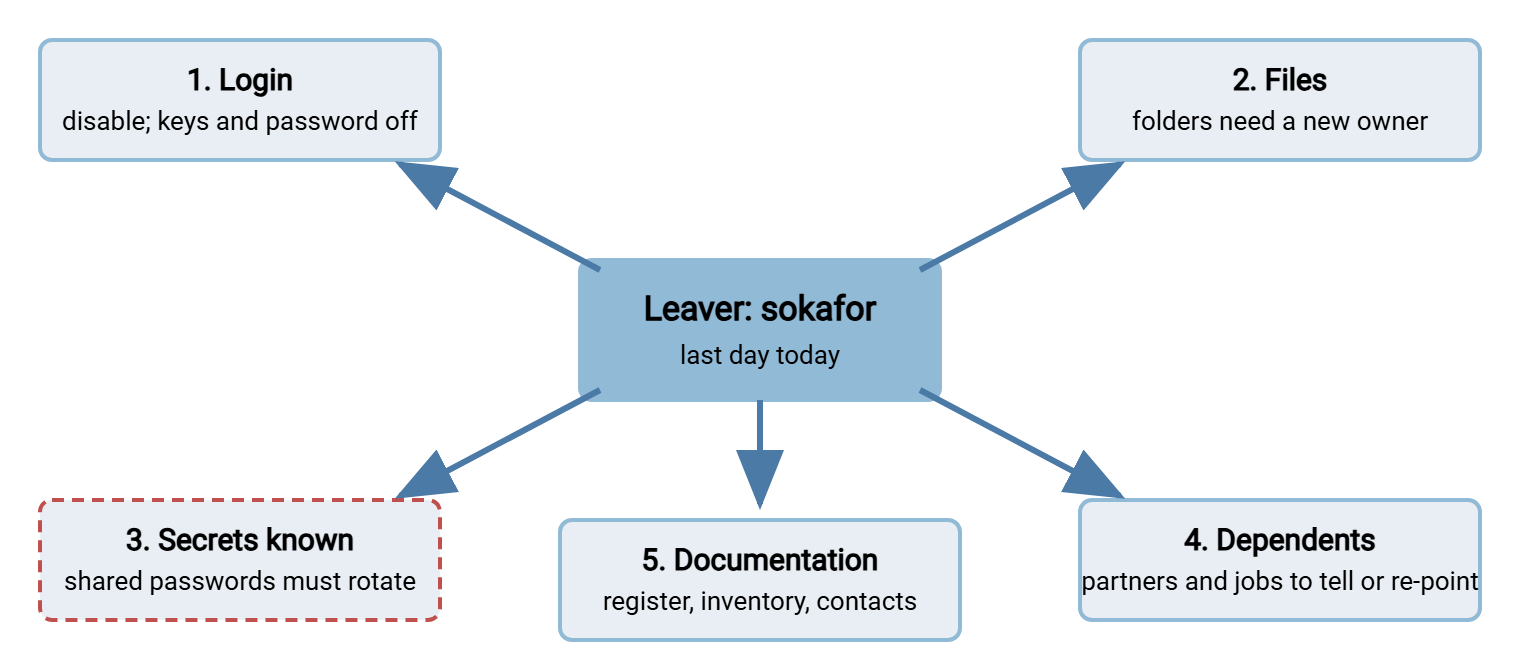
The order matters less than the completeness, but there is a sensible sequence. Disable the login first, because it is the only step that stops anything today. Then rotate the secrets, because they are the second-fastest route back in. Then deal with files, dependents, and documentation. Those are important and can wait until Monday morning without harm. Most offboarding processes stop after the first step because the first step is the only one the leaver email asked for.
Disable First, Delete Later
To disable an account is to make it unable to log in while leaving everything else about it intact. That includes its name, its folders, its permissions, and its history in the logs. To delete an account is to remove it entirely. Disable first, always, and delete only after a quarantine period. This is a fixed interval, typically thirty days, during which the account exists but cannot be used. Disabling is reversible in seconds and deleting is not. The quarantine is your insurance against the thing nobody knew depended on the account.
Why not just delete and be done? Because a deleted account still owns files, and files need an owner. Because a deleted account's name disappears from the server's user list. When a log line from last year mentions it, nobody can look it up. Because on some systems the numeric identifier behind a deleted account is reused by the next account created. That quietly hands the old files to a stranger. And on the Monday after a Friday deletion, the partner whose upload is bouncing phones. The answer is "we'll have to recreate it" instead of "give me thirty seconds".
How you disable depends on where the account lives. Directory-backed accounts are disabled in the directory, which the leaver process normally does for you. The transfer login stops the moment it happens. Server-local accounts are disabled in the server's console, which the leaver process does not do for you. That is why the register from earlier in this series matters: it tells you the leaver has a server-local account at all. On a Windows host with ordinary local users, one line does it:
Disable-LocalUser -Name sokafor
Get-LocalUser -Name sokafor | Select-Object Name, Enabled

Name     Enabled
----     -------
sokafor    False
On an OpenSSH-based SFTP host there is a trap worth knowing. Locking the password with usermod -L stops password logins and nothing else. An installed SSH key still works, because key authentication never consults the password. To stop every kind of login, expire the account, which the server checks regardless of method. Move the key file aside too:
chage -E 0 sokafor
mv /home/sokafor/.ssh/authorized_keys /home/sokafor/.ssh/authorized_keys.disabled-YYYY-MM-DD
chage -E sets the account's expiry as a number of days since the start of the epoch. Zero is safely in the past, and the server refuses the login before it looks at any credential. Renaming the key file rather than deleting it preserves the evidence of which keys were installed. You will want that evidence during the quarantine. Whichever platform you are on, test the disable by attempting a login, and paste the refusal into the ticket. "Disabled" is a claim; a refused login in the log is evidence.
Files Need a New Owner
The leaver's account probably owned folders, and folders on a transfer server are rarely private. An outbox contains files a partner has not collected yet. An inbox is a folder a partner writes to. The partner will keep writing to it after the person who set it up has gone. A personal upload area may hold the only copy of something the business needs. None of these can simply vanish with the account. The person to ask is the leaver's manager, not the leaver. The leaver is on their way out and has stopped caring about your folders.
For each folder the register lists against the account, the manager decides one of three things. Keep it and name a new owner, hand it to a successor's account, or archive it under the retention rule that applies. The decision is recorded in the register, the new owner's name replaces the old, and the folder's permissions are updated to match. The mechanics of changing who can reach a folder belong to the file-server permissions series. Here the point is only that the question is asked on the last day. It is answered by someone with the authority to answer it.
Do not delete a folder because its owner left. I once removed a leaver's account and home folder on the same afternoon, on the reasonable-sounding theory that a personal folder was personal. It was the drop point for three suppliers' invoices, and I found out at invoice-run time, from accounts payable, who were not reasonable about it. Our war-story series has a fuller postmortem of a similar afternoon in the deleted inbox. The lesson is the same: a folder's owner has left; the folder's users have not.
Secrets the Leaver Knew Must Rotate
Everything the leaver could have known is now outside your control. That includes their own password, which the disable handles. It also includes every shared secret they were ever given. There is the password of a service account they looked after, and the partner-side login in a script they wrote. There is the passphrase of a PGP key used to encrypt outbound files, and the admin console password on the transfer server itself. A password known to a person who has left is not a secret any more. It is a rumor.
The rule is to rotate every shared secret the leaver had access to, on the last day, whether or not you think they would misuse it. The question is not trust; it is whether the secret is still under your control, and it is not. Finding the list is the hard part. That is why the job credentials storage article insists that service passwords live in one place rather than in scripts. If they are in a vault, the vault tells you which ones the leaver could see. If they are in scripts, you are reading scripts on a Friday afternoon.
SSH keys deserve their own pass. The leaver's personal public key may be installed on more than one server, under more than one account. It will keep working everywhere you missed. Search every host the person could reach. On an OpenSSH host, the key's comment usually names its owner, and a search across all key files finds the candidates:
grep -l 'sokafor' /home/*/.ssh/authorized_keys /etc/ssh/authorized_keys/* 2>/dev/null
/home/svc-erp-payroll/.ssh/authorized_keys
/home/deploy/.ssh/authorized_keys
Each file listed contains a key whose comment mentions the leaver, installed under an account that is not theirs. The first line here says Sam's key could log in as the payroll service account. Comments are a convention, not a guarantee, so if you recorded the fingerprint of the leaver's key at issuance, match on that too. The mechanics of removing keys cleanly are in retiring keys at offboarding. That article also covers rotating a service account's own key when its custodian leaves. The offboarding checklist only needs a line that says the work was done and where.
Partners Who Must Be Told
If the leaver was the named contact for any partner, the partner needs a new name before they need it, not after. The next time their feed fails at two in the morning they will email the address in their runbook. If that address belongs to someone who left in the spring, the failure will wait until somebody notices the silence. Update the contact sheet from our flow ownership and contacts article, and send the partner a short message the same day.
Subject: Change of technical contact for the Meridian Parts file exchange

Hello Dana,

From YYYY-MM-DD, Sam Okafor is no longer your technical contact for the
file exchange between Acme and Meridian Parts. Please update your
records as follows:

  Technical contact:   Priya Nair, pnair@example.com, (phone on file)
  Escalation:          transfer-team@example.com
  Out of hours:        (unchanged)

Nothing changes on the connection itself: host, account (acme-in),
folders, and keys are all as before. If your side holds any credential
that Sam issued personally, or if Sam's name appears anywhere in your
runbook, please let me know and we will reissue it.

Regards,
Priya Nair
The last paragraph of that message is the one that finds problems. Partners sometimes hold a password that the leaver gave them by phone years ago, for an account in the leaver's own name. In those cases, nobody on your side knows. Asking is the only way to learn it. If the leaver was a partner's employee rather than yours, the same message goes the other way. In that case, the account they used on your server is disabled exactly as an internal leaver's would be. Ending the relationship with a partner altogether is a larger job. It means closing their accounts, their folders, and their place in the program, and is covered in partner offboarding. A contact leaving is not the same as a partner leaving, and it is worth saying so on the ticket.
Service Accounts Whose Owner Just Left
A service account belongs to a job, and the job does not know its owner has gone. The nightly payroll push in Sysax FTP Automation that Sam configured will run tonight, and tomorrow night. It uses the credentials Sam stored in it and delivers files to a partner Sam onboarded. Nothing about the leaver process will interrupt it. That is exactly as it should be: the job serves the business, not Sam. What must change is the register row, which now names an owner who does not exist.
Three steps, none of which involve stopping the job. Reassign ownership to the leaver's manager, temporarily. That way, the account has a living person to answer for it while a permanent custodian is chosen. An account owned by a manager who does not want it gets a new owner quickly. Rotate the service account's own credential if the leaver knew it, which they did if they configured the job. And check the job's configuration for anything else Sam knew: the partner-side password, the PGP passphrase, the notification address that was Sam's mailbox. The service account hygiene article covers how to keep those accounts in a state where this handover is routine rather than archaeological.
Northgate Retail's transfer administrator left on good terms, and his directory account was disabled the same afternoon. His personal SSH key stayed installed on the DMZ SFTP host for a year, because nobody searched for it. His password on a supplier's server stayed in a script that nobody re-read, because the script kept working. And the supplier's runbook still listed him as the escalation contact. So when the nightly feed failed the following winter they emailed his old address for three nights running before ringing the switchboard. Each of those was a line on a checklist that did not exist.
The Offboarding Checklist That Survives an Audit
The checklist is the article. Every section above becomes a line; every line has a place for evidence. The completed ticket is what you hand an auditor when they ask "show me how you offboard". Run it for every leaver who appears in the register, whether employee, contractor, partner contact, or job custodian. Run it for every leaver who does not, too. The register may be wrong, and this is a good moment to find out.
TRANSFER OFFBOARDING  -  leaver: Sam Okafor (sokafor)   last day: YYYY-MM-DD
Ticket: OFF-0412     Run by: P. Nair     Manager consulted: M. Chen

DAY OF LEAVING
[ ] 1. Register searched for every account owned by or named after the leaver
       (human, service, partner-contact)             -> list: ______________
[ ] 2. Human account(s) disabled (not deleted); login test refused; log line pasted
[ ] 3. Leaver's SSH key(s) removed from every account on every host; fingerprint
       matched; hosts searched: __________________
[ ] 4. Shared secrets the leaver could know rotated: service account passwords,
       partner-side logins, PGP passphrases, admin console   -> list: ________
[ ] 5. Service accounts owned by leaver reassigned to ____________ (temporary)
[ ] 6. Partner contacts updated; notification sent to: ____________
[ ] 7. Register updated: status=disabled, owner reassigned, quarantine end date set

WITHIN ONE WEEK
[ ] 8. Folders reviewed with manager: keep / hand over / archive, per folder
[ ] 9. Folder permissions updated to new owner; evidence pasted
[ ] 10. Flow inventory and contact sheet updated
[ ] 11. Scheduled jobs configured by leaver reviewed for embedded credentials
        and notification addresses

AT QUARANTINE END (+30 days)
[ ] 12. No dependency surfaced during quarantine (check ticket comments)
[ ] 13. Account deleted; final log line pasted; register row marked closed

Evidence attached: disable refusal, key removal output, rotation confirmations,
partner acknowledgement, permission change output.
Two lines earn their place more than the rest. Line one is searching the register before doing anything. It turns "remove Sam's access" into a list of specific accounts, some of which the leaver email's author has never heard of. And line twelve, the quarantine check, is the reason to disable rather than delete. In thirty days, anything that silently depended on the account will have failed, loudly. If anything depended on it, you will have restored the account with one click and learned something about your inventory.
Remember: disabling the login is where offboarding starts, not where it ends. Files need a new owner, and every shared secret the leaver knew must rotate on the last day. Partners need a new name before their next failure. Service accounts need a living owner even though the job keeps running. Delete only after the quarantine has proved nothing else depended on the account.
What Comes After Offboarding
An account closed this way leaves nothing behind that still works. There is no login, no lingering key, no rumor of a password, no partner emailing a mailbox that nobody reads. Closing the account this way also leaves a ticket that answers every question an auditor might ask. That ticket is produced as a by-product of doing the job rather than as extra work afterwards. The joiner and mover stages that came before — provisioning, credential issuance, and role changes — are what make the checklist short. An account with a register row, a named owner, and a known set of folders is a ten-minute offboarding. An account without them is an afternoon.
Some accounts were never offboarded at all, because the process did not exist when their owners left. The final article in the series, finding stale and orphaned accounts, is how you find them. Sam's account, incidentally, was deleted thirty-one days after Sam left, and nothing happened. Nothing happening is the whole point.
Frequently Asked Questions
How long should the quarantine period be?
The leaver's account is directory-backed and HR already disabled it. Am I done?
Should I really rotate a service password just because someone left on good terms?
What if a partner was using an account in the leaver's name?
Who owns a service account after its owner leaves?
From the Sysax team: we build secure file transfer software for Windows. Sysax Multi Server is an FTP, FTPS, SFTP, and HTTPS server. Sysax FTP Automation handles scheduled, scripted transfers. Free trials are on the download page.