
Role Changes, Moves, and the Permission Creep Problem
Most organizations have a joiner process, because a new person needs a laptop and somebody has to order it. Most have a leaver process, because the laptop has to come back. Almost nobody has a mover process. When a person changes job inside the company, nothing physical changes hands and no ticket is generated. Their transfer account, meanwhile, keeps every right it ever had and quietly acquires the rights of the new job on top.
That accumulation is permission creep. It is access that was granted for a reason, kept after the reason ended, and stacked on top of newer access granted for newer reasons. It is the most common way a least-privilege design turns into an everything-privilege reality without anyone ever making a bad decision. This article gives you the mover process. It covers the triggers you can actually catch and a re-scoping procedure that replaces access rather than adding to it. It also gives you a way to grant temporary access that genuinely expires, and the quarterly review that catches whatever the rest missed. It is the mover stage of our User Lifecycle series.
What Creep Looks Like on a Real Account
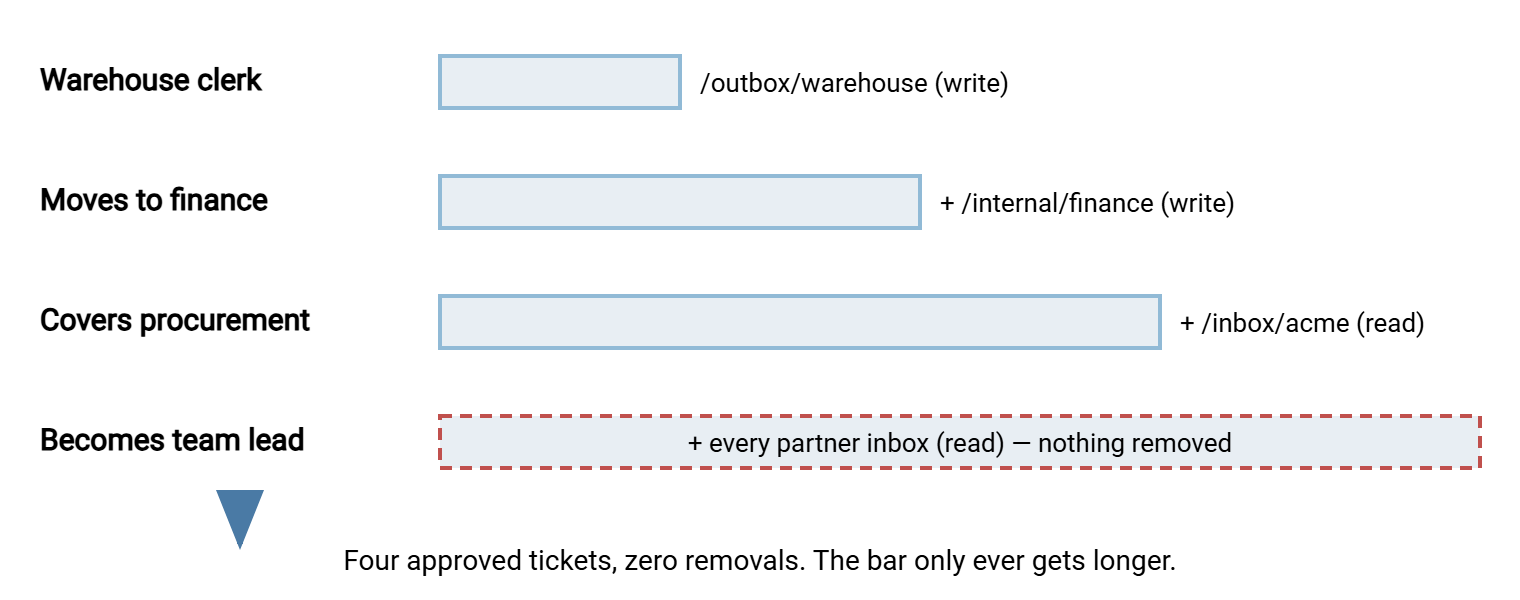
Follow one account through four years. Sam Okafor joins Meridian Parts in the warehouse and gets a transfer account with write access to /outbox/warehouse. That is exactly what a warehouse clerk needs. Eighteen months later Sam moves to finance and the finance manager requests write access to /internal/finance. Granted. The following spring Sam covers for a colleague in procurement for three months and needs to read the supplier inbox at /inbox/acme. Granted. When Sam becomes a team lead, the new manager asks for read access to every partner inbox "for oversight". Granted.
Every one of those grants was reasonable, approved, and ticketed. None was ever reversed. Sam now has write access to a warehouse folder Sam has not visited in years. Sam also has write access to finance, and read access to every file every partner sends. Sam is not a risk. Sam's account is, because whoever compromises it — or whoever inherits Sam's laptop password on a sticky note — gets four jobs' worth of access at once. The blast radius of one account article works through what that costs. Here the question is how it happened without anyone doing anything wrong.
The diagram below shows Sam's rights over time. Each move adds a layer. Nothing is ever taken away, so the account's reach only grows.
Why the Mover Process Does Not Exist
Joiners and leavers generate work for someone outside IT, so they generate a notification. HR has to set up payroll for a joiner and stop it for a leaver. The transfer team can hang its process off that signal. A move generates payroll changes too, but nobody thinks of a move as an access event, so the signal never reaches you. The new manager asks for the new access because they need it. Nobody asks for the old access to go, because nobody is inconvenienced by its staying.
The mover has an incentive to keep everything. Old access might be useful during handover, or for the occasional question from the old team, or "just in case". That is the phrase under which most permanent access is granted. The new manager cannot request the removal of access they do not know exists. And the transfer administrator, who is the only person who can see the full list, has no trigger to look at it. Three people, each behaving sensibly, and the account grows.
The fix has two halves. Catch the moves you can, and re-scope the account when you do. Then run a review on a calendar, because you will not catch them all, and the review is designed to assume that.
The Triggers You Can Actually Catch
You will never be told about every role change, but several kinds leave a trace you can watch for. The table lists the ones that matter for transfer accounts, how you are likely to hear, and what to re-scope when you do.
| Trigger | How you hear | What to re-scope |
|---|---|---|
| Internal transfer or promotion | Department or title changes in the directory; new manager requests new access | Human account: replace old template with new one |
| Contractor becomes employee | New directory account appears for an existing name | Close the contractor account; provision a fresh one |
| Employee becomes contractor | Leaver process fires, then a request arrives for "the same access as before" | Treat as leaver, then joiner, with an end date |
| Cover or secondment | Request for temporary access | Grant with an expiry; remove on the date |
| Partner's contact changes | Email from a new name at the partner, or a bounce from the old one | Update owner contact; rotate the credential the old contact held |
| Job is retired or re-pointed | Scheduled job disabled, or its owner changes | Service account: shrink to the folders the job still touches, or close |
The first row is the one you can automate. Human accounts may be directory-backed, or your account register may record each owner's department. In either case, a monthly comparison of directory attributes tells you who moved. Export the fields once a month:
Get-ADUser -Filter * -Properties Department, Title |
    Select-Object SamAccountName, Department, Title |
    Export-Csv -NoTypeInformation people-YYYYMM.csv
Then compare this month's file with last month's and print only the people who exist in both and whose department or title changed:
$prev = @{}
Import-Csv .\people-prev.csv | ForEach-Object { $prev[$_.SamAccountName] = $_ }

Import-Csv .\people-curr.csv | Where-Object {
    $prev.ContainsKey($_.SamAccountName) -and
    ($prev[$_.SamAccountName].Department -ne $_.Department -or
     $prev[$_.SamAccountName].Title -ne $_.Title)
} | Select-Object SamAccountName,
    @{ n='OldDepartment'; e={ $prev[$_.SamAccountName].Department } },
    Department, Title
The first block loads last month's export into a lookup table keyed by username. The second walks this month's export and keeps only rows where the same username existed last month with a different department or title. Joiners are excluded because they are not in the old file; leavers are excluded because they are not in the new one. The output is a short list of movers with their old and new departments, and each row is a re-scope ticket. On most estates the list is between zero and five names a month, which is a manageable number of conversations. It is also, on most estates, five more than were happening before.
The other rows in the table need a human ear. Tell the service desk that a request phrased "same access as before" or "can you add X to their existing account" is a mover. Ask them to route it to you with that word on it. A mover ticket then follows the procedure in the next section, which is different from a joiner ticket in one crucial way.
Re-scope by Replacing, Never by Adding
The mover procedure is the joiner procedure run again from scratch, followed by removal of everything the joiner procedure did not produce. The new manager fills in the same request form from the provisioning article as though the person were new. The form maps to a template. You apply the template to the existing account and remove every right that is not in it. The old access does not carry over, because nobody asked for it, and "nobody asked for it" is the whole basis of least privilege.
Before you remove anything, list what the account currently has, because the register may be out of date and the console is the truth. For a server whose accounts are ordinary Windows users with rights on the file system, icacls will find every folder whose permissions mention the account:
icacls D:\Transfer /findsid MERIDIAN\sokafor /t /c

SID Found: D:\Transfer\outbox\warehouse.
SID Found: D:\Transfer\internal\finance.
SID Found: D:\Transfer\inbox\acme.
SID Found: D:\Transfer\inbox\kestrel.
Successfully processed 2140 files; Failed processing 0 files
/findsid takes an account name or security identifier. It reports every file and folder under the path whose permission list mentions that name or identifier explicitly. /t walks subfolders and /c continues past errors. Each "SID Found" line is a place the account has been granted something, and the list is usually longer than anyone expected. For a server that manages its own accounts, open the account and read the list there instead. Sysax Multi Server, for instance, keeps folder permissions as a per-account list in its console. The auditing permissions article covers both routes in more detail. Either way, write the current list into the ticket before you change it. That way, the change can be reversed if the new manager forgot something.
Then apply the new template, remove the rest, and tell the person what they have lost and why. That last step is not politeness. It is what stops the phone call two weeks later when they try to reach the old folder and assume the server is broken. If they genuinely need old access for a handover, that is a temporary grant with an end date, which is the next section. It is not a reason to skip the removal.
Contractors Who Become Employees, and the Reverse
A contractor is provisioned like a partner: a server-local account, an end date matching the contract, a narrow template. When the contractor is hired as an employee, the temptation is to keep the account and "just extend it". It works and everyone knows the name. Resist. The contractor account was scoped for a contract that has ended. It has no directory backing and carries an end date that someone will now have to keep pushing back. Close it through the leaver process and provision the employee a directory-backed account through the joiner process. Two identities, one person, one clear handover date, and nothing inherited.
The reverse case is the one that catches people out. An employee leaves and returns as a contractor a month later, and the request arrives as "can you reactivate Dana's account". The directory account was disabled by the leaver process, correctly. Re-enabling it restores every right Dana ever accumulated, including the four jobs' worth of creep described above. The contractor now needs one folder. Treat it as a leaver followed by a joiner. The old account stays closed. The contractor gets a new server-local account with a template and an end date. The person is the same. The relationship is not.
Temporary Access with a Real Expiry
Temporary access is any grant with a stated end: cover for a colleague on leave, a project, an audit, a migration. It is the most honest kind of access request and the least honestly handled. The end date lives in the requester's memory and the requester's memory is busy. The rule that fixes it is simple: no temporary grant exists without a mechanism that removes it on the date. And "I'll remember" is not a mechanism.
Three mechanisms work, in order of preference. If the server can set an expiry date on an account, set it, and the login simply stops on the day. If the grant is a folder right on an account that must continue to exist, create a ticket with a due date for the removal. Create that ticket at the moment you make the grant, and assign it to yourself. That makes the removal a task in a queue rather than an intention. And if neither is possible, a scheduled script can read the register's review_by column. It emails you every expiry falling in the next seven days. That script is a morning's work and pays for itself the first time it fires. Record every temporary grant in the same format:
TEMPORARY ACCESS GRANT
Account:            sokafor
Added right:        read on /inbox/acme
Reason:             covering procurement for D. Reyes (leave)
Requested by:       M. Chen, procurement manager
Start:              YYYY-MM-DD
Ends:               YYYY-MM-DD   (must be a date, not "when Dana is back")
Removal mechanism:  [ ] account expiry set   [ ] removal ticket #____ due on end date
                    [ ] register review_by set and expiry script active
Removed on:         ______  by ______  (fill in when done)
The "Ends" line refuses events and demands dates on purpose. "When Dana is back" is not a date. It is a hope that someone will notice Dana is back and think of the transfer server. Dana will be back on a Tuesday, will have two hundred emails, and will not think of the transfer server. Neither will anyone else.
Bluewater Bank once granted three analysts read access to the reconciliation outbox "for two weeks" during a year-end close. The request was approved, the access was added, and the removal was left to memory. Over the following four years all three analysts moved teams twice, and one left and came back. The access moved with them each time because it was never on any template and therefore never in any review. An auditor eventually asked why a marketing analyst could read bank reconciliation files. The answer, "it was temporary", did not go over well.
The Quarterly Review That Catches the Rest
No trigger list is complete, so the mover process ends with an access review. This is a scheduled check, usually quarterly. Each account's owner confirms that the account and each of its rights are still needed. Auditors care about the evidence a review produces, and the periodic access reviews article covers that side properly. Here the concern is running one that finishes.
The review is a mail-merge, not a meeting. Take the account register and group rows by owner. Send each owner one message listing every account they own and every folder each can reach. Give three choices per line: keep, change, or remove. Give a deadline two weeks out. State in the message, in plain words, that any line not answered by the deadline will be treated as "remove". Say that the access will be disabled, not deleted, so that a mistake can be reversed in five minutes. Then do exactly that. Silence is consent for removal, and you must say so in advance and mean it. The first review in which you quietly extend the deadline is the last review anyone answers.
Subject: Quarterly transfer access review - reply by YYYY-MM-DD

You are listed as owner of the transfer accounts below. For each line,
reply KEEP, CHANGE (say what to), or REMOVE. Lines with no reply by the
date above will be disabled on that date; disabled access can be
restored on request within 30 days.

  sokafor        write  /internal/finance          KEEP / CHANGE / REMOVE
  sokafor        write  /outbox/warehouse          KEEP / CHANGE / REMOVE
  sokafor        read   /inbox/acme                KEEP / CHANGE / REMOVE
  svc-erp-payroll write /outbox/kestrel            KEEP / CHANGE / REMOVE

Thank you - this takes most owners under five minutes.
Each CHANGE and REMOVE becomes a ticket and is processed with the re-scope procedure above. Each KEEP updates the review_by date in the register by another quarter. Then file the sent messages, the replies, and the tickets together. That bundle is the evidence the auditor will ask for. Producing it takes no extra effort if you kept it as you went. The owner who never replies to three reviews in a row has told you something too. The account has no owner, only a name in a column. It belongs in the stale accounts hunt.
Remember: a move is a leaver and a joiner wearing the same badge. Re-scope by applying the new template and removing everything else. Give every temporary grant a mechanism that removes it on a date. Run the quarterly review as if the trigger list were incomplete, because it is.
Where the Mover Stage Leads
Consider an account that has been re-scoped at each move. Its temporary grants expired on their dates, and its owner answered the last review. That account has rights that match one job: the current one. That is what least privilege looks like after four years rather than after four minutes. It is entirely a matter of process rather than technology. The two articles that follow handle the end of the account's life. They are offboarding that actually closes the account when the owner leaves for good, and finding stale and orphaned accounts for everything the loop missed.
Sam Okafor, for the record, now has write access to /internal/finance and nothing else, and has not noticed. That is the correct outcome. Nobody ever notices least privilege working.
Frequently Asked Questions
Why not just add the new access and leave the old until someone complains?
How do I know what a mover's old access actually was?
icacls /findsid search on the file system for Windows accounts. Paste the result into the ticket before changing anything, so the change can be reversed if the new manager missed something.What if an owner never answers the quarterly review?
Does a service account need a mover process?
Is quarterly too often for a small server?
From the Sysax team: we build secure file transfer software for Windows. Sysax Multi Server is an FTP, FTPS, SFTP, and HTTPS server. Sysax FTP Automation handles scheduled, scripted transfers. Free trials are on the download page.