
Line Endings Across Systems: CRLF, LF, and the Files Between
A script that runs perfectly on the developer's laptop fails on the Linux server with bad interpreter. A CSV import puts a mysterious invisible character at the end of every last column. Two copies of the same file have different checksums, and nobody changed either of them. All three are the same problem wearing different clothes: the file's lines end in different bytes than the program reading it expected. Line endings are the most common reason a text file that looks fine turns out to be subtly wrong.
This article explains the two conventions from the bytes up and shows what actually breaks when they mix. It gives you the everyday commands to detect and convert them on Linux and Windows. It ends with the policy decision that makes the problem go away per flow instead of per incident. It is part of our ASCII vs Binary and Encoding Corruption series and pairs with the ASCII/binary trap, which covers how FTP's ASCII mode rewrites exactly these bytes in transit.
Two Bytes, Two Conventions
A text file has no "lines" in it. It is a sequence of bytes — numbers from 0 to 255. A program that shows you lines is looking for a particular byte, or pair of bytes, that means "the line ends here". Two control characters do that job:
- CR, carriage return, byte value
0Din hexadecimal (13 in decimal). Written\rin most programming languages. - LF, line feed, byte value
0A(10 in decimal). Written\n.
The names come from mechanical teleprinters, where they were two physical motions. The carriage return slid the print head back to the left margin. The line feed rolled the paper up one line. Starting a new line took both, so the two-byte sequence CR then LF — CRLF — was the natural encoding. When operating systems later chose a convention for files, they split into camps. Windows and its DOS ancestors kept CRLF. Unix chose a single LF, and every Unix descendant — Linux, the BSDs, modern macOS — follows it. The classic Macintosh, before it became a Unix system, used a lone CR; you still meet that convention in ancient exports and in some scientific instruments.
The diagram below shows the same three-character line, abc, as stored on each system.
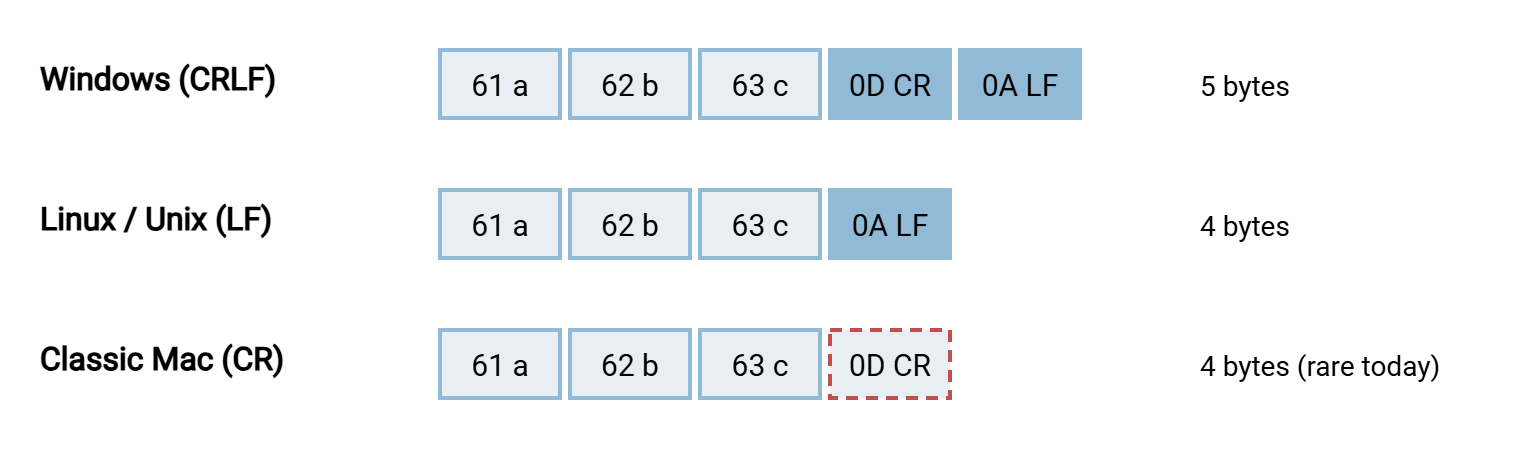
Notice the arithmetic: a Windows text file is exactly one byte per line longer than the same file on Linux. That is why a converted file's size changes by precisely its line count, a fact you will use for diagnosis later.
What Breaks When They Mix
Most modern software reads either convention without complaint, which lulls people into thinking the problem is solved. It is not — it has moved to the places where a program takes the bytes literally. These are the ones an administrator meets most often.
Scripts with CRLF on Linux
A shell script edited on Windows and copied to a Linux server ends every line with 0D 0A. The kernel reads the first line to find the interpreter and sees /bin/bash\r. It looks for a program by that name, which does not exist. Bash itself then treats stray \r bytes as part of commands and values:
$ ./deploy.sh
bash: ./deploy.sh: /bin/bash^M: bad interpreter: No such file or directory

$ bash deploy.sh
deploy.sh: line 2: $'\r': command not found
deploy.sh: line 9: syntax error: unexpected end of file
The ^M is how terminals display a CR byte; $'\r' is bash's way of printing the same thing. Newer shells word the first error as cannot execute: required file not found, which is even less helpful. The unexpected end of file comes from a keyword such as fi\r or done\r that bash no longer recognizes. If any of those three messages appears on a script that "works on my machine", check the line endings before anything else.
Configuration values with an invisible tail
A settings file with CRLF endings, read by a Linux program that splits on LF, produces values with a CR stuck to the end. host=db01.example.com becomes db01.example.com\r. The resulting error — "unknown host", "no such file", "invalid port" — names a value that looks perfectly correct on screen. The same thing happens to lists of filenames, hostnames, and account names fed to scripts.
Imports and flat files
Loaders that expect a specific terminator misread the other one. A CSV with CRLF read by a parser that splits on LF alone leaves \r attached to the last field of every row. Then 12.00\r fails a numeric check, and a lookup on the last column never matches. Fixed-width files — where every record is exactly N bytes and the loader counts rather than reads — are the worst case. One extra byte per record shifts every field after the first row. Loaders that expect CRLF and receive LF can see the whole file as a single record. The formats involved are described in flat file formats.
Checksums that disagree
A hash is computed over bytes, and CRLF and LF are different bytes. Suppose a partner hashes the file on Windows and you hash the copy on Linux after something converted it. The hashes differ even though nothing was "corrupted" in the everyday sense. That is a feature — the hash is telling the truth — but it means the two sides must agree on which bytes are being hashed. Hashing explained covers the mechanism. The practical rule is to hash the file as delivered, before any conversion, or to hash after conversion on both sides.
Mixed endings inside one file
The nastiest variant is a file with both conventions inside it: a CRLF file that someone appended LF lines to, or a partial conversion that stopped halfway. Tools that detect the convention from the first line get it wrong for the rest, and every symptom above appears intermittently. Mixed files are also the reason to be careful with conversion commands, as the next sections show.
Detecting Which Endings a File Has
Before converting anything, look. On Linux, the file command reports the convention in words. The cat -A command makes the invisible bytes visible — ^M for CR and $ at the true end of each line:
$ file deploy.sh orders.csv
deploy.sh:  Bourne-Again shell script, ASCII text executable, with CRLF line terminators
orders.csv: ASCII text

$ cat -A deploy.sh | head -2
#!/bin/bash^M$
echo "hello"^M$

$ grep -c $'\r' deploy.sh        # how many lines contain a CR
2
$ wc -l deploy.sh                # how many lines in total
2

$ od -c orders.csv | head -2      # octal dump, one character per column
0000000   i   d   ,   n   a   m   e   ,   a   m   o   u   n   t  \n   1
0000020   ,   A   l   i   c   e   ,   1   0   .   5   0  \n   2   ,   B
Reading these: file says nothing about line terminators when they are plain LF, and adds "with CRLF line terminators" or "with CR line terminators" otherwise. Comparing the grep -c count with wc -l tells you whether the file is consistent. Equal numbers mean every line has a CR, zero means none, and anything in between means a mixed file. The od -c dump shows each byte as a character, with \r and \n spelled out, which is the quickest way to check a specific line.
On Windows, PowerShell's Format-Hex shows the bytes, and a regular-expression count answers the consistency question. Modern Notepad also reports "Windows (CRLF)" or "Unix (LF)" in its status bar, and most code editors show the same thing in a corner:
PS> Format-Hex orders.csv | Select-Object -First 3

           00 01 02 03 04 05 06 07 08 09 0A 0B 0C 0D 0E 0F
00000000   69 64 2C 6E 61 6D 65 2C 61 6D 6F 75 6E 74 0D 0A  id,name,amount..
00000010   31 2C 41 6C 69 63 65 2C 31 30 2E 35 30 0D 0A 32  1,Alice,10.50..2

PS> $t = [IO.File]::ReadAllText("orders.csv")
PS> ([regex]::Matches($t, "`r`n")).Count        # CRLF endings
5
PS> ([regex]::Matches($t, "(?<!`r)`n")).Count   # bare LF endings
0
In the hex dump, 0D 0A at the end of each line is CRLF; a bare 0A is LF. The two counts give you the same consistency check as on Linux: all CRLF, all LF, or a mix. The pattern (?<!`r)`n means "an LF not preceded by a CR", which is exactly a bare Unix line ending.
Converting With Everyday Tools
Once you know what you have, conversion is a one-liner — but the one-liners differ in what they do to edge cases, so pick deliberately.
# The purpose-built tools: convert in place, skip binary files automatically
$ dos2unix deploy.sh
dos2unix: converting file deploy.sh to Unix format...
$ unix2dos -n orders.csv orders_win.csv       # -n writes a new file, leaves the source alone
unix2dos: converting file orders.csv to DOS format...

# sed: strip a CR only where it sits at the end of a line
$ sed -i 's/\r$//' deploy.sh

# tr: removes EVERY CR byte, including any that were not line endings
$ tr -d '\r' < input.txt > output.txt

# Verify
$ file deploy.sh
deploy.sh: Bourne-Again shell script, ASCII text executable
dos2unix and unix2dos are the safe choice: they handle mixed files correctly, refuse to touch files that look binary, and can keep the original timestamp. sed 's/\r$//' is nearly as safe because it only removes a CR immediately before a line ending. tr -d '\r' is the blunt instrument — fine for a file you know is pure text, dangerous on anything else. A CR byte in the middle of a line is data, not a line ending. Never run any of these on a file you have not confirmed is text.
On Windows, the .NET methods available from PowerShell do the same job. The lookbehind pattern from the detection step matters here. Replacing every `n with `r`n in a file that already has some CRLF lines would produce `r`r`n. So only bare LFs should be touched:
# CRLF -> LF
$t = [IO.File]::ReadAllText("deploy.sh")
$t = $t -replace "`r`n", "`n"
[IO.File]::WriteAllText("deploy.sh", $t)

# LF -> CRLF, without doubling lines that are already CRLF
$t = [IO.File]::ReadAllText("orders.csv")
$t = $t -replace "(?<!`r)`n", "`r`n"
[IO.File]::WriteAllText("orders_win.csv", $t)
Two PowerShell warnings. ReadAllText assumes UTF-8 unless the file starts with a byte-order mark. So a file in a legacy code page needs an explicit encoding argument. And WriteAllText writes UTF-8 without a mark. Both are covered in character encodings for admins. More importantly, the innocent-looking Get-Content in.txt | Set-Content out.txt is itself a converter. Get-Content splits the file into lines and Set-Content joins them back with the Windows newline. So an LF file silently becomes CRLF. Many "we never touched the file" mysteries end there.
Remember: a line-ending conversion is a change to the file. Do it once, in one known place, and hash the file after it. Never let it happen as a side effect of an editor, a shell command, or a transfer mode.
Where the Transfer Fits: Never Let the Transport Convert
There are three places a line ending can change between the system that wrote a file and the system that reads it. They are an editor or tool on the sending side, the transfer itself, and a tool on the receiving side. The transfer is the wrong place, for one reason: it is the only one of the three that cannot be inspected or tested. FTP's ASCII mode converts based on what each end assumes the other wants, applies that assumption to every file including binaries, and logs nothing. Set every transfer to binary mode and treat the transport as a byte copier, as the ASCII/binary trap explains in detail. SFTP, SCP, and HTTPS give you that behavior by default.
Conversion then becomes a visible, deliberate step in the job: a dos2unix run before upload, or a post-processing action after download. That step appears in the job definition and in the log. Scheduled-transfer tools with pre- and post-processing hooks, Sysax FTP Automation among them, let you attach such a step to the job. That way, the conversion and the transfer are recorded together. The pipeline view of that — what runs before the transfer, what runs after, and where a transformation belongs — is in transforming files between systems.
Two other silent converters deserve a mention. Source-control systems can be configured to convert line endings on check-out and check-in. So a script that is LF in the repository may be CRLF on a Windows working copy. And some editors normalize a whole file to their own preferred convention on save. Neither is a transfer problem, but both produce files that then get transferred, and the transfer gets the blame.
The Policy That Settles It Per Flow
You cannot pick a single convention for the whole organization, because the consumers differ. The Linux batch loader wants LF, the Windows accounting import wants CRLF, and the partner's mainframe wants something else again. What you can do is decide, per flow, and write the decision down. Four questions settle it:
- Which convention does the consumer require? Test it rather than assuming — feed it a file in each convention and see what happens. Many consumers accept both; then the answer is "either, but consistent".
- Which convention does the producer emit? Check an actual output file with the detection commands above, not the documentation.
- If they differ, where does the conversion happen? Exactly one place: at the producer before sending, or at the consumer after receiving. Never both, never "somewhere in the middle".
- Which bytes are hashed? The file as delivered, or the file after conversion — and both sides must use the same answer.
The result belongs in the flow's documentation and, for partner flows, in the interface agreement. A clause of one or two lines is enough, and it prevents months of intermittent trouble:
Flow:          ORDERS-IN (partner -> our Linux loader)
Format:        CSV, UTF-8 without BOM
Line endings:  LF only. Files received with CRLF are converted by the
               post-processing step "normalize-eol" before loading;
               mixed-ending files are rejected to the quarantine folder.
Transfer mode: binary (SFTP). No text-mode transfers.
Hash:          SHA-256 of the file as delivered, in ORDERS-IN.sha256
Notice what the clause does: it makes the conversion a named step with a home, and it turns a mixed-ending file from a mystery into a defined reject. The file interface contract article shows how such clauses fit alongside naming, timing, and format rules. The prevention checklist in this series folds them into a review you can run on every new flow.
The Version to Tell a Colleague
Windows ends lines with two bytes, CR and LF; Linux and its relatives use LF alone. Programs that take bytes literally — the shell reading a script, a loader counting record lengths, a hash — break or disagree when the two mix. Look before you convert (file, cat -A, Format-Hex). Convert with a tool that understands edge cases (dos2unix, or a lookbehind-aware replace in PowerShell). Keep the transfer in binary mode so it never converts for you, and decide per flow where the one conversion lives.
The next article, character encodings for admins, covers the other thing that makes a text file "subtly wrong": the bytes inside the lines. For the broader question of proving a file arrived unchanged, see verifying transfers end to end.
Frequently Asked Questions
What does ^M mean in an error message?
Does binary-mode FTP or SFTP change line endings?
Which convention should I standardize on?
Can a file have both CRLF and LF endings?
Why did my file's checksum change when I only "opened" it?
From the Sysax team: we build secure file transfer software for Windows. Sysax Multi Server is an FTP, FTPS, SFTP, and HTTPS server. Sysax FTP Automation handles scheduled, scripted transfers. Free trials are on the download page.