
Running Partner Exchange as a Program, Not a Pile
"Which of our partners still connect over plain FTP?" The question arrives on a Tuesday, from someone in security who would like a number by Thursday. The first trading partner your organization ever exchanged files with got a careful, hand-built setup. Someone chose the protocol, created the account, tested the connection, and wrote it all down somewhere. The fifth partner got a copy of the fourth's setup, adjusted under deadline. By the fifteenth, "setup" means finding whoever did the last one and hoping they remember. The Tuesday question has cousins: who can write into the orders folder? When did this partner last send us anything? So they all get the only honest answer available: nobody knows without a day of digging. There is a spreadsheet. It has opinions, most of them from before the server migration.
Partner file exchange, sometimes called B2B exchange, is the routine, mostly automated movement of files between your organization and other companies. The files include orders and invoices, claims and remittances, inventory feeds, payroll files, logistics manifests. Each individual connection is usually simple. The failure mode is almost never one connection; it is the collection. There are dozens of one-off setups, each slightly different, with no shared structure, no single list, and no owner. That collection is the pile. Nobody built it. It assembled itself, one reasonable Friday at a time.
This article is about the alternative: running partner exchange as a program. That means a small set of standard patterns every partner maps to, and a partner register that answers who-connects-how in one place. It means named roles that keep it owned, and a lifecycle that covers endings as well as beginnings. The article is the foundation for the rest of our B2B Partner Exchange series. By the end you will know exactly what a program consists of and how to get there from a pile without a giant project. Thursday's number is achievable. It is just not achievable from memory.
What a Pile Looks Like, and How It Got That Way
Nobody decides to build a pile. It accretes, one reasonable decision at a time. A partner insisted on FTPS, so an exception was made. A rush onboarding skipped the naming discussion, so that partner's files arrive named however their system names them. A script that fetches invoices was written on one administrator's workstation because that was fastest, and it still runs there. Each decision was locally sensible. The sum is an estate nobody can describe. Piles have no architect, only contributors.
You can recognize a pile by its symptoms:
- Every partner is a special case. Different protocols, different folder layouts, different naming, different credential arrangements — not because anyone chose variety, but because nobody chose anything.
- Knowledge lives in people, not records. The answer to "how does Cedar Freight connect?" is a person, and that person has vacation days and a resignation letter in their future.
- Credentials are wherever they landed. Passwords in old email threads, a private key on the workstation of someone who left, a shared login three partners were given because it was quick.
- Monitoring exists only where something once burned. The flows that failed loudly got alerts bolted on; the rest fail silently until a business team asks where their file is.
- Endings never happen. Partners whose contracts lapsed years ago still have working accounts, because switching something off feels riskier than leaving it.
The cost of a pile is not dramatic outage — piles mostly work, day to day. The cost is that every question becomes an investigation and every change becomes a risk. Onboarding a new partner takes weeks because there is no path to follow. An auditor's request for a list of external connections triggers a scramble. A security review finds accounts nobody can explain. And when something does break at two in the morning, the person on call is doing archaeology instead of operations. Archaeology is a respectable field. It is a poor on-call rotation.
A Program Is Four Commitments
The difference between a pile and a program is not a product purchase and not a bigger team. It is four structural commitments, each small on its own:
- Standard patterns. A short list of named ways a partner may connect and exchange files. Every partner maps to one of them; new arrangements are designed once, not per partner.
- A partner register. One maintained record that answers, for every partner: who they are, how they connect, what flows, and who to call.
- Named ownership. A person accountable for the program as a whole, and clear operational responsibility for the day-to-day.
- A lifecycle. Defined beginnings, defined operation, defined change, and — the part everyone skips — defined endings.
The diagram below puts the two states side by side. The partners and the files are the same in both pictures; the difference is structure and a single source of truth.
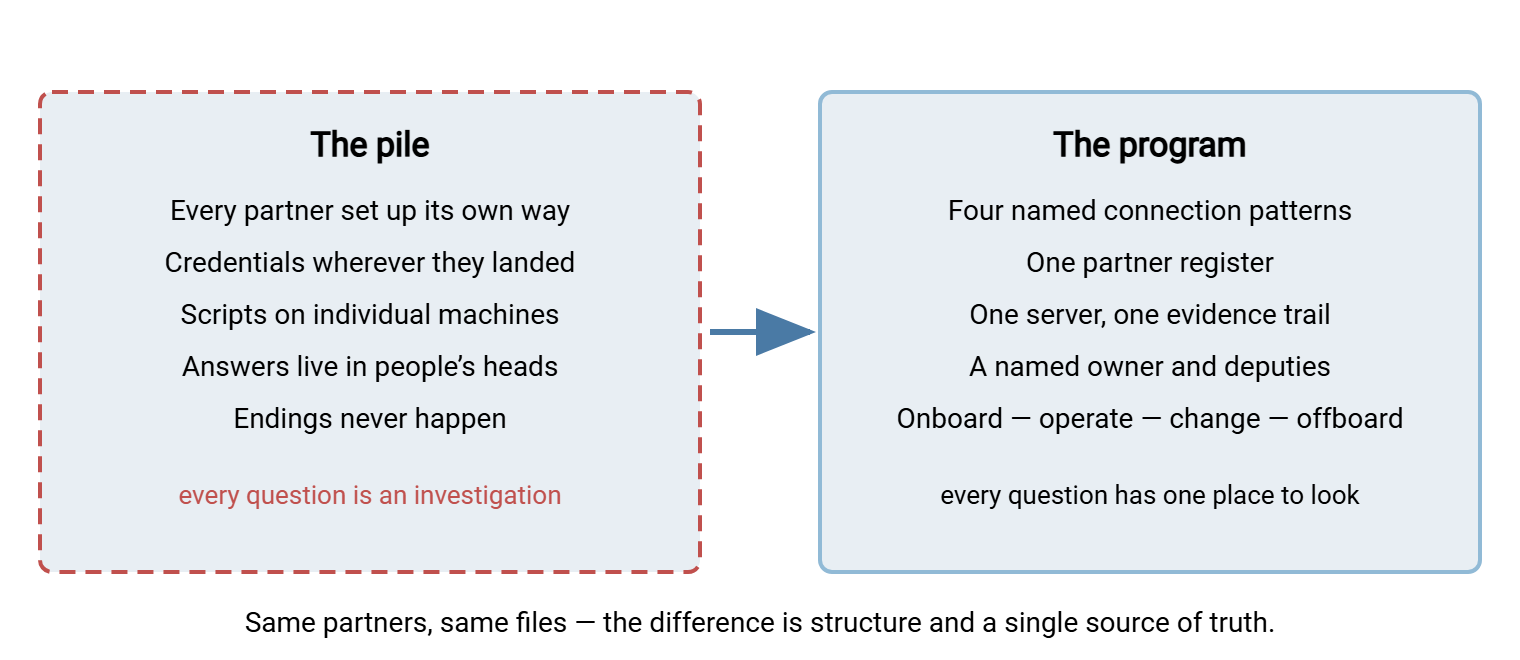
Notice what is not on the program side: no particular protocol, no particular software, no minimum partner count. A program with six partners and a spreadsheet register is still a program. A pile with expensive tooling is still a pile, only better lit.
The Standard Patterns Every Partner Maps To
Strip away the details and almost every partner connection is one of four shapes, defined by two questions. Which direction do files move, and which side initiates the connection? Naming the four shapes is the single highest-leverage act of standardization, because it turns "design a new integration" into "pick a pattern."
- Partner pushes to you. The partner's system connects to your transfer server and uploads into a folder that belongs to them. You control the endpoint, the account, and the logs. This is the workhorse pattern for inbound data — orders, claims, manifests.
- Partner pulls from you. You place outbound files in the partner's pickup folder on your server; their system connects on their schedule and fetches. Still your endpoint, still your logs — but delivery timing is in their hands, which matters when you write service expectations.
- You push to the partner. A scheduled job on your side connects to their server and uploads. Now you hold a credential for their system, your job owns retries, and your logs show only your half of the story.
- You pull from the partner. Your scheduled job fetches from their server — common when the partner is the bigger fish and dictates terms. Same credential and visibility consequences as the push case.
The first two patterns keep the exchange on infrastructure you run. That is why mature programs prefer them where there is a choice. There is one server to secure, one place where accounts live, one evidence trail. The full decision logic — firewall posture, who notices failure first, who owns retry — is covered in depth in push vs pull. The surrounding architecture (staging areas, hub topologies) is covered in our server-to-server exchange patterns series. Which protocols you offer within each pattern is its own decision. That is the standards menu, covered in setting technical standards for partner exchange. The underlying reasoning is in choosing a protocol for partner exchange.
Give the patterns short names — "inbound drop," "pickup," "outbound push," "scheduled fetch." Use those names everywhere: in the register, in onboarding conversations, in change tickets. When a new partner appears, the first question becomes "which pattern?" and most of the design is done the moment it is answered. What remains is mostly folder names, which somehow take longer.
The Partner Register: One Place That Answers Who Connects How
The partner register is the heart of the program: a single maintained record with one row (or one page) per partner. Its job is to make every routine question answerable in minutes by anyone on the team, without asking the person who did the setup. If you build only one thing from this article, build this.
A useful register records, for each partner:
- Partner code — a short, stable identifier (
ALPINE,HARBORM) used in account names, folder names, and file names. That way, everything traceable to the partner carries the same tag. Choose it once, at onboarding, and never reuse a retired code. - Legal name and business owner — the company, and the person inside your organization who owns the relationship and can answer "do we still work with them?"
- Technical contacts — named people (and a shared mailbox) on the partner side for connection issues, plus your own escalation path.
- Pattern and protocol — which of the four patterns, over which protocol, with which authentication method.
- Endpoints — the hostnames and ports involved, on whichever side hosts them.
- Flows — each distinct file stream: name, direction, schedule or expected cadence, and naming convention (with
YYYYMMDD-style tokens spelled out). - Credential notes — the type of credential, where it is stored, and when it is next due for rotation. Never the secret itself: a register is widely readable by design. So passwords and private keys live in your credential store, and the register only points at them.
- Expectations — the delivery windows and notice periods both sides agreed to, or a pointer to the document that records them.
- Status and dates — onboarding, active, exception, suspended, offboarded; the go-live date; the contract end or next review date.
Here is what a slice of a real register looks like with synthetic partners — note how much a single row already answers:
| Code | Partner | Pattern | Protocol & auth | Flows | Status |
|---|---|---|---|---|---|
| ALPINE | Alpine Parts Ltd (edi@alpineparts.example.com) |
Inbound drop (they push) | SFTP, public key | Orders in, daily by 06:00; acks out by 09:00 | Active |
| HARBORM | Harbor Mutual Insurance (it-ops@harbormutual.example.com) |
Pickup (they pull) | SFTP, public key + IP allowlist | Claims extract out, weekly Mon; fetched by Tue noon | Active |
| CEDARF | Cedar Freight (support@cedarfreight.example.com) |
Outbound push (we push) | FTPS, password + IP allowlist | Shipping manifests out, nightly after batch | Exception: FTPS, review at contract renewal |
| MERIDIAN | Meridian Foods (edi@meridianfoods.example.com) |
Scheduled fetch (we pull) | SFTP, public key (our key on their server) | Invoices in, monthly on the first business day | Onboarding — test files in progress |
Where should the register live? Wherever your team will actually maintain it. A shared spreadsheet is a perfectly honest starting point; a wiki page per partner with a summary table works too. I have watched a purpose-built register database die of neglect while the spreadsheet beside it thrived, because the spreadsheet was open on someone's second monitor. The tool matters far less than two disciplines. Every change to a partner's setup updates the register in the same change. The register is reviewed against reality on a schedule. That second discipline is where your server's logs earn their keep. A server like Sysax Multi Server records partner activity to a log file or a database. So you can periodically reconcile the register's claims ("HARBORM pulls weekly") against what actually connected, and catch both dormant partners and undocumented ones. A register that never meets the evidence drifts into fiction. Well-formatted fiction, with column headers, but fiction.
Remember: the register answers questions; it never holds secrets. Passwords, private keys, and anything else that grants access belong in your credential store. If a register row would let its reader log in, you have built a liability, not a record.
Roles: Who Keeps the Program Owned
Piles are what ownership vacuums grow. A program needs three roles filled. In a small shop, that may be two people, or even one person wearing labeled hats, as long as the hats are explicit:
- The program owner is accountable for the whole: the patterns, the standards, the register's accuracy, the exceptions list. When a new partner request arrives or a partner demands something off-menu, the owner decides. This is an accountability role, not necessarily the busiest pair of hands.
- Operators run the day-to-day: onboarding steps, credential changes, incident response, the monitoring queue. Every operator can find any partner's details in the register — that is the point of it.
- Business owners per partner sit outside IT: the buyer, account manager, or department that actually wants the exchange to exist. They answer the questions logs cannot. Is this relationship still live, has the contract changed, who at the partner should we call about a commercial dispute? Record the business owners in the register and keep them current; a partner whose business owner has left the company is a partner drifting toward orphanhood.
The test of role health is the vacation test. If the most knowledgeable person disappears for three weeks, can the others onboard a partner, rotate a credential, and answer an auditor? If not, the knowledge is in a head, not in the program. In that case, the fix is almost always to write the missing piece into the register or the runbook, not to hire a second hero. Heroes are expensive, scarce, and also take vacations.
The Lifecycle: Onboard, Operate, Change, Offboard
A program treats a partner connection the way good IT treats an employee account: it has a beginning, a middle, and — crucially — an end, each with defined steps.
- Onboard. A repeatable sequence from first contact to first production file, driven by a runbook and a standard information packet rather than fresh emails each time. This is the subject of a partner onboarding runbook that scales.
- Operate. The long middle: files flow, monitoring watches the promises you made, credentials rotate on schedule, and both sides know what to expect from each other. Expectations and their measurement are covered in SLAs and expectations for partner file exchange.
- Change. Protocols retire, servers migrate, standards evolve, partners get acquired. Change is where programs prove themselves. Every partner maps to a pattern and lives in the register. So "move everyone off plain FTP" becomes a filtered list and a plan instead of an expedition.
- Offboard. Contracts end. Credentials get revoked, flows get retired without breaking what remains, and retention duties on their data get honored. The register row flips to offboarded rather than quietly rotting. The checklist lives in offboarding partners without breakage.
Most estates have a beginning and a middle. Every estate I have walked through was rich in beginnings; I have yet to find one with a surplus of endings. It is the last two stages — deliberate change and deliberate endings — that separate a program from a pile with paperwork.
From Pile to Program, Without a Big Project
You do not get from pile to program by freezing onboarding for a quarter and rebuilding everything. You get there by changing how new things happen immediately, and converging old things opportunistically. A realistic sequence:
- Census what exists. Inventory every external file connection from evidence, not memory: server accounts and their last logins, firewall rules, scheduled tasks, scripts, and the log trail. Our guide to running a file flow census walks through the method. Expect surprises; the census that finds nothing embarrassing has not finished.
- Build the register from the census. One row per partner, however incomplete. An empty cell labeled "unknown — investigating" is more honest and more useful than no row.
- Name your patterns from what you already do. Look at the census: most partners already cluster into the four shapes. Write down the shapes, pick your preferred defaults, and you have version one of your standards.
- Run every new partner through the program from today. New partners get a pattern, a register row, standard credentials, and monitoring from day one. This costs almost nothing — it is the same work you would do anyway, in a defined order.
- Converge existing partners opportunistically. Do not launch forty renegotiations. Instead, use natural touchpoints — a credential rotation, a contract renewal, an incident, a server migration. Use each to pull one partner at a time onto the standard patterns. Each touchpoint already has the partner's attention; standardizing rides along nearly free.
- Review on a schedule. A short periodic pass over the register: dormant partners, overdue rotations, exceptions past their review date, contacts who bounced. Fold it into the access reviews you likely already owe — see periodic access reviews for transfer systems.
Northgate Retail ran its first census expecting eleven partners and found seventeen. Two of the extras were scripts on a workstation under a desk. They were still fetching price lists every night for a buyer who had moved teams the previous spring. One supplier had been dropping files into a folder nobody had opened in months. Nothing was broken, which was the unsettling part. The register they wrote that week had six rows marked "unknown, investigating". Closing them took a month of polite emails to people who had to check with other people. The next review, six months on, caught the newest orphan in an afternoon. Nobody was in trouble; the folder got an owner and the workstation was finally allowed to retire.
Automation deserves a special mention in step five. Piles keep their outbound and fetch jobs as scripts scattered across machines; part of converging is gathering them somewhere schedulable and visible. A tool like Sysax FTP Automation exists for exactly this shape of work — scheduled partner jobs with email notification on failure. Consolidating scripts into named, scheduled jobs makes the automation itself something the register can point at, instead of folklore on someone's workstation. Folklore is charming in villages and alarming in scheduled tasks.
Don't pause the world: the fastest way to kill a nascent program is to block new partner onboarding until the grand cleanup finishes. Run new partners the new way immediately; let the old estate converge one natural touchpoint at a time.
How You Know the Program Is Working
A program's health shows up as boring speed. Watch for these signals:
- Questions about partners get answered from the register in minutes, by whoever is asked — not routed to the one person who knows.
- Onboarding time stops depending on who does it. The measure to track is time-to-first-production-file, and it should fall as the runbook matures.
- Incidents start from a known map — pattern, endpoints, contacts, expectations — instead of archaeology.
- Audit and security requests ("list all external connections and their authentication") become an export, not a scramble.
- The exceptions list is short, dated, and shrinking — every exception has a review date instead of squatter's rights.
For the fuller management framing, see our what makes file transfer managed series. It maps visibility, control, automation, and audit as deliberate layers over your transfer estate. A partner exchange program is that thinking applied to the connections you share with other companies.
The Program in One Paragraph, and Where to Go Next
Partner exchange fails as a collection, so manage the collection. Name four standard connection patterns and map every partner to one. Keep a register that answers who-connects-how without asking anyone. Put a name on the program and on each relationship. Give every partner a lifecycle with a real ending. None of it requires new software, and all of it starts with a census and a spreadsheet this week. Thursday's number, in other words, is one filtered column away.
From here, a natural next read in this series is the onboarding runbook — the lifecycle stage where standardization pays off first. Another is setting technical standards, which turns your patterns into a menu partners can pick from. When you are ready for the forgotten end of the lifecycle, offboarding without breakage closes the loop.
Frequently Asked Questions
What counts as a "partner" in a partner exchange program?
We only have five partners. Is a program overkill?
What should never go in the partner register?
Is a spreadsheet really good enough for the register?
Who should own the partner exchange program?
From the Sysax team: we build secure file transfer software for Windows. Sysax Multi Server is an FTP, FTPS, SFTP, and HTTPS server. Sysax FTP Automation handles scheduled, scripted transfers. Free trials are on the download page.