
A Partner Onboarding Runbook That Scales
"Which port did we tell them?" "It was in the second email. Or the fourth." Ask an administrator to describe their last partner onboarding and you usually hear a story, not a procedure. There were three weeks of email back-and-forth, a password sent one way and a hostname another. A test failed because nobody had opened the firewall, and a go-live date slid twice. Ask about the one before that and you hear a different story. That variance is the tell: onboarding is being reinvented every time, and every reinvention forgets something. Usually the port.
Onboarding is also where your exchange program makes its first impression, in both directions. The partner learns whether working with you will be crisp or chaotic, and you learn the same about them. A messy onboarding does not just waste weeks. It bakes in the shortcuts (the shared password, the skipped test, the unmonitored flow) that you will be living with for the life of the relationship. Shortcuts taken under deadline have remarkable staying power. They outlast the deadline, the project, and frequently the people.
The fix is a runbook: a written, ordered sequence of stages that every partner onboarding follows. It is paired with a standard information packet you send instead of composing fresh emails. This article walks the sequence stage by stage and gives you the packet's table of contents to copy. It shows how to measure onboarding health with a single number: time to first production file. It is part of our B2B Partner Exchange series, and it assumes the program structures (patterns, register, standards) introduced in running partner exchange as a program. The port, for the record, goes in the packet. Page one.
Why Onboarding Deserves a Runbook
Every partner onboarding, however different the business context, answers the same short list of questions. What data moves, which direction, how often, over which protocol, authenticated how? Into which folders, named how, tested how, watched how, and supported by whom? A runbook asks those questions in a fixed order, so that none of them gets answered by accident in production.
The payoffs compound as the partner count grows:
- Speed. Nobody designs anything during onboarding — they select from standards decided earlier. Selection is fast; design is slow.
- Consistency. Partner forty's setup looks like partner twelve's, which is what makes a portfolio operable by a team instead of by its historians.
- Security under pressure. Go-live pressure is exactly when credentials get emailed and tests get skipped. A runbook is the checklist that holds the line when everyone is in a hurry.
- Delegability. A junior administrator can run a documented sequence end to end. Undocumented onboarding is forever senior-staff work.
One clarification before the stages: the runbook governs your side's work. You cannot script the partner — their firewall team, their change windows, their pace. What you can do is make every wait a wait on them, never on you, and the sequence below is arranged for exactly that. Partner firewalls open on their own schedule, like tides, but less predictably.
Treat the runbook itself as a living document with an owner. Every onboarding that hits a snag the runbook did not anticipate ends with a one-line edit. That might be a new intake question, a clearer packet sentence, or an extra go-live line. We learned this the slow way: our first runbook was rewritten after each of the first six onboardings, and then barely at all. After five or six partners the document stops changing much, and that stability is the sign it now matches reality rather than intentions.
The Sequence at a Glance
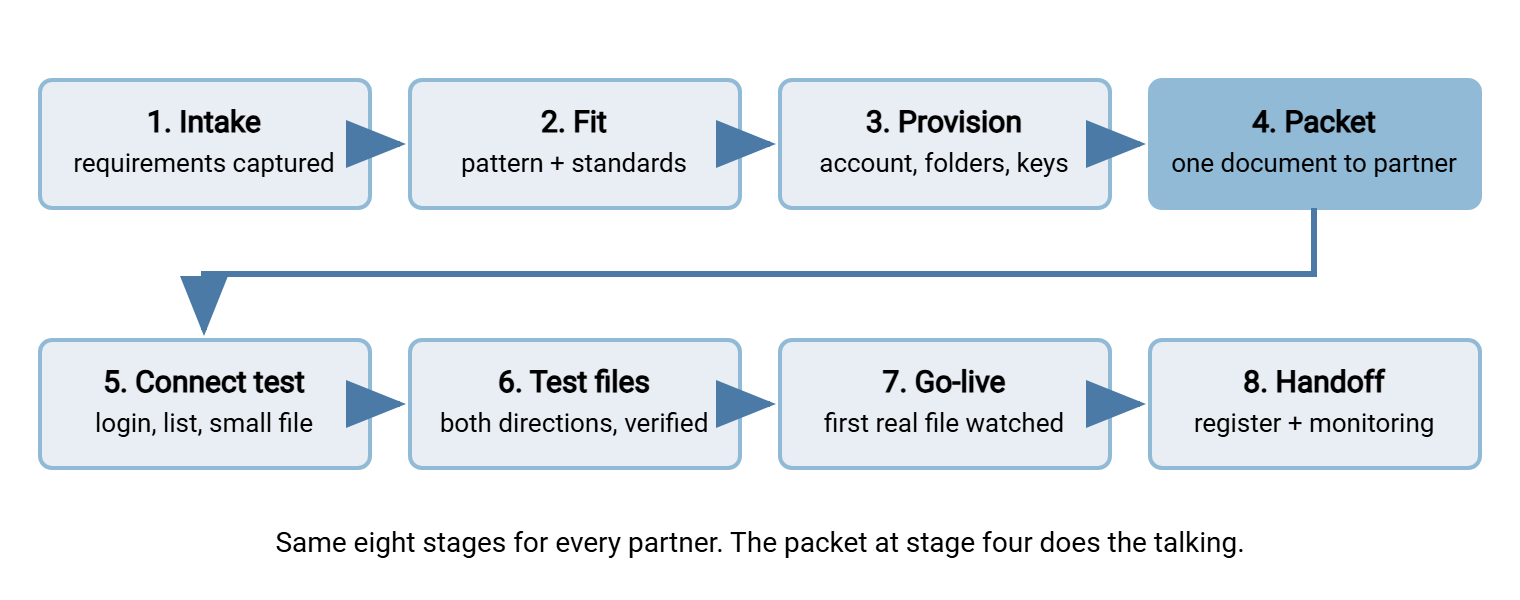
The runbook has eight stages. The first four happen mostly at your desk; the last four involve the partner actively. The diagram below shows the order — and the handoff at stage four, where a single packet replaces the email threads that usually fill this phase.
Stages One to Three: Intake, Fit, Provision
Stage one: intake — capture the requirements once
Intake is a structured conversation with whoever inside your organization wants this exchange to exist, plus the partner's technical contact. Use a fixed question list and record the answers straight into the partner's register row:
- What data moves, and which direction? One flow or several?
- How often, roughly how large, and by when must each file arrive or depart?
- What format — and is there a specification document, or just an example file?
- How sensitive is the content? Personal data, payment data, health data each carry duties that shape encryption and retention choices.
- What can the partner's side actually do? Can they speak SFTP? Manage a key pair? Restrict their source IP addresses? Their honest capability decides more than their preferences do.
- Who are the named contacts on both sides — business and technical — and what are their support hours?
- When does the business need this live? (Write it down; you will be managing to it.)
Resist the urge to start building during intake. Half-captured requirements are how a "daily" feed turns out to be hourly on month-end, discovered in production.
Stage two: fit the request to a pattern and the standards menu
Next, map the request onto the program's structures. Which of the four connection patterns (partner pushes, partner pulls, you push, you pull)? Which protocol and authentication method from your standards menu, which naming convention? This stage is deliberately boring — selection, not invention. The partner may be unable to meet the standard — no key management, an old system that only speaks FTPS. In that case, the exception is decided now, by the program owner, with a compensating control and a review date. That is exactly as described in setting technical standards for partner exchange. An exception granted at stage two is a decision; the same concession made at stage seven under go-live pressure is a surrender.
One special case worth naming: the partner may be an EDI shop expecting AS2 — the EDI world's message-based exchange protocol. In that case, the sequence here still applies, but certificates and message-level receipts replace some steps. Our separate guide to AS2 trading partner onboarding covers those specifics; do not improvise them from an SFTP mindset.
Stage three: provision — account, folders, naming
Now build your side completely, before the partner is involved. Create the partner's dedicated account, lay out their folder tree, and configure their access so the account can touch nothing but its own tree. A per-partner tree that has served many programs well:
/partners/ALPINE/
    inbound/      partner uploads here; your jobs collect and clear it
    outbound/     your jobs publish here; partner downloads (and may delete)
    test/         used during onboarding and after changes; never processed
Agree the file naming at the same time, using your program's convention — something like ALPINE_orders_YYYYMMDD.csv, with the partner code, flow name, and datestamp in fixed positions. The design reasoning (separators, datestamp position, what never to allow in a name) is covered in naming convention design; at onboarding you only apply it.
On a Windows transfer server such as Sysax Multi Server, this stage maps to ordinary configuration. Create the partner's account (a built-in account, or a Windows/Active Directory one if that is your model). Attach their public key or set the password policy. Scope the account's permissions to its own folder tree, and add an IP allow rule for the addresses they gave you at intake. Ten minutes of configuration, and the isolation and authentication story for this partner is done. The deeper reasoning behind those choices is the subject of credentials and security across many partners.
Stage Four: The Onboarding Packet
The onboarding packet is a single document that tells the partner everything they need to connect, test, and go live. It replaces the drip of emails that otherwise carries this information — and loses half of it. You maintain one template; each onboarding fills in the blanks. Send it as soon as provisioning is done, because everything after this point waits on the partner reading it. Email threads are where hostnames go to be misquoted.
The packet's table of contents, ready to copy:
- Connection details. Include hostname, port, protocol, and the server's host key fingerprint (for SFTP) or certificate details (for FTPS). That way, the partner can verify they are talking to you and not an imposter.
- Authentication instructions. What you need from them (their public key, their source IP addresses) and how credentials will be exchanged — through which channel, and explicitly not by email.
- Folder map. Their tree, what each folder is for, and who cleans up what.
- File naming and format. The exact naming convention with an example (
ALPINE_orders_YYYYMMDD.csv), plus the format specification or a sample file. - Schedule and cutoffs. When files are expected or published, in which timezone, and what happens to late arrivals.
- Upload convention. Explain how to avoid half-written files being read — typically upload under a temporary name, then rename to the final name. The why is in temp names and atomic renames.
- Test plan. The connectivity and test-file steps below, with proposed dates and the test folder to use.
- Contacts and support. Named contacts, the shared mailbox, support hours, and how to report a problem.
- Expectations summary. Include the delivery and response expectations both sides are signing up to. The fuller treatment is in SLAs and expectations. Include your maintenance notice policy too.
- Go-live criteria. The short list of things that must all be true before production traffic starts (see stage seven).
Credentials never ride in the packet. The packet says how secrets will be exchanged; the secrets travel separately. A key is handed over a verified channel. A password goes through a one-time-retrieval link or is read over a phone call to a known contact. The full choreography, including rotation later in life, is in the partner credential lifecycle.
Stages Five and Six: Prove the Path Before Trusting It
Stage five: connectivity test
The first live moment: the partner connects, authenticates, lists their folders, and moves one trivial file in and out of test/. Keep this stage deliberately tiny, because its failures are all plumbing. There may be a firewall not yet opened on their side. The coordination dance is described in firewalls and partner coordination. Other failures include a wrong port, a key pasted with a line break, or an IP allowlist missing their real egress address. Small tests localize plumbing problems fast. Book a half-hour window with their technical contact so failures are diagnosed live instead of over three days of email. The email version always finds a weekend.
Watch your server's log during the window — it tells you which layer failed without guesswork. That is the whole idea behind the layered troubleshooting method. No connection attempt at all means their firewall or your allowlist. A connection followed by an authentication failure means the credential. A login followed by permission errors means your folder scoping. Reading the attempt from your side usually settles in one minute what a partner's "it doesn't work" email would take a day to untangle. I keep the log open on a second monitor for the whole call, and it has never once been the wrong idea.
Stage six: test files, both directions
Now exchange realistic test files: correct naming, correct format, plausible size and content — not hello.txt. Realism matters because this stage is testing the agreement, not the network: does their system actually produce the naming you agreed? Does your side parse their format? Do files land complete under the temp-name-then-rename convention?
- Run every flow, in its real direction, at least twice — once to work, once to prove it was not luck.
- Verify received files match sent files by size and checksum, not by eyeball.
- Keep test traffic in the
test/folder or behind an agreedTEST_name prefix, and make sure production processing ignores it. A test invoice that reaches the ERP system is an incident, not a milestone. - Test one failure on purpose: a wrongly named file, a connection from a non-allowlisted address. You want to see the rejection and the alert now, while nobody is upset.
Stages Seven and Eight: Go-Live and Handoff
Stage seven: go-live
Go-live is a checklist, not a feeling. Production traffic starts only when every line is true:
- Connectivity and test files passed, both directions, with verified integrity.
- Credentials are in their permanent home and any temporary test credentials are gone.
- Monitoring is armed (see stage eight — armed before the first file, not after).
- The register row is complete: pattern, endpoints, contacts, schedule, credential notes.
- Both sides have named the date and the first expected file.
Then watch the first production file land, by hand, and confirm downstream processing consumed it. The first file gets a human witness; the ten-thousandth gets automation. Which brings us to the stage everyone forgets.
Stage eight: handoff to operations
Onboarding ends when the flow runs — and alerts — without the person who onboarded it. Concretely:
- Scheduled jobs exist as jobs, not as someone's script. If your side pushes or fetches, the transfer runs from your automation platform on its schedule. In Sysax FTP Automation, that means a named scheduled task per flow. Folder monitoring watches the inbound drop where that fits the pattern. The task includes OpenPGP decryption if the standard calls for it. It includes email notification on failure. That way, the flow's existence is visible in a job list, not in folklore.
- Expected-file monitoring is live. A daily file needs a check that notices its absence, because a partner flow that silently stops is the classic quiet failure. The mechanics — freshness checks and expected-file windows — are covered in freshness checks for expected files.
- The register is the record. Anyone on the operations rota can find this partner's everything in one place.
Remember: a flow is not live when the first file arrives; it is live when the first missing file would page somebody. Arm the monitoring before go-live and you will never have to explain to a business team why nobody noticed for nine days.
Measuring the Runbook: Time to First File
Time-to-first-file is the number of days from "we have a signed agreement and a technical contact" to "the first production file moved and was consumed." It is the single most honest health measure of an onboarding practice. It compresses speed, coordination, and rework into one number that business stakeholders also care about. It is also the only onboarding number anyone outside IT will ever ask for.
Record two timestamps per stage in the register — entered and completed — and the measure computes itself, along with something more useful: where the days went. In most programs the profile looks the same. Your desk stages (one to four) take a day or two. The partner-facing stages stretch — waiting for their firewall change, their key, their test window. That profile tells you the optimization: parallelize, do not hurry. Send the packet the moment provisioning finishes. Ask for their public key and source addresses at intake rather than at stage five. Propose test dates in the packet instead of negotiating them afterward. Programs that do this routinely onboard a standard partner in under two weeks of elapsed time, with under a day of actual work. The remaining days belong to a change board you have never met.
Watch the trend, not the individual case. A partner with a glacial IT department will blow the average — fine. But if every onboarding stalls at the same stage, the runbook has a defect at that stage, and the measure just found it for you.
Bluewater Bank's stage timestamps showed three onboardings in a row stalled at stage five, each for between two and five weeks. Each time the wait was the partner's firewall ticket. The pattern was identical: the partner's network team asked which port and from which address. The question bounced through two shared mailboxes, and a week disappeared before anyone on either side noticed. The fix was one block on page one of the packet: hostname, port, your connecting addresses. It included the sentence "please raise your firewall change now, before the test date." The next onboarding stalled for four days instead of four weeks. Those days were the partner's change-approval board, which no runbook can hurry. Nobody had been slow; the port had just been the last thing anyone mentioned.
The measure also earns the program political cover. A business team may ask why their new supplier is not live yet. In that case, "stage five, waiting on their firewall change since Tuesday, chased yesterday" is an answer that builds confidence. But "we're working on it" is an answer that invites someone to route around your program next time. The stage timestamps you record for measurement double as the status report — one more reason the register, not memory, holds them. Memory holds status about as well as it holds ports.
Onboarding Is the Program's Front Door
A scalable onboarding practice is eight boring stages in a fixed order. Capture requirements once, fit them to your patterns and standards, provision completely, and send one packet. Prove connectivity, prove the files, go live against a checklist, and hand off to operations with monitoring already armed. Boring is the achievement — it means partner forty gets the same crisp experience as partner four, from whichever administrator picks up the ticket.
The runbook leans on the rest of the program. The standards menu it selects from is defined in setting technical standards for partner exchange. The credential practices it applies are laid out in credentials and security across many partners. The expectations it records come from SLAs and expectations for partner file exchange. Start with the packet template — it is an afternoon's writing, and it pays back on the very next partner. Put the port on page one.
Frequently Asked Questions
How long should partner onboarding take?
What goes in an onboarding packet?
Why not just email the partner their password?
Do test files really need to be realistic?
When is onboarding actually finished?
From the Sysax team: we build secure file transfer software for Windows. Sysax Multi Server is an FTP, FTPS, SFTP, and HTTPS server. Sysax FTP Automation handles scheduled, scripted transfers. Free trials are on the download page.