
Customer Accounts: Create, Support, Retire
"Hi, it's Dana at the print shop. We've forgotten the password again." It is the third call this quarter from that account. The account will be verified, reset, delivered, and walked through the first login again, fifteen honest minutes. Meanwhile, the artwork the account exists to carry waits in someone's outbox. Creating that account took two minutes. Living with it takes years. The account you set up today for a customer's recurring uploads will demand a password reset within months. It will sit dormant when the customer's project pauses and hold files with retention obligations long after anyone remembers the project. And, if nothing is designed, it will still exist, password unchanged, the day an attacker's script finds it. Accounts are not a feature you configure once; they are a population you manage. The management is where the real cost and the real risk live.
This article designs the whole arc. It starts with provisioning that scales past the first dozen customers. Then comes the password-reset burden, measured honestly and then reduced by design. Next is dormancy policed as hygiene rather than discovered in an incident. Last is retirement that closes the account without losing the files it received. This article is part of our customer-facing file exchange series. It assumes the access-model decision from designing customer upload portals: accounts for recurring senders, lighter per-request access for one-time senders. Everything here is about the accounts you decided to have, including the one that keeps calling.
Why Customer Accounts Age Badly
Every other account population in your organization has a natural end signal. Employee accounts die when HR processes a departure. Partner accounts die when a contract ends and someone runs the offboarding checklist. Customer accounts have no such trigger. Customers drift away rather than resigning, projects fade rather than terminating, and no internal process fires on "this customer quietly stopped sending files." The general version of this problem, and why it is not unique to customers, is in why transfer accounts outlive their owners. Left alone, the population only grows. An aging, forgotten account is exactly what credential-guessing attacks feed on: a valid username, a password set years ago and never rotated, an owner who will never notice a login they did not make. The mechanics of those attacks are laid out in the anatomy of credential attacks; the lifecycle in this article is the defense that removes their favorite targets. Attackers, unlike customers, never forget a username.
Bluewater Bank's access review turned up an account named upload2, enabled, last login unknown because the logs from that era were gone. Nobody on the current team had created it. The folder behind it held a scattering of spreadsheets with customer-looking names in them. Was it safe to disable? Nobody could say; perhaps some quarterly process still depended on it. So it survived that review, as it had survived the last one, an unowned door into the network guarded by a password of unknown age. Then a reviewer the following year disabled it rather than deleting it, put a date in the calendar, and waited a month for something to break. Nothing did. Every step in this article exists to make that account impossible to produce. The disable-first habit that finally closed it is the ladder described below.
Every customer account must carry its future with it: who it belongs to, why it exists, and the condition under which it should stop existing. An account whose reason has been forgotten cannot be safely retired, so it never is. The provisioning design below exists mostly to make sure that information is captured at the one moment it is free: creation.
Creation: Provisioning at Customer Scale
At five customer accounts, hand-crafting each one is fine. At fifty, inconsistency creeps in — this account's folder is named after the customer, that one after the project, a third after whoever created it. At five hundred, inconsistency is operational debt. Nobody can tell from the account list who anything belongs to, and every support call starts with archaeology. The fix is a provisioning template decided once and applied every time:
- An account naming convention that encodes the customer identity predictably. That way, the account list reads like a register. The support desk can find the right account while the customer is still on the phone.
- A standard folder layout per account: where uploads land, where files you return to the customer are placed, all isolated from every other customer. Per-account isolation is the non-negotiable — one customer must never be able to list another's files. On the server side this is ordinary configuration. Sysax Multi Server, for example, authenticates customers against its own built-in accounts or your Windows and Active Directory users. It gives each account its own isolated folder with per-account permissions.
- Standard permissions — most customer accounts need upload rights and perhaps the ability to see what they sent, nothing more. Write-only drop areas are a legitimate choice where customers never need to review their submissions.
- A provisioning record: customer name, internal owner (which team or case this serves), creation date, and the expected end condition ("retire when the engagement closes," "review after one year of inactivity"). Two sentences captured now save an investigation later.
Credential delivery is part of creation, and it deserves more care than the common practice of emailing a username and password together to an unverified address. Split the channels — the username by email, the initial password by phone or through a separately established contact. Or use an initial password valid only briefly, with a forced change at first login where the platform you deploy supports it. Design the first login to succeed on the first try: a short note of what the customer will see, where to click, and who to contact if it fails. The first login is your one chance to make the account feel usable. A customer defeated on day one becomes an email-attachment sender forever. The password policy that first login enforces should follow the guidance in password policy for transfer accounts — strong, but built for humans who visit rarely.
One creation-side health check earns a place on someone's calendar: the account that never uploads. An account provisioned two weeks ago with zero logins usually means the customer could not get in and did not tell you. They hit a mistyped address, a spam-foldered welcome message, or a first-login failure, shrugged, and mailed the files instead. A quick weekly glance at "created recently, never used" catches these while a friendly follow-up still fixes them. It doubles as a quality check on your own provisioning. If a quarter of new accounts never see a login, the first-login experience is broken somewhere. The accounts are only the symptom. An account with zero logins is a customer who is currently emailing you.
The Password-Reset Burden, Measured Honestly
Here is the arithmetic most account designs skip, worked as an example you can redo with your own numbers. Suppose the recurring-sender population grows to four hundred accounts. These are occasional users — many log in once a month or less, which is precisely the usage pattern that forgets passwords. Experience across help desks puts the annual reset rate for occasional-use accounts around one reset per three or four accounts. Call it one hundred twenty resets a year. Each reset, done properly, is not a thirty-second favor. The support person must verify the requester is the customer — because a password reset granted to a stranger is an account handover. Then they must issue, deliver, and often walk the customer through the first login again. Fifteen minutes is honest. That is thirty hours a year of skilled support time, spent entirely on friction. Plus there is the quieter cost: every reset is a social-engineering opportunity. Attackers know reset flows are the soft side door of authentication. Thirty hours is most of a working week spent on nothing any customer asked for.
RESET-BURDEN WORKSHEET  (redo with your numbers)

  accounts                     A = 400
  expected resets/account/yr   r = 0.3   (occasional users)
  minutes per proper reset     m = 15    (verify + issue + walk-through)

  yearly resets       A x r        = 120
  yearly hours        120 x m / 60 = 30 hours
  ...plus each reset is an identity-verification decision.

  Now shrink each factor by design:
  A: fewer accounts  - per-request access for one-time senders
  r: fewer forgets   - username = email address; sane password
                       policy; lockout that says how long it lasts
  m: cheaper resets  - a scripted verification procedure; or
                       self-service reset IF identity-proofing
                       is genuinely solid (see below)
Each factor responds to design. Shrink A by not giving accounts to senders who did not need them — the portal article's access decision is also a reset-burden decision. Shrink r by making the username the customer's email address (one less thing to forget; half of "forgotten password" calls are really forgotten usernames). Also tune lockouts so a fumbled password does not escalate into a call. A customer locked out without being told for how long will always phone. The design that prevents it is in authentication failures and lockouts. Shrink m with a written verification script so every reset is checked the same way. Self-service reset means the customer proves control of their registered email and sets a new password unassisted. It is the biggest lever on m. If the platform you build or buy offers it, evaluate it on one question: is the identity proofing at least as strong as your help desk's script? A weak self-service flow does not reduce the reset burden; it automates the account-handover attack.
Remember: the reset burden is a design output, not a fact of life. Fewer accounts, guessable usernames, humane lockouts, and a scripted verification procedure routinely cut it by more than half. Every reset that never happens is also a social-engineering attempt that never gets its chance.
Support: The Middle Age of an Account
Between creation and retirement, accounts mostly need two things: help when access fails, and truth about who is behind them. The first is the reset and lockout story above, plus the broader ticket-reduction design in reducing the support load. The second is subtler: the person at the customer who holds the credentials changes jobs, and nobody tells you. The account still says "Harborview Clinics"; the human who knew the password left Harborview months ago — or worse, still knows it. For accounts carrying sensitive flows, a light annual touch keeps the mapping honest. That means a message to the registered contact confirming the account is still in use and still held by the right person. No response is itself information — it feeds the dormancy process below. Accounts do not tell you when their humans leave.
Keep a per-account view of activity, because support lives on it. When the registered contact calls to ask "did our upload arrive on Tuesday?", the answer should be a lookup, not a search party. This is one of the places server-side logging pays for itself daily. Take a server that logs every login, upload, and download to file and database (as Sysax Multi Server does). That turns most middle-age support questions into a one-query answer.
Equip the support desk before the first call, not after. They need three things in front of them. First is the account register (which account belongs to which customer, and who owns it internally). Then come the activity view above and the written verification script for resets. They also need the authority to disable an account on the spot when a call smells wrong. That is because "let me check with security and call you back" is a sentence that costs nothing and has ended real account-takeover attempts. I have watched it end one, and the caller did not call back. What the desk should not have is the ability to read customers' file content as a side effect of helping. Support needs metadata — names, times, sizes, statuses — not the documents themselves. The permission design should reflect that separation.
Dormancy: The Hygiene Policy
A dormant account is one with no successful login for a defined window. Dormancy is not misbehavior — customers pause, seasons end, projects sleep. But an account that is both dormant and enabled is pure downside. Nobody is watching it, and its password is aging toward guessable. The policy is a ladder, applied on a schedule, driven by your logs:
| Stage | Trigger (example) | Action |
|---|---|---|
| Notice | No login for ninety days | Message to the registered contact: still needed? |
| Disable | No login and no reply for a further thirty days | Account disabled, not deleted; reversible in minutes if the customer returns |
| Retire | Disabled for a further ninety days, owner confirms no return expected | Full retirement procedure (next section) |
Fit the windows to the scenario, not to a universal number. A tax-season customer is legitimately silent for most of the year, so a ninety-day trigger would harass exactly the customers who will return. Set their notice window past a year instead. Where the platform you deploy supports automatic account expiry dates, use them as a backstop for accounts with a known end ("access for the duration of the audit"). Where it does not, the same result comes from your dormancy sweep. That is a scheduled review of last-login dates from the server's logs, run the way finding stale and orphaned accounts describes for the whole account population. What matters is that the sweep runs on a calendar, not on memory, and that disable comes before delete, always. Disabling is free to reverse. The difference between the two is the difference between a mild customer inconvenience and an apology. Disabling is a phone call. Deleting is a letter.
Retirement: Closing the Account Without Losing the Files
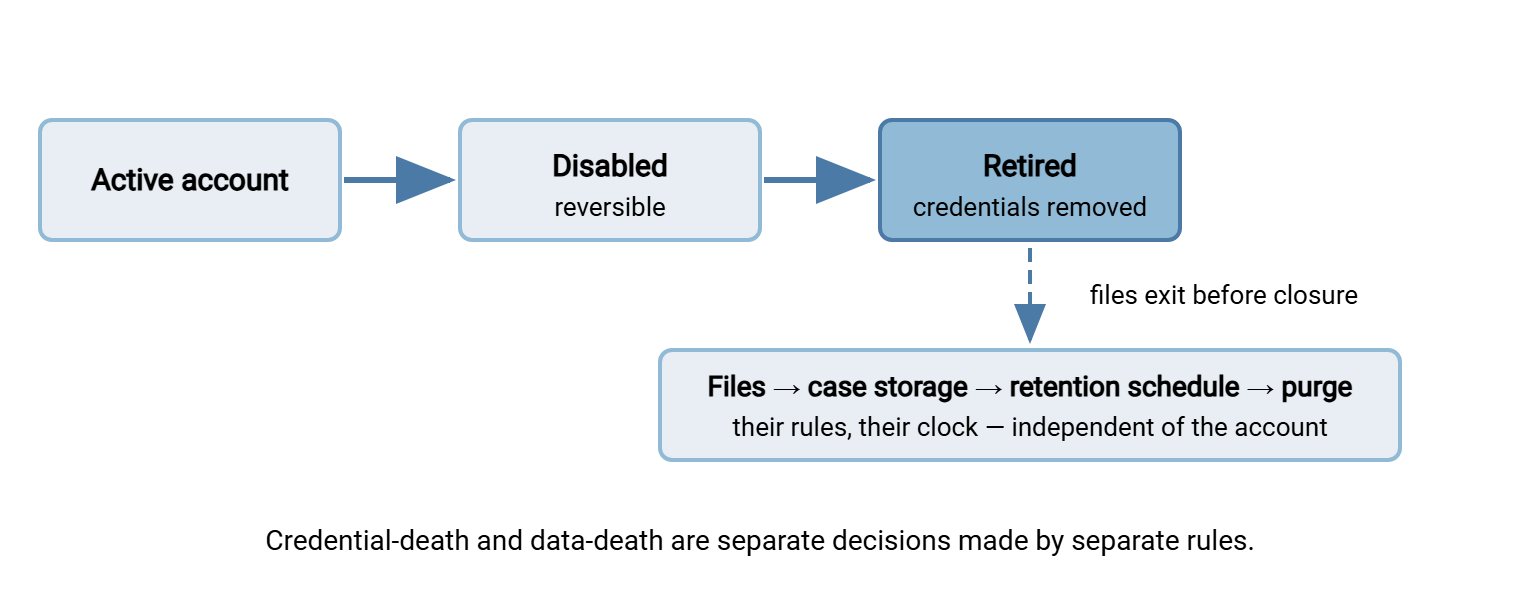
Retirement is where a wrong assumption does real damage. The instinct is "delete the account and its folder" — but the files a customer sent were never really the account's property. They belong to the case, the engagement, the legal obligation that caused them to be sent. Each carries its own retention duty that survives the account by years or must end sooner than the account would have kept it. Credential-death and data-death are two separate decisions, made by different rules.
The diagram below shows the split that makes retirement safe: the account's path ends, while the files follow the retention path that was theirs all along.
The retirement procedure, copyable:
ACCOUNT RETIREMENT CHECKLIST

[ ] Confirm with the internal owner: engagement closed, no
    return expected (check the provisioning record's end condition)
[ ] Inventory the account's folders: anything still there?
[ ] Move remaining files to their case/engagement storage,
    under the retention schedule that applies to that content
[ ] Anything past its retention? purge it now, per policy
[ ] Disable first if not already; confirm nothing breaks for
    fourteen days (a forgotten automation may still be pushing)
[ ] Remove credentials / delete the account
[ ] Record the closure: account, customer, date, who approved,
    where the files went
[ ] Tell the customer contact the access has closed and whom
    to contact for future needs
The retention half of this is its own discipline. What the schedules should say, who owns them, and how purges run without a human remembering are covered in retention basics for admins. The customer-exchange-specific obligations are covered in this pillar's governance article. The point here is sequencing: files first, credentials second, record always. An account deleted with its folder, on a platform where deleting the account removes the files, has more than once erased the only copy of documents a regulation required keeping. The closure record is what proves, later, that this is not what happened to you. The closure record is dull to write and thrilling to find.
The Lifecycle on One Page
Create with a template and a record of why. Deliver credentials carefully and make the first login succeed. Expect resets, measure the burden, and design it down rather than staffing it up. Verify occasionally that the human behind the account is still the right one. Sweep for dormancy on a calendar — notice, disable, retire — with windows fitted to each scenario's rhythm. Retire in the right order: files to their retention home, then credentials gone, then a record kept. Do this and your account population stays what it was meant to be — a register of live customer relationships. Neglect instead makes it a museum of stale credentials guarding forgotten personal data. The support-facing half of this story continues in reducing the support load of customer exchange. The obligations attached to the files themselves are covered in governance for customer-facing exchange. The print shop will still call now and then. The aim is that the call is a lookup, not archaeology.
Frequently Asked Questions
How long should we wait before treating a customer account as dormant?
Why not just delete dormant accounts immediately?
Is self-service password reset safe for customer accounts?
What happens to a customer's files when we close their account?
Should customer accounts live in Active Directory or in the transfer server?
From the Sysax team: we build secure file transfer software for Windows. Sysax Multi Server is an FTP, FTPS, SFTP, and HTTPS server. Sysax FTP Automation handles scheduled, scripted transfers. Free trials are on the download page.