
Reducing the Support Load of Customer Exchange
It is twenty past five on the evening before a filing deadline. The support queue has eleven new tickets, all about the upload page. "I can't log in." "It rejected my file." "It failed at ninety percent." "Did you get my documents?" "Where am I supposed to send this?" None of them are about the same thing, and all of them are about the same thing. Every customer-exchange system has a second cost that never appears in the project budget: the stream of tickets, calls, and please-help emails it generates forever after. Multiply a small per-customer probability by every customer you serve, and the support desk inherits a permanent workload that nobody designed and nobody owns.
Nearly every one of those tickets is a customer who wanted to comply and could not. That reframe is what this article is built on. It makes the support queue the most honest design review you will ever get. Each ticket names a place where the design leaked. This article works through the five causes behind the bulk of customer-exchange tickets, designs each one out, and then rewrites the error messages that turn confusion into calls. It is part of our customer-facing file exchange series. It leans on the design work of the earlier articles — because support load is not reduced at the help desk. It is reduced in the design.
The Ticket Funnel: Where Customers Leak Out
Picture the customer's journey as a funnel with four narrow points: they must find the right place, get in, have the file accepted, and learn that it worked. At each narrowing, some customers leak out of the happy path. Every leak lands somewhere: a ticket, an abandoned task, or an email attachment sent around the system entirely. The diagram shows the funnel and the five leak points this article repairs.
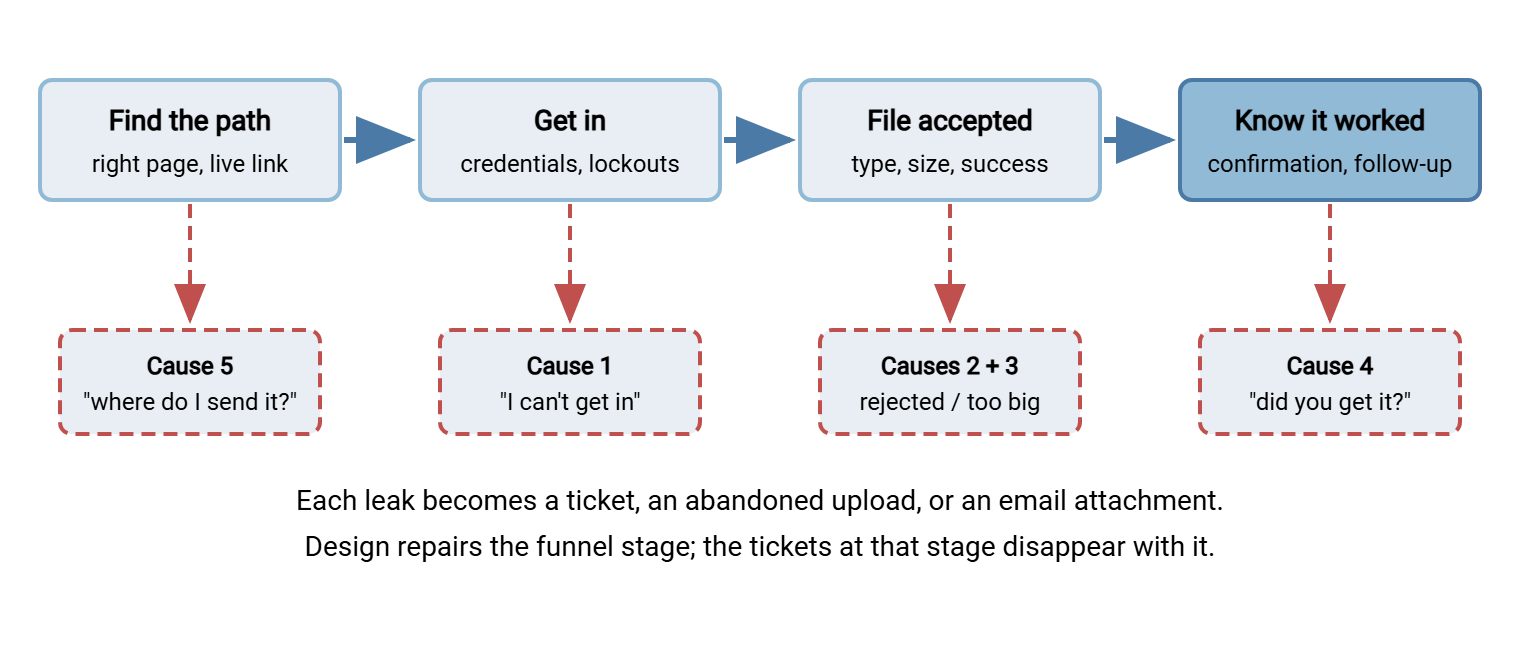
Before repairing anything, measure your own funnel: classify one month of exchange-related tickets against the five causes. The classification takes an afternoon and turns the argument from "support feels swamped" into "forty percent of our exchange tickets are silence-after-upload, which we can remove outright." It also gives you the before-number that proves the redesign worked. A copyable classification sheet:
TICKET CLASSIFICATION SHEET  (one month of exchange tickets)

  For each ticket, record ONE primary cause:

  [1] ACCESS     can't log in, forgot password/username,
                 locked out, "link expired / doesn't work"
  [2] REJECTED   file refused: wrong type, "invalid file",
                 customer doesn't understand why
  [3] SIZE/FAIL  too big, failed partway, endless spinner,
                 mobile/cellular upload death
  [4] SILENCE    "did you get my files?", duplicate upload,
                 file also sent by email "to be safe"
  [5] LOST PATH  "where do I send this?", files emailed to
                 a person because no path was provided
  [X] OTHER      genuinely novel (keep rare; re-read before
                 accepting a ticket as unclassifiable)

  Also mark: device if known (phone?), customer type
  (one-time / recurring), and minutes spent resolving.

  Output: count and total minutes per cause. Biggest number
  = first design target. Re-run monthly after each change.
Cause One: "I Can't Get In"
The ticket reads: forgotten password, unknown username, "my link says expired," or the quiet worst case — a lockout the customer does not even know happened, reported as "your site is broken." Access failures are the largest category in most queues, and they compound. A customer who fails to get in twice does not try a third time; they phone, or they email the files.
Designing it out is mostly work already specified elsewhere in this series. Give accounts only to senders who recur, so the population that can forget passwords is small — the access-model decision from the portal article. Make usernames the customer's email address, since half of credential tickets are really username amnesia. Apply the reset-burden design — guessable usernames, humane policy, scripted verification, honestly-evaluated self-service — from the account lifecycle article. And fix the lockout experience specifically. A customer-facing lockout must say, on the page, that the account is temporarily locked and for how long. That is because an unexplained refusal is indistinguishable from an outage and generates a call within minutes. The balance between slowing attackers and forgiving fumbles is tuned in authentication failures and lockouts. The residue after all this: genuine resets, handled by script. That residue is real but small — and every reset that remains is one your verification procedure was designed for.
One sub-species of this cause deserves its own line in your classification: the wrong-hands credential. The customer's office manager set up the account. The office manager left. The successor inherits a login nobody can find and a locked-out mailbox the reset would go to. The desk needs a procedure for this that is neither "sorry, can't help" nor "sure, here's a new password". Re-verify the customer relationship through the account's registered contact channel and involve the internal owner of that customer. Treat the request as what it is: a change of the human behind the account, worth recording, not just a reset. The successor did not inherit the password. They inherited the ticket.
Cause Two: "It Rejected My File"
The ticket reads: "your system won't take my document," usually with frustration, occasionally with the file attached to the ticket itself — the unscanned channel achieving exactly what the portal existed to prevent. Root cause, almost always: the system's idea of acceptable files was narrower than the customer's reality, or the rejection message explained nothing.
Design it out at both ends. Accept what customers actually produce. If the scenario is documents, that means phone photos in common image formats, not PDF-only purity. State the accepted types in customer words before the picker, as the portal article specifies. Then make every remaining rejection carry its own resolution: which file, what rule in plain terms, what to do next, and a human fallback. The template and the timing rules are in the intake article's reject-with-kindness section. A rejection that teaches costs zero tickets; a rejection that says "invalid file" costs one ticket and a resend attempt through email.
Watch this category for drift, because the world's file formats move while your accept-list stands still. A new phone generation starts saving photos in a newer format your list has never heard of. Suddenly a wave of "it rejected my photo" tickets arrives from customers doing exactly what last year's customers did successfully. When rejection tickets spike without a change on your side, suspect a change on theirs. In that case, pull a week of rejected-type values from the intake logs and see what new thing customers are now producing. The fix is a policy decision (accept the new format, or convert it, or explain the workaround on the page). But the detection is a support-queue signal, which is one more reason the classification sheet asks about devices. Your accept-list does not get a new phone every autumn. Your customers do.
Cause Three: "It Failed Partway Through"
The ticket reads: "it got to ninety percent and died," or "it just spins forever," and it clusters around the same profile — large files, phones, cellular connections. Root causes: limits discovered only at the end, uploads that cannot survive an interruption, and progress feedback that hides whether anything is happening.
The design-outs start with size limits. State them before the upload and enforce them at file-pick time, so an over-limit file costs two seconds rather than twenty minutes. Size the limits from files customers really send, not from a platform default. Show honest progress. For scenarios whose files are legitimately huge, choose upload mechanics that tolerate interruption. The options and their trade-offs live in large files over HTTP. Then test the whole journey on a real phone on a real cellular connection, which is where these tickets are born. The residue is genuinely broken connections, which no design removes (why they break at all is in why transfers get interrupted). But a failed upload whose page says "the connection dropped — your other two files are safe, try this one again" produces a retry. A generic failure produces a call.
Cause Four: "Did You Get My Files?"
The ticket reads exactly like that — polite, brief, and utterly avoidable. The customer uploaded successfully, saw nothing conclusive, and did the rational thing: asked. Silence after upload is the purest design failure in the catalog because removing it costs so little. It takes a per-file confirmation naming each file and its size, a reference number worth quoting, and one sentence of what happens next. The specification is in the portal article's confirmation section. Silence is the most expensive thing a page can say.
The half people forget is your side of the silence. If uploads sit unnoticed until someone thinks to look, the customer's "did you get it?" is often answered days later with "oh — yes, apparently" — which teaches the customer to always call. Close the loop with automation. A folder-monitoring tool such as Sysax FTP Automation watching the upload area can move arrivals onward and notify the owning team the moment files land. That way, the case handler's follow-up ("got your documents, all three are in") goes out the same day. When confirmation is immediate and human acknowledgment is fast, this ticket category approaches zero. In that case, the rare survivors are customers double-checking before a deadline, which is not a failure but a courtesy call.
Remember: silence is the only top-five cause that can be removed almost completely, and it is usually the cheapest fix on the list. Per-file confirmation with a reference, plus an automated arrival notification to your own staff, converts a permanent ticket stream into the occasional pre-deadline double-check.
Cause Five: "Where Do I Send This?"
The ticket reads: "where should I upload the documents you asked for?" — or worse, it never arrives, and the files show up in a case worker's inbox instead. Root cause: the request and the path were separated. Someone asked the customer for files in a letter, a call, or an email. The asking channel did not carry the sending path — or carried a link that had expired, or one forwarded from a colleague that pointed at the wrong case.
Design it out with one rule: the request is the path. Every message that asks a customer for files includes the exact place to put them — their case's upload access, live, tested, and scoped to them. Keep a stable, findable portal address linked from your public site for customers who lose the message and go searching (and who would otherwise find nothing and phone). Set link and access expiry beyond the realistic response window. An access that expires before the customer's deadline manufactures tickets on schedule. Make re-issuing a dead link a thirty-second act for your staff, not a provisioning project. The residue is customers who ignore every provided path and email files anyway. They get a warm reply, their files handled through the intake pipeline's fallback, and a gentle pointer to the portal for next time. I have watched a link expire on the morning of the deadline it was sent for; the queue that day was educational.
Expect this cause to spike at deadlines, because everything does. The evening before a filing deadline, every latent path problem surfaces at once — the letter sent weeks ago with a link that has since expired, the customer who deleted the email, the one who never received it. Deadline-heavy scenarios justify a small ritual. Shortly before each known deadline, re-send the path to everyone who has not yet delivered, with the link live and the case reference attached. One scheduled message removes an evening of simultaneous tickets — and it doubles as the nudge that improves on-time delivery itself. Deadlines do not create problems; they schedule them.
Rewrite the Error Messages
Across all five causes runs one multiplier: the words customers see when something fails. Systems speak to customers at exactly the moments things go wrong, in text usually written by whoever was closest to the code that day. Rewriting that text is the highest-leverage hour in customer-exchange support. The principles: say what happened in the customer's words, say what to do now, never show a bare code, and never close the door without pointing at the next one. A working set of rewrites:
| What the system says | What the customer should see |
|---|---|
| Error 413: Request Entity Too Large | This file is 480 MB; this page accepts files up to 200 MB. If you need to send something larger, contact us and we'll arrange it. |
| Invalid file type. | We can accept photos (JPG, PNG) and PDF documents here. This file appears to be something else — a photo of the document is fine if that's easier. |
| Authentication failed (too many attempts). | For security, sign-in is paused for fifteen minutes after several tries. Please try again after that — or call us at <number> and we'll help right away. |
| Upload failed: unknown error. | Something went wrong on our side and this file didn't arrive. Your other files are safe. Please try this one again — if it fails twice, contact us and quote reference UPLOAD-8146. |
| Session expired. | This page was open a while, so we signed you out for safety. Sign in again to continue — files you already uploaded are saved. |
Every rewrite answers "what happened?" and "what now?" in the same breath. It quantifies where numbers help and reassures about what did not go wrong ("your other files are safe"). That is because uncertainty about the rest is what turns one error into one ticket. Keep the raw technical detail flowing into your logs, where it belongs. The discipline of writing failure detail for operators is its own craft. The two audiences should never receive the same sentence. The log gets the number. The customer gets the sentence.
Test the rewrites the cheap way: hand each message to a colleague who has nothing to do with IT. Ask two questions — "what happened?" and "what would you do next?" If they hesitate on either, the message is not done. This costs ten minutes per message and catches the jargon that people close to the system can no longer see. And keep the messages in one reviewed place — a shared file, a template store — rather than scattered through page code and mail templates. That way, the next improvement is an edit, not an excavation. The same discipline, aimed at technical counterparties instead of customers, produces the partner FAQ and error decoder; the two documents should never share a sentence either.
Acme's support desk found its own version of this during the classification month. The canned reply for cause four, "did you get my files?", had been cloned from the cause-one reply years earlier. It still opened by walking the customer through a password reset. Nobody had noticed, because the customers who received it did the sensible thing and phoned. That is where the desk had been meeting them all along. The macro was rewritten to answer the question actually asked, with the file names and a reference pulled from the intake log. The phone calls in that category fell away within the month. The old macro was kept in a folder named examples, as a reminder that a fast answer to the wrong question is a slow answer.
Measure It Like an Admin
Support load deserves a denominator. Raw ticket counts mislead — more customers means more tickets even when the design improves. So track tickets per hundred completed uploads, classified by the five causes, month over month. The upload denominator comes straight from your server's records. A platform that logs every action to file and database, as Sysax Multi Server does, gives you completed-upload counts and per-account histories with a query. That also equips the support desk to answer "did it arrive?" during the call rather than after it. Re-run the classification after each design change; the cause you just designed out should visibly shrink, and whatever remains points at next quarter's fix. When a new ticket pattern appears — a new embedded browser mangling uploads, a new customer population with different habits — the funnel tells you which stage sprang the leak.
Track one shadow metric alongside the tickets: abandonment. Customers who fail and do not call are invisible in the queue but visible in the records. Those records show accounts created that never log in, logins that never upload, and uploads started that never complete. Rising abandonment with a quiet queue is not success; it is customers giving up silently and routing around you, which is worse than any ticket. The queue measures the customers who still believed you could help. Watch both.
The Queue Is the Report Card
A customer-exchange system's support queue converges on what its design deserves. Repair the funnel — findable paths, forgiving access, files accepted as customers actually make them, limits stated before they hurt, confirmation nobody can miss. Then the five great ticket engines go quiet one by one. That leaves a queue of genuine questions handled by a desk with time to handle them. The remaining piece of the series looks past the day-to-day at the obligations wrapped around all of it — retention, personal data, and the auditor's questions — in governance for customer-facing exchange. The eleven tickets at twenty past five were never eleven problems. They were five, and every one of the five has a fix above.
Frequently Asked Questions
What is the fastest single fix for customer upload support load?
How do we know which ticket cause to fix first?
Should error messages tell customers exactly why a file was refused?
Our lockouts protect against attackers — won't softening them help the attackers too?
What should we do when customers email files instead of using the portal?
From the Sysax team: we build secure file transfer software for Windows. Sysax Multi Server is an FTP, FTPS, SFTP, and HTTPS server. Sysax FTP Automation handles scheduled, scripted transfers. Free trials are on the download page.