
DMZ on a Budget: Options for Small Networks
The earlier articles in this series draw tidy diagrams with two firewalls, a buffer network, and a monitoring stack. You may run a ten-person shop with one internet line and a closet for a server room. If so, you may reasonably wonder whether any of it applies to you. It does. The threats do not scale down just because the network did. A small firm's exposed transfer port gets probed by the same scanners that hit an enterprise. A breach that reaches the only file server hurts a small business proportionally more.
What scales down is the build, and that is this article's subject: what real segmentation looks like when the budget is modest. We will start by clearing up the most common small-network trap. That is the consumer router setting that borrows the DMZ name without delivering any of the substance. Then we will walk three honest options, and finish with a minimum-viable checklist a one-admin shop can actually sustain. This article is part of our DMZ and gateway architecture series; the ideas it economizes are introduced in why file transfer services live in a DMZ.
The Router "DMZ Host" Setting Is Not a DMZ
Nearly every consumer and small-office router has a setting called DMZ host (sometimes "DMZ server" or "exposed host"). It sounds like exactly what this series describes. It is almost the opposite, and understanding why is the fastest security lesson in this article.
Here is what the setting actually does. You pick one machine on your LAN, and the router forwards all unsolicited inbound traffic — every port, every protocol — to that machine. That's the whole feature. Two things about it should now jump out. First, it opens the machine wider than a normal port forward. Instead of exposing one deliberate service, it exposes every service the machine runs, including ones you forgot exist. Second — and this is the disqualifying part — the machine stays on your LAN. There is no second boundary, no buffer network, no rule stopping it from reaching the laptop, the NAS, and the accounting PC beside it. The name survives from an era when router vendors needed a label for "send everything to this box," and it stuck.
The diagram shows what you actually get. Compare it with the three-zone layouts from earlier in the series and the difference needs no commentary.
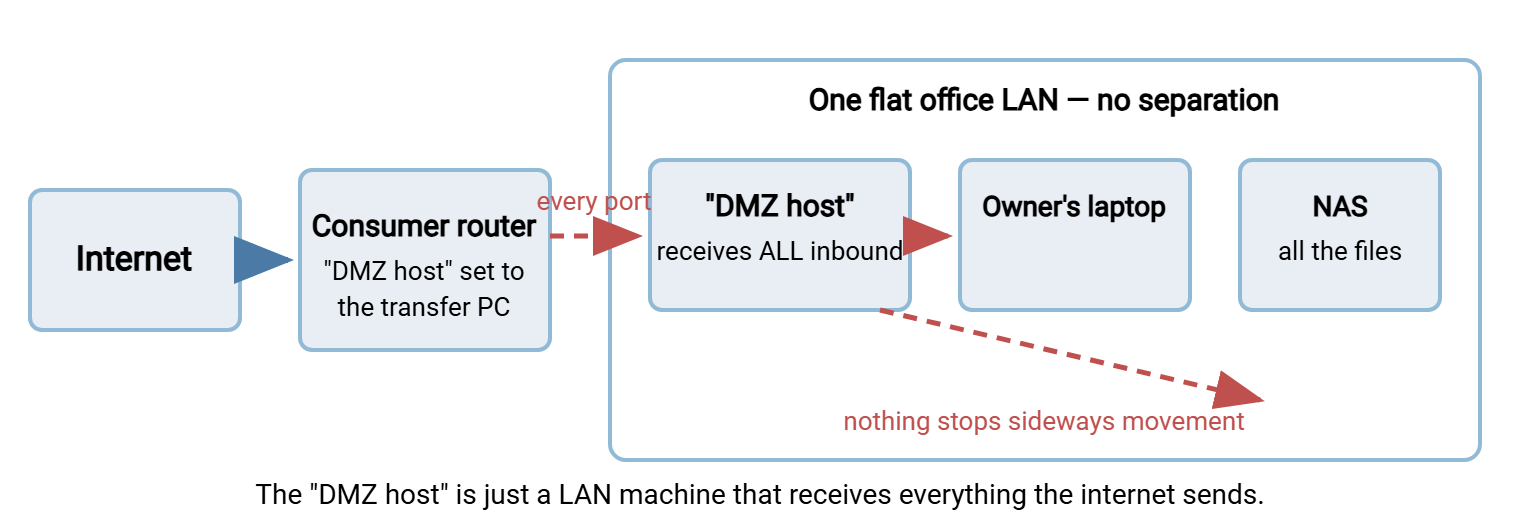
If you take one instruction from this article: never use the DMZ-host setting for a transfer server. If a plain port forward is genuinely all you can do today, a forward of one deliberate port is strictly less bad than the forward-everything setting. But both leave the exposed machine on your only network. That is the real problem the rest of this article solves.
What a Real DMZ Requires: Four Ingredients
Strip the enterprise diagrams to their essentials and a real DMZ needs exactly four things, none of which requires enterprise money:
- Separation: the exposed host sits in its own network segment, not on the office LAN.
- Enforcement: a firewall filters traffic between that segment and the office, deny-by-default.
- Direction control: the rules follow the pattern from the flow-direction article — internet reaches only the edge, the edge initiates nothing toward the office, the office pulls.
- Visibility: the edge host's logs leave the box, and somebody is alerted when the never-events happen.
Notice that these are properties, not products. Nothing on the list says "two firewalls," "rack-mounted," or any brand name. The enterprise builds in earlier articles buy the four ingredients with redundant hardware and dedicated teams. A small shop buys the same four with a spare firewall port, a managed switch, or a rented VM. The security comes from the properties holding, and an auditor — or an attacker — checks the properties, not the price tags.
Each option below is just a different way of buying those four ingredients with small-network gear.
Option 1: One Firewall, Three Legs
Many small-business firewalls — including the modest models, and the free-software firewalls people run on mini-PCs — have a spare interface, often labeled OPT or DMZ. Plug your transfer host into that interface and give it its own small subnet. Write the per-leg rules between the three zones: internet, DMZ leg, office leg. That is a genuine three-legged DMZ at the scale of one box and one cable. It is the same design mid-size networks use, described in the first article of this series.
The evening of work is smaller than it sounds. Six rules cover the whole design. Allow the internet to the edge host on the transfer port. Deny everything else inbound. Deny the DMZ leg to the office leg entirely. Allow one office machine to the edge for the pull and one for administration. Deny the DMZ leg outbound to the internet. Log the denies. Write those rules, test from the edge host that the office really is unreachable, and you are done. The full rule sets, ready to adapt, are in the flow-direction article.
The honest caveats are the ones any single-firewall design carries. One device holds the whole policy, so a misconfiguration there is a misconfiguration everywhere. The device itself must be kept updated. Neither caveat outweighs the gain. If your current firewall has a spare interface, this option costs nothing but an evening of rule-writing, and it is usually the right first move.
Option 2: VLANs on the Gear You Own
No spare interface? The same separation can be built logically. A VLAN (virtual LAN) makes one physical switch behave as several separate networks. Each switch port is assigned to a VLAN, and traffic cannot cross between VLANs inside the switch. Traffic can only cross where a router or firewall connects the VLANs and applies rules. A managed switch (one whose ports you can configure — the feature that separates it from the unmanaged desk switches) plus a VLAN-aware firewall is all it takes. The firewall connects to the switch over a trunk — a single cable carrying both VLANs, tagged so each packet declares which network it belongs to.
Here is the design: office machines live on one VLAN, and the transfer host lives alone on another. Every conversation between the two must climb up the trunk to the firewall and survive its rules. You have manufactured the three-legged design out of one cable and some configuration.
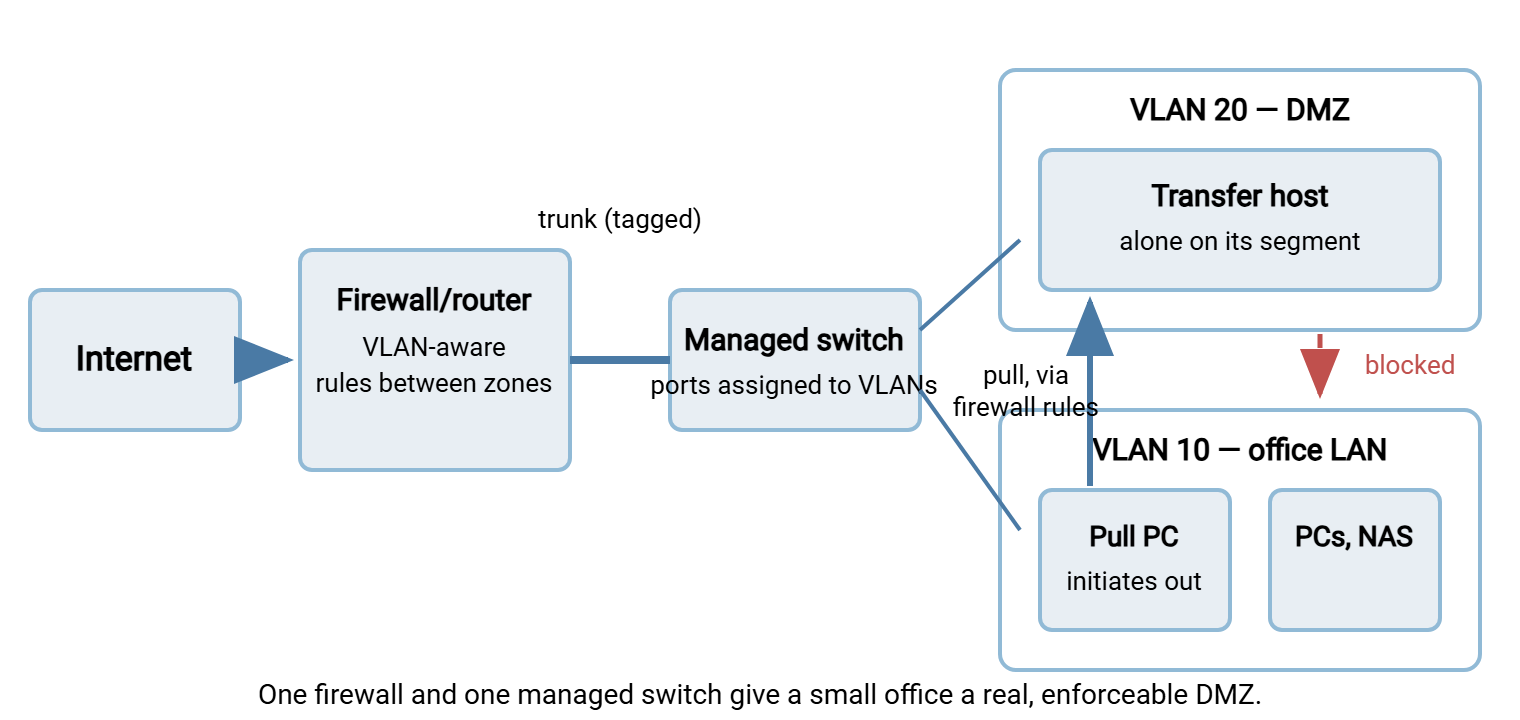
The caveats deserve honesty. The separation is only as good as the switch configuration. A port accidentally assigned to the wrong VLAN quietly bridges your zones. So label ports, avoid using the default VLAN for anything, and write the assignments down. And as with option 1, one physical box enforces everything. For a small office, both risks are manageable with tidiness — and the result enforces every rule from the flow-direction article just as faithfully as two chassis would. The transfer host on VLAN 20 can be any modest machine. A small Windows box or VM running Sysax Multi Server serves the role, with local partner accounts. The office-side pull is handled on schedule by Sysax FTP Automation from the pull PC on VLAN 10.
Option 3: Rent the Edge — a Cloud-Hosted Exchange Point
The third option moves the buffer zone out of your building entirely. Rent a small virtual machine from a cloud or VPS provider and make it the exchange point. Partners upload to and download from the cloud VM. A scheduled job in your office connects outward to it — collecting arrivals, dropping outbound files. It is exactly like the pull pattern from the rest of this series, stretched across the internet.
For a small shop this design has a remarkable property: your office needs no inbound ports at all. Nothing on your premises listens to the internet. The office firewall can sit fully closed, because every conversation it sees is one your pull job started. That also solves a problem money otherwise can't fix: CGNAT (carrier-grade NAT). This is when your ISP shares one public address among many customers and inbound connections to you are simply impossible. Behind CGNAT you cannot host an edge on premises at any budget; a cloud edge makes the question irrelevant.
The duties do not disappear — they relocate. The cloud VM is your DMZ host, and everything in the hardening article applies to it. That means minimal build, local accounts, no office credentials stored on it, logs shipped off, and short dwell enforced by frequent pulls. Files now rest briefly on rented hardware, so think about sensitivity. For confidential flows, encrypt files at the file level before they leave the sender, so the VM only ever holds ciphertext. And remember the rented edge is still yours to patch — the provider secures the building, not your VM.
Two practical selection notes. Every file now crosses the internet twice — partner to cloud, cloud to office. So pick a provider region near you and size the office line for the pull traffic. For typical business documents the double hop is unnoticeable, and only large media flows need thought. And prefer a provider that gives the VM its own firewall you can configure from outside the machine. That becomes your outer boundary, letting you expose the transfer port alone and keep management access limited to your office address.
The Three Options Side by Side
| Option | What it needs | Strengths | Watch out for |
|---|---|---|---|
| Three-legged firewall | A firewall with a spare interface | Simplest true DMZ; often zero new hardware | One box holds the whole policy |
| VLAN-based DMZ | Managed switch + VLAN-aware firewall | Real segmentation on modest gear; grows with you | Switch misassignment quietly bridges zones |
| Cloud-hosted edge | A small rented VM + an office pull job | No inbound ports at the office; works behind CGNAT | Data rests off-premises; VM is still yours to harden |
These combine, too. Plenty of small shops run the cloud edge for partner exchange and keep the office network VLAN-segmented anyway. That is because segmentation pays for itself the first time anything — a laptop, a smart TV, a compromised utility — misbehaves on the network.
What Stays the Same at Any Size
Whichever option you choose, the non-negotiables from the rest of this series apply unchanged, because none of them costs money — they cost decisions. The edge host initiates nothing toward the office, ever; the office pulls. No office password, key, or domain membership exists on the edge. Files dwell at the edge for minutes, swept by the pull schedule. Logs leave the edge automatically, even if "off-box" just means the office server. Somebody gets an alert when the edge tries to do something it never should. And prefer SFTP at the edge if you can choose — one port to expose instead of a control port plus a passive range. That keeps a small firewall's rule set readable, as the firewall's view of the protocols lays out. If partners require FTPS, publish its passive range deliberately per the passive-range guide rather than opening a wide swath.
Remember: small-network security fails less often from missing hardware than from missing separation. One exposed machine on the same LAN as everything else is the actual danger; any of the three options above removes it for less than the cost of the incident it prevents.
The Minimum-Viable-Segmentation Checklist
Here is the floor — the least a small shop should accept for internet-facing file exchange, in checklist form. Every line maps to something covered above or earlier in the series.
MINIMUM VIABLE SEGMENTATION - small-shop checklist
[ ] The exposed transfer host sits in its own segment (firewall leg, VLAN,
    or cloud VM) - never on the office LAN
[ ] A firewall enforces deny-by-default BETWEEN that segment and the office
[ ] Internet -> edge: transfer ports only (prefer SFTP - one port)
[ ] Edge -> office: nothing, ever
[ ] Office -> edge: pull job and admin access only, from named machines
[ ] Edge -> internet: denied except named needs (e.g. updates)
[ ] Edge host: local accounts only, not domain-joined, no office secrets
[ ] Files swept off the edge on a schedule measured in minutes
[ ] Edge logs copied off the box automatically, even to a small office server
[ ] An alert fires if the edge attempts to reach the office
[ ] The whole setup fits on one written page: what is where, and who to call
[ ] Router "DMZ host" setting: OFF
If you can tick every box, you have the same security properties as the mid-size builds in this series. Those are separation, enforcement, direction control, and visibility, expressed in small-network parts. That is the honest minimum, and it is genuinely enough for a small shop exchanging routine business files.
When to Step Up
The budget designs have a natural ceiling, and it helps to know the signals that you are reaching it. Partner count climbing into the dozens, with onboarding becoming a weekly chore. Contracts or regulators asking pointed questions about where data rests. A second admin joining, which makes documented, conventional architecture more valuable than clever minimalism. Transfer volumes that make the pull schedule a bottleneck. Any of these is a cue to revisit the patterns article with mid-size eyes. That means a dedicated edge host in a proper DMZ, perhaps a gateway for the sensitive lane. Each signal is also a cue to formalize monitoring per the hardening article.
It is also worth knowing what direction "up" points. The industry's current trajectory is treating every network segment as untrusted and verifying every connection on identity rather than location. That is the subject of our zero trust file transfer series. The small-org designs here are a genuine first step along it: you have already stopped trusting your own LAN to police itself.
Until then, do not let the enterprise diagrams intimidate you into doing nothing. A three-legged firewall or a pair of VLANs, a pull job, and a dozen firewall rules put a small shop meaningfully ahead of many larger networks. That is because the fundamentals, not the hardware, are what attackers actually collide with.
Frequently Asked Questions
My router only offers the "DMZ host" setting. Should I use it at all?
Are VLANs actually secure enough to separate a DMZ?
Is my data safe sitting on a rented cloud VM?
What is CGNAT, and how do I know if I'm behind it?
Could I build a DMZ with two cheap routers instead?
Roughly what does the honest minimum cost?
From the Sysax team: we build secure file transfer software for Windows. Sysax Multi Server is an FTP, FTPS, SFTP, and HTTPS server. Sysax FTP Automation handles scheduled, scripted transfers. Free trials are on the download page.