
Mapping Batch Dependencies Before They Map You
"Since when does the letters job read the eligibility snapshot?" Since always, it turns out. You are hearing about it now because it is 04:00 and the snapshot did not land. There are two ways to learn the dependency structure of a batch ecosystem. The first is deliberately, on paper, in daylight. The second is the default: one outage at a time, each incident teaching you a single edge of the graph at the price of a bad morning. Most shops are years into the second curriculum without ever having enrolled in the first. The graph, for its part, is patient. It will teach you every edge eventually.
This article is the first way. It gives you a discovery method with three passes (trace one output backward, read the logs forward, interview the humans). It gives you a register format for writing down what you find, and a way to draw the chain so the critical path is visible. It also gives you the habits that keep the map true after you have made it. It is part of our Nightly Batch Ecosystems series, and it turns the sketched night sheet from The Anatomy of a Batch Night into something you can bet a recovery on.
Three Kinds of Dependency, One Kind of Outage
A dependency exists wherever one piece of the night cannot succeed unless another piece already has. In batch ecosystems they come in three flavors, and telling them apart matters because they hide in different places:
- Data dependencies — job B reads a file that job A writes. These are the honest ones: the file is the visible edge, with a name, a folder, and a timestamp. Nearly every edge in your map will be a file, which is exactly why file interfaces make durable seams between systems (a theme our files-as-integration-glue series develops).
- Timing dependencies — job B is scheduled at 02:25 because job A "is always done by then." No file connects them directly; the edge exists only as an assumption baked into two clock times. These are the dangerous ones: invisible in any config, enforced by nothing, and wrong on exactly the nights that matter.
- Resource dependencies — two jobs share a database, a host, a network link, or a license, and collide when both run at once. They surface as mysterious slowness rather than clean failure, usually after someone "harmlessly" reschedules a job into an occupied hour.
All three produce the same outage signature — a downstream step consuming stale, partial, or absent input — but only the first kind announces itself. The real job of a dependency map is dragging the second and third kinds into the light. An implicit dependency (one enforced by hope and habit) fails silently. An explicit dependency (one enforced by a check, a trigger, or a marker file) fails loudly and early. Making edges explicit is half the modernization story told later in this series. Hope is not a scheduler. It is, however, widely deployed as one.
Why the Documented Chain Is Wrong
If a diagram of your batch night exists at all, it describes the design as it stood the day someone drew it. That might have been the migration, the go-live, or the audit. Batch ecosystems accrete. A report gets a second consumer. A script grows a side-output somebody downstream quietly starts reading. A workaround from an incident becomes load-bearing. A fixed job keeps its no-longer-necessary "wait until 01:00" forever. None of these changes update the diagram, because none of them felt like architecture at the time.
Here is Harborview's version of the story. During a rough patch a few winters back, an operator started manually copying the consolidated claims file to a second folder. It was "so the QA report could run early." The copy became a scheduled task, and the QA report's owner built two more reports on that folder. The original diagram — which shows one consumer of consolidation — has been wrong ever since. Nobody lied; the system just kept living after the drawing stopped.
So treat existing documentation as testimony, not evidence. The real chain lives in four places. These are the scheduler's task definitions, the jobs' own configs and scripts, and the folders where files actually appear and disappear. The fourth is the logs that record all of it happening. Discovery means reading those sources — and the method below does it in an order that catches each source's blind spots with the next one. Testimony is sincere. It is also, on average, two reorganizations old.
The Discovery Method
Pass 1: Trace one output backward
Start from a morning deliverable whose failure hurts — at our worked insurer, Harborview Mutual, the executive morning pack. Ask five mechanical questions and recurse:
- What job writes this artifact? (The scheduler's history or the file's own metadata tells you.)
- What inputs does that job read? Read its config or script — not your memory of it. Grep for paths, connection strings, and filename patterns.
- Where does each input come from — which job, transfer task, or partner delivery produces it?
- When does each input normally exist, and what does the job do if it is missing — fail, wait, or (worst) run happily against yesterday's copy?
- For each producer found, repeat from step 1.
The recursion bottoms out at daytime systems and external partners. What you now hold is a verified subtree for one deliverable: every edge on it has been read out of a config, not remembered. Do this for your top three or four deliverables and the subtrees will overlap heavily — that overlap is your first sighting of the critical path. Question 4 deserves special respect: a job that silently runs against a stale input is a wrong-numbers factory, the failure family described in why jobs fail silently.
Pass 2: Read the logs forward
Backward tracing finds what the configs declare; the logs reveal what actually happens, including consumers no config admits to. Take one representative week and line up three records. These are the scheduler's run history (what started and finished when), each job's own log, and — the underrated one — the transfer server's activity log. The transfer log is where hidden consumers surface, because it records not only every arrival but every pickup: which account downloaded which file at which time. Suppose the log shows a service account you do not recognize fetching the settlement file at 02:40 every night. You have just discovered an edge that exists in no diagram — some system, somewhere, depends on that file. A server that writes its activity log to both file and database, as Sysax Multi Server does, makes this pass a set of queries. One query could give you every event touching settle_YYYYMMDD.csv over ninety nights, sorted, rather than a week of scrolling.
Match producers to consumers by filename, folder, and time. A file written at 02:20 and read at 02:25 is an edge. A folder that receives a file nobody ever reads is a candidate for retirement (and a small victory to note). This pass also exposes timing dependencies. Two jobs whose start times track each other night after night with no file between them are coupled by clock. You should find out why. The answer is usually older than everyone currently on the team.
Pass 3: Interview the humans
Logs cannot see intentions, manual steps, or the things that only happen on bad nights. A short interview with each system's operator closes the gap. The question set that earns its time:
DEPENDENCY INTERVIEW — one page per system, ~20 minutes

1. What files does your system CONSUME overnight? From where, named how,
   expected by when?
2. What does it PRODUCE? Written where, named how, ready by when?
3. Who do you believe reads what you produce? (Compare with pass-2 logs.)
4. What happens on your side if an input is late? Missing? Half-written?
5. What do you check or fix BY HAND on a bad night? (Manual steps are
   dependencies too - on a person.)
6. What upstream change has burned you before?
7. If your system ran two hours late, who would call you first?
Question 5 is the goldmine: "I re-export the eligibility snapshot if the totals look off" is a dependency on one person's habit, invisible to every log. I have never run these interviews and had question 5 come back empty. Question 7 maps the blast radius as the organization actually feels it. The organization does not phone the job. It phones whoever answers.
The Dependency Register
Write the findings down artifact-first — one row per file, not per job — because files are the edges of this graph. Each row then reads as a contract: who makes it, who needs it, when, and how you know. A plain-text register beats a diagram for maintenance; the diagram gets generated from it when needed:
ARTIFACT: claims_consolidated_YYYYMMDD.dat
  producer:   claims consolidation job (23:30)
  consumers:  adjudication run (00:15); claims QA report (06:30)
  must exist: 00:10   missing-input behavior: adjudication FAILS (good)
  evidence:   consolidation log; transfer log pickup by svc-adjud
  fragility:  depends on 23:00 claims cutoff (see cutoff calendar)

ARTIFACT: elig_snapshot_YYYYMMDD.csv
  producer:   eligibility export task (20:15, runs 40s)
  consumers:  adjudication run; warehouse load; letter build
  must exist: 00:10   missing-input behavior: jobs USE YESTERDAY'S (bad)
  evidence:   pass-2 logs (3 pickups nightly); interview, claims ops
  fragility:  UNMONITORED single feeder of three critical jobs
Those two entries are real archetypes. The first is a healthy edge: monitored, failing loudly when starved. The second is the one this article is named for — and it deserves its own section.
Keep the register where operators already look — beside the on-call notes and the night sheet, in version control if you have it. Resist the urge to move it into a tool nobody opens at 03:00. Two conventions repay their cost. Record the evidence for every edge (which log line, which config, which interview). That way, a doubted entry can be re-verified in minutes instead of re-discovered in hours. And date each entry's last verification, so staleness is visible instead of invisible. A register nobody can open at 03:00 is a rumor.
The Unremarkable Job That Feeds Everything
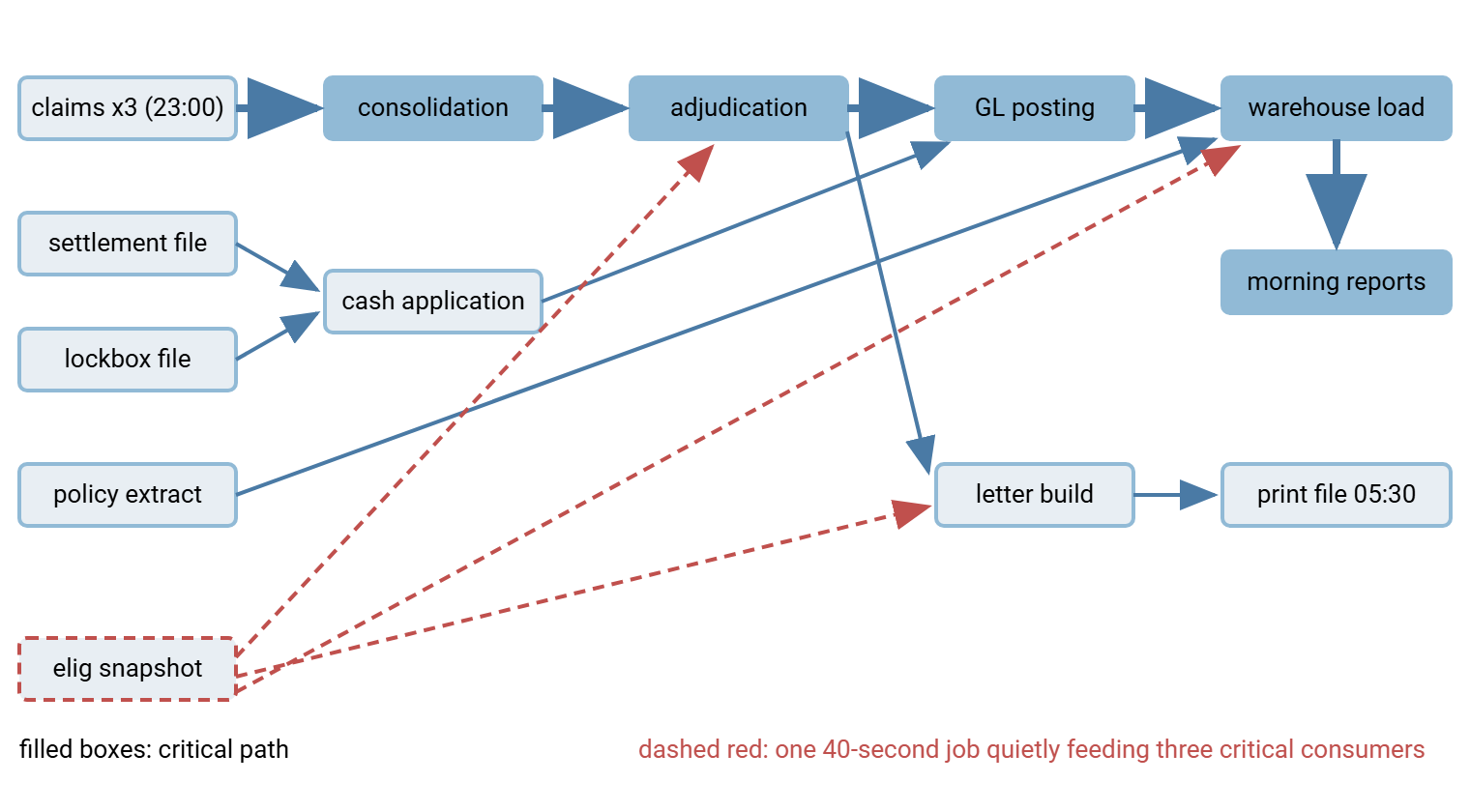
Every mature batch ecosystem contains at least one elig_snapshot. It is a tiny job, running in under a minute, created long ago, owned by nobody, absent from every diagram. Its output turns out to feed three of the most important runs of the night. Nobody monitors it because it never fails; it never fails because it does almost nothing. The night it finally does fail, adjudication pays claims against yesterday's eligibility, the warehouse loads mismatched dimensions, and the letters quote stale coverage. That is three incidents, one forty-second cause, discovered at 09:15 by the angriest route available.
Structurally these jobs are fan-out nodes: one output, many consumers. Their mirror image, fan-in nodes, have one job consuming many inputs, like the consolidation step merging three partners. They are fragile in the opposite way: they inherit every upstream sender's failure modes at once. When you draw your map, count the arrows at each node. The quiet box with three-plus arrows leaving it is where your next surprise lives, and it should jump the monitoring queue immediately. Give it an expected-file check on its output, of the kind described in freshness checks and expected files. Add a loud failure mode in every consumer that would otherwise shrug and use yesterday's copy. Yesterday's copy is always available. That is its whole problem.
Northgate Retail found one of theirs by retiring it. A store-hours export had run every evening for years. Its original consumer, a staffing report, had been decommissioned, so the export was switched off during a cleanup and the ticket closed. Two nights later the promotions pricing job began failing on a missing input. The trace led back to the "unused" export, which a second job had been reading the whole time. The export went back on, and the cleanup rule changed with it: nothing is retired until a week of transfer logs shows zero pickups. The register gained a row it should have had all along.
Here is Harborview's chain drawn from the register. Feeds are on the left, deliverables on the right, and the critical path in solid emphasis. The eligibility snapshot's three quiet red edges cut across the picture.
Finding the Critical Path
The critical path is the longest chain of dependent steps from the night's start to its last hard deadline. It is the sequence with zero slack, where any delay moves the finish line minute for minute. Everything not on it has slack: room to run late without hurting anything. Finding it takes no special software, just your register and typical durations:
- Write each node's typical duration next to it (use a representative week's p90, not the best night).
- Walk forward from the night's start, computing each node's earliest possible finish: the latest finish among its inputs, plus its own duration.
- The chain of nodes that produced the latest final finish is the critical path. Mark it.
- For every off-path node, note its slack: how late could it finish before it would delay a critical node?
Two payoffs follow immediately. Operationally, the path tells the on-call where minutes matter. A thirty-minute delay in cash application (ninety minutes of slack) is an annotation, while a thirty-minute delay in adjudication is a morning problem. That is the triage logic that drives replay order in Catch-Up. Strategically, the path is the only place where optimization buys anything. Shaving an hour off a slack-rich branch buys nothing. That is why the critical path is where all the work goes when the window shrinks. Remember that the path is not permanent — durations drift with data volume, and the path can hop branches when they do. So re-mark it whenever you refresh durations. We learned that the slow way, when the path hopped branches one spring and the map kept pointing at the old one for a quarter.
Remember: the critical path is a property of durations, not just structure. The map tells you what depends on what; only the map plus this quarter's timings tells you where the night is actually tight.
Keeping the Map Alive
A dependency map decays at the speed of change, and a wrong map is more dangerous than none — people trust it during incidents. Three habits keep it true without turning maintenance into a job:
- Couple it to change. Any change that adds, retires, or redirects a feed updates the register in the same ticket. Examples include onboarding a partner, pointing a job at a new folder, retiring a report. The register question ("which rows does this touch?") takes two minutes at change time and saves an incident later.
- Verify by log-diff on a cycle. Quarterly, rerun a lightweight pass 2: pull a week of transfer and scheduler logs and compare observed edges against the register. New unexplained pickups, vanished producers, and drifted timings all surface mechanically. This is the same census discipline described in the file flow census, scoped to one night.
- Make the register drive the tooling. The map earns its keep when it stops being documentation: each edge should generate an expected-file check. Edges you flagged as clock-coupled are candidates to become arrival-triggered instead. On the transfer layer this is concrete. A tool like Sysax FTP Automation can watch the folder where a producer drops its output. It can launch the dependent transfer when the file actually appears, converting a timing assumption into an explicit, self-enforcing edge. How far to take orchestration of the multi-step whole is its own design question, covered in orchestrating multi-step workflows.
The Map Is the Asset
Dependency mapping is unglamorous work with a spectacular exchange rate. Three passes — configs backward, logs forward, humans for what neither records — produce a register. The register produces a drawing; the drawing plus durations produces the critical path. From then on every incident starts with a lookup instead of an investigation. Every change request can be checked for blast radius, and every monitoring gap has an address. The fan-out node you found in an afternoon is the outage you will never have. The graph is still patient. It just has less left to teach.
From here, Catch-Up: Recovering the Batch After a Bad Night shows the map doing its highest-stakes job — ordering a recovery. Modernizing a Batch Ecosystem shows how the edges you made explicit become the seams along which the whole night gets safer.
Frequently Asked Questions
Do I need special software to map batch dependencies?
How long does a first mapping take?
What is the critical path, in one sentence?
What is a fan-out job and why does it matter?
How do I find dependencies that only exist in someone's head?
From the Sysax team: we build secure file transfer software for Windows. Sysax Multi Server is an FTP, FTPS, SFTP, and HTTPS server. Sysax FTP Automation handles scheduled, scripted transfers. Free trials are on the download page.