
Regression Testing Transfer Jobs
The shared rename script got a fix on Tuesday, for one partner's quirk. On Wednesday three other partners' files arrived with the wrong names. The fix had been tested carefully, against the one job it was meant for. That is the shape of every regression. A change to one job breaks a different one. A server upgrade quietly alters how empty files are handled. None of these were the thing anyone was testing, which is the whole problem. A test of the change you made cannot find the thing you did not know you changed. Only a fixed set of tests, run every time, against every job, can do that.
This article builds that set. It covers what a regression is and why transfer estates are prone to them. It shows how to write a catalog of test cases for each job: happy path, empty file, huge file, bad name, duplicate, partner down. It explains what a golden output is and how to record one. It shows how to write a small Python harness that runs a job against staging and compares the outcome with the golden. It covers when to run the suite, and the two things that decide whether a suite survives. The suite must stay fast enough that people actually run it. It must stay current as the flows change. A suite nobody runs is a folder of good intentions. It is the last article in our Testing and Staging Transfer Changes series. It assumes the staging environment from building a transfer staging environment and the files from synthetic test files and test data.
I put off writing tests for transfer jobs for years, on the grounds that the jobs were too simple to need them. The jobs were simple. The estate was not.
What a Regression Test Is
A regression is something that used to work and now does not, because of a change made for another reason. A regression test is a test written once, when a behavior is known to be correct. It runs again after every change to confirm the behavior is still correct. A regression suite is the whole collection, run together. The vocabulary around it is small:
- A test case is one scenario: this input, this action, this expected result.
- A fixture is the set-up a test case needs — clean folders, seeded files, a reachable simulator — and the clean-up afterwards.
- A golden output (or golden file) is the recorded correct result of a test case, captured when the job was known to be right. Every later run is compared with it.
- A harness is the program that runs the cases, applies the fixtures, collects the outcomes, compares them with the goldens, and reports pass or fail.
Transfer estates are unusually prone to regressions because so much is shared. One server setting governs every account. One pre-processing script serves many jobs. One credential store feeds them all, and one scheduler runs them. A change that is correct for the job in front of you is applied, in effect, to jobs you were not looking at. The regression suite is the set of eyes on those other jobs. It is different from the smoke test in rolling out transfer changes safely, which proves the platform works at all. The suite proves each job still does what it did. What it did, not what you remember it doing.
The Test-Case Catalog Per Job
Every job in the estate gets the same short catalog of cases, adapted to its folders and its rules. Six cases cover most of what goes wrong; the table shows each with its input and the outcome the golden should record. The inputs come from the synthetic test set, and "delivered" means "present on the partner simulator with the expected name and hash."
| Case | Input placed in the source folder | Expected outcome (what the golden records) |
|---|---|---|
| Happy path | One typical generated CSV | Delivered with the right name and hash; source folder empty (or archived, per the job's rule); log says finished |
| Empty file | TEST_empty.csv, 0 bytes |
Whatever the flow contract says — delivered, or rejected to a quarantine folder — but never silently dropped |
| Huge file | Just over the largest real file, or over a configured limit | Delivered intact within the job's timeout, or rejected with a size error if a limit applies |
| Bad name | A file that does not match the job's pattern; a name with spaces or accents | Non-matching file left untouched; awkward-but-valid name delivered unmangled |
| Duplicate | The happy-path file, sent again after it was already delivered | Whatever the contract says — overwrite, skip, or reject — recorded explicitly |
| Partner down | The happy-path file, with the simulator unreachable | Nothing delivered; file still at source; log shows the failure and a scheduled retry; notification sent |
Three of the six cases have "whatever the contract says" as their outcome, and that is deliberate. The regression suite does not decide what an empty file should do. The flow's owner decides. The decision is written into the file interface contract, and the test locks it in so that nobody changes it by accident. The partner-down case is the one most often skipped and most worth keeping, because retry behavior is where quiet regressions hide. The outcomes to expect are described in transient versus permanent failures. Add a seventh case for any quirk the job has already bitten you with — a temporary-name file that must not be picked up, say, per temp names and atomic renames. A regression suite is, above all, a record of past incidents that must not recur. Every good suite is an incident log with better manners.
Golden Outputs
A golden output is a small file that says what "correct" looked like. For a transfer job, the outcome that matters is a few facts. Which files ended up at the destination and with what hashes? Which files are left at the source? Did the log report success, and did a notification go out? A golden for the happy-path case looks like this:
{
  "case": "happy_path",
  "job": "acme-shipments",
  "delivered": {
    "shipments_YYYYMMDD.csv": "3b7f0c1d…e9a1"
  },
  "left_at_source": [],
  "archived": ["shipments_YYYYMMDD.csv"],
  "log_contains": ["transfer complete", "1 file(s) sent"],
  "log_must_not_contain": ["error", "retry"],
  "notification_sent": false
}
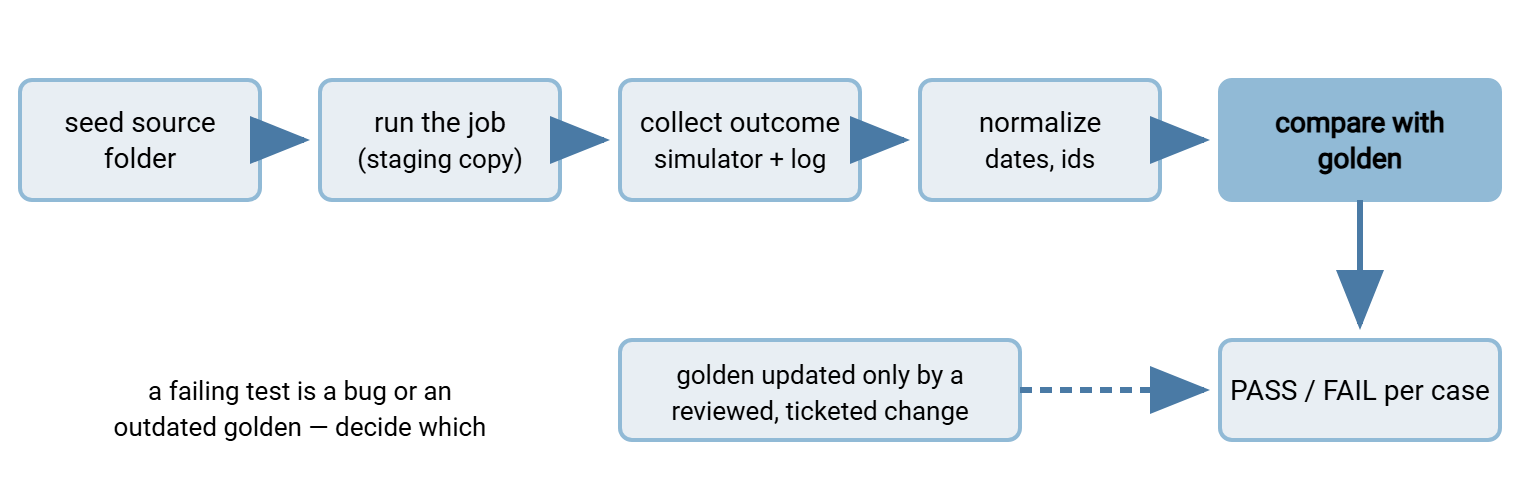
Two habits make goldens reliable. First, normalize anything that legitimately changes between runs. A datestamp in a filename becomes YYYYMMDD. A session identifier in a log line becomes SESSION. Timestamps are stripped before comparison. The harness applies the same normalization to the actual outcome, so the comparison is between two things that should be identical. Second, make goldens on purpose. A golden is recorded once, from a run against a build and configuration you have checked by hand. It changes only when someone decides the behavior should change — never because the test failed and updating the golden made it pass. Updating the golden to pass is testing in production with extra steps.
The diagram below shows the loop each test case runs. Seed the source folder, run the job, and collect the outcome from the simulator and the log. Normalize it, compare it with the golden, and report. A golden is updated only through the deliberate path on the right.
The Harness
The harness below uses Python with pytest, a long-standing test runner that discovers functions named test_…, runs them, and prints a summary. It runs on the staging job host. The job's staging source folder and the simulator's inbound folder are reachable as ordinary paths. The simulator is on the same virtual machine, or its folder is shared to the job host. That keeps the code short. Where the simulator is only reachable over SFTP, the snapshot function is replaced by an SFTP listing and download. This uses the building blocks in Python SFTP basics.
# tests/test_acme_shipments.py - regression cases for the staging copy of one job
import hashlib, json, re, shutil, subprocess, time
from pathlib import Path
import pytest

SRC    = Path(r"D:\stg\acme-shipments\outbound")      # staging job reads from here
DST    = Path(r"\\partner-sim\acme\inbound")         # simulator folder, shared to this host
LOG    = Path(r"D:\stg\logs\acme-shipments.log")
DATA   = Path(__file__).parent.parent / "testdata"   # the synthetic set
GOLDEN = Path(__file__).parent / "golden"
JOB    = ["schtasks", "/Run", "/TN", "STG acme-shipments"]   # or the job's own command line

def sha256(p):
    return hashlib.sha256(p.read_bytes()).hexdigest()

def norm(name):                                       # datestamps -> placeholder
    return re.sub(r"\d{8}", "YYYYMMDD", name)

def snapshot(folder):
    return {norm(f.name): sha256(f) for f in sorted(folder.iterdir()) if f.is_file()}

def wait_until(done, timeout=120):
    end = time.time() + timeout
    while time.time() < end:
        if done():
            return True
        time.sleep(2)
    return False

@pytest.fixture
def clean():
    for folder in (SRC, DST):
        for f in folder.iterdir():
            if f.is_file():
                f.unlink()
    yield

@pytest.fixture
def partner_down():                                   # pre-created, normally disabled block rule
    subprocess.run(["netsh", "advfirewall", "firewall", "set", "rule",
                    "name=STG-simulator-down", "new", "enable=yes"], check=True)
    yield
    subprocess.run(["netsh", "advfirewall", "firewall", "set", "rule",
                    "name=STG-simulator-down", "new", "enable=no"], check=True)

def run_case(case, inputs):
    for rel in inputs:
        shutil.copy(DATA / rel, SRC / Path(rel).name)
    mark = LOG.stat().st_size if LOG.exists() else 0
    subprocess.run(JOB, check=True)
    assert wait_until(lambda: b"job finished" in LOG.read_bytes()[mark:]), "job never finished"
    new_log = LOG.read_bytes()[mark:].decode(errors="replace").lower()
    golden = json.loads((GOLDEN / f"{case}.json").read_text())
    actual = {"delivered": snapshot(DST),
              "left_at_source": sorted(norm(f.name) for f in SRC.iterdir() if f.is_file())}
    assert actual == {k: golden[k] for k in actual}, f"{case}: outcome differs from golden"
    for s in golden.get("log_contains", []):         assert s in new_log, f"missing: {s}"
    for s in golden.get("log_must_not_contain", []): assert s not in new_log, f"found: {s}"

def test_happy_path(clean):
    run_case("happy_path", ["csv/TEST_shipments_crlf.csv"])

def test_empty_file(clean):
    run_case("empty_file", ["sizes/TEST_empty.csv"])

def test_bad_name(clean):
    run_case("bad_name", ["names/TEST_report with spaces.csv", "decoys/notes.txt"])

def test_duplicate(clean):
    run_case("happy_path", ["csv/TEST_shipments_crlf.csv"])
    run_case("duplicate",  ["csv/TEST_shipments_crlf.csv"])

def test_partner_down(clean, partner_down):
    run_case("partner_down", ["csv/TEST_shipments_crlf.csv"])

@pytest.mark.slow                                     # register in pytest.ini: markers = slow
def test_huge_file(clean):
    run_case("huge_file", ["sizes/TEST_huge.csv"])
Read the flow once. clean empties both folders before each case, so no case depends on the one before it. run_case copies the inputs from the synthetic set into the staging source folder. It remembers how long the log was, triggers the job, and waits. It polls every two seconds, for up to two minutes, for the job's own "finished" line to appear in the new part of the log. It then builds the actual outcome from the simulator's folder and the source folder, with datestamps normalized, and compares it with the golden. The log checks are separate assertions so the failure message names what was missing. partner_down is a fixture that enables a firewall rule you created in advance. The rule blocks the staging host's route to the simulator. The fixture disables it again afterwards, whatever the result. The huge-file case is marked slow so it can be left out of quick runs.
Run it with pytest -q tests/ for everything, or pytest -q -m "not slow" tests/ for the quick tier. The output is one character per case and a summary line. A failure prints the case name, the assertion, and the difference between actual and golden. That summary line, with its run identifier, is what goes into the change ticket. A case may fail, and you may need to see exactly what the job did step by step. A script editor with a line debugger helps. Sysax FTP Automation includes one for its transfer scripts. It lets you run the staging job one line at a time and watch the state after each. That is usually faster than adding log lines.
Remember: a regression test that passes tells you the job still does what it did when the golden was made. It does not tell you the golden was right. Review each golden by hand when it is created. Write down who reviewed it and why the outcome is correct. Treat a golden update as a change with a ticket, never as a way to make red turn green.
Running the Suite After Every Change
The suite earns its keep by being run. The rule for when is simple: Any change to production runs the cases for every job it could affect. A setting or server change runs everything. A job change runs that job's cases plus any job sharing a script or a credential with it. Consider an upgrade of the transfer server, a patch to the job host, a change to the shared pre-processing script, or a new cipher policy. All of these run the full suite in staging before the change ticket is written. The run identifier goes in the ticket's "tested" line.
Two further schedules pay for themselves. A nightly run of the full suite against staging, from a scheduled task or your CI runner, catches drift. Staging may have silently diverged from production, or a synthetic file may have been changed. In that case, the suite goes red before anyone is relying on it for a real change. And a run after every rollback confirms that the restored state is the old state and not a third one. If your jobs are driven by a scheduler, Task Scheduler for transfers shows how a task triggers a job on demand, which is what the harness relies on. The wider practice of testing transfer code as part of an application's own test suite is covered in integration testing transfers.
Acme's nightly run caught a folder rename before the partner did. A folder taxonomy tidy-up renamed the invoices feed's source folder from outbound to outbound-invoices, in staging first as the rule requires. The test constants were updated to match. The next morning the happy-path case was red. The file was still at the source, and the simulator had received nothing. The log said "0 file(s) sent" and called that a success. The job definition still pointed at the old path, which the job had helpfully recreated, empty. The definition was fixed in the same ticket. The rename went to production a day later with the fix beside it. The partner's invoices arrived on time without anyone there knowing there had been a question.
Keeping It Fast Enough That People Run It
A suite that takes an hour is run before big changes and skipped before small ones. Small ones are where regressions come from. Two-minute tests get run; forty-minute tests get scheduled. The budget is blunt: the quick tier finishes in the time it takes to make coffee, and the full tier finishes overnight. Three techniques get you there.
| Tier | What runs | When | Budget |
|---|---|---|---|
| Smoke | Happy path for every job | Before and after any change | Under two minutes |
| Core | All cases except slow |
Before every change ticket | Under ten minutes |
| Full | Everything, including huge files and long retries | Nightly, and before server changes | Whatever it takes, unattended |
- Mark the slow cases. The huge file, the many-small-files folder, and anything that waits on a real timeout carry the
slowmarker and run only in the full tier. - Do not wait for the whole retry schedule. A partner-down case that waits for five retries with growing gaps takes half an hour. Assert the first failure and the first retry line instead. The shape of the schedule is tested once, in the retry design described in retry strategies and backoff, not in every run. If the staging copy of a job is given a shorter retry interval to make this possible, record that as a known, deliberate difference from production.
- Run jobs in parallel when their folders do not overlap. Each job's cases touch only that job's source folder and its own simulator account, so ten jobs' happy paths can run at once. Cases within one job stay sequential.
Speed is not the same as performance testing. The suite checks that outcomes are correct, not that transfers are fast. Measuring speed over time is its own discipline, described in benchmark reporting and regression. The two should not be mixed, because a performance test needs realistic volume and a regression test needs to finish before the coffee does.
Keeping It Current
A suite decays when the flows change and the tests do not. The failure mode is gradual. A job's contract changes, its test goes red, and someone marks the test as skipped "for now." A month later the suite has eleven skipped cases and nobody trusts it. Eleven skipped cases is a suite that has quietly resigned. Four rules stop that.
- A new job ships with its cases. The six-case catalog and its goldens are part of creating a job, not a follow-up. The change ticket for a new flow has a line for them.
- A changed contract updates the golden, deliberately. A flow's owner may decide that empty files should now be rejected instead of delivered. In that case, the golden changes in the same ticket. The diff between old and new golden is reviewed, and the reason is recorded. The mechanics of changing what a file interface promises are in evolving file interfaces.
- A retired job takes its cases with it. Tests for jobs that no longer exist are deleted, not skipped. A skipped test is a decision postponed.
- A red test is decided the same day. Either it found a bug, and the bug is fixed, or the golden is outdated, and the golden is updated under a ticket. "Skip it for now" is not one of the options.
Ownership makes the rules stick. Each job's cases belong to the same person who owns the job in the flow inventory. That is the record described in our Documenting Transfer Flows series. That way, when the suite goes red for that job, the name next to it is the name of someone who knows what the flow is for. A red test with nobody's name beside it stays red.
Where the Series Ends Up
With a regression suite in place, the whole of this series becomes one routine. A change is classified. It goes to staging, where the synthetic files and the partner simulator exercise it. The suite runs and goes green. A partner test window confirms the half you cannot stage. The change ticket is written with its rollback. The rollout follows the go/no-go, the smoke test, the canary, and the watch period. The suite runs again afterwards. Each piece is small. Together they are the reason the transfer estate stops being the place where a thirty-second edit costs a night.
Start with six cases for the one job that has hurt you most. Make its goldens by hand, run the suite before the next change to that job, and add a job a week. Within a few months the estate has the safety net this series set out to build. The jobs will be as simple as ever; the surprises will be fewer.
Frequently Asked Questions
What is a regression, in plain words?
What is a golden file?
Do I need a programming language to do this?
How do I test "partner down" without breaking anything?
A test went red after an upgrade. Should I update the golden?
From the Sysax team: we build secure file transfer software for Windows. Sysax Multi Server is an FTP, FTPS, SFTP, and HTTPS server. Sysax FTP Automation handles scheduled, scripted transfers. Free trials are on the download page.