
Certificate and Key Expiry as Health Signals
Most server outages give some warning — a disk fills gradually, sessions climb toward a ceiling, error rates creep up. Expiry outages give none. A certificate is valid one second and rejected the next, at a precise moment set long ago by whoever issued it. Every client that checks it stops connecting at exactly that instant. The cruelty is that the failure was scheduled in advance and still surprises everyone, because nobody was watching the date.
This article turns that scheduled surprise into a boring calendar task. The trick is to treat "days remaining" as a health metric, exactly like disk percent or session count. Fold every expiring thing into one inventory with generous lead-time alerts. Include server certificates, client certificates, SSH host keys, partner public keys, PGP keys, and service-account passwords. You will learn how to read the days remaining for each kind of credential and how to build the inventory. You will learn how to set alerts that fire while there is still plenty of time to act. This is part of our server health monitoring series. It is about watching expiry as a health signal. The mechanics of obtaining, renewing, and chaining certificates live in the Group II certificate management series. Key rotation itself is covered in SSH key management.
Why Expiry Is a Health Dimension
Encrypted transfer protocols rest on credentials that carry an end date or an implied lifetime. An FTPS or HTTPS server presents a TLS certificate that is valid only until its expiry moment. Partners who authenticate with client certificates or SSH public keys hold credentials that expire or get rotated. Files encrypted with PGP keys depend on keys that can carry their own expiry. And the service account often has a password that expires on the domain's schedule. That is the account the server runs under, or that a scheduled job logs in with.
Every one of these, when it lapses, breaks connections — not slowly, but all at once. That makes expiry a health dimension: something you sample, compare against a threshold, and alert on. The metric is simply days remaining, and the threshold is a lead time long enough to renew calmly. A certificate with ninety days left is healthy; the same certificate with three days left is a red alert, even though nothing about the server has changed. Time is the only variable, which is exactly why a health system has to watch it.
Remember: expiry is the one failure you can see coming from months away and still walk straight into. The fix is not cleverness. It is a days-remaining number on a screen and an alert that fires with weeks to spare. That way, renewal happens on a Tuesday afternoon and never at 3 a.m.
Reading a Server Certificate's Days Remaining
The most important credential to watch is the certificate the server itself presents. You can read it straight off the live service with openssl, which connects, retrieves the certificate, and extracts its end date. Then a little arithmetic turns that end date into days remaining. Note the deliberate design of this snippet: it never prints the raw expiry date, only the number of days left. A days-remaining number is what you actually act on.
#!/bin/sh
# days until the served certificate expires -- prints only the day count
HOST="transfer.example.com"
PORT="990"

end=$(echo | openssl s_client -connect "$HOST:$PORT" 2>/dev/null \
      | openssl x509 -noout -enddate \
      | cut -d= -f2)

end_epoch=$(date -d "$end" +%s)
now_epoch=$(date +%s)
days=$(( (end_epoch - now_epoch) / 86400 ))

echo "$HOST certificate: $days days remaining"
transfer.example.com certificate: 23 days remaining
Twenty-three days is the entire point of the exercise: it is a number you can act on. That is unlike a date buried in a certificate that nobody reads until it is too late. The openssl s_client half connects and grabs the certificate as presented on the wire. That is better than reading a file, because it tests the certificate the service actually serves, chain and all. The openssl x509 -noout -enddate half extracts the end date, and the arithmetic converts it to days. Run this against every FTPS and HTTPS endpoint you operate.
Gotcha: a certificate does not stand alone — it is validated through a chain of issuing certificates, and those expire too. An intermediate certificate in the chain can lapse before your own certificate does, breaking validation even though your certificate still shows days remaining. When you check expiry against the live service rather than a single file, you are checking what the client actually sees. The chain itself is the certificate-management side, covered in installing and chaining.
Run the check against the address partners actually connect to, not just the server's own name. If your service sits behind a gateway or load balancer that terminates TLS, the certificate that matters is the one presented there. That certificate may differ from the one on the origin server. Probing the public endpoint is the only way to see the certificate your partners see. Gateway and proxy placement of this kind is covered in the Group VI reverse proxy for transfers article.
Reading Certificates on Windows
On a Windows server the certificates usually live in the local machine certificate store, and PowerShell reads their expiry directly. Again, compute days remaining rather than displaying the raw date — the store path Cert:\LocalMachine\My holds the machine's own certificates:
PS> Get-ChildItem Cert:\LocalMachine\My |
>>   Select-Object Subject,
>>     @{ n='DaysLeft'; e={ ($_.NotAfter - (Get-Date)).Days } } |
>>   Sort-Object DaysLeft

Subject                              DaysLeft
-------                              --------
CN=partner-portal.example.com               5
CN=transfer.example.com                    23
CN=internal-drop.example.com               88
This single command is a health check in itself: it lists every certificate the machine holds, sorted so the most urgent is on top. The NotAfter property carries the expiry moment; subtracting the current time and taking .Days gives the metric. A row showing five days left is a certificate you renew this week. The fact that it sorts to the top is the whole design. The steps to actually renew and re-install it are in installing and chaining certificates. The deeper monitoring patterns are in certificate expiry monitoring.
The Other Things That Expire
Certificates get the attention, but three other credentials expire quietly and cause the same all-at-once failures.
SSH host keys do not carry an expiry date, but they have an age and a rotation policy. A host key that changes without warning breaks every client that pinned the old one. Watching host-key age — and coordinating rotation so clients update their known-hosts entries first — keeps a rotation from looking like an attack. The full treatment is in host keys and known hosts. The health-side habit is small: record when each host key was created. That way, its age is a number you can see rather than a fact nobody remembers. A key that is far older than your rotation policy allows is a quiet form of debt. It is not an outage today, but a rotation you owe that gets riskier the longer it waits. More clients have pinned it, and more of them will break when it finally changes.
Partner public keys and client certificates are the ones you control least and forget most, because they belong to someone else. A partner's SSH public key or client certificate expires on their schedule, not yours. When it lapses their flow dies while everyone else's keeps working. That makes it look like a job problem rather than an expiry problem. Track partner credential expiry in the same inventory as your own. The lifecycle of these belongs to partner credential lifecycle.
Service-account passwords expire on the domain's password policy. When the account your server runs as hits that date, the service can fail to start. When the account a scheduled job authenticates with hits that date, the job can fail to log in. Compute the days remaining the same way and put it on the same screen. Scoping and rotating these accounts is covered in service accounts for jobs.
PGP keys used to encrypt files before sending, or to decrypt files on arrival, can carry their own expiry. They fail in a particularly confusing way. A partner keeps sending files encrypted to your expired key, or you keep encrypting to theirs. The transfer itself succeeds — the file moves — but the decryption at the far end refuses. Because the transport looks healthy, this reads as a content problem rather than an expiry problem. It can go undiagnosed for a while. Fold PGP key days-remaining into the inventory so the encryption layer is watched with the same eye as the transport. How these keys are generated, exchanged, and rotated is covered in PGP key management.
The Expiry Inventory
The single most valuable artifact in this whole subject is an expiry inventory: one list of everything that expires. Each row shows its days remaining and its lead-time status. Not a folder of certificates, not tribal knowledge — one table, refreshed on a schedule, that answers "is anything about to lapse?" at a glance. Here is the shape of it, with a relative days-remaining column and no absolute dates anywhere. That way, it stays readable and never goes stale on the page:
| Item | Type | Owner | Days left | Status |
|---|---|---|---|---|
| partner-portal.example.com | TLS server cert | Us | 5 | Critical — renew now |
| transfer.example.com | TLS server cert | Us | 23 | Warning — schedule renewal |
| Acme Freight SFTP key | Partner public key | Partner | 40 | Warning — notify partner |
| svc-transfer | Service-account password | Us | 61 | OK |
| invoices@ PGP key | PGP encryption key | Us | 88 | OK |
The status column is just the days-remaining metric run through two thresholds, and the sort puts the fire on top. Anything you cannot renew yourself — a partner's key — needs a longer lead time. You have to reach a human at another company before their credential lapses.
The discipline that makes the inventory work is completeness, not cleverness. An inventory that lists four of your five certificates is worse than useless, because it creates false confidence. The one you forgot is precisely the one that will lapse. Build the list by walking every service you run and asking "what credential does this present, and what does it trust?" Then keep it honest by rebuilding it from the live services on a schedule, rather than hand-editing a document that drifts out of date. A generated inventory cannot forget a certificate the way a person can.
Automating the Inventory
An inventory you refresh by hand is an inventory you eventually stop refreshing. The durable version is a small scheduled script that reads days remaining for each item. It writes them to the same kind of CSV the core-metrics collector produces, so the dashboard can render both from one place. This PowerShell example walks the machine certificate store and emits one row per certificate:
# expiry-inventory.ps1 -- one CSV row per certificate, sorted by urgency
$now = Get-Date
Get-ChildItem Cert:\LocalMachine\My |
  ForEach-Object {
    $days = ($_.NotAfter - $now).Days
    $status = if ($days -lt 7)  { 'CRITICAL' }
              elseif ($days -lt 30) { 'WARNING' }
              else { 'OK' }
    [pscustomobject]@{
      Item     = ($_.Subject -replace '^CN=','' -replace ',.*$','')
      Type     = 'TLS server cert'
      DaysLeft = $days
      Status   = $status
    }
  } |
  Sort-Object DaysLeft |
  Export-Csv -NoTypeInformation -Path D:\health\expiry.csv
Extend the same script with the other credential types. Add a call out to openssl for any external endpoints and a read of service-account password ages. Add a line per partner key from wherever you record them. The output is a single file the dashboard reads next to the disk-and-sessions CSV. So certificate days sit on the same screen as everything else. That is the whole design goal of this series. Give the collector the same care any unattended job deserves. A silent failure in the expiry gatherer would hide exactly the numbers it exists to surface.
Lead-Time Alerts
A lead-time alert fires not when something expires but well before, giving you room to act. The right lead time depends on how long renewal actually takes and who is involved. The diagram below shows the three zones every expiring item passes through as its days remaining count down.
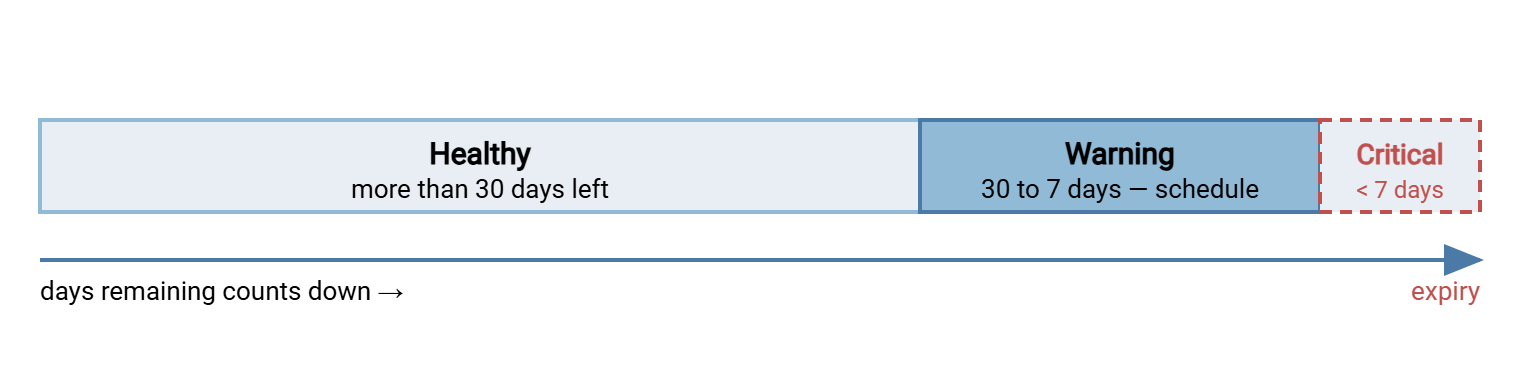
A workable default is a warning at thirty days and a critical alert at seven, but bend those to reality. Consider a partner's key that requires an email, a callback, and their change window. A certificate you can reissue yourself in an afternoon needs a shorter lead time than that key. The partner's key deserves a warning sixty or ninety days out. The point of the lead time is that it is longer than the renewal takes, so you are never racing the clock.
The "Everything Broke at Once" Story
Here is the incident this whole article exists to prevent, and it happens more or less the same way everywhere. An organization buys several certificates at the same time — it is tidy, it is one purchase order, everyone does it. A year or two later, those certificates expire within days of each other, because they were all issued on the same afternoon. Nobody was watching days remaining. One morning, three partners call within an hour: their transfers are failing with certificate errors. It is not one outage. It is several at once. The on-call engineer burns the morning renewing certificates by hand under pressure while partners escalate.
Every part of that story is preventable with an inventory and lead-time alerts. The clustering would have been visible months earlier as three rows counting down together. The alerts would have fired at thirty days, turning a crisis into three calendar entries. And staggering future renewals — so they do not all fall in the same week — would have removed the pileup entirely. The failure was never technical; it was a missing number on a screen. This is exactly the kind of event the transfer war stories collection documents, and the lesson is always the same: watch the date.
There is a second, subtler version of this story worth guarding against: the certificate that renews fine but is never actually installed. Someone reissues it, files it away, and forgets the last step, so the server keeps serving the old one right up to expiry. This is why watching the live service matters more than watching your renewal paperwork. The days-remaining number read off the wire tells you what clients see, not what you intended them to see.
Bringing It Together
Expiry is the most preventable outage there is, because time is the only thing that changes. Read days remaining for every certificate you serve and every partner credential you trust. Read it for every SSH host key you present and every service-account password you depend on. Put them all in one inventory sorted by urgency, refresh it on a schedule, and alert with a lead time longer than the renewal takes. Do that and nothing expires by surprise.
Fold the days-remaining numbers straight onto the health dashboard as a certificate tile, right beside the core metrics. For the renewal and chaining work these alerts trigger, hand off to the certificate management series. For the rotation side, see key rotation and inventory.
Frequently Asked Questions
Why track days remaining instead of the expiry date?
How do I read a server certificate's remaining days?
What besides TLS certificates should I watch for expiry?
What is a good lead time for an expiry alert?
Why do several certificates so often expire at the same time?
Is expiry monitoring the same as certificate management?
From the Sysax team: we build secure file transfer software for Windows. Sysax Multi Server is an FTP, FTPS, SFTP, and HTTPS server. Sysax FTP Automation handles scheduled, scripted transfers. Free trials are on the download page.