
What Encryption in Transit Doesn't Protect
"All our transfers are encrypted" is one of the most comforting sentences in IT — and one of the most misunderstood. It is usually true, increasingly easy to achieve, and it closes off a whole class of attacks that used to be trivial. But the sentence describes a pipe, and a file spends most of its life outside the pipe. Treating in-transit encryption as the finish line, rather than one layer, is how organizations end up genuinely surprised by incidents. Their "encrypted" transfers never could have prevented those incidents.
This article is the honest boundary map. We will state precisely what TLS and SSH promise, then walk the five gaps that sit outside that promise. They include files at rest on both ends, compromised endpoints, and visible metadata. They also include the far side you trust by necessity, and the partial coverage you may not realize you have. For each gap you will see what is actually exposed and which layer of defense closes it. Every one of these gaps has a known, practical answer. The goal is not to make encryption feel futile. It is to let you say "our transfers are encrypted" and know exactly how much you have and have not claimed.
This is part of our Encryption in Transit series. You may not yet have read how the protection works — the TLS article and the SSH article. If so, this one will still make sense. But those two explain the machinery whose limits we are about to draw.
The Promise, Stated Precisely
Encryption in transit — TLS underneath FTPS and HTTPS, SSH underneath SFTP and SCP — makes three promises about data while it moves between two endpoints. Nobody in between can read it (confidentiality). Nobody in between can alter it undetected (integrity). You are connected to the endpoint you meant to reach (authenticity). Every word of those sentences is load-bearing, and the two boundaries are "in between" and "while it moves." The protection begins when bytes leave one machine's transfer software and ends when they arrive at the other's. Before, after, and at either end: out of scope.
The analogy that keeps the scope honest is the armored truck. Hiring one means cargo cannot be robbed or tampered with on the road, and it will arrive at the address you specified. It says nothing about the warehouse the cargo left or the loading dock where it sits after delivery. It says nothing about a burglar already inside either building, or what the receiving company does with the goods next week. Nobody believes an armored truck secures their warehouses; plenty of people quietly believe TLS secures their file servers.
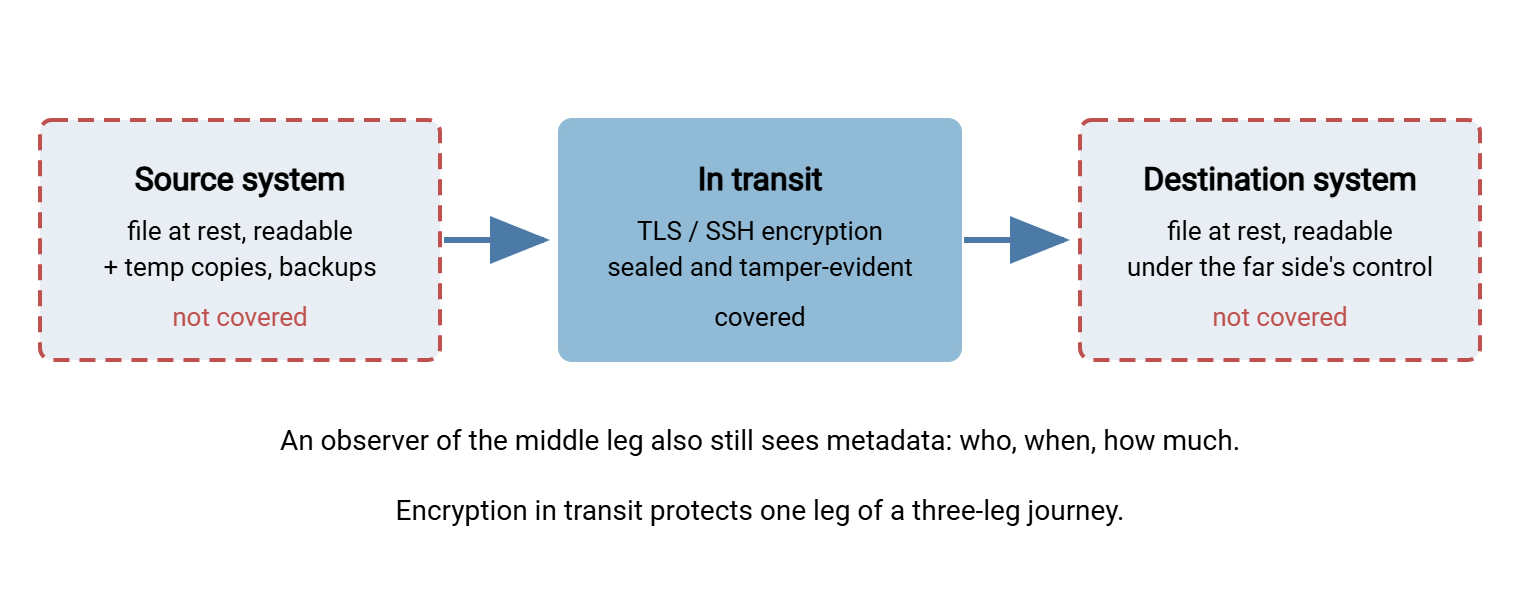
The diagram below shows a file's journey with the protected window drawn to scale of responsibility. Encryption in transit covers the middle leg, and only the middle leg.
Gap 1: The File at Rest, on Both Ends
The moment a transfer completes, the encryption that protected it evaporates. The file now sits on the destination's disk exactly as readable as it was on the source's — and the source copy is still there too. At rest — the state of data sitting on storage rather than crossing a network — is where files spend hours, months, or forever. It is entirely outside the transit protocols' job.
The exposure is bigger than the two obvious copies. Transfer workflows shed copies the way hikers shed gear. There are staging folders where files wait to be sent, upload directories where they land, and temporary files created during processing. There are archive folders "just in case," and backups that faithfully preserve all of the above. A payroll file that spent four encrypted seconds crossing the network may then spend two years readable in five locations. When a server is stolen, a disk is retired carelessly, or an account with too much access goes wandering, none of that four seconds of TLS matters.
What closes the gap: protection that applies while data sits. Disk or volume encryption defends against physical loss of the machine or drive. File-level encryption seals the file itself with a tool like PGP so it stays ciphertext wherever it is copied. It defends the file even from other users of the same system, and keeps it sealed across every hop and backup. Ruthless retention policy shrinks the target: files that are purged after processing cannot leak later. The whole discipline, including how at-rest and in-transit protection divide the work, is its own series: encryption at rest and end-to-end with PGP. If your transfers are automated, file-level sealing can be too. An automation client such as Sysax FTP Automation can OpenPGP-encrypt files before sending and decrypt on arrival. That closes the plaintext window at each end to nearly nothing.
Gap 2: Compromised Endpoints See Everything
Encryption in transit terminates at the endpoints — it must, because the endpoints are the parties meant to read the data. So anything running on an endpoint with sufficient privilege stands inside the protection, not outside it. Malware on the office PC that uploads the files sees them before they are encrypted. An attacker on the transfer server reads files after they are decrypted and watches credentials as accounts log in. They rummage the at-rest copies from Gap 1 at leisure.
There is a second, less obvious version of this gap: stolen credentials. An attacker who phishes a password or lifts an SSH key from an unprotected laptop does not need to break your encryption. They log in through it. The session is flawlessly encrypted; the tamper-evident seals all verify; the authenticity check passes because they really are talking to your genuine server. Every promise the protocol makes is kept, and your data leaves anyway. Encryption authenticates machines and accounts, not intentions. Your logs will show a normal, secure session. That is why unusual-activity review — new source addresses, odd hours, sudden volume — catches what the cryptography cannot.
What closes the gap: everything your security program already says about endpoints. Patched, minimal servers; transfer services running with least privilege; strong authentication with credentials that are stored properly and rotated; monitoring that notices anomalies. None of it is exotic, and all of it is out of the transit encryption's hands. The practical program lives in our hardening transfer servers series, with account-level defenses in authentication on transfer endpoints.
Remember: TLS and SSH will faithfully encrypt an attacker's session with exactly the care they give yours. Encryption in transit defeats the observer between machines; it is indifferent to who is at the machines. That is not a flaw — it is the scope. Endpoint security and authentication are separate layers because they answer questions encryption cannot.
Gap 3: Metadata — the Envelope Is Still Readable
Sealing a letter hides the words inside it. It does not hide the addresses on the envelope or the postmark. Nor does it hide the fact that you mail this particular lawyer a thick envelope on the first of every month. Encrypted network traffic is the same: the payload is ciphertext. But the metadata — the observable facts about the communication — remains visible to anyone positioned to watch the traffic.
Concretely, an observer who cannot read one byte of your transfers can still see which machines talked to which servers. They see which ports, and therefore usually which protocols, were used. They see when each connection happened and how long it lasted, roughly how much data moved in each direction, and how often the pattern repeats. In common configurations, they see the name of the server being requested. That can travel unencrypted during connection setup, along with the DNS lookups that preceded it. From that alone: "an accounting workstation sends about the payroll-sized amount of data to this payroll provider every second Thursday" — no decryption required. Analysts call this traffic analysis, and it is why "nobody can see our transfers" is never quite true; they cannot see into them.
What closes the gap: honestly, less than the other gaps. This gap matters less for most organizations, which is worth saying plainly rather than selling you a fix. You reduce metadata exposure at the margins: consolidate flows through fewer endpoints so patterns blur. Keep internal transfer traffic on internal networks, and avoid revealing hostnames like payroll-upload.example.com for sensitive services. But mostly you account for it: when you assess a workflow's risks, list what its metadata reveals. Decide whether any adversary you realistically face could use it. That weighing exercise is exactly what our file transfer threat modeling series teaches.
Gap 4: The Far Side Is Authenticated, Not Trustworthy
The authenticity promise says you are connected to the genuine transfer.partner-example.com. It says nothing about whether the organization behind that server stores your files sensibly, limits who can read them, or will notice their own breach. The moment your transfer completes, your data's security is governed by their Gap 1, their Gap 2, and their staff. No protocol setting on your side reaches any of it.
This gap has teeth in ordinary, non-malicious ways. The partner's receiving folder is world-readable on a shared server. Their contractor downloads your files to a laptop. They keep seven years of your uploads because nobody set a purge policy. They forward your file to their partner over plain FTP, and your beautifully encrypted delivery finishes its journey in cleartext. And consider the rare malicious case — a bad actor inside the partner, or a partner account that has been taken over. In that case, the encrypted channel delivers your data to them with full integrity, as designed.
What closes the gap: send less, bind them contractually, and seal what you send. Minimum data is the quiet champion — fields never sent cannot be mishandled. Data-handling agreements make expectations enforceable. And end-to-end file encryption changes the shape of the problem. A file PGP-encrypted to the final recipient's key stays ciphertext on every intermediate server and every far-side disk until the one intended party decrypts it. So you no longer have to trust each hop's storage — only the final keyholder. Again, the PGP series covers the practice.
Gap 5: The Encryption You Think You Have
The last gap is different in kind: cases where the in-transit protection itself is thinner than the label suggests. These are configuration and habit problems, not protocol limits — which makes them the cheapest gap on this page to fix.
- FTPS with an unprotected data channel. FTP's two-connection design means FTPS encrypts the command channel and the data channel separately. Configured with
PROT C, a session encrypts your login and then ships the actual file contents in cleartext. The mechanics are in how TLS wraps FTP — if you run FTPS, that wrinkle is required reading. - The plaintext fallback nobody closed. A server that still accepts plain FTP alongside FTPS lets one mis-set client checkbox quietly downgrade a "secure" flow to cleartext, forever. Your server — Sysax Multi Server included — may be able to serve both plain and encrypted protocols. If so, make sure the plain listener is off unless a documented exception needs it. Retiring it properly is the subject of our retiring plain FTP series.
- Verification switched off. Scripts and tools may run with certificate or host-key checking disabled — the automation equivalent of clicking through every warning. In that case, they keep the confidentiality math while silently abandoning the authenticity promise that aims it at the right machine.
- Warnings clicked through. Users trained to accept certificate and host-key warnings will one day accept the warning that was the real attack. That failure mode gets a full article: man-in-the-middle attacks and trust failures.
What closes the gap: verification from the outside. Do not trust the label on the box; test the endpoint the way a client would and confirm what is actually negotiated. The method is in cipher policy without a cryptography degree. The hunt for flows that turn out to be cleartext entirely is in finding cleartext transfers on your network.
Layering: How the Gaps Get Closed
Notice that nothing above argued encryption in transit is weak. It does its one job — protecting the moving middle leg — essentially perfectly when configured honestly. The gaps are simply the rest of the picture, and each one is answered by a different, well-understood layer:
| Gap | What is exposed | Layer that closes it |
|---|---|---|
| Files at rest, both ends | Readable copies on disks, staging folders, backups | Disk encryption, file-level (PGP) encryption, retention and purge policy |
| Compromised endpoints | Plaintext, credentials, and sessions at either machine | Hardening, patching, least privilege, strong authentication, monitoring |
| Metadata | Who talks to whom, when, how much, how often | Threat modeling, flow consolidation, acceptance with eyes open |
| The far side | Your data under someone else's controls | Minimum data, agreements, end-to-end file encryption |
| Partial coverage | Cleartext channels hiding under a "secure" label | Endpoint testing, closing plaintext fallbacks, verification kept on |
To make the boundary concrete for your own systems, run one real workflow — say, the nightly partner upload — through this self-check. It takes ten minutes with the flow's documentation open, and the questions are copy-paste ready for a runbook:
COVERAGE SELF-CHECK — one transfer workflow
 1. Where does the file exist in plaintext before sending?   (folders, temp, backups)
 2. Where does it exist in plaintext after arrival?          (including the far side)
 3. How long does each plaintext copy live? Who can read it?
 4. What protects each endpoint machine itself?              (patching, accounts, monitoring)
 5. Who could log in to this flow with stolen credentials,
    and what would they see in the logs?
 6. What does this flow's metadata reveal to an observer?
 7. Is every channel of the transfer really encrypted?       (test it — don't trust the label)
 8. Could any party downgrade this flow to cleartext?        (plain listener still open?)
 9. Does anything here rely on a clicked-through warning?
10. If the answer to 1-9 worries you: which layer closes it?
Most flows fail a question or two. That is the point of asking — each miss maps to a specific layer you now know how to add. That replaces a vague sense that "more security" is needed.
The Version to Tell a Colleague
Encryption in transit does one job superbly: while a file crosses the network, nobody in between can read it, alter it, or impersonate the destination. Everything else stays open: the file sits readable on both ends before and after (at-rest encryption and retention policy answer that). A compromised or credential-stolen endpoint stands inside the protection (hardening and authentication answer that). The traffic's envelope — who, when, how much — remains visible (threat modeling weighs that). The far side is authenticated but not therefore careful (minimum data and end-to-end PGP answer that). Misconfiguration can leave less encrypted than the label claims (testing answers that). Say "our transfers are encrypted" proudly — just know it describes the truck, not the warehouses.
From here, the natural next steps start with finding cleartext transfers on your network. Before layering protections, you should confirm the baseline layer actually exists everywhere. The encryption at rest and PGP series picks up precisely where the armored truck stops.
Frequently Asked Questions
If we use SFTP for everything, is our data encrypted?
Does encryption in transit protect against malware in transferred files?
Is metadata exposure really a problem for a small business?
Do I need PGP if I already use FTPS or SFTP?
Our compliance requirement says data must be encrypted in transit. Is TLS enough?
Can my ISP or network provider see what files we transfer?
From the Sysax team: we build secure file transfer software for Windows. Sysax Multi Server is an FTP, FTPS, SFTP, and HTTPS server. Sysax FTP Automation handles scheduled, scripted transfers. Free trials are on the download page.