
Recognizing Personal Data in Your File Flows
"Does your transfer server handle personal data?" The privacy officer asks it politely, with a form attached, and the honest answer from most administrators is "probably?" Files arrive from one system, get picked up by another, and nobody in between opens them. Yet a large share of those files are about people: customer exports, payroll feeds, support ticket dumps, sign-in logs. I spent my first years in the job moving files I had never once looked inside, and I would have answered that form the same way. Every privacy control you will ever apply — minimizing, masking, encrypting, purging — starts with the same unglamorous skill. That skill is noticing that a file contains personal data in the first place.
This article teaches that skill. It explains what personal data actually means (much more than names), and the difference between direct and indirect identifiers. It explains why harmless-looking columns become identifying in combination. It also shows where personal data hides in the ordinary files an admin moves every day. There is a hands-on spotting exercise over a synthetic export, and a screening checklist you can run against any new feed. This is the first article in our Personal Data in File Flows series, and everything else in the series builds on it.
What Counts as Personal Data
Personal data is any information that relates to an identified or identifiable person. Two halves of that definition deserve attention. "Relates to" means the information is about someone — their contact details, their purchases, their location, their opinions, even opinions others recorded about them. "Identifiable" means you do not need a name attached; if the data could reasonably be linked back to a specific person, it qualifies.
Terminology varies by jurisdiction. Some laws say personal information; frameworks in the United States often say PII, short for personally identifiable information. The boundaries differ slightly between regimes, but the core idea is the same everywhere, and in this series we will stick with "personal data" throughout. One honest caveat up front: this library explains what privacy laws typically expect so the technical work makes sense, but it is not legal advice. Deciding exactly what your organization's obligations are is the job of your privacy or legal team. Your job is to implement their decisions well — and to spot the files they need to know about.
The most common mistake admins make is equating personal data with a short list of scary fields: national ID numbers, card numbers, medical records. Those are personal data, certainly — often the sensitive kind — but the definition is far wider. A spreadsheet of employee parking assignments is personal data. A log line recording which account downloaded which file is personal data. The bar is low on purpose, because the risk comes from linkability, not from any one dramatic field. The parking list does not feel like a privacy file, which is exactly how it ends up on the intranet.
Direct Identifiers: Data That Points at Someone Outright
A direct identifier is a value that on its own singles out one person. No detective work required — the value is the person, for practical purposes. The common ones in file flows:
- Full names — the obvious case, including names embedded in email bodies, comments, and file paths.
- Email addresses — almost always tied to one individual, even work addresses in most organizations.
- Phone numbers — mobile numbers especially, which follow a person across employers and years.
- Government-issued numbers — national insurance, social security, tax, passport, and driving license numbers. These are also prime targets for fraud, which raises the stakes.
- Account and customer numbers — identifying within your systems, and identifying in the real world the moment they appear next to any other clue.
- Usernames and staff IDs —
asampleis a direct identifier inside your organization even though it means nothing outside it. Context decides. - Photos, voice recordings, biometric templates — less common in batch flows, but they do appear in HR and badge-system exports.
When any of these appears in a file, the question "is this personal data?" is already answered. The only remaining questions are how sensitive it is and what controls the flow needs. (The answer to the first is usually: more than the ticket said.)
Identifiers are contextual. A staff ID identifies precisely because your HR system can resolve it; a customer number identifies because your CRM can. When you send a file to a partner who holds the same lookup ability, the identifier works for them too. Recipients of your exports usually hold that lookup ability; that is why they want the file. The useful mental test is not "could a random stranger identify someone from this?" Instead, ask: "could this file's actual recipient, with the systems and data they already have, put a person to these rows?" For most business flows the honest answer is yes, in one lookup, before lunch.
Indirect Identifiers and the Combination Problem
The harder skill is spotting indirect identifiers — values that do not name anyone alone but narrow the field, sometimes drastically. Date of birth is the classic example. Thousands of people share any given birthday, so it feels safe. But combine date of birth with a postal code and a gender marker. In a famous re-identification result, that trio alone pinpointed a large fraction of an entire population. None of the three fields names anyone. Together they often do.
Think of indirect identifiers as puzzle pieces. Each piece is ambiguous; enough pieces make the picture unmistakable. Common pieces in transfer files:
- Dates — birth, hire, admission, termination. Precise dates narrow sharply; a hire date can identify one person in a small company.
- Location fields — postal codes, branch offices, delivery addresses stripped of names.
- Demographic fields — age bands, gender, nationality, language.
- IP addresses and device identifiers — treated as personal data under what privacy laws typically expect, because they can be linked to a subscriber or a device owner.
- Job titles and roles — "network engineer, Leeds office" may describe exactly one human being.
- Rare attributes — an unusual medical condition, an uncommon vehicle, a distinctive purchase history. Rarity identifies.
You cannot judge a file column by column. You judge the combination the file delivers to whoever receives it. You also judge the combinations they could build by joining your file with data they already hold. A recipient with a customer list can re-attach names to an "anonymous" export using nothing more than a shared account number. The quotation marks around anonymous are doing a great deal of work.
Remember: once a row contains even one identifier, every field in that row becomes personal data about that person. The account balance column is harmless in isolation; next to a customer number it is information about an identifiable individual and inherits all the obligations that follow.
The Identifiability Spectrum
Identifiability is a spectrum, not a yes/no switch. At one end, data with names attached. Then data without names that can still be linked to people through combinations or lookup tables. Then pseudonymized data, where identifiers have been replaced with codes but a key exists somewhere to reverse the substitution. Only at the far end — data aggregated or stripped so thoroughly that no realistic effort links it back to individuals — does it stop being personal data. The diagram below shows the spectrum, and the boundary where legal caution concentrates.
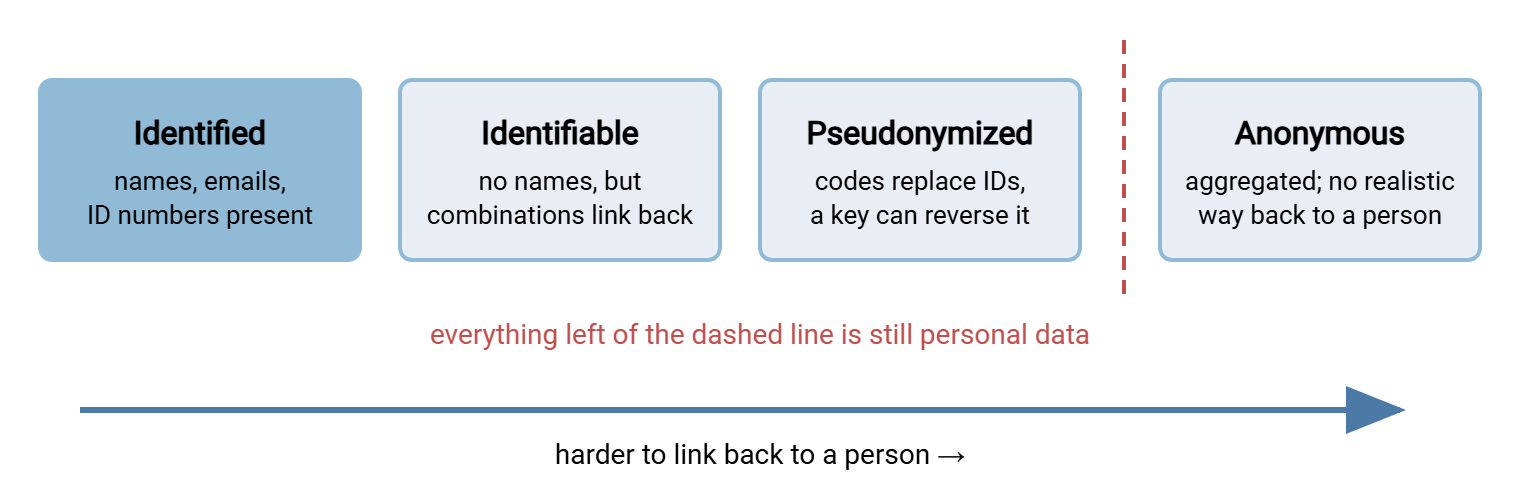
Two things about that dashed line matter for admins. First, pseudonymized data sits on the personal-data side of it. Replacing names with codes reduces risk but does not remove obligations, because the substitution can be reversed. Second, where exactly the line falls is a judgment call your privacy team makes, not a setting you flip. Our article on masking and pseudonymization walks the whole toolkit honestly, including why "we hashed the emails" moves data less far along this spectrum than most people assume.
Where Personal Data Hides in Ordinary Files
Nobody labels a file "personal data inside." It arrives wearing workaday names like export_final2.csv. These are the habitats to know:
- Database exports and reports. The classic carrier. Watch for the extra columns problem: the recipient needs three fields, but the export tool was pointed at the whole table, so twelve ride along. Our data minimization article attacks this directly.
- Spreadsheets. Everything exports carry, plus hidden sheets, filtered-out rows that are still present in the file, and pivot caches holding copies of source data the visible cells no longer show.
- Log files. Usernames, client IP addresses, file paths like
/home/asample/payslip.pdf, email addresses inside URLs. Logs are personal data about your own users and staff. Your transfer server's activity log is exactly this kind of record. In Sysax Multi Server that log can be written to a file and to a database. Because these logs are personal data, log stores deserve the same access discipline as the data folders they describe. Our guide to what to log covers the balance. - Free-text fields. Support notes, comments, descriptions. Structured columns are predictable; free text is where a health condition or a family situation appears in a file that was "just order data."
- Filenames.
jordan-example-disciplinary-outcome.docxdiscloses personal data before anyone opens it — and filenames travel into logs, backups, and email threads with none of the file's protections. - Document metadata. Author names, reviewer comments, and tracked changes inside office documents.
- Archives and backups. Every habitat above, duplicated and preserved. A purged export lives on in last month's backup set — a problem that matters enormously when access and deletion requests arrive.
If you want a systematic inventory of what actually leaves your network — not just what officially leaves — pair this article with what data leaves your network from our DLP series.
A Spotting Exercise: One Export, Ten Columns
Here is a synthetic customer export of the kind that crosses transfer servers every night. All values are invented; the names are deliberately fake and the addresses use reserved example domains. Read it and decide, column by column, what you are looking at before continuing.
# fictional sample - every value below is invented
cust_id,full_name,email,phone,dob,postcode,last_login_ip,balance,support_notes,opt_in
C-104,Alex Sample,alex@example.com,555-014-990,03/12/88,ZZ1 4EX,203.0.113.44,240.10,"asked about refund; mentioned recent hospital stay",yes
C-207,Jordan Example,jordan@example.net,555-020-113,11/30/91,ZZ2 9QT,198.51.100.7,88.00,"prefers evening calls - works day shift at the fire station",no
C-311,Casey Placeholder,casey@example.org,555-031-278,07/04/85,ZZ3 1AB,192.0.2.19,912.40,,yes
Now the walkthrough. full_name, email, and phone are direct identifiers — no argument. cust_id is an identifier too: meaningless to a stranger, instantly resolvable by anyone with access to your customer system. That includes every likely recipient of this file. dob and postcode are the textbook indirect pair; even with the name column deleted, those two plus any third clue re-identify most rows. last_login_ip is an indirect identifier in its own right. balance and opt_in are not identifiers at all — but they are personal data here, because they sit in rows that identify people. Delete every identifier and they would become harmless; keep one and they are attributes of a known individual.
The sting is in support_notes. Row one mentions a hospital stay — health information, which most privacy regimes treat as a specially protected category. Row two reveals an employer and a work pattern. Neither fact appears in any schema or data dictionary; both entered through a free-text box. This is why a file review that only reads column headers misses the most sensitive content. Sample the actual data, especially text fields. Pattern-matching approaches from pattern-based controls can automate part of that sampling. Their limits with free text are exactly the limits you just saw.
Score the exercise honestly against your first instinct. Most people classify three or four columns as personal data on a quick read — the name, the email, maybe the phone number. The correct answer is that the entire file is personal data, all ten columns. Three of them are individually capable of identifying someone, two more capable in combination. One carries special-category content that changes the required handling entirely. That gap between instinct and reality is the whole reason to practice. I scored four the first time I tried it, and I had built the export.
Special Categories: When Personal Data Turns Sensitive
Privacy regimes typically single out categories of personal data for stricter treatment, on the logic that misuse hurts more. The recurring list includes health information (in the healthcare world, HIPAA is the famous framework and calls it protected health information). It includes data about children, financial account details, and biometric data. It also includes facts like religious beliefs, union membership, or sexual orientation. Precise definitions and obligations vary by regime — which is, again, your privacy team's terrain, and the reason our compliance frameworks series exists.
Operationally, treat a special-category sighting as an escalation trigger. A feed you thought was logistics data may turn out to include a medical flag or a date of birth for minors. If so, that is not a flow you quietly keep running as-is. Flag it, get the purpose confirmed, and expect stronger controls: file-level encryption, tighter recipient lists, shorter retention. When the health column turns out to be unnecessary for the recipient's purpose, the best control is deleting the column at the source. Absence beats every safeguard ever invented.
A Screening Habit for Every New Flow
Recognition only helps if it happens routinely, not just the day you read an article about it. The fix is a small screening ritual whenever a new transfer is requested or an old one is reviewed. Copy this checklist into your flow-request template:
- Ask for a sample file, not a description. Descriptions say "order data"; samples show the date-of-birth column.
- Read every column header and ask of each: does this identify someone directly? Could it in combination? Is it an attribute of an identified person?
- Open the actual data and read a handful of rows, especially any free-text field, looking for names, contact details, and special-category surprises.
- Check the filename convention for embedded names or IDs.
- Ask who the people are — customers, staff, patients, children? — and roughly how many rows per run.
- Record the verdict ("contains personal data: yes/no; special categories: yes/no; identifiers: which") in your flow inventory, alongside owner and purpose. If you keep a file flow census, this is one more column in it.
- Route "yes" flows to the privacy conversation before they go live, not after.
You can automate the boring half of the ritual for recurring feeds. Because Sysax FTP Automation supports pre-transfer processing, a scheduled job can run your own check. Pre-transfer processing means running a script of yours before the transfer step. Such a check compares the file's header row against the approved column list. It stops the job when a new column appears, with an email notification telling you why. The script is yours and stays simple; the automation just guarantees it runs every time, which is the part humans forget.
Northgate Retail learned the value of the sample file on a feed the ticket described as "store delivery addresses for the courier." The sample arrived with fourteen columns. Five were address fields. The other nine included date of birth, loyalty tier, and a free-text delivery note in which a customer had mentioned a standing hospital appointment. The requester had never seen those columns, because the export tool had been pointed at the customer table and the customer table was what it exported. Trimming the feed to the five address fields took twenty minutes. The courier never learned the other nine had existed. The feed's row in the transfer inventory now says exactly what it carries. Nothing had left the building, which is what screening before go-live is for.
Remember: the dangerous flow is rarely the one everyone knows is sensitive — payroll gets encrypted and guarded. It is the "boring" feed nobody screened, quietly carrying a date-of-birth column for years. Screen the boring ones.
Noticing Is the First Control
Personal data is any information relating to an identifiable person — a definition that catches account numbers, IP addresses, log lines, and free-text comments, not just names. Direct identifiers point at someone outright; indirect identifiers do it in combination. That is why files must be judged as a whole, in the hands of their actual recipient. Personal data hides in exports, spreadsheets, logs, filenames, and backups, and the sensitive kind hides deepest in free text. A ten-minute screening habit with a real sample file catches most of it, parking list included.
Once you can see the personal data in your flows, the next question is what to do about it. Start with data minimization — the art of not sending it at all — then masking and pseudonymization for the data that must flow. The rest of the series turns both into defaults your batch jobs apply without being reminded.
Frequently Asked Questions
Is an IP address really personal data?
What is the difference between personal data and PII?
If I delete the name column, is the file anonymous?
Are our own server logs personal data?
Is encrypted personal data still personal data?
Does business contact information count?
From the Sysax team: we build secure file transfer software for Windows. Sysax Multi Server is an FTP, FTPS, SFTP, and HTTPS server. Sysax FTP Automation handles scheduled, scripted transfers. Free trials are on the download page.