
Rolling Out Transfer Changes Safely (and Rolling Back)
It is one in the morning, and the coffee has gone cold. The change passed in staging a week ago. The synthetic files went through, the partner test came back clean, and the regression suite is green. Now it goes into production, where the files are real, the partners are watching, and the jobs run at two in the morning without you. The rollout is the moment where careful preparation either pays off or turns out to have been theater. The difference is almost entirely in what you wrote down beforehand. I have done this night with a written rollback and without one. The second kind of night is longer.
This article is the procedure for that night. It explains what a change ticket is in plain words, and how to choose a maintenance window. It covers why changing one thing at a time is a diagnostic rule rather than a bureaucratic one. It explains what a canary flow is and how to pick one. It covers the rollback prerequisites that must exist before you touch anything. It includes a go/no-go checklist, a copyable smoke test, the post-change watch period, and the rollback itself. The rollback gets the most attention, because the one that was never rehearsed is a paragraph with an optimistic heading. It is part of our Testing and Staging Transfer Changes series and applies to changes on an existing platform. Swapping one platform for another is a larger exercise, covered by our cutover night technical runbook.
The Change Ticket in Plain Words
A change ticket — also called a change record or change request — is a written note. It says what you are about to change, why, and when. It says how you tested it, how you will know it worked, and how you will undo it. Whether it lives in a change-ticket system, a shared document, or an email thread matters far less than whether it exists before the change starts. It is the thing you read at 02:40 when something is wrong and you need to remember exactly what you did.
CHANGE TICKET  [reference]
Title:        Tighten SFTP cipher policy on sftp.example.com
Class:        setting  (job / setting / server / partner)
What changes: cipher list  old: [list]  ->  new: [list]     (one line per item)
Why:          hardening review finding H-3
Flows affected: acme-shipments, northwind-invoices, contoso-returns  (from the flow inventory)
Partners notified: all three, on [date placeholder]; contoso confirmed client supports new list
Tested:       staging pass [run id]; partner test windows acme + northwind [dates]; regression green
Window:       Tuesday 01:00-02:30 (after nightly batch, before 03:00 contoso pull)
Canary:       northwind-invoices first; widen after one clean cycle
Go/no-go:     checklist below, completed at 00:45
Verify:       smoke test on sftp.example.com from jobhost-01; each partner test account
Rollback:     restore server config snapshot [path]; restart service; smoke test; time limit 02:15
Watch:        until Thursday 09:00 (two cycles of every affected job); owner: [name]
Staging updated: yes
Every line answers a question someone will ask. "Flows affected" comes from the flow inventory — the one-page list of every transfer and who depends on it. It is described in our Documenting Transfer Flows series. If you cannot fill that line in, the change is not ready. The classes are the four from why transfer changes deserve staging, and the class decides how much of this article applies.
Picking the Maintenance Window
A maintenance window is the agreed period in which a change may be made and, if necessary, undone. The trap is choosing a time that is quiet for you. The window must be quiet for the flows you are touching, which means reading the job schedule and the partner cut-off times, not the office calendar. A change to the SFTP server at 21:00 is convenient for the administrator and catastrophic for the partner whose nightly pull starts at 21:15. No partner's scheduler has ever consulted your office calendar.
- Find the gap. List every affected job's schedule and every partner's expected connection times. The window is a gap that contains none of them, with room on both sides. The batch calendar in cut-off times and deadlines is exactly this list for the nightly ecosystem.
- Size it honestly. The window must hold the change, the smoke test, and a full rollback. Then double it, because the first estimate is always optimistic. If a change takes twenty minutes and rollback takes twenty, the window is at least eighty.
- Avoid the cliffs. Not month-end, not quarter-end, not the afternoon before a long weekend, not the night before a partner's busy day. A change that fails on a cliff has no time to be fixed.
- Tell the partners. Any partner whose flow is affected hears about the window in advance, in writing. Include the rollback time: "if we have not confirmed success by 02:15, we will have reverted and you will see no change."
One Thing at a Time
Bundling changes is tempting. The window is open, and the service will restart anyway. Why not also move the passive port range and update the certificate while you are in there? The answer is attribution. If three things change and one flow breaks, you now have three suspects and a partner waiting. If one thing changes and a flow breaks, you know the cause before you open the log. Bundling saves one restart and costs one investigation.
When several changes genuinely must land in one window, sequence them. Apply the first, run the smoke test, and record the result. Apply the second, smoke test, and record. Each step has its own line in the ticket and its own rollback point. A two-minute smoke test converts a bundle back into a series of single changes. The same discipline, applied to diagnosis, is the core of the layered troubleshooting method, which you will want if the smoke test fails.
Rollback Prerequisites: Before You Touch Anything
Rollback means restoring the platform to exactly the state it was in before the change. The word "exactly" is what makes it hard. A rollback may restore the settings but not the job versions, or the job versions but not the DNS record. That leaves you in a third state that nobody has tested. The third state has no name, no ticket, and no friends. So the prerequisites are captured before the change, in the calm, and the ticket does not proceed until every one exists.
- A configuration snapshot. Export the server's full configuration to a file and copy it somewhere the change cannot touch. That could be a settings export from the management console, a copy of the configuration folder, or an export of its registry keys. Use whichever your server documents as complete. It is the same artifact our Disaster Recovery for Transfer Workflows series treats as the first thing to back up.
- The previous job versions. Before editing any job definition or script, copy it or commit it to version control. For example, copy
acme-shipments.xmltoacme-shipments.xml.pre-[change-ref]. Rolling back a job is then a file copy, not a memory exercise. - Keys, certificates, and host keys. If the change touches any of them, the current ones are copied to a protected location first. The consequences of losing a host key in a rebuild are spelled out in migrating keys and certificates; they apply to any server change.
- DNS time-to-live lowered. The change may move a hostname to a new address. If so, the record's TTL must be reduced in advance. This is the number of seconds other systems may cache the answer. A record with a TTL of a day, changed at midnight, still points clients at the old address the next afternoon. Lower it to five minutes at least a day before the window, so that the change and its rollback both take effect within minutes.
- The test set and its hashes. The synthetic files the smoke test will send, with their known hashes, on the machine the test runs from.
- The rollback steps, written and timed. Not "revert if needed" but the exact commands and clicks, in order. Include a decision time: "if the smoke test is not green by 02:15, execute rollback." The decision time is the most important line in the ticket, because at 02:14 you will want ten more minutes.
For a platform migration, where every one of these matters at once, migration validation and rollback covers the larger version of the same list.
Kestrel Payroll rehearsed a rollback on a Tuesday and used it on a Friday. The change was a server patch. The rehearsal in staging (restore the snapshot, restart, smoke test) took eleven minutes and turned up a gap. The configuration export did not include the passive port range, so the restored server listened on the wrong ports. They fixed the export before the window, which fell on the Friday because that was the quietest night for the flows involved. The patch went in at 01:10, and the smoke test passed. The canary failed, because one partner's FTPS client could not complete a data connection on the patched build. At the decision time of 01:45 they rolled back in nine minutes. The smoke test went green. The partner's 03:00 pull ran on the old build without anyone at the partner noticing. The Tuesday cost an hour; the Friday would have cost a weekend.
Remember: a rollback plan you have never executed is a hypothesis. For any server-class change, rehearse the rollback in staging first — restore the snapshot, restart, smoke test — and time it. The number you get is the one that goes in the ticket, not the one you guessed.
Canary Flows First
A canary flow is one transfer that receives the change before all the others. It is chosen so that if it breaks, the damage is small and the signal is loud. It is like the birds miners once carried to detect bad air. A good canary is:
- Low blast radius — an internal flow, or a partner who is forgiving and reachable, never the largest customer.
- Representative — it uses the setting or path being changed, so that passing means something.
- Frequent — it runs at least daily, so a clean cycle is observed within a day, not a week.
- Well monitored — it already has a freshness check and an owner who reads alerts.
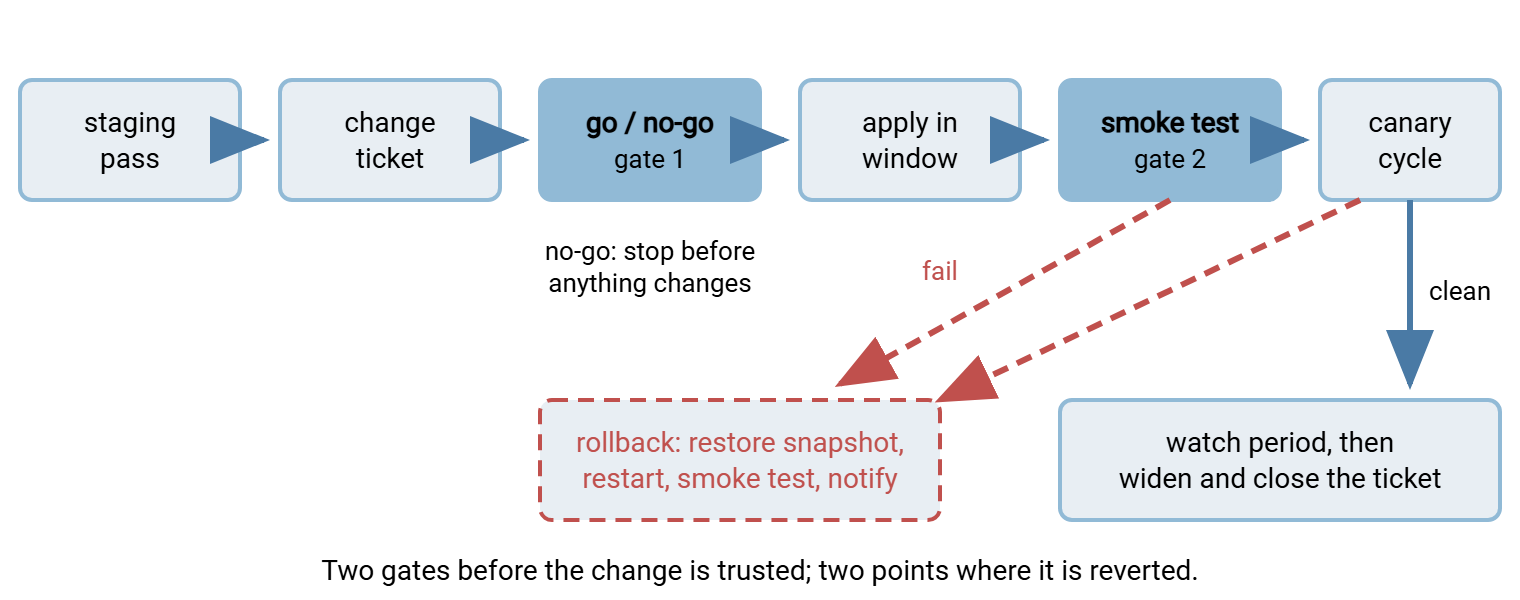
For a job change, the canary is the changed job itself. Run it by hand during the window with the synthetic files before leaving it to its schedule. A setting or server change may affect everyone at once. In that case, the canary is the first flow you watch complete a real cycle after the change. If the setting cannot be applied to one flow alone, the smoke test against each affected partner's test account is the canary. The diagram below shows the whole pipeline, with the two gates at which the change can be stopped.
The Go/No-Go Checklist
Fifteen minutes before the window, one person reads the checklist aloud and another answers. Any "no" is a no-go, and a no-go costs nothing: the window is rebooked and the change waits. It is the cheapest decision in the procedure, and the one most often skipped.
GO / NO-GO  (all must be YES)
[ ] Ticket complete: what, why, flows affected, tested, verify, rollback, watch owner
[ ] Staging pass and regression run recorded with ids
[ ] Partner test done for every partner whose client we cannot reproduce
[ ] Config snapshot taken in the last hour and copied off the server
[ ] Previous job versions saved; keys/certs/host key copied if touched
[ ] DNS TTL already lowered (if a name moves) and confirmed with a lookup
[ ] Window confirmed against the job schedule; no affected job runs inside it
[ ] Partners notified; nobody has asked us to wait
[ ] Rollback steps written, rehearsed in staging, decision time set
[ ] Smoke test script and test files present on the job host
[ ] Two people available for the window; the watch-period owner named
[ ] Nothing else is changing tonight (no other tickets in the same window)
Verifying After the Change: the Smoke Test
A smoke test is the shortest test that proves the platform basically works. Connect, log in, upload a file, download it back, compare hashes, and clean up. It does not test business logic; it tests that the four layers every transfer depends on — connectivity, authentication, permissions, protocol — are intact. It runs from the machine that runs the real jobs, against the real server, using the test account, in under a minute.
#!/bin/bash
# smoke-sftp.sh - prove the SFTP platform still works after a change
# usage: smoke-sftp.sh host account remote-folder
set -euo pipefail
HOST="$1"; ACCT="$2"; RDIR="$3"
NAME="TEST_smoke_$(date +%Y%m%d-%H%M%S).bin"
WORK="$(mktemp -d)"

head -c 1048576 /dev/urandom > "$WORK/$NAME"            # 1 MiB of random bytes
SENT=$(sha256sum "$WORK/$NAME" | cut -d' ' -f1)

sftp -b - "$ACCT@$HOST" <<EOF                            # -b - : read batch commands from stdin
cd $RDIR
put $WORK/$NAME
ls -l $NAME
get $NAME $WORK/$NAME.back
rm $NAME
EOF

GOT=$(sha256sum "$WORK/$NAME.back" | cut -d' ' -f1)
rm -rf "$WORK"
if [ "$SENT" = "$GOT" ]; then
    echo "SMOKE PASS  $HOST $ACCT  $SENT"
else
    echo "SMOKE FAIL  $HOST $ACCT  sent=$SENT got=$GOT" >&2
    exit 1
fi
Read it once, top to bottom. set -euo pipefail stops the script on the first error rather than reporting a pass after a failed step. The file name carries a timestamp so two runs never collide. sftp -b - runs a batch of commands and exits non-zero if any of them fail. That is what turns a permission error or a refused connection into a loud failure. The hash comparison is the only judge; "the upload seemed to work" is not evidence. Authentication uses the account's key from the job host's SSH configuration — the same key the real jobs use. The server's host key must already be in known_hosts. So a rebuild that changed the key fails here immediately, as it should. On Windows the same six steps translate into a PowerShell script around your SFTP client. Our article on PowerShell SFTP scripting shows the building blocks.
Run the smoke test three times. First, test against the production host with your own test account. Then test against each affected partner's test account on their side. Then — for a setting change — test with the client type you were most worried about. Record the pass lines in the ticket. If a run fails and the fix is not obvious, the decision time in the ticket decides for you. It was written for exactly this moment, by someone who was not tired.
The Post-Change Watch Period
The smoke test proves the platform works at 02:00. It does not prove that the 03:00 partner pull, the 06:00 export, or the weekly Sunday consolidation will work, because none of those have run yet. The watch period is the time after the change. It lasts until every affected flow has completed at least one — preferably two — real cycles under the new state. The ticket stays open throughout, and the named watch owner checks the flows at each cycle rather than waiting for an alert. The service restarting is the change starting, not finishing.
What to watch is short. Watch each affected job's status and duration compared with the last week. Watch the freshness checks for every expected file and the server's error log rate. Watch the partner acknowledgements, where they exist. And watch the inbox, for the message from the partner whose client nobody tested. Job status monitoring basics covers the mechanics. If the estate's alerts are not already read by someone, alerting that gets read is the prerequisite for a watch period that means anything. A daily job needs a watch of two days; a weekly job needs two weeks, and yes, the ticket stays open that long.
Rolling Back
Rollback is a decision, then a procedure. The decision is made by the clock, not by optimism. At the time written in the ticket, if the smoke test is not green or the canary has failed, the rollback starts. The procedure is the one rehearsed in staging.
ROLLBACK
[ ] Announce: "rolling back [ref]" to everyone on the window
[ ] Disable (do not delete) every affected scheduled job so nothing runs mid-rollback
[ ] Restore the configuration snapshot; restore previous job versions from their copies
[ ] Restore keys / certificates / host key if they were touched
[ ] Revert the DNS record if a name moved; confirm with a lookup from outside
[ ] Restart the service; confirm it is listening on the expected ports
[ ] Run the smoke test: own test account, then each affected partner's test account
[ ] Check for files that moved during the failed change: sent twice? stuck in a temp name? half-written?
[ ] Re-enable the jobs; run any missed job by hand if its window has passed
[ ] Notify partners: reverted, no action needed, new window to follow
[ ] Record in the ticket: what failed, what the logs said, what was restored, timings
[ ] Update staging to match production again (it now differs by the reverted change)
Two lines deserve explanation. Jobs are disabled rather than deleted because a deleted job's schedule, credentials, and options have to be recreated from memory. A disabled one is re-enabled with a click. In a scheduler such as Sysax FTP Automation, disabling a scheduled task keeps its definition intact while the rollback proceeds. And the line about files that moved is there because a change that half-worked may have sent a file before it failed. The same file will be sent again when the job is re-enabled unless the flow tolerates that. Whether it does, and how to make it so, is the subject of safe reprocessing patterns.
A rollback is not a failure of the process; it is the process working. The failure would have been discovering the problem at 09:00 with three partners on the phone. Record what happened, take it back to staging — which now has a test case it did not have before — and rebook the window. I have never regretted a rollback at 02:20. The ten more minutes, several times.
The Night, in One Paragraph
Write the ticket, including the rollback and its decision time. Choose a window that is quiet for the affected flows. Size it for the change plus rollback and double it. Tell the partners. Capture the snapshot, the job versions, the keys, and lower the DNS TTL. Read the go/no-go checklist aloud and stop if any answer is no. Change one thing. Smoke test from the job host with the test accounts. Watch the canary through a real cycle. Hold the ticket open for two cycles of every affected job. At the decision time, if it is not green, roll back and rebook.
The pieces this procedure depends on are built elsewhere in this series. Find the staging pass in building a transfer staging environment. Find the partner test in partner test windows and test endpoints. The regression run should be green before the ticket is even written. Find it in regression testing transfer jobs.
Frequently Asked Questions
What is a change ticket, really?
What is a canary flow?
Why lower the DNS TTL before a change?
What does a smoke test check?
How long should the watch period be?
From the Sysax team: we build secure file transfer software for Windows. Sysax Multi Server is an FTP, FTPS, SFTP, and HTTPS server. Sysax FTP Automation handles scheduled, scripted transfers. Free trials are on the download page.