
The Blast Radius of One Stolen Transfer Credential
Assume it will happen. One of your transfer credentials — a partner's password, an automation account's key, a login pasted into the wrong chat window — ends up in someone else's hands. Not "if," but "when." Transfer credentials live on other people's machines, in scripts, in scheduled jobs, and in the memory of everyone who ever needed the file. The question that matters is not whether one will leak. It is: when one does, how much of your world does it touch?
That reach has a name — the blast radius — and the reassuring thing about it is that you can measure it in advance. You can take any single account and enumerate everything it can read, write, delete, and reach. You can see the damage on paper before anyone causes it for real. This is a defensive exercise, done to your own accounts, with the goal of making each one reach as little as possible. The best time to run it is a quiet afternoon. The worst time is during the incident, when someone else has already run it for you.
This article is that exercise: a tabletop walkthrough with a worksheet you can fill in, ending in structural fixes that shrink the radius for good. It is the payoff of our Permissions series — everything from directory design to least privilege to auditing exists to make the answer here small.
What Blast Radius Means, and Why You Measure It
Blast radius is the total set of things one compromised account can affect. That includes every file it can read, every file it can change or destroy, and every folder whose contents it can list. It includes every other system it can reach by reusing what it holds. It is a property of the account, not of the attacker. The same login grants the same reach to whoever holds it. So you can map it completely without knowing anything about who might one day misuse it.
The term is borrowed on purpose. A blast radius describes how far damage travels from a single point. Just so, a credential's radius describes how far trouble travels from a single leaked secret. A room key and a master key can both be stolen with equal ease. The difference that decides how bad the theft is comes down to how many doors the stolen one opens. This whole exercise is about making sure you have handed out room keys, not master keys.
Measuring it is a purely defensive move, and it is worth being clear about that. The exercise borrows an attacker's question — "what can I get to from here?" — and turns it inward. You are not learning to attack anything. You are enumerating your own exposure using the same audit tools from the auditing article. That way, you can shrink the reach structurally before it is ever tested. Every foot of radius you remove now is damage that simply cannot happen later, no matter who ends up holding the credential.
Step One: Pick the Account
Start with the accounts whose compromise would hurt most, because those are the ones worth shrinking first. Two kinds top the list:
- The most privileged. Automation and service accounts often accumulate broad rights because they touch many flows and nobody wants to debug a permission error at 2 a.m. Their power makes them the highest-value target.
- The most exposed. Long-lived partner credentials and accounts whose secrets live on machines you do not control are among the ones most likely to leak in the first place. So are logins shared among several people or scripts.
An account that is both — a powerful, widely shared automation login — is where you begin. Pick one real account and hold it fixed for the rest of the exercise. Blast radius is measured one credential at a time, because that is how a compromise arrives.
If you have never listed your accounts this way, that inventory is itself the first deliverable. It lists every partner login, every service account, every shared credential, ranked by privilege and exposure. You cannot measure the reach of accounts you have forgotten you have. Forgotten accounts are exactly the ones that leak quietly and reach further than anyone remembers granting. The orphan hunt from the auditing article and this ranking are the same list read two ways.
Step Two: Enumerate the Reach
Now map everything the chosen account can touch. Do it concretely, by acting as the account with the audit commands rather than trusting your memory of what you granted. Record each reachable thing along four dimensions:
- Read. Every file and folder it can open. This is confidentiality exposure — what could be copied out and never returned.
- Write and overwrite. Everything it can change or plant. This is integrity exposure — the ability to alter a file others trust. That is how a poisoned file rides your own distribution channel to its targets.
- Delete and list. What it can destroy (availability) and what it can enumerate (even filenames leak, as the directory design article covered).
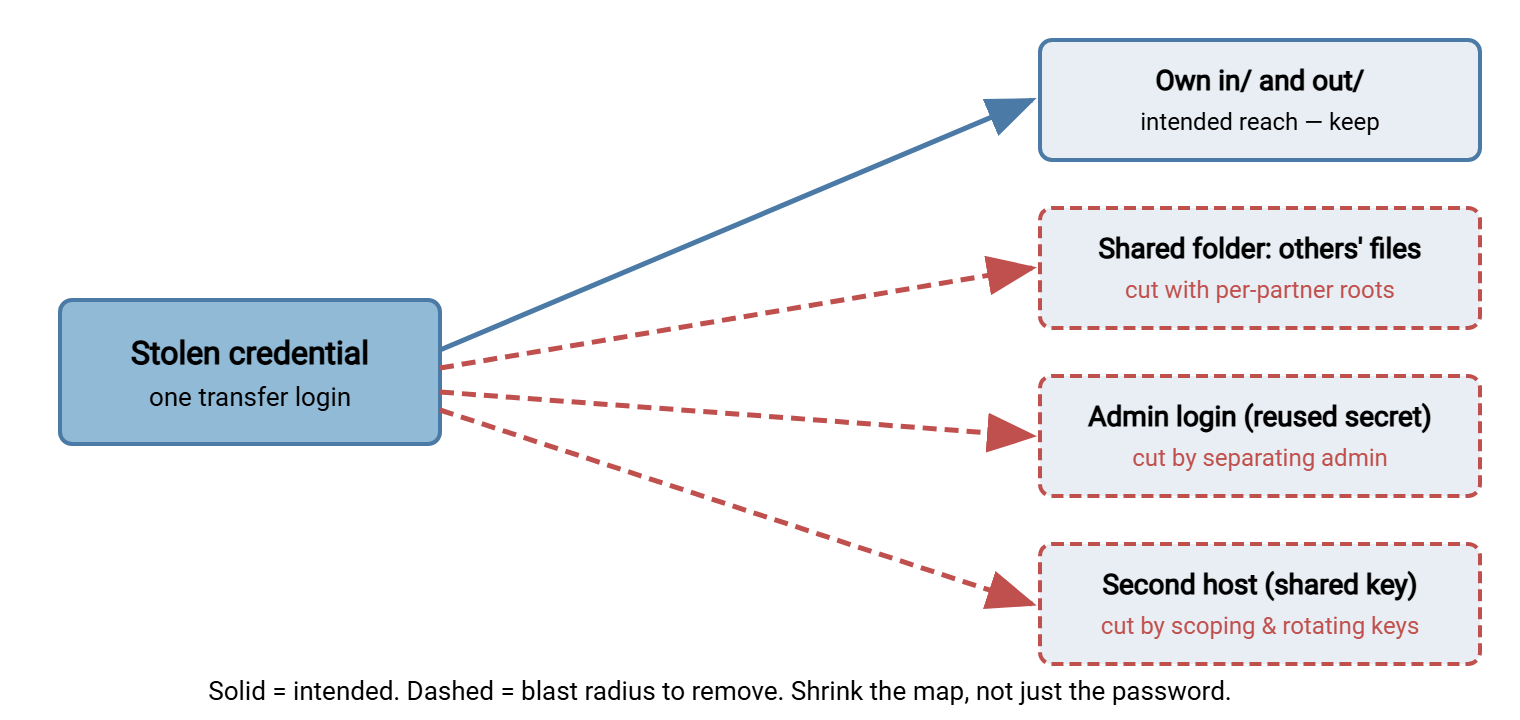
- Pivot. The dangerous one: can this credential become another? A password reused on the admin console, an SSH key that also opens a second host, a service account that is also a local administrator. Pivots are how a single file-drop login turns into a foothold on the whole environment.
Enumerate by acting, not by remembering. Become the account and let the filesystem answer, exactly as the audit does — your memory of what you granted is not evidence:
    # Linux: what can this identity actually read and write?
$ sudo -u svc-edi find /srv /data -readable -type f 2>/dev/null   # everything readable
$ sudo -u svc-edi find /srv /data -writable -type d 2>/dev/null   # everywhere writable
$ getent group | grep svc-edi          # groups that quietly widen its reach
$ grep -rl svc-edi /home/*/.ssh/authorized_keys 2>/dev/null       # hosts its key opens

    # Windows: effective access on disk (the pivots you hunt separately)
C:\> accesschk.exe -s "FILESRV\svc-edi" D:\
The first two commands map the file reach. The group check catches the invisible widening the auditing article warned about. The last is how you begin finding pivots — the places the same key is accepted. Pivots rarely appear in a folder listing, so hunt them on purpose. Look at where the account's key and password are configured and reused, not only at what folders it owns. A reused secret is the reach you are most likely to miss and the one that hurts most.
The map below shows the shape you are looking for. One stolen credential has an intended reach — its own inbox and outbox, which is fine. Then there are the reaches that should not exist. It reaches into a shared area holding other partners' data, into an admin login through a reused password, and onto a second host through a shared key. Each dashed line is a foot of blast radius, and each is labeled with the structural fix that severs it.
Step Three: Assess the Damage
With the reach mapped, translate it into the three kinds of harm. That is the language an incident is judged in, and it clarifies what to fix first:
- Confidentiality — what could be read and copied out. Sum the sensitivity of everything in the read column. One partner's own files is a contained loss; every partner's files through a shared area is a breach.
- Integrity — what could be altered undetected. Write access to a distribution folder is the quiet danger here. An attacker who replaces a file you publish has turned your own trusted channel into their delivery mechanism.
- Availability — what could be destroyed. Delete rights across a wide area let one credential wipe or hold data hostage. The case for withholding delete by default, made in the least-privilege article, is exactly this.
The pivots multiply all three. A credential that stays inside one partner's folder caps every kind of damage at that folder. A credential that becomes an admin login or opens a second host uncaps them entirely. The radius is no longer one folder but everything the next credential reaches, and the one after that.
Remember: rotating the stolen credential is necessary but not sufficient. Rotation closes one leaked secret; it does nothing about the next leak, because the reach is still there waiting. The durable win is structural. Make any single credential reach so little that its compromise is a contained event by design, not a crisis you rotate your way out of.
Step Four: Shrink It Structurally
The point of the exercise is the shrinking, and every fix is structural. It changes what the account can ever reach, rather than reacting to a specific breach. Each one has appeared earlier in this series; blast radius is where they pay off together:
- Jail the account to its own root so it cannot navigate to anything else, the confinement from SFTP server configuration.
- Give each partner an isolated root and abolish shared areas, so a compromised login reads one partner's data and no one else's — the directory design guarantee.
- Split read from write and withhold delete by default. That way, a stolen download credential cannot upload a poisoned file and a stolen upload credential cannot destroy what is already there.
- Separate admin from transfer accounts and never reuse a secret across two systems, which severs the pivot lines — the single highest-value cut on the map.
- Scope and rotate keys so one SSH key opens exactly one host. Remove the orphaned grants an audit turns up, since every orphan is unattended radius.
Notice that none of these depend on detecting the attacker or reacting quickly. They shrink the radius whether or not you ever notice the compromise, which is what makes them worth more than any amount of monitoring. On a Windows transfer server, confining every account to its own directory is the structural move that does the most work. Sysax Multi Server keeps each account jailed to its own root with its own authentication. So a leaked login lands in one box and finds no way out of it.
When the list of cuts is long, sequence it by the map rather than by whatever is easiest. Sever pivots first, because they are what turn a contained loss into an uncapped one. Then close the shared-area reads, which convert one victim into many. Then tighten the ordinary read, write, and delete rights. An afternoon spent cutting the two or three pivot lines usually removes more real risk than weeks of adjusting folder bits. That is because it lowers the ceiling on how bad any single compromise can ever get. The ceiling, not the average case, is what an incident is measured against.
The Blast-Radius Worksheet
Run the exercise on paper. For one account, fill a row per reachable thing — file area, folder, or other system. Record the right it has, the sensitivity of what is there, whether it enables a pivot, and the structural fix that shrinks it. The example below is a filled worksheet for an EDI automation account named svc-edi; the last row is the template for your own.
| What it reaches | Right | Sensitivity | Pivot? | Structural shrink |
|---|---|---|---|---|
partnera/in |
Write / add | Low (its own drop) | No | Already contained — keep |
partnera/out |
Read | Medium (partner data) | No | Acceptable for its job |
shared/reports |
Read/write/delete | High (all partners) | Reads others | Abolish shared area; use directed copies |
| Admin console (same password) | Full control | Critical | Becomes admin | Unique secret; separate admin account |
| Backup host (same SSH key) | Read/write | High | Lateral move | Per-host key; rotate; remove reuse |
| (your reachable thing) | R / W / D / List | Low / Med / High | Yes / No | (the change that cuts it) |
A Worked Walkthrough
Read the worksheet as a story about svc-edi. Its intended job is small and safe: drop files into one partner's inbox, read from one outbox. If that were the whole map, a leak of svc-edi would be a contained event — one partner's data, no pivots, rotate the key and move on.
But three rows turn a contained event into a serious one. The shared/reports area gives svc-edi read of every partner's data, so a leak becomes a multi-partner disclosure. The reused admin password means the same secret that drops EDI files also administers the server, converting a file-drop compromise into total control. And the shared SSH key opens the backup host, so the attacker steps sideways onto a second machine holding more data still. The credential that was supposed to reach one inbox in fact reaches the entire environment. None of it required any cleverness, only the reuse and the shared area that were already there.
The fixes write themselves from the last column. Abolish the shared area in favor of directed copies, give svc-edi its own unique secret and strip its admin access, and issue a per-host key. After those three structural changes, the worksheet for svc-edi has two low-and-medium rows and no pivots. You have not made the credential harder to steal — you have made stealing it not matter very much, which is the durable goal. The credential-lifecycle side of that work lives in our transfer authentication series. The wider practice of reasoning this way is threat modeling a transfer workflow.
Make It a Habit, Not a One-Off
One walkthrough hardens one account; the value compounds when the exercise becomes routine. Run it for each of your high-value accounts in turn. Work it into the onboarding of any new automation login before that login goes live, and repeat it whenever the architecture changes. A new shared area, a new integration, a new host in the mix can all quietly extend a radius you measured as small last time. Keep the completed worksheets; a folder of them is a map of your exposure over time. It is also evidence, if anyone asks, that you manage the reach of your credentials on purpose rather than discover it during an incident. The habit costs an afternoon now and again, and it is the cheapest incident-preparation you will ever do. That is because the work happens while nothing is on fire.
Where This Leaves You
The blast radius of a stolen credential is knowable, and shrinking it is the whole reason permissions are worth designing rather than accumulating. Pick your most privileged or most exposed account, and enumerate everything it can read, write, delete, and reach. Translate that into confidentiality, integrity, and availability harm, and then cut the reach structurally. Jail it, isolate it, split its rights, and above all sever every pivot so one credential can never become another. Do it on a quiet afternoon, to your own accounts, before anyone else has the chance.
This closes the Permissions series. It covered the models underneath, directory trees that isolate, and least privilege applied honestly. It covered the inheritance that trips up uploads, and the audit that keeps it all true. Every one of them is a way to make the answer on this worksheet smaller. For the account side of the same problem, FTP account models is a useful companion.
Frequently Asked Questions
What does "blast radius" mean for a transfer account?
Is this a hacking exercise?
Isn't rotating the password enough after a leak?
What is a pivot, and why is it the worst part?
Which account should I run this on first?
From the Sysax team: we build secure file transfer software for Windows. Sysax Multi Server is an FTP, FTPS, SFTP, and HTTPS server. Sysax FTP Automation handles scheduled, scripted transfers. Free trials are on the download page.