
Application Helpers and ALGs: Friend and Foe
The passive reply left the server carrying one address and arrived at the client carrying another. Nobody typed the second one. It is in no configuration file, and the server's administrator, asked about it, has never seen it before. Somewhere in almost every firewall is a small piece of code that reads FTP conversations and quietly edits them. It was written with the best of intentions: to make FTP work through NAT. Nobody would have to understand the announced-address problem or open a passive port range. On a home router it usually succeeds. On a business network carrying encrypted transfers between partners, it is responsible for a family of failures that look like nothing else. Sessions log in and then die, and error messages name an address nobody configured.
This article explains what that code actually does, step by step. It is called the application layer gateway, or ALG, or FTP helper, depending on who built the firewall. You will see the rewrite happen in a packet and learn why it cannot possibly help once the control channel is encrypted. You will recognize the symptoms it produces when it guesses wrong, and know exactly when to turn it off and how. This is the third article in our Firewalls, NAT, and File Transfer series and assumes the two ideas from the earlier articles. FTP negotiates its data connection inside the control connection. NAT rewrites headers but not payloads. The helper is the exception to the second idea, and it is help of the kind you did not ask for and cannot easily decline.
What an ALG Is
An application layer gateway is a component of a firewall or NAT device that understands one specific application protocol. It understands the protocol well enough to read its conversation and act on it. A stateful firewall normally looks only at packet headers — addresses, ports, flags. An ALG goes further and reads the payload, the actual bytes the application is sending, looking for the particular lines that matter to it.
Several protocols have ALGs, and they all exist for the same reason. The protocol writes addresses or ports into its payload, which plain NAT cannot fix. SIP, the signaling protocol behind most business telephony, is the other famous example. Anyone who has run a phone system has heard the advice "turn off SIP ALG." It is the same problem wearing a different hat. The FTP variant is called the FTP ALG, the FTP helper, FTP fixup, FTP inspection, or on Linux nf_conntrack_ftp. On Windows Defender Firewall it is the "stateful FTP" setting. They differ in detail, but the job is the same. So, eventually, is the advice.
What the FTP Helper Actually Does
Take the standard case from the earlier articles. A server at 10.0.5.20 sits behind a firewall with public address 203.0.113.80. A partner at 198.51.100.20 connects to port 21 and asks for passive mode. The helper watches everything on port 21 and does four things:
- It parses the control connection. Every packet on port 21 is scanned for the handful of lines the helper cares about. These are
PORTandEPRTfrom the client, and the227and229replies from the server. - It rewrites the address. When the server sends
227 Entering Passive Mode (10,0,5,20,195,87), the helper recognizes10,0,5,20as the server's private address. It replaces that with203,0,113,80and forwards the edited packet. - It fixes the consequences of editing. The new address is three characters longer than the old one, so the packet grew. TCP numbers every byte in a stream. So every later packet in that direction now carries sequence numbers that are three bytes off from what the client expects. The helper keeps a running correction and adjusts every subsequent packet in both directions for the life of the connection.
- It opens a pinhole. It records an expectation in the state table. The expectation says "a connection from 198.51.100.20 to 203.0.113.80 port 50007 is about to arrive. Treat it as related to the control connection, translate it to 10.0.5.20, and allow it." That temporary, single-use opening is the pinhole. No permanent rule for the passive range is needed.
The diagram shows steps 2 and 4 together. The reply enters the firewall with a private address and leaves with a public one. An expectation entry appears for the data port.
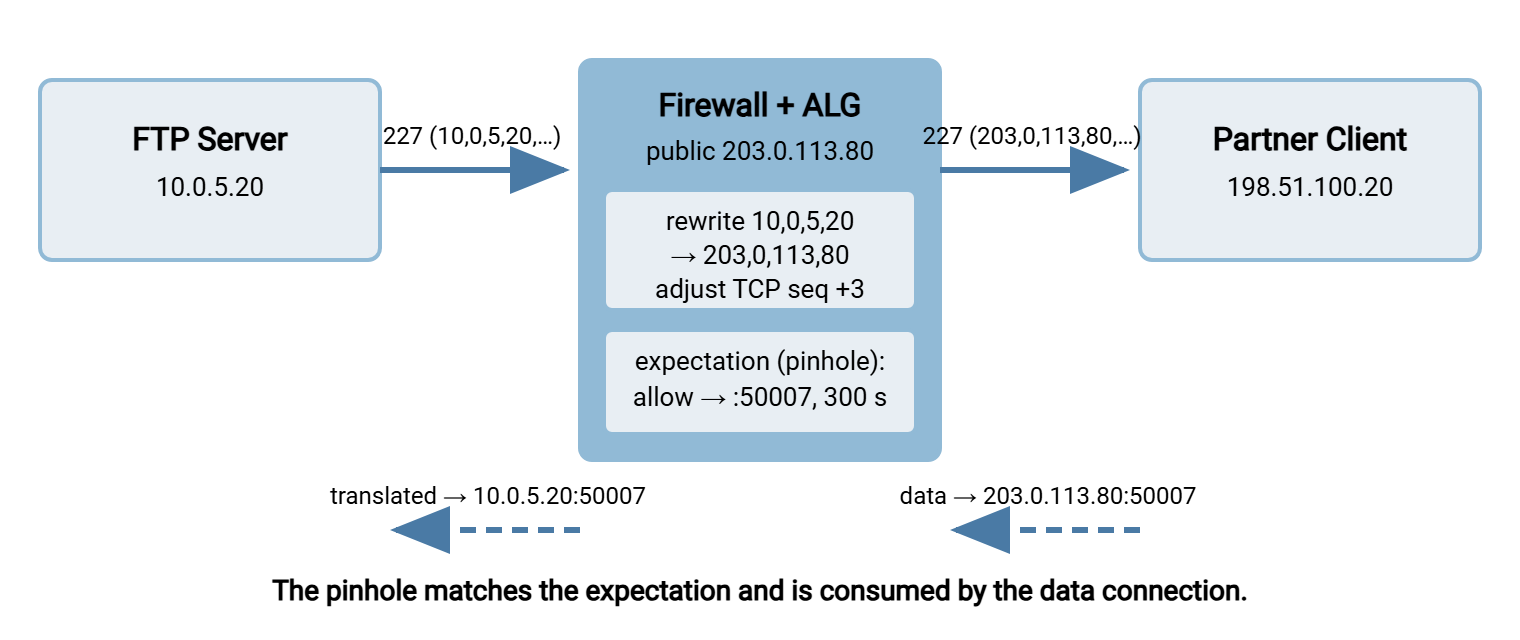
You can watch the pinhole exist on a Linux firewall. Expectations are listed separately from ordinary connections:
$ sudo conntrack -L expect
298 proto=6 src=198.51.100.20 dst=10.0.5.20 sport=0 dport=50007 master-src=198.51.100.20 master-dst=10.0.5.20 sport=49812 dport=21 class=0 helper=ftp
Read it as: "for the next 298 seconds, expect a TCP connection from 198.51.100.20 (any source port) to 10.0.5.20 port 50007. Its parent (master) is the control connection on port 21. The helper responsible is ftp." The countdown is the pinhole's lifetime, five minutes by default. When the data connection arrives it matches the expectation, is marked RELATED, and the expectation is consumed. If the client is slower than the countdown, the pinhole closes and the data connection is dropped as a stranger. Five minutes is generous by a firewall's standards and brief by a batch job's.
Turning the helper on, deliberately
On current Linux kernels the helper is not attached automatically; you assign it to the control port explicitly and then accept related connections. In nftables:
table inet filter {
    ct helper ftp-standard {
        type "ftp" protocol tcp
    }
    chain prerouting {
        type filter hook prerouting priority 0;
        tcp dport 21 ct helper set "ftp-standard"
    }
    chain input {
        type filter hook input priority 0; policy drop;
        ct state established,related accept
        tcp dport 21 accept
    }
}
The iptables equivalent is iptables -t raw -A PREROUTING -p tcp --dport 21 -j CT --helper ftp followed by the usual -m conntrack --ctstate RELATED,ESTABLISHED -j ACCEPT. Notice what is absent: there is no rule for the passive range. The related state is doing that job. That is the helper's whole appeal — and its whole risk. The moment the helper cannot see the negotiation, there is nothing else letting the data connection in.
The Friend: When Helpers Genuinely Save the Day
Credit where it is due. The helper is the right tool in three situations:
- Active-mode clients behind NAT. A legacy device or the built-in Windows command-line
ftp.exe, which speaks only active mode, sends its private address inPORT. The helper on the client-side firewall rewrites it to the public address and opens a pinhole for the server's callback. Without the helper, active mode from behind NAT is simply impossible. - Servers you cannot reconfigure. An appliance or an inherited server that announces its private address and offers no setting to change it. The helper on the server-side firewall patches the
227reply on the way out. - Home and small-office routers. Where nobody will ever open a passive range by hand, an always-on helper is why FTP works at all.
Every one of those cases involves plain FTP, in cleartext, on the standard port. Move away from any of those three conditions and the friend becomes the foe. It does not announce the change of heart.
The Foe: How Helpers Break Transfers
Encrypted control channels: FTPS
FTPS wraps the control connection in TLS. With explicit FTPS, the session starts in cleartext on port 21, and the client sends AUTH TLS. From the next byte everything is encrypted, as described in how TLS wraps FTP. The helper, still attached to port 21, sees AUTH TLS and then a stream it cannot parse. A well-behaved helper gives up silently: no rewriting and, critically, no pinhole. If the administrator was relying on the helper instead of a static rule for the passive range, every data connection is now dropped. A badly behaved helper treats the ciphertext as a protocol violation and resets the session. So does a strict inspection mode that insists port-21 traffic must look like FTP. The symptom is a successful login followed by an immediate disconnect on the first LIST.
Implicit FTPS on port 990 is encrypted from the first byte, so a port-21 helper never sees it. The failure is the missing pinhole and nothing else. Either way: with FTPS the helper contributes nothing. It must be replaced by static rules for the passive range plus the server announcing its public address by hand. That is the recipe in FTPS through firewalls and NAT. One protocol-level escape hatch exists — the CCC command. It returns the control channel to cleartext after authentication so a helper can read it again. But it exposes filenames and commands to the network and most servers disable it. Treat it as a last resort, not a design.
Bluewater Bank found this out the week it enabled TLS on a partner FTP link that had run in cleartext for years. Plain FTP had always worked, so nobody had ever written a rule for the passive range. The helper had been opening pinholes the whole time, unthanked. The morning after the switch every partner logged in, sent LIST, and was disconnected. The ticket opened with the words "network problem," closed briefly with "server problem," and reopened. A capture on the firewall showed the helper, still attached to port 21, meeting ciphertext after AUTH TLS and resetting the session as malformed FTP. The fix was three things nobody had needed before. They were a static rule for the passive range, the public address in the server's announced-address field, and inspection off for that rule. The change record now carries a note that reads "the helper was doing the work."
Non-standard ports
Helpers attach to a port, not to a protocol. Run the control connection on 2121 to dodge scanners, and the port-21 helper never sees it. There is no rewriting and no pinhole. An administrator who believes "the ALG handles FTP" is then left with a silent drop. Either attach the helper to the new port too or, better, stop relying on it.
Servers that already announce the right address
A correctly configured server announces 203.0.113.80 itself. A cautious helper finds the payload already correct and leaves it alone. A less cautious one rewrites whatever address it finds. On some devices that produces the firewall's inside address or the original private address. In those cases, the reply was correct on the way in and wrong on the way out. When a client reports connecting to an address the server never announced, suspect the helper before the server. I once spent a day blaming a server for an address a helper had invented.
Two helpers in a row
Double NAT with an FTP helper on each device means the 227 line is rewritten twice, with two independent sequence-number corrections stacked on one stream. In the best case the second rewrite is redundant. In the worst, it turns the first helper's output into an address that belongs to neither network. Or the corrections drift and the control session is garbled a few commands later. Provider-supplied routers in front of a business firewall are the usual culprit; bridge mode, described in the NAT types article, removes one of the two.
Pinholes with short lives
The expectation lasts a few minutes and admits one connection. A client that negotiates a passive port, then spends longer than that before connecting, finds the pinhole gone. An example is a script that opens the data port only after a slow local step. The symptom is intermittent: fast runs succeed, slow runs hang at the data connection. The pinhole leaves no note when it goes.
Deep inspection on next-generation firewalls
A next-generation firewall identifies applications by content rather than port, and its rules are written in terms of applications: "allow ftp," "allow ssl." That works until FTPS on port 21 is classified as generic TLS and no longer matches the "ftp" rule. It also fails if the data connection — raw file bytes with no protocol signature — is classified as "unknown-tcp" and dropped by the catch-all. Intrusion-prevention signatures add another layer: an unusually long password or an odd SITE command can trip a rule written for an old exploit. The symptom is a log line naming an application or threat you did not expect. The fix is a rule that matches the traffic as it really appears, which the rule design article works through.
Remember: a helper is a substitute for configuration, not an addition to it. If the server announces the correct public address and the passive range has its own rule, the helper has nothing to do and can only cause harm. If the control channel is encrypted, the helper is blind. Configure the server and the rules properly, and switch the helper off for that traffic.
The Symptom Table
Helper problems produce a recognizable set of complaints. Each row pairs the symptom with the most likely helper-related cause and the test that confirms it.
| Symptom | Likely helper cause | Confirming test |
|---|---|---|
Plain FTP works, FTPS logs in then hangs or disconnects at LIST |
Helper cannot read the encrypted channel; no pinhole, or session reset by strict inspection | Add a static rule for the passive range; if FTPS then works, the helper was the only thing letting data in |
| Client reports connecting to an address the server never announced | Helper rewrote a 227 reply that was already correct |
Capture on both sides of the firewall; compare the 227 payload before and after |
| Works on port 21, fails identically on port 2121 | Helper attached to 21 only; the passive range has no rule of its own | conntrack -L expect shows entries during a port-21 session and none during a 2121 session |
| Fast transfers succeed; a script with a pause before the data connection hangs | Pinhole expired before the data connection arrived | Watch the expectation countdown reach zero before the client connects |
Control session garbled or dropped a few commands after PASV |
Two helpers in series; conflicting sequence adjustments | Disable the helper on one device or bridge the outer one; retest |
| Firewall log names an unexpected application or threat for transfer traffic | Application identification or IPS signature mismatch | Read the log entry's application and rule fields; write a rule that matches them |
Proving the Helper Is Involved
The decisive evidence is always the same: what the server sent versus what the client received. If they differ, something in between edited the payload, and the only thing that edits payloads is a helper. Two ways to get it:
Compare the logs. Ask the server's administrator for the passive reply their server logged, and read the one your client logged. A mismatch like this is conclusive:
Server log:   227 Entering Passive Mode (203,0,113,80,195,87)
Client log:   227 Entering Passive Mode (10,0,5,1,195,87)
Capture on both sides. When logs are unavailable, a packet capture on the server and another on the client shows the edit directly. On the server, capture the control connection and print the payload as text:
$ sudo tcpdump -ni eth0 -A 'tcp port 21 and host 198.51.100.20'
02:10:07.114 IP 10.0.5.20.21 > 198.51.100.20.49812: Flags [P.], length 51
...227 Entering Passive Mode (203,0,113,80,195,87)
Run the same capture on the client. In a graphical analyzer, the display filter ftp.response.code == 227 shows only passive replies and the protocol decode names the address each carries. If the client's copy differs from the server's, the case is closed. The step-by-step version of this investigation, with the other filters worth knowing, is in the troubleshooting playbook. Captures settle arguments that logs only prolong.
When to Turn It Off, and How
The decision is simpler than it looks. Turn the helper off for transfer traffic when any of the following is true:
- The protocol is FTPS, explicit or implicit. The helper cannot help and may harm.
- The server announces its own public address and the passive range has a static rule. The helper is redundant.
- The control connection uses a non-standard port. The helper is not attached anyway; remove the false sense of security.
- A partner reports connecting to an address you never configured.
Keep it on only for cleartext FTP where you cannot configure the server or the client — the three "friend" cases above. Document that dependency, because whoever eventually enables TLS on that server will hit the wall you have just read about. I have been that whoever, and I would have appreciated the note.
How to switch it off depends on the platform, but the shapes are consistent:
# Windows Defender Firewall: disable stateful FTP inspection
C:\> netsh advfirewall set global StatefulFtp disable
C:\> netsh advfirewall show global      (confirm "StatefulFtp  Disable")

# Linux nftables / iptables: simply do not assign the helper
#   remove the "ct helper set" rule, or the "-j CT --helper ftp" rule,
#   and add explicit rules for the passive range instead:
tcp dport 50000-50100 accept
On a dedicated firewall appliance the setting lives in the service or application definition for FTP — often a checkbox labeled inspection, ALG, or helper. It can usually be disabled per rule rather than globally, which is the right granularity. Turn it off for the rule carrying partner FTPS, and on for the rule carrying the legacy scanner's plain FTP. Then make sure the configuration the helper was substituting for is in place. That means passive range and announced address on the server, static rules on the firewall. On a Windows server running Sysax Multi Server, both the passive port range and the announced address are set directly in the server configuration. So the firewall needs the two static rules and no inspection at all.
The Short Version
An FTP helper reads the control connection and rewrites the addresses inside PORT and 227 lines. It corrects the sequence numbers it disturbed and opens a short-lived pinhole for the data connection. It is a friend for cleartext FTP on port 21 where nobody can configure the endpoints. It is a foe the moment the control channel is encrypted or the port is non-standard. It is also a foe when the server already announces the right address, or two helpers stack up. The evidence is always the same — server's reply versus client's reply. The remedy is always the same: configure the endpoints and the rules properly, then turn the helper off for that traffic. It meant well.
For the rule set that makes the helper unnecessary, continue to designing transfer-friendly firewall rules. The modern negotiation that avoids the address problem entirely is EPSV. Its replies carry only a port number, never an address. See the PORT, PASV, EPRT, and EPSV commands. And for the comparison that makes many teams retire the helper along with plain FTP, the firewall view of FTP, FTPS, and SFTP is the companion read.
Frequently Asked Questions
What is an ALG in plain words?
Why does plain FTP work through my firewall but FTPS does not?
What is a pinhole?
How can I tell whether the helper changed a reply?
Should I just turn every FTP helper off?
Is the SIP ALG on my router the same thing?
From the Sysax team: we build secure file transfer software for Windows. Sysax Multi Server is an FTP, FTPS, SFTP, and HTTPS server. Sysax FTP Automation handles scheduled, scripted transfers. Free trials are on the download page.