
FTPS Through Firewalls and NAT: Why Encryption Breaks the Old Tricks
It is one of the most reliable surprises in file transfer. Plain FTP through your firewall works fine — has for years. You enable FTPS on the same server, a partner connects, and the login succeeds. Then the first directory listing hangs until it dies with a timeout or a 425 Can't open data connection. Nothing else changed. The obvious conclusion — "FTPS must be misconfigured" — is usually wrong. What actually happened is that encryption switched off a hidden favor your firewall had been doing for FTP all along.
This article explains that favor, why TLS makes it impossible, and what to build instead. By the end you will be able to recognize the blinded-helper failure on sight and distinguish it from the look-alike failures. You will be able to publish an FTPS service through a firewall and NAT using patterns that do not depend on the network reading your traffic. It is part of our FTPS In Depth series. It leans on two ideas from earlier in the library: FTP's two-connection design and the encryption layering covered in how TLS wraps FTP.
The Inheritance: One Session, Two Connections, One Awkward Negotiation
FTPS is FTP wrapped in TLS, and it inherits FTP's defining quirk unchanged. A session uses a long-lived control connection (commands and replies, normally port 21, or 990 for implicit mode). It also uses a fresh, separate data connection for every file transfer and every directory listing. In the passive mode that virtually all modern clients use, each data connection targets a high port on the server. The port is chosen from the server's passive port range and announced to the client mid-conversation in the reply to the PASV command. If any of that is unfamiliar, start with active vs passive FTP explained — this article builds directly on it.
Now look at that arrangement through a firewall administrator's eyes. The data connection goes to a port that is different every time and is named inside the conversation. A firewall that only reads packet headers cannot know which port to permit next. That negotiation-inside-the-payload design is the root of every FTP firewall problem ever filed. The story of how firewalls cope with it is told in why firewalls block active FTP.
The Old Trick: FTP Helpers and ALGs
Firewalls and NAT devices solved the problem by cheating — usefully. Nearly every serious network device ships an FTP helper, also called an ALG (application-layer gateway) or "FTP inspection". It is a small piece of code that watches traffic to port 21, reads the FTP conversation as it passes, and intervenes in two ways:
- Pinholes. When the helper sees the server's
227 Entering Passive Mode (203,0,113,10,195,87)reply, it decodes the address and port. It opens a temporary, precise hole in the firewall for exactly that data connection — then closes it after use. No standing rules for high ports needed. - Address rewriting. Under NAT, the helper edits the FTP conversation itself. NAT is network address translation, where a device swaps private internal addresses for a shared public one. A server may announce its private address
192.168.1.5in aPASVreply. In that case, the text gets rewritten on the fly to the public address the outside world can actually reach.
This is why plain FTP so often "just works" through consumer routers and corporate firewalls that nobody configured for it. An invisible assistant has been reading the mail and fixing the addresses. The assistant has one absolute requirement — it must be able to read the conversation.
TLS Blinds the Helper
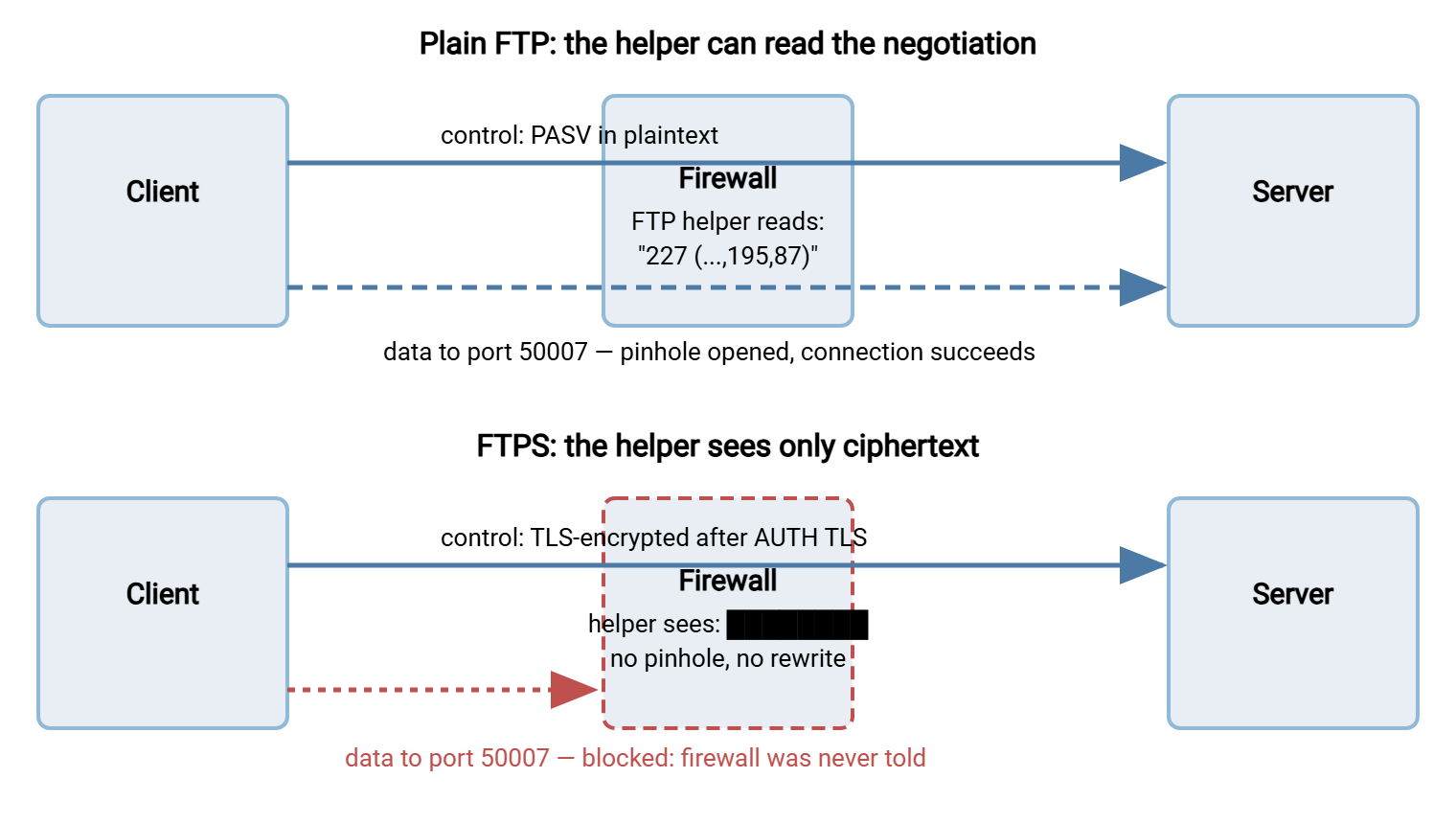
You can see where this is going. The moment an FTPS client sends AUTH TLS and the handshake completes, the control channel becomes ciphertext. The helper watching port 21 sees the plaintext greeting and sees AUTH TLS go by. It then sees nothing but encrypted bytes for the rest of the session. The 227 reply with its port number is in there somewhere — unreadable. No pinhole gets opened. No private address gets rewritten. The client dutifully connects to a port the firewall never heard about, announced by a server whose NAT address was never fixed up. The data connection dies on arrival. Implicit mode on port 990 fares no better. Helpers never watched that port in the first place, and its traffic is encrypted from the first byte.
The diagram below shows the same firewall handling both cases: reading a plain FTP negotiation and opening the pinhole, then standing blind in front of an FTPS session.
One more wrinkle deserves a warning label: some helpers do not merely go blind — they misbehave. An ALG that tries to parse the encrypted stream as FTP can mangle packets, strip or garble the AUTH TLS exchange, or reset connections it no longer understands. If FTPS sessions fail in bizarre ways at the handshake itself, a meddling helper on the path is a prime suspect. In that case, the fix below applies doubly.
The Failure Signature — and Its Look-Alikes
The blinded-helper failure has a precise shape: TCP connects, TLS handshake succeeds, login succeeds, and the first operation needing a data connection hangs or fails — a directory listing, an upload, a download. That last step is the tell, but two other FTPS failures look identical from the client side, so triage matters:
- Firewall or NAT (this article): the data connection never reaches the server. Server log shows the passive port offered, then silence — no incoming connection. Or the client reports trying to connect to a private address like
192.168.1.5. That means the server is announcing its internal NAT address now that no helper rewrites it. - TLS session reuse: the data connection arrives but the server refuses it because the client's TLS handshake did not resume the control session. The server log says so explicitly. The full story is in how TLS wraps FTP.
- Plain mode mismatch: problems that exist even without TLS — wrong mode, broken passive config. The systematic method in diagnosing FTP mode failures separates these in minutes.
Remember: "login works, listing hangs" after enabling FTPS is almost never an encryption bug. It is the firewall doing exactly what it always did — blocking unannounced connections — now that TLS has silenced the helper that used to announce them. The cure is never to weaken the firewall wholesale; it is to give it static, explicit knowledge of your data ports.
The Durable Fix: Static Configuration Instead of Magic
Since the network can no longer learn your data ports by eavesdropping, you tell it everything up front. Three settings, all server-side, replace the helper completely:
- Pin a passive port range. Configure the server to use a fixed block of high ports — say
50000–50100— instead of any free port. Size it generously: each concurrent transfer or listing briefly occupies one. - Open that range statically on the firewall, inbound to the server, alongside
port 21(and990if you offer implicit mode — see explicit vs implicit FTPS). - Announce the public address. Behind NAT, set the server's "external IP" so its
PASVreplies name the address partners can actually reach. No helper will rewrite it now. (Clients using the modernEPSVcommand sidestep the address half of this. The reply carries only a port and the client reuses the control connection's address. But you cannot count on every partner client using that command. The command family is covered in PORT, PASV, EPRT and EPSV.)
These are ordinary settings in any serious server. In Sysax Multi Server, the passive port range is part of the server configuration. So steps 1 and 3 are a settings change rather than a registry hunt. The full server-side walkthrough — range sizing, external IP pitfalls, testing — lives in configuring passive port ranges. Everything there applies to FTPS verbatim, with one addition: disable the FTP helper for your FTPS traffic while you are in the firewall anyway. It can no longer help, it can still harm, and static rules have replaced it.
A Publishing Checklist You Can Reuse
Here is the whole pattern as a checklist, in the order that avoids re-work. It assumes explicit FTPS; add the bracketed line for implicit.
PUBLISHING FTPS THROUGH A FIREWALL — CHECKLIST

 1. Server: set passive port range .......... e.g. 50000-50100
 2. Server: set external/public IP .......... the address partners connect to
 3. Firewall: allow inbound TCP 21 .......... explicit FTPS control
    [ Firewall: allow inbound TCP 990 ....... only if implicit mode offered ]
 4. Firewall: allow inbound TCP 50000-50100 . the exact range from step 1
 5. Firewall/NAT: forward those same ports .. to the server's internal address
 6. Firewall: disable FTP ALG/helper/inspection on these rules
 7. Test from OUTSIDE the network:
      - connect, log in, list a directory, transfer one file up and down
      - confirm the PASV reply shows the PUBLIC address (client log)
 8. Document: hostname, mode, ports, range — in the partner connection sheet
Two notes on the checklist. Step 5 matters in NAT setups where port-forwarding rules are separate from allow rules — the range must appear in both. Step 7 is non-negotiable: testing from inside the network exercises none of the NAT path and proves nothing. Borrow an outside connection or a remote machine.
What Changed, Side by Side
It helps to see the old world and the new world in one view. The left column is plain FTP leaning on a helper; the right column is FTPS with the static pattern above. Every row is a job that still has to be done — the only question is who does it now.
| Job to be done | Plain FTP with a helper | FTPS with static rules |
|---|---|---|
| Learning the data port | Helper reads each PASV reply live |
Administrator pins a known range in advance |
| Fixing the NAT address | Helper rewrites the private IP in the reply | Server announces its external IP itself |
| Firewall rules required | Port 21 only — pinholes handle the rest | 21 (and 990 if offered) plus the full passive range |
| FTP helper / ALG setting | Required — leave it on | Useless and risky — disable it for this traffic |
| Typical failure when misconfigured | Works "by magic" until the helper is off | Login succeeds, listings hang until range and IP are set |
Notice that the right-hand column contains nothing dynamic. That is the point: an FTPS deployment done this way has no moving parts in the network, which makes it boring. Boring is exactly what you want from a partner-facing transfer service.
Patterns for Special Situations
The CCC temptation
You will find forum advice suggesting the CCC command — dropping control-channel encryption after login so the helper can read PASV again. It genuinely works, and it is genuinely a trap: commands and filenames travel exposed and tamperable for the rest of the session. How TLS wraps FTP makes the full case. With a pinned range and static rules you never need it. Reserve it for a legacy device you cannot change and cannot route around, as a documented exception.
Load balancers, proxies, and DMZ front ends
Everything above assumes one firewall between client and server. Put a load balancer or reverse proxy in the path and the data-connection problem returns one layer deeper. The device must route each data connection to the same back-end server that issued the passive port, without reading the encrypted control channel. The standard solutions — per-node port slices, session affinity — are covered in FTP through load balancers and proxies. When you evaluate any fronting device for FTPS, the one question that matters is "how does it associate encrypted data connections with sessions?"
Fixed partners: allowlist by source
When the same few partners connect from known addresses, tighten every rule in the checklist with source-IP restrictions. In that case, port 21 and the passive range open only to the partners' addresses. This shrinks the exposed surface dramatically and turns your passive range from "open high ports" into "open high ports for three networks." It pairs well with the account-level controls in hardening FTPS.
The Client Side of the Same Story
The blindness is symmetrical: helpers on the client's firewall also stop assisting when the control channel encrypts. Three consequences for the connecting side:
- Outbound rules must be honest. A strict egress network needs outbound TCP to
21(or990) plus the server's announced passive ports. From the client side, those look like arbitrary high ports on a remote address. Networks that allow all outbound connections (most) never notice. Locked-down environments must allow the partner's published range explicitly, which is a fine reason to ask partners for their range in writing. - FTP-aware proxies drop out. Some corporate networks funnel FTP through a proxy that speaks the protocol. Encrypted FTPS is opaque to it, so sessions that worked for plain FTP fail. That is often the explanation for "works from home, fails from the office" with FTPS specifically.
- Unattended jobs should pin their settings. A scheduled transfer that relies on network defaults inherits every one of these surprises at 2 a.m. In an automation tool such as Sysax FTP Automation, the connection profile records protocol, mode, and passive behavior per job. The tool's retry and error handling give you a log trail when a partner's firewall change — not yours — breaks the run.
When to Stop Fighting
Honesty requires saying it: some of this pain is optional. Protocols that run everything over a single connection — SFTP on port 22, HTTPS uploads on 443 — give firewalls one port to open and nothing to negotiate. That is why network teams love them. The comparison is drawn out in our SFTP vs FTPS vs FTP series and the SFTP series. If you are choosing a protocol fresh, weigh that. But when FTPS is the requirement — a partner's standard, a compliance mandate, an installed base — the patterns in this article are not workarounds. They are the correct, stable way to run it. A pinned range, static rules, an announced public address, and a disabled helper will carry an FTPS service for years without drama.
The Version to Tell a Colleague
Firewalls and NAT devices used to keep FTP working by reading the control conversation. They opened data ports on the fly and rewrote private addresses inside PASV replies. TLS encrypts that conversation, so the helper goes blind, and the data connections FTPS still needs start dying while logins keep succeeding. The fix is to stop depending on magic. Pin a passive range on the server and open it statically. Announce the public IP, disable the now-useless FTP helper, and test from outside. Same two-connection protocol, new division of labor — the network is told instead of eavesdropping.
For related reading in this series, see how TLS wraps FTP for the session-reuse refusals that mimic firewall blocks. See explicit vs implicit FTPS for the port layout. See the client compatibility matrix for writing partner documents that prevent these tickets entirely.
Frequently Asked Questions
Why does plain FTP work through my firewall but FTPS hangs at the directory listing?
Do I still need a passive port range with FTPS?
Should I disable the FTP ALG or helper on my firewall for FTPS?
Which ports do I open on the server side for FTPS?
Does implicit FTPS on port 990 avoid these firewall problems?
Can my firewall decrypt FTPS to inspect it like it does with HTTPS?
From the Sysax team: we build secure file transfer software for Windows. Sysax Multi Server is an FTP, FTPS, SFTP, and HTTPS server. Sysax FTP Automation handles scheduled, scripted transfers. Free trials are on the download page.