
NAT Types and What They Do to Transfers
"It's behind NAT." The sentence lands in the ticket like a verdict, everyone nods, and nothing has been explained. I have done the nodding myself. Behind which NAT? There is not one; there are half a dozen distinct ways a network can rewrite addresses. Each breaks file transfer in its own particular way. A transfer that works through one kind fails through another. The failure looks like a firewall problem, a server bug, or a partner's mistake depending on where you happen to be standing.
This article takes each NAT type in turn — source NAT, port forwarding, double NAT, carrier-grade NAT, and hairpinning. It explains each the only way that matters operationally: by what it does to a transfer. You will learn to recognize which kind you are behind from ordinary command output. You will learn to predict which protocol will survive it and to fix the announced-address problem passive FTP is famous for. The vocabulary is defined as we go, because "it's behind NAT" should be the start of a diagnosis rather than the end of one.
It is the second article in our Firewalls, NAT, and File Transfer series. The opening article explained why FTP negotiates a second connection inside the first. This one is about what happens to the addresses that negotiation carries. The short answer is nothing, and that is the problem.
NAT in One Paragraph, Then the Vocabulary
NAT — network address translation — is a device rewriting the addresses in packet headers as they pass through. It keeps a table so it can rewrite the replies back. NAT exists because the internet has far fewer addresses than there are devices. So organizations use private addresses internally — the 10.0.0.0/8, 172.16.0.0/12, and 192.168.0.0/16 ranges, never routed on the internet. They let a NAT device present them to the world under one or a few public addresses.
Three terms cover almost everything you will meet:
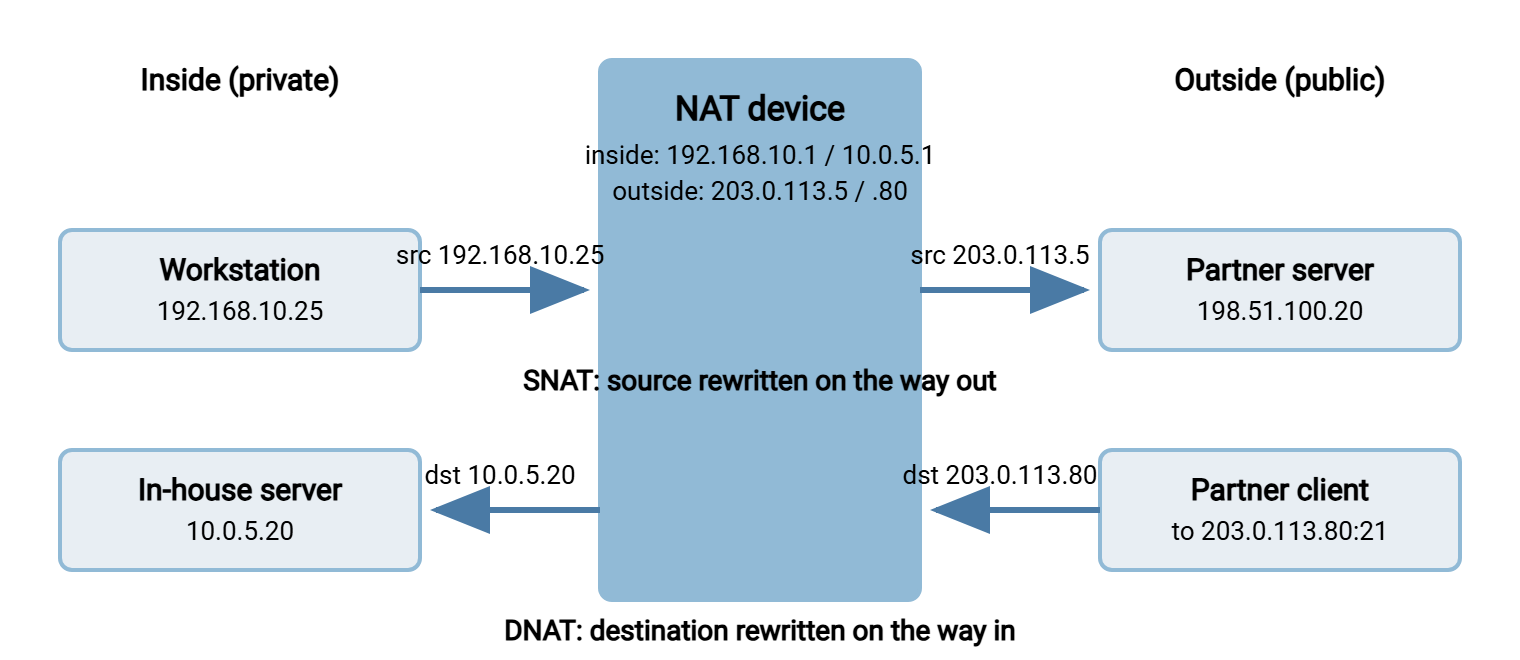
- SNAT (source NAT) rewrites the source address of packets going out. An internal machine therefore appears to the internet as the NAT device's public address. When many machines share one public address, the device also rewrites source ports to keep connections apart. That variant is called PAT, NAPT, or on Linux masquerading. It is what your office firewall does all day.
- DNAT (destination NAT) rewrites the destination address of packets coming in. A connection to a public address is therefore delivered to an internal server. When only specific ports are forwarded it is called port forwarding. When every port is mapped to one internal host it is called static NAT or one-to-one NAT.
- Hairpin NAT (also NAT loopback or NAT reflection) is the special case where an internal client uses the public address of an internal server. The packet has to go out to the NAT device and turn straight back in.
The diagram shows SNAT and DNAT side by side: an office workstation reaching a partner's server, and a partner reaching an in-house server. In both cases the packet header carries one address inside and a different one outside.
Keep one fact in mind throughout. NAT rewrites addresses in the packet header. It does not read or rewrite an address an application has written into the payload. FTP writes addresses into its payload every time it negotiates a data connection. NAT reads the outside of the envelope and considers its work complete.
Source NAT: The Client Side of Every Transfer
Source NAT is what your outbound transfers pass through. A scheduled job on an internal host at 192.168.10.25 connects to a partner. The office firewall rewrites the source to 203.0.113.5 and picks a fresh source port. The partner sees 203.0.113.5. On Linux the rule is one line, and the resulting table entry is visible with conntrack:
$ sudo iptables -t nat -A POSTROUTING -o eth0 -j MASQUERADE

$ sudo conntrack -L | grep dport=22
tcp  6 431990 ESTABLISHED src=192.168.10.25 dst=198.51.100.20 sport=51204 dport=22 src=198.51.100.20 dst=203.0.113.5 sport=22 dport=51204 [ASSURED] mark=0 use=1
The second half of the entry is the reply direction, addressed to 203.0.113.5. Replies come back to the public address and the firewall translates them to the workstation. For SFTP, that is the whole story — one connection, one entry, nothing in the payload for NAT to get wrong. The only way SNAT hurts an SFTP session is by forgetting the entry during a long silence. That belongs to our timeouts and dropped sessions series. The NAT table holds no grudges; it just forgets you after a long enough quiet.
For active-mode FTP, SNAT is fatal. The client sends PORT 192,168,10,25,201,85 — its own private address, written into the payload. The server dutifully tries to connect to 192.168.10.25, an address that exists only inside your building. Unless an FTP helper on the firewall rewrites that line (the subject of the next article), the data connection never arrives. Switching the client to passive mode removes the problem, because in passive mode the client writes no address at all. It is hard to get an address wrong when you never say one.
For passive FTP and FTPS, plain SNAT is harmless — the client opens both connections outward and both are translated normally. One trap bites organizations with more than one public address. If the firewall uses a NAT pool (several public addresses, chosen per connection), the control connection may leave as 203.0.113.5 and the data connection as 203.0.113.6. Many FTP servers refuse a data connection that arrives from a different address than the control connection, as a defense against hijacking. They reply with a 425 error. The fix is to pin transfer hosts to one public address with a specific SNAT rule placed before the pool rule.
Destination NAT and Port Forwarding: The Server Side
Hosting a transfer server behind NAT means DNAT. The server lives at 10.0.5.20; the public address is 203.0.113.80; the firewall forwards specific ports inward. Here is the nftables version, which is the syntax you will meet on a current Linux firewall:
table ip nat {
    chain prerouting {
        type nat hook prerouting priority -100;
        iifname "eth0" tcp dport 22 dnat to 10.0.5.20
        iifname "eth0" tcp dport { 21, 50000-50100 } dnat to 10.0.5.20
    }
    chain postrouting {
        type nat hook postrouting priority 100;
        oifname "eth0" masquerade
    }
}
Two things to notice. DNAT only redirects the packet; a separate filter rule must still allow it. So a forgotten filter rule produces the same silent drop as a forgotten forward. And the passive range 50000-50100 is forwarded as a block that must match the server's configured range exactly. A server that hands out port 50150 when the forward stops at 50100 fails intermittently. That is the worst kind of failure, because it depends on which port the server happens to pick. Failures that depend on luck get closed as "could not reproduce" and return on Monday.
For SFTP and HTTPS, this is enough: one port forwarded, one filter rule, done. For FTP and FTPS, forwarding is necessary but not sufficient, because of the announced-address problem.
The announced-address problem
When a client sends PASV, the server replies with the address and port the client should connect to. Left to itself, the server reports the address of its own network interface — 10.0.5.20. That is the only address it knows it has:
Command:   PASV
Response:  227 Entering Passive Mode (10,0,5,20,195,87)
Status:    Connecting to 10.0.5.20:50007 ...
Error:     Connection timed out
Error:     Failed to retrieve directory listing
The DNAT device translated every packet header correctly. It never touched the payload, so the client received a private address and tried to connect to it. From the client's network, 10.0.5.20 is unreachable or — worse — some unrelated printer on the client's own LAN. Some clients defend themselves: curl has a --ftp-skip-pasv-ip option and lftp a ftp:fix-pasv-address setting. Both ignore the announced address and reuse the one the control connection went to. You cannot rely on partners having such clients configured.
Northgate Retail hosted its supplier FTPS server behind exactly this kind of forward. For two days every supplier could log in and do nothing else. The network side confirmed that port 21 and the passive range were forwarded and allowed, and they were. The server side confirmed the service was up and the range was set, and it was. The ticket had changed queues four times before anyone pasted a supplier's session log into it. There in the 227 line sat 10,0,5,20, announced to the whole internet with complete confidence. The external-address setting had been left at its default during the build. One field and one restart later the suppliers were listing directories. The build checklist gained a line that reads "announced address equals public address," which nobody has skipped since.
The proper fix is on the server: tell it which address to announce. Every serious FTP server has a setting for the external address alongside the passive range. The two together are the whole job — configuring passive port ranges walks through it. In Sysax Multi Server the passive port range and the announced address are ordinary settings in the server configuration. So hosting it behind a port-forwarding firewall is a matter of matching two numbers rather than editing files. FTPS uses the same settings plus the extra care in FTPS through firewalls and NAT, because no helper can patch an encrypted reply for you.
Remember: NAT translates headers, not payloads. Any protocol that writes an address into its payload must be told the public address explicitly. That means FTP and FTPS with their PORT and 227 lines. Set it on the server for passive mode and on the client for active mode. SFTP and HTTPS write no addresses and need nothing.
Double NAT: Two Translations in a Row
Double NAT means the packet is translated twice on its way out and twice on its way back. It is translated once by your firewall, then again by another device between you and the internet. The classic case is a provider's modem-router that performs its own NAT, with the organization's firewall plugged into it like an ordinary client. Virtual environments produce it too, when a virtual network translates guest addresses before the physical firewall translates them again. Nobody plans double NAT. It accumulates.
The tell-tale sign is that the "outside" address of your firewall is itself private. Look at the firewall's WAN interface: if it reads 192.168.1.2 rather than a public address, there is another NAT device beyond it. A traceroute shows the same thing from any workstation:
C:\> tracert -d 198.51.100.20
  1     1 ms    192.168.10.1      <- office firewall
  2     2 ms    192.168.1.1       <- a second private hop: the provider's router
  3    11 ms    203.0.113.1       <- first public address
  ...
Two consecutive private hops before the first public one means two NAT devices. Outbound SFTP still works — each device keeps its own table and the replies unwind through both. Hosting a server means every port must be forwarded twice. Forward it on the provider's router to the firewall's WAN address, then on the firewall to the server. Miss the outer forward and the port is reachable from the office but not from the internet, which looks exactly like a partner-side problem. The passive-mode announced address must be the outermost public address, 203.0.113.80, not the firewall's WAN address. And the outer device may be a consumer router with an FTP helper of its own. In that case, expect it to rewrite 227 replies whether you want it to or not. The safest course is to have the provider put the modem into bridge mode, so only one device translates. I once spent an afternoon forwarding ports on the wrong one of the two devices, and I check the WAN address first now.
Carrier-Grade NAT: When You Have No Public Address at All
Carrier-grade NAT (CGNAT) is source NAT performed by the internet provider itself, sharing one public address among many customers. It is common on mobile connections, on some fiber and cable services, and in regions where public addresses are scarce. Your router receives an address from the 100.64.0.0/10 range — 100.64.0.0 through 100.127.255.255, a block reserved for exactly this purpose. The provider translates it again on the way to the internet.
The consequences are blunt. You cannot host a server: there is no public address to forward from. No rule you create will make the provider's NAT deliver inbound connections to you. Outbound transfers work, with two catches. Your public address is shared with strangers and may change without notice. So a partner who allowlists "your" address is allowlisting a neighborhood and will lose you when the provider reassigns it. And the provider's NAT is usually a pool, so the control and data connections of a passive FTP session can leave under different addresses. That is the 425 refusal described above, with nothing you can pin.
Recognizing CGNAT takes one look: a router WAN address beginning with 100. whose second number is between 64 and 127. If the address is public but a partner's log shows a different one, there is a second translation upstream. The remedies are architectural. Host the server somewhere with a real public address — a rented server, a cloud host, a colocation rack. Reach partners through a VPN or a hosted transfer gateway with a stable address. And prefer SFTP across any CGNAT boundary, because it never opens a second connection that a pool can separate.
Hairpin NAT: Inside Reaching Inside via Outside
The scenario: your server sits at 10.0.5.20 behind public address 203.0.113.80, and DNS says ftp.example.com is 203.0.113.80. Partners on the internet connect fine. A colleague on the office network tries the same hostname and gets a timeout. The connection went from an inside address to the firewall's outside address. The firewall had to do something it is not always built to do. It had to accept a packet on its inside interface and apply the DNAT for its own public address. It then had to send it straight back out the same interface. Many firewalls regard the request as improper and do not reply.
That is hairpinning, named for the U-turn the packet makes. The diagram shows the path and a second problem. Even when the U-turn works, the server sees the connection coming from the workstation's real address and replies directly, bypassing the firewall. This happens unless the firewall also applies SNAT so the reply comes back through it.
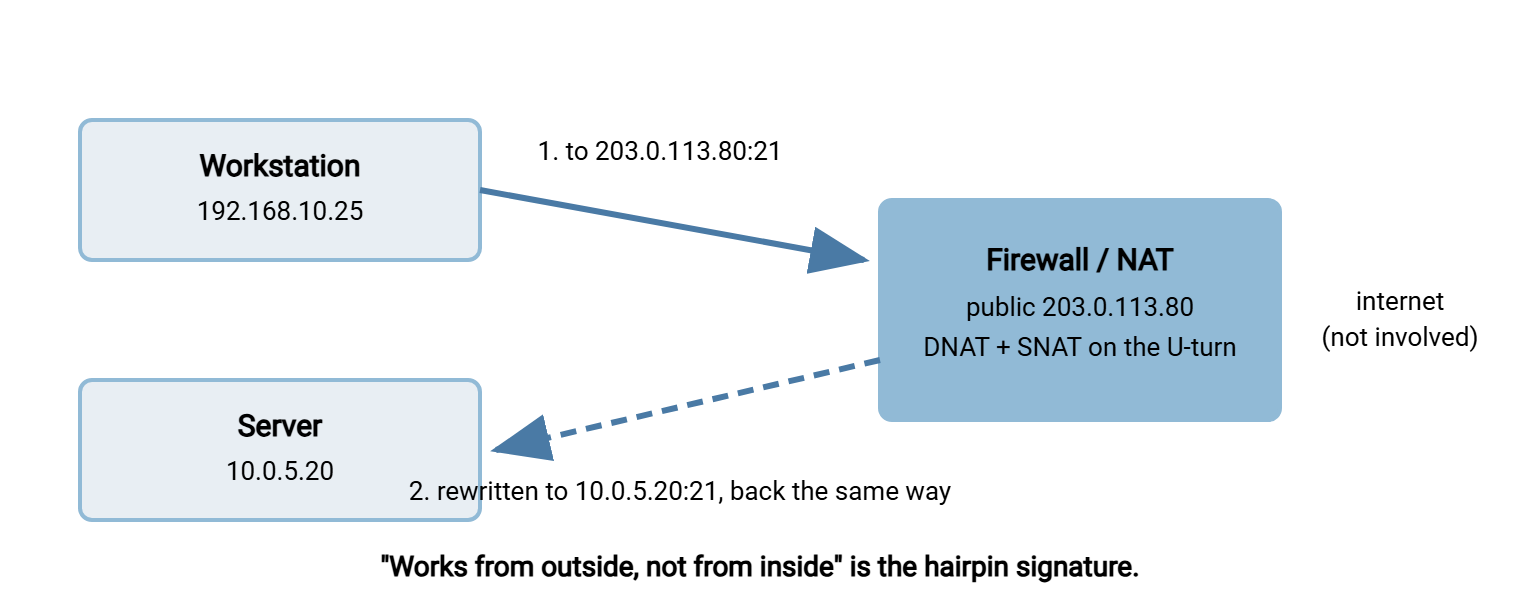
Passive FTP adds a twist. Once the server announces 203.0.113.80 for internet partners, it announces that address to inside clients too. So every data connection from the office needs the hairpin as well — for the whole passive range. Some servers can announce a different address to local-network clients; if yours can, use it. Otherwise there are two clean fixes. Split DNS makes ftp.example.com resolve to 10.0.5.20 inside and 203.0.113.80 outside, so inside clients never touch the public address. It is the simplest and most robust. Or a proper hairpin rule on the firewall — usually called NAT reflection or NAT loopback — that applies both translations to inside-to-public-address traffic. "Works from outside but not inside" is one row of the symptom table in the troubleshooting playbook.
NAT Type by Protocol: What Survives
The table condenses the sections above. "Works" means with nothing more than the obvious port forwards. The label "config" means once the announced address or a specific rule is set. The label "breaks" means no server-side setting can save it.
| NAT situation | SFTP / HTTPS | Passive FTP / FTPS | Active FTP |
|---|---|---|---|
| Client behind source NAT | Works | Works (pin one address if a NAT pool is used) | Breaks without a helper |
| Server behind port forwarding | Works | Config: announced address + forwarded range | Config: outbound from port 20 allowed |
| Double NAT | Works (forward twice to host) | Config: forward twice, announce outermost address | Breaks in practice |
| Carrier-grade NAT | Outbound works; hosting impossible | Outbound may hit 425 from address pools; hosting impossible | Breaks |
| Inside client, public address (hairpin) | Config: hairpin rule or split DNS | Config: hairpin for whole range, or split DNS | Unpredictable |
Read down the SFTP column: the single-connection protocols are indifferent to nearly every kind of NAT. When a partner asks which protocol to use across an awkward network, that column is the answer. It has been the answer for some time.
Finding Out Which NAT You Are Behind
You can classify your own situation in five minutes with tools already on the machine, working from the transfer host itself:
- What is my own address? Run
ipconfigon Windows orip addron Linux. A10.,172.16–31., or192.168.address means at least one NAT between you and the internet. - What does my firewall's outside interface show? Log into the firewall or router and read its WAN address. Public: single NAT. Private (
192.168.1.xis typical): double NAT.100.64–127.x.x: carrier-grade NAT. - What does the far end see? Ask a partner for the source address in their server log, or read it from your own server's log when connecting outward. If it differs from your firewall's WAN address, there is another translation upstream.
- How many private hops?
tracert -dortraceroute -nto any public address; count the private addresses before the first public one. - Does the public address work from inside?
Test-NetConnection 203.0.113.80 -Port 21from an inside workstation. Failure while partners succeed means no hairpin.
Write the answers down. Every later firewall conversation — with your own network team or with a partner — starts from these five facts. The partner coordination article builds its shared connection sheet on them.
The Short Version
NAT rewrites packet headers, not payloads. Source NAT is invisible to SFTP. It is harmless to passive FTP unless an address pool splits the two connections, and fatal to active FTP. Port forwarding needs the passive range forwarded as a block and the server told which public address to announce. Double NAT means doing that twice and announcing the outermost address. Carrier-grade NAT means you cannot host at all. Hairpinning is why a server works from outside but not inside, and split DNS is the cleanest cure. Through all of it, the single-connection protocols sail on untouched. "It's behind NAT" is still true; it is just no longer the end of the sentence.
Next in this series, application helpers and ALGs covers the devices that try to fix the announced-address problem for you. It also covers the damage they do when they guess wrong. For rule design once you know your NAT type, see designing transfer-friendly firewall rules. For where the server should sit in the first place, inbound versus outbound flows in the DMZ series is the companion read.
Frequently Asked Questions
Which ports do I forward for an FTP, FTPS or SFTP server behind NAT?
What is the difference between SNAT and DNAT?
Why does my FTP server announce a 10.x.x.x address to clients?
How do I know if I am behind double NAT?
Can I host a transfer server behind carrier-grade NAT?
Why does the server work for partners but not from inside the office?
Which protocol is safest across unknown NAT?
From the Sysax team: we build secure file transfer software for Windows. Sysax Multi Server is an FTP, FTPS, SFTP, and HTTPS server. Sysax FTP Automation handles scheduled, scripted transfers. Free trials are on the download page.