
Verifying Large Transfers Without Doubling the Time
Everyone agrees a transferred file should be verified. Everyone also knows what happens with a 40 GB file: the transfer finishes. Someone runs a hash on the source, and someone runs a hash on the copy. Each takes several minutes of disk time. The job's total duration quietly grows by a third — or, on a fast network, doubles. So the verification step gets skipped "just this once," then routinely. The first anyone hears of a truncated file is when the database restore fails. The cost of verifying large files is real; the answer is not to skip it but to stop paying for it twice.
This article is about verification at scale. It measures what hashing actually costs. It shows how to compute the hash while the bytes are being read or written so that no extra pass over the disk is needed. It explains when a size check is enough to gate the expensive step and compares per-chunk hashes with a whole-file hash. It describes a cheap tail check for files too enormous to hash routinely. It ends with the manifest habits that make all of this automatic. The fundamentals — what a hash is, why MD5 and SHA-256 differ, how a checksum file is laid out — are in our hashing explained article. Here we assume them and deal with the size problem. This is part of our Large File Strategies series.
What Verification Costs at Scale
A hash is a short fingerprint computed from every byte of a file. The same bytes always give the same hash, and any change gives a different one. Computing it means reading the whole file, and for a large file that is a disk operation before it is a CPU operation. Modern processors run SHA-256 at several hundred megabytes to over a gigabyte per second per core, so on most machines the disk sets the pace:
| Where the 40 GB file lives | Sequential read speed | Time to hash once | Both ends, after the transfer |
|---|---|---|---|
| Spinning disk | about 200 MB/s | about 3.5 minutes | about 7 minutes |
| SATA solid-state drive | about 500 MB/s | about 80 seconds | under 3 minutes |
| NVMe drive, fast CPU | CPU-bound, about 1 GB/s | about 40 seconds | under 1.5 minutes |
Set those against the transfer itself. On the 200 megabit link used throughout this series, 40 GB takes about thirty minutes. Post-transfer hashing on spinning disks adds seven minutes — nearly a quarter again. On fast drives, it adds a tolerable minute or two. On a 10 gigabit local network the transfer takes about half a minute. Hashing both ends afterward takes three to fourteen times as long as the transfer did. That is the case the title refers to. The waste has a specific shape: the file was already read once on the sender (to send it). It was written once on the receiver (to store it). Post-transfer hashing reads it a second time on each side purely to look at bytes that just went past.
Hash While the Bytes Move
The fix is to compute the hash from the same stream of bytes the transfer is already handling. On the sender, every byte read from disk goes to the network and into the hash calculation. On the receiver, every byte from the network goes to disk and into a hash calculation. When the transfer ends, both sides have a hash. No extra disk read has happened anywhere, and the CPU work was done in the idle moments between network packets. The diagram shows the two branches on each side.
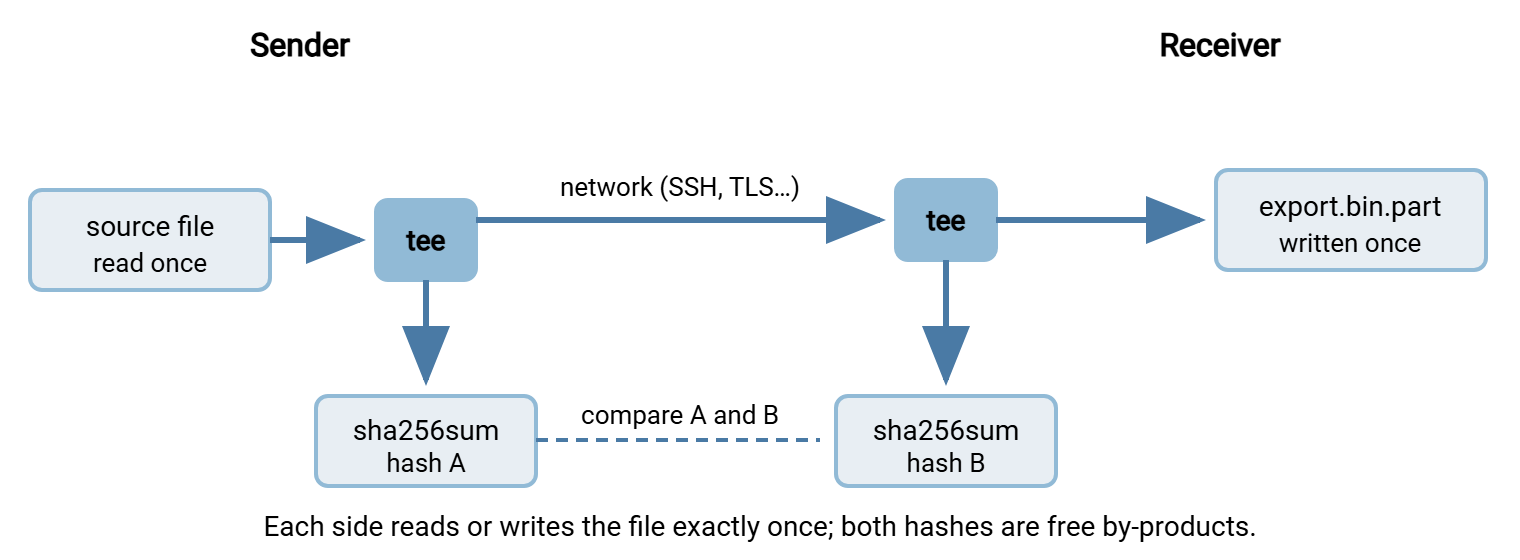
On Linux and other Unix-like systems the tool for splitting a stream two ways is tee. A shell feature called process substitution — the >( … ) syntax — lets one of the two outputs be another command instead of a file. Sending over SSH, the whole thing is one line on each side:
$ tee >(sha256sum > export.bin.sha256) < /srv/export/export.bin \
    | ssh alex@10.20.30.40 'tee /srv/inbound/export.bin.part | sha256sum'
c9e2f1a4b8d07e3c5f6a2b9d1e4c7a0f3b6d9e2c5a8f1b4d7e0c3a6f9b2d5e87  -

$ cat export.bin.sha256
c9e2f1a4b8d07e3c5f6a2b9d1e4c7a0f3b6d9e2c5a8f1b4d7e0c3a6f9b2d5e87  -
Read it left to right. The source file is fed into the local tee, which writes a copy into the process substitution. There, sha256sum computes hash A and saves it to export.bin.sha256. The local tee also passes the bytes on into ssh. On the far machine, another tee writes the bytes to export.bin.part and passes them to a second sha256sum. Its output — hash B — comes back over the SSH connection and prints on your screen. The trailing - just means "computed from standard input." If the two hashes match, the copy is proven identical to the source and the file can be renamed to its final name. The total disk traffic was one read and one write, the minimum possible. The same trick works for downloads with any tool that can write to standard output, for example curl -sS https://files.example.com/export.bin | tee export.bin.part | sha256sum.
Not every transfer can be piped this way — an SFTP or FTPS client that reads the file itself gives you no stream to tap. Two things help there. Some clients and servers can compute a hash as a side effect of the transfer. Some offer a command that returns the hash of a file on the server without downloading it. Support varies, so check the documentation of both ends. Failing that, hashing on the receiving side immediately after arrival is cheaper than it looks. The operating system usually still holds the most recently written part of the file in memory. Only the older part has to come back from disk.
On Windows, PowerShell has no tee for binary data, but a short .NET loop does the same job for any copy the script performs itself. Here, that is a copy to a network share with the hash computed from the same buffer that is written:
$src = 'D:\export\export.bin'
$dst = '\\fileserver\inbound\export.bin.part'
$sha = [System.Security.Cryptography.SHA256]::Create()
$in  = [System.IO.File]::OpenRead($src)
$out = [System.IO.File]::Create($dst)
$buf = New-Object byte[] (4MB)
while (($n = $in.Read($buf, 0, $buf.Length)) -gt 0) {
    $out.Write($buf, 0, $n)
    [void]$sha.TransformBlock($buf, 0, $n, $null, 0)
}
[void]$sha.TransformFinalBlock($buf, 0, 0)
$in.Close(); $out.Close()
$hex = ($sha.Hash | ForEach-Object { $_.ToString('x2') }) -join ''
"$hex  export.bin" | Set-Content -Encoding ascii 'D:\export\export.bin.sha256'
Each 4 MB buffer is written to the destination and then fed to the hash object. TransformFinalBlock closes the calculation. The last two lines format the result as the standard lowercase hex string followed by two spaces and the file name. That is the same layout sha256sum produces, so a Linux receiver can check it with sha256sum -c. Whoever receives the file computes its hash with Get-FileHash -Algorithm SHA256 and compares.
Size First, Then Hash
A hash is the definitive check, but it is not the first check. The size of a file costs nothing to read — it is metadata, and no bytes are touched. It catches the single most common way large transfers go wrong: they stop early. A file that is 27,917,287,424 bytes instead of 40,000,000,000 is wrong, and no minutes of hashing are needed to prove it. So the order is always the same: compare sizes; if they differ, stop and deal with it; if they match, hash.
$ stat -c %s /srv/export/export.bin
40000000000
$ ssh alex@10.20.30.40 stat -c %s /srv/inbound/export.bin.part
40000000000

PS> (Get-Item 'D:\export\export.bin').Length
40000000000
Be clear about what a size match does and does not prove. It proves the transfer was not cut short and that the receiver did not append to a stale file. Those two failures account for nearly all bad large transfers in practice. It does not prove the bytes are right. A resume that started at the wrong offset or a file regenerated between attempts produces the correct size with the wrong contents. So does a corrupt block written by a failing disk. The size check is a gate, not a verdict. The reason to run it first is that it lets you skip the expensive step only when the expensive step would certainly fail anyway.
Remember: in-transit corruption is rarer than people think, because SSH and TLS both check every packet's integrity as it arrives and a corrupted packet is re-sent, not stored. What end-to-end hashing catches at scale is everything around the wire: truncation, bad resumes, wrong files, stale copies, and disk or memory faults on either machine. Those are exactly the failures a size check alone misses, so size is the gate and the hash is the proof.
Chunk Hashes Versus a Whole-File Hash
When a large file is split into chunks for transfer, there are two kinds of hash to keep, and they answer different questions. A hash of each chunk answers "which piece is wrong?" The receiver checks each piece as it arrives and asks for just that piece again. On a 40 GB file, that turns a thirty-minute re-send into a fifty-second one. A hash of the whole file answers "is the reassembled result exactly the original?" It also catches pieces joined in the wrong order, a mistake no chunk hash can see. Keep both; they cost the same read if computed together.
Computing them together is the trick. Splitting already reads the file once, so hash the chunks and the whole during that read rather than afterward. GNU split can pass each chunk through a command instead of writing it directly. A tee around the whole thing feeds the same bytes to a whole-file hash:
$ tee >(sha256sum | sed 's| -| export.bin|' >> export.bin.manifest) < export.bin \
    | split -b 1G -d -a 3 --filter='tee "$FILE" | sha256sum | sed "s| -| $FILE|" >> export.bin.manifest' - export.bin.

$ sort -k2 export.bin.manifest | head -3
c9e2f1a4b8d07e3c5f6a2b9d1e4c7a0f3b6d9e2c5a8f1b4d7e0c3a6f9b2d5e87  export.bin
3f1a9c0e7b2d5f8a1c4e7b0d3f6a9c2e5b8d1f4a7c0e3b6d9f2a5c8e1b4d7f0a  export.bin.000
88d4e70c19a3b6f2d5e8c1a4f7b0d3e6a9c2f5b8e1d4a7c0f3b6e9d2a5c8f1b4  export.bin.001
The outer tee sends every byte to a whole-file sha256sum and on into split. For each chunk, split runs the --filter command with the chunk's bytes on its input and the chunk's name in $FILE. That inner tee writes the chunk to disk and hashes it at the same time. The sed calls replace the - that sha256sum prints for standard input with the real file name. So the manifest comes out in the exact format that sha256sum -c reads back. One read of the source produces 38 chunks, 38 chunk hashes, and the whole-file hash. Without the trick, the same manifest costs three reads — one to split, one to hash the chunks, one to hash the whole. On a spinning disk, that is ten minutes instead of three.
Tail Checks for the Truly Enormous
Above a few hundred gigabytes, even one extra read may be more than a routine job can afford. It is worth asking what a cheaper check can honestly guarantee. A tail check hashes only the last few tens of megabytes of the file on both sides — plus, usually, the first few — and compares. It reads a fixed 128 MB regardless of file size, so it takes a second on any drive:
# Linux: hash the last 64 MB locally and remotely (head -c does the same for the first 64 MB)
$ tail -c 67108864 /srv/export/export.bin | sha256sum
$ ssh alex@10.20.30.40 'tail -c 67108864 /srv/inbound/export.bin.part | sha256sum'

# PowerShell: seek to 64 MB before the end, read it, hash it
$fs  = [System.IO.File]::OpenRead('D:\inbound\export.bin.part')
$len = 64MB
[void]$fs.Seek(-$len, [System.IO.SeekOrigin]::End)
$buf = New-Object byte[] $len
$n   = $fs.Read($buf, 0, $len); $fs.Close()
$sha = [System.Security.Cryptography.SHA256]::Create()
($sha.ComputeHash($buf, 0, $n) | ForEach-Object { $_.ToString('x2') }) -join ''
Combined with a size match, a tail check catches truncation (the size). It also catches a resume that started at the wrong offset (the tail is shifted and hashes differently). The combination catches a file regenerated between attempts (the tail changed), and a wrong or stale file altogether (the head changed). What it cannot catch is a corrupt block somewhere in the middle. Given that in-transit corruption is caught by the encrypted transport, the remaining risk is a fault on one machine's disk or memory. That is real, but rare, and the kind of thing a full hash at a quieter time can still catch later.
That makes the tail check appropriate for routine internal moves where the file will be used and any problem noticed. It is inappropriate for anything where the hash is the proof. That includes regulated data, partner deliverables, backups you will not open until the day you need them, and anything that may become evidence. For those, pay for the full hash — the cases and the reasoning are in hashes as custody evidence. The honest way to use a sampling check is to write down that it was used, so nobody later mistakes "tail verified" for "verified."
Manifests That Make It Routine
Verification only happens every time if it is part of the transfer rather than a separate chore. The mechanism that achieves that is the manifest. For a single file, it is the manifest's small cousin, the sidecar hash file — export.bin.sha256 traveling beside export.bin. Three habits turn it from documentation into automation:
- Send the hash file after the data file. Its arrival then means two things at once: the data is complete, and here is what it should hash to. A receiver script waits for the sidecar, checks size, checks hash, renames, and only then hands the file on. This is the marker-file pattern from marker and control files, with the marker doing double duty.
- Use the standard layout. Hash, two spaces, file name, one line per file.
sha256sum -creads it on Linux; on Windows a few lines of PowerShell parse it and compare againstGet-FileHash. A manifest in a private format needs custom code on every receiver; the standard one works everywhere. - Make the check's result visible. Log the size, the hash, and the verdict for every file, so that "was it verified?" is answered by a search rather than by faith. Integrity in automation covers the logging and alerting side.
Scheduled-transfer tools carry part of this load. Sysax FTP Automation, for example, can compare folders after a job to confirm that what was sent is what arrived. Its post-processing steps can run the hash check and rename as part of the same scheduled task. Whatever tool runs the job, the design is the same: the hash is computed during the transfer where possible, compared automatically, and recorded. It is never left to a person to remember at the end of a thirty-minute wait.
A Verification Plan by Size and Stakes
| Situation | Check | Extra disk reads |
|---|---|---|
| Under a few gigabytes | Size, then full hash both ends, however computed | One each side; too small to matter |
| Tens of gigabytes, routine | Size, then full hash computed during the transfer | None |
| Chunked transfer | Per-chunk hashes on arrival, whole-file hash after reassembly | None on the sender; one after the join on the receiver |
| Hundreds of gigabytes, routine and internal | Size plus head-and-tail hash; full hash later if the file matters | 128 MB, effectively none |
| Any size, evidential or partner deliverable | Full hash both ends, recorded in a manifest and in the log | Whatever it costs |
The Version to Keep in Your Head
Verifying a large file is expensive only when it is done as a separate pass. Hash the bytes while they are already streaming. Use tee and process substitution on Linux, or a hash object fed from the copy loop on Windows. Then both hashes become free. Check the size before anything else, because it is free and catches the most common failure. In chunked transfers keep per-chunk hashes to localize a problem and a whole-file hash to prove the result, computed in the same read. For enormous routine files a size-plus-tail check is a defensible compromise, as long as it is recorded as such. For anything that must be proven, pay for the full hash. And put the hash in a manifest that travels after the file, so verification is a step the job performs, not a task a person remembers.
This closes the Large File Strategies series. The transfer-wide view of the same subject continues in verifying transfers end to end. That article covers where corruption comes from, and how to verify a flow end to end rather than one file. The design that makes a resumed file safe to verify at all is in designing large transfers to resume.
Frequently Asked Questions
Is comparing file sizes enough to verify a large transfer?
Which hash should I use for large files — MD5 or SHA-256?
Why is hashing right after the transfer faster than hashing later?
Can I get the hash from the server without downloading the file?
When is a head-and-tail check acceptable instead of a full hash?
From the Sysax team: we build secure file transfer software for Windows. Sysax Multi Server is an FTP, FTPS, SFTP, and HTTPS server. Sysax FTP Automation handles scheduled, scripted transfers. Free trials are on the download page.