
Chunking and Splitting Large Files
Sometimes the best way to move one enormous file is to stop treating it as one file. Cut it into pieces of a size the path can handle comfortably. Send the pieces — several at a time if the link allows. Then put them back together on the far side. If a piece fails, you re-send that piece, not the whole thing. If the far end has a two-gigabyte upload cap, every piece fits under it. If a proxy kills any connection older than an hour, no piece lives long enough to notice. Chunking is the oldest large-file trick there is, and it still solves problems that nothing else does.
This article is the hands-on guide. It covers when chunking beats resuming and how to split a file on Linux and on Windows. It shows how to hash each chunk into a manifest so the receiver can prove every piece arrived intact. It also covers how to send chunks in parallel and how to reassemble and verify without ever exposing a half-built file. The commands are real and the outputs are explained line by line. It is part of our Large File Strategies series. The companion piece on designing transfers to resume covers the alternative approach. This article ends with a rule for choosing between them.
When Chunking Beats Resume
The obvious alternative to chunking is resume — a transfer that, after an interruption, continues from the byte where it stopped. When resume works, it is simpler: one file, one transfer, no reassembly. Chunking wins in the situations where resume cannot work or is not enough:
- The far end cannot resume. Web upload forms, many partner portals, some appliances, and any server whose administrator has disabled resume. If the receiver can only accept whole files, make the whole files small.
- There is a hard size cap. Portals capped at 2 GB per upload, email gateways, storage tiers with a per-object limit. A 40 GB file cannot be resumed past a cap; it can be split under one.
- There is a hard time cap. A firewall or load balancer that ends any session older than an hour will kill a seventy-minute resumable transfer at the same point every time. Chunks that each take five minutes never reach the limit.
- You want parallelism. A single connection on a long, high-latency path often cannot fill the link. Several chunks in flight at once can — the reasons are in our parallel streams article.
- You want fine-grained verification. A whole-file hash that fails tells you the 40 GB is wrong somewhere. A per-chunk hash tells you which gigabyte is wrong, and you re-send that one.
- An intermediate hop has limited space. A relay or staging box with 20 GB free can pass 1 GB chunks through one at a time; it can never hold the 40 GB whole.
Chunking has costs too. It needs scratch space for the pieces on both ends — briefly double the file's size unless you stream the split. It adds a reassembly step that must be done carefully. And it adds coordination: the receiver needs to know how many pieces to expect and how to check them. The manifest is what makes that coordination reliable.
The Pattern
Every chunked transfer follows the same six steps, and the diagram below shows them. The sender splits the file into numbered chunks and writes a manifest of their hashes. The chunks travel, possibly several at a time. The receiver checks each chunk against the manifest, then joins them in order into a temporary file. It verifies the whole and only then renames it to its final name.
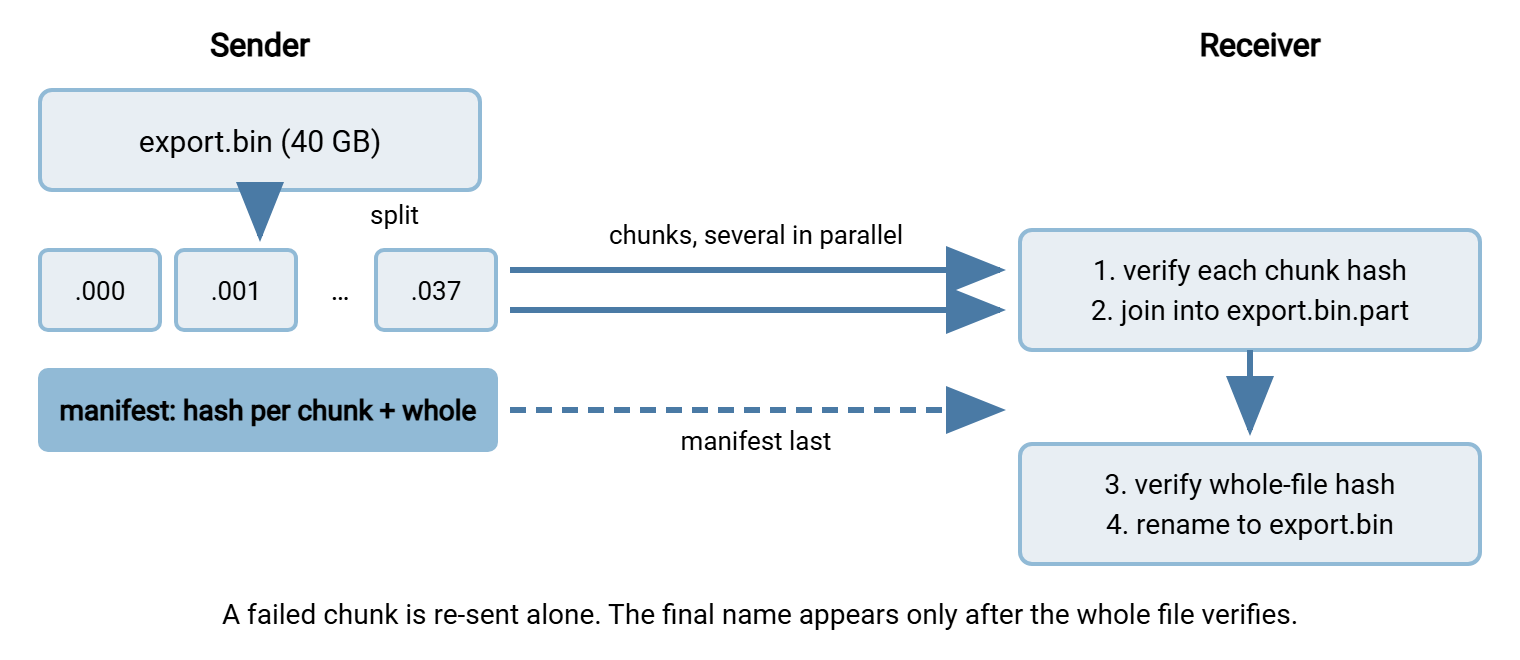
Two details in that picture matter more than they look. The manifest is sent last, so its arrival doubles as the signal that every chunk has been sent. This is a form of the marker-file pattern described in marker and control files. And the joined file has a temporary name until the whole-file hash passes, so nothing downstream can pick up an incomplete or corrupt reassembly.
Splitting on Linux
The split command has been in every Unix-like system for decades. With -b it cuts a file into fixed-size pieces. -d asks for numeric suffixes instead of letters. And -a 3 makes them three digits wide, so they sort correctly up to a thousand pieces:
$ ls -l export.bin
-rw-r--r-- 1 alex staff 40000000000 Mar 14 01:52 export.bin

$ split -b 1G -d -a 3 export.bin export.bin.
$ ls export.bin.* | head -3; ls export.bin.* | tail -1; ls export.bin.* | wc -l
export.bin.000
export.bin.001
export.bin.002
export.bin.037
38

$ ls -l export.bin.037
-rw-r--r-- 1 alex staff 271552512 Mar 14 01:55 export.bin.037
Reading the output: the file was cut into 38 pieces named export.bin.000 through export.bin.037, and the last one is smaller. Why 38 and not 40? Because 1G to split means a binary gigabyte, 1,073,741,824 bytes, and forty decimal gigabytes is 37.25 of those. The first 37 pieces are full-size and the 38th holds the remaining 272 MB. Nothing is wrong; it is worth knowing so the count does not surprise you. If you want exactly a thousand million bytes per piece, use -b 1000M… which is 1000 binary megabytes, still not quite decimal. Use -b 1000000000 for an exact byte count.
Splitting reads the whole file and writes it out again, so it takes as long as a local copy. That is a couple of minutes for 40 GB on a fast disk. It needs 40 GB of free space beside the original. If space is tight, GNU split can hand each piece to a command instead of writing it, with --filter. The command receives the piece on standard input and its name in the $FILE variable. So a piece can be sent as it is cut and never touch the local disk. Verify that your split supports the option before building on it.
Splitting on Windows
Windows has no built-in split, but PowerShell can do the same job with a few lines using the .NET file stream classes. You may see advice to use Get-Content -ReadCount for this. Avoid it for anything large, because it turns every byte into a separate object and runs slowly while consuming enormous memory. A stream loop reads a modest buffer at a time and runs at disk speed:
$src   = 'D:\export\export.bin'
$chunk = 1GB                      # PowerShell: 1GB = 1073741824 bytes
$in    = [System.IO.File]::OpenRead($src)
$buf   = New-Object byte[] (4MB)
$i     = 0
while ($in.Position -lt $in.Length) {
    $name = '{0}.{1:D3}' -f $src, $i
    $out  = [System.IO.File]::Create($name)
    $written = 0
    while ($written -lt $chunk) {
        $toRead = [int][Math]::Min($buf.Length, $chunk - $written)
        $n = $in.Read($buf, 0, $toRead)
        if ($n -le 0) { break }
        $out.Write($buf, 0, $n)
        $written += $n
    }
    $out.Close()
    $i++
}
$in.Close()
"Wrote $i chunks"

Wrote 38 chunks
Walk through it once. The outer loop runs until the input position reaches the end of the file. Each pass creates a chunk file named with a three-digit number ({1:D3} formats 7 as 007). Then the inner loop copies 4 MB at a time until the chunk holds one binary gigabyte or the input runs out. The result is the same 38 files as the Linux example, byte for byte. That matters if the receiver is on a different platform. Chunks made on Windows can be joined on Linux and vice versa, because a chunk is just bytes.
The other Windows option is 7-Zip's volume feature, which splits an archive into numbered pieces as it creates it. With compression switched off (-mx0) it is effectively a splitter that also records a checksum of every file inside:
C:\> 7z a -v1g -mx0 D:\export\export.7z D:\export\export.bin
C:\> dir /b D:\export\export.7z.*
export.7z.001
export.7z.002
...
export.7z.038
-v1g means one-gigabyte volumes. On the far side, 7z x export.7z.001 finds the remaining volumes by name and joins them. It verifies the built-in checksum as it extracts — reassembly and integrity check in one step. The trade-off is that the receiver needs 7-Zip installed and cannot use the plain cat-style join. So it is best when both ends are Windows machines you control.
The Manifest
A manifest is a small text file listing every chunk with its hash, plus the hash and size of the whole file. It turns "I think all the pieces arrived" into "every piece is proven correct, and the reassembled file is proven identical to the original." The hashing fundamentals are in checksum files and manifests; here is the large-file version:
$ sha256sum export.bin.0?? > export.bin.manifest
$ sha256sum export.bin >> export.bin.manifest
$ cat export.bin.manifest
3f1a9c…e2b0  export.bin.000
88d4e7…0c19  export.bin.001
…
a07b3d…4f6e  export.bin.037
c9e2f1…7a35  export.bin
Each line is a hash, two spaces, and a file name — the format sha256sum -c reads back. Hashing 40 GB of chunks plus the 40 GB original means reading 80 GB. On a spinning disk, that is ten minutes or more. The verification article shows how to compute the chunk hashes and the whole-file hash in a single pass instead. The Windows equivalent uses Get-FileHash and writes the same two-column layout so either platform can check it:
Get-ChildItem 'D:\export\export.bin.0*' | Sort-Object Name | ForEach-Object {
    $h = Get-FileHash -Algorithm SHA256 $_.FullName
    '{0}  {1}' -f $h.Hash.ToLower(), $_.Name
} | Set-Content -Encoding ascii 'D:\export\export.bin.manifest'
Add the whole-file line the same way. Keep the manifest with the chunks, name it after the file, and send it after the last chunk.
Remember: the manifest is the contract. Without it, the receiver can only count pieces and hope. With it, a missing, truncated, or corrupted chunk is identified by name in seconds, and only that chunk needs to be sent again.
Sending Chunks in Parallel
Chunks are ordinary files, so any client that can upload one file can upload them all. Run several uploads at once to keep the link full. On Linux, xargs -P runs a command on each name with up to a chosen number in flight. Here, that means four scp uploads at a time to a temporary folder on the server:
$ ls export.bin.0?? | xargs -P 4 -I{} scp -q {} alex@10.20.30.40:/srv/inbound/export.tmp/
$ scp -q export.bin.manifest alex@10.20.30.40:/srv/inbound/export.tmp/
Watch the far end while this runs. Four streams on a long-latency path can fill a link that one stream left half empty. Four streams on a short, already-saturated path just share it and finish at the same time as one. Parallelism helps when the bottleneck is per-connection, not when it is the link itself — parallel streams explains how to tell. Also make sure the server allows enough simultaneous connections from one account. Many cap it at a small number, and the extra uploads simply fail to connect.
Now the payoff in numbers. Take the running example from this series: 40 GB over a 200 megabit link, about 22 MB per second. The path has a two percent chance of dropping any connection in a given ten-minute window. Sent as one file, the transfer takes thirty minutes and fails about six percent of the time, throwing away everything. Sent as 1 GB chunks, each chunk takes about fifty seconds. A drop still happens with the same overall likelihood — but it costs one fifty-second chunk, re-sent automatically. The expected total penalty over the whole job is a few seconds. The path did not get better. The cost of its bad moments did.
In a scheduled flow, the split runs as a pre-processing step and the uploads run as the job. An automation client such as Sysax FTP Automation can run a script before the transfer. It can push everything in a folder on schedule, with retry on the pieces that fail. So the chunk loop needs no one watching it.
Reassembling and Verifying
On the receiver, verify first, join second, verify again, rename last. The order matters: joining before checking means a bad chunk is discovered only after a 40 GB join. Checking each chunk is fast and pinpoints the problem.
$ cd /srv/inbound/export.tmp
$ grep 'export.bin.0' export.bin.manifest | sha256sum -c
export.bin.000: OK
export.bin.001: OK
…
export.bin.023: FAILED
…
export.bin.037: OK
sha256sum: WARNING: 1 computed checksum did NOT match
One chunk failed; re-send chunk 023 and run the check again. When every line says OK, join the pieces in order into a temporary name, verify the whole file against the last manifest line, and rename:
$ cat export.bin.0?? > ../export.bin.part
$ cd .. && grep ' export.bin$' export.tmp/export.bin.manifest | sed 's/export.bin$/export.bin.part/' | sha256sum -c
export.bin.part: OK
$ mv export.bin.part export.bin && rm -r export.tmp
The glob export.bin.0?? expands in alphabetical order, which is numeric order because the suffixes are fixed-width — the reason for -a 3 at the start. The sed line simply points the manifest's whole-file entry at the temporary name so sha256sum -c can check it. The rename is instant on the same volume, and only after it does the final name exist. So a watch folder or downstream job can never see anything but a complete, verified file. On Windows, the equivalent join is a stream copy in PowerShell followed by Get-FileHash and Rename-Item:
$out = [System.IO.File]::Create('D:\inbound\export.bin.part')
Get-ChildItem 'D:\inbound\export.tmp\export.bin.0*' | Sort-Object Name | ForEach-Object {
    $in = [System.IO.File]::OpenRead($_.FullName); $in.CopyTo($out); $in.Close()
}
$out.Close()
(Get-FileHash -Algorithm SHA256 'D:\inbound\export.bin.part').Hash.ToLower()
c9e2f1…7a35
Rename-Item 'D:\inbound\export.bin.part' 'export.bin'
The copy /b a + b + c out form of the old command shell also works for a handful of pieces. But it needs every name on the command line; the loop scales to any count. Whichever tool you use, the invariants are the same: join in order, verify the whole, rename atomically, then delete the chunks. Never delete the sender's chunks until the receiver has confirmed the final hash.
Choosing a Chunk Size
There is no universal chunk size, but there is a short list of constraints, and the right size is the largest one that satisfies all of them:
| Constraint | What it implies |
|---|---|
| Hard size cap at the receiver | Chunk comfortably under the cap — 1.5 GB under a 2 GB limit, leaving room for overhead |
| Session age or idle limit in the path | Chunk transfer time well under the limit — a quarter of it is a safe margin |
| Cost of a re-send | Smaller chunks on flaky paths; a re-send should cost seconds, not minutes |
| Per-file overhead | Larger chunks; each file costs a connection setup, a directory entry, and a manifest line — thousands of tiny chunks recreate the many-small-files problem |
| Scratch space on a relay | Chunks small enough that several fit in the relay's free space at once |
For most multi-gigabyte files over a WAN, somewhere between 500 MB and 2 GB satisfies everything. That means a few minutes per chunk, dozens rather than thousands of pieces, and a re-send that costs little. Pick a round number and write it in the job's documentation. Keep it the same for every run so the manifest format and the receiver's script never need to change.
The Version to Keep in Your Head
Chunking turns one long, fragile transfer into many short, boring ones. Split with a fixed-width numeric suffix so the pieces sort. Hash every piece and the whole into a manifest. Send the pieces — in parallel if the path rewards it — and the manifest last. On the far end, verify each piece, then join in order to a temporary name. Verify the whole, rename, and only then clean up. Use it when the far end cannot resume or when a size or time cap stands in the way. Also use it when you want parallelism or when you need to know exactly which gigabyte went wrong.
When resume is available and the path has no hard caps, resume is the simpler tool. Our article on designing large transfers to resume shows how to make it work unattended. The two combine well too: chunks are natural resume points. A chunked transfer whose individual pieces can also resume is about as robust as a network transfer gets. For the verification side at full scale — hashing while writing, tail checks, manifests for whole datasets — continue with verifying large transfers without doubling the time.
Frequently Asked Questions
Do the chunks have to be joined with the same tool that split them?
Why did my 40 GB file split into 38 pieces instead of 40?
Is it safe to send the manifest first so the receiver knows what to expect?
How many parallel uploads should I run?
Can I skip the whole-file hash if every chunk hash passed?
From the Sysax team: we build secure file transfer software for Windows. Sysax Multi Server is an FTP, FTPS, SFTP, and HTTPS server. Sysax FTP Automation handles scheduled, scripted transfers. Free trials are on the download page.